# Introduction

## Welcome to Z**ū**m Rails

**Simplify your payment processing with Zūm Rails.** Our flexible platform offers a variety of options to suit your organization's unique needs, from instant bank account aggregation to recurring payments and invoices.

## Key Features

* **Effortless Integration:** Our intuitive APIs make it easy to incorporate payments into your application, ensuring a seamless user experience.
* **Unified Payment Experience:** Benefit from a consistent API across various payment rails, simplifying development and maintenance.
* **Scalable to Meet Your Needs:** Zūm Rails can handle your growing transaction volume, ensuring a reliable and efficient payment solution.
* **Tailored to Your Business:** Customize our platform to align with your specific requirements and preferences.
* **Enhanced Security with Zūm Connect:** Securely capture sensitive information using our advanced aggregation service, reducing the risk of fraudulent activity.
* **Streamlined Onboarding:** Our aggregation service simplifies the capture of user banking information, providing a faster and more convenient onboarding process.

Explore our documentation and learn how Zūm Rails can help you streamline your payment processes and drive business growth.

## Jump right in

<table data-view="cards"><thead><tr><th></th><th></th><th data-hidden data-card-cover data-type="files"></th><th data-hidden></th><th data-hidden data-card-target data-type="content-ref"></th></tr></thead><tbody><tr><td><strong>Getting Started</strong></td><td>Use Zūm Rails to process payments on your website</td><td><a href="/files/MQ4yHLv5tztT2pwFcJQq">/files/MQ4yHLv5tztT2pwFcJQq</a></td><td></td><td><a href="/pages/Zvukm7MAGL6ooitMTmpY">/pages/Zvukm7MAGL6ooitMTmpY</a></td></tr><tr><td><strong>API Reference</strong></td><td>Ready to start developing? Skip to our API reference</td><td><a href="/files/ZFWpLyR0QV6hqBEiejez">/files/ZFWpLyR0QV6hqBEiejez</a></td><td></td><td><a href="/pages/HoFL23x1ZKbTL2DPA0rD">/pages/HoFL23x1ZKbTL2DPA0rD</a></td></tr><tr><td><strong>Asking for Help</strong></td><td>Have questions? Get help from our integration experts</td><td><a href="/files/yMvKcHoxMEcXJujHhNSN">/files/yMvKcHoxMEcXJujHhNSN</a></td><td></td><td><a href="/pages/KuUra6SfnPirNGwHmBH2">/pages/KuUra6SfnPirNGwHmBH2</a></td></tr></tbody></table>


# Your Zum Rails Account

## Sandbox &#x20;

Zūm Rails offers a sandbox environment for our clients to test integration and familiarize with the different areas of the product. Clients will be able to access the portal, use our APIs and SDK for testing purposes while using the sandbox environment.&#x20;

You can reach out to our sales team to book a demo and get access to your Zūm Rails Sandbox environment.

[**Contact Sales**](https://zumrails.com/contact/)&#x20;

In the sandbox environment, you can get access to your API credentials, test creation and management of users, payment instruments, transactions, and webhooks.&#x20;

### **Get Access to API Credentials**&#x20;

Once you have access to the portal, obtain your API username and password by going to \
**Settings > Webhook & API Settings > API Settings.** These credentials are vital for accessing Zūm Rails services securely.

<figure><img src="/files/SordbbiLVDdFBM4pSBMb" alt=""><figcaption></figcaption></figure>

### **Start Testing**

* [Create & Manage Users](/getting-started/quickstart#create-a-user)
* [Transactions](/api-reference/transactions)
* [Webhooks](/api-reference/webhooks)

## Production&#x20;

Once your team has setup their sandbox environment and concluded the testing and integration, you can mirror your integration in the production environment to move money between your users.  Reach out to our sales team to get started with using Zūm Rails in production environment.


# Developer Quickstart

To begin processing payments with Zūm Rails, you need to follow a few preliminary steps. This guide will walk you through the necessary procedures to ensure a smooth onboarding experience.

## Initial Setup

{% stepper %}
{% step %}

### Create a Sandbox Account

Visit the Zūm Rails website and sign up for a sandbox account. This will be your primary testing environment where you can simulate payment processes without actual transactions.
{% endstep %}

{% step %}

### Access the Zūm Rails Portal

After creating your sandbox account, log into the Zūm Rails Portal. This intuitive interface allows you to manage your users, monitor transactions, and oversee your payment operations.
{% endstep %}

{% step %}

### **Obtain API Username and Password**

Once you have access to the portal, obtain your API username and password. These credentials are vital for accessing Zūm Rails services securely.
{% endstep %}

{% step %}

### **Add a Funding Source**

Within the Portal, set up a funding source. This is necessary to facilitate transactions to and from your wallet, and ensure smooth payment processing.
{% endstep %}
{% endstepper %}

## Ways to Integrate

There are various ways to integrate with Zūm Rails. Check the options below to decide what fits your workflow:

### **API Integration**

Explore our API to efficiently manage transactions, users, invoices, and more. By integrating our API, you gain full control over the user interface, allowing you to tailor it to meet your specific business needs.&#x20;

Integrating APIs using Bearer Token Authorization is one of the most secure methods. Once generated, a Bearer Token is valid for up to an hour, enabling secure, repeated API calls without requiring repeated authorization.

### **Portal**

Utilize the portal to create transactions, add users, and generate invoices. Explore our [FAQ](https://knowledge-base.zumrails.com/faqs) and [Video Tutorials](https://www.youtube.com/@zumrails) to learn more about starting to move money via the portal. By choosing the portal, you can bypass API integration.

### **Hybrid (Recommended)**

The hybrid model provides a robust and secure way to utilize APIs for transaction monitoring, money tracking, report downloading, and more. Through the Zūm portal, you can integrate the API/SDK or embed our URL in your application to manage users, initiate transactions, and send payment links. Moreover, you'll receive real-time updates on user and transaction statuses, allowing you to automate follow-up actions based on payment status.

## Next Steps

### Zum Wallet

* This is a virtual account you can use to manage funds. If you need to move funds directly from a Funding Source to a User, or the opposite, the funds will pass through Zūm Wallet automatically.
* To find the Wallet ID, go to the Wallet page on the Portal or use the [wallet endpoint](/api-reference/wallets) below.
* You can also set up auto top-up to maintain a minimum balance in your wallet by configuring settings on the Wallet page on the Portal.&#x20;

```json
{
  "statusCode": 200,
  "message": "GET Request successful.",
  "isError": false,
  "result": [
    {
      "Id": "30126b59-...-008376504210",
      "Type": "Unified",
      "Balance": 1000.5
    }
  ]
}
```

### Create a User&#x20;

* At Zūm, Users represent the payee for accounts payable, or the payer for accounts receivable.&#x20;
* Use the Zūm Rails API to create a user profile. This will allow you to manage user-specific data (such as a bank account or card information) and process transactions.

{% hint style="info" %}
To learn more about creating users, refer to the [users API](/api-reference/users).\
\
You may skip user profile creation and create a transaction without creating a user first. See [transactions API](/api-reference/transactions) to learn more.
{% endhint %}

### Create a Transaction

* Set up transactions using the API. This will enable you to test payment processes and manage transaction records effectively.

```json
{
  "ZumRailsType": "AccountsReceivable",
  "TransactionMethod": "Eft",
  "Amount": 123.45,
  "Memo": "Invoice 1234",
  "Comment": "Thank you for your business",
  "UserId": "USER_ID",
  "WalletId": "WALLET_ID"
}
```

For details on creating transactions for various use cases, see the [API reference](/api-reference/transactions).

### Add a Funding Source

* This is your business bank account, to be able to start moving funds you will need to link your bank account information using Zūm Portal.
* You can add a funding source through the Portal by going to the Funding Sources > Add New Bank Account option.&#x20;


# Introduction

## Zūm Wallet

Zūm wallet is a virtual account which is used to facilitate money movement from either your bank account to your users’ bank account or the opposite. You can see all activity involving your Zūm wallet through the portal, such as credit and debit transactions. **Every Zūm Rails customer account comes with one Zūm Wallet**.

The goal of the Zūm Wallet is to help you manage funds. You can preload the wallet for faster disbursement or collect multiple transactions and then send one aggregate transaction to your funding source, or split the funds.

{% hint style="info" %}
If you are using the API, you will need the wallet ID to create transactions involving wallet.
{% endhint %}

{% embed url="<https://youtu.be/fbQ7A2HuI0o>" %}

## Funding Source

* Connect your business bank account to Virtual Wallet to move funds for all transaction types.&#x20;
* Add a funding source through the Portal by going to the Funding Sources > Add New Bank Account option.&#x20;

## Transaction Types

Zūm Rails offers 5 main methods to facilitate financial transactions, accessible through both the portal and API. When using the API, specify the transaction type with “ZumRailsType”:

* FundZumWallet&#x20;
* WithdrawZumWallet
* AccountsPayable
* AccountsReceivable
* UserTransfer (Only available using API)

{% embed url="<https://youtu.be/XL6imA-_Gvs>" %}

{% hint style="info" %}

* Zūm Rails allows money to be sent to a user from your virtual wallet or from your funding source.
* Zūm Rails allows money to be collected from a user to your virtual wallet or to your funding source.
  {% endhint %}

## Transaction Limits

The Transaction Limits feature allows customers to control and manage the usage of their payment methods by defining specific thresholds. These limits help reduce risk, enforce business rules, and ensure transactions remain within acceptable boundaries.

The following limits can be configured:

* **Amount Limit per Transaction**\
  Defines the maximum amount allowed for a single transaction. Any transaction exceeding this value will be declined.
* **Maximum Volume per Day**\
  Sets the total cumulative amount that can be processed within a single day.
* **Transactions per Day**\
  Limits the number of transactions that can be performed within a 24-hour period.
* **Maximum Volume per Month**\
  Defines the total cumulative amount that can be processed within a calendar month.

These limits are flexible and can be tailored to each customer’s specific requirements. The **Zum Rails team** will work with you to configure the appropriate thresholds based on your business model, risk tolerance, and operational needs.

The table below outlines the default transaction limit values configured for your account.

| Transaction Limit            | Maximum            |
| ---------------------------- | ------------------ |
| Amount limit per transaction | $9,999.99 CAD      |
| Maximum volume per day       | $ 1,000,000.00 CAD |
| Transaction per day          | 100                |
| Maximum Volume Per Month     | $1,000,000.00 CAD  |

Use [this endpoint](/api-reference/operations/transaction-limits) to retrieve the transaction limits configured for a specific customer. Partners can also use this endpoint to view the transaction limits associated with their customers.

By default, a **Transaction Monthly Limit Alert** email notification is enabled for all customers. This notification is automatically sent to the customer’s registered email address when 80% of the configured monthly transaction volume limit is reached, providing early visibility into usage levels and helping prevent service interruptions. Both the notification settings and the threshold percentage can be customized through the portal under the **Settings > Notifications** page, allowing customers to tailor alerts to their specific operational needs.

## Payment Options

Zūm Rails allows effective management and control of financial transactions by regulating the sources and destinations of funds:

### **Collect Money**

* **Transfer funds from a user to a virtual wallet:** easily collect payments and store them securely in your virtual wallet.
* **Directly transfer funds from a user to a funding source:** facilitate direct deposits into a specified funding account without intermediary steps.

### **Send Money**

* **Transfer funds from virtual wallet to a user:** disburse payments from stored funds in your virtual wallet directly to users.
* **Transfer funds from a funding source to a user:** send payments directly from a designated funding source to a user.

## Additional Features

<table data-column-title-hidden data-view="cards"><thead><tr><th></th><th data-hidden data-card-cover data-type="files"></th></tr></thead><tbody><tr><td><strong>Schedule transactions</strong> in advance. Once a transaction is set with a future start date, it will be queued for processing.</td><td><a href="/files/NmiGXU7rA8VDFZN3qlCx">/files/NmiGXU7rA8VDFZN3qlCx</a></td></tr><tr><td>Setup <strong>Reoccurring transactions</strong> to automatically trigger transactions with a frequency, start date, and an end up.</td><td><a href="/files/FtWX6eULqZXhdyOJFuJV">/files/FtWX6eULqZXhdyOJFuJV</a></td></tr><tr><td>Setup <strong>Auto Top-up</strong> to maintain a minimum balance in your virtual Zūm wallet as per your business needs </td><td><a href="/files/S6IaPeTmCmrbfXToUnqQ">/files/S6IaPeTmCmrbfXToUnqQ</a></td></tr></tbody></table>


# Payment Rails

This page outlines various payment methods available in the US and Canada.

## **US Payment Methods**&#x20;

<figure><img src="/files/t4MADQNksjIywsGO0yez" alt=""><figcaption></figcaption></figure>

| Method                                             | Description                                      | Duration          | Send Funds | Request Funds |
| -------------------------------------------------- | ------------------------------------------------ | ----------------- | ---------- | ------------- |
| [Standard ACH](/payments/bank-payments/ach)        | Electronic funds transfer between banks          | 1-3 business days | Yes        | Yes           |
| [Same-day ACH](/payments/bank-payments/ach)        | Same-day electronic funds transfer between banks | 1 business day    | Yes        | Yes           |
| [RTP/FedNow](/payments/bank-payments/rtp-fednow)   | Instant funds transfer to banks                  | Instant           | Yes        | No            |
| Debit Card                                         | Funds transfer through debit cards               | Instant           | Yes        | No            |
| [Credit Card](/payments/card-payments/credit-card) | Collect funds through credit cards               | Instant           | No         | Yes           |

{% hint style="warning" %}
For Standard and Same-day ACH debit transactions, additional hold times might apply depending on the risk.
{% endhint %}

## **Canadian Payment Methods**

<figure><img src="/files/KquwlHYB5QUh7qZuYOL9" alt=""><figcaption></figcaption></figure>

<table><thead><tr><th width="111">Method</th><th width="240">Description</th><th width="142">Duration</th><th width="112">Send Funds</th><th>Request Funds</th></tr></thead><tbody><tr><td><a href="/pages/N4lV9SIggOi0oqdO786u">EFT</a></td><td>Electronic funds transfer between banks</td><td>3 times a day</td><td>Yes</td><td>Yes</td></tr><tr><td><a href="/pages/48CC5uiEJgtRqLAoXQ7P">Interac</a></td><td>Online e-transfers, user receives an e-mail or SMS</td><td>Immediately</td><td>Yes</td><td>Yes</td></tr><tr><td><a href="/pages/LQYCHqj9ZOXBS6pvVuBJ">Visa Direct</a></td><td>Visa rails to send and pull funds directly to visa debit card</td><td>Immediately</td><td>Yes</td><td>Yes</td></tr><tr><td><a href="/pages/ZLyDryQ0rXYldPHJnR9c">Credit Card</a></td><td>Credit Card payments/checkout to collect funds</td><td>Immediately</td><td>No</td><td>Yes</td></tr></tbody></table>


# Bank Payments

Introduction to bank payments

## Overview

Zum Rails offers bank account payment methods designed for ease and efficiency. These include:

* **EFT**: Electronic Funds Transfer (EFT) enables electronic money transfers between bank accounts in Canada, eliminating paper checks.
* **ACH:** The Automated Clearing House (ACH) network in the US streamlines electronic bank transactions, providing a secure, low-cost alternative to checks and wire transfers.
* **RTP/FedNow:** RTP and FedNow enable instant, secure bank transfers in the US. They operate as credit push systems, requiring payer authorization for final transactions.

These methods are tailored to cater to a wide range of business needs, ensuring seamless financial transactions.

## Use Cases

1. **Loan Disbursements**: Financial institutions utilize EFT/ACH to directly deposit loan amounts into borrowers' bank accounts, streamlining the disbursement process.
2. **Mortgage Payments**: Real estate companies and property managers can automate monthly mortgage or rent payments through EFT/ACH, ensuring timely transactions without manual intervention.
3. **Direct Debits for Loan Repayments**: Lenders can collect loan repayments via ACH, reducing operational costs and minimizing the risk of late payments by automating the collection process.
4. **Payroll Services**: Many companies use EFT/ACH to streamline payroll processes, allowing employees to receive direct deposits of their salaries into their bank accounts efficiently.
5. **Vendor Payments**: Businesses in retail and manufacturing often use EFT/ACH to pay vendors, ensuring timely and documented transactions.
6. **Real Estate Closing Payments**: EFT/ACH is used for transferring large sums securely during closing processes, ensuring funds are transmitted safely between parties, including buyers, sellers, and escrow accounts.
7. **Utility Bill Payments**: Utility companies frequently use EFT/ACH for collecting monthly payments, offering customers an automated and convenient bill payment option.

## Deep Dive

<table data-view="cards"><thead><tr><th></th><th></th><th data-hidden data-card-target data-type="content-ref"></th><th data-hidden data-card-cover data-type="files"></th></tr></thead><tbody><tr><td><strong>Get Started with EFT</strong></td><td>Learn how to process Electronic Funds Transfers (EFTs) quickly and securely. Simplify your transactions and improve cash flow.</td><td><a href="/pages/N4lV9SIggOi0oqdO786u">/pages/N4lV9SIggOi0oqdO786u</a></td><td><a href="/files/NBPaZcla4qH6NLmF3Co7">/files/NBPaZcla4qH6NLmF3Co7</a></td></tr><tr><td><strong>Get Started with ACH</strong></td><td>Master ACH transactions and understand the key roles in fund transfers. Ensure efficient and compliant processing.</td><td><a href="/pages/uqTF0BmdUDR6xcaGzRIe">/pages/uqTF0BmdUDR6xcaGzRIe</a></td><td><a href="/files/VtCNROUoE9vdxI518tyW">/files/VtCNROUoE9vdxI518tyW</a></td></tr><tr><td><strong>Get Started with RTP/FedNow</strong></td><td>Leverage RTP/FedNow to transfer funds instantly to your users' bank accounts in the US.</td><td><a href="/pages/sN3uRTS4ln5oyXBubPtM">/pages/sN3uRTS4ln5oyXBubPtM</a></td><td><a href="/files/rCMyPu3CTF1lvudoq8GE">/files/rCMyPu3CTF1lvudoq8GE</a></td></tr></tbody></table>


# EFT

Introduction to Electronic Fund Transfers (EFTs) transactions

## Overview

An EFT payment method is an electronic funds transfer between banks in Canada that takes up to 3 days to complete. You can send and receive funds using EFT.&#x20;

`Method: POST`

`Endpoint: {{env}}/api/transaction`&#x20;

**Example**

{% tabs %}
{% tab title="Request Payload" %}

```json
{
  "ZumRailsType": "AccountsReceivable",
  "TransactionMethod": "Eft",
  "Amount": 123.45,
  "Memo": "Memo description",
  "Comment": "This transaction is just a test from a user to wallet",
  "UserId": "1d431e8b-...85452adb4eee",
  "WalletId": "8ebd932b-...b92633e14297"
}
```

{% endtab %}
{% endtabs %}

**Request Parameters**

<table><thead><tr><th width="215">Parameter</th><th width="112">Type</th><th width="106">Mandatory</th><th>Description</th></tr></thead><tbody><tr><td>ZumRailsType</td><td>string</td><td>yes</td><td>Transaction type</td></tr><tr><td>TransactionMethod</td><td>string</td><td>yes</td><td>Transaction method</td></tr><tr><td>Amount</td><td>decimal</td><td>yes</td><td>Transaction amount</td></tr><tr><td>Memo</td><td>string</td><td>yes</td><td>Memo description. If customer transaction description type is "PerTransaction", this will be shown at the bank statements. Maximum of 15 characters. Only letters, numbers, dash, space and underscore are allowed</td></tr><tr><td>Comment</td><td>string</td><td>no</td><td>Internal comment you might want to add. Interac transactions will display the comment on the request.</td></tr><tr><td>FundingSourceId</td><td>guid</td><td>no</td><td>Funding Source Id</td></tr><tr><td>WalletId</td><td>guid</td><td>no</td><td>Wallet Id</td></tr><tr><td>UserId</td><td>guid</td><td>no</td><td>User Id</td></tr><tr><td>User</td><td><a href="https://docs.zumrails.com/docs/canada/api-specification/users">User input</a></td><td>no</td><td>It's possible to create a transaction without adding a user first. Simply pass the user object (instead of the UserId) into the transaction body. For reference, check the payload example of the user object <a href="https://docs.zumrails.com/docs/canada/api-specification/users#creating-a-new-user">here</a> and pass this when you create a transaction (check interac transaction payload example). Only available for EFT and interac transaction methods</td></tr><tr><td>ScheduledStartDate</td><td>date</td><td>no</td><td>The date when the transaction will be sent to the financial institution, in the format <code>YYYY-MM-DD</code>. Must be greater than today.</td></tr><tr><td>ClientTransactionId</td><td>string</td><td>no</td><td>This field can be used to store the Transaction id created in your system when the Transaction is initiated</td></tr></tbody></table>

{% hint style="success" %}
To learn more about EFT transactions, see [API Reference](/api-reference/transactions).
{% endhint %}

## Benefits of using EFT&#x20;

* **Speed & Efficiency**: Faster transactions  and no need for paper checks or visits to the bank.
* **Cost-Effective**: Low transaction fees and reduced administrative costs.
* **Security**: Encrypted, reducing fraud risk, and providing clear transaction records.
* **Accuracy**: Fewer errors, with automatic transaction reconciliation.
* **Recurring Payments**: Ideal for subscriptions and direct deposits, ensuring on-time payments.

## How it works?

**Collect PAD**

Independent of the method used to add payment profile, a user is always asked to agree and consent the information shared (PAD) when creating a payment profile. The message can be customized for your needs as well. Your specific settings will be available under your profile in Zūm Rails portal.

**Transaction Types**

With EFT, you can perform five unique transaction types:

* FundZumWallet&#x20;
* WithdrawZumWallet
* AccountsPayable
* AccountsReceivable
* UserTransfer (Only available using API)

{% hint style="info" %}
Each transaction type is subject to its own set of limits, as outlined in the [**Transaction Limits**](/payments/introduction#transaction-limits) section.
{% endhint %}

**Transaction Life Cycle**&#x20;

* **Accounts Receivable transaction with funds deposited to Wallet**
  1. Transaction Started
  2. Transaction for debit transaction was added to an EFT File
  3. EFT file for debit transaction uploaded to Financial Institution
  4. EFT answer was received for debit transaction from financial institution
  5. Wallet Funded
  6. EFT for debit transaction has been processed by Financial Institution&#x20;
  7. Transaction Complete
* **Accounts Payable transaction with funds sent to User from Wallet**
  1. Transaction started
  2. Wallet Withdrawn&#x20;
  3. Credit transaction added to an EFT file
  4. EFT file for credit transaction uploaded to Financial Institution&#x20;
  5. EFT answer received for credit transaction from Financial Institution&#x20;
  6. EFT for credit transaction processed by Financial Institution&#x20;
  7. Transaction Complete

## Processing Schedule

**EFT**&#x20;

* Times we send the transactions - mon to fri:
  * 2:55am;
  * 1:58pm;
  * 5:58pm;
* When we process the responses - tue to sat:
  * 8:00am;

## **Transaction Events**

Zūm Rails also offers a more detailed transaction event, to indicate every step the transaction passed.

<table><thead><tr><th width="92.82904052734375">Method</th><th width="272">Event</th><th>Description</th></tr></thead><tbody><tr><td>All</td><td>Started</td><td>When the transaction started</td></tr><tr><td>All</td><td>Succeeded</td><td>When the transaction succeeds, when it finishes without any error</td></tr><tr><td>All</td><td>WalletFunded</td><td>When the transaction funds a wallet</td></tr><tr><td>All</td><td>WalletWithdrawn</td><td>When the transaction withdrawn a wallet</td></tr><tr><td>-------</td><td>-------</td><td>-------</td></tr><tr><td>Eft</td><td>EFTFileCreated</td><td>When an EFT file is created. One transaction might have up to 2 files</td></tr><tr><td>Eft</td><td>EFTFileUploaded</td><td>When an EFT file is uploaded</td></tr><tr><td>Eft</td><td>EFTAnswerReceived</td><td>When an EFT file response is received</td></tr><tr><td>Eft</td><td>EFTAnswerProcessed</td><td>When an EFT file is processed</td></tr><tr><td>Eft</td><td>EftFailedValidationRejection</td><td>When EFT could not be created, due an invalid information provided</td></tr><tr><td>Eft</td><td>EftFailedCurrencyAccountMismatch</td><td>When currency of the transaction does not match the currency of the account.</td></tr><tr><td>Eft</td><td>EftFailedTransactionLimitExceeded</td><td>When payment amount exceeds user’s transaction limit.</td></tr><tr><td>Eft</td><td>EftFailedInsufficientFunds</td><td>When transaction is rejected, due non sufficient funds available</td></tr><tr><td>Eft</td><td>EftFailedCannotLocateAccount</td><td>When account is not located, account, transit or institution numbers are invalid</td></tr><tr><td>Eft</td><td>EftFailedStopPayment</td><td>Account do not allow EFT</td></tr><tr><td>Eft</td><td>EftFailedAccountClosed</td><td>When account is closed</td></tr><tr><td>Eft</td><td>EftFailedNoDebitAllowed</td><td>Account do not allow EFT</td></tr><tr><td>Eft</td><td>EftFailedFundsNotFree</td><td>When transaction is rejected, due non sufficient funds available</td></tr><tr><td>Eft</td><td>EftFailedCurrencyAccountMismatch</td><td>When the currency of the transaction does not match the currency of the account</td></tr><tr><td>Eft</td><td>EftFailedPayorPayeeDeceased</td><td>Account do not allow EFT</td></tr><tr><td>Eft</td><td>EftFailedFrozenAccount</td><td>Account do not allow EFT</td></tr><tr><td>Eft</td><td>EftFailedInvalidErrorAccountNumber</td><td>When account is not located, account numbers are invalid</td></tr><tr><td>Eft</td><td>EftFailedErrorPayorPayeeName</td><td>When account is not located, first, last or company name (business) mismatch</td></tr><tr><td>Eft</td><td>EftFailedRefusedNoAgreement</td><td>Account do not allow EFT</td></tr><tr><td>Eft</td><td>EftFailedNotInAccountAgreementP</td><td>Account do not allow EFT</td></tr><tr><td>Eft</td><td>EftFailedNotInAccountAgreementE</td><td>Account do not allow EFT</td></tr><tr><td>Eft</td><td>EftFailedAgreementRevoked</td><td>Account do not allow EFT</td></tr><tr><td>Eft</td><td>EftFailedDefaultByAFinancialInstitution</td><td>Generic error provided by the financial institution</td></tr><tr><td>Eft</td><td>EftFailedCustomerInitiatedReturnCreditOnly</td><td>When the payee has requested the credit to be returned</td></tr><tr><td>Eft</td><td>EftFailedTransactionNotAllowed</td><td>When the bank account is banned</td></tr><tr><td>Eft</td><td>EftFailedCustomerInitiatedReturnCreditOnly</td><td>When the payee has requested the credit to be returned</td></tr><tr><td>Eft</td><td>EftFailedNoPrenotificationP1</td><td>No Confirmation/Pre-Notification – Personal</td></tr><tr><td>Eft</td><td>EftFailedNoPrenotificationP2</td><td>No Confirmation/Pre-Notification – Business</td></tr><tr><td>Eft</td><td>EFTFileCreated</td><td>When the EFT file is created</td></tr><tr><td>Eft</td><td>EFTAnswerReceived</td><td>When the EFT answer is received</td></tr><tr><td>Eft</td><td>EFTAnswerProcessed</td><td>When the EFT answer is processed</td></tr><tr><td>Eft</td><td>NotEnoughBalanceInWalletError</td><td>When the wallet has not balance enough</td></tr></tbody></table>

## Testing

### Users & Bank Accounts

In the sandbox environment, to add a bank account for a User, use any valid 3-digit institution number along with a randomly generated transit number and account number.

### Transactions

To simulate an EFT failure, include an event name from the list above in the COMMENT field when creating a transaction. If you don't mention an event in the COMMENT, the transaction will change its status to "Completed" in the sandbox environment.

**Examples:**

{% tabs %}
{% tab title="Simulating Success" %}

```json
{
  "ZumRailsType": "FundZumWallet",
  "TransactionMethod": "Eft",
  "Amount": 123.45,
  "Memo": "Memo description",
  "Comment": "This transaction will succeed because there's no keyword",
  "FundingSourceId": "1d431e8b-...85452adb4eee",
  "WalletId": "8ebd932b-...b92633e14297"
}
```

{% endtab %}

{% tab title="Simulating Failure" %}

```json
{
  "ZumRailsType": "FundZumWallet",
  "TransactionMethod": "Eft",
  "Amount": 123.45,
  "Memo": "Memo description",
  "Comment": "EftFailedNoDebitAllowed", // Include event name in comment
  "FundingSourceId": "1d431e8b-...85452adb4eee",
  "WalletId": "8ebd932b-...b92633e14297"
}
```

{% endtab %}
{% endtabs %}


# ACH

Introduction to Automated Clearing House (ACH) transactions

## Overview

The ACH (Automated Clearing House) network facilitates transfer of funds between banks in the US. Transactions can take between 24-48 hours for transactions to complete.

Zūm Rails offers support for **Standard ACH** and **Same-day ACH**. Using either payment method, customers can send and receive funds.

## Benefits of using ACH&#x20;

* **Low-Cost**: ACH payments usually have lower fees than wire transfers or credit cards.
* **Speed**: ACH payments are processed quickly, often within 1-2 business days.
* **Security**: Highly secure with encryption and reduced risk of fraud compared to checks or cash.
* **Convenience**: Easy to set up for recurring payments like payroll, bills, and subscriptions.
* **Wide Usage**: Commonly accepted by businesses and financial institutions, both domestic and international.

## **Transaction Types**

Using ACH, you can fund or withdraw Zūm Wallet, or send or receive funds from your users. Zum Rails supports the following transaction types for ACH:

* FundZumWallet&#x20;
* WithdrawZumWallet
* AccountsPayable
* AccountsReceivable

{% hint style="info" %}
Each transaction type is subject to its own set of limits, as outlined in the [**Transaction Limits**](/payments/introduction#transaction-limits) section.
{% endhint %}

## Transaction Events

Zūm Rails offers comprehensive transaction event tracking, detailing each step in a transaction's lifecycle. These events are also available as webhooks for real-time updates.

{% tabs %}
{% tab title="Standard ACH" %}

<table><thead><tr><th width="313">Event</th><th>Description</th></tr></thead><tbody><tr><td>AchTransactionAccepted</td><td>When transaction is accepted</td></tr><tr><td>AchFailedTransactionExpired</td><td>When transaction has expired</td></tr><tr><td>AchFailedReturnedOrClosedAccount</td><td>When transaction is returned due to a closed account or any other return reason</td></tr><tr><td>AchFailedRejectedWithReason</td><td>When transaction is rejected for a reason</td></tr><tr><td>AchFailedGeneralError</td><td>When transaction has failed due to general error</td></tr><tr><td>AchFailedHighRiskOrPotentialFraud</td><td>When transaction is rejected as high-risk or potential fraud</td></tr><tr><td>AchFailedDueToMerchantSetup</td><td>When transaction failed because of invalid or inactive merchant id</td></tr><tr><td>AchFailedInvalidValueForField</td><td>When transaction failed due to invalid value for field</td></tr><tr><td>AchFailedAuthorizationRevoked</td><td>When transaction failed because authorization was revoked</td></tr><tr><td>AchFailedDuplicateTransaction</td><td>When transaction failed due to duplicated transaction</td></tr><tr><td>AchFailedDueToProcessorTimeout</td><td>When transaction is not successfully processed due to processor timeout</td></tr><tr><td>AchFailedTransactionNotAllowed</td><td>When transaction is not allowed by provider</td></tr><tr><td>AchBankAccountVerificationFailed</td><td>When transaction fails because the bank account verification failed</td></tr><tr><td>AchDebitResponseReceived</td><td>When response is received for a debit transaction</td></tr><tr><td>AchCreditResponseReceived</td><td>When response is received for a credit transaction</td></tr><tr><td>AchTransactionReturned</td><td>When transaction returned from bank and will be resubmitted in the next banking cycle. Note that this does not mean the transaction failed.</td></tr><tr><td>AchTransactionResubmitted</td><td>When transaction is resubmitted for processing again</td></tr><tr><td>AchCancellationFailed</td><td>When request to cancel transaction failed</td></tr><tr><td>AchCancellationFailedDueToMerchantSetup</td><td>When request to cancel transaction failed due to merchant setup</td></tr><tr><td>AchCancellationFailedRefundGreaterThanTransactionAmount</td><td>When request to cancel transaction failed as refund amount is bigger than transaction amount</td></tr><tr><td>AchCancellationFailedTransactionAlreadyCancelled</td><td>When request to cancel transaction failed because transaction is already cancelled</td></tr><tr><td>AchFailedDueToNegativeData</td><td>When transaction failed due to negative user data</td></tr><tr><td>AchFailedIneligibleBankAccount</td><td>When transaction failed because bank account is not on ACH network</td></tr></tbody></table>
{% endtab %}

{% tab title="Same-day ACH" %}

<table><thead><tr><th width="353">Event</th><th>Description</th></tr></thead><tbody><tr><td>SameDayAchFailedGeneralError</td><td>When transaction has failed due to general error</td></tr><tr><td>SameDayAchFailedHighRiskOrPotentialFraud</td><td>When transaction is rejected as high-risk or potential fraud</td></tr><tr><td>SameDayAchFailedDueToNegativeData</td><td>When transaction failed due to negative user data</td></tr><tr><td>SameDayAchFailedDueToMerchantSetup</td><td>When request to cancel transaction failed due to merchant setup</td></tr><tr><td>SameDayAchFailedDueToProcessorTimeout</td><td>When transaction is not successfully processed due to processor timeout</td></tr><tr><td>SameDayAchFailedTransactionExpired</td><td>When transaction has expired</td></tr><tr><td>SameDayAchFailedPaymentDeclinedByUser</td><td>When transaction is declined by user</td></tr><tr><td>SameDayAchFailedTransactionNotAllowed</td><td>When transaction is not allowed by provider</td></tr><tr><td>SameDayAchFailedInvalidValueForField</td><td>When transaction failed due to invalid value for field</td></tr><tr><td>SameDayAchFailedAuthorizationRevoked</td><td>When transaction failed because authorization was revoked</td></tr><tr><td>SameDayAchFailedDuplicateTransaction</td><td>When transaction failed due to duplicated transaction</td></tr><tr><td>SameDayAchBankAccountVerificationFailed</td><td>When transaction failed because the bank account verification failed</td></tr><tr><td>SameDayAchFailedRejectedWithReason</td><td>When transaction is rejected for a reason</td></tr><tr><td>SameDayAchFailedReturnedOrClosedAccount</td><td>When transaction is returned due to a closed account or any other return reaso</td></tr></tbody></table>
{% endtab %}
{% endtabs %}

{% hint style="success" %}
For detailed instructions on initiating ACH transactions, please consult the [API Reference](/api-reference/transactions).
{% endhint %}

## Testing

### Users & Bank Accounts

In sandbox, to add a bank account for a User, use any valid routing-number. The account-number can be any 5-17 digit number.

Some valid routing numbers that will work on the sandbox environment are:

* 122000661
* 026009593
* 063100277

To simulate verification statuses (for bank accounts) in sandbox, use the following routing and account numbers.

| Routing Number | Account Number | Verification Status      |
| -------------- | -------------- | ------------------------ |
| 122105278      | 999999999      | :red\_circle: Failed     |
| 122000661      | 0000000016     | :orange\_circle: Unknown |
| 122105278      | 0000000049     | :green\_circle: Verified |

### Transactions

To simulate an ACH failure, include an event name from the list above in the COMMENT field when creating a transaction. If you don't mention an event in the COMMENT, the transaction will change its status to "Completed" in the sandbox environment.

{% tabs %}
{% tab title="Simulating Success" %}

```json
{
  "ZumRailsType": "AccountPayable",
  "TransactionMethod": "Ach",
  "Amount": 123.45,
  "Memo": "This transaction will succeed",
  "Comment": "This transaction will succeed because there's no keyword",
  "UserId": "1d431e8b-...85452adb4eee",
  "WalletId": "8ebd932b-...b92633e14297"
}
```

{% endtab %}

{% tab title="Simulating Failure" %}

```json
{
  "ZumRailsType": "AccountPayable",
  "TransactionMethod": "Ach",
  "Amount": 123.45,
  "Memo": "This transaction will fail with event AchFailedRejectedWithReason",
  "Comment": "AchFailedGeneralError",   // Include event name in comment
  "UserId": "1d431e8b-...85452adb4eee",
  "WalletId": "8ebd932b-...b92633e14297"
}
```

{% endtab %}
{% endtabs %}

{% hint style="warning" %}
To simulate a late failure, mention any of the following events in the COMMENT field:

* `AchFailedRejectedWithReason`
* `AchFailedReturnedOrClosedAccount`
* `SameDayAchFailedRejectedWithReason`
* `SameDayAchFailedReturnedOrClosedAccount`
  {% endhint %}

## Additional features

* **Account Verification** -  Zūm Rails provides Account Verification services, allowing connection to a user's financial institution to retrieve account and routing numbers. This information is useful for tasks such as money transfers and account setup. Zūm Rails ensures account validation according to NACHA WEB debit rules.
* **Balance Checks** - Balance Checks allow retrieving the available balance for an end user’s financial accounts. This service provides balance details without retrieving transaction data.
* **Owner identification** - Owner Identification retrieves information about the owner of an account, such as their name, address, and contact information. This information is crucial for verifying the identity of an end user.


# RTP/FedNow

Introduction to RTP and FedNow payment methods

## Overview

RTP, operated by The Clearing House, and FedNow, from the Federal Reserve, are U.S. payment networks that facilitate immediate fund transfers between participating financial institutions, with transactions typically completing within seconds, 24/7/365.

Zūm Rails combines RTP and FedNow into one seamless payment method, enabling customers to instantly transfer funds.

## Benefits of using RTP/FedNow

* **Speed and Availability:** Funds are transferred and available to the recipient almost immediately, typically within seconds, at any time of the day, week or year - including weekends and holidays.
* **Finality of Payment:** Once a payment is successfully processed, it is final and cannot be reversed by the sender. This provides certainty for the recipient.
* **Increased Transparency and Security:** Both sender and receiver typically receive immediate confirmation of the transaction.
* **Broader Accessibility:** FedNow and RTP aim to provide broad access to instant payments for financial institutions of all sizes, including smaller banks and credit unions.
* **Facilitates Innovation:** Instant payments can enable new business models, improve customer experiences (e.g., instant insurance payouts, gig economy worker payments), and foster stronger buyer-supplier relationships.

## **Transaction Types**

Using RTP/FedNow, you can only send funds to your users or withdraw the Zūm Wallet with the following transaction types:

* WithdrawZumWallet
* AccountsPayable

{% hint style="info" %}
Each transaction type is subject to its own set of limits, as outlined in the [**Transaction Limits**](/payments/introduction#transaction-limits) section.
{% endhint %}

## Transaction Events

Zūm Rails offers comprehensive transaction event tracking, detailing each step in a transaction's lifecycle. These events are also available as webhooks for real-time updates.

{% tabs %}
{% tab title="RTP/FedNow" %}

<table><thead><tr><th width="359">Event</th><th>Description</th></tr></thead><tbody><tr><td>RtpFedNowTransactionAccepted</td><td>When transaction is accepted</td></tr><tr><td>RtpFedNowCreditResponseReceived</td><td>When response is received for credit transaction</td></tr><tr><td>RtpFedNowFailedReturnedOrClosedAccount</td><td>When transaction is returned due to a closed account or any other reason</td></tr><tr><td>RtpFedNowFailedRejectedWithReason</td><td>When transaction is rejected for a reason</td></tr><tr><td>RtpFedNowFailedTransactionNotAllowed</td><td>When transaction is not allowed by the provider</td></tr><tr><td>RtpFedNowFailedGeneralError</td><td>When transaction failed due to a generic error</td></tr><tr><td>RtpFedNowFailedHighRiskOrPotentialFraud</td><td>When transaction is rejected as high-risk or potential fraud</td></tr><tr><td>RtpFedNowFailedInvalidValueForField</td><td>When transaction failed due to invalid value for field</td></tr><tr><td>RtpFedNowFailedDuplicateTransaction</td><td>When transaction failed due to duplicated transaction</td></tr><tr><td>RtpFedNowBankAccountVerificationFailed</td><td>When transaction fails because bank account is unverified</td></tr></tbody></table>
{% endtab %}
{% endtabs %}

{% hint style="success" %}
For detailed instructions on initiating RTP/FedNow transactions, please consult the [API Reference](/api-reference/transactions).
{% endhint %}

## Testing

To simulate a failure, include the event name from the list above in the COMMENT field when creating a transaction. If you don't mention an event in the COMMENT, the transaction will change its status to "Completed" in the sandbox environment.

{% tabs %}
{% tab title="Simulating Success" %}

```json
{
  "ZumRailsType": "AccountPayable",
  "TransactionMethod": "RtpFedNow",
  "Amount": 123.45,
  "Memo": "This transaction will succeed",
  "Comment": "This transaction will succeed because there's no keyword",
  "UserId": "1d431e8b-...85452adb4eee",
  "WalletId": "8ebd932b-...b92633e14297"
}
```

{% endtab %}

{% tab title="Simulating Failure" %}

```json
{
  "ZumRailsType": "AccountPayable",
  "TransactionMethod": "RtpFedNow",
  "Amount": 123.45,
  "Memo": "This transaction will fail with event RtpFedNowFailedGeneralError",
  "Comment": "RtpFedNowFailedGeneralError",   // Include event name in comment
  "UserId": "1d431e8b-...85452adb4eee",
  "WalletId": "8ebd932b-...b92633e14297"
}
```

{% endtab %}
{% endtabs %}


# Interac e-Transfer

Introduction to Interac e-Transfer

## Overview

Interac e-Transfer is a widely used digital payment service in Canada that enables individuals and businesses to send and receive money electronically through participating financial institutions. The service offers a convenient and secure method for transferring funds directly from one bank account to another, using just an email address or mobile phone number. The system is supported by several major Canadian banks and credit unions, providing users with a seamless way to conduct everyday transactions without needing physical cash or checks.

## Features

* **Security:** Interac e-Transfers are protected through multiple layers of security, including encryption and personal security questions, ensuring that funds are transferred safely.
* **Speed:** Transactions are typically completed within 30 minutes, making it a quick option for transferring funds.
* **Convenience:** Funds can be sent and received using only an email address or mobile phone number, eliminating the need for physical bank information.
* **Accessibility:** Available through most Canadian banks and credit union online banking platforms or mobile apps, making it widely accessible to users.
* **Notifications:** Both the sender and recipient receive notifications via email or text message when a transfer is initiated, accepted, or declined, providing up-to-date transaction status.
* **Flexible Limits:** Users can transfer varying amounts based on their financial institution's limits, accommodating different transaction needs.

## Use-Cases

* **Personal Transactions:** Individuals frequently use Interac e-Transfer to split bills, pay rent, or reimburse friends and family for shared expenses, providing a simple and quick alternative to cash or checks.
* **Small Business Payments:** Small business owners benefit from Interac e-Transfer by using it to pay suppliers, settle invoices, or receive payments from customers, thereby enhancing cash flow management.
* **Online Purchases:** Consumers can pay for goods and services from vendors who accept Interac e-Transfer as a payment option, offering an additional level of convenience for online shopping.
* **Gift Giving:** Sending money as a gift is made easier with e-transfers, allowing recipients to receive funds directly into their bank accounts, eliminating the need for gift cards or cheques.

These use-cases demonstrate the versatility of Interac e-Transfer as a tool for both personal and business financial transactions.


# Send & Request

Sending and Requesting funds using Interac E-Transfer

## Overview

Interac e-Transfer is a fast and secure way to send and receive money directly from one bank account to another in Canada.

Zūm Rails offers both bulk and retail options for Interac e-Transfers in Canada, catering to different needs:

* **Bulk**: This option is ideal for businesses or organizations that need to send multiple payments at once. It allows for the simultaneous transfer of funds to multiple recipients, simplifying payroll or mass-distribution needs while maintaining the security and efficiency of standard Interac e-Transfers.
* **Retail**: This is tailored for individual or one-time transactions, suitable for personal use such as sending money to a friend or family member. Retail transfers are straightforward, requiring only the recipient's email or mobile number to initiate a transaction.

Both options provide the core benefits of Interac e-Transfers, including speed, convenience, and security.

{% hint style="warning" %}
To learn more about Interac bulk and retail e-Transfer options, contact <support@zumrails.com>.
{% endhint %}

## **Transaction Types**

Using Interac, you can send or receive funds from your users. Zum Rails supports the following transaction types for Interac:

* AccountsPayable
* AccountsReceivable

{% hint style="info" %}
Each transaction type is subject to its own set of limits, as outlined in the [**Transaction Limits**](/payments/introduction#transaction-limits) section.
{% endhint %}

## Processing Schedule

**Interac - RBC**

* Times we send the transactions - everyday:
  * every 5 minutes;
* When we process the responses - everyday:
  * Email finalization if user name matches - every 3 minutes;
  * Intraday reports - every 3rd hour from 6 through 21;
  * Debit daily reports - 3:00am;
  * Credit daily reports - 3:05am;

**Interac - Desjardins**

* Times we send the transactions - everyday:
  * every 4 minutes;
* When we process the responses - everyday:
  * Email finalization if user name matches - every minute;
  * Intraday reports - every hour - we depend on when the reports are received though;
  * Debit daily reports - 3:15m;
  * Credit daily reports - 3:30am;
  * Debit transactions - responses are processed when Desjardins send us webhooks;

**Interac - PTC**

* Transactions are sent when they are created;
* Debit responses are processed when PTC sends us webhooks;
  * We also have two process that checks transactions status everyday:
    * every 6 minutes for transactions from the last two days;
    * every hour for transactions older than two days;
* Credit responses are checked every day:
  * every 6 minutes for transactions from the last two days;
  * every hour for transactions older than two days;
* Settlement job - mon to fri:
  * 9:00am;

## Transaction Events

Zūm Rails provides detailed transaction events that indicate each step of the transaction process.

<table><thead><tr><th width="197">Method</th><th>Event</th><th>Description</th></tr></thead><tbody><tr><td>All</td><td>Started</td><td>When the transaction started</td></tr><tr><td>All</td><td>Succeeded</td><td>When the transaction succeeds, when it finishes without any error</td></tr><tr><td>All</td><td>WalletFunded</td><td>When the transaction funds a wallet</td></tr><tr><td>All</td><td>WalletWithdrawn</td><td>When the transaction withdrawn a wallet</td></tr><tr><td>--------</td><td>--------</td><td>--------</td></tr><tr><td>Interac</td><td>InteracSent</td><td>When the transaction is sent to Interac</td></tr><tr><td>Interac</td><td>InteracAcknowledgedCredit</td><td>When a credit transaction is received by Interac</td></tr><tr><td>Interac</td><td>InteracAcknowledgedDebit</td><td>When a debit transaction is received by Interac</td></tr><tr><td>Interac</td><td>InteracFailedRecipientContactInfoMissing</td><td>Need to add recipient email or mobile phone number</td></tr><tr><td>Interac</td><td>InteracFailedInvalidEmailFormat</td><td>If the email provided is not valid. * We minimize this error by validating it before</td></tr><tr><td>Interac</td><td>InteracFailedInvalidPhoneNumber</td><td>If the phone number provided is not valid</td></tr><tr><td>Interac</td><td>InteracFailedMultipleTransferLevelErrors</td><td>If there is more than one error in the file</td></tr><tr><td>Interac</td><td>InteracFailedRevoked</td><td>When the transaction is revoked</td></tr><tr><td>Interac</td><td>InteracFailedBulkCancellationRequest</td><td>When the transaction was cancelled by request</td></tr><tr><td>Interac</td><td>InteracFailedRecipientRejected</td><td>When the transaction was cancelled due to recipient having declined receipt of funds</td></tr><tr><td>Interac</td><td>InteracFailedAuthentication</td><td>Transfer cancelled due to maximum number of unsuccessful attempts to answer the security question by the recipient</td></tr><tr><td>Interac</td><td>InteracFailedReachedCancellationCutOff</td><td>Transfer cancelled due to expiry</td></tr><tr><td>Interac</td><td>InteracFailedNotificationDeliveryFailure</td><td>Transfer cancelled due to maximum number of failed email notification attempts reached</td></tr><tr><td>Interac</td><td>InteracFailedAmountGreaterThanMax</td><td>If the transaction amount exceeds the maximum allowed</td></tr><tr><td>Interac</td><td>InteracFailedDebtorRejected</td><td>The debtor rejected the request</td></tr><tr><td>Interac</td><td>InteracFailedFundsDepositFailed</td><td>The funds deposit failed</td></tr><tr><td>Interac</td><td>InteracFailedClientEmailedToRequestCancellation</td><td>Client emailed to request cancellation</td></tr><tr><td>Interac</td><td>InteracFailedGenericError</td><td>When Interac Network is unavailable - * We have never seen this</td></tr><tr><td>Interac</td><td>InteracWaitingSettlementIntoWallet</td><td>Waiting for funds to be settled into wallet</td></tr><tr><td>Interac</td><td>InteracSettledIntoWallet</td><td>When Interac funds are settled into wallet</td></tr><tr><td>Interac</td><td>InteracFailedNameMismatch</td><td>When the debtor name used to fulfill the Interac is different than the name on file</td></tr><tr><td>Interac</td><td>InteracFraudAlertResponded</td><td>When a fraud alert responded for that transaction</td></tr><tr><td>Interac</td><td>InteracFundsHeldForValidation</td><td>User needs to contact their Financial Institution to validate the transfer and release of funds</td></tr><tr><td>Interac</td><td>InteracFailedInvalidAccountNumber</td><td>When the account number provided is invalid</td></tr><tr><td>Interac</td><td>InteracFailedRequestBlockedByUser</td><td>When the transaction failed since the user has blocked some or all Interac requests coming to their email</td></tr><tr><td>Interac</td><td>InteracCreditorExternalFinancialInfo</td><td>When the accounts payable transaction is updated with the creditor external financial information</td></tr></tbody></table>

## Testing

To simulate an Interact failure, include an event name from the list above in the COMMENT field when creating a transaction. If you don't mention an event in the COMMENT, the transaction will change its status to "Completed" in the sandbox environment.

The default Interac notification method is **email**. To send the notification via **SMS**, include the parameter `"InteracNotificationChannel": "sms"` in the request payload. In the **Sandbox** environment, the user will receive an **email simulating the SMS message**, containing a link to complete or decline the transaction. The user must have a **valid mobile phone number** associated with their profile to use the SMS notification option.

{% tabs %}
{% tab title="Simulating Success" %}

```json
{
  "ZumRailsType": "AccountsReceivable",
  "TransactionMethod": "Interac",
  "Amount": 123.45,
  "Memo": "Memo description",
  "Comment": "This transaction will succeed because there's no keyword",
  "UserId": "8ebd932b-...b92633e14290",
  "TargetUserId": "8ebd932b-...b92633e14291"
}
```

{% endtab %}

{% tab title="Simulating Failure" %}

```json
{
  "ZumRailsType": "AccountsReceivable",
  "TransactionMethod": "Interac",
  "Amount": 123.45,
  "Memo": "Memo description",
  "Comment": "InteracFailedNotificationDeliveryFailure",
  "UserId": "8ebd932b-...b92633e14290",
  "TargetUserId": "8ebd932b-...b92633e14291"
}
```

{% endtab %}

{% tab title="Simulating SMS Notification" %}

```json
{
  "ZumRailsType": "AccountsReceivable",
  "TransactionMethod": "Interac",
  "Amount": 123.45,
  "Memo": "Memo description",
  "Comment": "This transaction will send notification via SMS",
  "UserId": "8ebd932b-...b92633e14290",
  "WalletId": "8ebd932b-...b92633e14291",
  "InteracNotificationChannel": "sms"
}
```

{% endtab %}
{% endtabs %}

## Interac Fraud Alerts

Interac flags certain transactions that they believe could be possible fraud cases. Zūm Rails changes status of transactions that are flagged by Interac to “Under Review” for the customer to investigate. Using the API and portal, you can:&#x20;

* Opt-in to receive e-mail notifications and a web hook for each transaction flagged by Interac.
* Take action from the transaction menu or from API in response to the Interac Fraud Alert. See [Review Transactions](/payments/interac-e-transfer/review-transactions) section to learn more.

## Cancellation

Use this endpoint to cancel a specific interac transaction.

`Method: DELETE`

`Endpoint: {{env}}/api/transaction/{transaction_id}`

{% tabs %}
{% tab title="Response" %}

```json
{
  "statusCode": 200,
  "message": "DELETE Request successful.",
  "isError": false,
  "result": "Request completed"
}
```

{% endtab %}
{% endtabs %}

## Interac - Send Funds options

Use this endpoint if you want to know if the user is registered for automatic deposits, or if it's account router number eligible. The user id is informed in the url.

`Method: GET`

`Endpoint: {{env}}/api/user/GetInteracSendFundsOptions/{user_id}`

{% tabs %}
{% tab title="Response" %}

```json
{
  "statusCode": 200,
  "message": "GET Request successful.",
  "isError": false,
  "result": {
    "RequireSecurityQuestionAndAnswer": true,
    "AutomaticDepositAvailable": false,
    "AccountNumberRoutingAvailable": false
  }
}
```

{% endtab %}
{% endtabs %}

**Response Parameters**

<table><thead><tr><th width="337">Parameter</th><th width="104">Type</th><th>Description</th></tr></thead><tbody><tr><td>RequireSecurityQuestionAndAnswer</td><td>boolean</td><td>Indicate if security questions are required for the informed user in order to create an Interac Send Funds</td></tr><tr><td>AutomaticDepositAvailable</td><td>boolean</td><td>If true, means this user email is registered for Interac automatic deposit</td></tr><tr><td>AccountNumberRoutingAvailable</td><td>boolean</td><td>If true, means this user can accept Interac Account Routing ANR. The user needs to have the bank account information on file.</td></tr></tbody></table>

## Connect SDK: Request Funds

**Using SDK**

Once authorized, the next step is to create a token. You will need to create a token with the payload as below.

{% tabs %}
{% tab title="Request Funds" %}

```json
{
  "ConnectTokenType": "RequestFunds",
  "RequestFundsId": "e212a298-4f39-4ac0-b9d6-60fc1c215176"
}
```

{% endtab %}
{% endtabs %}

**Callbacks**

{% tabs %}
{% tab title="onSuccess" %}

```json
{
  "origin": "ZUM_RAILS",
  "userId": "2b500e4e-a5fe-4697-a88b-07eb8162cc22",
  "transactionId": "f884b81d-9335-4560-b764-aee1e369791d"
}
```

{% endtab %}
{% endtabs %}


# Review Transactions

## Overview

Interac transactions may occasionally be placed under-review to pass fraud checks, ensuring the security of financial operations. During this process, transactions are temporarily held. This safeguard helps protect both consumers and businesses from unauthorized transactions and potential financial loss.

Customers are notified about the review status, and further action may be prompted if necessary to confirm the transaction's legitimacy. See [possible actions](/api-reference/operations/review-transactions#possible-actions) for more information.

{% hint style="warning" %}
While all Interac transactions undergo additional fraud screening, only a select few transactions may be placed under-review.
{% endhint %}

## How it Works

<figure><img src="/files/0DXbDAwrdEWjBbGBjwNr" alt=""><figcaption></figcaption></figure>

{% hint style="warning" %}
**Note**

* Upon investigation if the transaction is a fraud or scam, then the transaction is cancelled.
* Upon investigation if the transaction is legitimate, then transaction is completed.
  {% endhint %}

{% hint style="info" %}
**What can trigger an Interac Fraud alert?**

* Interac does not share the reason for flagging a transaction for fraud.
* Here are some situations that may trigger a transaction to be in-review for fraud:
  * When the same person attempts multiple transactions on the same day
  * When the email used belongs to a domain that is recently registered
  * When the person attempts to complete the payment using a suspicious browser fingerprint (IP address, browser, device, time-zone)
  * When the person attempts to deposit with multiple bank accounts
    {% endhint %}

See the [API reference](/api-reference/operations/review-transactions#interac-fraud) for more information on how to take action on an in-review Interac transaction.


# Card Payments

Introduction to Card payments

Zūm Rails offers card payment methods designed for ease and efficiency. For example, credit card's can be used for accounts receivable transactions to request funds.&#x20;

`Method: POST`

`Endpoint: {{env}}/api/transaction`&#x20;

**Example**

{% tabs %}
{% tab title="Request" %}

```json
{
  "ZumRailsType": "AccountsReceivable",
  "TransactionMethod": "CreditCard",
  "Amount": 123.45,
  "Memo": "Memo",
  "Comment": "This transaction is just a test from a user to wallet",
  "UserId": "1d431e8b-...85452adb4eee",
  "Authorize": {
    "Capture": false,
    "AutoExpireDays": 5
  }
}
```

{% endtab %}
{% endtabs %}

## **Transaction Events**

<table><thead><tr><th width="152.20001220703125">CreditCard</th><th width="299.4000244140625">CreditCardInvalidRequest</th><th>When transaction has failed due to invalid request</th></tr></thead><tbody><tr><td>CreditCard</td><td>CreditCardRejectedByIssuingBank</td><td>When transaction is rejected by issuing bank</td></tr><tr><td>CreditCard</td><td>CreditCardExpiredCard</td><td>When transaction has failed due to expired card</td></tr><tr><td>CreditCard</td><td>CreditCardSuspectedFraud</td><td>When transaction has failed due to suspected fraud</td></tr><tr><td>CreditCard</td><td>CreditCardTransactionNotPermitted</td><td>When transaction is not permitted</td></tr><tr><td>CreditCard</td><td>CreditCardContactSupport</td><td>When transaction has failed. Contact support</td></tr><tr><td>CreditCard</td><td>CreditCardInvalidMerchantSetUp</td><td>When transaction has failed due to invalid merchant setup</td></tr><tr><td>CreditCard</td><td>CreditCardSecurityViolation</td><td>When transaction has failed due to security violation</td></tr><tr><td>CreditCard</td><td>CreditCardInvalidCardOrDetails</td><td>When transaction has failed due to invalid card or card details</td></tr><tr><td>CreditCard</td><td>CreditCardLostOrStolenCard</td><td>When transaction has failed due to lost ot stolen card</td></tr><tr><td>CreditCard</td><td>CreditCardAccountClosedOrBlocked</td><td>When transaction has failed due to account closed or blocked</td></tr><tr><td>CreditCard</td><td>CreditCardDeemedHighRisk</td><td>When transaction has failed due to deemed high risk</td></tr><tr><td>CreditCard</td><td>CreditCardUnknownResponseFromIssuingBank</td><td>When transaction has failed due to unknown response from issuing bank</td></tr><tr><td>CreditCard</td><td>CreditCardCouldNotLocateOriginalTransaction</td><td>When reversal transaction has failed due to could not locate original transaction</td></tr><tr><td>CreditCard</td><td>CreditCardTransactionAlreadyReversed</td><td>When reversal transaction has failed due to already reversed</td></tr><tr><td>CreditCard</td><td>CreditCardGenericError</td><td>When transaction has failed due to generic error</td></tr><tr><td>CreditCard</td><td>CreditCardServiceUnavailable</td><td>When transaction has failed due to service unavailable</td></tr><tr><td>CreditCard</td><td>CreditCardRetryLater</td><td>When transaction has failed. Retry later</td></tr><tr><td>CreditCard</td><td>CreditCardReversalRejected</td><td>When reversal transaction is rejected</td></tr><tr><td>CreditCard</td><td>CreditCardDuplicateReversal</td><td>When reversal transaction has failed due to duplicated</td></tr><tr><td>CreditCard</td><td>CreditCardTransactionAlreadySettled</td><td>When reversal transaction has failed due to already settled</td></tr><tr><td>CreditCard</td><td>CreditCardTimeoutReversal</td><td>When reversal transaction has failed due to timeout</td></tr><tr><td>CreditCard</td><td>CreditCardDuplicateTransaction</td><td>When transaction has failed due to duplicated</td></tr><tr><td>CreditCard</td><td>CreditCardNotActivated</td><td>When transaction has failed because of inactive card.</td></tr></tbody></table>

## Testing

To simulate an Credit Card transaction failure, include an event name from the list above in the COMMENT field when creating a transaction. If you don't mention an event in the COMMENT, the transaction will change its status to "Completed" in the sandbox environment.

**Examples:**

{% tabs %}
{% tab title="Simulating Success" %}

```json
{
  "ZumRailsType": "AccountsReceivable",
  "TransactionMethod": "CreditCard",
  "Amount": 123.45,
  "Memo": "Memo",
  "Comment": "This transaction will succeed because there's no keyword",
  "UserId": "1d431e8b-...85452adb4eee",
  "WalletId": "8ebd932b-...b92633e14297",
  "PaymentInstrumentId": "92142401-...389ba0d87e75"
}
```

{% endtab %}

{% tab title="Simulating Failure" %}

<pre><code><strong>{  
</strong><strong>  "TransactionMethod": "CreditCard",
</strong>  "Amount": 123.45,
  "Memo": "Memo",
  "Comment": "CreditCardExpiredCard",
  "UserId": "1d431e8b-...85452adb4eee",
  "WalletId": "8ebd932b-...b92633e14297",
  "PaymentInstrumentId": "92142401-...389ba0d87e75"
}
</code></pre>

{% endtab %}
{% endtabs %}


# Visa Direct

Available only to CA customers

## Introduction

Visa rails to send and pull funds directly to visa debit card. Visa Direct offers fast, secure, and convenient payment solutions with global reach. Other benefits of Visa Direct include:&#x20;

* **Speed**: Near-instant transfers, often within minutes, compared to traditional methods.
* **Global Reach**: Available in 200+ countries and supports multiple currencies.
* **Convenience**: Easy to use, requiring only a recipient’s Visa card details.
* **Security**: Built-in fraud prevention and encryption via Visa’s trusted network.
* **Accessibility**: Available to anyone with a Visa card, no need for a bank account.
* **Versatile**: Ideal for consumer-to-consumer, business-to-consumer, and government payments.

## How it works?

Visa Direct works by enabling real-time payments directly to a recipient’s Visa debit, credit, or prepaid card. Here’s how it works step-by-step:

* **Initiating the Transfer**: The sender uses a Züm Rails to send money to a recipient’s Visa debit, credit, or prepaid card, providing their card details.
* **Transaction Processing**: The sender's bank or service provider requests the payment through Visa’s network, which verifies and authorizes the transaction.
* **Sending the Funds**: Visa Direct transfers the funds instantly (or within a few minutes) to the recipient’s card.
* **Recipient Access**: The recipient can immediately use the funds for purchases or withdrawals.

## **Transaction Types**

Using Visa Direct, you can fund or withdraw Zūm Wallet, receive funds from an user (Accounts Receivable) or you can pay an user (Accounts Payable). Zum Rails supports the following transaction types for Visa Direct:

* FundZumWallet&#x20;
* WithdrawZumWallet
* AccountsPayable
* AccountsReceivable

{% hint style="info" %}
Each transaction type is subject to its own set of limits, as outlined in the [**Transaction Limits**](/payments/introduction#transaction-limits) section.
{% endhint %}

## 3D Secure

3D Secure (3DS) adds an extra layer of authentication to card-not-present (CNP) transactions, helping prevent unauthorized card use and protecting both you and Zūm Rails from fraud.

#### What is 3D Secure?

When a customer makes a card payment, 3D Secure prompts them to complete an extra verification step—usually by entering a code sent by their bank or through biometric verification via their banking app. This process is commonly known through card network brands like Visa Secure or Mastercard Identity Check.

Successfully authenticated payments are covered by a liability shift. If a 3DS-authenticated payment is later disputed as fraudulent, the liability shifts from you to the card issuer (e.g., TD, CIBC, Scotiabank).

#### How to Implement 3D Secure?

1\. **Get Authorized**

To use 3D Secure, you must first authenticate with the Zūm Rails API. Refer to our [Authentication](/api-reference/authentication) Guide.

**2. Create a 3DS Connect Token**

Create a token with the following payload:

```json
{
  "ConnectTokenType": "ThreeDS",
  "UserId": "1111c68f-e927-4e93-b55a-bbec31aaa111",
  "Amount": 10.0,
  "Configuration": {
    "TransactionMethod": "VisaDirect"
  }
}
```

**3. Initialize the 3DS SDK**

Pass the token into the 3DS SDK. If a challenge is required, the SDK will display a popup for the customer to complete the authentication. When the flow is completed, the SDK returns a callback with the following parameters:

```json
{
  "userId": "57c7c68f-e927-4e93-b55a-bbec31aaa632",
  "cardEci": "05",
  "cardDsTransId": "d65e93c3-35ab-41ba-b307-767bfc19eae3",
  "cardAuthenticationValue": "9ec1JHwF5eWa8/j/hlS5DjHZBsY=",
  "origin": "ZUM_RAILS"
}
```

4. **Use 3DS Parameters in the Transaction API**

To complete the payment, include the following values in your transaction creation request, with the correct field names for that payload used:

* cardEci -> cardEci
* cardDsTransId -> cardXid
* cardAuthenticationValue -> cardCavv

For a full list of parameters and payload structure, please refer to the [Transaction API Reference](/api-reference/transactions#creating-a-new-transaction).

{% hint style="info" %}
**NOTE**

These values are required for all card transactions that involve 3DS, except for Visa Direct Accounts Payable.
{% endhint %}

**Testing Credentials**

<table><thead><tr><th width="133">Networks/Brands</th><th width="187.39996337890625">Card Number</th><th width="162.800048828125">Type of Transaction</th><th>ECI</th><th>Status/Success</th></tr></thead><tbody><tr><td>Visa</td><td>4005519200000004; 4124939999999990; 4444333322221111</td><td>Frictionless</td><td>05</td><td>Y</td></tr><tr><td>Visa</td><td>4009348888881881; 4485660000000007</td><td>Frictionless</td><td>07</td><td>N</td></tr><tr><td>Visa</td><td>4012000033330026; 4485666666666668</td><td>Challenge/Prompt</td><td>Depends on the challenge completion</td><td>Depends on the challenge completion</td></tr><tr><td>Visa</td><td>4012000077777777; 4124930001898619</td><td>-</td><td>-</td><td>Error: Card not enrolled</td></tr><tr><td>Visa</td><td>4166676667666746</td><td>Frictionless</td><td>00</td><td>R - Issuer rejected authentication and requests authorization not to be attempted</td></tr><tr><td>Mastercard</td><td>5555341244441115; 5406004444444443; 5407721000353481</td><td>Frictionless</td><td>02</td><td>Y</td></tr><tr><td>Mastercard</td><td>5577000055770004; 5415244444444444</td><td>Frictionless</td><td>00</td><td>N</td></tr><tr><td>Mastercard</td><td>5100060000000002; 5472065555555557</td><td>Challenge/Prompt</td><td>Depends on the challenge completion</td><td>Depends on the challenge completion</td></tr><tr><td>Amex</td><td>370000000000002; 370000999999990</td><td>Frictionless</td><td>05</td><td>Y</td></tr><tr><td>Amex</td><td>370000000100018; 370000222222228</td><td>Frictionless</td><td>07</td><td>N</td></tr><tr><td>Amex</td><td>378282246310005; 340000111111117</td><td>Challenge/Prompt</td><td>Depends on the challenge completion</td><td>Depends on the challenge completion</td></tr></tbody></table>

{% hint style="info" %}
To get started with 3D Secure, please contact us via the chat feature in the Zūm Rails portal or email us at <support@zumrails.com>.
{% endhint %}

## Transaction Events

* Transaction with type Accounts Receivable started
* Wallet was funded
* Transaction completed

## Testing

To simulate an Visa Direct failure, include an event name from the list above in the COMMENT field when creating a transaction. If you don't mention an event in the COMMENT, the transaction will change its status to "Completed" in the sandbox environment. Learn more about testing in [Transactions](/api-reference/transactions).

{% tabs %}
{% tab title="Simulating Success" %}

```json
{
  "ZumRailsType": "FundZumWallet",
  "TransactionMethod": "VisaDirect",
  "Amount": 123.45,
  "Memo": "Memo description",
  "Comment": "This transaction will succeed because there's no keyword",
  "UserID": "1d431e8b-...85452adb4eee",
  "WalletId": "8ebd932b-...b92633e14297"
}
```

{% endtab %}

{% tab title="Simulating Failure" %}

```json
{
  "ZumRailsType": "FundZumWallet",
  "TransactionMethod": "VisaDirect",
  "Amount": 123.45,
  "Memo": "Memo description",
  "Comment": "VisaDirectInsufficientFunds",
  "UserID": "1d431e8b-...85452adb4eee",
  "WalletId": "8ebd932b-...b92633e14297"
}
```

{% endtab %}
{% endtabs %}


# Credit Card

`Method: POST`

`Endpoint: {{env}}/api/transaction`&#x20;

**Example**

{% tabs %}
{% tab title="Request Payload" %}

```json
{
  "ZumRailsType": "AccountsReceivable",
  "TransactionMethod": "CreditCard",
  "Amount": 123.45,
  "Memo": "Memo",
  "Comment": "This transaction is just a test from a user to wallet",
  "UserId": "1d431e8b-...85452adb4eee",
  "Authorize": {
    "Capture": false,
    "AutoExpireDays": 5
  }
}
```

{% endtab %}
{% endtabs %}

## Refund a Transaction

With Zūm Rails, it is easy to refund Credit Card transactions. Currently we support whole/partial refunds of initial transactions. When you create a new refund, you must specify the transaction ID that you wish to refund. Creating a new refund will refund a transaction that has previously been created but not yet refunded. Funds will be refunded to the credit card that was originally charged.

`Method: POST`

`Endpoint: {{env}}/api/transaction/{transaction_id}/refund`

## Chargeback

Chargeback applies only for credit card transactions and it can be accepted or disputed by the user until the due date. After the chargeback due date passes, the chargeback is accepted by default.

#### Accept Chargeback <a href="#accept-chargeback" id="accept-chargeback"></a>

Use [this endpoint](/api-reference/operations/review-transactions#accept-chargeback) to accept a specific chargeback for a credit card transaction.

`Method: PATCH`

`Endpoint: {{env}}/api/TransactionChargeback/{{TransactionChargebackId}}/accept`

**Dispute Chargeback**

Use [this endpoint](/api-reference/operations/review-transactions#dispute-chargeback) to dispute a specific chargeback for a credit card transaction.

`Method: PATCH`

`Endpoint: {{env}}/api/TransactionChargeback/{{TransactionChargebackId}}/dispute`

{% hint style="info" %}
NOTE

A chargeback cannot be disputed if it is already accepted or disputed or is past due date.
{% endhint %}

## **Processing Schedule**

**Credit Card**

**Credit Card – Bambora**

* Transactions are sent to the processor immediately upon creation.
* Authorization responses are received in real time.

**Credit Card – Authorize.net**

* Transactions are sent to the processor immediately upon creation.
* Authorization responses are received in real time.

**Credit Card – Fiserv**

* Transactions are sent to the processor immediately upon creation.
* Authorization responses are received in real time.
* Settlement: transactions created before 11:00 PM ET are settled into the customer's wallet by 9:00 AM ET the next business day.
* Authorization holds that are not captured/completed within 5 days are automatically canceled (released) by the processor.

## **Transaction Types**

Using Credit Card, you can receive funds from your users. Zum Rails supports the following transaction types for Credit Card:

* AccountsReceivable

{% hint style="info" %}
Each transaction type is subject to its own set of limits, as outlined in the [**Transaction Limits**](/payments/introduction#transaction-limits) section.
{% endhint %}

## **Transaction Events**

<table><thead><tr><th width="149">Payment Method</th><th>Event</th><th>Description</th></tr></thead><tbody><tr><td>CreditCard</td><td>CreditCardInvalidRequest</td><td>When transaction has failed due to invalid request</td></tr><tr><td>CreditCard</td><td>CreditCardRejectedByIssuingBank</td><td>When transaction is rejected by issuing bank</td></tr><tr><td>CreditCard</td><td>CreditCardExpiredCard</td><td>When transaction has failed due to expired card</td></tr><tr><td>CreditCard</td><td>CreditCardSuspectedFraud</td><td>When transaction has failed due to suspected fraud</td></tr><tr><td>CreditCard</td><td>CreditCardTransactionNotPermitted</td><td>When transaction is not permitted</td></tr><tr><td>CreditCard</td><td>CreditCardContactSupport</td><td>When transaction has failed. Contact support</td></tr><tr><td>CreditCard</td><td>CreditCardInvalidMerchantSetUp</td><td>When transaction has failed due to invalid merchant setup</td></tr><tr><td>CreditCard</td><td>CreditCardSecurityViolation</td><td>When transaction has failed due to security violation</td></tr><tr><td>CreditCard</td><td>CreditCardInvalidCardOrDetails</td><td>When transaction has failed due to invalid card or card details</td></tr><tr><td>CreditCard</td><td>CreditCardLostOrStolenCard</td><td>When transaction has failed due to lost ot stolen card</td></tr><tr><td>CreditCard</td><td>CreditCardAccountClosedOrBlocked</td><td>When transaction has failed due to account closed or blocked</td></tr><tr><td>CreditCard</td><td>CreditCardDeemedHighRisk</td><td>When transaction has failed due to deemed high risk</td></tr><tr><td>CreditCard</td><td>CreditCardUnknownResponseFromIssuingBank</td><td>When transaction has failed due to unknown response from issuing bank</td></tr><tr><td>CreditCard</td><td>CreditCardCouldNotLocateOriginalTransaction</td><td>When reversal transaction has failed due to could not locate original transaction</td></tr><tr><td>CreditCard</td><td>CreditCardTransactionAlreadyReversed</td><td>When reversal transaction has failed due to already reversed</td></tr><tr><td>CreditCard</td><td>CreditCardGenericError</td><td>When transaction has failed due to generic error</td></tr><tr><td>CreditCard</td><td>CreditCardServiceUnavailable</td><td>When transaction has failed due to service unavailable</td></tr><tr><td>CreditCard</td><td>CreditCardRetryLater</td><td>When transaction has failed. Retry later</td></tr><tr><td>CreditCard</td><td>CreditCardReversalRejected</td><td>When reversal transaction is rejected</td></tr><tr><td>CreditCard</td><td>CreditCardDuplicateReversal</td><td>When reversal transaction has failed due to duplicated</td></tr><tr><td>CreditCard</td><td>CreditCardTransactionAlreadySettled</td><td>When reversal transaction has failed due to already settled</td></tr><tr><td>CreditCard</td><td>CreditCardTimeoutReversal</td><td>When reversal transaction has failed due to timeout</td></tr><tr><td>CreditCard</td><td>CreditCardDuplicateTransaction</td><td>When transaction was rejected as duplicate</td></tr><tr><td>CreditCard</td><td>CreditCardNotActivated</td><td>When transaction failed due to inactive card</td></tr></tbody></table>

## Testing

### Transactions

To simulate an Credit Card transaction failure, include an event name from the list above in the COMMENT field when creating a transaction. If you don't mention an event in the COMMENT, the transaction will change its status to "Completed" in the sandbox environment.

**Examples:**

{% tabs %}
{% tab title="Simulating Success" %}

```json
{
  "ZumRailsType": "AccountsReceivable",
  "TransactionMethod": "CreditCard",
  "Amount": 123.45,
  "Memo": "Memo",
  "Comment": "This transaction will succeed because there's no keyword",
  "UserId": "1d431e8b-...85452adb4eee",
  "WalletId": "8ebd932b-...b92633e14297",
  "PaymentInstrumentId": "92142401-...389ba0d87e75"
}
```

{% endtab %}

{% tab title="Simulating Failure" %}

```json
{
  "TransactionMethod": "CreditCard",
  "Amount": 123.45,
  "Memo": "Memo",
  "Comment": "CreditCardExpiredCard",
  "UserId": "1d431e8b-...85452adb4eee",
  "WalletId": "8ebd932b-...b92633e14297",
  "PaymentInstrumentId": "92142401-...389ba0d87e75"
}
```

{% endtab %}
{% endtabs %}

### Chargebacks

To simulate chargeback reasons and statuses, include specific keywords in the transaction's COMMENT field when creating a transaction. This will trigger a chargeback with the indicated reason and status within minutes.

For instance, if the COMMENT field has "chargebackreasonfraud chargebackstatewon" a simulated chargeback is generated with the reason "Fraud" and a pending status, which later updates to "Won."

{% hint style="warning" %}
The following keywords only simulate chargebacks for Canadian customers. Please reach out to <support@zumrails.com> for more information.
{% endhint %}

#### Chargeback Reason

| Keyword                   | Chargeback Reason |
| ------------------------- | ----------------- |
| chargebackreasonclerical  | Clerical          |
| chargebackreasonfraud     | Fraud             |
| chargebackreasoninquiry   | Inquiry           |
| chargebackreasonquality   | Quality           |
| chargebackreasontechnical | Technical         |

#### Chargeback Status

| Keyword                    | Chargeback Status |
| -------------------------- | ----------------- |
| chargebackstatepending     | Pending           |
| chargebackstateunderreview | Under Review      |
| chargebackstatewon         | Won               |
| chargebackstatelost        | Lost              |


# Push-to-debit

Available only to US customers

## Introduction

As a US customer, you can add a debit card as a funding source to fund and withdraw from the Züm wallet instantly.&#x20;

## How it works?

You can add a new debit card as a funding source using the portal. The following information is required when adding a debit card. The debit card information is not editable.

{% hint style="info" %}
Contact Zum Rails Support to edit Debit Card information
{% endhint %}

* First Name (Mandatory)&#x20;
* Last Name (Mandatory)&#x20;
* Email (Optional)&#x20;
* Debit Card Number (Mandatory)&#x20;
* Expiry Month (Mandatory)&#x20;
* Expiry Year (Mandatory)&#x20;
* Address Line 1 (Mandatory)&#x20;
* Address Line 2 (Optional)&#x20;
* City (Mandatory)&#x20;
* State (Mandatory)&#x20;
* Zip Code (Mandatory)&#x20;
* Country (Mandatory)&#x20;

**Transaction Types**

* Withdraw Wallet Transaction&#x20;
* Daily withdrawal to debit card (automated)&#x20;

## Processing Schedule

{% hint style="info" %}
Push-to-debit transaction are instantaneous!
{% endhint %}

## Debit Cards transaction events

* Transaction with type Accounts Payable
* Wallet withdrawn
* Response received from financial institution for transaction
* Transaction completed

## Testing

To simulate an ACH failure, include an event name from the list above in the COMMENT field when creating a transaction. If you don't mention an event in the COMMENT, the transaction will change its status to "Completed" in the sandbox environment.

{% tabs %}
{% tab title="Simulating Success" %}

```json
{
  "ZumRailsType": "AccountPayable",
  "TransactionMethod": "DebitCard",
  "Amount": 123.45,
  "Memo": "This transaction will succeed",
  "Comment": "This transaction will succeed because there's no keyword",
  "UserId": "1d431e8b-...85452adb4eee",
  "WalletId": "8ebd932b-...b92633e14297"
}
```

{% endtab %}

{% tab title="Simulating Failure" %}

```json
{
  "ZumRailsType": "AccountPayable",
  "TransactionMethod": "DebitCard",
  "Amount": 123.45,
  "Memo": "This transaction will fail with event DebitCardFailedPaymentDeclined",
  "Comment": "DebitCardFailedPaymentDeclined",
  "UserId": "1d431e8b-...85452adb4eee",
  "WalletId": "8ebd932b-...b92633e14297"
}
```

{% endtab %}
{% endtabs %}


# Introduction

**Welcome to the Zūm Rails Card Issuance Documentation.**

Zūm Rails enables Canadian partners to deploy, manage, and scale both Prepaid and Secured Credit Card programs. Our platform bridges the gap between traditional banking rails and modern fintech needs, offering real-time card issuance, automated KYC/IDV workflows, and integrated funding via Canada’s most popular payment methods. With Zūm Rails' white-label solutions and APIs, you can issue virtual and physical cards, configure card details, manage funding, and handle cardholder information with ease

### Key Features

* **Unified BaaS Architecture:** A single integration point for full Card Program Management, including regulatory oversight, fraud monitoring (AML/CTF), and chargeback management.
* **Integrated Identity Verification (Zūm KYC):** Fully automated, white-label onboarding powered by AiPrise. We handle the "Exact Match" logic for legal names and DOBs against ID documents to ensure compliance and high pass rates.
* **Security & Tokenization:** As a PCI Level 1 provider, we utilize advanced tokenization. Our SDKs ensure sensitive card data (PAN, CVV) never touches your servers, drastically reducing your compliance burden, so you don't have to.
* **Plug & Play Customizable Brand Experience:** Tailor everything from the virtual and physical card design to the web-based cardholder interface. Use our Zum Connect SDK to embed these features or redirect users to a Zūm-hosted, white-labeled environment. Alternatively, access all this information via API and build it into your own frontend experience. Zūm handles the full card program management — including program setup, card velocity limits, fraud monitoring, compliance, cardholder agreements, digital and plastic card issuance, and chargeback oversight.
* **Fully Compliant:** Zūm Rails is Level 1 PCI compliant, so you don’t have to be. Our SDKs tokenize card numbers to keep your cardholders’ data secure.
* **Tailored to Your Business:** Customize the card design, platform, and cardholder interface to match your brand.
* **Monetization Engine:** Our programs are built to generate interchange and fee revenue, turning your card product into a profit centre from day one. Ask our sales team for a demo of the Zūm Card Issuance platform and learn how you can start earning from your card programs.

Zūm Rails offers two flexible integration paths to suit your technical resources and desired speed-to-market:

* **Zūm Rails White-Label Solution**
* **Zūm Rails API Solution**

### Zūm Rails White-Label Solution

This "Plug & Play" approach provides a complete, turn-key cardholder experience with minimal development.

* **Administrative Portal:** Comprehensive tools for your team to manage users, monitor transactions, and handle program-level settings.
* **Hosted Onboarding:** A secure, mobile-optimized web form that handles data collection, OTP verification, and identity documentation.
* **Cardholder Self-Service:** A ready-made portal where users can view balances, check transactions, and manage security deposits.
* **Integrated Payment Gateway:** Native access to the Zūm Rails rails for instant card loading/unloading via Interac e-Transfer, EFT, and Visa Debit.

Zūm Rails provides the card onboarding application in a web form that handles the collection of card profile information and identity verification information from the card applicant.

You can use our hosted [Card Onboarding](/tokenization-1/zum-connect#card-onboarding) URL or integrate the process into your application’s embedded flow using our SDK. See [Zum Connect](https://docs.zumrails.com/tokenization-1/zum-connect) and [Card Onboarding](/tokenization-1/zum-connect#card-onboarding) for integration details.

List of SDKs

* [Card Onboarding](/tokenization-1/zum-connect#card-onboarding): Handles the end-to-end applicant journey from profile setup to KYC.
* [View Card Information](/tokenization-1/zum-connect#view-card-information): Securely renders sensitive card details (PAN/CVC) within your UI.
* [Card Funding Checkout](/tokenization-1/zum-connect#card-funding-checkout): A modular UI component for managing security deposits and card loads.

### Zūm Rails API-first Solution

Designed for partners building bespoke financial experiences, our APIs offer deep programmatic control over the entire card lifecycle.

* **Programmatic Issuance:** Trigger card creation and activation instantly upon KYC approval.
* **Lifecycle Control:** Manage card states (Active, Blocked, Closed, Reissue) via backend triggers.
* **Real-Time Data Streams:** Access granular transaction history, balance inquiries, and cardholder metadata to power your own analytics or user dashboards.

Zūm Rails [Cards API](/api-reference/cards) solution allows you to instantly issue cards, access card account information and transaction data to effectively manage your card program and card lifecycle management.

List of API's

* [Approve Card](/api-reference/users#approve-a-card)
* [Activate Card](/api-reference/cards#activate-card)
* [Update Card Profile](/api-reference/users#update-a-card-information)
* [Update Card Program](/api-reference/cards#update-card-program)
* [Get Balance Inquiry](/api-reference/cards#get-balance-inquiry)
* [Update Card Status](/api-reference/cards#update-card-status)
* [Reissue Card](/api-reference/cards#reissue-card)
* [Get Card Transactions](/api-reference/cards#get-card-transactions)
* [Load and Unload Card](/api-reference/transactions#creating-a-new-transaction)

<br>


# How it Works

## Authentication

All API requests use the Bearer Token Authorization. See [Authentication](/api-reference/authentication) for details.

## Identity Verification

The Zūm Rails platform features an integrated identity verification engine designed to meet strict Canadian regulatory requirements (FINTRAC). Our automated system collects, parses, and validates applicant data in real time, ensuring a frictionless transition from applicant to cardholder.

The onboarding interface is delivered as a secure, Zūm-hosted web experience. Partners can deploy this via two primary methods:

1. Hosted URL: Redirect applicants to a unique, Zūm-hosted landing page.
2. Embedded SDK: Use the Zūm Connect SDK to iframe the verification journey directly into your existing web or mobile application for a seamless "in-app" feel.

Zūm Rails collects the required information from the cardholder, including personal details and verification documents such as a valid government-issued ID, proof of address, or other supporting documentation.&#x20;

See [Zum Connect](/tokenization-1/zum-connect) for integration details.

**Onboarding & KYC Journey**

1. Profile Setup & OTP: Applicants provide core contact details, including Legal Full Name, Email Address, and Phone Number. To ensure the authenticity of the contact data, Zūm Rails triggers a mandatory One-Time Password (OTP) verification via SMS or Email.
2. Comprehensive IDV & Occupation Declaration: Upon successful profile creation, the system initiates the Identity Verification (IDV) phase:
   1. Address Collection: The verified residential address is automatically synchronized as both the Shipping Address for plastic issuance and the Billing Address for card transactions.
   2. Government ID Upload: Collection of valid, non-expired government-issued identification.
   3. Biometric Facial Match: A live "selfie" comparison against the provided ID to prevent spoofing.

Here’s a preview of the form used in Zūm Rails’ sample integration:

<figure><img src="/files/hMyJ5YiJMVVmLOWSaOnM" alt=""><figcaption></figcaption></figure>

#### Your unique card onboarding URL/SDK

* Navigate to Settings → Integration Codes.
* For Hosted URL: Select the Embedded Codes tab. Locate the Card Onboarding banner to copy your production or sandbox URL.
  * "Enable Public URLs" checkbox needs to be checked for the hosted URL option to work
* For SDK Implementation: Select the JavaScript SDK tab. Locate the Card Onboarding section to find your specific `ConnectTokenType`: `CardOnboarding` configuration.

#### How to customize your card onboarding URL/SDK

* Navigate to Settings → Brand Customization.
* Visual Identity: Upload your brand logo and icon.

#### Available notifications and webhook

* After the card applicant completes the card onboarding flow, based on your configuration and level of integration, if applicable, the following will occur: real-time status updates, webhook notifications, and user synchronization.

{% tabs %}
{% tab title="Emails from Zum Rails" %}

<table><thead><tr><th width="179.4000244140625">Email(s) To</th><th>Reason for Email(s)</th></tr></thead><tbody><tr><td>Customer</td><td>Notification of card application submitted, approved, under review, declined, and incomplete</td></tr><tr><td>Cardholder</td><td>Notification of card application submitted, approved, under review, declined, and incomplete</td></tr></tbody></table>
{% endtab %}

{% tab title="Webhooks" %}

<table data-header-hidden><thead><tr><th width="232">Type</th><th>Event</th><th>Description</th></tr></thead><tbody><tr><td>PrepaidCardUser</td><td>OnboardIncomplete</td><td>Webhook call for user that has completed profile setup but not KYC/IDV step</td></tr><tr><td>PrepaidCardUser</td><td>OnboardInProgress</td><td>Webhook call for user submitted card application</td></tr><tr><td>PrepaidCardUser</td><td>OnboardApproval</td><td>Webhook call for user KYC card application is approved and pending card issuance</td></tr><tr><td>PrepaidCardUser</td><td>OnboardUnderReview</td><td>Webhook call for user card application is under review</td></tr><tr><td>PrepaidCardUser</td><td>OnboardDeclined</td><td>Webhook call for user card application is declined</td></tr><tr><td>SecuredCardUser</td><td>OnboardIncomplete</td><td>Webhook call for user that has completed profile setup but not KYC/IDV step</td></tr><tr><td>SecuredCardUser</td><td>OnboardInProgress</td><td>Webhook call for user submitted card application</td></tr><tr><td>SecuredCardUser</td><td>OnboardApproval</td><td>Webhook call for user KYC card application is approved and pending card issuance</td></tr><tr><td>SecuredCardUser</td><td>OnboardUnderReview</td><td>Webhook call for user card application is under review</td></tr><tr><td>SecuredCardUser</td><td>OnboardDeclined</td><td>Webhook call for user card application is declined</td></tr></tbody></table>
{% endtab %}
{% endtabs %}

## Card Issuance

Upon receiving card application has passed the identify verification, a Partner and Customer can approve the card on the Zūm Rails portal on the Users page or with the [Approve Card](/api-reference/users#approve-card) endpoint in the [Users API](/api-reference/users). This endpoint is used when the identity verification process has been completed and the card applicant has passed verification.

#### Available notifications and webhooks

If you have the configuration, the following emails will be sent.

{% tabs %}
{% tab title="Emails from Zum Rails" %}

<table><thead><tr><th width="179.4000244140625">Email(s) To</th><th>Reason for Email(s)</th></tr></thead><tbody><tr><td>Customer</td><td>Notification of card is issued successfully</td></tr><tr><td>Cardholder</td><td>Notification of card is issued successfully</td></tr></tbody></table>
{% endtab %}

{% tab title="Webhooks" %}

| Type            | Event      | Description                                         |
| --------------- | ---------- | --------------------------------------------------- |
| PrepaidCardUser | CardIssued | Webhook call for user’s card is issued successfully |
| SecuredCardUser | CardIssued | Webhook call for user’s card is issued successfully |
| {% endtab %}    |            |                                                     |
| {% endtabs %}   |            |                                                     |

## Card Management

### Display full card details

You can use our [View Card Information](/tokenization-1/zum-connect#view-prepaid-card-details) SDK to display the sensitive data of your issued cards on your application.

Go to Settings → Integration Codes → JavaScript SDK to locate the View Card Information banner to find the `ConnectTokenType`: `ViewCardInformation` configuration.

### Activate the users current card

Once your card has been approved or you created a new card, you need to activate the card to perform other card management activities. You can use the [Activate Card](/api-reference/cards#activate-card) endpoint in the [Cards API](/api-reference/cards) to activate your user's card.

#### Available notifications and webhooks

{% tabs %}
{% tab title="Emails from Zum Rails" %}

<table><thead><tr><th width="179.4000244140625">Email(s) To</th><th>Reason for Email(s)</th></tr></thead><tbody><tr><td>Cardholder</td><td>Notification of card being activated</td></tr></tbody></table>
{% endtab %}

{% tab title="Webhooks" %}

| Type            | Event         | Description                                |
| --------------- | ------------- | ------------------------------------------ |
| PrepaidCardUser | CardActivated | Notification of users card being activated |
| SecuredCardUser | CardActivated | Notification of users card being activated |
| {% endtab %}    |               |                                            |
| {% endtabs %}   |               |                                            |

### Change the card program of a user's current card

Each card is assigned a card program ID which sets the overall transaction limitations, card artwork, and other program configurations. To change the card program attached to a user's card, call the [Change Card Program](/api-reference/cards#change-card-program) endpoint in the [Cards API](/api-reference/cards). The card program ID you input must be an existing card program id listed under your Customer profile.

You can also do this on our portal through the user detail page.

#### Available notifications and webhooks

{% tabs %}
{% tab title="Emails from Zum Rails" %}

<table><thead><tr><th width="179.4000244140625">Email(s) To</th><th>Reason for Email(s)</th></tr></thead><tbody><tr><td>Cardholder</td><td>Notification that the users card has changed card programs</td></tr></tbody></table>
{% endtab %}

{% tab title="Webhooks" %}

| Type            | Event              | Description                                       |
| --------------- | ------------------ | ------------------------------------------------- |
| PrepaidCardUser | CardProgramChange  | Webhook call for user updating their card program |
| SecuredCardUser | CardProgramChanged | Webhook call for user updating their card program |
| {% endtab %}    |                    |                                                   |
| {% endtabs %}   |                    |                                                   |

### Get the balance on a user's current card

You can view a user's current card balance through the [Get Balance Inquiry](/api-reference/cards#get-balance-inquiry) endpoint in the [Cards API](/api-reference/cards).&#x20;

### Get all cards attached to a user

You can view a user's cards through the [Get Card](/api-reference/cards#get-cards) endpoint in the [Cards API](/api-reference/cards).&#x20;

### Update the status on a user's current card

You can update the user’s current card status through our [Set Card Status](/api-reference/cards#set-card-status) endpoint in the [Cards API](/api-reference/cards).&#x20;

You can also do this through our portal on the View User Details page.

#### Available notifications and webhooks

{% tabs %}
{% tab title="Emails from Zum Rails" %}

<table><thead><tr><th width="179.4000244140625">Email(s) To</th><th>Reason for Email(s)</th></tr></thead><tbody><tr><td>Cardholder</td><td>Notification of what the card status is changed to</td></tr></tbody></table>
{% endtab %}

{% tab title="Webhooks" %}

| Type            | Event             | Description                                                                                          |
| --------------- | ----------------- | ---------------------------------------------------------------------------------------------------- |
| PrepaidCardUser | CardStatusChanged | Webhook call for user’s new [card status](https://docs.zumrails.com/api-reference/cards#card-status) |
| SecuredCardUser | CardStatusChanged | Webhook call for user’s new [card status](https://docs.zumrails.com/api-reference/cards#card-status) |

{% endtab %}
{% endtabs %}

### Update card profile

There are 3 different endpoints we have to update the card profile.

* &#x20;[Update User Profile Information endpoint in User API](/api-reference/users#update-a-user)
* [ Update Address Information endpoint in User API](/api-reference/users#update-a-card-information)

You can also do this through our portal on the users edit detail page.

**Available notifications and webhooks**

{% tabs %}
{% tab title="Emails from Zum Rails" %}

<table><thead><tr><th width="179.4000244140625">Email(s) To</th><th>Reason for Email(s)</th></tr></thead><tbody><tr><td>Cardholder</td><td>Notification of card profile updates (name, address, date of birth, occupation, phone number)</td></tr></tbody></table>
{% endtab %}

{% tab title="Webhooks" %}

| Type            | Event         | Description                                                                                    |
| --------------- | ------------- | ---------------------------------------------------------------------------------------------- |
| PrepaidCardUser | ProfileUpdate | Webhook call for user profile updates (name, address, date of birth, occupation, phone number) |
| SecuredCardUser | ProfileUpdate | Webhook call for user profile updates (name, address, date of birth, occupation, phone number) |
| {% endtab %}    |               |                                                                                                |
| {% endtabs %}   |               |                                                                                                |

### Reissue card

If your user has an existing card and wants a new card, you can use the [Reissue Card](/api-reference/cards#reissue-card) endpoint in the [Card API](/api-reference/cards) to create a new card and attach it to your user. The old card will be detached from our database but you can still access the information via [Get Card](/api-reference/cards#get-cards) endpoint in the [Cards API](/api-reference/cards).

You can also do this through our portal on the users edit detail page.

#### Available notifications

{% tabs %}
{% tab title="Emails from Zum Rails" %}

<table><thead><tr><th width="179.4000244140625">Email(s) To</th><th>Reason for Email(s)</th></tr></thead><tbody><tr><td>Cardholder</td><td>Notification of new card being added</td></tr></tbody></table>
{% endtab %}

{% tab title="Webhooks" %}

| Type            | Event       | Description                             |
| --------------- | ----------- | --------------------------------------- |
| PrepaidCardUser | CardReissue | Webhook call for user’s card reissuance |
| SecuredCardUser | CardReissue | Webhook call for user’s card reissuance |
| {% endtab %}    |             |                                         |
| {% endtabs %}   |             |                                         |

### Funding

For Prepaid Cards, you can add funds to the card from your Zūm Wallet via the Zūm Rails portal and [Transaction API](/api-reference/transactions#creating-a-new-transaction), or the cardholder can load funds through an applicable Zūm Rails payment method via the [Card Funding Checkout](/tokenization-1/zum-connect#card-funding-checkout) SDK. You can unload funds back to your Zūm Wallet through the Zūm Rails portal.&#x20;

**Available notifications**

{% tabs %}
{% tab title="Emails from Zum Rails" %}

<table><thead><tr><th width="179.4000244140625">Email(s) To</th><th>Reason for Email(s)</th></tr></thead><tbody><tr><td>Cardholder</td><td>Notification for transactions (Approved, Pending, Declined)</td></tr></tbody></table>
{% endtab %}
{% endtabs %}

### Security Deposit

For Secured Credit Card, you can add funds to the card from your Zūm Wallet via the Zūm Rails portal and [Transaction API](/api-reference/transactions#creating-a-new-transaction), or the cardholder can load funds through an applicable Zūm Rails payment method via the [Card Funding Checkout](/tokenization-1/zum-connect#card-funding-checkout) SDK. You can unload funds back to your Zūm Wallet through the Zūm Rails portal.&#x20;

**Available notifications**

Funding

For Prepaid Cards, you can add funds to the card from your Zūm Wallet via the Zūm Rails portal and [Transaction API](/api-reference/transactions#creating-a-new-transaction), or the cardholder can load funds through an applicable Zūm Rails payment method via the [Card Funding Checkout](/tokenization-1/zum-connect#card-funding-checkout) SDK. You can unload funds back to your Zūm Wallet through the Zūm Rails portal.&#x20;

**Available notifications**

{% tabs %}
{% tab title="Emails from Zum Rails" %}

<table><thead><tr><th width="179.4000244140625">Email(s) To</th><th>Reason for Email(s)</th></tr></thead><tbody><tr><td>Cardholder</td><td>Notification for transactions (Approved, Pending, Declined)</td></tr></tbody></table>
{% endtab %}
{% endtabs %}


# Zūm Connect

Learn how to use the Connect URL at Zūm Rails

### URL V/S SDK

Our URLs allow you to host our UI within your application and it's the easiest to use for our clients.\
It's a unique URL which you can host as an iframe, send by e-mail or sms. Since, this is a public URL which is not tokenized, it’s not the most recommended option.

The javascript sdk library allows you to build a more robust integration with Zūm Rails. Instead of hosting a public URL, the library offers the possibility for you to first create a temporary token, then initiate and receive real-time updates and listen to events. Hence, it is the best option for our clients.

### Connect SDK (Install & Init)

To start using the library you will need to do the following:

<figure><img src="/files/1nUa5rlh9bf8CjMXsc01" alt=""><figcaption></figcaption></figure>

1. **Authorize** using the endpoint `{{env}}/api/authorize`.&#x20;
2. **Create a token** which has to be informed in the SDK. Use the endpoint `{{env}}/api/connect/createtoken` to generate the token. The token is valid for **15 minutes**, and it will be automatically expired after a user uses it.

{% tabs %}
{% tab title="Payload" %}

```json
{
  "ConnectTokenType": "AddPaymentProfile",
  "Configuration": {
    "allowEft": true,
    "allowInterac": true,
    "allowVisaDirect": true,
    "allowCreditCard": true
  }
}
```

{% endtab %}

{% tab title="Response" %}

```json
{
  "statusCode": 200,
  "message": "POST Request successful.",
  "isError": false,
  "result": {
    "Token": "production|AddPaymentProfile|85dedfcd-f8de-45e4-851a-5a8b79b75e15|a4ae068aeeea49859c266605a5c3cddd",
    "ExpirationUTC": "2022-03-21T13:30:56.4052997Z",
    "CustomerId": "85dedfcd-f8de-45e4-851a-5a8b79b75e15",
    "CompanyName": "Company To Test",
    "Environment": "production",
    "ConnectTokenType": " "
  }
}
```

{% endtab %}
{% endtabs %}

<table><thead><tr><th width="225.199951171875">ConnectTokenType</th><th>Description</th></tr></thead><tbody><tr><td>CheckoutProduct</td><td>Define a request to go to the Connect checkout product</td></tr><tr><td>CheckoutProductPrice</td><td>Define a request to go to the Connect checkout product price</td></tr><tr><td>AddPaymentProfile</td><td>Define a request to go to the Connect Add payment profile</td></tr><tr><td>AddFundingSource</td><td>Define a request to go to the Connect Add funding source</td></tr><tr><td>UpdateSubscription</td><td>Define a request to go to the Connect Update subscription</td></tr><tr><td>CancelSubscription</td><td>Define a request to go to the Connect Cancel subscription</td></tr><tr><td>SubscriptionDetails</td><td>Define a request to go to the Connect Subscription details</td></tr><tr><td>ManageUserPortal</td><td>Define a request to go to the Connect Manage user profile</td></tr><tr><td>ViewCardInformation</td><td>Define a request to go to the View Card Information</td></tr><tr><td>RequestFunds</td><td>Define a request to go to the Connect Request funds</td></tr><tr><td>InvoicePayment</td><td>Define a request to go to the Connect Invoice Payment</td></tr><tr><td>InvoiceDownload</td><td>Define a request to go to the Connect Invoice Download</td></tr><tr><td>SendFunds</td><td>Define a request to go to the Connect Send Funds</td></tr><tr><td><a href="/pages/LQYCHqj9ZOXBS6pvVuBJ#id-3d-secure">ThreeDS</a></td><td>Define a request to go to the Connect ThreeDS</td></tr><tr><td>HostedCheckout</td><td>Define a request to go to the Hosted Checkout</td></tr><tr><td>CardOnboarding</td><td>Define a request to go to the Card Onboarding application</td></tr></tbody></table>

3. Refer the javascript sdk library into your website, build your configuration options and init the sdk. Inform the token (result.Token) in any request you want to execute.

{% hint style="info" %}
**NOTE**\
To get the URL/SDK navigate to the settings menu option > Integration codes
{% endhint %}

#### Install & Initialize the SDK

Use the JavaScript library below to integrate the SDK into your website. Make sure to use the appropriate URL—one for the sandbox environment and another for production.

Sandbox

```html
<script
  id="zumrailssdk"
  src="https://sandbox-cdn.zumrails.com/sandbox/zumsdk.js"
  type="text/javascript"
  async=""
></script>
```

Production

```html
<script
  id="zumrailssdk"
  src="https://cdn.zumrails.com/production/zumsdk.js"
  type="text/javascript"
  async=""
></script>
```

The library expects 1 mandatory parameter:

<table><thead><tr><th width="154.79998779296875">Parameter</th><th>Description</th></tr></thead><tbody><tr><td>token</td><td>The token received in the endpoint <code>{{env}}/api/connect/createtoken</code></td></tr></tbody></table>

Bellow you can find an example of the code needed to init the JS SDK.

```html
<script>
  $(function () {
    $("#btnGoConnect").click(function () {
      const token = "<THE TOKEN RECEIVED IN THE CREATE TOKEN ENDPOINT>"

      ZumRailsSDK.init({
        token: token,
        onLoad: function () {
          console.log("onLoad")
        },
        onError: function (error) {
          console.log("onError", error)
        },
        onSuccess: function (data) {
          console.log("onSuccess", data)
        },
        onButtonClose: function () {
          console.log("onButtonClose")
        },
      })
    })
  })
</script>
```

### SDK Callbacks

When something happens, the sdk library will fire a few callbacks, this allows you to easily get the data and take an immediate action. For example, call the endpoint to get the full card information onSuccess by passing the requestId or cardId

#### onLoad <a href="#onload" id="onload"></a>

This callback is triggered when the UI is loaded and presented on the screen.

*Parameters*

* There are no parameters in this callback

#### onButtonClose <a href="#onbuttonclose" id="onbuttonclose"></a>

This callback is triggered when the end user clicks in the X button to close the Connect

*Parameters*

* There are no parameters in this callback

#### onError <a href="#onerror" id="onerror"></a>

This callback is triggered when the connection failed by any error not expected in the happy flow

*Parameters*

* error: An error message explaining the reason why the failure happened

#### onSuccess <a href="#onsuccess" id="onsuccess"></a>

This callback is triggered when the connection is completed

*Parameters*

* data: The information returned will depend on the `ConnectTokenType` defined.

For example, when you use `AddPaymentProfile` will return something like this below:

```json
{
  "invoiceId": null,
  "userId": "2abc0bda-98bf-40e0-993b-4b76302c0843",
  "transactionId": null,
  "subscriptionId": null,
  "origin": "ZUM_RAILS",
  "clientUserId": null,
  "extraField1" : null,
  "extraField2" : null
}
```

### User tokenization / Add payment profile

The best way to add a user to the Zūm Rails platform is through Zūm Connect. It consists of an iFrame website, hosted by Zūm Rails and referenced in your website.

The Zūm Connect iframe will display a form to capture the user's basic information (Full Name and Email) so that we can create an identity.

Independent of the method, the user will always be asked to agree and consent the information shared (PAD). The message can be customized for your needs as well. Your specific settings will be available under your profile in Zūm Rails portal. Depending on your need, you can capture the new user using our webhook mechanism, or if you need it right at the moment we redirect back to your flow, you can capture the Zūm user id (token) by listening to an event message as described in your portal settings.

After a user creates and links his account, you will be able to view it in the Zūm Rails portal or use the API to filter and get a specific user.

#### Add payment profile using URL

<figure><img src="/files/NKZcMmSmTZKikdJZjb1M" alt=""><figcaption></figcaption></figure>

#### Pre-filling the form

To help streamline the Zūm Connect experience, it is possible to pass information that you already have through optional parameters in the url:

{% tabs %}
{% tab title="Canada" %}

<table><thead><tr><th width="226.5999755859375">Name</th><th>Description</th></tr></thead><tbody><tr><td>accountType</td><td>Personal or Business</td></tr><tr><td>firstName</td><td>User first name, when the account type is Personal</td></tr><tr><td>lastName</td><td>User last name, when the account type when is Personal</td></tr><tr><td>dateOfBirth</td><td>User date of birth</td></tr><tr><td>email</td><td>User email</td></tr><tr><td>companyName</td><td>Company name, when the account type is Business</td></tr><tr><td>memo</td><td>Transaction memo that will be created with the <em>request funds</em>. The limit is 15 characters</td></tr><tr><td>comment</td><td>Transaction comment that will be created with the <em>request funds</em>. The limit is 400 characters</td></tr><tr><td>allowEft</td><td>To display only EFT payment method.</td></tr><tr><td>allowInterac</td><td>To display only INTERAC payment method.</td></tr><tr><td>allowVisaDirect</td><td>To display only VISA DIRECT payment method.</td></tr><tr><td>allowCreditCard</td><td>To display only CREDIT CARD payment method.</td></tr><tr><td>displayTermsAndCondition</td><td>To display the terms and conditions checkbox or not.</td></tr><tr><td>displayDetailsColumn</td><td>To display the left side column with transaction details, amount and recurrency</td></tr><tr><td>displayZumRailsLogo</td><td>To display the powered by Zūm Rails logo</td></tr><tr><td>displayPhoneNumber</td><td>To display the phone number field</td></tr><tr><td>displayAccountType</td><td>To display account type option</td></tr><tr><td>displayFullName</td><td>To display a full name field instead of first and last name fields when the user chooses Personal as account type. (It can be pre-filled with firstName query param)</td></tr><tr><td>hideBackButton</td><td>To hide all back buttons</td></tr><tr><td>hideShippingAddress</td><td>To hide the shipping address</td></tr><tr><td>hideRailsName</td><td>To hide the rails name when there is just one</td></tr><tr><td>hideFirstName*</td><td>To hide the first name field</td></tr><tr><td>hideLastName*</td><td>To hide the last name field</td></tr><tr><td>hideFullName*</td><td>To hide the full name field</td></tr><tr><td>hideEmail*</td><td>To hide the email field</td></tr><tr><td>hideCreditCardAddress*</td><td>To hide all the credit card address fields</td></tr><tr><td>language</td><td>Change the connect language. There are two available options: en (english) and fr (french). If not set, the language will be chosen according to the browser language. English is applied if the given language is not available</td></tr><tr><td>backgroundColor</td><td>Change the background color around the form with a hex code (Only numbers, you don't need to send the hash symbol prefix)</td></tr><tr><td>foregroundColor</td><td>Change the foreground color in the form with a hex code (Only numbers, you don't need to send the hash symbol prefix)</td></tr><tr><td>disablePreFilledFields</td><td>Disable all fields that received a value by query parameter (Example: firstName, lastName...)</td></tr><tr><td>creditCardAddresLine1</td><td>Define the field address line 1 in credit card tab</td></tr><tr><td>creditCardAddresLine2</td><td>Define the field address line 2 in credit card tab</td></tr><tr><td>creditCardCity</td><td>Define the field city in credit card tab</td></tr><tr><td>creditCardProvince</td><td>Define the field province/territory in credit card tab</td></tr><tr><td>creditCardPostalCode</td><td>Define the field postal code in credit card tab</td></tr><tr><td>creditCardCountry</td><td>Define the field country in credit card tab. NOTE: Currently we only accept "Canada" as the value for this parameter. Any other values, if specified, will be ignored.</td></tr><tr><td>clientUserId</td><td>Your internal user id for user added.</td></tr><tr><td>extraField1</td><td>User extra field 1</td></tr><tr><td>extraField2</td><td>User extra field 2</td></tr><tr><td>successURL</td><td>The URL to which Zum Rails will redirect end-users, after the payment is initiated by the end-user.</td></tr><tr><td>cancelURL</td><td>The URL to which Zum Rails will redirect end-users, when they decide to cancel the payment.</td></tr></tbody></table>

{% endtab %}

{% tab title="US" %}

<table><thead><tr><th width="241.7999267578125">Name</th><th>Description</th></tr></thead><tbody><tr><td>firstName</td><td>User first name, when the account type is Personal</td></tr><tr><td>lastName</td><td>User last name, when the account type when is Personal</td></tr><tr><td>email</td><td>User email</td></tr><tr><td>allowCreditCard</td><td>To display only CREDIT CARD payment method.</td></tr><tr><td>allowAch</td><td>To display only ACH (bank) payment method.</td></tr><tr><td>displayTermsAndConditions</td><td>To display the terms and conditions checkbox or not.</td></tr><tr><td>displayZumRailsLogo</td><td>To display the powered by Zūm Rails logo</td></tr><tr><td>hideRailsName</td><td>To hide the rails name when there is just one</td></tr><tr><td>hideCreditCardAddress*</td><td>To hide all the credit card address fields</td></tr><tr><td>backgroundColor</td><td>Change the background color around the form with a hex code (Only numbers, you don't need to send the hash symbol prefix)</td></tr><tr><td>foregroundColor</td><td>Change the foreground color in the form with a hex code (Only numbers, you don't need to send the hash symbol prefix)</td></tr><tr><td>disablePreFilledFields</td><td>Disable all fields that received a value by query parameter (Example: firstName, lastName...)</td></tr><tr><td>creditCardAddressLine1</td><td>Define the field address line 1 in credit card tab</td></tr><tr><td>creditCardAddressLine2</td><td>Define the field address line 2 in credit card tab</td></tr><tr><td>creditCardAddressCity</td><td>Define the field city in credit card tab</td></tr><tr><td>creditCardAddressProvince</td><td>Define the field province/territory in credit card tab</td></tr><tr><td>creditCardAddressPostalCode</td><td>Define the field postal code in credit card tab</td></tr><tr><td>creditCardAddressCountry</td><td>Define the field country in credit card tab.</td></tr><tr><td>accountType</td><td>“Personal” or “Business”</td></tr><tr><td>companyName</td><td>Company name, when the account type is Business</td></tr><tr><td>idType</td><td>The type of ID: “DL” or “SSN”, when the account type is Personal</td></tr><tr><td>idNumber</td><td>ID (DL or SSN) number, when the account type is Personal</td></tr><tr><td>idState</td><td>State where ID was issued, when the account type is Personal and id type is DL</td></tr><tr><td>businessTaxId</td><td>Business tax ID, when the account type is Business</td></tr><tr><td>billingAddressLine1</td><td>Define the field address line 1 in bank tab</td></tr><tr><td>billingAddressLine2</td><td>Define the field address line 2 in bank tab</td></tr><tr><td>billingAddressCity</td><td>Define the field city in bank tab</td></tr><tr><td>billingAddressProvince</td><td>Define the field state in bank tab</td></tr><tr><td>billingAddressPostalCode</td><td>Define the field postal code in bank tab</td></tr><tr><td>billingAddressCountry</td><td>Define the field country in bank tab. See <a data-mention href="/pages/K6zvlPs03Hxc9UIVAved">/pages/K6zvlPs03Hxc9UIVAved</a> for more information.</td></tr><tr><td>clientUserId</td><td>Your internal user id for user added</td></tr><tr><td>extraField1</td><td>User extra field 1</td></tr><tr><td>extraField2</td><td>User extra field 2</td></tr><tr><td>successURL</td><td>The URL to which Zum Rails will redirect end-users, after the payment is initiated by the end-user.</td></tr><tr><td>cancelURL</td><td>The URL to which Zum Rails will redirect end-users, when they decide to cancel the payment.</td></tr><tr><td>singleAccountSelection</td><td>Enable the user to select a specific account Chequing or Savings and disable all others.</td></tr><tr><td>displayBankConnection</td><td><p>Controls whether users can manually enter and verify their bank account details in the Connect UI if aggregation fails or their institution isn't listed. </p><p>Supported values are:</p><ul><li><code>none</code>: Manual connection is disabled (default).</li><li><code>all</code>: Manual connection is shown on the search page, consent page, and if aggregation fails.</li><li><code>hideOnConsentPage</code>: Manual connection is shown only on the search page and if aggregation fails.</li></ul><p>To enable this feature, please contact us via the chat in the Zūm Rails portal or email us at <a href="mailto:support@zumrails.com">support@zumrails.com</a>.</p></td></tr></tbody></table>
{% endtab %}
{% endtabs %}

{% hint style="info" %}
**NOTE**

Hiding a field doesn't mean that it is no longer mandatory, please use the other query params to pre-fill: firstName, lastName, email, etc.
{% endhint %}

The field `creditCardProvince` can be defined with this state abbreviations:

| Abbreviation | Description               |
| ------------ | ------------------------- |
| AB           | Alberta                   |
| BC           | British Columbia          |
| MB           | Manitoba                  |
| NB           | New Brunswick             |
| NL           | Newfoundland and Labrador |
| NS           | Nova Scotia               |
| NT           | Northwest Territories     |
| NU           | Nunavut                   |
| ON           | Ontario                   |
| PE           | Prince Edward Island      |
| QC           | Quebec                    |
| SK           | Saskatchewan              |
| YT           | Yukon                     |

Examples:

`{{env}}/connect-adduser/{{customerId}}?accountType=personal&firstname=Name&lastname=Last&email=user@zumrails.com`

`{{env}}/connect-adduser/{{customerId}}/{{requestFundsId}}?accountType=personal&memo=memo&comment=here%20is%20an%20example%20comment`

`{{env}}/connect-adduser/{{customerId}}?allowEft=true&language=fr`

`{{env}}/connect-adduser/{{customerId}}?allowEft=true&allowInterac=true`

#### &#x20;Event Listeners

When a new user is added or a request funds is fulfilled, Zūm Connect will trigger an event to provide to your application the UserId, TransactionId or RecurrentTransactionId.

To listen to the event in js, your website must refer to Zūm Connect using an iFrame, and then your website should have the script/example.

```javascript
<script>
  window.addEventListener("message", function (e) {
    var data = e.data
    if (data && data.origin && data.origin === "ZUM_RAILS") {
      console.log(data)
    }
  })
</script>
```

\
Add User Event&#x20;

```json
{
  "origin": "ZUM_RAILS",
  "userId": "c18dd952-...-9bd6a46eb1c4",
  "clientUserId": null,
  "extraField1" : null,
  "extraField2" : null
}
```

**Add Payment Profile using SDK**&#x20;

<figure><img src="/files/UD4H1Xn7dD9jMz1AVnqQ" alt=""><figcaption></figcaption></figure>

Once authorized, the next step is to create a token. You will need to create a token with the payload as below. For this specific type of request the parameters for the allowment of rails are mandatory.

{% tabs %}
{% tab title="Add a payment profile without name matching" %}

```json
{
  "ConnectTokenType": "AddPaymentProfile",
  "Configuration": {
    "allowEft": true,
    "allowInterac": true,
    "allowVisaDirect": true,
    "allowCreditCard": true
  }
}
```

{% endtab %}

{% tab title="Add a payment profile with name matching" %}

```json
{
  "ConnectTokenType": "AddPaymentProfile",
  "User": {
    "firstName": "John",
    "lastName": "Doe",
    "email": "test@zumrails.com",
    "addressCity": "Montréal",
    "addressLine1": "4975 Rue de Sorel",
    "addressProvince": "QC",
    "addressPostalCode": "H4P1G3"
  },
  "Configuration": {
    "allowEft": true,
    "allowInterac": true,
    "allowVisaDirect": true,
    "allowCreditCard": true
  }
}
```

{% endtab %}
{% endtabs %}

**Callbacks**

{% tabs %}
{% tab title="onSuccess" %}

```json
{
  "invoiceId": "null",
  "userId": "80d53753-a9f7-4b81-93f0-44879ed778af",
  "transactionId": "null",
  "subscriptionId": null,
  "origin": "ZUM_RAILS",
  "clientUserId": null,
  "extraField1" : null,
  "extraField2" : null
}
```

{% endtab %}
{% endtabs %}

### **Update Payment Profile**

The Update Payment Profile Token Type allows customers to let end users add or update a credit card on their existing profile through the SDK. This provides a seamless and secure experience for managing payment methods, while preventing the creation of duplicate user profiles.

If a payment method (e.g., a credit card) already exists for the user, the new details will overwrite the existing method.

```json
{
  "ConnectTokenType": "UpdatePaymentProfile",
  "UserId": "772645eb-0ed9-4ff4-b8ac-47b1d115736d",
  "Configuration": {
    "allowEft": false,
    "allowVisaDirect": false,
    "allowCreditCard": true
  }
}
```

{% hint style="info" %}
**NOTE**

* User personal details such as first name, last name, email, and phone number are pre-filled and not editable during this flow.
* The token can be configured to allow Credit Card only.
* Supports pre-filled form parameters and standard SDK callbacks.
* UserId is required to associate the updated payment method with an existing user.
* This token type is currently available only to Canadian customers.
  {% endhint %}

### **Invoice Checkout**

The best way to let the user choose and pay for an item is using the checkout. It consists of an iFrame website, hosted by Zūm Rails and referenced in your website. The Iframe will display the products/prices to the user and they can choose what they would like to pay for. It will display the form to collect the user’s payment information, then create a transaction and send the invoice to the user over their email once the transaction is successful.

#### Invoice checkout using URL

<figure><img src="/files/i8fE9b6qvCiOE8ecqyqr" alt=""><figcaption></figcaption></figure>

#### Event Listener

When a new invoice is created through checkout, Zūm Connect will trigger an event to provide to your application the UserId, TransactionId or InvoiceId.

To listen to the js event, your website must refer to Zūm Connect using an iFrame, and then your website should have the script/example as described.

{% tabs %}
{% tab title="Other Rails" %}

```json
{
  "origin": "ZUM_RAILS",
  "invoiceId": "c18dd952-...-9bd6a46eb1c4",
  "userId": "c18dd952-...-9bd6a46eb1c4",
  "transactionId": "c18dd952-...-9bd6a46eb1c4",
  "clientUserId": null,
  "extraField1" : null,
  "extraField2" : null
}
```

{% endtab %}

{% tab title="EFT" %}

```json
{
  "origin": "ZUM_RAILS",
  "userId": "c18dd952-...-9bd6a46eb1c4",
  "clientUserId": null,
  "extraField1" : null,
  "extraField2" : null
}
```

{% endtab %}
{% endtabs %}

**Invoice Checkout using SDK**&#x20;

<figure><img src="/files/yOIamOmIKiWE7ddd20tA" alt=""><figcaption></figcaption></figure>

Once authorized, the next step is to create a token. You will need to create a token with the payload as below based on if it's a checkout for an entire product or a specific product price.

{% tabs %}
{% tab title="Checkout for a product" %}

```json
{
  "ConnectTokenType": "CheckoutProduct",
  "ProductId": "01cd838e-9f07-47e9-8581-ecc324b0529b"
}
```

{% endtab %}

{% tab title="Checkout for a specific product price " %}

```json
{
  "ConnectTokenType": "CheckoutProductPrice",
  "ProductId": "01cd838e-9f07-47e9-8581-ecc324b0529b"
}
```

{% endtab %}
{% endtabs %}

**Callbacks**

{% tabs %}
{% tab title="onSuccess" %}

```json
{
  "invoiceId": "60ca0702-40ef-4d8a-ab5d-0788382c7934",
  "userId": "80d53753-a9f7-4b81-93f0-44879ed778af",
  "transactionId": "15de3094-84d8-4c6b-b001-02384be50ba1",
  "subscriptionId": null,
  "origin": "ZUM_RAILS",
  "clientUserId": null,
  "extraField1" : null,
  "extraField2" : null
}
```

{% endtab %}
{% endtabs %}

### Subscription checkout

The best way to let the user choose and subscribe to an item is using the checkout. It consists of an iFrame website, hosted by Zūm Rails and referenced in your website. The Iframe will display the products/prices to the user and they can choose what they would like to subscribe to. It will display the form to collect the user’s payment information, create the subscription and email the subscription details to the user.

{% hint style="info" %}
In case of subscription, a new invoice will be generated based on the billing cycle. Whenever a new invoice is generated we will automatically charge the payment method that was used when creating the subscription using the checkout link.
{% endhint %}

#### Subscription checkout using URL

<figure><img src="/files/dVg3hVd2mu42Zh4kHwTz" alt=""><figcaption></figcaption></figure>

#### Event Listener

When a new subscription is created through checkout, Zūm Connect will trigger an event to provide to your application the UserId, TransactionId or subscriptionId.

To listen to the js event, your website must refer to Zūm Connect using an iFrame, and then your website should have the script/example as described.

{% tabs %}
{% tab title="Other Rails" %}

```json
{
  "origin": "ZUM_RAILS",
  "subscriptionId": "c18dd952-...-9bd6a46eb1c4",
  "userId": "c18dd952-...-9bd6a46eb1c4",
  "transactionId": "c18dd952-...-9bd6a46eb1c4",
  "clientUserId": null,
  "extraField1" : null,
  "extraField2" : null
}
```

{% endtab %}

{% tab title="EFT" %}

```json
{
  "origin": "ZUM_RAILS",
  "userId": "c18dd952-...-9bd6a46eb1c4",
  "clientUserId": null,
  "extraField1" : null,
  "extraField2" : null
}
```

{% endtab %}
{% endtabs %}

#### Subscription checkout using SDK

<figure><img src="/files/8HYPVuzhutfrmEbHWgDp" alt=""><figcaption></figcaption></figure>

Once authorized, the next step is to create a token. You will need to create a token with the payload as below based on if it's a checkout for an entire product or a specific product price.

{% tabs %}
{% tab title="Checkout for a product" %}

```json
{
  "ConnectTokenType": "CheckoutProduct",
  "ProductId": "01cd838e-9f07-47e9-8581-ecc324b0529b"
}
```

{% endtab %}

{% tab title="Checkout a specific product price" %}

```json
{
  "ConnectTokenType": "CheckoutProductPrice",
  "ProductId": "01cd838e-9f07-47e9-8581-ecc324b0529b"
}
```

{% endtab %}
{% endtabs %}

#### Callbacks

{% tabs %}
{% tab title="onSuccess" %}

```json
{
  "invoiceId": null,
  "userId": "80d53753-a9f7-4b81-93f0-44879ed778af",
  "transactionId": null,
  "subscriptionId": "578c3ddf-64ec-4479-ad7a-a3154bbe64c4",
  "origin": "ZUM_RAILS",
  "clientUserId": null,
  "extraField1" : null,
  "extraField2" : null
}
```

{% endtab %}
{% endtabs %}

### Manage Subscriptions

This library will allow the users to manage their subscriptions (view, cancel or update them). It consists of an iFrame website, hosted by Zūm Rails and referenced in your website.

#### View or Update a subscription using the SDK <a href="#view-or-update-a-subscription-using-the-sdk" id="view-or-update-a-subscription-using-the-sdk"></a>

<figure><img src="/files/i8sRFMRDbrvNaaGfGeme" alt=""><figcaption></figcaption></figure>

Once authorized, the next step is to create a token. You will need to create a token with the payload as below.

**Cancel a Subscription**

```
{
  "ConnectTokenType": "CancelSubscription",
  "SubscriptionId": "01cd838e-9f07-47e9-8581-ecc324b0529b"
}
```

#### Callbacks

{% tabs %}
{% tab title="onSuccess" %}

```json
{
    "invoiceId": "null",
    "userId": "null",
    "transactionId": "null",
    "subscriptionId": "80d53753-a9f7-4b81-93f0-44879ed778af",
    "origin": "ZUM_RAILS",
    "clientUserId": null,
    "extraField1" : null,
    "extraField2" : null
}
```

{% endtab %}
{% endtabs %}

### Manage user account

This library will allow the users to manage their account (view, cancel or update, pay for subscriptions/invoices). It consists of an iFrame website, hosted by Zūm Rails and referenced in your website.

#### Manage user account using SDK <a href="#manage-user-account-using-sdk" id="manage-user-account-using-sdk"></a>

<figure><img src="/files/eh4VQRzw8wSXsqKLtyn7" alt=""><figcaption></figcaption></figure>

Once authorized, the next step is to create a token. You will need to create a token with the payload as below.

**Manage user portal**

```json
{
  "ConnectTokenType": "ManageUserPortal",
  "Email": "customer@zumrails.com"
}
```

{% hint style="info" %}
Each user will receive a link along with the emails for invoices/subscription which they can use to manage their account. If they initiate this flow on their own they will be asked to enter their email address > Zūm will check if that email address has any subscriptions/invoices under your customer account > if yes, we will send a one-time passcode to the users’ email which if matches with what the user enters in the UI, we will show them their Invoices/subscriptions/payment details.
{% endhint %}

### View Card Information

This workflow allows the cardholder to view the card details through a security process using the SDK token “ViewCardInformation”.

{% tabs %}
{% tab title="Payload" %}

```json
{
     "ConnectTokenType": "ViewCardInformation",
     "UserId": "f414fd80-ef5d-42d7-91b2-9546d2501b5d",
     "CardId": "g414fd80-ef5d-42d7-91b2-9546d2501b5d"
}
```

{% endtab %}

{% tab title="Response" %}

```json
{
    "statusCode": 200,
    "message": "POST Request successful.",
    "isError": false,
    "result": {
        "Token": "master|ViewCardInformation|f414fd80-ef5d-42d7-91b2-9546d2501b5d|bbb63ba328074eb8a03af9672b9e8de3",
        "ExpirationUTC": "2025-05-30T18:59:10.3233582Z"
    }
}
```

{% endtab %}
{% endtabs %}

**Input Parameters**

<table><thead><tr><th width="208.625">Parameter</th><th width="140.25">Type</th><th width="108.8828125">Mandatory</th><th>Description</th></tr></thead><tbody><tr><td>UserId</td><td>guid</td><td>yes</td><td>User Id</td></tr><tr><td>CardId</td><td>guid</td><td>yes</td><td>Id of the specific card type issued (e.g. Prepaid Card User Id)</td></tr></tbody></table>

Refer the javascript sdk library into your website, build your configuration options and init the SDK. Inform the token (result.Token) in the request you want to execute.

The card details iframe will be loaded with the card details information as image below.

{% hint style="info" %}
**NOTE**

SDK Callbacks for this Token Type are onButtonClose and onError
{% endhint %}

### Card Onboarding

This workflow allows the cardholder to apply for the card using the SDK token "CardOnboarding".

Alternatively, our URLs allow you to host our UI within your application and it's the easiest to use for our clients. It's a unique public URL which you can host as an iframe, send by e-mail or sms. Your unique public URL can be found in the Settings --> Integration Codes page on the Zūm Rails portal.

{% tabs %}
{% tab title="Payload" %}

```json
{
     "ConnectTokenType": "CardOnboarding",
     "CardType": "PrepaidCard",
     "Language": "fr",
     "CardProgramId": "Zumrails_Test"
}
```

{% endtab %}

{% tab title="Complimentary  information" %}

```json
{
     "ConnectTokenType": "CardOnboarding",
     "Configuration": {
          "firstName": "John",
          "lastName": "Doe",
          "email": "john.doe@zumrails.com"
     }
}
```

{% endtab %}
{% endtabs %}

**Input Parameters**

<table><thead><tr><th width="158.4375">Parameter</th><th width="111.1171875">Type</th><th width="176.77734375">Mandatory</th><th>Description</th></tr></thead><tbody><tr><td>CardType</td><td>string</td><td>no</td><td>PrepaidCard or SecuredCreditCard. Defaults to PrepaidCard if it's empty</td></tr><tr><td>Language</td><td>string</td><td>no</td><td>"en" or "fr". Defaults to "en" if it's empty</td></tr><tr><td>CardProgramId</td><td>string</td><td>no</td><td>Each card program for the Customer will have a CardProgramId generated.</td></tr></tbody></table>

The card onboarding iFrame will be loaded.

For complimentary information, refer to [Pre-filling the form](#pre-filling-the-form).

### Cardholder Portal

This workflow allows the cardholder to access the Cardholder Portal using the SDK token "CardHolderPortal".

Alternatively, our Cardholder Portal URLs allow you to host our UI within your application and it's the easiest to use for our clients. It's a unique public URL which you can host as an iframe. Your unique public URL can be found in the Settings --> Integration Codes page on the Zūm Rails portal.

{% tabs %}
{% tab title="Payload" %}

```json
{
     "ConnectTokenType": "CardHolderPortal",
     "UserId": "f414fd80-ef5d-42d7-91b2-9546d2501b5d",
     "Language": "en"
}
```

{% endtab %}

{% tab title="Response" %}

```json
{
    "statusCode": 200,
    "message": "POST Request successful.",
    "isError": false,
    "result": {
        "Token": "master|CardHolderPortal|f414fd80-ef5d-42d7-91b2-9546d2501b5d|bbb63ba328074eb8a03af9672b9e8de3",
        "ExpirationUTC": "2025-05-30T18:59:10.3233582Z"
    }
}
```

{% endtab %}
{% endtabs %}

**Input Parameters**

<table><thead><tr><th width="158.4375">Parameter</th><th width="111.1171875">Type</th><th width="176.77734375">Mandatory</th><th>Description</th></tr></thead><tbody><tr><td>UserId</td><td>string</td><td>yes</td><td>The Id of the User</td></tr><tr><td>Language</td><td>string</td><td>no</td><td>"en" or "fr". Defaults to "en" if it's empty</td></tr></tbody></table>

{% hint style="info" %}
**NOTE**

* By default, the token expires after 15 minutes. After that, the Cardholder will follow the standard OTP verification to login again.
  {% endhint %}

#### **Event Listener**

When a new card onboard application is created through [Card Onboarding](#card-onboarding), Zūm Connect will trigger an event to provide to your application the UserId, TransactionId or InvoiceId.

To listen to the js event, your website must refer to Zūm Connect using an iFrame, and then your website should have the script/example as described.

```json
{
     "origin": "ZUM_RAILS",
     "customerId": "731ec4d9-4f14-43cb-9c38-ebd5c80665fa",
     "userId": "1905845e-1309-4529-a66e-61933b31e561",
     "sessionId": "09da52dd94f144ed8dc631e3a655ee74"
} 
```

### Hosted Checkout

The Hosted Checkout feature enables developers to quickly generate a secure, customizable payment page by providing product details like name, price, and description. Customers can complete transactions using their preferred payment method through a seamless, white-labeled interface. This solution simplifies payment integration, offering a PCI-compliant checkout experience that maintains brand consistency across different platforms.

#### Hosted Checkout using SDK <a href="#hosted-checkout-using-sdk" id="hosted-checkout-using-sdk"></a>

Once authorized, the next step is to create a token. You will need to create a token with the payload as below. Follow the examples to see how to handle the product information, fees attached to product and specific configurations

{% tabs %}
{% tab title="Mandatory fields" %}

```json
{
  "ConnectTokenType": "HostedCheckout",
  "Amount": 10.0,
  "Items": [
    {
      "Name": "Product Name",
      "Price": 10.0
    }
  ]
}
```

{% endtab %}

{% tab title="Complementary information" %}

```json
{
  "ConnectTokenType": "HostedCheckout",
  "Amount": 10.0,
  "ReturnTokenWithoutUrl": true,
  "ExpirationUTC": "2024-09-15T17:53:17.8033045Z",
  "Items": [
    {
      "Name": "Item to sell",
      "Description": "Description of the item to sell",
      "Price": 10.0,
      "Quantity": 1,
      "ImageUrl": "https://image-url-example"
    }
  ],
  "Configuration": {
    "allowEft": true,
    "allowInterac": true,
    "allowVisaDirect": true,
    "successURL": "https://success-url-example",
    "cancelURL": "https://cancel-url-example"
  }
}
```

{% endtab %}

{% tab title="With additional amounts" %}

```json
{
  "ConnectTokenType": "HostedCheckout",
  "Amount": 11.1,
  "ReturnTokenWithoutUrl": true,
  "Items": [
    {
      "Name": "Item to sell",
      "Description": "Description of the item to sell",
      "Price": 10.0
    }
  ],
  "AdditionalAmounts": [
    {
     "Type": "CommonFee",
     "Name": "Fee 1",
     "Description": "Common Fee",
     "Amount": 0.1
    },
    {
      "Type": "TaxRate",
      "Name": "TaxRate 1",
      "Description": "Tax Rate",
      "Amount": 0.1,
      "RateType": "Inclusive"
    }
  ],
  "Configuration": {
    "allowCreditCard": true
  }
}
```

{% endtab %}
{% endtabs %}

{% hint style="info" %}
Some fields, if not informed, will have default values.

* If `ExpirationUTC` isn't specified, the token will be valid during the next 24 hours;
* If `Quantity`, property of the object inside of the `Items` list, isn't informed, it's value will be 1;
* If none transaction method is specified (by the fields `allowEft`, `allowInterac`, `allowVisaDirect`, `allowCreditCard` and `allowAch`), then the payment methods on the Hosted Checkout will be the ones enabled for the customer that called the API.
  {% endhint %}

{% hint style="info" %}
**NOTE**

* By default, the HostedCheckout response includes the URL to the HostedCheckout endpoint. If you only need the token in the response, you can use the `ReturnTokenWithoutUrl` field. This field is applicable only to HostedCheckout.
* The `RateType` field, which is a property of the objects in the `AdditionalAmounts` list, must be provided **only** when the `Type` is set to `"TaxRate"`.
  {% endhint %}

#### Callbacks

{% tabs %}
{% tab title="onSuccess" %}

```json
{
  "origin": "ZUM_RAILS",
  "invoiceId": "731eabd7-9b50-469f-ab8b-54f7ec89109f",
  "userId": "80d53753-a9f7-4b81-93f0-44879ed778af",
  "transactionId": "0795b370-b2c8-431d-899c-3b54d589e8b0",
  "sessionId" : "89d53753b2c8431d899c54f7ec89109f"
}
```

{% endtab %}
{% endtabs %}

### Card Funding Checkout

The Card Funding Checkout feature enables developers to quickly generate a secure, customizable payment page by providing product details like name, amount, and description. Cardholders can complete load transactions using their preferred payment method through a seamless, white-labeled interface. This solution simplifies payment integration, offering a PCI-compliant checkout experience that maintains brand consistency across different platforms.

#### Card Funding Checkout using SDK <a href="#hosted-checkout-using-sdk" id="hosted-checkout-using-sdk"></a>

Once authorized, the next step is to create a token. You will need to create a token with the payload as below.&#x20;

Based on the `CardId` , it will provide the correct Prepaid Card UI and Secured Credit Card UI.

For Prepaid Cards, follow the examples to see how to handle the product information, fees attached to product and specific configurations.

{% tabs %}
{% tab title="Mandatory fields" %}

```json
{
  "ConnectTokenType": "CardFundingCheckout",
  "UserId": "772645eb-0ed9-4ff4-b8ac-47b1d115736d",
  "CardId": "g414fd80-ef5d-42d7-91b2-9546d2501b5d"
}
```

{% endtab %}

{% tab title=" Additional Amounts (Prepaid Card)" %}

```json
{
     "ConnectTokenType": "CardFundingCheckout",
     "UserId": "772645eb-0ed9-4ff4-b8ac-47b1d115736d",
     "CardId": "g414fd80-ef5d-42d7-91b2-9546d2501b5d",
     "AdditionalAmounts": [
          {
               "Type": "PrepaidCardFee",
               "Name": "Card Activation Fee",
               "Description": "To apply the card activation fee",
               "Amount": 10
          }
     ]
     "Configuration": {
          "amount": 20
     }
}
```

{% endtab %}
{% endtabs %}

**Input Parameters**

<table><thead><tr><th width="179.44140625">Parameter</th><th width="123.4609375">Type</th><th width="137.71484375">Mandatory</th><th>Description</th></tr></thead><tbody><tr><td>UserId</td><td>guid</td><td>yes</td><td>User Id</td></tr><tr><td>CardId</td><td>guid</td><td>yes</td><td>Id of the specific card type issued (e.g. Prepaid Card User Id)</td></tr></tbody></table>

{% hint style="info" %}
**NOTE**

* Only `allowEft` is enabled and only `Amount` can be pre-filled.   &#x20;
  {% endhint %}

#### Callbacks

{% tabs %}
{% tab title="onSuccess" %}

```json
{
  "origin": "ZUM_RAILS",
  "userId": "80d53753-a9f7-4b81-93f0-44879ed778af",
  "userCardId": "90d53753-a9f7-4b81-93f0-44879ed778af",
  "clientUserId": "40d53753-a9f7-4b81-93f0-44879ed778af",
  "transactionId": "0795b370-b2c8-431d-899c-3b54d589e8b0",
  "sessionId" : "89d53753b2c8431d899c54f7ec89109f"
}
```

{% endtab %}
{% endtabs %}


# Overview

## Invoice

Invoices are statements of amount owed by a user, and are either generated one-time, or generated periodically from a subscription.

Standalone invoices contain items which are product prices that have a “one-time” frequency. You can also create a one-off product which will be a temporary product just for the sake of a particular invoice.

## Subscription

Subscriptions allow you to charge a user on a recurring basis. Subscription creation requires items which are product prices that have a “recurring plan” frequency. Subscription will generate invoices according to the billing cycle (monthly, weekly, biweekly, annually).


# Products

## Product

Products represent the goods or services you offer to your users. You might also offer versions of your products. Each product has a unique ID which is automatically generated when you create a product. When you create a product in Zūm Rails, you have to provide a name. You can optionally add other attributes, like a description or image.

Because you can have multiple products, you’ll need to specify which product to use when creating Checkout links, Invoices or Subscriptions if you want to sell a specific product to the user.

### Manage existing products and prices

You can update product details through the Portal or API. For example, you might change the description of a product, or add new product images to use on the Checkout page.

If you’re no longer selling a product, you can archive both it and the price through the Dashboard by clicking the Archive button, or through the API. We store the archived product and price information indefinitely to maintain records of past invoices/subscriptions/transactions. You can delete products or prices that are currently not being used for invoices/subscriptions.

{% hint style="info" %}
Learn more about how to create a product and the product lifecycle in the [API Reference documentation. ](/api-reference/products)
{% endhint %}

{% hint style="info" %}
Learn more about payment links and using Products using Zum Connect [here](/tokenization-1/zum-connect#hosted-checkout).
{% endhint %}

## Price

Prices define how much and how often to charge for products. Prices can either be a one-time or recurring plan. Subscriptions use recurring prices to charge the customer at an interval, such as “monthly.” If you sell the same service at several different subscription intervals, it’s best to create multiple recurring prices for the same product.

Because a product can have multiple prices associated with it, you’ll need to specify which price to use when creating Checkout links, Invoices or Subscriptions if you want to sell a specific product price to the user.

{% hint style="info" %}
**NOTE**

At Least one price is necessary to create a product.
{% endhint %}

Pricing models reflect your business revenue model. We currently offer the below models for pricing:

* Standard pricing—Charge the same price for each unit.
* Package pricing—Charge by the package, or group of units, like charging $15.00 CAD for every 5 units. Purchases are rounded up by default, so a customer buying 8 units would pay $30.00 CAD.

Here’s how you can create products/prices:

{% embed url="<https://youtu.be/7em4Fla50Y8?si=vr0K7rWL2CRsI4qJ>" %}

<figure><img src="/files/QLkWjoBo8o6oGNYf6WJV" alt=""><figcaption></figcaption></figure>

## Common Fee

Common Fees describe the price of fees presented to your users and can be applied to invoices/subscriptions or for checkout links. However, we won’t automatically set them on your behalf unless you specifically set it when creating the common fee.

## Tax

Zūm Rails allows you to define any number of tax rates and apply them to invoices, subscriptions, and payments when using Checkout. However, we won’t automatically set them on your behalf unless you specifically set it when creating the tax rate.

Tax rates can either be exclusive or inclusive. An exclusive tax is not included in the invoice subtotal, whereas an inclusive tax is.

The following table illustrates a 13% tax rate modifying the total amount due, depending on whether it’s exclusive or inclusive.

| Tax           | Subtotal | Tax Due                               | Total                 |
| ------------- | -------- | ------------------------------------- | --------------------- |
| 13% Exclusive | $5.00    | $0.65                                 | $5.65 ($5.00 + $0.65) |
| 13% Inclusive | $5.00    | $0.65 (already included in the price) | $5.00 ($4.35 + $0.65) |

When determining tax amounts, Zūm Rails rounds it to the smallest currency unit (2 decimals) before summing across the entire invoice. You can add multiple tax rates to invoices/subscriptions or for checkout links.


# Invoices

Invoices allow you to request or pull funds for products or services sold to your users. Sending an invoice to your user can be beneficial in keeping a clear record of transactions, budgeting and expense for users, tax compliance, and dispute resolution.&#x20;

## How invoices work

Invoices are statements of amount owed by a user, and are either generated one-time, or generated periodically from a subscription.

Standalone invoices contain items which are product prices that have a “one-time” frequency. You can also create a one-off product which will be a temporary product just for the sake of a particular invoice.

Here’s how you can create an invoice:

<figure><img src="/files/4uaUkyIiHjbS7Saf4rWp" alt=""><figcaption></figcaption></figure>

If your invoice is configured to be charged automatically to the user on the available payment method, Zūm Rails will automatically finalize your invoice and attempt payment. Once the transaction for the payment is successful, the user will receive an invoice over their email confirming the same. If your invoice is configured to be billed by sending an email to the user with a link to pay, then Zūm Rails will email the invoice to your user and await payment. These emails will contain a link to a hosted page to pay the invoice.

{% embed url="<https://youtu.be/UdU7doF9MYo?si=hY2XBGuDTij8tO3I>" %}

Here’s what happens after the invoice has been created based on the payment selections:

<figure><img src="/files/ORqsZZqXKFtxL4vXEb6V" alt=""><figcaption></figcaption></figure>

Voiding an invoice is conceptually similar to deleting (canceling) it. However, voiding an invoice maintains a trail, which allows you to look up the invoice by ID. Voided invoices are treated as zero-value for reporting purposes. After you void an invoice, the Hosted Invoice Page is still accessible, and displays a message indicating that the invoice has been voided. Voided invoices aren’t payable. You can void invoices only when they have a status of open or uncollectable. To void an invoice from the portal, go to the Invoice details page, click on Change invoice status. In the resulting dialog, select Void. You can also void an invoice through the API.

Invoices can also be created using the checkout URL/SDK if you do not have your user information. See how to get started with checkout URL/SDK [here](/tokenization-1/zum-connect).

## Invoice Lifecycle

A successful subscription flow looks like this:

1. The invoice is created with status Open
2. Based on the way of payment collection, the invoice will be either automatically charged to the user over the available payment method or the invoice will be emailed to the user to pay manually.
3. If the transaction to collect payment succeeds, Zūm updates the status to paid, and the user receives an email with the invoice.
4. If the transaction to collect payment fails, the invoice remains open.

Draft invoices are still editable and remain unsent. At this point, you can finalize the invoice, or delete it. If the Invoice was created with the option “Automatically charge user”, Zūm will initiate a transaction to collect the payment. If the transaction fails, the invoice will remain in the “open” status with the transaction status “failed”. We will not re-initiate the transaction at this stage. If the Invoice was created with the option “Email invoice to user to pay manually”, Zūm will wait for the user to initiate a transaction. If the user pays the invoice and the payment is successful, the invoice updates to paid. If they don’t make a payment, the invoice will remain open until the due date is reached. Once the due date is reached, the invoice status will change to Past due. If the user tries to pay an invoice that is past due, they will still be able to make the payment.

## Invoice Retries

You can choose optimal times to retry failed payment attempts to increase the chance of successfully paying an invoice. You can set up the frequency of retry per payment method and also the number of hours after which you want the failed payment to be retried.

You can retry a failed payment up to four times. All the configurations can be set up within the portal under the Settings > Invoice settings menu option.

{% hint style="info" %}
Learn more about invoice checkout and using Zum Connect [here](/tokenization-1/zum-connect#invoice-checkout).
{% endhint %}


# Subscriptions

## How subscriptions work

Subscriptions allow you to charge a user on a recurring basis. Subscription creation requires items which are product prices that have a “recurring plan” frequency. Subscription will generate invoices according to the billing cycle (monthly, weekly, biweekly, annually).

Here’s how you can create a subscription:

&#x20;

<figure><img src="/files/UwhuH8Wo5ojSTvvJZd9C" alt=""><figcaption></figcaption></figure>

Whenever a subscription is first created, the user will receive an email with the subscription details. If your subscription is configured to be charged automatically to the user on the available payment method, Zūm Rails will automatically finalize your invoice and attempt payment according to the billing cycle. Once the transaction for the payment is successful, the user will receive an invoice over their email confirming the same. If your subscription is configured to be billed by sending an email to the user with a link to pay, then Zūm Rails will email the invoice to your user and await payment according to the billing cycle. These emails will contain a link to a hosted page to pay the invoice.

Here’s what happens after the subscription has been created based on the payment selections:

<figure><img src="/files/yWqfoQbv4pbk2OWY0eNK" alt=""><figcaption></figcaption></figure>

Zūm supports changing existing subscriptions without having to cancel and recreate them. Some of the most significant changes you might make are:

* Changing the quantity of products within the subscription
* Changing the method/way of payment collection

Changes are reflected with the next invoice generated as per the billing cycle of the user.

{% embed url="<https://www.youtube.com/watch?pp=ygUWenVtIHJhaWxzIHN1YnNjcmlwdGlvbg==&v=iJ3ux7l5TZk>" %}

Here’s how you can update subscriptions:

&#x20;

<figure><img src="/files/BW14l7YPcXDlW3RBj5yA" alt=""><figcaption></figcaption></figure>

By default, subscriptions and billing continue until cancellation. You can also cancel subscriptions yourself, either through the API or the Zūm Portal.

Here’s how you can cancel subscriptions:

&#x20;

<figure><img src="/files/KA249yQiZsR8u88UX9mM" alt=""><figcaption></figcaption></figure>

<figure><img src="https://docs.zumrails.com/assets/images/flow9-fd02a66483e5c50f85c675838853188c.png" alt=""><figcaption></figcaption></figure>

{% embed url="<https://www.youtube.com/watch?pp=ygUhU3Vuc2NyaXB0aW9uIG1hbmFnZW1lbnQgenVtIHJhaWxz&v=mxVKZxkc1t4>" %}

Voiding invoices related to subscriptions works the same way as for standalone invoices.

Subscriptions can also be created using the checkout URL/SDK if you do not have your user information. For subscriptions generated through checkout links the user will be charged automatically on the payment details provided according to the billing cycle. See how to get started with checkout URL/SDK [here](/tokenization-1/zum-connect).

**note**

At this point, we do not have prorate billing for subscriptions.

## Subscription Lifecycle <a href="#subscription-lifecycle" id="subscription-lifecycle"></a>

A successful subscription flow looks like this:

1. The subscription is created with status Active
2. An invoice is created with status open for the subscription as per the billing period
3. Based on the way of payment collection, the invoice will be either automatically charged to the user over the available payment method or the invoice will be emailed to the user to pay manually.

If the subscription was created with the option “Automatically charge user”, Zūm will initiate a transaction to collect the payment. If the transaction fails, the invoice will remain in the “open” status with the transaction status “failed”. We will not re-initiate the transaction at this stage. If the subscription was created with the option “Email invoice to user to pay manually”, Zūm will wait for the user to initiate a transaction. If the user pays the invoice and the payment is successful, the invoice updates to paid. If they don’t make a payment, the invoice will remain open until the due date is reached. Once the due date is reached, the invoice status will change to Past due. If the user tries to pay an invoice that is past due, they will still be able to make the payment.

If you leave the subscription in place, the most recent unpaid invoice remains open, new invoices are generated, and payments on new invoices are attempted.

{% hint style="info" %}
Learn more about how to create and manage a subscription in the [API Reference documentation. ](/api-reference/subscriptions)
{% endhint %}

{% hint style="info" %}
Learn more about subscription checkout and using Zum Connect [here](/tokenization-1/zum-connect#view-or-update-a-subscription-using-the-sdk).
{% endhint %}


# Overview

High-level view of the process and the steps to use the aggregation services successfully.

## Ways to integrate

There are two main different ways of using Zūm Rails Aggregation service:

1. Full API Integration
2. Connector UI

### Full API Integration <a href="#full-api-integration" id="full-api-integration"></a>

This integration method allows your own application to take full control of the experience. It's recommended only for partners. In order to have access to it, please drop us a message at <support@zumrails.com> or use the chat inside our portal. We will review case by case to enable this option.

### Connector UI <a href="#connector-ui" id="connector-ui"></a>

**Connector UI is the recommended way of integrating with Zum Rails Aggregation** for most of our clients. For this integration method, we provide you with a complete component for you to embed inside your existing application.

There are two different ways to use Connector UI, simply getting a public URL (The Connector UI), or using a javascript library (The Connector SDK) to initiate it.

* [**The Connector SDK**](/data-aggregation/how-it-works#connector-sdk), gives you more security and flexibility to take actions based on javascript callbacks.
* [**The Connector UI**](/data-aggregation/how-it-works#connector-ui) it's the easiest way to use. It's a unique URL you can host as an iframe, send by e-mail or sms.

The first step to building your aggregation integration is to use [Connector Configuration](/data-aggregation/connector-configuration) to customize your experience.

{% hint style="info" %}
**INFO**

If you are using other products from Zūm Rails, like Connect for Payments or Invoice and Subscription, the Zūm Rails UI will automatically use Zūm Rails Data Aggregation. **This session is only useful if you are using only Zūm Rails Data Aggregation services**
{% endhint %}


# Use Cases

**Account Verification**

Instant Account Verification allows connecting to an end user’s financial institution to retrieve account and routing numbers for. This data can be used for various purposes, including money movement and account opening.

Account Verification is commonly used for money transfers by retrieving account, transit and routing numbers to initiate transfers or direct deposits. It simplifies the digital banking onboarding process by verifying account details automatically, enhancing compliance through KYC processes, and confirming account information to reduce the risk of fraudulent transactions.

**Owner Identification**

Owner Identification retrieves information about the owner of an account, such as their name, address, and contact information. This information is crucial for verifying the identity of an end user.

Owner Identification supports various use cases including account opening by validating personal details during the onboarding process. It aids in fraud detection by comparing provided information against retrieved data to detect inconsistencies. Additionally, it enables digital identity verification for remote onboarding and contributes to customer data enrichment by appending accurate information to user profiles.

**Balance Checks**

Balance Checks allow retrieving the available balance for an end user’s financial accounts. This service provides balance details without retrieving transaction data.

Balance Checks are used for payment authorization to check available balance before processing transactions and to avoid failed payments. They also help with account funding verification by ensuring sufficient funds are available before initiating transfers or withdrawals. Furthermore, they provide real-time balance information for digital wallet management and can be used to verify account balance as part of KYC or eligibility checks during account opening.

**Transaction Data**

Retrieve account and transaction data from an end user's financial institution. Account Aggregation provides up to 360 days of data.

Transaction Data retrieval supports the enhanced data by providing customers  with insights into their end users spending and savings habits. It is essential for creditworthiness assessment by analyzing transaction history to determine a user’s financial health for lending purposes. It also supports subscription detection, fraud analysis by identifying unusual spending patterns, and financial reporting by compiling comprehensive reports for users or businesses.

Transaction scraping can be performed either synchronously or asynchronously, depending on the configuration parameter **asyncTransactions**. When set to **true**, transactions are processed asynchronously, allowing faster responses and background data retrieval. When set to **false**, the process runs synchronously, returning transaction data as part of the immediate response.

**Insights**

Financial Insights provide a deep analysis of a user’s financial habits, organized into categories such as Income, Expenses, and other derived insights.

Financial Insights are used to categorize income into various types, such as salary and government payments, while also tracking expenses to highlight potential savings opportunities. They assist in providing an overview of the end users financial wellness through financial health assessment and suggest actions based on predictive analysis, such as reducing NSF incidents by recommending better days to pull funds. Additionally, Financial Insights enhance credit scoring by combining income and expense analysis for improved risk assessment.

\
\
\
\ <br>


# Supported Institutions

Our platform provides seamless connectivity to a wide range of financial institutions, enabling you to easily integrate financial data into your application. By utilizing our API, you can access a comprehensive list of institutions available for connection

`Method: GET`

`http://api.aggregation.zumrails.com/api/institution/GetInstitutions`

```json
{
    "statusCode": 200,
    "message": "GET Request successful.",
    "result": [
        {
            "Id": "2a778283-d87a-4b8c-aa3e-af1ed16bc486",
            "FullName": "Zūm Rails Testing Bank",
            "ShortName": "ZumTest",
            "LogoData": "data:image/png;base64,iVBORw0KGgoAAAANSUhE..",
            "Url": "www.zumrails.com",
            "ConnectUsernameLabel": "Username",
            "ConnectPasswordLabel": "Password",
            "Country": "Canada",
            "ShowAsDefault": true,
            "AllowNewRequests": true,
            "MxOauthSupported": false
        }
    ]
}

```

<table><thead><tr><th width="177.00006103515625">Parameter</th><th width="117.199951171875">Type</th><th>Description</th></tr></thead><tbody><tr><td>Id</td><td>guid</td><td>A unique identifier representing the institution.</td></tr><tr><td>FullName</td><td>string</td><td>The full official name of the financial institution</td></tr><tr><td>ShortName</td><td>string</td><td>A shortened or commonly used name for the institution</td></tr><tr><td>Country</td><td>string</td><td>The country where the institution is available. Represented as a country name (e.g., "Canada").</td></tr><tr><td>ShowAsDefault</td><td>boolean</td><td>Indicates whether the institution should be displayed by default in the institution list. If false, it will only be displayed when explicitly searched by the user.</td></tr><tr><td>AllowNewRequests</td><td>boolean</td><td>Specifies whether new connection requests to this institution are allowed. If false, the institution is currently unavailable for new connections.</td></tr><tr><td>MxOauthSupported</td><td>boolean</td><td>Indicates whether the institution supports OAuth-based authentication for secure connections.</td></tr></tbody></table>

### Display single institution

When the **institutionid** parameter is provided, the Connector skips the institution selection step and navigates directly to the credentials page.

If the **consent** parameter is also provided:

* If `consent=true`, the consent page is displayed first, and the credentials page is shown after the user accepts the consent.
* If `consent=false`, the credentials page is displayed immediately, without showing the consent page.

You can use the **Connector Configuration** page to configure the `institutionid` and generate a customized Connector UI URL or Connector SDK payload.

#### Steps to Configure a Single Institution

1. Open the **Connector Configuration** page.
2. Select **Configure the user experience**.
3. Enter the institution ID in the **Display Single Institution (one ID only)** field.
4. Click **Apply** to preview the configuration.
5. Click **Copy** to generate the URL or JSON payload.

<figure><img src="/files/ypcMPyZhlZgdwpb4LHTe" alt=""><figcaption></figcaption></figure>

After clicking **Copy**, a sample URL and JSON configuration will be generated with the `institutionid` parameter included.

<figure><img src="/files/953I04rC6g84mo7hfsdm" alt=""><figcaption></figcaption></figure>


# Data

### **Aggregation**

Zūm Rails can retrieve and utilize a user's financial data for account verification (KYC) and risk assessment purposes when aggregation is enabled in your account.

{% hint style="info" %}
**Personal Information**

This section contains details about the account holder, which are primarily used for identity verification (KYC) and risk assessment. The information includes:

* **Full Name:** The first name, last name, and full name of the account holder.
* **Email Address:** The registered email associated with the account.
* **Phone Number**: A contact number linked to the account.
* **Date of Birth:** The birth date of the account holder.
* **Address Information:**
  * **Street Address (Civic Address)**: The home address of the user.
  * **City:** The city of residence.
  * **Province/State:** The province or state of residence.
  * **Country:** The country where the account holder resides.
  * **Postal Code:** The postal or ZIP code.
    {% endhint %}

{% hint style="info" %}
**Account Information**

This section provides details about the bank accounts, including account types, balances, and institution identifiers. The information includes:

* **Institution Information:**
  * **Institution ID:** A unique identifier for the financial institution.
  * **Institution Name:** The name of the bank or financial institution (e.g., Tangerine).
* **Account Details:**
  * **Account ID:** A unique identifier for each account.
  * **Institution Number:** The unique bank institution number.
  * **Transit Number:** The branch transit number where the account is held.
  * **Account Number:** The actual bank account number
  * **Title:** The name or description of the account (e.g., "Bank Chequing Account").
  * **Currency:** The currency type of the account (e.g., CAD).
  * **Balance:** The available balance in the account at the time of retrieval.
  * **Account Category:** The type of account (e.g., "Operation" for standard bank accounts).\
    Account Subcategory: More specific classifications such as "Chequing," "Savings," or "CreditCard."\ <br>
    {% endhint %}

{% hint style="info" %}
**Transaction History**

This section lists financial transactions associated with each account, detailing expenditures, deposits, and category classifications. The information includes:

* **Transaction ID**: A unique identifier for each transaction.
* **Transaction Date:** The date the transaction was processed.
* **Description:** A short description of the transaction (e.g. "UBER EATS," "TARGET STORE").
* **Transaction Amount:**
  * **Debit:** The amount deducted from the account (expenses).
  * **Credit:** Any deposit made into the account (income).
* **Balance After Transaction:** The account balance after processing the transaction.
* **Transaction Category:**
  * **Category Name:** The classification of the transaction (e.g. "Food Delivery & Restaurants", "Mortgage Payments", "Other Shopping").
  * **Insights Type:** Whether the transaction is categorized as an "Expense" or “Income”
    {% endhint %}

The sample response below shows the data that can be expected when querying account owners, account information and account transaction history:

```json
{
  "statusCode": 200,
  "message": "GET Request successful.",
  "isError": false,
  "result": {
    "RequestId": "6082136a-...-e4b5129dc9d4",
    "CustomerId": "b0db65fd-...-55a57b9a7c69",
    "Card": {
      "Id": "0f980576-..-02d090f70edf",
      "UpdatedAt": "0001-01-01T00:00:00Z",
      "CreatedAt": "0001-01-01T00:00:00Z",
      "Accounts": [
        {
          "Id": "dc8b5922-...-ac7e9f7eeed3",
          "UpdatedAt": "0001-01-01T00:00:00Z",
          "InstitutionNumber": "001",
          "TransitNumber": "12345",
          "AccountNumber": "1234567",
          "Title": "Bank Chequing Account",
          "Balance": 10.83,
          "Currency": "CAD",
          "AccountCategory": "Operation",
          "AccountSubCategory": "Chequing",
          "Transactions": [
            {
              "Id": "1a97486e-...-b5df75a75501",
              "UpdatedAt": "0001-01-01T00:00:00Z",
              "Date": "2022-06-05T00:00:00Z",
              "Description": "UBER EATS",
              "Debit": 30.0,
              "Balance": 1000.83,
              "Category": {
                  "Id": "baeda044-...-ae6ed78cf524",
                  "Name": "Food Delivery & Restaurants",
                  "InsightsType": "Expense"
              }
            }
          ]
        },
        {
          "Id": "bae5010d-...-5eb2f2517652",
          "UpdatedAt": "0001-01-01T00:00:00Z",
          "InstitutionNumber": "001",
          "TransitNumber": "12345",
          "AccountNumber": "1234567",
          "Title": "Bank Savings Account",
          "Balance": 103.17,
          "Currency": "CAD",
          "AccountCategory": "Operation",
          "AccountSubCategory": "Savings",
          "Transactions": [
            {
              "Id": "7bb694d3-...-df90dbc9d8ad",
              "UpdatedAt": "0001-01-01T00:00:00Z",
              "Date": "2022-06-03T00:00:00Z",
              "Description": "Bank Mortgage",
              "Debit": 530.12,
              "Balance": 103.17,
              "Category": {
                  "Id": "baeda044-...-ae6ed78cf524",
                  "Name": "Mortgage payments",
                  "InsightsType": "Expense"
              }
            }
          ]
        },
        {
          "Id": "4ff87b60-...-28b40cb1d935",
          "UpdatedAt": "0001-01-01T00:00:00Z",
          "InstitutionNumber": "001",
          "TransitNumber": "00152",
          "AccountNumber": "4242 xxxx  xxxx 4242",
          "Title": "Bank World Visa",
          "Balance": 3953.75,
          "Currency": "CAD",
          "AccountCategory": "Credit",
          "AccountSubCategory": "CreditCard",
          "Transactions": [
            {
              "Id": "e7523aa5-....-790bfa70ee9b",
              "UpdatedAt": "0001-01-01T00:00:00Z",
              "Date": "2022-06-04T00:00:00Z",
              "Description": "TARGET STORE",
              "Debit": 29.35,
              "Balance": 548.78,
              "Category": {
                  "Id": "baeda044-...-ae6ed78cf524",
                  "Name": "Other Shopping",
                  "InsightsType": "Expense"
              }
            }
          ]
        }
      ],
      "InstitutionId": "08cde436-e9a0-41c3-915a-7e7ebad26be8",
      "InstitutionName": "Tangerine",
      "HolderId": "634ba946-...-2815891e3439",
      "Holder": {
        "FirstName": "John Paul",
        "LastName": "Smith",
        "FullName": "John Paul Smith",
        "Email": "johnpaul@smith.com",
        "PhoneNumber": "514-123-1234",
        "DateOfBirth": "1980-01-01",
        "AddressCivic": "101 Street",
        "AddressCity": "Toronto",
        "AddressProvince": "ON",
        "AddressCountry": "CA",
        "AddressPostalCode": "A0A 0A0"
      },
      "SelectedAccountId": "dc8b5922-...-ac7e9f7eeed3"
    }
  }
}

```


# How it works

## Connector UI

The connector URL is a URL you can host on your website or send by email. No specific integration is required to let your clients link their cards. This connector UI is used if your use case is just aggregation. If you want to use aggregation with payments, this is a different flow, and you need to use the Url from the portal under Integration Codes >> Add Payment Profile.

An example URL looks like this:

* Production: `https://connector.aggregation.zumrails.com/?customerid=<YOUR-CUSTOMER-ID>`.
* Sandbox: `https://connector-sandbox.aggregation.zumrails.com/?customerid=<YOUR-CUSTOMER-ID>`.

{% hint style="info" %}
We recommend you use the [**Connector Configuration**](/data-aggregation/connector-configuration) page to build your customized URL.
{% endhint %}

#### Event listener <a href="#event-listener" id="event-listener"></a>

Every interaction with the UI triggers a JavaScript event listener that your host page can listen to. Each message has a step, as described below.

Add the event listener on your website

```javascript
<script>
  window.addEventListener("message", function (e) {
    console.log(e.data)
  })
</script>
```

Example message:

```json
{
  step: "INSTITUTIONSELECTED"
  data: {
    institution: "Zum Rails Test Bank"
  }
}
```

Steps that can be listened:

| Step                            | Description                                                                                                                                                                                                                                                                         |
| ------------------------------- | ----------------------------------------------------------------------------------------------------------------------------------------------------------------------------------------------------------------------------------------------------------------------------------- |
| CONNECTORLOADED                 | When the Connector is loaded                                                                                                                                                                                                                                                        |
| CONNECTORCLOSED                 | When the Connector is closed                                                                                                                                                                                                                                                        |
| CONSENTACCEPTED                 | When the consent was accepted                                                                                                                                                                                                                                                       |
| INSTITUTIONSELECTED             | When an institution is selected                                                                                                                                                                                                                                                     |
| AUTHENTICATEINITIATED           | When we start authenticating the connection                                                                                                                                                                                                                                         |
| ACCOUNTSELECTORFOOTERCLICKED    | When the link on the instution selection footer is clicked                                                                                                                                                                                                                          |
| SECURITYQUESTIONPROMPTED        | When a security question is prompted                                                                                                                                                                                                                                                |
| SECURITYQUESTIONANSWERINITIATED | When the security question is answered, and we resume the authentication                                                                                                                                                                                                            |
| AUTHENTICATECOMPLETED           | When authentication is completed                                                                                                                                                                                                                                                    |
| GETINFORMATIONINITIATED         | When the get card information process starts                                                                                                                                                                                                                                        |
| GETINFORMATIONCOMPLETED         | When the get card information process completes                                                                                                                                                                                                                                     |
| CONNECTIONSUCCESSFULLYCOMPLETED | **When the process is completed.** The property `data` will contain up to 5 fields that can be used to link the user from your system with the aggregation. Example: `{ requestid: 'asdf...asdf', cardid: 'asdf...asdf', extrafield1: '', extrafield2: '', userid: 'asdf...asdf' }` |
| GENERICERROR                    | When an unexpected error occurs                                                                                                                                                                                                                                                     |

## Connector SDK

The javascript SDK library allows you to build a more robust integration with the Zūm Rails Connector. Instead of hosting a public URL, the library enables you to create a temporary token, initiate and configure the Connector via Javascript and finally receive callbacks when the connection is completed.

> Steps to follow to complete your integration:

1. Call Zūm Rails API to create a Connector Token
2. Refer the javascript SDK library to your website, build your configuration options and init the SDK
3. Handle the callbacks
4. Go Live

### Create a token <a href="#create-a-token" id="create-a-token"></a>

To create a token, you must first authenticate in Zūm Rails API. More information can be found [here](https://docs.zumrails.com/docs/canada/api-specification/authentication)

The second step is to create a token for the Connector SDK.

`Method: POST`

`Endpoint: {{env}}/api/aggregationconnector/createtoken`

Response

```json
{
  "statusCode": 200,
  "message": "POST Request successful.",
  "isError": false,
  "result": {
    "Token": "production-75c90e75e76c49f5a3ae4504afc8cfc5",
    "ExpirationUTC": "2022-02-17T22:33:44.9490972Z",
    "CustomerId": "a3510efb-5edb-4972-96be-a5a91ddfa56a",
    "CompanyName": "Demo Aggregation"
  }
}
```

You will need to use the property `result.Token`.

{% hint style="info" %}
Each token is valid only once, for 15 minutes.
{% endhint %}

### Install JS SDK <a href="#install-js-sdk" id="install-js-sdk"></a>

Refer to the JS library below to integrate it into your website. Use one URL for sandbox, and another for production.

Sandbox

```javascript
<script
  id="zumrailsconnector"
  src="https://cdn.aggregation.zumrails.com/sandbox/connector.js"
  type="text/javascript"
  async=""
></script>
```

Production

```javascript
<script
  id="zumrailsconnector"
  src="https://cdn.aggregation.zumrails.com/production/connector.js"
  type="text/javascript"
  async=""
></script>
```

### Init the JS SDK <a href="#init-the-js-sdk" id="init-the-js-sdk"></a>

The library expects 2 mandatory parameters:

<table><thead><tr><th width="126">Parameter</th><th>Description</th></tr></thead><tbody><tr><td>token</td><td>The token received in the endpoint <code>{{env}}/api/aggregationconnector/createtoken</code></td></tr><tr><td>config</td><td>A JSON config representing all the configurations available and described <a href="https://docs.zumrails.com/docs/canada/data-aggregation/connector-sdk#configuration">here</a></td></tr></tbody></table>

Below is an example of the code needed to init the JS SDK.

**JS SDK Code**

```javascript
<button class="mt-5" type="button" id="btnGoConnect">Call aggregation</button>
<script>
  $(function () {
    $("#btnGoConnect").click(function () {
      const token = "<THE TOKEN RECEIVED IN THE CREATE TOKEN ENDPOINT>"

      ZumRailsConnector.init({
        token: token,
        options: {
          accountselector: true,
          testinstitution: true,
          backbutton: true,
          closebutton: true,
          asynctransactions: true
          extrafield1: "<my-extra-data>",
        },
        onLoad: function () {
          console.log("onLoad")
        },
        onError: function (error) {
          console.log("onError", error)
        },
        onSuccess: function (
          requestid,
          cardid,
          extrafield1,
          extrafield2,
          userid,
          clientuserid,
        ) {
          console.log(
            "onSuccess",
            requestid,
            cardid,
            extrafield1,
            extrafield2,
            userid,
            clientuserid  
          )
        },
        onStepChanged: function (data) {
          console.log("onStepChanged", data)
        },
        onConnectorClosed: function () {
          console.log("onConnectorClosed")
        },
      })
    })
  })
</script>
```

{% hint style="info" %}
In the example above, it will be needed to add [jQuery](https://jquery.com/) reference. Second, in order to trigger the aggregation flow is expected to define a button with id **btnGoConnect**

```javascript
<button class="mt-5" type="button" id="btnGoConnect">Call aggregation</button>
```

{% endhint %}

{% hint style="info" %}
We recommend you use the **Configure** page to build the `options` property.
{% endhint %}

### Callbacks <a href="#callbacks" id="callbacks"></a>

When something happens, the SDK library will fire a few callbacks, allowing you to get the data and take immediate action quickly. For example, call the endpoint to get the full card information onSuccess by passing the requestId or cardId

#### onLoad <a href="#onload" id="onload"></a>

This callback is triggered when the UI is loaded and presented on the screen.

*Parameters*

* There are no parameters in this callback

#### onConnectorClosed[#](https://docs.zumrails.com/docs/canada/data-aggregation/connector-sdk#onconnectorclosed) <a href="#onconnectorclosed" id="onconnectorclosed"></a>

This callback is triggered when the end user clicks the X button to close the Connector

*Parameters*

* There are no parameters in this callback

#### onError <a href="#onerror" id="onerror"></a>

This callback is triggered when the connection fails by any error not expected in the happy flow.

*Parameters*

* error: An error message explaining the reason why the failure happened

#### onSuccess <a href="#onsuccess" id="onsuccess"></a>

This callback is triggered when the connection is completed, and the card was successfully linked

*Parameters*

* requestid: The id of the request, unique per attempt
* cardid: The id of the card, unique per card, and institution number. If you connect the same card 2 times, the cardid will keep being the same
* extrafield1: The extra field 1 informed when the library was initiated
* extrafield2: The extra field 2 informed when the library was initiated
* userid: The id of the user added in Zūm Rails Portal if parameter adduserinportal is set to true
* clientuserid: Your internal user id for user added in Zūm Rails Portal if parameter adduserinportal is set to true and clientuserid is informed

#### onStepChanged <a href="#onstepchanged" id="onstepchanged"></a>

This callback is triggered when there is a page change, or an action was taken by the end-user

**Parameters**

* data: A json object with this format `{ step: <STEP>, data: {EXTRA DATA}}`

A list of steps can be found here:

| Parameter                       | Description                                                              |
| ------------------------------- | ------------------------------------------------------------------------ |
| CONNECTORLOADED                 | When the Connector is loaded                                             |
| CONNECTORCLOSED                 | When the Connector is closed                                             |
| CONSENTACCEPTED                 | When the consent was accepted                                            |
| INSTITUTIONSELECTED             | When an institution is selected                                          |
| AUTHENTICATEINITIATED           | When we start authenticating the connection                              |
| ACCOUNTSELECTORFOOTERCLICKED    | When the link on the instution selection footer is clicked               |
| SECURITYQUESTIONPROMPTED        | When a security question is prompted                                     |
| SECURITYQUESTIONANSWERINITIATED | When the security question is answered, and we resume the authentication |
| AUTHENTICATECOMPLETED           | When authentication is completed                                         |
| GETINFORMATIONINITIATED         | When the get card information process starts                             |
| GETINFORMATIONCOMPLETED         | When the get card information process completes                          |
| CONNECTIONSUCCESSFULLYCOMPLETED | When the process is completed                                            |
| GENERICERROR                    | When an unexpected error occurs                                          |

## Reconnect

Aggregation Reconnect will help you to refresh your users bank accounts in a secure and intuitive way. You can use this to refresh the banking information of your users that were connected using aggregation.

You just need to inform the CardId that you want to reconnect using the Zūm SDK/URL and it will trigger the reconnect flow.

{% hint style="info" %}
To reconnect a card, the username linked to the CardId has to be the same. In case the username has changed, the card cannot be reconnected.
{% endhint %}

Here is how Reconnect will work:

1. User has successfully connected a bank account using Zūm Aggregation.
2. Zūm returns a CardID for the user’s bank account that was connected.
3. Trigger the Reconnect URL/SDK flow specifying the cardID.
4. Zūm will retrieve the username and the bank account associated with the CardID
5. User reconnects successfully and callbacks are returned. Once reconnected, you can access the data collected for that particular bank account via the Zūm API.

### Ways to integrate <a href="#ways-to-integrate" id="ways-to-integrate"></a>

There is one way of using Zūm Rails Aggregation Reconnect:

1. Connector SDK

{% hint style="info" %}
To use the reconnect feature you will take advantage of our secure Javascript SDK. This will be mandatory because of it's added security when updating existing users through aggregation.
{% endhint %}

#### Connector SDK <a href="#connector-sdk" id="connector-sdk"></a>

In order to reconnect a user’s card using the Connector SDK use the same payload specified [here](https://docs.zumrails.com/docs/canada/data-aggregation/connector-sdk) to generate the token and build the configuration. You need to specify the option **cardidforreconnect** with the value of the CardId that need to be reconnected. Check the example bellow

```json
options: {
  cardidforreconnect: "<CardId value>"
}
```

{% hint style="info" %}
To activate this feature for your account, please reach out to us at <support@zumrails.com> or using the chat function in the portal.
{% endhint %}

{% hint style="info" %}
Only users added after this feature is activated will be able to reconnect their bank accounts.
{% endhint %}

## Access the data

After a card is linked using the Connect UI or Connect SDK, the data can be available to you in different ways, as listed below:

#### Access the data in Zūm Rails portal <a href="#access-the-data-in-zum-rails-portal" id="access-the-data-in-zum-rails-portal"></a>

For every new connection made for a specific card, a new user will automatically be created in the Zūm Rails portal. You can search it under the User page by the user name or email. In this option, zero integration is required, but it's a bit difficult to match the user since the name on the bank account might be different than the name you have in your file.

#### Access the data via API <a href="#access-the-data-via-api" id="access-the-data-via-api"></a>

After a successful connection via Connector UI or Connector SDK, the first step is to get the RequestId (Unique identifier for the request).

If you are using the Connector UI, you can get the RequestId with event listener. If you are using the Connector SDK you can get the RequestID in the callback.

After you have the RequestId, the next step is to call the API to [get the aggregation data](/api-reference/aggregation).

#### Access the data via webhooks <a href="#access-the-data-via-webhooks" id="access-the-data-via-webhooks"></a>

You can receive the information via webhook. To do that, open the Zūm Rails portal, navigate to **Settings > Webhook & API Settings**, and enable the aggregation events. Once a new connection is made, a webhook will be sent to the specified URL.

A new webhook type called **Aggregation Transaction Events** is available, which includes the events **Completed** and **Failed**. The **Completed** event is triggered once the process finishes successfully, delivering all user banking information, including transaction history. If the asynchronous transaction scraping process fails, a **Failed** event will be sent to notify the customer accordingly.


# Connector Configuration

You can use the link below to easily configure the Connector experience:<br>

{% embed url="<https://connector-sandbox.aggregation.zumrails.com/connector-setup>" %}

On the left-hand side of the page, you can customize the user experience and interface using the available dropdown options. After selecting your desired configuration, click **Apply** to preview the changes in real time on the right-hand side.

<figure><img src="/files/ZJpYAEPKTG9grzECQc7y" alt=""><figcaption><p>Example of the configuration page with customizations applied after clicking the “Apply” button.</p></figcaption></figure>

Once you are satisfied with the configuration, click the **Copy** button to retrieve your setup:

* If you are using **The Connector UI**, copy the generated URL.
* If you are using **The Connector SDK**, copy the generated JSON configuration.

<figure><img src="/files/syzBsGtv0sC7YTUQ2OuU" alt=""><figcaption><p>Example of the generated URL and JSON displayed after clicking the “Copy” button.</p></figcaption></figure>


# Testing

Nothing blocks you from testing with a live card, but we recommend using the Zūm Rails Test Institution.

* If you are using the Connector without a javascript library, you must specify the parameter `testinstitution=true` in the url.
* If you are using the javascript library, you must pass the property `testinstitution:true` in the config parameter.

By doing the configuration above, the first institution on the list will be Zūm Rails Test Institution.

## Happy path without security question <a href="#happy-path-without-security-question" id="happy-path-without-security-question"></a>

<table><thead><tr><th width="368.4000244140625">Username</th><th>Password</th></tr></thead><tbody><tr><td>zum</td><td>rails</td></tr></tbody></table>

## Security question single answer <a href="#security-question-single-answer" id="security-question-single-answer"></a>

This option is used with institutions that prompt a one-time verification code/SMS, or a single question, for example: `What is the name of your first pet?` or `Confirm your identity on your phone`

| Username                    | Password |
| --------------------------- | -------- |
| zumquestionwithsingleanswer | rails    |

## Security question with multiple choices and a single answer <a href="#security-question-with-multiple-choices-and-a-single-answer" id="security-question-with-multiple-choices-and-a-single-answer"></a>

This option is used with institutions that prompt SMS or Email verification when they give a list of options to send the verification code.

| Username                                  | Password |
| ----------------------------------------- | -------- |
| zummultiplechoicequestionwithsingleanswer | rails    |

## Security question with multiple options <a href="#security-question-with-multiple-options" id="security-question-with-multiple-options"></a>

This option is used with institutions that prompt SMS or Email verification when they give a list of phones and a list of options (SMS/Phone Call/Email) to send the verification code.

| Username         | Password |
| ---------------- | -------- |
| zumsendtooptions | rails    |

{% tabs %}
{% tab title="Canada" %}

## Other currencies <a href="#other-currencies" id="other-currencies"></a>

Considering all options above, the balance simulated for the account will be using Canadian Dollar as currency, we can allow Zūm Rails Test Institution to support balance information with another currency such as Euro or US Dollar.

<table><thead><tr><th width="196.5999755859375">Username</th><th width="117.60003662109375">Password</th><th>Currency</th></tr></thead><tbody><tr><td>zumUSD</td><td>rails</td><td>US Dollar</td></tr><tr><td>zumEUR</td><td>rails</td><td>Euro</td></tr><tr><td>zumRandomCurrency</td><td>rails</td><td>Randomize between Canadian Dollar, US Dollar and Euro</td></tr></tbody></table>

## Force Insights Transactions Categorization <a href="#force-insights-transactions-categorization" id="force-insights-transactions-categorization"></a>

This option forces the Aggregation process to trigger categorization for Insights using the Zūm Rails Test Institution. It allows testing how transactions will be categorized by the Categorization service in a non-production environment. If the customer has configured the Insights webhook, it may be triggered with either a "Failed" or "Completed" event, depending on the categorization result. Please ensure that the aggregation request has the variable GetTransactions set to true.

| Username               | Password |
| ---------------------- | -------- |
| zumforcecategorization | rails    |

## Simulate Insights Categorization Error <a href="#simulate-insights-categorization-error" id="simulate-insights-categorization-error"></a>

This option simulates a transaction categorization failure within the Insights process, following the standard path without a security question. If the customer has configured the Insights Failed webhook, this username can be used to trigger the failure simulation. Please ensure that the aggregation request has the variable GetTransactions set to true.

| Username                      | Password |
| ----------------------------- | -------- |
| zumgenericerrorcategorization | rails    |
| {% endtab %}                  |          |

{% tab title="US" %}

## Security question with image data

This option is used with institutions that prompt an image verification, for example: An image will be displayed with the question: `Who is this guy?`

| Username     | Password |
| ------------ | -------- |
| zumImageData | rails    |

{% hint style="info" %}
**INFO**

If the question does not provide enough information for the correct answer, please respond with `correct`.
{% endhint %}

## Security question with image options

This option is used by institutions that require image verification. For example, a prompt like `Please select your favorite actor` will be displayed along with a group of images. The user must select the correct image based on the prompt to proceed.

| Username        | Password |
| --------------- | -------- |
| zumImageOptions | rails    |

{% hint style="info" %}
**INFO**

If the question does not provide enough information for the correct answer, please follow these guidelines:

1. If there are repeated images, select the single unique image as the correct answer.
2. If there are no repeated images, select the top left image as the correct answer.
   {% endhint %}

## Multiple security questions with single answer

This option is used by institutions that prompt multiple questions with a single answer for each question. For example, two questions might be displayed: `What city were you born in?` and `What is your mother's maiden name?` The user must answer all the questions to proceed.

| Username                             | Password |
| ------------------------------------ | -------- |
| zumMultipleQuestionsWithSingleAnswer | rails    |

{% hint style="info" %}
**INFO**

If the question does not provide enough information for the correct answer, please respond with `correct`.
{% endhint %}
{% endtab %}
{% endtabs %}


# Overview

## Introduction

Welcome to Zūm Rails Insights Documentation.

Our team has developed an amazing product that helps you gain valuable insight into your customers’ habits.

From spending to savings, we can breakdown consumer profiles through each transaction, allowing your company to make decisions based on financial data.

Insights are organized into three groups: Income, Expenses, and Insights. You can view the detailed explanation for each attribute on the following pages.

There are two ways you can use Insights:

1. Zūm Rails Portal
2. Zūm Rails API

### Zūm Rails Portal

Through the Zūm Rails Portal, you can visualize each attribute over time, apply different filters and inspect the data used to calculate each attribute.

### Zūm Rails API

The Insights API will return a JSON, allowing your application to make instant programmatic decisions based on multiple attributes. To view the detailed API specification for Insights, [click here](https://docs.zumrails.com/docs/canada/api-specification/insights).


# Income

Income allows you to see the various ways your customers receive credits to their accounts. From government deposits to bi-weekly payments, you can track the financial health of your customers.

## Employment Income

**Bonuses**

Earnings rewarded for performance in addition to salary

*result.Income.GroupCategory.employmentincome.bonus*

**Salaried Income**

A wage or salary deposited directly from an employer

*result.Income.GroupCategory.employmentincome.employmentpaycheck*

## Other Income

**Payment Reversals**

The amount received from purchase reversals

*result.Income.GroupCategory.otherincome.creditreversals*

**Gambling Income**

The amount earned from online gambling, casinos, and lotteries

*result.Income.GroupCategory.otherincome.gamblingincome*

**Loan Deposits**

Money received from a loan dispersal

*result.Income.GroupCategory.otherincome.loandeposits*

**Rewards and Returns**

Money received for an eligible return, reward, or offer extended by a store, credit card, etc.

*result.Income.GroupCategory.otherincome.offers\&rewards*

**Other Incomes**

Money received from other sources

*result.Income.GroupCategory.otherincome.otherincomes*

**Savings and Investments Interest Income**

Money received from investments that have generated revenue

*result.Income.GroupCategory.otherincome.savingsandinvestimentsinterestincome*

**Tax Rebate**

A reimbursement in the event taxes paid exceed the liability

*result.Income.GroupCategory.otherincome.taxrebate*

**Tax Refund**

A reimbursement from the government of the excess paid for taxes

*result.Income.GroupCategory.otherincome.taxrefund*

## Government Income

**Child Benefits**

Money received from the government for child benefits

*result.Income.GroupCategory.governmentincome.childsupportincome*

**Employment Insurance Income**

Temporary income provided by the government to support unemployed workers

*result.Income.GroupCategory.governmentincome.employmentinsuranceincome*

**Other Government Income**

Other government related deposits

*result.Income.GroupCategory.governmentincome.othergovernmentincome*

**Pension Income**

Money received from a government or employment pension

*result.Income.GroupCategory.governmentincome.pensionincome*

**Reimbursements**

Money received from an accepted reimbursement

*result.Income.GroupCategory.governmentincome.reimbursement*

**Social Assistance Income**

Money received from various social government assistance programs

*result.Income.GroupCategory.governmentincome.socialassistenceincome*

**Workplace Safety Income**

Money received from workplace safety benefits

*result.Income.GroupCategory.governmentincome.wsibincome*

## Transfer

**Credit Transfer**

Money transferred into an account from another banking account or from an electronic transfer

*result.Income.GroupCategory.transfer.credittransfer*

## Uncategorized

**Uncategorized Income**

Money received from other sources that couldn't be categorized

*result.Income.GroupCategory.uncategorized.uncategorizedincome*


# Expenses

Expenses give you an in-depth view of your customers’ spending habits and what they might be more inclined to indulge in regularly.

## Bills & Utilities

**Electricity**

The amount spent on electric bills

*result.Expenses.GroupCategory.bills\&utilities.electricity.total*

**Gas**

The amount spent on gas

*result.Expenses.GroupCategory.bills\&utilities.gas.total*

**Telecommunication**

The amount spent on telecommunication bills

*result.Expenses.GroupCategory.bills\&utilities.telecommunication.total*

**Utilities**

The amount spent on utilities

*result.Expenses.GroupCategory.bills\&utilities.utilities.total*

**Water**

The amount spent on water

*result.Expenses.GroupCategory.bills\&utilities.water.total*

## Fees & Charges

**NSF - Non-Sufficient Funds Fee**

A fee charged to an account when there are insufficient funds for pre-authorized withdrawal or cheque

*result.Expenses.GroupCategory.fees\&charges.insufficientfundsfee.total*

**Other Bank Fees**

Others fees charged by a financial institution

*result.Expenses.GroupCategory.fees\&charges.otherbankfee.total*

**SPF - Stop Payment Fee**

A fee charged when the account owner requests a stop payment on a cheque, draft, money order, or other form of pre-authorized debit

*result.Expenses.GroupCategory.fees\&charges.stoppaymentfees.total*

## Entertainment

**Movies and Music**

The amount spent on movies and music not including subscriptions

*result.Expenses.GroupCategory.entertainment.movies\&music.total*

**Other Entertainment**

The amount spent on entertainment

*result.Expenses.GroupCategory.entertainment.otherentertainment.total*

**Subscriptions**

The amount spent on subscriptions and memberships

*result.Expenses.GroupCategory.entertainment.subscriptions.total*

## Financial

**Insurance**

The amount spent on insurance

*result.Expenses.GroupCategory.financial.insurance.total*

## Food & Drinking

**Alcohol and Cannabis**

The amount spent on alcohol and Cannabis

*result.Expenses.GroupCategory.food\&dining.alcohol\&cannabis.total*

**Coffee Shops**

The amount spent in coffee shops

*result.Expenses.GroupCategory.food\&dining.coffeeshops.total*

**Food Delivery and Restaurants**

The amount spent on delivery, takeout, and restaurants

*result.Expenses.GroupCategory.food\&dining.fooddelivery\&restaurants.total*

**Groceries**

The amount spent on groceries

*result.Expenses.GroupCategory.food\&dining.grocery.total*

## Gifts & Donations

**Charity**

The amount given to charitable institutions

*result.Expenses.GroupCategory.gifts\&donations.charity.total*

**Gifts**

The amount spent on gift cards and at gift shops

*result.Expenses.GroupCategory.gifts\&donations.gifts.total*

## Health & Fitness

**Beauty Products**

The amount spent on beauty products

*result.Expenses.GroupCategory.health\&fitness.beautyproducts.total*

**Dentist**

The amount spent on dental treatments

*result.Expenses.GroupCategory.health\&fitness.dentist.total*

**Medical**

The amount spent on medical appointments

*result.Expenses.GroupCategory.health\&fitness.doctor.total*

**Gym**

The amount spent on gym memberships

*result.Expenses.GroupCategory.health\&fitness.gym.total*

**Pharmacy**

The amount spent on pharmacy products

*result.Expenses.GroupCategory.health\&fitness.pharmacy.total*

**Sports**

The amount spent on sports clubs and organizations

*result.Expenses.GroupCategory.health\&fitness.sports.total*

## Home

**Furniture**

The amount spent on furniture

*result.Expenses.GroupCategory.home.furniture.total*

**Mortgage Payments**

The amount taken by a bank to repay a mortgage

*result.Expenses.GroupCategory.home.mortgagepayments.total*

**Rent**

The amount spent on rent

*result.Expenses.GroupCategory.home.rent.total*

## Loans

**Auto Loan**

Car payments

*result.Expenses.GroupCategory.loans.autoloan.total*

**Loan Fees and Charges**

The total amount of fees and charges associated to loans

*result.Expenses.GroupCategory.loans.loanfeesandcharges.total*

**Student Loan**

The amount spent on student loans

*result.Expenses.GroupCategory.loans.studentloan.total*

## Investments

**Savings and Investment Expenses**

Money moved to various investment and saving platforms

*result.Expenses.GroupCategory.investments.savings\&investmentexpenses.total*

## Other Expense

**Education**

The amount spent on school and training

*result.Expenses.GroupCategory.otherexpense.education.total*

**Gambling Expenses**

The amount spent on online gambling, casinos, and lotteries.

*result.Expenses.GroupCategory.otherexpense.gamblingexpenses.total*

**Other Expenses**

The amount spent on other expenses

*result.Expenses.GroupCategory.otherexpense.otherexpenses.total*

## Pets

**Pet Supplies**

The amount spent on pet supplies

*result.Expenses.GroupCategory.pets.petsupplies.total*

## Shopping

**Amazon Orders**

The amount spent on Amazon

*result.Expenses.GroupCategory.shopping.amazonorders.total*

**Clothing**

The amount spent on clothes

*result.Expenses.GroupCategory.shopping.clothing.total*

**Electronics**

The amount spent on electronic products or devices

*result.Expenses.GroupCategory.shopping.electronics.total*

**Other Shopping**

The amount spent on other types of shopping

*result.Expenses.GroupCategory.shopping.othershopping.total*

## Taxes

**Tax and Government Fees**

Taxes and fees owed to the government

*result.Expenses.GroupCategory.taxes.taxandgovernmentfees.total*

## Travel

**Air Travel**

The amount spent on air travel

*result.Expenses.GroupCategory.travel.airtravel.total*

**Cash and ATM**

Total withdrawals made from an ATM

*result.Expenses.GroupCategory.travel.cash\&atm.total*

**Hotel**

The amount spent on hotels

*result.Expenses.GroupCategory.travel.hotel.total*

**Car Rentals and Transport**

The amount spent on car rentals and other methods of transportation

*result.Expenses.GroupCategory.travel.rentalcar\&transport.total*

## Transfer

**Debit Transfer**

The amount of transferred between bank accounts

*result.Expenses.GroupCategory.transfer.debittransfer.total*

**International Transfer**

The amount of money sent through financial institutions supporting internal transfers

*result.Expenses.GroupCategory.transfer.internationaltransfer.total*

## Uncategorized

**Uncategorized Expense**

The amount spent on other expenses that couldn't be categorized

*result.expense.uncategorized.uncategorizedexpense.total*


# Insights

Insights offers you a holistic view of various customer trends and allow you to assess any risks that might be present quickly.

**Average Salary Received**

This represents the average salary received from an employer for a given period

*result.Insights.EmployerInfo.AverageAmount*

**Payment Frequency**

This is the frequency of days between the salaries payments

*result.Insights.EmployerInfo.Frequency*

**Income Trend**

This represents the trend of deposits to an account. It can increase, decreasing, or remain consistent

*result.Insights.EmployerInfo.IncomeTrend*

**Employer Name**

The name of the employer(s)

*result.Insights.EmployerInfo.Name*

**Total Employment Income**

This represents the total salary paid by an employer for a given period

*result.Insights.EmployerInfo.TotalEmploymentIncome*

**Account Age Days**

This represents the number of days since the account was opened at a banking institution

*result.Insights.FraudDetection.AccountAgeDays*

**Average Operations Balance**

This amount represents the average balance found in accounts connected through aggregation. This amount is only updated when a user connects through aggregation.

*result.Insights.FraudDetection.AverageOperationsBalance*

**Chequing Account - Days With Negative Balances**

The number of days the account was negative in a given period of time. Note that this can only be viewed with chequing accounts.

*result.Insights.FraudDetection.CheckingsDaysWithNegativeBalance*

**Count Loan Fees and Charges**

The number represents the count of all loan fines, for example, late payment fees for the chosen period

*result.Insights.FraudDetection.CountLoanFeesAndCharges*

**Count NSF Fee**

The number of times a non-sufficient funds (NSF) fee was charge to the account

*result.Insights.FraudDetection.CountNsfFee*

**Count Stop Payment**

The number of times a stop payment fee was charged to the account in order to stop a check or automated payment from occurring

*result.Insights.FraudDetection.CountStopPayment*

**Credit Activity Trend**

It represents the trend of credits to an account over the chosen period

*result.Insights.FraudDetection.CreditActivityTrend*

**Debit Activity Trend**

This represents the trend of debits from an account over the chosen period

*result.Insights.FraudDetection.DebtActivityTrend*

**Income Detected**

This shows if the customer is self-employed or works for a company. This type of information is beneficial when performing a credit analysis.

*result.Insights.FraudDetection.IncomeDetected*

**List of Loan Fees Transactions**

A list of fee transactions from a loan

*result.Insights.FraudDetection.ListofLoanFEEStransactions*

**List of NSF Transactions**

A list of NSF transactions

*result.Insights.FraudDetection.ListofNSFtransactions*

**List of Stop Payment Transactions**

A list of SPT transactions

*result.Insights.FraudDetection.ListofStopPYMTtransactions*

**Operation Balance Trend**

It represents the trend balance to account over the chosen period. It could be either Increasing/Decreasing/Consistent

*result.Insights.FraudDetection.OperationBalanceTrend*

**Cash Flow Record**

This represents the result of positive or negative balance for a timeframe

*result.Insights.FreeCashFlow\.CashFlowRecord*

**Current Chequing Balance**

This represents the latest balance from a chequing account

*result.Insights.FreeCashFlow\.CurrentChequingBalance*

**Current Operations Balance**

This represents the latest balance considering checking and savings accounts

*result.Insights.FreeCashFlow\.CurrentOperationsBalance*

**Large Transaction**

This represents the largest debit transaction in a given timeframe

*result.Insights.FreeCashFlow\.LargeTransaction*

**Recurring Payments**

The total amount of recurring payments

*result.Insights.FreeCashFlow\.RecurringPayments*

**Top Five Recurring Payments**

The top 5 recurring payments

*result.Insights.FreeCashFlow\.TopFiveRecurringPayments*

**Average Government Income**

Average Government Income

*result.Insights.NonEmployerInfo.AverageGovernmentIncome*

**Average Non Employer Income**

Average Non Employer Income

*result.Insights.NonEmployerInfo.AverageNonEmployerIncome*

**Average Saving And Investment Income**

Average Saving And Investment Income

*result.Insights.NonEmployerInfo.AverageSavingAndInvestmentIncome*

**Non Employment Income Trend**

Non Employment Income Trend

*result.Insights.NonEmployerInfo.NonEmploymentIncomeTrend*

**Total Government Income**

Total Government Income

*result.Insights.NonEmployerInfo.TotalGovernmentIncome*

**Total Non Employer Income**

Total Non Employer Income

*result.Insights.NonEmployerInfo.TotalNonEmployerIncome*

**Total Saving And Investment Income**

Total Saving And Investment Income

*result.Insights.NonEmployerInfo.TotalSavingAndInvestmentIncome*

**Total Expenses Over Total Salaries**

It represents the total expense percentage over the total salary amount in a given period of time

*result.Insights.SalaryAnalysis.MortgagePercentageOverSalary*

<br>


# Brand Customization

## Overview

The user interface and experience can be fully customized to appear native to your brand. Any user interacting through Zūm Rails will see your logos, colors, and brand identity.

Zūm portal allows you to customize and preview email invoices, hosted/checkout pages, invoice PDFs, hosted payment profiles and more through your Brand Customization settings.To make changes, go to **Settings > Brand Customization** and click 'Save Settings' after you've completed your changes. You can also reset to the default settings by clicking on the small icon next to each customization option explained below.

## **Customization Options**

**Logo options** A logo representing your brand to override the default icon. Logos must be in JPG, JPEG or PNG format, less than 2Mb in size. Recommended dimensions are: 90px by 90px.

**Color options** Brand color: Your organization’s main brand color which will be reflected on buttons, used on email invoices, hosted checkout, and the hosted payment profile creation. Default color is #28c76f. Accent color: Your organization’s accent color will be applied for links, active elements, and important text. Default color is #28c76f. Background color: It represents the color of the background behind the frames. Default color is #f2f3f4. Foreground color: It represents the color of the frames. Default color is #ffffff.

**Footer options** Phone number: You can add a phone number where the user can reach your organization’s customer service team. By default, this field will have no information. Email address: You can add the email address where the user can reach your organization’s customer service team. By default, it will have the same email address as your Zūm Portal settings > Account details.

**Aggregation URL** You can customize the look and feel of the Aggregation screens and paste the URL here. The URL customizations will be visible to your users. To customize the URL navigate \[here] (../data-aggregation/configure).

**Apply brand settings** Brand customization settings apply to your whole account and take effect in many places as explained below.

## **Feature Mapping**

<table><thead><tr><th width="132.83856201171875">Setting</th><th width="109.64373779296875">Email Invoices</th><th width="124.1031494140625">Hosted Checkout</th><th width="95.333251953125">Invoice PDF</th><th width="106.2447509765625">User Profile Creation</th><th>Aggregation UI</th></tr></thead><tbody><tr><td>Logo</td><td>Yes</td><td>Yes</td><td>No</td><td>No</td><td>Should be setup in the Aggregation URL</td></tr><tr><td>Brand Color</td><td>Yes</td><td>Yes</td><td>No</td><td>Yes</td><td>Should be setup in the Aggregation URL</td></tr><tr><td>Accent Color</td><td>Yes</td><td>Yes</td><td>No</td><td>No</td><td>Should be setup in the Aggregation URL</td></tr><tr><td>Background Color</td><td>No</td><td>Yes</td><td>No</td><td>Yes</td><td>Not Applicable</td></tr><tr><td>Foreground Color</td><td>Yes</td><td>Yes</td><td>No</td><td>Yes</td><td>Not Applicable</td></tr><tr><td>Phone Number</td><td>Yes</td><td>No</td><td>No</td><td>No</td><td>Not Applicable</td></tr><tr><td>Email Address</td><td>Yes</td><td>No</td><td>No</td><td>No</td><td>Not Applicable</td></tr></tbody></table>


# Overview

<figure><img src="/files/rA02PmjGy4kdXfkfyLYx" alt=""><figcaption></figcaption></figure>

## Environments

Zūm Rails provides two environments to make API requests - a sandbox environment for testing, and a live environment where payments are processed.

<table><thead><tr><th width="166">Environment</th><th width="279">Portal URL</th><th>API Base URL</th></tr></thead><tbody><tr><td>Sandbox</td><td><a href="https://sandbox.zumrails.com/">https://sandbox.zumrails.com</a></td><td><a href="https://api-sandbox.zumrails.com/">https://api-sandbox.zumrails.com</a></td></tr><tr><td>Production</td><td><a href="https://app.zumrails.com/">https://app.zumrails.com</a></td><td><a href="https://api-app.zumrails.com/">https://api-app.zumrails.com</a></td></tr></tbody></table>

The two environments are separate and do not share information.&#x20;

Production:

* Live Portal: [https://app.zumrails.com](https://app.zumrails.com/)
* Live API base URL: [https://api-app.zumrails.com](https://api-app.zumrails.com/)
* Requests limits\*:
  * 1000 requests/5 min for the /api/authorize;
  * 100 requests/5 min for the filter endpoints;
  * 100 requests/5 min for the GET/api/transaction/\*;

Sandbox:

* Sandbox Portal: [https://sandbox.zumrails.com](https://sandbox.zumrails.com/)
* Sandbox API base URL: [https://api-sandbox.zumrails.com](https://api-sandbox.zumrails.com/)
* Request limits\*:
  * 300 requests/5 min for all endpoints;

\**When limits are exceeded, the IP will be blocked for 5 minutes*

\*Browser **caching** should remain **enabled** when using the [SDK](/tokenization-1/zum-connect) or browsing the Sandbox Portal — with caching disabled, static assets and repeated requests are re-fetched on every load instead of being reused, which can exhaust this per-IP limit and trigger the 5-minute block.

## API Standards

* All datetime fields are stored and returned in UTC format.
* All API requests must pass `Content-type: application/json` in the header.

**API Structure**

{% tabs %}
{% tab title="Example API Response" %}

```json
{
  "statusCode": 200,
  "message": "POST Request successful.",
  "isError": false,
  "result": {}
}
```

{% endtab %}
{% endtabs %}

All API endpoints return the same response, containing 4 important pieces of information:

<table><thead><tr><th width="186.20001220703125">Field</th><th>Description</th></tr></thead><tbody><tr><td><code>statusCode</code></td><td>The HTTP status code.</td></tr><tr><td><code>message</code></td><td>A message describing if the response was successful.</td></tr><tr><td><code>isError</code></td><td><code>true</code> or <code>false</code> to indicate if the request was successfully processed.</td></tr><tr><td><code>result</code></td><td>The JSON response for the API call.</td></tr><tr><td><code>responseException</code></td><td>When <code>isError</code> is <code>true</code>, the exception message indicating the problem.</td></tr></tbody></table>

{% hint style="info" %}
**INFO**

We recommend first checking if `isError` is `true`. If not, use the `statusCode` to determine the appropriate next steps. For successful responses (`isError: false`), the `statusCode` will guide your subsequent actions.
{% endhint %}

Follow these steps to quickly get started with the Zūm Rails API:

Once you have access to your sandbox portal:

1. Login in your sandbox portal, navigate to Settings -> Webhook & API Settings. Grab your API username and password
2. Download and install the Postman app
3. Install the Zūm Rails Postman Collection. Click the "Run in Postman" button below to install
4. In Postman find the endpoint /Authorize, paste your API username and password and it's all set.

▶ [Run in Postman](https://god.postman.co/run-collection/10947695989d0c951b02?action=collection%2Fimport)

{% hint style="info" %}
**NOTE**

This Postman Collection is already prepared to set the authorization token as an environment variable, so that you don't need to copy and paste the authorization token every time. If you need to change this configuration, go to Authorize endpoint in the Postman Collection, and open the Tests tab to view how this tweak is done.
{% endhint %}

## Postman Collection

To get started with the Zūm Rails API:

1. Login in the sandbox portal.
2. Navigate to Settings -> Webhook & API Settings page, and copy the API username and password.
3. Download and install the Postman app.
4. For your region, click the "Run in Postman" button below to install the Zūm Rails Postman Collection.
5. Open the Postman Collection, find the endpoint `/Authorize`, and paste your API username and password.

<table data-view="cards"><thead><tr><th>Region</th><th>Postman Collection</th><th data-hidden data-card-target data-type="content-ref"></th></tr></thead><tbody><tr><td>Canada</td><td><img src="/files/t6PzrRq4oHBbwVnf1Qu6" alt=""></td><td><a href="https://god.postman.co/run-collection/10886392-036e1f78-a103-4fbe-88ec-b1bfdf9fc255?action=collection%2Fimport">https://god.postman.co/run-collection/10886392-036e1f78-a103-4fbe-88ec-b1bfdf9fc255?action=collection%2Fimport</a></td></tr><tr><td>United States</td><td><img src="/files/t6PzrRq4oHBbwVnf1Qu6" alt=""></td><td><a href="https://god.postman.co/run-collection/28802020-61bb02e8-2e3e-46e7-a293-4d70fc65010a?action=collection%2Fimport">https://god.postman.co/run-collection/28802020-61bb02e8-2e3e-46e7-a293-4d70fc65010a?action=collection%2Fimport</a></td></tr></tbody></table>

{% hint style="info" %}
Each Postman Collection is already prepared to set the authorization token as an environment variable, so you don't need to copy and paste the authorization token every time. If you need to change this configuration, go to the `Authorize` endpoint in the Postman Collection, and review the Scripts tab.
{% endhint %}


# Authentication

All API requests are using the Bearer Token Authorization. A Bearer Token will last up to an hour from the time it is generated, allowing multiple API calls to be made securely without authorizing each time.

## Authenticate

Use this endpoint if you want to authenticate and generate the token.

To be able to get your token access, open the Settings page in the Portal, then navigate to the section Webhook & API settings. You will need the username and password.

`Method: POST`

`Endpoint: {{env}}/api/authorize`

{% tabs %}
{% tab title="Payload" %}

```json
{
  "Username": "abc...123",
  "Password": "xyz...321"
}
```

{% endtab %}

{% tab title="Response" %}

```json
{
    "statusCode": 200,
    "message": "POST Request successful.",
    "isError": false,
    "result": {
        "Role": "API",
        "Token": "eyJhbG...tOTuvNvJc",
        "CustomerId": "3012...042f2",
        "CompanyName": "Test Company Inc."
        "CustomerType": "Customer",
        "Username": "b022aced-fae9-414f-853e-959fdf90d8f1"    }
}
```

{% endtab %}
{% endtabs %}

**Input parameters**

<table><thead><tr><th>Parameter</th><th width="237">Type</th><th>Description</th></tr></thead><tbody><tr><td>Username</td><td>string</td><td>Your API username</td></tr><tr><td>Password</td><td>string</td><td>Your API password</td></tr></tbody></table>

**Responses**

<table><thead><tr><th width="282.2000732421875">Parameter</th><th>Description</th></tr></thead><tbody><tr><td>Role</td><td>The role this login belongs to</td></tr><tr><td>Token</td><td>The authorization token that needs to be used in any other API request</td></tr><tr><td>CustomerId</td><td>The customer id this login belongs to</td></tr><tr><td>CompanyName</td><td>The company name this login belongs to</td></tr><tr><td>CustomerType</td><td>Type for the customer account</td></tr><tr><td>Username</td><td>Username for the login</td></tr></tbody></table>

{% hint style="info" %}
**INFO**

You have to inform the Token field received in this endpoint in any other request you want to execute. Once the token expires, you have to authenticate again to be able to retrieve a new token.
{% endhint %}

## Cancel token

Use this endpoint to invalidate an active authorization token. Once canceled, the token can no longer be used for authentication or API access.

`Method: PATCH`

`Endpoint: {{env}}/api/authorize/canceltoken`

{% tabs %}
{% tab title="Response" %}

```json
{
    "statusCode": 200,
    "message": "Token cancelled",
    "isError": false
}
```

{% endtab %}
{% endtabs %}


# Users

{% hint style="info" %}
**TIP (US)**

In sandbox, to add a **credit card** for a User, use any of the following card numbers.

**Mastercard**

* 5102610000000077
* 5102630000000026

**Visa**

* 4000130000000106
* 4000240000044432
* 4000230000044433
* 4000230000048889
* 4000240000044481
* 4000230000055587
* 4000240000044663

**Amex**

* 379605170000771

**Discover**

* 6011208701111117

**Diners**

* 36797342194957

**JCB**

* 3587306912123367
  {% endhint %}

{% hint style="info" %}
**TIP (Canada)**

In sandbox, to add a **credit card** for a User, use any of the following card numbers.

**Mastercard**

* 5102610000000077

**Visa**

* 4000240000044432

**Amex**

* 345871064513417

**Discover**

* 6568109091508150

**Diners**

* 38160339454777

**JCB**

* 3587306912123367
  {% endhint %}

### Aggregators

At Zūm, Users represent the payee for accounts payable, or the payer for accounts receivable. There are 3 ways of ingesting users, API, Portal, and Zūm Connect.

Zūm Rails recommends using Zūm Connect for the below reasons:

* For EFT, it offers the end user the possibility to link his bank account, ensuring that the bank account information will be verified to avoid transaction failures.
* For Credit Card and Visa Direct, it's required that we reduce your PCI scope.

For more information about Zūm Connect, click here.

{% embed url="<https://youtu.be/a633gth0PPg>" %}

## Create a new user

### API

Use this endpoint if you want to add a new user to your account. For Credit Card and Visa Direct, if you want to add a user through API, please contact Zūm support to enable this feature.

For Visa Direct Push transactions, it is possible to add a user through API providing only the card number, please contact Zūm support to enable this feature. [Request example](#request-visa-direct-push-canada).

`Method: POST`

`Endpoint: {{env}}/api/user`

{% tabs fullWidth="false" %}
{% tab title="Request (Canada)" %}

```json
{
  "FirstName": "John",
  "LastName": "Doe",
  "Email": "johndoe@zumrails.com",
  "CompanyName": null,
  "PhoneNumber": "5141231234",
  "ClientUserId": "*",
  "BankAccountInformation": {
    "InstitutionNumber": "111",
    "TransitNumber": "12345",
    "AccountNumber": "1234567"
  },
  "CreditCardInformation": {
    "Number": "1234123412341234",
    "EncryptedNumber": "",
    "ExpireMonth": "01",
    "ExpireYear": "2027",
    "CVV": "123",
    "AddressLine1": "123 street",
    "AddressLine2": "Apartment 123",
    "AddressPostalCode": "A1A 1A1",
    "AddressCountry": "Canada",
    "AddressCity": "Toronto",
    "AddressState": "ON"
  },
  "ShippingSameAsBilling": false,
  "Addresses": [
    {
      "AddressCity": "User City",
      "AddressCountry": "Canada",
      "AddressLine1": "user address 122",
      "AddressLine2": "test222",
      "AddressPostalCode": "J4V0A3",
      "AddressState": "QC",
      "AddressType": "Shipping"
    }
  ]
}
```

{% endtab %}

{% tab title="Request (Visa Direct Push - Canada) " %}

```json
{
  "FirstName": "John",
  "LastName": "Doe",
  "Email": "johndoe@zumrails.com",  
    "CreditCardInformation": {
        "Number": "1234123412341234",
        "EncryptedNumber": ""
    }
}
```

{% endtab %}

{% tab title="Response (Canada)" %}

```json
{
  "statusCode": 200,
  "message": "POST Request successful.",
  "isError": false,
  "result": {
    "Id": "0bc9894d-b37b-4ae0-af70-f691024aca19",
    "FirstName": "John",
    "LastName": "Doe",
    "CompanyName": null
  }
}
```

{% endtab %}

{% tab title="Request (ACH -US)" %}

```json
{
  "FirstName": "John",
  "LastName": "Doe",
  "Email": "johndoe@zumrails.com",
  "CompanyName": null,
  "PhoneNumber": "5141231234",
  "ClientUserId": "*",
  "IdType": "DL",
  "IdNumber": "12-3456789",
  "IdState": "CA",
  "PaymentInstruments": [
    {
      "RoutingNumber": "122000661",
      "AccountNumber": "1234567890",
      "AccountType": "Checking",
      "AddressLine1": "123 street",
      "AddressLine2": "Apartment 123",
      "AddressPostalCode": "11215",
      "AddressCountry": "USA",
      "AddressCity": "Brooklyn",
      "AddressState": "NY",
      "PaymentMethod": "BankAccount"
    }
  ]
}
```

{% endtab %}

{% tab title="Request (Debit Card -US)" %}

```json
{
  "FirstName": "John",
  "LastName": "Doe",
  "Email": "johndoe@zumrails.com",
  "CompanyName": null,
  "PhoneNumber": "5141231234",
  "PaymentInstruments": [
    {
      "Number": "4000230000048889",
      "EncryptedNumber": "",
      "ExpireMonth": "08",
      "ExpireYear": "2027",
      "AddressLine1": "123 street",
      "AddressLine2": "Apartment 123",
      "AddressPostalCode": "11215",
      "AddressCountry": "USA",
      "AddressCity": "Brooklyn",
      "AddressState": "NY",
      "PaymentMethod": "DebitCard"
    }
  ]
}
```

{% endtab %}

{% tab title="Request (Credit Card -US)" %}

```json
{
  "FirstName": "John",
  "LastName": "Doe",
  "Email": "johndoe@zumrails.com",
  "CompanyName": null,
  "PhoneNumber": "5141231234",
  "PaymentInstruments": [
    {
      "Number": "4000230000048889",
      "EncryptedNumber": "",
      "ExpireMonth": "08",
      "ExpireYear": "2027",
      "Cvv": "123",
      "AddressLine1": "123 street",
      "AddressLine2": "Apartment 123",
      "AddressPostalCode": "11215",
      "AddressCountry": "USA",
      "AddressCity": "Brooklyn",
      "AddressState": "NY",
      "PaymentMethod": "CreditCard"
    }
  ]
}
```

{% endtab %}

{% tab title=" Response (US)" %}

```json
{
  "statusCode": 200,
  "message": "POST Request successful.",
  "isError": false,
  "result": {
    "Id": "0bc9894d-b37b-4ae0-af70-f691024aca19",
    "FirstName": "John",
    "LastName": "Doe",
    "CompanyName": null,
    "IsActive": true,
    "PaymentInstruments": [
      {
        "Id": "92142401-d17e-4906-91e8-389ba0d87e75",
        "RoutingNumber": "021000021",
        "AccountNumber": "1001001235",
        "AddressLine1": "123 street",
        "AddressLine2": "Apartment 123",
        "AddressPostalCode": "11215",
        "AddressCountry": "USA",
        "AddressCity": "Brooklyn",
        "AddressState": "NY",
        "PaymentMethodType": "BankAccount"
      }
    ]
  }
}
```

{% endtab %}
{% endtabs %}

**Input parameters**

{% tabs %}
{% tab title="Canada" %}

<table><thead><tr><th width="173.5999755859375">Parameter</th><th>Type</th><th>EFT (Mandatory)</th><th>Interac (Mandatory)</th><th>Credit Card (Mandatory)</th><th>Visa Direct (Mandatory)</th><th>Description</th></tr></thead><tbody><tr><td>FirstName</td><td>string</td><td>yes</td><td>yes</td><td>yes</td><td>yes</td><td>User's first name, in case User is an individual. Character limit is 120.</td></tr><tr><td>LastName</td><td>string</td><td>yes</td><td>yes</td><td>yes</td><td>yes</td><td>User's last name, in case User is an individual. Character limit is 120.</td></tr><tr><td>CompanyName</td><td>string</td><td>yes</td><td>yes</td><td>yes</td><td>yes</td><td>Company name, in case User is a company. Character limit is 120.</td></tr><tr><td>Email</td><td>string</td><td>yes</td><td>yes</td><td>yes</td><td>yes</td><td>User e-mail</td></tr><tr><td>PhoneNumber</td><td>string</td><td>no</td><td>no</td><td>no</td><td>no</td><td>Phone number (maximum 10 characters, no special characters accepted)</td></tr><tr><td>ClientUserId</td><td>string</td><td>no</td><td>no</td><td>no</td><td>no</td><td>External Client User Identifier</td></tr><tr><td><strong>BankAccountInformation</strong></td><td></td><td>yes</td><td></td><td></td><td></td><td></td></tr><tr><td>InstitutionNumber</td><td>string</td><td>yes</td><td>no</td><td>no</td><td>no</td><td>Institution Number, 3 digits</td></tr><tr><td>TransitNumber</td><td>string</td><td>yes</td><td>no</td><td>no</td><td>no</td><td>Transit Number, 5 digits</td></tr><tr><td>AccountNumber</td><td>string</td><td>yes</td><td>no</td><td>no</td><td>no</td><td>Account Number</td></tr><tr><td><strong>CreditCardInformation</strong></td><td></td><td></td><td></td><td>yes</td><td>yes</td><td></td></tr><tr><td>Number</td><td>string</td><td>no</td><td>no</td><td>yes</td><td>yes</td><td>Leave empty if EncryptedNumber is included</td></tr><tr><td>EncryptedNumber</td><td>string</td><td>no</td><td>no</td><td>no</td><td>no</td><td>Encrypted card number. Refer to Encryption section for more information</td></tr><tr><td>ExpireMonth</td><td>number</td><td>no</td><td>no</td><td>yes</td><td>yes</td><td>Card expiry month, 2 digits.</td></tr><tr><td>ExpireYear</td><td>number</td><td>no</td><td>no</td><td>yes</td><td>yes</td><td>Card expiry year, 4 digits</td></tr><tr><td>CVV</td><td>string</td><td>no</td><td>no</td><td>yes</td><td>yes</td><td>Security code, 3 or 4 digits</td></tr><tr><td>AddressLine1</td><td>string</td><td>no</td><td>no</td><td>no</td><td>no</td><td>Billing address line 1 (maximum 60 characters)</td></tr><tr><td>AddressLine2</td><td>string</td><td>no</td><td>no</td><td>no</td><td>no</td><td>Billing address line 2 (maximum 60 characters)</td></tr><tr><td>AddressPostalCode</td><td>string</td><td>no</td><td>no</td><td>no</td><td>no</td><td>Billing address postal code</td></tr><tr><td>AddressCountry</td><td>string</td><td>no</td><td>no</td><td>no</td><td>no</td><td>Billing address country</td></tr><tr><td>AddressCity</td><td>string</td><td>no</td><td>no</td><td>no</td><td>no</td><td>Billing address city (maximum 32 characters)</td></tr><tr><td>AddressState</td><td>string</td><td>no</td><td>no</td><td>no</td><td>no</td><td>Billing address state/province</td></tr></tbody></table>
{% endtab %}

{% tab title="US" %}

<table><thead><tr><th width="148">Parameter</th><th>Type</th><th>ACH (Mandatory)</th><th>Debit Card (Mandatory)</th><th>Credit Card (Mandatory)</th><th>Description</th></tr></thead><tbody><tr><td>FirstName</td><td>string</td><td>conditional</td><td>conditional</td><td>conditional</td><td>User's first name, in case User is an individual. Character limit is 120.</td></tr><tr><td>LastName</td><td>string</td><td>conditional</td><td>conditional</td><td>conditional</td><td>User's last name, in case User is an individual. Character limit is 120.</td></tr><tr><td>CompanyName</td><td>string</td><td>conditional</td><td>conditional</td><td>conditional</td><td>Company name, in case User is a company. Character limit is 120.</td></tr><tr><td>Email</td><td>string</td><td>yes</td><td>yes</td><td>no</td><td>User's e-mail</td></tr><tr><td>PhoneNumber</td><td>string</td><td>yes</td><td>no</td><td>no</td><td>Phone number (maximum 10 characters, no special characters accepted)</td></tr><tr><td>ClientUserId</td><td>string</td><td>no</td><td>no</td><td>no</td><td>External identifier for the user</td></tr><tr><td>BusinessTaxId</td><td>string</td><td>conditional</td><td>-</td><td>-</td><td>Business tax ID, required in case User is a company</td></tr><tr><td>IdType</td><td>string</td><td>conditional</td><td>-</td><td>-</td><td>ID type, can be <code>DL</code> or <code>SSN</code></td></tr><tr><td>IdNumber</td><td>string</td><td>conditional</td><td>-</td><td>-</td><td>ID number</td></tr><tr><td>IdState</td><td>string</td><td>conditional</td><td>-</td><td>-</td><td>State where ID was issued</td></tr><tr><td><strong>PaymentInstruments</strong></td><td></td><td>yes</td><td>yes</td><td>yes</td><td>List of payment instruments</td></tr><tr><td>PaymentMethod</td><td>string</td><td>yes</td><td>yes</td><td>yes</td><td>Payment method must be <code>BankAccount</code>, <code>DebitCard</code> or <code>CreditCard</code></td></tr><tr><td>RoutingNumber</td><td>string</td><td>yes</td><td>-</td><td>-</td><td>Routing number, 9 digits, required when payment method is <code>BankAccount</code></td></tr><tr><td>AccountNumber</td><td>string</td><td>yes</td><td>-</td><td>-</td><td>Account number, 5-17 digits, required when payment method is <code>BankAccount</code></td></tr><tr><td>AccountType</td><td>string</td><td>yes</td><td>-</td><td>-</td><td>Account type, can be either <code>Checking</code> or <code>Savings</code>, required when payment method is <code>BankAccount</code></td></tr><tr><td>ExternallyVerified</td><td>boolean</td><td>no</td><td>-</td><td>-</td><td>Set to true to skip bank account verification</td></tr><tr><td>Number</td><td>string</td><td>-</td><td>yes</td><td>yes</td><td>Card number, 16 digits. Leave empty if EncryptedNumber is included</td></tr><tr><td>EncryptedNumber</td><td>string</td><td>-</td><td>no</td><td>no</td><td>Encrypted card number. Refer to Encryption section for more information</td></tr><tr><td>ExpireMonth</td><td>string</td><td>-</td><td>yes</td><td>yes</td><td>Card expiry month, 2 digits</td></tr><tr><td>ExpireYear</td><td>string</td><td>-</td><td>yes</td><td>yes</td><td>Card expiry year, 4 digits</td></tr><tr><td>Cvv</td><td>string</td><td>-</td><td>-</td><td>yes</td><td>Card verification number, 3-4 digits, required fir <code>CreditCard</code></td></tr><tr><td>AddressLine1</td><td>string</td><td>-</td><td>yes</td><td>yes</td><td>Card address line 1 (minimum 3 characters, maximum 30 characters)</td></tr><tr><td>AddressLine2</td><td>string</td><td>-</td><td>no</td><td>no</td><td>Card address line 2 (maximum 30 characters)</td></tr><tr><td>AddressPostalCode</td><td>string</td><td>-</td><td>yes</td><td>yes</td><td>Card address postal code</td></tr><tr><td>AddressCountry</td><td>string</td><td>-</td><td>yes</td><td>yes</td><td>Card address country. See  for more information.</td></tr><tr><td>AddressCity</td><td>string</td><td>-</td><td>yes</td><td>yes</td><td>Card address city (maximum 32 characters)</td></tr><tr><td>AddressState</td><td>string</td><td>-</td><td>yes</td><td>yes</td><td>Card address state</td></tr></tbody></table>
{% endtab %}
{% endtabs %}

{% hint style="danger" %}
**CAUTION**

1. When creating a user, provide `FirstName` and `LastName` if the user is an individual, or provide `CompanyName` if the user is a business.
2. CVV and Expire Month/Year are mandatory for all transaction types with the Visa Direct/Credit Card payment methods.
3. When an SSN is provided for a User, then `IdNumber` should be 9 digits.
4. To skip bank account verification, speak to your account executive or reach out to support.
5. The card number can be provided encrypted to improve the security. When EncryptedNumber is included, the Number field must be not informed. Refer to Encryption section for more information.
6. When adding a User with only the card number, it will be enabled only for Visa Direct Push transactions.
7. The card expiration date (ExpireMonth / ExpireYear) must not exceed 5 years from the current date.
   {% endhint %}

**Response (Canada)**

<table><thead><tr><th width="201.79998779296875">Parameter</th><th width="137.7999267578125">Type</th><th>Description</th></tr></thead><tbody><tr><td>Id</td><td>guid</td><td>User id</td></tr><tr><td>FirstName</td><td>string</td><td>First name</td></tr><tr><td>LastName</td><td>string</td><td>Last name</td></tr><tr><td>CompanyName</td><td>string</td><td>Company name, in case it's a company</td></tr><tr><td>Email</td><td>string</td><td>email used to create user</td></tr><tr><td>IsActive</td><td>bool</td><td>Indicates if user is active</td></tr></tbody></table>

{% hint style="info" %}
**TIP (US)**

In sandbox, to add a **credit card** for a User, use any of the following card numbers.

**Mastercard**

* 5102610000000077
* 5102630000000026

**Visa**

* 4000130000000106
* 4000240000044432
* 4000230000044433
* 4000230000048889
* 4000240000044481
* 4000230000055587
* 4000240000044663

**Amex**

* 379605170000771

**Discover**

* 6011208701111117

**Diners**

* 36797342194957

**JBC**

* 3587306912123367
  {% endhint %}

{% hint style="info" %}
**TIP (US)**

In sandbox, to add a **debit card** for a User, use any of the following card numbers.

**Mastercard**

* 5204730820000029
  {% endhint %}

{% hint style="info" %}
**INFO (US)**

It is possible to add credit cards or bank accounts from a country other than the US. To consult the list of acceptable countries, click here.
{% endhint %}

### Aggregators

Use this endpoint if you want to add a new user to your account. Only if you are using a third-party aggregator.

`Method: POST`

`Endpoint: {{env}}/api/user`

{% tabs %}
{% tab title="User (Canada)" %}

<table data-full-width="true"><thead><tr><th width="231.4000244140625">Name</th><th width="144">Type</th><th>Description</th></tr></thead><tbody><tr><td>FirstName<mark style="color:red;">*</mark></td><td>string</td><td>First name, if the User is an individual.</td></tr><tr><td>LastName<mark style="color:red;">*</mark></td><td>string</td><td>Last name, if User is an individual. Maximum 100 characters.</td></tr><tr><td>CompanyName<mark style="color:red;">*</mark></td><td>string</td><td>Company name, if User is a company. Maximum 100 characters.</td></tr><tr><td>Email<mark style="color:red;">*</mark></td><td>string</td><td>Email address</td></tr><tr><td>PhoneNumber</td><td>string</td><td>Phone number. Maximum 10 characters (no special characters).</td></tr><tr><td>ClientUserId</td><td>string</td><td>External identifier for the User.</td></tr><tr><td><strong>BankAccountInformation</strong></td><td></td><td></td></tr><tr><td>InstitutionNumber</td><td>string</td><td>Institution Number, 3 digits</td></tr><tr><td>TransitNumber</td><td>string</td><td>Transit Number, 5 digits</td></tr><tr><td>AccountNumber</td><td>string</td><td>Account Number</td></tr><tr><td><strong>CreditCardInformation</strong></td><td></td><td></td></tr><tr><td>Number</td><td>string</td><td><a data-footnote-ref href="#user-content-fn-1">Card number</a></td></tr><tr><td>ExpireMonth</td><td>string</td><td>Card expiry month, 2 digits.</td></tr><tr><td>ExpireYear</td><td>string</td><td>Card expiry year, 4 digits.</td></tr><tr><td>CVV</td><td>string</td><td>Security code, 3 or 4 digits.</td></tr><tr><td>AddressLine1</td><td>string</td><td>Billing address line 1. Maximum 60 characters.</td></tr><tr><td>AddressLine2</td><td>string</td><td>Billing address line 2. Maximum 60 characters.</td></tr><tr><td>AddressCity</td><td>string</td><td>Billing address city. Maximum 32 characters.</td></tr><tr><td>AddressState</td><td>string</td><td>Billing address state/province. See region codes.</td></tr><tr><td>AddressPostalCode</td><td>string</td><td>Billing address postal code</td></tr><tr><td>AddressCountry</td><td>string</td><td>Billing address country</td></tr><tr><td><strong>Addresses</strong></td><td></td><td></td></tr><tr><td>AddressType</td><td>string</td><td>??</td></tr><tr><td>AddressLine1</td><td>string</td><td>Shipping address line 1. Maximum 60 characters.</td></tr><tr><td>AddressLine2</td><td>string</td><td>Shipping address line 2. Maximum 60 characters.</td></tr><tr><td>AddressCity</td><td>string</td><td>Shipping address city. Maximum 32 characters.</td></tr><tr><td>AddressState</td><td>string</td><td>Shipping address state/province. See region codes.</td></tr><tr><td>AddressPostalCode</td><td>string</td><td>Shipping address postal code</td></tr><tr><td>AddressCountry</td><td>string</td><td>Shipping address country</td></tr></tbody></table>
{% endtab %}

{% tab title="User (US)" %}

<table><thead><tr><th width="226">Name</th><th width="149">Type</th><th>Description</th></tr></thead><tbody><tr><td>FirstName<mark style="color:red;">*</mark></td><td>string</td><td>First name, if the User is an individual. Maximum 100 characters.</td></tr><tr><td>LastName<mark style="color:red;">*</mark></td><td>string</td><td>Last name, if User is an individual. Maximum 100 characters.</td></tr><tr><td>CompanyName<mark style="color:red;">*</mark></td><td>string</td><td>Company name, if User is a company. Maximum 100 characters.</td></tr><tr><td>Email<mark style="color:red;">*</mark></td><td>string</td><td>Email address</td></tr><tr><td>PhoneNumber</td><td>string</td><td>Phone number. Maximum 10 characters (no special characters).</td></tr><tr><td>ClientUserId</td><td>string</td><td>External identifier for the User.</td></tr><tr><td>BusinessTaxId</td><td>string</td><td>Business tax ID, required in case User is a company.</td></tr><tr><td>IdType</td><td>string</td><td>ID type, can be <code>DL</code> or <code>SSN</code></td></tr><tr><td>IdNumber</td><td>string</td><td><a data-footnote-ref href="#user-content-fn-2">ID number</a></td></tr><tr><td>IdState</td><td>string</td><td>State where ID was issued. See region codes.</td></tr><tr><td><strong>PaymentInstruments</strong></td><td></td><td></td></tr><tr><td>PaymentMethod</td><td>string</td><td>Payment method must be <code>BankAccount</code>, <code>DebitCard</code> or <code>CreditCard</code></td></tr><tr><td>RoutingNumber</td><td>string</td><td>Routing number, 9 digits, required when payment method is <code>BankAccount</code></td></tr><tr><td>AccountNumber</td><td>string</td><td>Account number, 5-17 digits, required when payment method is <code>BankAccount</code></td></tr><tr><td>AccountType</td><td>string</td><td>Account type, can be either <code>Checking</code> or <code>Savings</code>, required when payment method is <code>BankAccount</code></td></tr><tr><td>Number</td><td>string</td><td><a data-footnote-ref href="#user-content-fn-1">Card number, 16 digits</a></td></tr><tr><td>ExpireMonth</td><td>string</td><td>Card expiry month, 2 digits</td></tr><tr><td>ExpireYear</td><td>string</td><td>Card expiry year, 4 digits</td></tr><tr><td>Cvv</td><td>string</td><td>Card verification number, 3-4 digits, required for <code>CreditCard</code></td></tr><tr><td>AddressLine1</td><td>string</td><td>Card address line 1, 3-30 characters.</td></tr><tr><td>AddressLine2</td><td>string</td><td>Card address line 2, maximum 30 characters.</td></tr><tr><td>AddressCity</td><td>string</td><td>Card address city, maximum 32 characters.</td></tr><tr><td>AddressState</td><td>string</td><td>Card address state</td></tr><tr><td>AddressPostalCode</td><td>string</td><td>Card address postal code</td></tr><tr><td>AddressCountry</td><td>string</td><td>Card address country. See country &#x26; region codes.</td></tr></tbody></table>
{% endtab %}
{% endtabs %}

{% tabs %}
{% tab title="Request (Canada)" %}

```json
{
  "FirstName": "John",
  "LastName": "Doe",
  "Email": "johndoe@zumrails.com",
  "CompanyName": null,
  "PhoneNumber": "5141231234",
  "ClientUserId": "*",
  "BankAccountInformation": {
    "InstitutionNumber": "111",
    "TransitNumber": "12345",
    "AccountNumber": "1234567"
  },
  "CreditCardInformation": {
    "Number": "1234123412341234",
    "ExpireMonth": "01",
    "ExpireYear": "2020",
    "CVV": "123",
    "AddressLine1": "123 street",
    "AddressLine2": "Apartment 123",
    "AddressPostalCode": "A1A 1A1",
    "AddressCountry": "Canada",
    "AddressCity": "Toronto",
    "AddressState": "ON"
  },
  "ShippingSameAsBilling": false,
  "Addresses": [
    {
      "AddressCity": "User City",
      "AddressCountry": "Canada",
      "AddressLine1": "user address 122",
      "AddressLine2": "test222",
      "AddressPostalCode": "J4V0A3",
      "AddressState": "QC",
      "AddressType": "Shipping"
    }
  ]
}
```

{% endtab %}

{% tab title="Response (Canada)" %}

```json
{
  "statusCode": 200,
  "message": "POST Request successful.",
  "isError": false,
  "result": {
    "Id": "0bc9894d-b37b-4ae0-af70-f691024aca19",
    "FirstName": "John",
    "LastName": "Doe",
    "Email": "johndoe@zumrails.com",
    "CompanyName": null
  }
}
```

{% endtab %}

{% tab title="Request (US)" %}

```json
//Request - ACH
{
  "FirstName": "John",
  "LastName": "Doe",
  "Email": "johndoe@zumrails.com",
  "CompanyName": null,
  "PhoneNumber": "5141231234",
  "ClientUserId": "*",
  "IdType": "DL",
  "IdNumber": "12-3456789",
  "IdState": "CA",
  "PaymentInstruments": [
    {
      "RoutingNumber": "122000661",
      "AccountNumber": "1234567890",
      "AccountType": "Checking",
      "AddressLine1": "123 street",
      "AddressLine2": "Apartment 123",
      "AddressPostalCode": "11215",
      "AddressCountry": "USA",
      "AddressCity": "Brooklyn",
      "AddressState": "NY",
      "PaymentMethod": "BankAccount"
    }
  ]
}

//Request - Debit Card
{
  "FirstName": "John",
  "LastName": "Doe",
  "Email": "johndoe@zumrails.com",
  "CompanyName": null,
  "PhoneNumber": "5141231234",
  "PaymentInstruments": [
    {
      "Number": "4000230000048889",
      "ExpireMonth": "08",
      "ExpireYear": "2026",
      "AddressLine1": "123 street",
      "AddressLine2": "Apartment 123",
      "AddressPostalCode": "11215",
      "AddressCountry": "USA",
      "AddressCity": "Brooklyn",
      "AddressState": "NY",
      "PaymentMethod": "DebitCard"
    }
  ]
}

//Request - Credit Card
{
  "FirstName": "John",
  "LastName": "Doe",
  "Email": "johndoe@zumrails.com",
  "CompanyName": null,
  "PhoneNumber": "5141231234",
  "PaymentInstruments": [
    {
      "Number": "4000230000048889",
      "ExpireMonth": "08",
      "ExpireYear": "2026",
      "Cvv": "123",
      "AddressLine1": "123 street",
      "AddressLine2": "Apartment 123",
      "AddressPostalCode": "11215",
      "AddressCountry": "USA",
      "AddressCity": "Brooklyn",
      "AddressState": "NY",
      "PaymentMethod": "CreditCard"
    }
  ]
}
```

{% endtab %}

{% tab title="Response (US)" %}

```json
{
  "statusCode": 200,
  "message": "POST Request successful.",
  "isError": false,
  "result": {
    "Id": "0bc9894d-b37b-4ae0-af70-f691024aca19",
    "FirstName": "John",
    "LastName": "Doe",
    "CompanyName": null,
    "IsActive": true,
    "PaymentInstruments": [
      {
        "Id": "92142401-d17e-4906-91e8-389ba0d87e75",
        "RoutingNumber": "021000021",
        "AccountNumber": "1001001235",
        "AddressLine1": "123 street",
        "AddressLine2": "Apartment 123",
        "AddressPostalCode": "11215",
        "AddressCountry": "USA",
        "AddressCity": "Brooklyn",
        "AddressState": "NY",
        "PaymentMethodType": "BankAccount"
      }
    ]
  }
}
```

{% endtab %}
{% endtabs %}

**Input parameters**

<table><thead><tr><th width="159.800048828125">Parameter</th><th width="135.199951171875">Type</th><th width="134.2000732421875">Mandatory</th><th>Description</th></tr></thead><tbody><tr><td>FirstName</td><td>string</td><td>yes</td><td>User first name</td></tr><tr><td>LastName</td><td>string</td><td>yes</td><td>User last name</td></tr><tr><td>Email</td><td>string</td><td>yes</td><td>User e-mail</td></tr><tr><td>AuthCode</td><td>string</td><td>yes</td><td>Key used to get an access_code</td></tr></tbody></table>

{% hint style="info" %}
**INFO**

It is possible to add credit cards or bank accounts from a country other than the US. To consult the list of acceptable countries, [click here](https://docs.zumrails.com/docs/us/api-specification/countries-and-administrative-units).
{% endhint %}

## Update a user

Use this endpoint if you want to edit the basic information for an existing user. The user id is informed in the url and the body payload contains the user information. This endpoint does not update the bank account information or the credit card information.

`Method: PATCH`

`Endpoint: {{env}}/api/user/UpdateBasicInformation/{user_id}`

{% tabs %}
{% tab title="Payload (Canada)" %}

```json
{
  "FirstName": "John",
  "LastName": "Doe",
  "CompanyName": null,
  "DateOfBirth": "2000-01-25",
  "Email": "johndoe@zumrails.com",
  "PhoneNumber": "5141231234",
  "ClientUserId": "*"
}
```

{% endtab %}

{% tab title="Response (Canada)" %}

```json
{
  "statusCode": 200,
  "message": "POST Request successful.",
  "isError": false,
  "result": "0bc9894d-....-f691024aca19"
}
```

{% endtab %}

{% tab title="Payload (US)" %}

```json
{
  "FirstName": "John",
  "LastName": "Doe",
  "CompanyName": null,
  "Email": "johndoe@zumrails.com",
  "PhoneNumber": "5141231234",
  "ClientUserId": "*",
  "IdType": "DL",
  "IdNumber": "12-3456789",
  "IdState": "CA"
}
```

{% endtab %}

{% tab title="Response (US)" %}

```json
{
  "statusCode": 200,
  "message": "POST Request successful.",
  "isError": false,
  "result": "0bc9894d-....-f691024aca19"
}
```

{% endtab %}
{% endtabs %}

**Input parameters**

{% tabs %}
{% tab title="Canada" %}

<table><thead><tr><th>Parameter</th><th>Type</th><th>EFT (Mandatory)</th><th>Interac (Mandatory)</th><th width="128">Credit Card (Mandatory)</th><th>Prepaid Card (Mandatory)</th><th>Visa Direct (Mandatory)</th><th>Description</th></tr></thead><tbody><tr><td>FirstName</td><td>string</td><td>yes</td><td>yes</td><td>yes</td><td>yes</td><td>yes</td><td>User first name. Character limit is 100 (60 for a Card User).</td></tr><tr><td>LastName</td><td>string</td><td>yes</td><td>yes</td><td>yes</td><td>yes</td><td>yes</td><td>User last name. Character limit is 100 (60 for a Card User).</td></tr><tr><td>CompanyName</td><td>string</td><td>no</td><td>yes</td><td>yes</td><td>no</td><td>yes</td><td>Company name, in case it's a company. Character limit is 100.</td></tr><tr><td>Email</td><td>string</td><td>yes</td><td>yes</td><td>yes</td><td>yes</td><td>yes</td><td>User e-mail</td></tr><tr><td>Language</td><td>string</td><td>no</td><td>no</td><td>no</td><td>no</td><td>no</td><td>Language preference (en, fr)</td></tr><tr><td>PhoneNumber</td><td>string</td><td>no</td><td>no</td><td>no</td><td>on</td><td>no</td><td>Phone number (maximum 10 characters, no special characters accepted)</td></tr><tr><td>ClientUserId</td><td>string</td><td>no</td><td>no</td><td>no</td><td>no</td><td>no</td><td>External Client User Identifier</td></tr><tr><td>DateOfBirth</td><td>date</td><td>no</td><td>no</td><td>no</td><td>yes</td><td>no</td><td>Date of birth</td></tr></tbody></table>
{% endtab %}

{% tab title="US" %}

| Parameter     | Type   | ACH (Mandatory) | Debit Card (Mandatory) | Credit Card (Mandatory) | Description                                                          |
| ------------- | ------ | --------------- | ---------------------- | ----------------------- | -------------------------------------------------------------------- |
| FirstName     | string | yes             | yes                    | yes                     | User first name                                                      |
| LastName      | string | yes             | yes                    | yes                     | User last name                                                       |
| CompanyName   | string | no              | no                     | no                      | Company name, in case it's a company                                 |
| Email         | string | yes             | yes                    | no                      | User e-mail                                                          |
| PhoneNumber   | string | yes             | no                     | no                      | Phone number (maximum 10 characters, no special characters accepted) |
| ClientUserId  | string | no              | no                     | no                      | External Client User Identifier                                      |
| BusinessTaxId | string | yes             | -                      | -                       | Business tax ID, required in case User is a company                  |
| IdType        | string | yes             | -                      | -                       | ID type, can be `DL` or `SSN`                                        |
| IdNumber      | string | yes             | -                      | -                       | ID number                                                            |
| IdState       | string | yes             | -                      | -                       | tate where ID was issued                                             |
| {% endtab %}  |        |                 |                        |                         |                                                                      |
| {% endtabs %} |        |                 |                        |                         |                                                                      |

**Response**

| Parameter | Type | Description |
| --------- | ---- | ----------- |
| id        | guid | User id     |

## Add payment instrument

Use this endpoint to add a payment instrument's information for an existing user. Include the user id as a path parameter in the URL and the new values in the body payload.

`Method: POST`

`Endpoint: {{env}}/api/user/AddPaymentInstrumentInformation/{user_id}`

{% hint style="warning" %}
This endpoint is only available to US customers.
{% endhint %}

{% tabs %}
{% tab title="Request (ACH)" %}

```json
{
  "AccountType": "Checking",
  "RoutingNumber": "123456789",
  "AccountNumber": "1234567890",
  "AddressLine1": "123 street",
  "AddressLine2": "Apartment 123",
  "AddressPostalCode": "11215",
  "AddressCountry": "USA",
  "AddressCity": "Brooklyn",
  "AddressState": "NY"
}
```

{% endtab %}

{% tab title="Request (Debit Card)" %}

```json
{
  "Number": "4000230000048889",
  "ExpireMonth": "08",
  "ExpireYear": "2026",
  "AddressLine1": "123 street",
  "AddressLine2": "Apartment 123",
  "AddressPostalCode": "11215",
  "AddressCountry": "USA",
  "AddressCity": "Brooklyn",
  "AddressState": "NY",
  "PaymentMethod": "DebitCard"
}
```

{% endtab %}

{% tab title="Request (Credit Card)" %}

```json
{
  "Number": "4000230000048889",
  "ExpireMonth": "08",
  "ExpireYear": "2026",
  "Cvv": "1234",
  "AddressLine1": "123 street",
  "AddressLine2": "Apartment 123",
  "AddressPostalCode": "11215",
  "AddressCountry": "USA",
  "AddressCity": "Brooklyn",
  "AddressState": "NY",
  "PaymentMethod": "CreditCard"
}
```

{% endtab %}

{% tab title="Response" %}

```json
{
  "statusCode": 200,
  "message": "POST Request successful.",
  "isError": false,
  "result": "0bc9894d-....-f691024aca19"
}
```

{% endtab %}
{% endtabs %}

**Request parameters**

<table><thead><tr><th width="193">Parameter</th><th width="82">Type</th><th width="82">ACH (Mandatory)</th><th>Debit Card (Mandatory)</th><th>Credit Card (Mandatory)</th><th>Description</th></tr></thead><tbody><tr><td>AccountType</td><td>string</td><td>yes</td><td>-</td><td>-</td><td>Account Type can be either Checking or Savings</td></tr><tr><td>RoutingNumber</td><td>string</td><td>yes</td><td>-</td><td>-</td><td>Routing Number, 9 digits</td></tr><tr><td>AccountNumber</td><td>string</td><td>yes</td><td>-</td><td>-</td><td>Account Number</td></tr><tr><td>ExternallyVerified</td><td>boolean</td><td>no</td><td>-</td><td>-</td><td>Set to true to skip bank account verification</td></tr><tr><td>Number</td><td>string</td><td>-</td><td>yes</td><td>yes</td><td>Card number, 16 digits</td></tr><tr><td>ExpireMonth</td><td>string</td><td>-</td><td>yes</td><td>yes</td><td>Card expiry month, 2 digits</td></tr><tr><td>ExpireYear</td><td>string</td><td>-</td><td>yes</td><td>yes</td><td>Card expiry year, 4 digits</td></tr><tr><td>Cvv</td><td>string</td><td>-</td><td>-</td><td>yes</td><td>Credit Card verification number, 3-4 digits</td></tr><tr><td>AddressLine1</td><td>string</td><td>yes</td><td>yes</td><td>yes</td><td>Card address line 1 (minimum 3 characters, maximum 30 characters)</td></tr><tr><td>AddressLine2</td><td>string</td><td>no</td><td>no</td><td>no</td><td>Card address line 2 (maximum 30 characters)</td></tr><tr><td>AddressPostalCode</td><td>string</td><td>yes</td><td>yes</td><td>yes</td><td>Card address postal code</td></tr><tr><td>AddressCountry</td><td>string</td><td>yes</td><td>yes</td><td>yes</td><td>Card address country</td></tr><tr><td>AddressCity</td><td>string</td><td>yes</td><td>yes</td><td>yes</td><td>Card address city (maximum 32 characters)</td></tr><tr><td>AddressState</td><td>string</td><td>yes</td><td>yes</td><td>yes</td><td>Card address state</td></tr></tbody></table>

**Response**

<table><thead><tr><th width="289">Parameter</th><th width="173">Type</th><th>Description</th></tr></thead><tbody><tr><td>payment_instrument_id</td><td>guid</td><td>Payment Instrument id</td></tr></tbody></table>

## Update payment instrument

Use this endpoint to edit a payment instrument's information for an existing user. Include the user id as a path parameter in the URL and the new values in the body payload.

`Method: PATCH`

`Endpoint: {{env}}/api/user/UpdatePaymentInstrumentInformation/{user_id}/{payment_instrument_id}`

{% hint style="warning" %}
This endpoint is only available to US customers.
{% endhint %}

{% tabs %}
{% tab title="Request (ACH)" %}

```json
{
  "AccountType": "Checking",
  "RoutingNumber": "123456789",
  "AccountNumber": "1234567890",
  "AddressLine1": "123 street",
  "AddressLine2": "Apartment 123",
  "AddressPostalCode": "11215",
  "AddressCountry": "USA",
  "AddressCity": "Brooklyn",
  "AddressState": "NY"
}
```

{% endtab %}

{% tab title="Request (Debit Card)" %}

```json
{
  "Number": "4000230000048889",
  "ExpireMonth": "08",
  "ExpireYear": "2026",
  "AddressLine1": "123 street",
  "AddressLine2": "Apartment 123",
  "AddressPostalCode": "11215",
  "AddressCountry": "USA",
  "AddressCity": "Brooklyn",
  "AddressState": "NY",
  "PaymentMethod": "DebitCard"
}
```

{% endtab %}

{% tab title="Request (Credit Card)" %}

```json
{
  "Number": "4000230000048889",
  "ExpireMonth": "08",
  "ExpireYear": "2026",
  "Cvv": "1234",
  "AddressLine1": "123 street",
  "AddressLine2": "Apartment 123",
  "AddressPostalCode": "11215",
  "AddressCountry": "USA",
  "AddressCity": "Brooklyn",
  "AddressState": "NY",
  "PaymentMethod": "CreditCard"
}
```

{% endtab %}

{% tab title="Response" %}

```json
{
  "statusCode": 200,
  "message": "POST Request successful.",
  "isError": false,
  "result": "0bc9894d-....-f691024aca19"
}
```

{% endtab %}
{% endtabs %}

**Request parameters**

<table><thead><tr><th width="194">Parameter</th><th width="81">Type</th><th width="108">ACH (Mandatory)</th><th>Debit Card (Mandatory)</th><th>Credit Card (Mandatory)</th><th>Description</th></tr></thead><tbody><tr><td>AccountType</td><td>string</td><td>yes</td><td>-</td><td>-</td><td>Account Type can be either Checking or Savings</td></tr><tr><td>RoutingNumber</td><td>string</td><td>yes</td><td>-</td><td>-</td><td>Routing Number, 9 digits</td></tr><tr><td>AccountNumber</td><td>string</td><td>yes</td><td>-</td><td>-</td><td>Account Number</td></tr><tr><td>ExternallyVerified</td><td>boolean</td><td>no</td><td>-</td><td>-</td><td>Set to true to skip bank account verification</td></tr><tr><td>Number</td><td>string</td><td>-</td><td>yes</td><td>yes</td><td>Card number, 16 digits</td></tr><tr><td>ExpireMonth</td><td>string</td><td>-</td><td>yes</td><td>yes</td><td>Card expiry month, 2 digits</td></tr><tr><td>ExpireYear</td><td>string</td><td>-</td><td>yes</td><td>yes</td><td>Card expiry year, 4 digits</td></tr><tr><td>Cvv</td><td>string</td><td>-</td><td>-</td><td>yes</td><td>Credit Card verification number, 3-4 digits</td></tr><tr><td>AddressLine1</td><td>string</td><td>yes</td><td>yes</td><td>yes</td><td>Card address line 1 (minimum 3 characters, maximum 30 characters)</td></tr><tr><td>AddressLine2</td><td>string</td><td>no</td><td>no</td><td>no</td><td>Card address line 2 (maximum 30 characters)</td></tr><tr><td>AddressPostalCode</td><td>string</td><td>yes</td><td>yes</td><td>yes</td><td>Card address postal code</td></tr><tr><td>AddressCountry</td><td>string</td><td>yes</td><td>yes</td><td>yes</td><td>Card address country</td></tr><tr><td>AddressCity</td><td>string</td><td>yes</td><td>yes</td><td>yes</td><td>Card address city (maximum 32 characters)</td></tr><tr><td>AddressState</td><td>string</td><td>yes</td><td>yes</td><td>yes</td><td>Card address state</td></tr></tbody></table>

**Response**

<table><thead><tr><th width="295">Parameter</th><th width="197">Type</th><th>Description</th></tr></thead><tbody><tr><td>user_id</td><td>guid</td><td>User id</td></tr><tr><td>payment_instrument_id</td><td>guid</td><td>Payment Instrument id</td></tr></tbody></table>

### Update bank account information

Use this endpoint if you want to edit the bank account information from a user. The user id is informed in the url and the body payload contains the user information.

`Method: PATCH`

`Endpoint: {{env}}/api/user/UpdateBankAccountInformation/{user_id}`

{% tabs %}
{% tab title="Payload" %}

```json
{
  "InstitutionNumber": "111",
  "TransitNumber": "12345",
  "AccountNumber": "1234567"
}
```

{% endtab %}

{% tab title="Response" %}

```json
{
  "statusCode": 200,
  "message": "POST Request successful.",
  "isError": false,
  "result": "0bc9894d-....-f691024aca19"
}
```

{% endtab %}
{% endtabs %}

**Input parameters**

<table><thead><tr><th width="186.79998779296875">Parameter</th><th width="122.4000244140625">Type</th><th width="147.800048828125">EFT (Mandatory)</th><th>Description</th></tr></thead><tbody><tr><td>InstitutionNumber</td><td>string</td><td>yes</td><td>Institution Number, 3 digits</td></tr><tr><td>TransitNumber</td><td>string</td><td>yes</td><td>Transit Number, 5 digits</td></tr><tr><td>AccountNumber</td><td>string</td><td>yes</td><td>Account Number</td></tr></tbody></table>

**Response**

| Parameter | Type | Description |
| --------- | ---- | ----------- |
| id        | guid | User id     |

Use this endpoint if you want to edit the credit card billing address information from a user. The user id is informed in the url and the body payload contains the address information.

`Method: PATCH`

`Endpoint: {{env}}/api/user/UpdateBillingAddressInformation/{user_id}`

{% hint style="warning" %}
Note that this endpoint is restricted to Canadian customers.
{% endhint %}

{% tabs %}
{% tab title="Request " %}

```json
{
  "AddressLine1": "123 street",
  "AddressLine2": "Apartment 123",
  "AddressPostalCode": "A1A 1A1",
  "AddressCountry": "Canada",
  "AddressCity": "Toronto",
  "AddressState": "ON"
}
```

{% endtab %}

{% tab title="Response" %}

```json
{
  "statusCode": 200,
  "message": "POST Request successful.",
  "isError": false,
  "result": "0bc9894d-....-f691024aca19"
}
```

{% endtab %}
{% endtabs %}

**Input parameters**

| Parameter         | Type   | Credit Card (Mandatory) | Visa Direct (Mandatory) | Description                                    |
| ----------------- | ------ | ----------------------- | ----------------------- | ---------------------------------------------- |
| AddressLine1      | string | no                      | yes                     | Billing address line 1 (maximum 60 characters) |
| AddressLine2      | string | no                      | yes                     | Billing address line 2 (maximum 60 characters) |
| AddressPostalCode | string | no                      | yes                     | Billing address postal code                    |
| AddressCountry    | string | no                      | yes                     | Billing address country (Canada)               |
| AddressCity       | string | no                      | yes                     | Billing address city (maximum 32 characters)   |
| AddressState      | string | no                      | yes                     | Billing address state/province                 |

**Response**

| Parameter | Type | Description |
| --------- | ---- | ----------- |
| id        | guid | User id     |

### Credit / debit card details

Use this endpoint if you want to edit the credit card information for a user. The user id is informed in the url and the body payload contains the user information.

`Method: PATCH`

`Endpoint: {{env}}/api/user/UpdateCreditCardInformation/{user_id}`

{% hint style="warning" %}
Note that this endpoint is restricted to Canadian customers.
{% endhint %}

{% tabs %}
{% tab title="Payload" %}

```json
{
  "Number": "4242424242424242",
  "ExpireMonth": "01",
  "ExpireYear": "2025",
  "CVV": "111",
  "AddressLine1": "123 street",
  "AddressLine2": "Apartment 123",
  "AddressPostalCode": "A1A 1A1",
  "AddressCountry": "Canada",
  "AddressCity": "Toronto",
  "AddressState": "ON"
}
```

{% endtab %}

{% tab title="Response" %}

```json
{
  "statusCode": 200,
  "message": "POST Request successful.",
  "isError": false,
  "result": "0bc9894d-....-f691024aca19"
}
```

{% endtab %}
{% endtabs %}

**Input parameters**

| Parameter         | Type   | Credit Card (Mandatory) | Visa Direct (Mandatory) | Description                                    |
| ----------------- | ------ | ----------------------- | ----------------------- | ---------------------------------------------- |
| Number            | string | yes                     | yes                     |                                                |
| ExpireMonth       | number | yes                     | yes                     | Card expiry month, 2 digits                    |
| ExpireYear        | number | yes                     | yes                     | Card expiry year, 4 digits                     |
| CVV               | string | yes                     | yes                     | Security code, 3 or 4 digits                   |
| AddressLine1      | string | no                      | yes                     | Billing address line 1 (maximum 60 characters) |
| AddressLine2      | string | no                      | yes                     | Billing address line 2 (maximum 60 characters) |
| AddressPostalCode | string | no                      | yes                     | Billing address postal code                    |
| AddressCountry    | string | no                      | yes                     | Billing address country (Canada)               |
| AddressCity       | string | no                      | yes                     | Billing address city (maximum 32 characters)   |
| AddressState      | string | no                      | yes                     | Billing address state/province                 |

**Response**

| Parameter | Type | Description |
| --------- | ---- | ----------- |
| id        | guid | User id     |

## Update a card information

Use this endpoint to update the billing address information attached to a user.

`Method: PUT`

`Endpoint: {{env}}/api/User/UpdateCardInformation/{{userId}}`

{% tabs %}
{% tab title="Payload" %}

```json
{
    "BillingAddress": {
        "AddressLine1": "123 street",
        "AddressLine2": "Apartment 123",
        "AddressPostalCode": "A1A 1A1",
        "AddressCountry": "CA",
        "AddressCity": "Toronto",
        "AddressState": "ON"
    },
    "ShippingAddress": {
        "AddressLine1": "123 street",
        "AddressLine2": "Apartment 456",
        "AddressPostalCode": "B1B 1B1",
        "AddressCountry": "CA",
        "AddressCity": "Toronto",
        "AddressState": "ON"
    }
}

```

{% endtab %}

{% tab title="Response" %}

```json
{
    "statusCode": 200,
    "message": "PUT Request successful.",
    "isError": false,
    "result": {
        "Id": "936805d2-4840-4861-9639-ffced536617a",
        "UserId": "a5263767-d4a2-4465-872e-0ef80ea8baec",
        "FirstName": "AprFourteenOne",
        "LastName": "AprFourteenOne",
        "Gender": "Male",
        "Email": "dickson.li+aprfourteenone@zumrails.com",
        "PhoneNumber": "1234567890",
        "Occupation": "ZUM_DEV",
        "DateOfBirth": "1990-01-01",
        "Language": "En",
        "UserPrepaidCard": {
            "Id": "45c0c185-93a2-4faa-acf1-c0fcdee6f2d7",
            "CardBrand": "Unknown",
            "CardApplicationStatus": "Approved",
            "OnboardStatus": "Approved",
            "CardNumber": "************3745",
            "CardStatus": "Activated",
            "CardReferenceId": "599000184751",
            "CardRegistrationStatus": "NotRegistered",
            "CardProgramId": "Zumrail_ProdT",
            "CardholderId": "599000000000001847",
            "AvailableBalance": 0.0,
            "LedgerBalance": 0.0,
            "CustomerId": "81a3feb5-a958-4e22-9246-47d7a96e3535",
            "OnboardId": "b9e6b9b9-8381-4b5d-a297-ce1dc9c01e88",
            "CreatedAt": "2026-04-14T20:11:54.15274Z",
            "CardActivatedAt": "2026-04-14T20:15:05.068327Z"
        },
        "ShippingAddress": {
            "AddressLine1": "123 street",
            "AddressLine2": "Apartment 456",
            "AddressPostalCode": "B1B 1B1",
            "AddressCountry": "CA",
            "AddressCity": "Toronto",
            "AddressState": "ON"
        },
        "BillingAddress": {
            "AddressLine1": "123 street",
            "AddressLine2": "Apartment 123",
            "AddressPostalCode": "A1A 1A1",
            "AddressCountry": "CA",
            "AddressCity": "Toronto",
            "AddressState": "ON"
        }
    }
}

```

{% endtab %}
{% endtabs %}

#### **Input parameters**

<table><thead><tr><th width="201.20001220703125">Parameter</th><th width="135.79998779296875">Type</th><th width="114.20001220703125">Required</th><th>Description</th></tr></thead><tbody><tr><td>UserId</td><td>guid</td><td>Yes</td><td>User Id</td></tr><tr><td><strong>BillingAddress</strong></td><td></td><td></td><td></td></tr><tr><td>AddressLine1</td><td>string</td><td>Yes</td><td>Billing Address 1</td></tr><tr><td>AddressLine2</td><td>string</td><td>No</td><td>Billing Address 2</td></tr><tr><td>AddressPostalCode</td><td>string</td><td>Yes</td><td>Billing Postal Code</td></tr><tr><td>AddressCountry</td><td>string</td><td>Yes</td><td>Billing Country Code (CA is only available for BaaS)</td></tr><tr><td>AddressCity</td><td>string</td><td>Yes</td><td>Billing City</td></tr><tr><td>AddressState</td><td>string</td><td>Yes</td><td>Billing Province</td></tr><tr><td><strong>ShippingAddress</strong></td><td></td><td></td><td></td></tr><tr><td>AddressLine1</td><td>string</td><td>Yes</td><td>Shipping Address 1</td></tr><tr><td>AddressLine2</td><td>string</td><td>No</td><td>Shipping Address 2</td></tr><tr><td>AddressPostalCode</td><td>string</td><td>Yes</td><td>Shipping Postal Code</td></tr><tr><td>AddressCountry</td><td>string</td><td>Yes</td><td>Shipping Country Code (CA is only available for BaaS)</td></tr><tr><td>AddressCity</td><td>string</td><td>Yes</td><td>Shipping City</td></tr><tr><td>AddressState</td><td>string</td><td>Yes</td><td>Shipping Province</td></tr></tbody></table>

#### Response

| Parameter              | Type     | Description                                         |
| ---------------------- | -------- | --------------------------------------------------- |
| Id                     | guid     | Id of the user                                      |
| UserId                 | guid     | Id of the card user                                 |
| FirstName              | string   | First name                                          |
| LastName               | string   | Last name                                           |
| Gender                 | string   | Gender of the user                                  |
| Email                  | string   | Email on card                                       |
| Phone Number           | string   | Phone number of the user                            |
| Occupation             | string   | Occupation of the user                              |
| DateOfBirth            | string   | Date of birth of the user                           |
| Language               | string   | Language preference of the card user                |
| Comment                | string   | Latest comment of the user                          |
| **UserPrepaidCard**    |          |                                                     |
| Id                     | guid     | Id of the prepaid card user, also is the UserCardId |
| CardBrand              | string   | Card network used for the card                      |
| CardApplicationStatus  | string   | Card application status                             |
| OnboardStatus          | string   | Card onboarding status                              |
| CardNumber             | string   | Card number                                         |
| CardStatus             | string   | Card status                                         |
| CardReferenceId        | guid     | Card reference id                                   |
| CardRegistrationStatus | string   | Card registtration status                           |
| CardProgramId          | string   | Card program id                                     |
| CardholderId           | guid     | Cardholder Id                                       |
| AvailableBalance       | decimal  | Current available balance of the card               |
| LedgerBalance          | string   | Current ledger balance of the card                  |
| CustomerId             | guid     | Customer Id                                         |
| OnboardId              | guid     | Onboarding Id                                       |
| CreatedAt              | datetime | Card creation date                                  |
| CardActivatedAt        | datetime | Card activated date                                 |
| **ShippingAddress**    |          |                                                     |
| AddressLine1           | string   | Card shipping address line 1                        |
| AddressLine2           | string   | Card shipping address line 2                        |
| AddressPostalCode      | string   | Card shipping address postal code                   |
| AddressCountry         | string   | Card shipping address country                       |
| AddressCity            | string   | Card shipping adress city                           |
| AddressState           | string   | Card shipping address state                         |
| **BillingAddress**     |          |                                                     |
| AddressLine1           | string   | Card billing address 1                              |
| AddressLine2           | string   | Card billing address 2                              |
| AddressPostalCode      | string   | Card billing address postal code                    |
| AddressCountry         | string   | Card billing address country                        |
| AddressCity            | string   | Card billing address city                           |
| AddressState           | string   | Card billing address state                          |

| Category               | Type        | Description                                      |
| ---------------------- | ----------- | ------------------------------------------------ |
| CardNumber             | String      | Card number                                      |
| ExpireMonth            | String      | Month card expires on                            |
| ExpireYear             | String      | Year card expires on                             |
| CustomerId             | Guid        | Customers Id                                     |
| **PrepaidCardUser**    | <p><br></p> | <p><br></p>                                      |
| Id                     | Guid        | Id of prepaid card                               |
| UserId                 | Guid        | UserId of prepaid card                           |
| FirstName              | String      | First name                                       |
| LastName               | String      | Last name                                        |
| CardApplicationStatus  | String      | Card application status                          |
| OnboardStatus          | String      | Card onboarding status                           |
| CardNumber             | String      | Card number                                      |
| CardStatus             | String      | Card status                                      |
| CardReferenceId        | String      | Card reference id                                |
| CardProgramId          | String      | Card program id                                  |
| AvailableBalance       | Number      | Current balance of the card                      |
| CustomerId             | Guid        | Customer Id                                      |
| OnboardId              | Guid        | Onboarding Id                                    |
| Email                  | String      | Email on card                                    |
| CardApplicationStatus  | String      | Status of card application                       |
| CardStatus             | String      | Card status                                      |
| CardRegistrationStatus | String      | Status of card registration                      |
| AvailableBalance       | Number      | Current balance of the card                      |
| LedgerBalance          | Number      | Ledger balance of the card                       |
| CardHolderId           | String      | Card Holder Id                                   |
| CardReferenceId        | String      | Card Reference Id                                |
| CardRegistered         | Boolean     | Flag for if the card is registered               |
| AddressLine1           | String      | Address                                          |
| AddressLine2           | String      | Second Address                                   |
| AddressPostalCode      | String      | Postal code                                      |
| AddressCountry         | String      | Country Code                                     |
| AddressCity            | String      | City                                             |
| AddressState           | String      | Province                                         |
| IsZumCardActive        | Boolean     | Flag for if the zum card for this user is active |

## Approve a Card

Use this endpoint to approve a user’s card and add a new card to the user.

`Method: POST`

`Endpoint: {{env}}/api/user/approveCard`

{% tabs %}
{% tab title="Request (Prepaid Card)" %}

```json
{
    "UserId": "8ebd932b-...b92633e14297",
    "UserCardId": "9bd31212b-...b926dc141397",
    "CardProgramId": "Customer_Card_Program"
}
```

{% endtab %}

{% tab title="Request (Secured Credit Card)" %}

```json
{
    "UserId": "00000000-0000-0000-0000-000000000000",
    "CardProgramId": "Customer_Card_Program",
    "UserCardId": "00000000-0000-0000-0000-000000000000",
    "CreditLimit": 5000.00
}
```

{% endtab %}

{% tab title="Response" %}

```json
{
    "statusCode": 200,
    "message": "POST Request successful.",
    "isError": false,
    "result": ""
}
```

{% endtab %}
{% endtabs %}

#### **Input Parameters**

<table><thead><tr><th width="208.625">Parameter</th><th width="140.25">Type</th><th width="108.8828125">Mandatory</th><th>Description</th></tr></thead><tbody><tr><td>UserId</td><td>guid</td><td>yes</td><td>User Id</td></tr><tr><td>UserCardID</td><td>guid</td><td>yes</td><td>Id of the specific card type issued (e.g. Prepaid Card User Id)</td></tr><tr><td>CardProgramId</td><td>string</td><td>yes</td><td>Customer's Card Program Id (Case Sensitive). The Card Program Id will be generated by Zum and shared with you to store.</td></tr><tr><td>CreditLimit</td><td>number</td><td>yes</td><td>Security Deposit amount that will be pulled to secure the User's Credit Limit. Only required for Secured Credit Card issuance.</td></tr></tbody></table>

#### Response

| Parameter    | Type   | Description                 |
| ------------ | ------ | --------------------------- |
| ResponseDesc | String | Description of the response |

## Update shipping address

Use this endpoint if you want to update the shipping address information from a user. The user id is informed in the url and the body payload contains the address information.

`Method: PATCH`

`Endpoint: {{env}}/api/user/UpdateShippingAddressInformation/{user_id}/{sameAsBilling}`

{% hint style="info" %}
The `sameAsBilling` boolean, when set to true, populates the shipping address with the billing address details
{% endhint %}

{% tabs %}
{% tab title="Payload" %}

```json
{
  "AddressLine1": "123 street",
  "AddressLine2": "Apartment 123",
  "AddressPostalCode": "A1A 1A1",
  "AddressCountry": "Canada",
  "AddressCity": "Toronto",
  "AddressState": "ON"
}
```

{% endtab %}

{% tab title="Response" %}

```json
{
  "statusCode": 200,
  "message": "POST Request successful.",
  "isError": false,
  "result": "0bc9894d-....-f691024aca19"
}
```

{% endtab %}
{% endtabs %}

**Input parameters**

| Parameter         | Type    | Credit Card (Mandatory) | Visa Direct (Mandatory) | Zum Card (Mandatory) | Description                                     |
| ----------------- | ------- | ----------------------- | ----------------------- | -------------------- | ----------------------------------------------- |
| AddressLine1      | string  | no                      | yes                     | yes                  | shipping address line 1 (maximum 60 characters) |
| AddressLine2      | string  | no                      | yes                     | no                   | shipping address line 2 (maximum 60 characters) |
| AddressPostalCode | string  | no                      | yes                     | yes                  | shipping address postal code                    |
| AddressCountry    | string  | no                      | yes                     | no                   | shipping address country (Canada)               |
| AddressCity       | string  | no                      | yes                     | yes                  | shipping address city (maximum 32 characters)   |
| AddressState      | string  | no                      | yes                     | yes                  | shipping address state/province                 |
| sameAsBilling     | boolean | no                      | no                      | no                   | shipping address is as the Billing Address      |

**Response**

| Parameter     | Type    | Description                                         |
| ------------- | ------- | --------------------------------------------------- |
| id            | guid    | User id                                             |
| sameAsBilling | boolean | Use the billing address as shipping address if true |

## Get a specific user

Use this endpoint if you want to get all the information for a specific user. The user id is informed in the url.

`Method: GET`

`Endpoint: {{env}}/api/user/{user_id}`

{% tabs %}
{% tab title="Response (Canada)" %}

```json
{
  "statusCode": 200,
  "message": "GET Request successful.",
  "isError": false,
  "result": {
    "Id": "03dcefc9-4aad-4184-a93f-dd734a1e9ddc",
    "CreatedAt": "2020-05-13T14:23:32.809446",
    "FirstName": "john",
    "LastName": "Doe",
    "CompanyName": null,
    "PhoneNumber": null,
    "Email": "johndoe@gmail.com",
    "Language": "en",
    "ClientUserId": "*",
    "LastRefresh": "0001-01-01T00:00:00",
    "AggregationRequestId": "15bb883e-e0bb-4a58-9a2c-f8ff234033b4",
    "BankAccountInformation": {
      "Institution": "Bank Name",
      "InstitutionNumber": "123",
      "TransitNumber": "12345",
      "AccountNumber": "1234567",
      "FirstName": null,
      "LastName": null,
      "AggregationStatus": "Connected",
      "LastTimeRefreshed": "2020-05-13T14:24:05.82614",
      "AggregationFailedReason": "None",
      "AggregationBalance": 50007.98,
      "NameMatch": {
        "Score": 90,
        "Result": "Matched"
      }      
    },
    "CreditCardInformation": {
      "Number": "************1234",
      "ExpireMonth": "01",
      "ExpireYear": "2020",
      "AddressLine1": "123 street",
      "AddressLine2": "Apartment 123",
      "AddressPostalCode": "A1A 1A1",
      "AddressCountry": "Canada",
      "AddressCity": "Toronto",
      "AddressState": "ON",
      "BrandName": "Visa",
      "Institution": "TD",
      "VerifyCreditCardStatus": "NotVerified",
      "VisaDirectCardType": "Debit",
      "IssuingBank": "TD Canada Trust",
      "IssuingCountryCode": "CAN",
      "CardIndicator": "Debit - PIN Only without EBT",
      "DetailedProductId": "204",
      "CardInfoUpdatedAt": "2026-07-28T14:02:11.000Z",
      "CardMetadata": {
          "CvvResult": "MATCH",
          "AvsResult": "FULL_MATCH",
          "CardType": "Debit",
          "CardBrand": "VISA",
          "DebitCardPull": false,
          "DebitCardPush": false,
          "FinancialInstitution": "TD",
          "Country": "CA",
          "Currency": "CAD",
          "VisaDirectAniResult": "VERIFIED_MATCH"
       },
    },
    "TransactionsMethodsAvailable": {
      "Eft": true,
      "VisaDirectPull": false,
      "VisaDirectPush": false,
      "Interac": true,
      "CreditCard": true
    }
  }
}
```

{% endtab %}

{% tab title="Response (Canada - CardUser)" %}

```json
{
    "statusCode": 200,
    "message": "GET Request successful.",
    "isError": false,
    "result": {
        "Id": "1763f576-b6b7-463c-b0b3-d009c0038be8",
        "CreatedAt": "2025-05-25T19:54:29.500759Z",
        "AccountType": "Personal",
        "Name": "New User",
        "FirstName": "New",
        "LastName": "User",
        "PhoneNumber": "2222222222",
        "Currency": "CAD",
        "ShippingSameAsBilling": false,
        "Email": "user@example.com",
        "DateOfBirth": "01-01-1990",
        "Occupation": "Business and Financial Operations (Accounting, Budgeting, Banking, Fundraising, Insurance Claims, etc.)",
        "Language": "en",
        "Customer": {
            "Id": "04054b0c-a6d4-48e4-9bc8-36ebbacc408f",
            "CompanyName": "Zum Card Customer"
        },
        "Addresses": [
            {
                "AddressLine1": "123 Main Street",
                "AddressLine2": "Suite 123",
                "AddressPostalCode": "A1A 1A1",
                "AddressCountry": "CA",
                "AddressCity": "Anytown",
                "AddressState": "ON",
                "AddressType": "Billing"
            }
        ],
        "TransactionMethodsAvailable": {
            "Interac": false,
            "Eft": false,
            "VisaDirectPull": false,
            "VisaDirectPush": false,
            "CreditCard": false,
            "PrepaidCard": true
        },
        "CardUser": {
            "Id": "88a24aaa-214c-40f3-beeb-7666a91f9248",
            "UserId": "a1f26783-8e7b-4aeb-adc4-60f47c5a9f4c",
            "FirstName": "Sebastian",
            "LastName": "Gadzinski",
            "Gender": "Male",
            "Email": "sebastian.gadzinski+hpeofif@zumrails.com",
            "PhoneNumber": "2222222222",
            "Occupation": "Developer",
            "DateOfBirth": "2008-03-05",
            "Language": "En",
            "Comment": "APPROVED.",
            "UserPrepaidCard": {
                "Id": "d1751e46-042c-492b-bc2a-cfa0aaea1016",
                "CardBrand": "Unknown",
                "CardApplicationStatus": "Approved",
                "OnboardStatus": "Approved",
                "CardNumber": "************8704",
                "ExpireMonth": "04",
                "ExpireYear": "2028",
                "CardStatus": "IssuedInactive",
                "CardReferenceId": "599000153544",
                "CardRegistrationStatus": "NotRegistered",
                "CardProgramId": "Zumrail_ProdT",
                "CardholderId": "599000000000001535",
                "AvailableBalance": 10.0,
                "LedgerBalance": 10.0,
                "CustomerId": "04054b0c-a6d4-48e4-9bc8-36ebbacc408f",
                "OnboardId": "bd98b10f-bd55-4f03-8f29-e8a42cb5c33d",
                "CreatedAt": "2026-03-17T00:20:15.979253Z",
                "CardActivatedAt": "2026-03-17T00:21:10.897278Z"
            },
            "UserSecuredCard": {
                "Id": "99e3b78c-4cde-454c-afcc-63637d377d78",
                "CardBrand": "Unknown",
                "CardApplicationStatus": "Approved",
                "OnboardStatus": "Approved",
                "CardNumber": "************9267",
                "ExpireMonth": "04",
                "ExpireYear": "2028",
                "CardStatus": "Activated",
                "CardReferenceId": "599000194196",
                "CardRegistrationStatus": "NotRegistered",
                "CardProgramId": "SECURE_TEST",
                "CardholderId": "599000000000001930",
                "AvailableBalance": -10.0,
                "LedgerBalance": -10.0,
                "CustomerId": "04054b0c-a6d4-48e4-9bc8-36ebbacc408f",
                "OnboardId": "1d2f5ad7-0c4a-4bb3-bd27-5ad7765be1b4",
                "CreatedAt": "0001-01-01T05:00:00Z",
                "PendingAmount": 0.0,
                "CreditLimitRequested": 6000,
                "CreditLimit": 300.0,
                "SecurityDepositAmount": 300.0,
                "SecurityDepositCardNumber": "959901******2283",
                "SecurityDepositCardReferenceId": "599000192991",
                "LastPaymentAmount": 0,
                "MinimumPaymentAmount": 0,
                "StatementAmount": 0
            },
            "ShippingAddress": {
                "AddressLine1": "123 Main Street",
                "AddressLine2": "Suite 123",
                "AddressPostalCode": "A1A 1A1",
                "AddressCountry": "CA",
                "AddressCity": "Anytown",
                "AddressState": "ON"
            },
            "BillingAddress": {
                "AddressLine1": "123 Main Stre",
                "AddressLine2": "Suite 123",
                "AddressPostalCode": "A1A 1A1",
                "AddressCountry": "CA",
                "AddressCity": "Anytown",
                "AddressState": "ON"
            },
            "Notifications": {
                "AllowTransactionEmailNotification": true,
                "AllowTransactionSmsNotification": true,
                "AllowProfileUpdateEmailNotification": true,
                "AllowProfileUpdateSmsNotification": true,
                "AllowLoginSessionEmailNotification": true,
                "AllowLoginSessionSmsNotification": true
            }
        },
        "HasPrepaidCardUser": true
    }
}
```

{% endtab %}

{% tab title="Response (US)" %}

```json
  {
      "statusCode": 200,
      "message": "GET Request successful.",
      "isError": false,
      "result": {
        "Id": "0bc9894d-....-f691024aca19",
        "CreatedAt": "2022-01-20T17:16:05.166865Z",
        "AccountType": "Personal",
        "Name": "John Doe",
        "FirstName": "John",
        "LastName": "Doe",
        "PhoneNumber": "",
        "Currency": "USD",
        "AggregationRequestId": "15bb883e-e0bb-4a58-9a2c-f8ff234033b4",
        "Customer":{
          "AchProvider": "Fiserv",
          "CompanyName": "Main Company Inc",
          "Id": "12345678-1234-1234-1234-123456789123"
        },
        "Email": "john.doe@zumrails.com",
        "IdType": "SSN",
        "IdNumber": "*****1234",
        "PaymentInstruments": [
          {
            "Id": "92142401-d17e-4906-91e8-389ba0d87e75",
            "RoutingNumber": "021000021",
            "AccountNumber": "1001001235",
            "AddressLine1": "123 street",
            "AddressLine2": "Apartment 123",
            "AddressCity": "Brooklyn",
            "AddressState": "NY",
            "AddressPostalCode": "11215",
            "AddressCountry": "USA",
            "AggregationBalance": 500000,
            "AggregationRequestId": "011e4acb-0b9b-4d30-9dfc-f6793fa97eaf",
            "AggregationStatus": "Connected",
            "AllowRefreshBalance": false,
            "PaymentMethod": "BankAccount",
            "BankAccountInformation": {
              "Id": "caeb3477-03ba-4874-a22e-a8e3b9ffa472",
              "Institution": "Zūm Rails Testing Bank",
              "AccountNumber": "4921710685",
              "AccountType": "Personal",
              "BankAccountType": "Checking",
              "RoutingNumber": "021000021",
              "Name": "John Doe",
              "FirstName": "John",
              "LastName": "Doe",              
              "CreatedAt": "2024-07-30T22:48:15.211332Z",
              "AggregationStatus": "Connected",
              "LastTimeRefreshed": "2024-07-30T23:11:49.323567Z",
              "AggregationBalance": 500000,
              "Country": "USA",              
              "AggregationRequestId": "011e4acb-0b9b-4d30-9dfc-f6793fa97eaf"
            }
          },
          {
            "Id": "0f429457-fec9-4c33-b945-3dae92bb10d3",
            "Number": "************8889",
            "ExpireYear": "26",
            "ExpireMonth": "08",
            "AddressLine1": "123 street",
            "AddressLine2": "Apartment 123",
            "AddressCity": "Brooklyn",
            "AddressState": "NY",
            "AddressPostalCode": "11215",
            "AddressCountry": "USA",
            "PaymentMethod": "DebitCard"
          },
          {
            "Id": "1a2b3c4d-fec9-4c33-b945-3dae92bb10d3",
            "Number": "************8596",
            "ExpireYear": "2026",
            "ExpireMonth": "08",
            "AddressLine1": "123 street",
            "AddressLine2": "Apartment 123",
            "AddressCity": "Brooklyn",
            "AddressState": "NY",
            "AddressPostalCode": "11215",
            "AddressCountry": "USA",
            "PaymentMethod": "CreditCard",
            "IssuingBank": "Chase Bank",
            "IssuingCountryCode": "USA",
            "CardIndicator": "Credit",
            "DetailedProductId": "101",
            "CardInfoUpdatedAt": "2026-07-28T14:02:11.000Z"
          }
        ],
        "TransactionMethodsAvailable": {
          "Ach": true,
          "DebitCard": true,
          "CreditCard": true,
          "CreditCard": true,
          "MoneyTransfer": false
        },
        "ClientUserId": ""
      }
  }
```

{% endtab %}
{% endtabs %}

**Response**

{% hint style="info" %}
**About `CardInfoUpdatedAt`:** this timestamp advances whenever *any one* of `IssuingBank`, `IssuingCountryCode`, `CardIndicator`, or `DetailedProductId` is refreshed — not necessarily all four. Each field only updates when the card network's response actually includes a new value for it; a field not returned on a given transaction keeps its last known value even as the timestamp advances. To check whether a specific field is populated, check that field directly rather than inferring freshness from the timestamp alone. A `null` timestamp means none of the four fields have been populated yet — this is expected for cards that haven't had a Sale, Refund, Authorization, or Verification transaction since this data started being collected.
{% endhint %}

These fields are refreshed automatically on Sale, Refund, Authorization, and Verification transactions, for both US and Canadian credit cards — not just at initial card verification.

{% hint style="info" %}
**Field availability:** `IssuingBank`, `IssuingCountryCode`, `CardIndicator`, `DetailedProductId`, and `CardInfoUpdatedAt` are not available on every account — availability depends on your account's credit card processing configuration. If these fields are consistently absent on your account, contact Zūm support to confirm whether they apply to your setup.
{% endhint %}

{% tabs %}
{% tab title="Canada" %}

| Parameter                        | Type     | Description                                                                                                                                                                       |
| -------------------------------- | -------- | --------------------------------------------------------------------------------------------------------------------------------------------------------------------------------- |
| Id                               | guid     | User id                                                                                                                                                                           |
| CreatedAt                        | datetime | When the user was created                                                                                                                                                         |
| FirstName                        | string   | First name                                                                                                                                                                        |
| LastName                         | string   | Last name                                                                                                                                                                         |
| CompanyName                      | string   | Company name                                                                                                                                                                      |
| PhoneNumber                      | string   | Phone number                                                                                                                                                                      |
| Email                            | string   | E,mail address                                                                                                                                                                    |
| Language                         | string   | Language preference                                                                                                                                                               |
| ClientUserId                     | string   | External Client User Identifier                                                                                                                                                   |
| LastRefresh                      | datetime | Last name                                                                                                                                                                         |
| AggregationRequestId             | guid     | Unique identifier of the aggregation request                                                                                                                                      |
| **BankAccountInformation**       |          |                                                                                                                                                                                   |
| Institution                      | string   | Institution name                                                                                                                                                                  |
| InstitutionNumber                | string   | Institution Number                                                                                                                                                                |
| TransitNumber                    | string   | Transit Number                                                                                                                                                                    |
| AccountNumber                    | string   | Account Number                                                                                                                                                                    |
| FirstName                        | string   | Last name                                                                                                                                                                         |
| LastName                         | string   | Last name                                                                                                                                                                         |
| AggregationStatus                | string   | Indicate if the account is Connected                                                                                                                                              |
| LastTimeRefreshed                | datetime | When the last refresh happened                                                                                                                                                    |
| AggregationFailedReason          | string   | If failed, informs the failure reason                                                                                                                                             |
| AggregationBalance               | decimal  | EFT account current balance                                                                                                                                                       |
| NameMatch.Score                  | number   | A numerical value between 0 and 100 indicating the similarity between the provided user name and the name on the bank account. Scores exceeding 90 suggest a high degree of match |
| NameMatch.Result                 | string   | A description of the name-match score. It can be “Matched” or “Not Matched”                                                                                                       |
| **CreditCardInformation**        |          |                                                                                                                                                                                   |
| Number                           | string   | Last for digits only                                                                                                                                                              |
| ExpireMonth                      | number   | Card expiry month, 2 digits                                                                                                                                                       |
| ExpireYear                       | number   | Card expiry year, 4 digits                                                                                                                                                        |
| CVV                              | string   | Security code, 3 or 4 digits                                                                                                                                                      |
| AddressLine1                     | string   | Billing address line 1 (maximum 60 characters)                                                                                                                                    |
| AddressLine2                     | string   | Billing address line 2 (maximum 60 characters)                                                                                                                                    |
| AddressPostalCode                | string   | Billing address postal code                                                                                                                                                       |
| AddressCountry                   | string   | Billing address country                                                                                                                                                           |
| AddressCity                      | string   | Billing address city (maximum 32 characters)                                                                                                                                      |
| AddressState                     | string   | Billing address state/province                                                                                                                                                    |
| BrandName                        | string   | The brand, Visa, Master, etc.                                                                                                                                                     |
| Institution                      | string   | The institution of the card, valid for Visa Direct when using aggregation                                                                                                         |
| VerifyCreditCardStatus           | string   | If it is credit card and the card is verified                                                                                                                                     |
| IssuingBank                      | string   | Name of the bank that issued the card, as confirmed by the card network on a recent transaction or verification                                                                   |
| IssuingCountryCode               | string   | 3-character country code of the issuing bank                                                                                                                                      |
| CardIndicator                    | string   | Human-readable card type (e.g. "Debit - PIN Only without EBT"), distinguishing true credit from debit/prepaid hybrids                                                             |
| DetailedProductId                | string   | Detailed card product classification code reported by the card network                                                                                                            |
| CardInfoUpdatedAt                | datetime | When `IssuingBank`/`IssuingCountryCode`/`CardIndicator`/`DetailedProductId` were last refreshed. `null` if never populated. See note below.                                       |
| **CardMetadata**                 |          |                                                                                                                                                                                   |
| CvvResult                        | string   | Result of the CVV check                                                                                                                                                           |
| AvsResult                        | string   | Result of the AVS check                                                                                                                                                           |
| VisaDirectAniResult              | string   | Result of the Visa Account Name Inquiry (ANI). Only applicable to Visa Direct.                                                                                                    |
| CardType                         | string   | Card type                                                                                                                                                                         |
| CardBrand                        | string   | Card brand                                                                                                                                                                        |
| DebitCardPull                    | boolean  | Boolean flag if the Visa debit card is eligible for pull. Only applicable to Visa Direct.                                                                                         |
| DebitCardPush                    | boolean  | Boolean flag if the Visa debit card is eligible for push. Only applicable to Visa Direct.                                                                                         |
| FinancialInstitution             | string   | The institution of the card, valid for Visa Direct when not using aggregation                                                                                                     |
| Country                          | string   | ISO 3166-1 alpha-2 country code of the country where the card is issued.                                                                                                          |
| Currency                         | string   | Currency code for the card.                                                                                                                                                       |
| **CardUser**                     |          |                                                                                                                                                                                   |
| Id                               | guid     | Id of the user                                                                                                                                                                    |
| UserId                           | guid     | Id of the card user                                                                                                                                                               |
| FirstName                        | string   | First name                                                                                                                                                                        |
| LastName                         | string   | Last name                                                                                                                                                                         |
| Gender                           | string   | Gender of the user                                                                                                                                                                |
| Email                            | string   | Email on card                                                                                                                                                                     |
| Phone Number                     | string   | Phone number of the user                                                                                                                                                          |
| Occupation                       | string   | Occupation of the user                                                                                                                                                            |
| DateOfBirth                      | string   | Date of birth of the user                                                                                                                                                         |
| Language                         | string   | Language preference of the card user                                                                                                                                              |
| Comment                          | string   | Latest comment of the user                                                                                                                                                        |
| **UserPrepaidCard**              |          |                                                                                                                                                                                   |
| Id                               | guid     | Id of the prepaid card user, also is the UserCardId                                                                                                                               |
| CardBrand                        | string   | Card network used for the card                                                                                                                                                    |
| CardApplicationStatus            | string   | Card application status                                                                                                                                                           |
| OnboardStatus                    | string   | Card onboarding status                                                                                                                                                            |
| CardNumber                       | string   | Card number                                                                                                                                                                       |
| ExpireMonth                      | number   | Card expiry month, 2 digits                                                                                                                                                       |
| ExpireYear                       | number   | Card expiry year, 4 digits                                                                                                                                                        |
| CardStatus                       | string   | Card status                                                                                                                                                                       |
| CardReferenceId                  | guid     | Card reference id                                                                                                                                                                 |
| CardRegistrationStatus           | string   | Card registtration status                                                                                                                                                         |
| CardProgramId                    | string   | Card program id                                                                                                                                                                   |
| CardholderId                     | guid     | Cardholder Id                                                                                                                                                                     |
| AvailableBalance                 | decimal  | Current available balance of the card                                                                                                                                             |
| LedgerBalance                    | string   | Current ledger balance of the card                                                                                                                                                |
| CustomerId                       | guid     | Customer Id                                                                                                                                                                       |
| OnboardId                        | guid     | Onboarding Id                                                                                                                                                                     |
| CreatedAt                        | datetime | Card creation date                                                                                                                                                                |
| CardActivatedAt                  | datetime | Card activated date                                                                                                                                                               |
| **ShippingAddress**              |          |                                                                                                                                                                                   |
| AddressLine1                     | string   | Card shipping address line 1                                                                                                                                                      |
| AddressLine2                     | string   | Card shipping address line 2                                                                                                                                                      |
| AddressPostalCode                | string   | Card shipping address postal code                                                                                                                                                 |
| AddressCountry                   | string   | Card shipping address country                                                                                                                                                     |
| AddressCity                      | string   | Card shipping adress city                                                                                                                                                         |
| AddressState                     | string   | Card shipping address state                                                                                                                                                       |
| **BillingAddress**               |          |                                                                                                                                                                                   |
| AddressLine1                     | string   | Card billing address 1                                                                                                                                                            |
| AddressLine2                     | string   | Card billing address 2                                                                                                                                                            |
| AddressPostalCode                | string   | Card billing address postal code                                                                                                                                                  |
| AddressCountry                   | string   | Card billing address country                                                                                                                                                      |
| AddressCity                      | string   | Card billing address city                                                                                                                                                         |
| AddressState                     | string   | Card billing address state                                                                                                                                                        |
| HasPrepaidCardUser               | Boolean  | Flag for if user has prepaid card                                                                                                                                                 |
| **TransactionsMethodsAvailable** |          |                                                                                                                                                                                   |
| Eft                              | Boolean  | Indicate if this user can do EFT transactions                                                                                                                                     |
| VisaDirectPull                   | Boolean  | Indicate if this user can do Visa Direct PULL transactions                                                                                                                        |
| VisaDirectPush                   | Boolean  | Indicate if this user can do Visa Direct PUSH transactions                                                                                                                        |
| Interac                          | Boolean  | Indicate if this user can do Interac transactions                                                                                                                                 |
| CreditCard                       | Boolean  | Indicate if this user can do Credit Card transactions                                                                                                                             |
| ZumCard                          | Boolean  | Indicate if this user can do Zum Card transactions                                                                                                                                |
| {% endtab %}                     |          |                                                                                                                                                                                   |

{% tab title="US" %}

<table><thead><tr><th width="192.60003662109375">Parameter</th><th width="154.4000244140625">Type</th><th>Description</th></tr></thead><tbody><tr><td>Id</td><td>guid</td><td>User id</td></tr><tr><td>CreatedAt</td><td>datetime</td><td>When the user was created</td></tr><tr><td>FirstName</td><td>string</td><td>First name</td></tr><tr><td>LastName</td><td>string</td><td>Last name</td></tr><tr><td>CompanyName</td><td>string</td><td>Company name</td></tr><tr><td>PhoneNumber</td><td>string</td><td>Last name</td></tr><tr><td>Email</td><td>string</td><td>Last name</td></tr><tr><td>ClientUserId</td><td>string</td><td>External Client User Identifier</td></tr><tr><td>BusinessTaxId</td><td>string</td><td>Business tax ID, required in case User is a company</td></tr><tr><td>IdType</td><td>string</td><td>ID type, can be <code>DL</code> or <code>SSN</code></td></tr><tr><td>IdNumber</td><td>string</td><td>Lst 4 digits of the ID number</td></tr><tr><td>IdState</td><td>string</td><td>State where ID was issued</td></tr><tr><td>PaymentInstrumentId</td><td>string</td><td>Payment instrument id</td></tr><tr><td>AggregationRequestId</td><td>guid</td><td>Unique identifier of the aggregation request</td></tr><tr><td><strong>Customer</strong></td><td></td><td></td></tr><tr><td>Id</td><td>string</td><td>Customer id</td></tr><tr><td>CompanyName</td><td>string</td><td>Customer's company name</td></tr><tr><td><strong>PaymentInstruments</strong></td><td></td><td></td></tr><tr><td>id</td><td>string</td><td>Payment instrument id</td></tr><tr><td>RoutingNumber</td><td>string</td><td>Routing Number</td></tr><tr><td>AccountNumber</td><td>string</td><td>Account Number</td></tr><tr><td>PaymentMethod</td><td>string</td><td>Payment Method</td></tr><tr><td>Number</td><td>string</td><td>Masked card number with the last 4 digits</td></tr><tr><td>ExpireMonth</td><td>string</td><td>Card expiry month, 2 digits</td></tr><tr><td>ExpireYear</td><td>string</td><td>Card expiry year, 2 digits for <code>DebitCard</code> and 4 digits for <code>CreditCard</code></td></tr><tr><td>AddressLine1</td><td>string</td><td>Card address line 1 (minimum 3 characters, maximum 30 characters)</td></tr><tr><td>AddressLine2</td><td>string</td><td>Card address line 2 (maximum 30 characters)</td></tr><tr><td>AddressPostalCode</td><td>string</td><td>Card address postal code</td></tr><tr><td>AddressCountry</td><td>string</td><td>Card address country</td></tr><tr><td>AddressCity</td><td>string</td><td>Card address city (maximum 32 characters)</td></tr><tr><td>AddressState</td><td>string</td><td>Card address state</td></tr><tr><td>AggregationBalance</td><td>decimal</td><td>ACH account current balance</td></tr><tr><td>AggregationRequestId</td><td>guid</td><td>Unique identifier of the aggregation request</td></tr><tr><td>AggregationStatus</td><td>string</td><td>Indicate if the account is Connected</td></tr><tr><td>AllowRefreshBalance</td><td>Boolean</td><td>Indicate if the balance can be refreshed via Aggregation</td></tr><tr><td>IssuingBank</td><td>string</td><td>Name of the bank that issued the card. Only present when PaymentMethod is <code>CreditCard</code>.</td></tr><tr><td>IssuingCountryCode</td><td>string</td><td>3-character country code of the issuing bank. Only present when PaymentMethod is <code>CreditCard</code>.</td></tr><tr><td>CardIndicator</td><td>string</td><td>Human-readable card type (e.g. "Debit - PIN Only without EBT"). Only present when PaymentMethod is <code>CreditCard</code>.</td></tr><tr><td>DetailedProductId</td><td>string</td><td>Detailed card product classification code. Only present when PaymentMethod is <code>CreditCard</code>.</td></tr><tr><td>CardInfoUpdatedAt</td><td>datetime</td><td>When the above 4 fields were last refreshed. <code>null</code> if never populated. See note below.</td></tr><tr><td><strong>BankAccountInformation</strong></td><td></td><td></td></tr><tr><td>Id</td><td>guid</td><td>BankAccountInformation id</td></tr><tr><td>AccountNumber</td><td>string</td><td>Account Number</td></tr><tr><td>AccountType</td><td>string</td><td>Indicate the type of the account (Personal/Business)</td></tr><tr><td>AggregationBalance</td><td>decimal</td><td>ACH account current balance</td></tr><tr><td>AggregationRequestId</td><td>guid</td><td>Unique identifier of the aggregation request</td></tr><tr><td>AggregationStatus</td><td>string</td><td>Indicate if the account is Connected</td></tr><tr><td>BankAccountType</td><td>string</td><td>Indicate the type of the bank account</td></tr><tr><td>Country</td><td>string</td><td>Bank account country</td></tr><tr><td>CreatedAt</td><td>datetime</td><td>When the bank account information was created</td></tr><tr><td>Name</td><td>string</td><td>Full name</td></tr><tr><td>FirstName</td><td>string</td><td>First name</td></tr><tr><td>LastName</td><td>string</td><td>Last name</td></tr><tr><td>Institution</td><td>string</td><td>Institution name</td></tr><tr><td>RoutingNumber</td><td>string</td><td>Routing Number</td></tr><tr><td>LastTimeRefreshed</td><td>datetime</td><td>When the last refresh happened</td></tr><tr><td>AggregationFailedReason</td><td>string</td><td>If failed, informs the failure reason</td></tr><tr><td><strong>TransactionsMethodsAvailable</strong></td><td></td><td></td></tr><tr><td>Ach</td><td>Boolean</td><td>Indicate if this user can do ACH transactions</td></tr><tr><td>DebitCard</td><td>Boolean</td><td>Indicate if this user can do Debit card transactions</td></tr><tr><td>CreditCard</td><td>Boolean</td><td>Indicate if this user can do Credit card transactions</td></tr><tr><td>MoneyTransfer</td><td>Boolean</td><td>Indicate if this user can do money transfer transactions</td></tr></tbody></table>
{% endtab %}
{% endtabs %}

**AggregationStatus**

<table><thead><tr><th width="159">Status</th><th>Description</th></tr></thead><tbody><tr><td>NotConnected</td><td>The account is not linked using Zūm Connect</td></tr><tr><td>Connected</td><td>Account is fully connected and ready to be used</td></tr><tr><td>Connecting</td><td>Process underway to link account</td></tr><tr><td>Refreshing</td><td>The account is linked, but the aggregation service is still refreshing/connecting the account.</td></tr><tr><td>RefreshFailed</td><td>The account was linked but the aggregation service could not refresh the most updated information</td></tr></tbody></table>

**CvvResult**

| Result    | Description                                                                |
| --------- | -------------------------------------------------------------------------- |
| MATCH     | Security code was matched.                                                 |
| NO\_MATCH | Security code does not match.                                              |
| UNKNOWN   | Security code verification was not performed. Issuer does not participate. |

**AvsResult**

| Result                    | Description                                                                                |
| ------------------------- | ------------------------------------------------------------------------------------------ |
| FULL\_MATCH               | Address and postal code match.                                                             |
| ADDRESS\_ONLY\_MATCH      | Address matches, but postal code does not or is unknown.                                   |
| POSTAL\_CODE\_ONLY\_MATCH | Postal code matches, but address does not or is unknown.                                   |
| NOT\_VERIFIED             | Address not verified. AVS not supported, or system not available, or incompatible formats. |
| NO\_MATCH                 | No match. Neither postal code nor address match.                                           |

**VisaDirectAniResult**

| Result                   | Description               |
| ------------------------ | ------------------------- |
| VERIFIED\_MATCH          | Name matched.             |
| VERIFIED\_NO\_MATCH      | Name does not match.      |
| VERIFIED\_PARTIAL\_MATCH | Name matched partially.   |
| NOT\_VERIFIED\_NO\_MATCH | Name match not performed. |
| NOT\_SUPPORTED           | Name match not supported. |

{% hint style="info" %}
**INFO**

When a new user is added using Zūm Connect, with financial data aggregation, it might take a few minutes until the account is completely connected. The Field BankAccountInformation. AggregationStatus will indicate when the account is connected. If the response is: Refreshing, call this endpoint again after 30 seconds.
{% endhint %}

{% hint style="info" %}
**TIP**

Some credit cards do not allow Visa Direct, if they have a credit card informed and it allows Visa Direct, the field CreditCardInformation.VisaDirect will be true.
{% endhint %}

## Delete a user

Use this endpoint if you want to delete a user. The user id is informed in the url. When deleting a user, all transactions already created for the respective user will remain active, but the user's data will be completely erased.

`Method: DELETE`

`Endpoint: {{env}}/api/user/{user_id}`

{% hint style="info" %}
**INFO**

When deleting a user, all transactions already created for the respective user will remain active, but the user's data will be completely erased.
{% endhint %}

{% tabs %}
{% tab title="Response" %}

```json
{
  "statusCode": 200,
  "message": "DELETE Request successful.",
  "isError": false,
  "result": ""
}
```

{% endtab %}
{% endtabs %}

## Search for a user

Use this endpoint to search for specific users. Results are returned with pagination, so to retrieve all users, you must make successive calls to this endpoint while incrementing the `PageNumber` parameter.

{% hint style="info" %}
**NOTE**\
This endpoint returns limited user details. To retrieve full information for a specific user, use the [Get a specific user](#get-a-specific-user) endpoint.
{% endhint %}

`Method: POST`

`Endpoint: {{env}}/api/user/filter`

{% tabs %}
{% tab title="Payload" %}

```json
{
  "CreatedAtOperator": "isBetween",
  "CreatedAtFrom": "2020-05-13T04:00:00.000Z",
  "CreatedAtTo": "2020-05-13T04:00:00.000Z",
  "UserName": "John Doe",
  "Email": "johndoe@gmail.com",
  "ClientUserIdOperator": "contains",
  "ClientUserId": "*",
  "Pagination": {
    "PageNumber": 1
  },
    "TransactionMethodAvailable": 9
}
```

{% endtab %}

{% tab title="Payload (Canada - CardUser)" %}

```json
{
    "CardStatus": "Activated",
    "CardOnboardStatus": "Approved",
    "GenericSearch": null,
    "Pagination": {
        "PageNumber": 1,
        "ItemsPerPage": 10
    }
}
```

{% endtab %}

{% tab title="Response (Canada)" %}

```json
{
  "statusCode": 200,
  "message": "POST Request successful.",
  "isError": false,
  "result": {
    "CurrentPage": 1,
    "PageSize": 1,
    "TotalCount": 1,
    "Items": [
      {
        "Id": "4085e4dc-f4f4-41d2-8bf2-20522aab5e1b",
        "CreatedAt": "2020-05-12T15:23:24.531531",
        "FirstName": "John",
        "LastName": "Doe",
        "Email": "johndoe@gmail.com",
        "CompanyName": "",
        "ClientUserId": "*",
        "BankAccountInformation": {
          "LastTimeRefreshed": "2020-05-12T15:23:24.496157",
          "AggregationStatus": "NotConected",
          "AggregationBalance": 123.45,
          "NameMatch": {
            "Score": 90,
            "Result": "Matched"
          }
        }
      }
    ]
  }
}
```

{% endtab %}

{% tab title="Response (Canada - CardUser)" %}

```json
{
    "statusCode": 200,
    "message": "POST Request successful.",
    "isError": false,
    "result": {
        "CurrentPage": 1,
        "PageSize": 10,
        "TotalCount": 3,
        "Items": [
            {
                "Id": "d50b3eae-7712-40a6-b9ed-f9b3b4383f68",
                "CreatedAt": "2026-03-24T18:56:04.240576Z",
                "AccountType": "Personal",
                "Name": "MarTwoFourOne MarTwoFourOne",
                "FirstName": "MarTwoFourOne",
                "LastName": "MarTwoFourOne",
                "PhoneNumber": "1234567890",
                "Currency": "CAD",
                "ShippingSameAsBilling": false,
                "Email": "dickson.li+martwofourone@zumrails.com",
                "DateOfBirth": "01-12-1990",
                "Occupation": "ZUM_DEV",
                "Customer": {
                    "Id": "887ead16-0a27-4f41-8557-da6423a37a6f",
                    "CompanyName": "Aug130947"
                },
                "Addresses": [],
                "TransactionMethodsAvailable": {
                    "Interac": true,
                    "Eft": false,
                    "VisaDirectPull": false,
                    "VisaDirectPush": false,
                    "CreditCard": false,
                    "CreditCardUs": false,
                    "Ach": false,
                    "SameDayAch": false,
                    "RtpFedNow": false,
                    "DebitCard": false,
                    "MoneyTransfer": false,
                    "PrepaidCard": true
                },
                "TransactionMethodsAvailableDescription": "Interac, Prepaid Card",
                "CardUser": {
                    "Id": "a4981e14-4636-4a1b-9c58-e0f117cfd50e",
                    "UserId": "d50b3eae-7712-40a6-b9ed-f9b3b4383f68",
                    "FirstName": "MarTwoFourOne",
                    "LastName": "MarTwoFourOne",
                    "Gender": "Male",
                    "Email": "dickson.li+martwofourone@zumrails.com",
                    "PhoneNumber": "1234567890",
                    "Occupation": "ZUM_DEV",
                    "DateOfBirth": "1990-01-12",
                    "Language": "En",
                    "Comment": "Ai Prise simulation for APPROVED.",
                    "UserPrepaidCard": {
                        "Id": "c7e39f56-8b71-434a-8137-29a6b089de13",
                        "CardBrand": "Unknown",
                        "CardApplicationStatus": "Approved",
                        "OnboardStatus": "Approved",
                        "CardNumber": "************2244",
                        "CardStatus": "Activated",
                        "CardReferenceId": "599000158153",
                        "CardRegistrationStatus": "NotRegistered",
                        "CardProgramId": "Zumrail_ProdT",
                        "CardholderId": "599000000000001569",
                        "AvailableBalance": 0.0,
                        "LedgerBalance": 0.0,
                        "CustomerId": "887ead16-0a27-4f41-8557-da6423a37a6f",
                        "OnboardId": "7a9ed2e1-4b6d-4759-96ed-61229eb237a3",
                        "CreatedAt": "2026-03-24T22:21:32.908101Z",
                        "CardActivatedAt": "2026-03-24T22:37:12.402398Z"
                    },
                    "ShippingAddress": {
                        "AddressLine1": "123 Main Street",
                        "AddressLine2": "Suite 123",
                        "AddressPostalCode": "A1A 1A1",
                        "AddressCountry": "CA",
                        "AddressCity": "Anytown",
                        "AddressState": "ON"
                    },
                    "BillingAddress": {
                        "AddressLine1": "123 Main Street",
                        "AddressLine2": "Suite 123",
                        "AddressPostalCode": "A1A 1A1",
                        "AddressCountry": "CA",
                        "AddressCity": "Anytown",
                        "AddressState": "ON"
                    },
                    "Notifications": {
                        "AllowTransactionEmailNotification": true,
                        "AllowTransactionSmsNotification": true,
                        "AllowProfileUpdateEmailNotification": true,
                        "AllowProfileUpdateSmsNotification": true,
                        "AllowLoginSessionEmailNotification": true,
                        "AllowLoginSessionSmsNotification": true
                    }
                },
                "HasPrepaidCardUser": true,
                "Language": "En"
            },
            {
                "Id": "e2667bc3-933b-441d-9322-cade8b4713c9",
                "CreatedAt": "2026-03-19T19:04:29.054787Z",
                "AccountType": "Personal",
                "Name": "MarNinteenOne MarNinteenOne",
                "FirstName": "MarNinteenOne",
                "LastName": "MarNinteenOne",
                "PhoneNumber": "1234567890",
                "Currency": "CAD",
                "ShippingSameAsBilling": false,
                "Email": "dickson.li+marninteenone@zumrails.com",
                "DateOfBirth": "01-01-1990",
                "Occupation": "ZUM_DEV",
                "Customer": {
                    "Id": "887ead16-0a27-4f41-8557-da6423a37a6f",
                    "CompanyName": "Aug130947"
                },
                "Addresses": [],
                "TransactionMethodsAvailable": {
                    "Interac": true,
                    "Eft": false,
                    "VisaDirectPull": false,
                    "VisaDirectPush": false,
                    "CreditCard": false,
                    "CreditCardUs": false,
                    "Ach": false,
                    "SameDayAch": false,
                    "RtpFedNow": false,
                    "DebitCard": false,
                    "MoneyTransfer": false,
                    "PrepaidCard": true
                },
                "TransactionMethodsAvailableDescription": "Interac, Prepaid Card",
                "CardUser": {
                    "Id": "52272c3b-19bc-4686-a855-87545c493ff4",
                    "UserId": "e2667bc3-933b-441d-9322-cade8b4713c9",
                    "FirstName": "MarNinteenOne",
                    "LastName": "MarNinteenOne",
                    "Gender": "Male",
                    "Email": "dickson.li+marninteenone@zumrails.com",
                    "PhoneNumber": "1234567890",
                    "Occupation": "ZUM_DEV",
                    "DateOfBirth": "1990-01-01",
                    "Language": "En",
                    "Comment": "Ai Prise simulation for APPROVED.",
                    "UserPrepaidCard": {
                        "Id": "ffb06b96-6656-4759-bb50-9989eefd35f3",
                        "CardBrand": "Unknown",
                        "CardApplicationStatus": "Approved",
                        "OnboardStatus": "Approved",
                        "CardNumber": "************8891",
                        "CardStatus": "Activated",
                        "CardReferenceId": "599000154238",
                        "CardRegistrationStatus": "NotRegistered",
                        "CardProgramId": "Zumrail_ProdT",
                        "CardholderId": "599000000000001542",
                        "AvailableBalance": 0.0,
                        "LedgerBalance": 0,
                        "CustomerId": "887ead16-0a27-4f41-8557-da6423a37a6f",
                        "OnboardId": "56ee4d95-723c-47cc-bd0d-464a02483aad",
                        "CreatedAt": "2026-03-19T19:04:23.583527Z",
                        "CardActivatedAt": "2026-03-19T19:13:17.412489Z"
                    },
                    "ShippingAddress": {
                        "AddressLine1": "123 Main Street",
                        "AddressLine2": "Suite 123",
                        "AddressPostalCode": "A1A 1A1",
                        "AddressCountry": "CA",
                        "AddressCity": "Anytown",
                        "AddressState": "ON"
                    },
                    "BillingAddress": {
                        "AddressLine1": "123 Main Street",
                        "AddressLine2": "Suite 123",
                        "AddressPostalCode": "A1A 1A1",
                        "AddressCountry": "CA",
                        "AddressCity": "Anytown",
                        "AddressState": "ON"
                    },
                    "Notifications": {
                        "AllowTransactionEmailNotification": true,
                        "AllowTransactionSmsNotification": true,
                        "AllowProfileUpdateEmailNotification": true,
                        "AllowProfileUpdateSmsNotification": true,
                        "AllowLoginSessionEmailNotification": true,
                        "AllowLoginSessionSmsNotification": true
                    }
                },
                "HasPrepaidCardUser": true,
                "Language": "En"
            }
        ]
    }
}
```

{% endtab %}

{% tab title="Response (US)" %}

```json
{
  "statusCode": 200,
  "message": "POST Request successful.",
  "isError": false,
  "result": {
    "CurrentPage": 1,
    "PageSize": 1,
    "TotalCount": 1,
    "Items": [
      {
        "Id": "4085e4dc-f4f4-41d2-8bf2-20522aab5e1b",
        "CreatedAt": "2020-05-12T15:23:24.531531",
        "AccountType": "Personal",
        "Name": "John Doe",
        "FirstName": "John",
        "LastName": "Doe",
        "PhoneNumber": "8888888888",
        "Currency": "USD",
        "Email": "johndoe@gmail.com",
        "Customer": {
          "Id": "911388da-5095-4cc9-bf51-cf636dd6c46b",
          "CompanyName": "US Company"         
        },
        "TransactionMethodsAvailable": {
          "Ach": true,
          "DebitCard": true,
          "CreditCard": true
        },
        "TransactionMethodsAvailableDescription": "ACH, Debit Card, Credit Card",
        "ClientUserId": "1",
        "IdType": "DL",
        "IdNumber": "*****6789",
        "IdState": "CA",
        "PaymentInstruments": [
          {
            "Id": "9dc4a630-883a-425c-b162-c8c8eb813775",
            "RoutingNumber": "122105155",
            "AccountNumber": "2020202020",
            "AddressLine1": "123 street",
            "AddressLine2": "Apartment 123",
            "AddressCity": "Brooklyn",
            "AddressState": "NY",
            "AddressPostalCode": "11215",
            "AddressCountry": "USA",
            "PaymentMethod": "BankAccount"
          },
          {
            "Id": "0f429457-fec9-4c33-b945-3dae92bb10d3",
            "Number": "************8889",
            "ExpireYear": "26",
            "ExpireMonth": "08",
            "AddressLine1": "123 street",
            "AddressLine2": "Apartment 123",
            "AddressCity": "Brooklyn",
            "AddressState": "NY",
            "AddressPostalCode": "11215",
            "AddressCountry": "USA",
            "PaymentMethod": "DebitCard"
          }
        ]
      }
    ]
  }
}
```

{% endtab %}
{% endtabs %}

**Operators**

Use these operators to filter by UserName, ClientUserId, CustomerName and CustomerId

<table><thead><tr><th width="330.7999267578125">Type</th><th>Description</th></tr></thead><tbody><tr><td>contains</td><td>Filter records that contains the value</td></tr><tr><td>excludes</td><td>Filter records that does not contains the value</td></tr><tr><td>exactly matches</td><td>Filter records that exactly matches the value</td></tr></tbody></table>

**Date operators**

Use these operators to filter by CreatedAt

<table><thead><tr><th width="330.7999267578125">Type</th><th>Description</th></tr></thead><tbody><tr><td>IsInTheLast</td><td>Filter records on or after</td></tr><tr><td>ExactlyMatches</td><td>Filter records with exact date</td></tr><tr><td>IsBetween</td><td>Filters records in range</td></tr><tr><td>IsAfter</td><td>Filter records after date</td></tr><tr><td>IsOnOrAfter</td><td>Filter records on or after</td></tr><tr><td>IsBefore</td><td>Filter records before date</td></tr><tr><td>IsBeforeOrOn</td><td>Filter records before or on date</td></tr></tbody></table>

**Input parameters**

<table><thead><tr><th width="193.79998779296875">Parameter</th><th width="142.4000244140625">Type</th><th width="138.7999267578125">Mandatory</th><th>Description</th></tr></thead><tbody><tr><td>GenericSearch</td><td>string</td><td>no</td><td>Filter users by user name and user email</td></tr><tr><td>UserName</td><td>string</td><td>no</td><td>First and/or Last name</td></tr><tr><td>UserNameOperator</td><td>string</td><td>no</td><td>Operator to filter with UserName property</td></tr><tr><td>CreatedAt</td><td>datetime</td><td>no</td><td>Create date</td></tr><tr><td>CreatedAtFrom</td><td>datetime</td><td>no</td><td>Start date (This field is only used when the operator is <code>IsBetween</code>)</td></tr><tr><td>CreatedAtTo</td><td>datetime</td><td>no</td><td>End date (This field is only used when the operator is <code>IsBetween</code>)</td></tr><tr><td>CreatedAtOperator</td><td>string</td><td>no</td><td>Operator to filter with CreatedAt properties</td></tr><tr><td>Email</td><td>string</td><td>no</td><td>User email</td></tr><tr><td>ClientUserId</td><td>string</td><td>no</td><td>External Client User Identifier</td></tr><tr><td>ClientUserIdOperator</td><td>string</td><td>no</td><td>Operator to filter with ClinetUserId property</td></tr><tr><td>CustomerName</td><td>string</td><td>no</td><td>Customer name (for partners only)</td></tr><tr><td>CustomerNameOperator</td><td>string</td><td>no</td><td>Operator to filter with CustomerName property</td></tr><tr><td>CustomerId</td><td>string</td><td>no</td><td>Customer Id (for partners only)</td></tr><tr><td>CustomerIdOperator</td><td>string</td><td>no</td><td>Operator to filter with CustomerId property</td></tr><tr><td>TransactionMethodAvailable</td><td>Integer</td><td>no</td><td>Transaction method available for the user</td></tr><tr><td>CardStatus</td><td>string</td><td>no</td><td>Operator to filter with the CardStatus property when a card is issued</td></tr><tr><td>CardOnboardStatus</td><td>string</td><td>no</td><td>Operator to filter with the CardOnboardStatus property when a card application is in progress</td></tr><tr><td><strong>Pagination</strong></td><td></td><td>no</td><td></td></tr><tr><td>PageNumber</td><td>number</td><td>no</td><td>The respective page, starting at 1</td></tr><tr><td>ItemsPerPage</td><td>number</td><td>no</td><td>The amount of items per page between 0 and 100</td></tr></tbody></table>

**Response**

{% tabs %}
{% tab title="Canada" %}

<table><thead><tr><th width="211.800048828125">Parameter</th><th width="172">Type</th><th>Description</th></tr></thead><tbody><tr><td>CurrentPage</td><td>number</td><td>The current page</td></tr><tr><td>PageSize</td><td>number</td><td>The amount of rows returned in the current page</td></tr><tr><td>TotalCount</td><td>number</td><td>The total rows the filter returns</td></tr><tr><td><strong>Items</strong></td><td></td><td>List of users</td></tr><tr><td>Id</td><td>guid</td><td>User id</td></tr><tr><td>CreatedAt</td><td>datetime</td><td>When the user was created</td></tr><tr><td>FirstName</td><td>string</td><td>First name</td></tr><tr><td>LastName</td><td>string</td><td>Last name</td></tr><tr><td>CompanyName</td><td>string</td><td>Company name</td></tr><tr><td>Email</td><td>string</td><td>User email</td></tr><tr><td>Language</td><td>string</td><td>Language reference</td></tr><tr><td>ClientUserId</td><td>string</td><td>External Client User Identifier</td></tr><tr><td><strong>BankAccountInformation</strong></td><td></td><td>* if available</td></tr><tr><td>LastTimeRefreshed</td><td>datetime</td><td>Last time the account was refreshed</td></tr><tr><td>AggregationStatus</td><td>string</td><td>Indicates if the account is linked with the aggregation service</td></tr><tr><td>AggregationBalance</td><td>decimal</td><td>Account balance</td></tr><tr><td>NameMatch.Score</td><td>number</td><td>A numerical value between 0 and 100 indicating the similarity between the provided user name and the name on the bank account. Scores exceeding 90 suggest a high degree of match</td></tr><tr><td>NameMatch.Result</td><td>string</td><td>A description of the name-match score. It can be “Matched” or “Not Matched”</td></tr><tr><td><strong>PrepaidCardUser</strong></td><td></td><td></td></tr><tr><td>Id</td><td>Guid</td><td>Id of prepaid card</td></tr><tr><td>UserId</td><td>Guid</td><td>UserId of prepaid card</td></tr><tr><td>FirstName</td><td>String</td><td>First name</td></tr><tr><td>LastName</td><td>String</td><td>Last name</td></tr><tr><td>CardApplicationStatus</td><td>String</td><td>Card application status</td></tr><tr><td>OnboardStatus</td><td>String</td><td>Card onboarding status</td></tr><tr><td>CardNumber</td><td>String</td><td>Card number</td></tr><tr><td>CardStatus</td><td>String</td><td>Card status</td></tr><tr><td>CardReferenceId</td><td>String</td><td>Card reference id</td></tr><tr><td>CardProgramId</td><td>String</td><td>Card program id</td></tr><tr><td>AvailableBalance</td><td>String</td><td>Current balance of the card</td></tr><tr><td>CustomerId</td><td>Guid</td><td>Customer Id</td></tr><tr><td>OnboardId</td><td>Guid</td><td>Onboarding Id</td></tr><tr><td>Email</td><td>String</td><td>Email on card</td></tr><tr><td>Language</td><td>String</td><td>Language preference on card</td></tr><tr><td>HasPrepaidCardUser</td><td>String</td><td>Indicate if this user can do Prepaid Card transactions</td></tr></tbody></table>
{% endtab %}

{% tab title="US" %}

<table><thead><tr><th width="206.39996337890625">Parameter</th><th width="177.60009765625">Type</th><th>Description</th></tr></thead><tbody><tr><td>CurrentPage</td><td>number</td><td>The current page</td></tr><tr><td>PageSize</td><td>number</td><td>The amount of rows returned in the current page</td></tr><tr><td>TotalCount</td><td>number</td><td>The total rows the filter returns</td></tr><tr><td><strong>Items</strong></td><td></td><td>List of users</td></tr><tr><td>Id</td><td>guid</td><td>User id</td></tr><tr><td>CreatedAt</td><td>datetime</td><td>When the user was created</td></tr><tr><td>AccountType</td><td>datetime</td><td>Type of user account</td></tr><tr><td>FirstName</td><td>string</td><td>First name</td></tr><tr><td>LastName</td><td>string</td><td>Last name</td></tr><tr><td>CompanyName</td><td>string</td><td>Company name</td></tr><tr><td>Email</td><td>string</td><td>Email address</td></tr><tr><td>PhoneNumber</td><td>string</td><td>Phone number</td></tr><tr><td>Currency</td><td>string</td><td>Account currency</td></tr><tr><td>TransactionMethodsAvailableDescription</td><td>string</td><td>Description of available transaction methods</td></tr><tr><td>ClientUserId</td><td>string</td><td>External Client User Identifier</td></tr><tr><td>IdType</td><td>string</td><td>ID type, can be <code>DL</code> or <code>SSN</code></td></tr><tr><td>IdNumber</td><td>string</td><td>ID number</td></tr><tr><td>IdState</td><td>string</td><td>State where ID was issued</td></tr><tr><td><strong>Customer</strong></td><td></td><td>Associated Customer</td></tr><tr><td>Id</td><td>string</td><td>Customer Id</td></tr><tr><td>CompanyName</td><td>string</td><td>Customer's company name</td></tr><tr><td><strong>TransactionMethodsAvailable</strong></td><td>string</td><td>Available transaction methods for user</td></tr><tr><td>Ach</td><td>bool</td><td>Indicate ACH transaction activation state</td></tr><tr><td>DebitCard</td><td>bool</td><td>Indicate Debit card transaction activation state</td></tr><tr><td>CreditCard</td><td>bool</td><td>Indicate Credit card transaction activation state</td></tr><tr><td><strong>PaymentInstruments</strong></td><td></td><td>List of payment instruments</td></tr><tr><td>Id</td><td>string</td><td>Payment instrument id</td></tr><tr><td>RoutingNumber</td><td>string</td><td>Bank account Routing Number</td></tr><tr><td>AccountNumber</td><td>string</td><td>Bank account Account Number</td></tr><tr><td>PaymentMethod</td><td>string</td><td>Payment Method</td></tr><tr><td>Number</td><td>string</td><td>Masked card number with the last 4 digits</td></tr><tr><td>ExpireMonth</td><td>string</td><td>Card expiry month, 2 digits</td></tr><tr><td>ExpireYear</td><td>string</td><td>Card expiry year, 2 digits</td></tr><tr><td>AddressLine1</td><td>string</td><td>Card address line 1 (minimum 3 characters, maximum 30 characters)</td></tr><tr><td>AddressLine2</td><td>string</td><td>Card address line 2 (maximum 30 characters)</td></tr><tr><td>AddressPostalCode</td><td>string</td><td>Card address postal code</td></tr><tr><td>AddressCountry</td><td>string</td><td>Card address country</td></tr><tr><td>AddressCity</td><td>string</td><td>Card address city (maximum 32 characters)</td></tr><tr><td>AddressState</td><td>string</td><td>Card address state</td></tr></tbody></table>
{% endtab %}
{% endtabs %}

TransactionMethod

<table data-header-hidden><thead><tr><th width="226">Number</th><th>Name</th><th>Currnecy</th></tr></thead><tbody><tr><td>#</td><td>Name</td><td>Currency</td></tr><tr><td>0</td><td>Eft</td><td>CAD</td></tr><tr><td>1</td><td>Interac</td><td>CAD</td></tr><tr><td>2</td><td>VisaDirect</td><td>CAD</td></tr><tr><td>3</td><td>CreditCard</td><td>CAD</td></tr><tr><td>4</td><td>Ach</td><td>USD</td></tr><tr><td>5</td><td>DebitCard</td><td>USD</td></tr><tr><td>6</td><td>CreditCardUs</td><td>USD</td></tr><tr><td>7</td><td>MoneyTransfer</td><td>USD</td></tr><tr><td>8</td><td>ZumTransfer</td><td>USD</td></tr><tr><td>9</td><td>ZumCard</td><td>CAD</td></tr><tr><td>10</td><td>SameDayAch</td><td>USD</td></tr><tr><td>11</td><td>RtpFedNow</td><td>USD</td></tr></tbody></table>

{% hint style="warning" %}
**INFO**

We recommend you search by a respective user, retrieve the user id and then use the GET specific user endpoint to retrieve the detailed information about the user.
{% endhint %}

## Check RTP or FedNow eligibility

You can use this endpoint to check if a US bank account is eligible for payments using RTP or FedNow rails.

`Method: POST`

`Endpoint: {{env}}/api/user/checkuseligibility`

{% tabs %}
{% tab title="Payload (US)" %}

```json
{
    "RoutingNumbers": [
        "011000138"
    ]
}
```

{% endtab %}

{% tab title="Response (US)" %}

```json
{
    "statusCode": 200,
    "message": "POST Request successful.",
    "isError": false,
    "result": {
        "Routing_numbers": [
            {
                "Eligible": true,
                "Fednow": false,
                "Routing_number": "011000138",
                "Rtp": true
            }
        ]
    }
}
```

{% endtab %}
{% endtabs %}

## Interac - Send Funds options

{% hint style="warning" %}
**INFO**

This endpoint is not available for all Zūm Rails customers, if you need to use it, make sure to talk with our team.
{% endhint %}

Use this endpoint if you want to know if the user is registered for automatic deposits, or if it's account router number eligible. The user id and channel are informed in the URL. The default channel is email\_address when channel parameter is not informed in the URL.

`Method: GET`

`Endpoint: {{env}}/api/user/GetInteracSendFundsOptions/{user_id}?channel={channel}`

Define the channel parameter to verify if the user's e-mail\_address or mobile\_number is registered for autodeposit. Channel options are: (`channel=email_address` or `channel=mobile_number`)

{% tabs %}
{% tab title="Response" %}

```json
{
  "statusCode": 200,
  "message": "GET Request successful.",
  "isError": false,
  "result": {
    "RequireSecurityQuestionAndAnswer": true,
    "AutomaticDepositAvailable": false,
    "AccountNumberRoutingAvailable": false
  }
}
```

{% endtab %}
{% endtabs %}

**Response**

<table><thead><tr><th width="294">Parameter</th><th width="92">Type</th><th>Description</th></tr></thead><tbody><tr><td>RequireSecurityQuestionAndAnswer</td><td>boolean</td><td>Indicate if security questions are required for the informed user in order to create an Interac Send Funds</td></tr><tr><td>AutomaticDepositAvailable</td><td>boolean</td><td>If true, means this user email or mobile number is registered for Interac automatic deposit</td></tr><tr><td>AccountNumberRoutingAvailable</td><td>boolean</td><td>If true, means this user can accept Interac Account Routing ANR. The user needs to have the bank account information on file.</td></tr></tbody></table>

[^1]: To create a new user with card information via API, please contact support.

[^2]: When `IDType` is `SSN`, then `IDNumber` should be 9 digits long.


# Cards

## Create Card

Use this endpoint to link an existing User or create a new user. The endpoint can only be used for Cards that do not require KYC and ID vertification.

`Method: POST`

`Endpoint: {{env}}/api/card/create`

{% tabs %}
{% tab title="Request" %}

```json
{
  "CardProgramId": "string",
  "UserId": "00000000-0000-0000-0000-000000000000",
  "FirstName": "string",
  "LastName": "string",
  "Email": "string",
  "PhoneNumber": "string",
  "DateOfBirth": "string",
  "ClientUserId": "string",
  "Language": "En",
  "AddressLine1": "string",
  "AddressLine2": "string",
  "AddressCity": "string",
  "AddressState": "string",
  "AddressPostalCode": "string",
  "AddressCountry": "string"
}

```

{% endtab %}

{% tab title="Response" %}

```json
{
    "statusCode": 200,
    "message": "POST Request successful.",
    "isError": false,
    "result": {
        "FirstName": "string",
        "LastName": "string",
        "Email": "string",
        "PhoneNumber": "string",
        "DateOfBirth": "string",
        "CustomerId": "00000000-0000-0000-0000-000000000000",
        "OnboardId": "00000000-0000-0000-0000-000000000000",
        "OnboardStatus": "string",
        "SessionId": "string",
        "UserId": "00000000-0000-0000-0000-000000000000",
        "ClientUserId": "string",
        "UserCardId": "00000000-0000-0000-0000-000000000000",
        "CardType": "string",
        "AddressLine1": "string",
        "AddressLine2": "string",
        "AddressCity": "string",
        "AddressState": "string",
        "AddressPostalCode": "string",
        "AddressCountry": "string"
    }
}
```

{% endtab %}
{% endtabs %}

#### **Input Parameters**

| Field             | Type     | Mandatory                            | Description                                                                        |
| ----------------- | -------- | ------------------------------------ | ---------------------------------------------------------------------------------- |
| CardProgramId     | string   | Y                                    | The unique identifier for the card program being utilized.                         |
| UserId            | Guid?    | N                                    | The identifier for an existing user in the BaaS system.                            |
| FirstName         | string   | Y - only when UserId is not supplied | The legal first name of the card applicant.                                        |
| LastName          | string   | Y - only when UserId is not supplied | The legal last name of the card applicant.                                         |
| Email             | string   | Y - only when UserId is not supplied | The primary email address for the new user.                                        |
| PhoneNumber       | string   | Y - only when UserId is not supplied | The contact phone number for the user.                                             |
| DateOfBirth       | string   | Y - only when UserId is not supplied | The birth date of the user.                                                        |
| ClientUserId      | string   | Y - only when UserId is not supplied | A custom identifier for the user provided by the client.                           |
| Language          | Language | Y                                    | The preferred communication language for the user. Default is En. Set to En or Fr. |
| AddressLine1      | string   | Y - only when UserId is not supplied | The primary line of the physical or billing address.                               |
| AddressLine2      | string   | Y - only when UserId is not supplied | The secondary line (suite, apt) of the address.                                    |
| AddressCity       | string   | Y - only when UserId is not supplied | The city of the physical or billing address.                                       |
| AddressState      | string   | Y - only when UserId is not supplied | The state or province of the address.                                              |
| AddressPostalCode | string   | Y - only when UserId is not supplied | The postal or zip code of the address.                                             |
| AddressCountry    | string   | Y - only when UserId is not supplied | The country code of the physical or billing address.                               |

#### **Response**

| Field               | Type   | Description                                                       |
| ------------------- | ------ | ----------------------------------------------------------------- |
| FirstName           | string | The legal first name of the profile holder.                       |
| LastName            | string | The legal last name of the profile holder.                        |
| Email               | string | The registered email address for the user profile.                |
| PhoneNumber         | string | The verified phone number for the profile.                        |
| DateOfBirth         | string | The user's date of birth as recorded in the system.               |
| CustomerId          | Guid   | The unique identifier for the customer record.                    |
| OnboardId           | Guid   | The unique identifier for the specific onboarding session.        |
| OnboardStatus       | string | The current state of the onboarding process.                      |
| SessionId           | string | The identifier for the active verification or onboarding session. |
| UserId              | Guid   | The unique identifier for the user in the BaaS platform.          |
| ClientUserId        | string | The external identifier provided by the client for the user.      |
| UserCardId          | Guid   | The unique identifier for the card associated with this user.     |
| CardType            | string | The category of the issued card (e.g., Prepaid, Secured).         |
| CardHolderPortalUrl | string | The URL where the cardholder can access their management portal.  |
| AddressLine1        | string | The primary line of the user's registered address.                |
| AddressLine2        | string | The secondary line of the user's address.                         |
| AddressCity         | string | The city of the user's address.                                   |
| AddressState        | string | The state or province of the user's address.                      |
| AddressPostalCode   | string | The postal or zip code of the user's address.                     |
| AddressCountry      | string | The country code of the user's address.                           |

## Activate Card

Use this endpoint to set the users current prepaid card status to Activated.

`Method: POST`

`Endpoint: {{env}}/api/card/activate-card`

{% tabs %}
{% tab title="Request" %}

```json
{
    "UserId": "8ebd932b-...b92633e14297",
    "UserCardId": "9bd31212b-...b926dc141397"
}
```

{% endtab %}

{% tab title="Response" %}

```json
{
    "statusCode": 200,
    "message": "POST Request successful.",
    "isError": false,
    "result": {
        "ResponseDesc": "Operation is successful."
    }
}
```

{% endtab %}
{% endtabs %}

#### **Input Parameters**

<table><thead><tr><th width="208.625">Parameter</th><th width="140.25">Type</th><th width="108.8828125">Mandatory</th><th>Description</th></tr></thead><tbody><tr><td>UserId</td><td>Guid</td><td>Yes</td><td>User Id</td></tr><tr><td>UserCardID</td><td>Guid</td><td>Yes</td><td>Id of the specific card type issued (e.g. Prepaid Card User Id)</td></tr></tbody></table>

#### Response

| Parameter    | Type   | Description                 |
| ------------ | ------ | --------------------------- |
| ResponseDesc | String | Description of the response |

## Update Card Program

Use this endpoint to update the card program of the current card attached to the user.

`Method: POST`

`Endpoint: {{env}}/api/card/update-card-program`

{% tabs %}
{% tab title="Request" %}

```json
{
    "UserId": "8ebd932b-...b92633e14297",
    "UserCardId": "9bd31212b-...b926dc141397",
    "NewProgramId": "Customer_Card_Program"
}
```

{% endtab %}

{% tab title="Response" %}

```json
{
    "statusCode": 200,
    "message": "POST Request successful.",
    "isError": false,
    "result": {
        "CardReferenceId": "110195650197284",
        "NewProgramId": "Zumrail_test_prog",
        "ResponseDesc": "Operation is successful."
    }
}
```

{% endtab %}
{% endtabs %}

#### **Input Parameters**

<table><thead><tr><th width="176.23046875">Parameter</th><th width="122.19140625">Type</th><th width="110.76171875">Mandatory</th><th>Description</th></tr></thead><tbody><tr><td>UserId</td><td>Guid</td><td>Yes</td><td>User Id</td></tr><tr><td>UserCardId</td><td>Guid</td><td>Yes</td><td>Id of the specific card type issued (e.g. Prepaid Card User Id)</td></tr><tr><td>NewProgramId</td><td>String</td><td>Yes</td><td>New Card Program Id (Case Sensitive)</td></tr></tbody></table>

#### Response

| Parameter       | Type   | Description          |
| --------------- | ------ | -------------------- |
| CardReferenceId | String | Card Reference Id    |
| NewProgramId    | String | New Card Program Id  |
| ResponseDesc    | String | Response description |

## Get Cards

Use this endpoint to gather all the cards attached to the user.

`Method: GET`

`Endpoint: {{env}}/api/card/get-cards/{{userId}}`

{% tabs %}
{% tab title="Response" %}

```json
{
    "statusCode": 200,
    "message": "GET Request successful.",
    "isError": false,
    "result": [
        {
            "Id": "ba2d7ae1-65e8-4e90-8064-91f65f76a9d5",
            "CardBrand": "Unknown",
            "CardType": "SecuredCreditCard",
            "CardApplicationStatus": "Approved",
            "OnboardStatus": "Approved",
            "CardNumber": "************1619",
            "ExpireMonth": "07",
            "ExpireYear": "28",
            "CardStatus": "IssuedInactive",
            "CardReferenceId": "599000386149",
            "CardRegistrationStatus": "NotRegistered",
            "CardProgramId": "SECURE_TEST",
            "CardholderId": "599000000000003861",
            "AvailableBalance": -10.0,
            "LedgerBalance": -10.0,
            "CustomerId": "04054b0c-a6d4-48e4-9bc8-36ebbacc408f",
            "OnboardId": "a30803aa-3dff-4dc6-9940-d74d5f9d8a1a",
            "CreatedAt": "0001-01-01T05:00:00Z",
            "BypassedKycVerification": false,
            "PendingAmount": 0,
            "CreditLimitRequested": 500,
            "CreditLimit": 500.0,
            "SecurityDepositAmount": 500.0,
            "SecurityDepositCardNumber": "************4463",
            "SecurityDepositCardReferenceId": "599000386049",
            "LastPaymentAmount": 0,
            "MinimumPaymentAmount": 0,
            "StatementDate": "2026-07-27",
            "StatementAmount": 0
        },
        {
            "Id": "c08e177c-be4c-4f36-8539-83689fb95ae0",
            "CardBrand": "Unknown",
            "CardType": "PrepaidCard",
            "CardApplicationStatus": "Approved",
            "OnboardStatus": "Approved",
            "CardNumber": "************3481",
            "ExpireMonth": "07",
            "ExpireYear": "2029",
            "CardStatus": "IssuedInactive",
            "CardReferenceId": "599000385610",
            "CardRegistrationStatus": "NotRegistered",
            "CardProgramId": "Zumrail_ProdT",
            "CardholderId": "599000000000003833",
            "AvailableBalance": 99.99,
            "LedgerBalance": 99.99,
            "CustomerId": "04054b0c-a6d4-48e4-9bc8-36ebbacc408f",
            "OnboardId": "e57e7797-fb41-492b-8606-b91314ae15bd",
            "CreatedAt": "2026-07-21T00:14:20.341661Z"
        },
        {
            "Id": "c9680dfc-cbc3-41f0-bf9d-29f9ab36f66f",
            "CardBrand": "Unknown",
            "CardType": "PrepaidCard",
            "CardApplicationStatus": "Approved",
            "OnboardStatus": "Approved",
            "CardNumber": "************1996",
            "ExpireMonth": "07",
            "ExpireYear": "29",
            "CardStatus": "Closed",
            "CardReferenceId": "599000383331",
            "CardRegistrationStatus": "NotRegistered",
            "CardProgramId": "Zumrail_ProdT",
            "CardholderId": "599000000000003833",
            "AvailableBalance": 0.0,
            "LedgerBalance": 0.0,
            "CustomerId": "04054b0c-a6d4-48e4-9bc8-36ebbacc408f",
            "OnboardId": "e57e7797-fb41-492b-8606-b91314ae15bd",
            "CreatedAt": "2026-07-18T00:26:52.844958Z",
            "CardActivatedAt": "2026-07-18T00:40:42.760871Z",
            "CardClosedAt": "2026-07-21T00:14:19.617416Z",
            "BypassedKycVerification": false
        }
    ]
}
```

{% endtab %}
{% endtabs %}

**Input Parameters**

| Parameter | Type | Mandatory | Description |
| --------- | ---- | --------- | ----------- |
| UserId    | Guid | Yes       | User Id     |

**Response**

| Id                             | Guid        | The unique identifier for the User Card                             |
| ------------------------------ | ----------- | ------------------------------------------------------------------- |
| CardBrand                      | string      | The brand of the card (e.g., Visa, Mastercard).                     |
| CardType                       | string      | The functional type of the card (Prepaid or Secured).               |
| CardApplicationStatus          | string      | The current status of the card application.                         |
| OnboardStatus                  | string      | The status of the user onboarding process for this card.            |
| CardNumber                     | string      | The masked or truncated card number.                                |
| ExpireMonth                    | string      | The two-digit expiration month of the card.                         |
| ExpireYear                     | string      | The expiration year of the card.                                    |
| CardStatus                     | CardStatus? | The operational status of the card (e.g., Active, Blocked, Closed). |
| CardOnboardingStatus           | string      | Specific onboarding step reached for the card.                      |
| CardReferenceId                | string      | The external reference identifier from the card processor.          |
| CardRegistrationStatus         | string      | Indicates if the card has been registered by the user.              |
| CardholderUserId               | string      | The identifier of the user who holds the card.                      |
| CardProgramId                  | string      | The identifier of the card program this card belongs to.            |
| CardholderId                   | string      | The processor-specific cardholder identifier.                       |
| AvailableBalance               | decimal     | The amount of funds currently available for spending.               |
| LedgerBalance                  | decimal     | The total balance including pending transactions.                   |
| CustomerId                     | string      | The unique identifier for the customer (tenant).                    |
| OnboardId                      | string      | The identifier for the specific onboarding session.                 |
| CreatedAt                      | DateTime?   | The timestamp when the card record was created.                     |
| CardActivatedAt                | DateTime?   | The timestamp when the card was activated.                          |
| CardClosedAt                   | DateTime?   | The timestamp when the card was closed.                             |
| BypassedKycVerification        | bool        | Indicates if automated identity verification was skipped.           |
| PendingAmount                  | decimal?    | The sum of all transactions currently in a pending state.           |
| CreditLimitRequested           | decimal?    | The credit limit amount requested by the applicant.                 |
| CreditLimit                    | decimal     | The total approved credit limit for the card.                       |
| SecurityDepositAmount          | decimal     | The amount held as a security deposit for secured cards.            |
| SecurityDepositCardNumber      | string      | The card number associated with the security deposit.               |
| SecurityDepositCardReferenceId | string      | The reference ID for the security deposit card.                     |
| LastPaymentDate                | string      | The date of the last payment made on the account.                   |
| LastPaymentAmount              | decimal     | The amount of the most recent payment.                              |
| MinimumPaymentAmount           | decimal     | The minimum amount required for the next payment.                   |
| MinimumPaymentDueDate          | string      | The deadline for making the minimum payment.                        |
| StatementDate                  | string      | The date when the most recent statement was generated.              |
| StatementAmount                | decimal     | The total balance due on the last statement.                        |

## Update Card Status

Use this endpoint to set the card status of the user’s current card.

`Method: POST`

`Endpoint: {{env}}/api/card/update-card-status`

{% tabs %}
{% tab title="Request" %}

```json
{
    "UserId": "8ebd932b-...b92633e14297",
    "UserCardId": "9bd31212b-...b926dc141397",
    "CardStatus": "FraudBlock"
}
```

{% endtab %}

{% tab title="Response" %}

```json
{
    "statusCode": 200,
    "message": "POST Request successful.",
    "isError": false,
    "result": {
        "CardStatus": "FraudBlock",
        "ResponseDesc": "Operation is successful."
    }
}
```

{% endtab %}
{% endtabs %}

#### **Request Parameters**

<table><thead><tr><th width="165.55859375">Parameter</th><th width="128.15234375">Type</th><th width="118.47265625">Mandatory</th><th>Description</th></tr></thead><tbody><tr><td>UserId</td><td>Guid</td><td>Yes</td><td>User Id</td></tr><tr><td>UserCardId</td><td>Guid</td><td>Yes</td><td>Id of the specific card type issued (e.g. Prepaid Card User Id)</td></tr><tr><td>CardStatus</td><td>String</td><td>Yes</td><td>New Card Status</td></tr></tbody></table>

#### **Response**&#x20;

| Parameter    | Type   | Description          |
| ------------ | ------ | -------------------- |
| CardStatus   | String | Card Status          |
| ResponseDesc | String | Response description |

#### **Card Status**

These are the available card status updates.

| Card Status      | Description                                                                         |
| ---------------- | ----------------------------------------------------------------------------------- |
| Issued\&inactive | Card is issued and not activated yet (default card status on new and reissued card) |
| Activated        | Card is active and ready for use.                                                   |
| Closed           | Card account is closed.                                                             |
| Inactive         | Card is temporarily inactive.                                                       |
| FraudBlock       | Card is blocked due to suspected fraud.                                             |

These are the available card statuses that can be returned.

| Card Status         | Description                             |
| ------------------- | --------------------------------------- |
| PendingCardIssuance | Card is not issued yet                  |
| Issued\&inactive    | Card is issued and not activated yet    |
| Activated           | Card is active and ready for use.       |
| Closed              | Card account is closed.                 |
| Inactive            | Card is temporarily inactive.           |
| FraudBlock          | Card is blocked due to suspected fraud. |

These are the available card application statuses when the User is in the process of applying for the card and the card is not yet issued.

| Card Status     | Description                                                                                   |
| --------------- | --------------------------------------------------------------------------------------------- |
| PendingApproval | Card application has passed KYC/IDV and not yet approved for card issuance                    |
| UnderReview     | Card application is under review                                                              |
| Rejected        | Card application is declined                                                                  |
| Approved        | Card application is approved for card issuance                                                |
| InProgress      | Card application KYC/IDV verification is submitted and process is in progress                 |
| Incomplete      | Card application has completed the card profile setup and KYC/IDV step has not been completed |

## Reissue Card

Use this endpoint to reissue an existing non-closed card and close the existing card attached to the user. The reissued card will have a new card number, new expire date, and new CVC.

`Method: POST`

`Endpoint: {{env}}/api/card/reissue-card`

{% tabs %}
{% tab title="Request" %}

```json
{
    "UserId": "8ebd932b-...b92633e14297",
    "UserCardId": "9ebd932b-...b92633e14297"
}
```

{% endtab %}

{% tab title="Response" %}

```json
{
    "statusCode": 200,
    "message": "POST Request successful.",
    "isError": false,
    "result": {
        "NewCardReferenceId": "110195650225284",
        "ResponseDesc": "Operation is successful.",
        "UserId": "8cdbcf63-7fd1-445c-ac34-4d20bef30c82",
        "Last4Digits": "1956",
        "ExpireMonth": "04",
        "ExpireYear": "27",
        "AvailableBalance": 4.35,
        "LedgerBalance": 4.35,
        "FirstName": "Julies",
        "LastName": "Test",
        "CardStatus": "IssuedInactive",
        "CardProgramId": "Zumrail_Test",        
        "Email": "john.doe@zumrails.com"
    }
}

```

{% endtab %}
{% endtabs %}

#### **Request Parameters**

| Parameter  | Type | Required | Description                                                     |
| ---------- | ---- | -------- | --------------------------------------------------------------- |
| UserId     | guid | yes      | User Id                                                         |
| UserCardId | guid | yes      | Id of the specific card type issued (e.g. Prepaid Card User Id) |
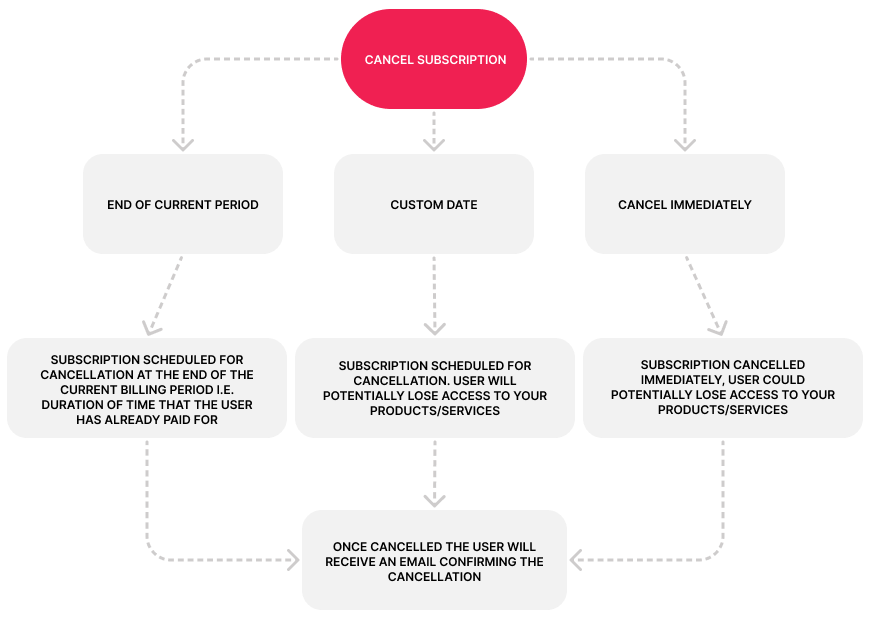
#### **Response**

| Parameter          | Field  | Description                                      |
| ------------------ | ------ | ------------------------------------------------ |
| NewCardReferenceId | String | New Card Reference Id                            |
| ResponseDesc       | String | Response description                             |
| UserId             | Guid   | User Id of the prepaid card user                 |
| Last4Digits        | Number | Last 4 digits of the prepaid card number         |
| ExpireMonth        | String | Expiry month of the prepaid card number          |
| ExpireYear         | String | Expiry year of the prepaid card number           |
| Available balance  | Number | Available balance of the prepaid card number     |
| Ledger Balance     | Number | Ledger balance of the prepaid card number        |
| FirstName          | String | First name of the prepaid card user              |
| LastName           | String | Last name of the prepaid card user               |
| CardStatus         | String | Card status of the reissued card                 |
| CardProgramId      | String | Card program the reissued card is assigned under |
| Email              | String | Email address of the prepaid card user           |

## Get Card Transactions

Use this endpoint for transaction history from a users prepaid card.

`Method: POST`

`Endpoint: {{env}}/api/user/get-card-transactions`

{% tabs %}
{% tab title="Request" %}

```json
{
    "UserId": "8ebd932b-...b92633e14297",
    "CardReferenceId": "599000027458",
    "CreatedAtOperator": "isInTheLast",
    "CreatedAt": "2023-01-01 12:00:00.000",
    "Pagination": {
        "PageNumber": 1,
        "ItemsPerPage": 10
    }
}

```

{% endtab %}

{% tab title="Response" %}

```json
{
    "statusCode": 200,
    "message": "POST Request successful.",
    "isError": false,
    "result": {
        "CurrentPage": 1,
        "PageSize": 10,
        "TotalCount": 4,
        "Items": [
            {
                "Id": "6adae97f-1bf0-491a-b192-173d81cb9518",
                "CreatedAt": "2025-06-10T12:20:30Z",
                "SettlementDate": "2025-06-14",
                "TransactionId": "F333334",
                "Description": "Grocery Store Purchase",
                "Status": "Posted",
                "Debit": -3.99,
                "Credit": 0,
                "MerchantNameAndLocation": "Fake Retailer Inc. New York NY"
            },...
        ]
    }
}


```

{% endtab %}
{% endtabs %}

#### **Request Parameters**

| UserId                  | Guid            | Yes | User Id                                        |
| ----------------------- | --------------- | --- | ---------------------------------------------- |
| CardReferenceId         | String          | Yes | Card reference id                              |
| CardTransactionType     | String          | No  | Card issuer transaction type                   |
| CardTransactionStatuses | String          | No  | Card transaction statuses                      |
| TransactionZumRailsType | String          | No  | Transaction zum rails type                     |
| CardTransactionId       | String          | No  | Card issuer transaction id                     |
| GenericSearch           | String          | No  | Filter the search with this text               |
| AmountLowerLimit        | Number          | No  | Lower limit transaction amount                 |
| AmountUpperLimit        | Number          | No  | Upper limit transaction amount                 |
| CreatedAtOperator       | String          | No  | Date filter type for query                     |
| CreatedAtFrom           | Datetime        | No  | Start date for query                           |
| CreatedAtTo             | Datetime        | No  | End date for query                             |
| CreatedAt               | Datetime        | No  | Base date for query                            |
| Timezone                | Windows or IANA | No  | Timezone identifier                            |
| **Pagination**          | -               | Yes |                                                |
| PageNumber              | Number          | Yes | The respective page, starting at 1             |
| ItemsPerPage            | Number          | Yes | The amount of items per page between 0 and 100 |

#### **Response**

| Parameter               | Type        | Description                       |
| ----------------------- | ----------- | --------------------------------- |
| CurrentPage             | Number      | Current page of transaction list  |
| PageSize                | Number      | Number of items in page requested |
| TotalCount              | Number      | Number of total items queryable   |
| **Items**               | <p><br></p> | <p><br></p>                       |
| Id                      | Guid        | Zum Rails Transaction Id          |
| CreatedAt               | Datetime    | Created at date and time          |
| SettlementDate          | Date        | Date funds settled                |
| TransactionId           | String      | Card issuer transaction id        |
| Description             | String      | Description of transaction        |
| Status                  | String      | Status of transaction             |
| Debit                   | Decimal     | Amount Debited                    |
| Credit                  | Decimal     | Amount Credited                   |
| MerchantNameAndLocation | String      | Merchant name and location        |

**CreatedAtOperator:**&#x20;

| Type           | Description                              |
| -------------- | ---------------------------------------- |
| IsInTheLast    | Between user creation date and now       |
| ExactlyMatches | Exactly matches CreatedAt                |
| IsBetween      | Is between CreatedAtFrom and CreatedAtTo |
| IsAfter        | Is after CreatedAt                       |
| IsOnOrAfter    | Is on or after CreatedAt                 |
| IsBefore       | Is before CreatedAt                      |
| IsBeforeOrOn   | Is before or on CreatedAt                |

**CardTransactionStatuses:**&#x20;

| Type     | Description           |
| -------- | --------------------- |
| Posted   | Posted transactions   |
| Pending  | Pre Auth Transactions |
| Declined | Declined Transcations |

**CardTransactionType:**&#x20;

| Type   | Description         |
| ------ | ------------------- |
| POS    | POS Purchase        |
| ATM    | Cash Withdrawal     |
| Debit  | Debit Transactions  |
| Credit | Credit Transactions |

## Cancel Transactions

Use this endpoint for reversing pre-auth POS transactions and fee transactions.

`Method: DELETE`

`Endpoint: {{env}}/api/card-transaction/{transactionId}`

{% tabs %}
{% tab title="Response" %}

```json
{
    "statusCode": 200,
    "message": "DELETE Request successful.",
    "isError": false,
    "result": "Request completed"
}
```

{% endtab %}
{% endtabs %}

## Get Statement List

Use this endpoint to retrieve a paginated list of card statements for a User.

`Method: POST`

`Endpoint: {{env}}/api/card/statements/filter`

{% tabs %}
{% tab title="Request" %}

```json
{
    "UserId": "8ebd932b-...b92633e14297",
    "UserCardId": "9bd31212b-...b926dc141397",
    "AddTransactionDetails": true,
    "dateFrom": "2026-05-01T00:00:00Z",
    "dateTo": "2026-12-31T23:59:59Z",
    "TransactionPageSize": 10,
    "Pagination": {
        "PageNumber": 1,
        "ItemsPerPage": 10
    }
}

```

{% endtab %}

{% tab title="Response" %}

```json
{
    "statusCode": 200,
    "message": "POST Request successful.",
    "isError": false,
    "result": {
        "CurrentPage": 1,
        "PageSize": 10,
        "TotalCount": 2,
        "Items": [
            {
                "Id": "a3986b76-c899-4be1-8999-29d4b3adab34",
                "UserCardId": "952ea6a5-5eee-4291-9d13-422df35fcd94",
                "PeriodStart": "05-01-2026",
                "PeriodEnd": "05-31-2026",
                "StatementDate": "05-01-2026",
                "PaymentDueDate": "2026-05-25T04:00:00Z",
                "CreatedAt": "2026-06-02T23:22:48.893546Z",
                "Last4Digits": "2945",
                "CardType": "SecuredCreditCard",
                "PreviousBalance": 146.65,
                "Payments": 0.0,
                "OtherCredits": 0.0,
                "Purchases": 0.0,
                "CashAdvance": 0.0,
                "InterestCharged": 0.7,
                "FeeCharged": 35.0,
                "NewBalance": 182.35,
                "MinimumPaymentDue": 10,
                "CreditLimit": 360.0,
                "AvailableCredit": 177.65,
                "DaysAccountPastDue": 0,
                "StatementGenerated": true,
                "Transactions": []
            }
        ]
    }
}


```

{% endtab %}

{% tab title="Response with Transactions" %}

```json
{
    "statusCode": 200,
    "message": "POST Request successful.",
    "isError": false,
    "result": {
        "CurrentPage": 1,
        "PageSize": 10,
        "TotalCount": 2,
        "Items": [
            {
            "Id": "a3986b76-c899-4be1-8999-29d4b3adab34",
            "UserCardId": "952ea6a5-5eee-4291-9d13-422df35fcd94",
            "PeriodStart": "05-01-2026",
            "PeriodEnd": "05-31-2026",
            "StatementDate": "05-01-2026",
            "PaymentDueDate": "2026-05-25T04:00:00Z",
            "CreatedAt": "2026-06-02T23:22:48.893546Z",
            "Last4Digits": "2945",
            "CardType": "SecuredCreditCard",
            "PreviousBalance": 146.65,
            "Payments": 0.0,
            "OtherCredits": 0.0,
            "Purchases": 0.0,
            "CashAdvance": 0.0,
            "InterestCharged": 0.7,
            "FeeCharged": 35.0,
            "NewBalance": 182.35,
            "MinimumPaymentDue": 10,
            "CreditLimit": 360.0,
            "AvailableCredit": 177.65,
            "DaysAccountPastDue": 0,
            "StatementGenerated": true,
            "Transactions": [
                    {
                        "Id": "08994cab-b3d9-466b-be58-4d3227997d37",
                        "StatementId": "a3986b76-c899-4be1-8999-29d4b3adab34",
                        "Type": "Fee",
                        "Description": "Fee - Card Activation",
                        "TransactionDate": "2026-05-28T04:00:00Z",
                        "TransactionPostedDate": "2026-05-28T04:00:00Z",
                        "Amount": 0.01,
                        "CreatedAt": "2026-06-02T23:22:48.892975Z"
                    }
                ]
            }
        ]
    }
}


```

{% endtab %}
{% endtabs %}

#### **Request Parameters**

<table><thead><tr><th width="205.25390625">Parameter</th><th>Type</th><th>Mandatory</th><th>Description</th></tr></thead><tbody><tr><td>UserId</td><td>Guid</td><td>Yes</td><td>User Id</td></tr><tr><td>UserCardId</td><td>Guid</td><td>No</td><td>Id of the specific card type issued (e.g. Secured Credit Card User Id)</td></tr><tr><td>AddTransactionDetails</td><td>Bool</td><td>No</td><td><p>Whether to include transactions in each statement.</p><p>Set to true or false. </p><p>Default: false</p></td></tr><tr><td>DateFrom</td><td>Datetime</td><td>No</td><td>Start date for query</td></tr><tr><td>DateTo</td><td>Datetime</td><td>No</td><td>End date for query</td></tr><tr><td>Pagination</td><td></td><td>No</td><td></td></tr><tr><td>PageNumber</td><td>Number</td><td>No</td><td>The respective page, starting at 1</td></tr><tr><td>ItemsPerPage</td><td>Number</td><td>No</td><td>The amount of items per page between 0 and 100</td></tr></tbody></table>

#### **Response**

| Parameter             | Type     | Description                                                 |
| --------------------- | -------- | ----------------------------------------------------------- |
| CurrentPage           | Number   | Current page of results                                     |
| PageSize              | Number   | Number of items in page requested                           |
| TotalCount            | Number   | Total number of items queryable                             |
| Items                 |          |                                                             |
| Id                    | Guid     | Statement Id                                                |
| UserCardId            | Guid     | Id of the Secured Credit Card associated with the statement |
| PeriodStart           | DateOnly | Start date of the statement period                          |
| PeriodEnd             | DateOnly | End date of the statement period                            |
| StatementDate         | DateOnly | Date the statement was generated                            |
| PaymentDueDate        | Datetime | Payment due date                                            |
| CreatedAt             | Datetime | Record creation timestamp                                   |
| Last4Digits           | String   | Last 4 digits of the card number                            |
| CardType              | String   | Card type (e.g. SecuredCredit)                              |
| PreviousBalance       | Decimal  | Balance carried over from prior statement                   |
| Payments              | Decimal  | Total payments received                                     |
| OtherCredits          | Decimal  | Other credits applied                                       |
| Purchases             | Decimal  | Total purchases made                                        |
| CashAdvance           | Decimal  | Total cash advances                                         |
| InterestCharged       | Decimal  | Interest charged this period                                |
| FeeCharged            | Decimal  | Fees charged this period                                    |
| NewBalance            | Decimal  | Closing balance of the statement                            |
| MinimumPaymentDue     | Decimal  | Minimum payment required                                    |
| CreditLimit           | Decimal  | Credit limit of the card                                    |
| AvailableCredit       | Decimal  | Available credit remaining                                  |
| DaysAccountPastDue    | Int      | Number of days the account is past due                      |
| StatementGenerated    | Bool     | Whether the statement has been generated                    |
| Transactions          | List     | Transactions included if AddTransactionDetails is true      |
| Transactions          |          |                                                             |
| Id                    | Guid     | Internal Id assigned to the transaction                     |
| StatementId           | Guid     | Corresponding StatementId of the transaction                |
| Last4Digits           | Number   | Last 4 digits of the card                                   |
| CardStatus            | String   | Status of the card at the time of the transaction           |
| Type                  | String   | Transaction type                                            |
| Description           | String   | Description of the transaction                              |
| TransactionDate       | Datetime | Date and time the transaction occured                       |
| TransactionPostedDate | Datetime | Date and time the transaction was posted                    |
| Amount                | Decimal  | Transaction amount. Negative amount is a debit.             |
| CreatedAt             | Datetime | Record creation timestamp                                   |

## Get Statement Transactions

Use this endpoint to retrieve a paginated list of card statement transactions for a User.

Returns a `404` if a `StatementId` is provided but not found for the user.

`Method: POST`

`Endpoint: {{env}}/api/card/statements-transactions/filter`

{% tabs %}
{% tab title="Request" %}

```json
{
    "UserId": "8ebd932b-...b92633e14297",
    "UserCardId": "9bd31212b-...b926dc141397",
    "StatementId": "a1b2c3d4-...e5f6",
    "Date": "2025-05-01T00:00:00Z",
    "DateOperator": "IsAfter",
    "Pagination": {
        "PageNumber": 1,
        "ItemsPerPage": 10
    }
}

```

{% endtab %}

{% tab title="Response" %}

```json
{
    "statusCode": 200,
    "message": "POST Request successful.",
    "isError": false,
    "result": {
        "CurrentPage": 1,
        "PageSize": 10,
        "TotalCount": 67,
        "Items": [
            {
                "Id": "41747dff-93b8-4d09-a014-c36e13bf834b",
                "StatementId": "a07e344c-775c-45f8-8b20-2511c0c271ba",
                "Type": "Purchase",
                "Description": "Maintenance fee charged",
                "TransactionDate": "2026-05-07T04:00:00Z",
                "TransactionPostedDate": "2026-05-07T04:00:00Z",
                "Amount": 2,
                "CreatedAt": "2026-05-29T22:08:16.754873Z"
            },
            {
                "Id": "9127fe5a-71b1-44b4-b70f-38e47baa90d7",
                "StatementId": "a07e344c-775c-45f8-8b20-2511c0c271ba",
                "Type": "Credit",
                "Description": "Payment",
                "TransactionDate": "2026-05-07T04:00:00Z",
                "TransactionPostedDate": "2026-05-07T04:00:00Z",
                "Amount": -22.0,
                "CreatedAt": "2026-05-29T22:08:16.754875Z"
            }
        ]
    }
}


```

{% endtab %}
{% endtabs %}

#### **Request Parameters**

| Parameter    | Type         | Mandatory | Description                                                     |
| ------------ | ------------ | --------- | --------------------------------------------------------------- |
| UserId       | Guid         | Yes       | User Id                                                         |
| UserCardId   | Guid         | Yes       | Filter by specific card. Id of the specific card type issued    |
| StatementId  | Guid         | No        | Filter by specific statement. Returns 404 if not found for user |
| Date         | DateTime     | No        | Base date for query (used with DateOperator)                    |
| DateOperator | DateOperator | No        | Date filter type for query                                      |
| DateFrom     | DateTime     | No        | Start date for range query                                      |
| DateTo       | DateTime     | No        | End date for range query                                        |
| Pagination   |              | No        |                                                                 |
| PageNumber   | Number       | No        | The respective page, starting at 1                              |
| ItemsPerPage | Number       | No        | The amount of items per page between 0 and 100                  |

#### **Response**

| Parameter             | Type     | Description                                    |
| --------------------- | -------- | ---------------------------------------------- |
| CurrentPage           | Number   | Current page of results                        |
| PageSize              | Number   | Number of items in page requested              |
| TotalCount            | Number   | Total number of items queryable                |
| Items                 |          |                                                |
| Id                    | Guid     | Transaction Id                                 |
| Last4Digits           | String   | Last 4 digits of the card number               |
| UserCardId            | Guid     | Id of the card associated with the transaction |
| CardStatus            | String   | Status of the card at time of transaction      |
| Type                  | String   | Transaction type                               |
| Description           | String   | Description of the transaction                 |
| TransactionDate       | DateTime | Date and time the transaction occurred         |
| TransactionPostedDate | DateTime | Date and time the transaction was posted       |
| Amount                | Decimal  | Transaction amount (negative = debit)          |
| CreatedAt             | DateTime | Record creation timestamp                      |

**DateOperator:**&#x20;

| Type           | Description                              |
| -------------- | ---------------------------------------- |
| IsInTheLast    | Between user creation date and now       |
| ExactlyMatches | Exactly matches CreatedAt                |
| IsBetween      | Is between CreatedAtFrom and CreatedAtTo |
| IsAfter        | Is after CreatedAt                       |
| IsOnOrAfter    | Is on or after CreatedAt                 |
| IsBefore       | Is before CreatedAt                      |
| IsBeforeOrOn   | Is before or on CreatedAt                |


# Transactions

## Creating a new transaction

Use this endpoint if you want to add a new transaction.

`Method: POST`

`Endpoint: {{env}}/api/transaction`

**Canada**

{% tabs %}
{% tab title="EFT" %}

```json
{
  "ZumRailsType": "AccountsReceivable",
  "TransactionMethod": "Eft",
  "Amount": 123.45,
  "Memo": "Memo description",
  "Comment": "This transaction is just a test from a user to wallet",
  "UserId": "1d431e8b-...85452adb4eee",
  "WalletId": "8ebd932b-...b92633e14297"
}
```

{% endtab %}

{% tab title="Visa Direct" %}

```json
{
  "ZumRailsType": "AccountsReceivable",
  "TransactionMethod": "VisaDirect",
  "Amount": 123.45,
  "Memo": "Memo description",
  "Comment": "This transaction is just a test from a user to wallet",
  "UserId": "1d431e8b-...85452adb4eee",
  "WalletId": "8ebd932b-...b92633e14297"
}
```

{% endtab %}

{% tab title="Interac" %}

```json
{
  "ZumRailsType": "AccountsReceivable",
  "TransactionMethod": "Interac",
  "Amount": 123.45,
  "Memo": "Memo description",
  "Comment": "This transaction is just a test from a user to wallet",
  "User": {
    "CompanyName": "Example Company",
    "Email": "example@company.com"
  },
  "InteracNotificationChannel": "email",
  "WalletId": "8ebd932b-...b92633e14297",
  "InteracHasSecurityQuestionAndAnswer": true,
  "InteracSecurityQuestion": "Your question",
  "InteracSecurityAnswer": "Your answer"
}
```

{% endtab %}

{% tab title="Credit Card" %}

```json
{
  "ZumRailsType": "AccountsReceivable",
  "TransactionMethod": "CreditCard",
  "Amount": 123.45,
  "Memo": "Memo",
  "Comment": "This transaction is just a test from a user to wallet",
  "UserId": "1d431e8b-...85452adb4eee",
  "Authorize": {
    "Capture": false,
    "AutoExpireDays": 5
  }
}
```

{% endtab %}

{% tab title="Prepaid Card" %}

<pre class="language-json"><code class="lang-json"><strong>{    
</strong>    "ZumRailsType": "LoadCard",
    "TransactionMethod": "PrepaidCard",
    "Amount": 10.0,
    "Memo": "",
    "Comment": "",
    "WalletId": "1d431e8b-...85452adb4eee",
    "UserId": "8ebd932b-...b92633e14297"
}
 
</code></pre>

{% endtab %}

{% tab title="Secured Credit Card" %}

```json
To fund the Security Deposit of a User with a Secured Credit Card
{
    "ZumRailsType": "LoadCard",
    "TransactionMethod": "CreditCardIssuance",
    "Amount": 9.00,
    "Memo": "memo",
    "Comment": "comment",
    "UserId": "<guid>",
    "WalletId": "<guid>"
}

To make a payment for a User with a Secured Credit Card
{
    "ZumRailsType": "StatementPayment",
    "TransactionMethod": "CreditCardIssuance",
    "Amount": 2.00,
    "Memo": "memo",
    "Comment": "comment",
    "UserId": "<guid>",
    "WalletId": "<guid>"
}
```

{% endtab %}

{% tab title="Response" %}

```json
{
  "statusCode": 200,
  "message": "POST Request successful.",
  "isError": false,
  "result": {
    "Id": "0bc9894d-...f691024aca19"
  }
}
```

{% endtab %}
{% endtabs %}

**US**

{% tabs %}
{% tab title="ACH" %}

```json
{
  "ZumRailsType": "AccountsPayable",
  "TransactionMethod": "Ach",
  "Amount": 123.45,
  "Memo": "Memo",
  "Comment": "This transaction is just a test from a wallet to user",
  "UserId": "1d431e8b-...85452adb4eee",
  "WalletId": "8ebd932b-...b92633e14297",
  "PaymentInstrumentId": "92142401-...389ba0d87e75"
}
```

{% endtab %}

{% tab title="RTP-FedNow" %}

```json
{
  "ZumRailsType": "AccountsPayable",
  "TransactionMethod": "RtpFedNow",
  "Amount": 123.45,
  "Memo": "Memo",
  "Comment": "This transaction is just a test from a wallet to user",
  "UserId": "1d431e8b-...85452adb4eee",
  "WalletId": "8ebd932b-...b92633e14297",
  "PaymentInstrumentId": "92142401-...389ba0d87e75"
}
```

{% endtab %}

{% tab title="Debit Card" %}

```json
{
  "ZumRailsType": "AccountsPayable",
  "TransactionMethod": "DebitCard",
  "Amount": 123.45,
  "Memo": "Memo",
  "Comment": "This transaction is just a test from a wallet to user",
  "UserId": "1d431e8b-...85452adb4eee",
  "WalletId": "8ebd932b-...b92633e14297",
  "PaymentInstrumentId": "92142401-...389ba0d87e75"
}
```

{% endtab %}

{% tab title="Credit Card" %}

```json
{
  "ZumRailsType": "AccountsReceivable",
  "TransactionMethod": "CreditCard",
  "Amount": 123.45,
  "Memo": "Memo",
  "Comment": "This transaction is just a test from a user to wallet",
  "UserId": "1d431e8b-...85452adb4eee",
  "WalletId": "8ebd932b-...b92633e14297",
  "PaymentInstrumentId": "92142401-...389ba0d87e75"
}
```

{% endtab %}

{% tab title="Money Transfer" %}

```json
{
  "ZumRailsType": "AccountsReceivable",
  "TransactionMethod": "MoneyTransfer",
  "Amount": 123.45,
  "Memo": "Memo",
  "Comment": "This transaction is just a test from a user to wallet",
  "UserId": "1d431e8b-...85452adb4eee",
  "WalletId": "8ebd932b-...b92633e14297",
  "PaymentInstrumentId": "92142401-...389ba0d87e75"
}
```

{% endtab %}

{% tab title="Response" %}

```json
{
  "statusCode": 200,
  "message": "POST Request successful.",
  "isError": false,
  "result": {
    "Id": "0bc9894d-...f691024aca19",
    "Amount": 123.45,
    "Comment": "This transaction is just a test from a wallet to user",
    "TransactionMethod": "Ach",
    "TransactionStatus": "InProgress",
    "Customer": {
      "Id": "911388da-5095-4cc9-bf51-cf636dd6c46b",
      "CompanyName": "US Company",
      "CompanyEmail": "uscompany@zumrails.com"
    },
    "ZumRailsType": "AccountsReceivable",
    "PaymentInstrumentId": "8951e72a-...d334f07fe908",
    "CreditCardResponseCode": "000",
    "CreditCardAdditionalResponseData": "APPROVAL",
    "User": {
      "Id": "8bad268a-5a76-4d59-8cc9-83e8e6cedfd1",
      "FirstName": "Jane",
      "LastName": "Smith",
      "Email": "jane.smith@example.com"
    },
    "Wallet": {
      "Id": "1662f74a-...d8b966ac7198",
      "Type": "Unified",
      "Currency": "USD"
    },
    "From": "Jane Smith - jane.smith@example.com",
    "Memo": "Memo",
    "To": "Zūm Wallet",
    "Currency": "USD",
    "CreatedAt": "2023-07-14T21:20:20.4715365Z",
    "TransactionHistory": [{
      {
        "Id": "1177131e-...d5a30d1f40ba",
        "CreatedAt": "2023-07-14T21:20:20.7628922Z",
        "Event": "Started",
        "EventDescription": "Transaction with type AccountsReceivable started, from Jane Smith - jane.smith@example.com to Zūm Wallet with amount: $123.45"
      },
    }]
  }
}
```

{% endtab %}
{% endtabs %}

**Input parameters**

{% tabs %}
{% tab title="Canada" %}

<table><thead><tr><th width="212">Parameter</th><th width="112">Type</th><th width="95.4000244140625">Mandatory</th><th>Description</th></tr></thead><tbody><tr><td>ZumRailsType</td><td>string</td><td>yes</td><td>Transaction type</td></tr><tr><td>TransactionMethod</td><td>string</td><td>yes</td><td>Transaction method</td></tr><tr><td>Amount</td><td>decimal</td><td>yes</td><td>Transaction amount</td></tr><tr><td>Memo</td><td>string</td><td>yes</td><td>Memo description. If customer transaction description type is "PerTransaction", this will be shown at the bank statements. Maximum of 15 characters. Only letters, numbers, dash, space and underscore are allowed</td></tr><tr><td>Comment</td><td>string</td><td>no</td><td>Internal comment you might want to add. Interac transactions will display the comment on the request.</td></tr><tr><td>FundingSourceId</td><td>guid</td><td>no</td><td>Funding Source Id</td></tr><tr><td>WalletId</td><td>guid</td><td>no</td><td>Wallet Id</td></tr><tr><td>UserId</td><td>guid</td><td>no</td><td>User Id</td></tr><tr><td>User</td><td><a href="/pages/z7wlCwKI1EGRGD84e2yi">User input</a></td><td>no</td><td>It's possible to create a transaction without adding a user first. Simply pass the user object (instead of the UserId) into the transaction body. For reference, check the payload example of the user object <a href="/pages/z7wlCwKI1EGRGD84e2yi#create-a-new-user">here</a> and pass this when you create a transaction (check interac transaction payload example). Only available for EFT and interac transaction methods</td></tr><tr><td>AuthCode</td><td>string</td><td>no</td><td>Processor clients can use this to securely send user information in the transaction creation API.</td></tr><tr><td>ScheduledStartDate</td><td>date</td><td>no</td><td>The date when the transaction will be sent to the financial institution, in the format <code>YYYY-MM-DD</code>. Must be greater than today.</td></tr><tr><td>ClientTransactionId</td><td>string</td><td>no</td><td>This field can be used to store the Transaction id created in your system when the Transaction is initiated</td></tr><tr><td><strong>3D Secure</strong></td><td>-</td><td>-</td><td>Only needed for 3D secure - Visa Direct and Credit Card</td></tr><tr><td>CardEci</td><td>string</td><td>no</td><td>Received from 3D secure, required if using 3D Secure but optional for Visa Direct Accounts Payable transactions</td></tr><tr><td>CardXid</td><td>string</td><td>no</td><td>Received from 3D secure, required if using 3D Secure but optional for Visa Direct Accounts Payable transactions</td></tr><tr><td>CardCavv</td><td>string</td><td>no</td><td>Received from 3D secure, required if using 3D Secure but optional for Visa Direct Accounts Payable transactions</td></tr><tr><td><strong>Interac Fields</strong></td><td>-</td><td>-</td><td>Only needed for Interac transactions</td></tr><tr><td>UseInteracANR</td><td>boolean</td><td>no</td><td>Indicates whether a transaction will be deposited directly to the user's saved account. (This works only for Interac account payable). Read more about Interac ANR <a href="https://knowledge-base.zumrails.com/interac-anr">here</a>.</td></tr><tr><td>InteracHasSecurityQuestionAndAnswer</td><td>boolean</td><td>no</td><td>Indicate if there will be a question and answer for Interac</td></tr><tr><td>InteracSecurityQuestion</td><td>string</td><td>yes</td><td>The question for the user to process the interac request. Required if InteracHasSecurityQuestionAndAnswer is true. Pattern accepted: String [ 5 .. 40 ]. Characters accepted: a-zA-Z0-9àâäèéêëîïôœùûüÿçÀÂÄÈÉÊËÎÏÔŒÙÛÜŸÇ </td></tr><tr><td>InteracSecurityAnswer</td><td>string</td><td>yes</td><td>The answer for the user to process the interac request. Required if InteracHasSecurityQuestionAndAnswer is true. Pattern accepted: String [ 3 .. 25 ]. Characters accepted: a-zA-Z0-9àâäèéêëîïôœùûüÿçÀÂÄÈÉÊËÎÏÔŒÙÛÜŸÇ </td></tr><tr><td>SessionFingerprint</td><td>string</td><td>yes</td><td>A unique identifier for this sender, we recommend using <a href="https://github.com/fingerprintjs/fingerprintjs">fingerprintjs</a>. Required if peer-to-peer Interac transactions are enabled.</td></tr><tr><td>SessionIpAddress</td><td>string</td><td>yes</td><td>The IP address of the UserId, the sender, of the funds. Required if Accounts Payable with Interac, and peer-to-peer enabled.</td></tr><tr><td>InteracNotificationChannel</td><td>string</td><td>no</td><td>Indicates whether the notification will be sent via <strong>email</strong> or <strong>SMS</strong>. If not provided, the default value is <strong>email</strong>.</td></tr><tr><td><strong>Authorize</strong></td><td>-</td><td>no</td><td>Only needed for authorized hold Credit Card transactions</td></tr><tr><td>Capture</td><td>boolean</td><td>no</td><td>The field is required for authorized hold Credit Card transactions. Capture can be set to true or false</td></tr><tr><td>AutoExpireDays</td><td>number</td><td>no</td><td>The field is required for authorized hold Credit Card transactions. AutoExpireDays should be an number between 1 to 5.</td></tr></tbody></table>
{% endtab %}

{% tab title="US" %}

<table><thead><tr><th>Parameter</th><th width="122">Type</th><th width="129.5999755859375">Mandatory</th><th>Description</th></tr></thead><tbody><tr><td>ZumRailsType</td><td>string</td><td>yes</td><td>Transaction type</td></tr><tr><td>TransactionMethod</td><td>string</td><td>yes</td><td>Transaction method.</td></tr><tr><td>Amount</td><td>decimal</td><td>yes</td><td>Transaction amount</td></tr><tr><td>Memo</td><td>string</td><td>yes</td><td>Memo description.</td></tr><tr><td>Comment</td><td>string</td><td>no</td><td>Internal comment you might want to add.</td></tr><tr><td>FundingSourceId</td><td>guid</td><td>no</td><td>Funding Source Id</td></tr><tr><td>WalletId</td><td>guid</td><td>no</td><td>Wallet Id</td></tr><tr><td>UserId</td><td>guid</td><td>no</td><td>User Id</td></tr><tr><td>PaymentInstrumentId</td><td>string</td><td>yes</td><td>Payment instrument id</td></tr><tr><td>User</td><td><a href="/pages/z7wlCwKI1EGRGD84e2yi">User input</a></td><td>no</td><td>It's possible to create a transaction without adding a user first. Simply pass the user object (instead of the UserId) into the transaction body. For reference, check the payload example of the user object <a href="/pages/z7wlCwKI1EGRGD84e2yi#create-a-new-user">here</a> and pass this when you create a transaction.</td></tr><tr><td>ScheduledStartDate</td><td>date</td><td>no</td><td>The date when the transaction will be sent to the financial institution, in the format <code>YYYY-MM-DD</code>. Must be greater than today.</td></tr><tr><td>ClientTransactionId</td><td>string</td><td>no</td><td>This field can be used to store the Transaction id created in your system when the Transaction is initiated</td></tr></tbody></table>
{% endtab %}
{% endtabs %}

{% hint style="info" %}

* For **Interac transactions**, either a **memo** or a **comment** is required.\
  If both are provided, the **comment** will be shown in the Interac request.
* When creating a transaction with a **scheduled start date** (delay transaction initiation), the transaction will be queued and sent to the financial institution based on the specified schedule.
  {% endhint %}

{% hint style="info" %}
**INFO**

For different use cases, Zūm Rails recommends the following workflows:

* **Accounts Payable (AP):**\
  Fund the Zūm Wallet in advance to ensure funds are available for timely disbursements.
* **Accounts Receivable (AR):**\
  Move funds from the end user into the Zūm Wallet, then configure an automatic daily withdrawal to your funding source at the end of each day.
  {% endhint %}

{% hint style="info" %}
**INFO (Credit Card Canada)**

When creating a Credit Card transaction with `capture = false`, an authorization transaction is generated and remains in a pending state for up to 5 days, awaiting completion. If the transaction is not completed within this period, it will be automatically voided.

After the authorization transaction is created, it can be completed either through the portal or via the API using the [transaction completion endpoint](#complete-a-transaction).
{% endhint %}

**Response**

| Parameter | Type | Description    |
| --------- | ---- | -------------- |
| Id        | guid | Transaction id |

**ZumRailsType**

<table><thead><tr><th width="196">Type</th><th width="339">Description</th><th>Information to Provide</th></tr></thead><tbody><tr><td>FundZumWallet</td><td>Send money from your <strong>Funding Source</strong> to <strong>Zūm Wallet</strong></td><td><ul><li>FundingSourceId</li><li>WalletId</li></ul></td></tr><tr><td>WithdrawZumWallet</td><td>Withdraw money from <strong>Zūm Wallet</strong> to your <strong>Funding Source</strong></td><td><ul><li>FundingSourceId</li><li>WalletId</li></ul></td></tr><tr><td>AccountsPayable</td><td>Send money (accounts payable) from your <strong>Zūm Wallet</strong> to a <strong>User</strong></td><td><ul><li>UserId</li><li>WalletId</li></ul></td></tr><tr><td>AccountsPayable</td><td>Send money (accounts payable) from your <strong>Funding Source</strong> to a <strong>User</strong></td><td><ul><li>FundingSourceId</li><li>UserId</li></ul></td></tr><tr><td>AccountsReceivable</td><td>Receive money (accounts receivable) from a <strong>User</strong> to your <strong>Zūm Wallet</strong></td><td><ul><li>UserId</li><li>WalletId</li></ul></td></tr><tr><td>AccountsReceivable</td><td>Receive money (accounts receivable) from a <strong>User</strong> to your <strong>Funding Source</strong></td><td><ul><li>UserId</li><li>FundingSourceId</li></ul></td></tr><tr><td>UnloadCard</td><td>Debit transaction to the <strong>Zūm Wallet</strong> from the card</td><td><ul><li>UserId</li><li>WalletId</li></ul></td></tr><tr><td>LoadCard</td><td>Credit transaction loading the card or securing the security deposit from the <strong>Zūm Wallet</strong></td><td><ul><li>UserId</li><li>WalletId</li></ul></td></tr><tr><td>StatementPayment</td><td>To make a payment to a User with a Secured Credit Card</td><td><ul><li>UserId</li><li>WalletId</li></ul></td></tr></tbody></table>

{% hint style="warning" %}
Credit card transactions in Canada are settled either directly into the merchant account or into the customer wallet, depending on the credit card provider. As a result, specifying a `WalletId` or `FundingSourceId` is not mandatory when creating a credit card transaction. If the transaction is configured to settle into a wallet and no `WalletId` is provided, the customer’s default wallet will be used automatically.
{% endhint %}

**TransactionMethod**

{% tabs %}
{% tab title="Canada" %}

| Type               |
| ------------------ |
| Eft                |
| Interac            |
| VisaDirect         |
| CreditCard         |
| PrepaidCard        |
| CreditCardIssuance |
| {% endtab %}       |

{% tab title="US" %}

| Method        | Description               |
| ------------- | ------------------------- |
| Ach           | Standard ACH transaction  |
| SameDayAch    | Same-day ACH transaction  |
| RtpFedNow     | RTP/FedNow transaction    |
| DebitCard     | DebitCcard transaction    |
| CreditCard    | Credit Card transaction   |
| MoneyTransfer | MoneyTransfer transaction |
| {% endtab %}  |                           |
| {% endtabs %} |                           |

**InteracNotificationChannel**

{% tabs %}
{% tab title="Canada" %}

| InteracNotificationChannel |
| -------------------------- |
| email                      |
| sms                        |
| {% endtab %}               |
| {% endtabs %}              |

{% hint style="danger" %}
In a sandbox environment, real bank operations are not performed. It provides a way to simulate success, failures and review situations.
{% endhint %}

{% hint style="danger" %}
Interac transactions in sandbox will be simulated like the real flow. Hence, emails will be sent out to the user email mentioned when the transaction is created. Make sure to use a real email address to be able to simulate this flow and complete the transaction. Whether notification type is SMS the user will receive an **email simulating the SMS message**, containing a link to complete or decline the transaction. The user must have a **valid mobile phone number** associated with their profile to use the SMS notification option.
{% endhint %}

**Keywords to simulate a transaction failure (Canada)**

{% hint style="warning" %}
To simulate a failure, use one of the keywords to simulate failure (shown below) in the field COMMENT while creating a transaction. If no keyword is informed, or something else is informed, the transaction will eventually change status to "Completed". This service is executed every minute.
{% endhint %}

<table><thead><tr><th width="214">Eft</th><th>VisaDirect</th><th>Interac</th><th>CreditCard</th></tr></thead><tbody><tr><td>EftFailedValidationRejection</td><td>VisaDirectGenericError</td><td>InteracFailedRecipientContactInfoMissing</td><td>CreditCardDeclined</td></tr><tr><td>EftFailedInsufficientFunds</td><td>VisaDirectDoNotHonor</td><td>InteracFailedInvalidEmailFormat</td><td>CreditCardError *</td></tr><tr><td>EftFailedCannotLocateAccount</td><td>VisaDirectInsufficientFunds</td><td>InteracFailedInvalidPhoneNumber</td><td>CreditCardHeldForReview *</td></tr><tr><td>EftFailedStopPayment</td><td>VisaDirectNotPermittedToCardHolderInformed</td><td>InteracFailedMultipleTransferLevelErrors</td><td>CreditCardGenericError *</td></tr><tr><td>EftFailedAccountClosed</td><td>VisaDirectAmountLimitNotAuthorized</td><td>InteracFailedRevoked</td><td>CreditCardUnknownResponse *</td></tr><tr><td>EftFailedNoDebitAllowed</td><td>VisaDirectRejectedAmlOrFraud</td><td>InteracFailedBulkCancellationRequest</td><td>CreditCardHoldCallOrPickUpCard *</td></tr><tr><td>EftFailedFundsNotFree</td><td>VisaDirectRejectedAccountLimitExceeded</td><td>InteracFailedRecipientRejected</td><td>CreditCardSecViolation *</td></tr><tr><td>EftFailedCurrencyAccountMismatch</td><td>VisaDirectReenterTransaction</td><td>InteracFailedAuthentication</td><td>CreditCardServNotAllowed *</td></tr><tr><td>EftFailedPayorPayeeDeceased</td><td>VisaDirectInvalidTransaction</td><td>InteracFailedReachedCancellationCutOff</td><td>CreditCardCvvMismatch *</td></tr><tr><td>EftFailedFrozenAccount</td><td>VisaDirectInvalidCardNumber</td><td>InteracFailedNotificationDeliveryFailure</td><td>CreditCardInvalidMerchantId *</td></tr><tr><td>EftFailedInvalidErrorAccountNumber</td><td>VisaDirectIssuerOrSwitchInoperative</td><td>InteracFailedAmountGreaterThanMax</td><td>CreditCardAmountExceeded *</td></tr><tr><td>EftFailedErrorPayorPayeeName</td><td>VisaDirectUnsupportedCardType</td><td>InteracFailedDebtorRejected</td><td>CreditCardRefundAmountExceeded *</td></tr><tr><td>EftFailedRefusedNoAgreement</td><td>VisaDirectInvalidExpiryDate</td><td>InteracFailedFundsDepositFailed</td><td>CreditCardCashbackNotApp *</td></tr><tr><td>EftFailedNotInAccountAgreementP</td><td>VisaDirectInvalidPIN</td><td>InteracFailedClientEmailedToRequestCancellation</td><td>CreditCardExpiredCard *</td></tr><tr><td>EftFailedNotInAccountAgreementE</td><td>VisaDirectInvalidSecret</td><td>InteracFailedGenericError</td><td>CreditCardNoAccountFound *</td></tr><tr><td>EftFailedAgreementRevoked</td><td></td><td>InteracFailedNameMismatch</td><td>CreditCardNotPermittedToCardHolderInformed *</td></tr><tr><td>EftFailedDefaultByAFinancialInstitution</td><td></td><td>InteracFailedInvalidAccountNumber</td><td>CreditCardInvalidCardNumber *</td></tr><tr><td>EftFailedTransactionNotAllowed</td><td></td><td>InteracFailedRequestBlockedByUser</td><td>CreditCardRejectedAmlOrFraud *</td></tr><tr><td></td><td></td><td></td><td>CreditCardTypeNotAccepted *</td></tr><tr><td></td><td></td><td></td><td>CreditCardDomesticDebitDeclined *</td></tr><tr><td></td><td></td><td></td><td>CreditCardClosedAccount *</td></tr></tbody></table>

\* Not available for all Credit Card customers

{% hint style="info" %}
**NOTE**

You can simulate late failures (after transaction completion) by using a comment: (event name), Latefailure. This feature is only available for EFT transaction error. If the string is incorrect, the transaction will fail with the event specified within it.
{% endhint %}

## Get a specific transaction

Use this endpoint if you want to get all the information for a specific transaction. The transaction id is informed in the url.

`Method: GET`

`Endpoint: {{env}}/api/transaction/{transaction_id}`

{% tabs %}
{% tab title="Response (Canada)" %}

```json
{
  "statusCode": 200,
  "message": "GET Request successful.",
  "isError": false,
  "result": {
    "Id": "b7a8a505...364e8836404e",
    "CreatedAt": "2020-05-13T17:59:47.039462",
    "Memo": "Memo test",
    "Comment": "This is a transaction to test",
    "Amount": 123.45,
    "Customer": {
      "Id": "e15bbe9b...dc256ba3a247",
      "CompanyName": "Sam's Gym"
    },
    "User": {
      "Id": "c11cc378...8f34ac8173be",
      "FirstName": "John",
      "LastName": "111",
      "Email": "lxtkzblpk12wurb4tczfy@gmail.com",
      "IsActive": true
    },
    "Wallet": {
      "Id": "8ebd932b...b92633e14297",
      "Type": "Unified"
    },
    "FundingSource": {
      "Id": "1d431e8b...85452adb4eee",
      "Institution": "Institution",
      "InstitutionNumber": "123",
      "TransitNumber": "12345",
      "AccountNumber": "1234567"
    },
    "EventHistory": [
      {
        "CreatedAt": "2020-05-13T17:59:47.284943",
        "Event": "EFTFileUploaded",
        "EventDescription": "EFT file uploaded to Financial Institution"
      },
      {
        "CreatedAt": "2020-05-13T17:59:47.284943",
        "Event": "Started",
        "EventDescription": "Transaction with type FundZumWallet started, from Funding Source to Zūm Wallet with amount: $123.45"
      }
    ],
    "ZumRailsType": "FundZumWallet",
    "TransactionMethod": "Eft",
    "TransactionStatus": "InProgress",
    "RecurrentTransactionId": "16d2406f...87d397a8356f",
    "FailedTransactionEvent": null,
    "From": "Zūm Wallet",
    "To": "User john 111",
    "FailedAt": null,
    "IsRefundable": false,
    "AuthorizedHoldExpiredAt": ""
  }
}
```

{% endtab %}

{% tab title="Response (US)" %}

```json
{
  "statusCode": 200,
  "message": "GET Request successful.",
  "isError": false,
  "result": {
    "Id": "b7a8a505...364e8836404e",
    "CreatedAt": "2020-05-13T17:59:47.039462",
    "Memo": "Memo test",
    "Comment": "This is a transaction to test",
    "Amount": 123.45,
    "Currency": "USD",
    "TelecheckApprovalCode": "1228",
    "PaymentInstrumentId": "8951e72a-....d334f07fe908",
    "Customer": {
      "Id": "e15bbe9b...dc256ba3a247",
      "CompanyName": "Sam's Gym"
    },
    "User": {
      "Id": "c11cc378...8f34ac8173be",
      "FirstName": "John",
      "LastName": "111",
      "Email": "lxtkzblpk12wurb4tczfy@gmail.com",
      "IsActive": true
    },
    "Wallet": {
      "Id": "8ebd932b...b92633e14297",
      "Type": "Unified",
      "Currency": "USD"
    },
    "FundingSource": {
      "Id": "1d431e8b...85452adb4eee",
      "Institution": "Institution",
      "InstitutionNumber": "123",
      "RoutingNumber": "12345",
      "AccountNumber": "1234567"
    },
    "TransactionChargeback": [
      {
        "Id": "e5ec36c3...5445500db505"
        "AcquirerReferenceNumber" : "1674915201620667421592979",
        "AuthorizationCode" : "OK5234",
        "ChargebackAmount" : 9.91,
        "ChargebackControlNumber" : "771638347",
        "ChargebackStatus" : "Disputed",
        "ChargebackWorkTypeCode" : "1",
        "DisputeCurrencyCode" : "USD",
        "DisputeReasonCode" : "1350",
        "DueDate" : "2024-04-14",
        "FileId" : "685221186",        
        "MemberMessageText" : "Misrepresentation",
        "ReceivedDate" : "2024-04-10",
      }
    ],
    "TransactionHistory": [
      {
        "CreatedAt": "2020-05-13T17:59:47.284943",
        "Event": "Started",
        "EventDescription": "Transaction with type AccountsPayable started, from Funding Source to Zūm Wallet with amount: $123.45"
      }
    ],
    "ZumRailsType": "AccountsPayable",
    "TransactionMethod": "Ach",
    "TransactionStatus": "InProgress",
    "From": "Zūm Wallet",
    "To": "User john 111",
    "FailedAt": null,
    "PaymentInstrumentId": "92142401-d17e-4906-91e8-389ba0d87e75"
  }
}
```

{% endtab %}
{% endtabs %}

**Response**

{% tabs %}
{% tab title="Canada" %}

<table><thead><tr><th width="253">Parameter</th><th width="103">Type</th><th>Description</th></tr></thead><tbody><tr><td>Id</td><td>guid</td><td>Transaction id</td></tr><tr><td>CreatedAt</td><td>datetime</td><td>When the transaction was created</td></tr><tr><td>Memo</td><td>string</td><td>Transaction memo</td></tr><tr><td>Comment</td><td>string</td><td>Transaction comment</td></tr><tr><td>Amount</td><td>decimal</td><td>Transaction amount</td></tr><tr><td>ZumRailsType</td><td>string</td><td>Transaction type</td></tr><tr><td>TransactionStatus</td><td>string</td><td>Indicate the status of the transaction</td></tr><tr><td>RecurrentTransactionId</td><td>guid</td><td>The id of the recurrent transaction that created this transaction (null if inexistent)</td></tr><tr><td>FailedTransactionEvent</td><td>string</td><td>If the transaction has failed, the <a href="/pages/7hVvsVu9dh6nz6rg1Ueo#status-and-events">transaction event</a> that caused it (null otherwise)</td></tr><tr><td>ScheduledStartDate</td><td>date</td><td>The date transaction will be sent to the financial institution.</td></tr><tr><td>ClientTransactionId</td><td>string</td><td>The Transaction id you informed in the creation of this transaction</td></tr><tr><td>InteracUrl</td><td>string</td><td>The interac URL to complete the transaction, if available</td></tr><tr><td>InteracDebtorInstitutionNumber</td><td>string</td><td>The Financial Institution used to complete the Interac Request money. This information is not available for all requests; it depends on the bank being used to process the payment.</td></tr><tr><td>InteracDebtorFullName</td><td>string</td><td>The Full Name used to complete the Interac Request money. This information is not yet 100% accurate; often is the same name is sent. Gradually, each Institution is improving and sending this information for Zūm Rails. This information is not available for all requests; it depends on the bank being used to process the payment.</td></tr><tr><td>InteracDebtorAccountNumber</td><td>string</td><td>The Account Number used to complete the Interac Request money. This information is not available for all requests; it depends on the bank being used to process the payment.</td></tr><tr><td>InteracCreditorInstitutionNumber</td><td>string</td><td>The Financial Institution used to complete the Interac Send money. This information is not available for all requests; it depends on the bank being used to process the payment.</td></tr><tr><td>InteracCreditorFullName</td><td>string</td><td>The Full Name used to complete the Interac Send money. This information is not yet 100% accurate; often is the same name is sent. Gradually, each Institution is improving and sending this information for Zūm Rails. This information is not available for all requests; it depends on the bank being used to process the payment.</td></tr><tr><td>InteracCreditorAccountNumber</td><td>string</td><td>The Account Number used to complete the Interac Send money. This information is not available for all requests; it depends on the bank being used to process the payment.</td></tr><tr><td>InteracNotificationChannel</td><td>string</td><td>Indicates whether the Interac notification is email or sms.</td></tr><tr><td>UseInteracANR</td><td>boolean</td><td>Indicates whether a transaction will be deposited directly to the user's saved account. (This works only for account payable transactions from wallet to user)</td></tr><tr><td>From</td><td>string</td><td>From description for the transaction</td></tr><tr><td>To</td><td>string</td><td>To description for the transaction</td></tr><tr><td>IsRefundable</td><td>boolean</td><td>Indicates if the transaction is IsRefundable</td></tr><tr><td>FailedAt</td><td>datetime</td><td>When the transaction was failed (null otherwise)</td></tr><tr><td>AuthorizedHoldExpiredAt</td><td>datetime</td><td>When the transaction was the authorized hold Credit Card transaction (null otherwise)</td></tr><tr><td><strong>Customer</strong></td><td></td><td>Basic Customer data</td></tr><tr><td>CompanyName</td><td>string</td><td>Company Name</td></tr><tr><td>Id</td><td>guid</td><td>Id for the related customer</td></tr><tr><td><strong>User</strong></td><td></td><td>If transaction has a user - * Not all information from a user is returned in this endpoint</td></tr><tr><td>Id</td><td>guid</td><td>The user id</td></tr><tr><td>First Name</td><td>string</td><td>User first name</td></tr><tr><td>Last Name</td><td>string</td><td>User last name</td></tr><tr><td>Company Name</td><td>string</td><td>User company name</td></tr><tr><td>IsActive</td><td>boolean</td><td>Indicates if the user is active or not</td></tr><tr><td><strong>Wallet</strong></td><td></td><td>If transaction has a wallet * Not all information from a user is returned in this endpoint</td></tr><tr><td>Id</td><td>guid</td><td>The wallet id</td></tr><tr><td>Type</td><td>string</td><td>The wallet type</td></tr><tr><td><strong>FundingSource</strong></td><td></td><td>If transaction has a funding source * Not all information from a user is returned in this endpoint</td></tr><tr><td>Id</td><td>guid</td><td>The funding source id</td></tr><tr><td>Institution</td><td>string</td><td>The institution name</td></tr><tr><td>InstitutionNumber</td><td>string</td><td>The institution number</td></tr><tr><td>TransitNumber</td><td>string</td><td>The transit number</td></tr><tr><td>AccountNumber</td><td>string</td><td>The account number</td></tr><tr><td><strong>TargetWallet</strong></td><td></td><td>If transaction has a target wallet</td></tr><tr><td>Id</td><td>guid</td><td>The target wallet id</td></tr><tr><td>Type</td><td>string</td><td>The target wallet type</td></tr><tr><td><strong>TransactionHistory</strong></td><td></td><td>List of transaction history events</td></tr><tr><td>CreatedAt</td><td>datetime</td><td>When the transaction event happened</td></tr><tr><td>Event</td><td>string</td><td>The event happened</td></tr><tr><td>EventDescription</td><td>string</td><td>The event description</td></tr></tbody></table>
{% endtab %}

{% tab title="US" %}

<table><thead><tr><th width="230.20001220703125">Parameter</th><th width="132.7999267578125">Type</th><th>Description</th></tr></thead><tbody><tr><td>Id</td><td>guid</td><td>Transaction id</td></tr><tr><td>CreatedAt</td><td>datetime</td><td>When the transaction was created</td></tr><tr><td>Memo</td><td>string</td><td>Transaction memo</td></tr><tr><td>Comment</td><td>string</td><td>Transaction comment</td></tr><tr><td>Amount</td><td>decimal</td><td>Transaction amount</td></tr><tr><td>Currency</td><td>string</td><td>Transaction currency</td></tr><tr><td>ZumRailsType</td><td>string</td><td>Transaction type</td></tr><tr><td>TransactionStatus</td><td>string</td><td>Indicates the status of the transaction</td></tr><tr><td>FailedTransactionEvent</td><td>string</td><td>If the transaction has failed, the <a href="https://docs.zumrails.com/docs/us/api-specification/transactions/#status-and-events">transaction event</a> that caused it (null otherwise)</td></tr><tr><td>ScheduledStartDate</td><td>date</td><td>The date on which the transaction will be sent to the financial institution</td></tr><tr><td>ClientTransactionId</td><td>string</td><td>The Transaction id you informed in the creation of this transaction</td></tr><tr><td>From</td><td>string</td><td>From description for the transaction</td></tr><tr><td>To</td><td>string</td><td>To description for the transaction</td></tr><tr><td>FailedAt</td><td>datetime</td><td>When the transaction was failed (null otherwise)</td></tr><tr><td>TelecheckApprovalCode</td><td>string</td><td>When the transaction method is ACH with provider Telecheck (null otherwise)</td></tr><tr><td>TelecheckDenialRecordNumber</td><td>string</td><td>When the transaction method is ACH with provider Telecheck and the transaction was denied (null otherwise)</td></tr><tr><td>PaymentInstrumentId</td><td>string</td><td>Payment instrument id</td></tr><tr><td>CreditCardResponseCode</td><td>string</td><td>Response code when the transaction method is Credit Card with provider RapidConnect (null otherwise)</td></tr><tr><td>CreditCardAdditionalResponseData</td><td>string</td><td>Additional response data when the transaction method is Credit Card with provider RapidConnect (null otherwise)</td></tr><tr><td>CreditCardAuthorizationId</td><td>string</td><td>Authorization id when the transaction method is Credit Card with provider RapidConnect (null otherwise)</td></tr><tr><td>CreditCardAuthorizationNetworkId</td><td>string</td><td>Authorization network id when the transaction method is Credit Card with provider RapidConnect (null otherwise)</td></tr><tr><td>CreditCardAuthorizationNetworkName</td><td>string</td><td>Authorization network name when the transaction method is Credit Card with provider RapidConnect (null otherwise)</td></tr><tr><td>CreditCardErrorData</td><td>string</td><td>Error message when the transaction method is Credit Card with provider RapidConnect (null otherwise)</td></tr><tr><td><strong>Customer</strong></td><td></td><td>Basic Customer data</td></tr><tr><td>Id</td><td>guid</td><td>Id for the related customer</td></tr><tr><td>CompanyName</td><td>string</td><td>Company Name</td></tr><tr><td><strong>User</strong></td><td></td><td>If transaction has a user - * Not all information from a user is returned in this endpoint</td></tr><tr><td>Id</td><td>guid</td><td>The user id</td></tr><tr><td>First Name</td><td>string</td><td>User first name</td></tr><tr><td>Last Name</td><td>string</td><td>User last name</td></tr><tr><td>Company Name</td><td>string</td><td>User company name</td></tr><tr><td>IsActive</td><td>boolean</td><td>Indicates if the user is active or not</td></tr><tr><td><strong>Wallet</strong></td><td></td><td>If transaction has a wallet * Not all information from a user is returned in this endpoint</td></tr><tr><td>Id</td><td>guid</td><td>The wallet id</td></tr><tr><td>Type</td><td>string</td><td>The wallet type</td></tr><tr><td><strong>FundingSource</strong></td><td></td><td>If transaction has a funding source * Not all information from a user is returned in this endpoint</td></tr><tr><td>Id</td><td>guid</td><td>The funding source id</td></tr><tr><td>Institution</td><td>string</td><td>The institution name</td></tr><tr><td>InstitutionNumber</td><td>string</td><td>The institution number</td></tr><tr><td>TransitNumber</td><td>string</td><td>The transit number</td></tr><tr><td>RoutingNumber</td><td>string</td><td>The account number</td></tr><tr><td><strong>TargetWallet</strong></td><td></td><td>If transaction has a target wallet</td></tr><tr><td>Id</td><td>guid</td><td>The target wallet id</td></tr><tr><td>Type</td><td>string</td><td>The target wallet type</td></tr><tr><td><strong>TransactionChargeback</strong></td><td></td><td>List of transaction chargebacks</td></tr><tr><td>Id</td><td>guid</td><td>The transaction chargeback id</td></tr><tr><td>AcquirerReferenceNumber</td><td>string</td><td>Reference number associated with the inquiry</td></tr><tr><td>AuthorizationCode</td><td>string</td><td>Authorization code from association(s)</td></tr><tr><td>ChargebackAmount</td><td>decimal</td><td>Chargeback amount</td></tr><tr><td>ChargebackControlNumber</td><td>string</td><td>Chargeback control number</td></tr><tr><td>ChargebackStatus</td><td>string</td><td>Chargeback status</td></tr><tr><td>ChargebackWorkTypeCode</td><td>string</td><td>Chargeback work type code</td></tr><tr><td>DisputeCurrencyCode</td><td>string</td><td>Dispute currency code</td></tr><tr><td>DisputeReasonCode</td><td>string</td><td>Dispute reason code</td></tr><tr><td>DueDate</td><td>string</td><td>Due date (format "yyyy-MM-dd)</td></tr><tr><td>FileId</td><td>string</td><td>File id</td></tr><tr><td>MemberMessageText</td><td>string</td><td>Member message text</td></tr><tr><td>ReceivedDate</td><td>string</td><td>Received date (format "yyyy-MM-dd)</td></tr><tr><td><strong>TransactionHistory</strong></td><td></td><td>List of transaction history events</td></tr><tr><td>CreatedAt</td><td>datetime</td><td>When the transaction event happened</td></tr><tr><td>Event</td><td>string</td><td>The event that happened</td></tr><tr><td>EventDescription</td><td>string</td><td>The event description</td></tr></tbody></table>
{% endtab %}
{% endtabs %}

## Status and events <a href="#status-and-events" id="status-and-events"></a>

Zūm Rails offers 6 main statuses for transactions:

**Transaction Status**

<table><thead><tr><th width="132">Type</th><th>Description</th></tr></thead><tbody><tr><td>InProgress</td><td>Indicates the transaction is being processed</td></tr><tr><td>Completed</td><td>Indicates the transaction is completed, this is a permanent status for Interac, Visa Direct and Credit Card. For EFT, a completed transaction might still fail up to 90 days after it's completion.</td></tr><tr><td>Failed</td><td>Indicates the transaction has failed, this is a permanent status.</td></tr><tr><td>Cancelled</td><td>Indicates the transaction has canceled, this is a permanent status.</td></tr><tr><td>Scheduled</td><td>Indicates the transaction is scheduled.</td></tr><tr><td>InReview</td><td>Indicates the transaction is under review. As of now, only Interac transactions uses this status. Once a transaction is "Under Review" you need to "Take Action" on the transaction from within the portal or via API implementation to guide Interac on how you want to treat this transaction. It could also happen that "Completed" transactions are flagged as "Under Review". This is when Interac requires a response from the Merchant stating if the transactions is legit/fraud/scam. Click <a href="https://knowledge-base.zumrails.com/interac-transaction-in-review">here</a> to read more. A transaction might be under review up to 7 days, after that our system will automatically cancel it.</td></tr><tr><td>Pending Cancellation</td><td>Indicates a cancellation request has been submitted for the transaction, but a response from the payment provider is still pending. This status applies to certain payment methods, such as Interac and ACH, where cancellations are not immediate and require provider confirmation.</td></tr></tbody></table>

**Transaction Events**

Zūm Rails also offers a more detailed transaction event, to indicate every step the transaction passed. Depending on the transaction methods, the events will change.

{% tabs %}
{% tab title="Canada" %}

<table><thead><tr><th width="129">Method</th><th>Event</th><th>Description</th></tr></thead><tbody><tr><td>All</td><td>Started</td><td>When the transaction started</td></tr><tr><td>All</td><td>Succeeded</td><td>When the transaction succeeds, when it finishes without any error</td></tr><tr><td>All</td><td>WalletFunded</td><td>When the transaction funds a wallet</td></tr><tr><td>All</td><td>WalletWithdrawn</td><td>When the transaction withdrawn a wallet</td></tr><tr><td>-------</td><td>-------</td><td>-------</td></tr><tr><td>Eft</td><td>EFTFileCreated</td><td>When an EFT file is created. One transaction might have up to 2 files</td></tr><tr><td>Eft</td><td>EFTFileUploaded</td><td>When an EFT file is uploaded</td></tr><tr><td>Eft</td><td>EFTAnswerReceived</td><td>When an EFT file response is received</td></tr><tr><td>Eft</td><td>EFTAnswerProcessed</td><td>When an EFT file is processed</td></tr><tr><td>Eft</td><td>EftFailedValidationRejection</td><td>When EFT could not be created, due an invalid information provided</td></tr><tr><td>Eft</td><td>EftFailedInsufficientFunds</td><td>When transaction is rejected, due non sufficient funds available</td></tr><tr><td>Eft</td><td>EftFailedCannotLocateAccount</td><td>When account is not located, account, transit or institution numbers are invalid</td></tr><tr><td>Eft</td><td>EftFailedStopPayment</td><td>Account do not allow EFT</td></tr><tr><td>Eft</td><td>EftFailedAccountClosed</td><td>When account is closed</td></tr><tr><td>Eft</td><td>EftFailedNoDebitAllowed</td><td>Account do not allow EFT</td></tr><tr><td>Eft</td><td>EftFailedFundsNotFree</td><td>When transaction is rejected, due non sufficient funds available</td></tr><tr><td>Eft</td><td>EftFailedCurrencyAccountMismatch</td><td>When the currency of the transaction does not match the currency of the account</td></tr><tr><td>Eft</td><td>EftFailedPayorPayeeDeceased</td><td>Account do not allow EFT</td></tr><tr><td>Eft</td><td>EftFailedFrozenAccount</td><td>Account do not allow EFT</td></tr><tr><td>Eft</td><td>EftFailedInvalidErrorAccountNumber</td><td>When account is not located, account numbers are invalid</td></tr><tr><td>Eft</td><td>EftFailedErrorPayorPayeeName</td><td>When account is not located, first, last or company name (business) mismatch</td></tr><tr><td>Eft</td><td>EftFailedRefusedNoAgreement</td><td>Account do not allow EFT</td></tr><tr><td>Eft</td><td>EftFailedNotInAccountAgreementP</td><td>Account do not allow EFT</td></tr><tr><td>Eft</td><td>EftFailedNotInAccountAgreementE</td><td>Account do not allow EFT</td></tr><tr><td>Eft</td><td>EftFailedAgreementRevoked</td><td>Account do not allow EFT</td></tr><tr><td>Eft</td><td>EftFailedDefaultByAFinancialInstitution</td><td>Generic error provided by the financial institution</td></tr><tr><td>Eft</td><td>EftFailedCustomerInitiatedReturnCreditOnly</td><td>When the payee has requested the credit to be returned</td></tr><tr><td>Eft</td><td>EftFailedTransactionNotAllowed</td><td>When the bank account is banned</td></tr><tr><td>Eft</td><td>EftFailedCustomerInitiatedReturnCreditOnly</td><td>When the payee has requested the credit to be returned</td></tr><tr><td>Eft</td><td>EftFailedNoPrenotificationP1</td><td>No Confirmation/Pre-Notification – Personal</td></tr><tr><td>Eft</td><td>EftFailedNoPrenotificationP2</td><td>No Confirmation/Pre-Notification – Business</td></tr><tr><td>Eft</td><td>EFTFileCreated</td><td>When the EFT file is created</td></tr><tr><td>Eft</td><td>EFTAnswerReceived</td><td>When the EFT answer is received</td></tr><tr><td>Eft</td><td>EFTAnswerProcessed</td><td>When the EFT answer is processed</td></tr><tr><td>Eft</td><td>NotEnoughBalanceInWalletError</td><td>When the wallet has not balance enough</td></tr><tr><td>-------</td><td>-------</td><td>-------</td></tr><tr><td>VisaDirect</td><td>VisaDirectGenericError</td><td>When a generic error happened in the network</td></tr><tr><td>VisaDirect</td><td>VisaDirectDoNotHonor</td><td>When the information provided was inconsistent, such as address or name on card</td></tr><tr><td>VisaDirect</td><td>VisaDirectInsufficientFunds</td><td>When not sufficient funds available in the card</td></tr><tr><td>VisaDirect</td><td>VisaDirectNotPermittedToCardHolderInformed</td><td>When the card holder did not authorize the transaction or the card is restricted for this usage</td></tr><tr><td>VisaDirect</td><td>VisaDirectAmountLimitNotAuthorized</td><td>When the limit informed invalid, too high or exceeds the withdrawal frequency limit, too many transactions for this card in the current period</td></tr><tr><td>VisaDirect</td><td>VisaDirectRejectedAmlOrFraud</td><td>When visa identified this transaction as AML or potential fraud</td></tr><tr><td>VisaDirect</td><td>VisaDirectWaitingSettlementIntoClientsAccounts</td><td>Waiting for funds to be settled into client's account</td></tr><tr><td>VisaDirect</td><td>VisaDirectSettledIntoClientsAccount</td><td>When visa funds are settled into client's account</td></tr><tr><td>VisaDirect</td><td>VisaDirectInvalidCardNumber</td><td>When the card has an invalid number</td></tr><tr><td>VisaDirect</td><td>VisaDirectChargeback</td><td>When the card number is invalid</td></tr><tr><td>VisaDirect</td><td>VisaDirectReenterTransaction</td><td>When an error happened. Retry creating the transaction</td></tr><tr><td>VisaDirect</td><td>VisaDirectInvalidTransaction</td><td>When transaction was considered invalid by visa direct</td></tr><tr><td>VisaDirect</td><td>VisaDirectIssuerOrSwitchInoperative</td><td>When issuer or switch is inoperative</td></tr><tr><td>VisaDirect</td><td>VisaDirectUnsupportedCardType</td><td>When a type card is not supported</td></tr><tr><td>VisaDirect</td><td>VisaDirectRejectedAccountLimitExceeded</td><td>When an account limit reaches the exceed amount</td></tr><tr><td>VisaDirect</td><td>VisaDirectInvalidExpiryDate</td><td>When a VisaDirect transaction due to invalid expiration dates</td></tr><tr><td>VisaDirect</td><td>VisaDirectInvalidPIN</td><td>When a VisaDirect transaction due to invalid pin</td></tr><tr><td>VisaDirect</td><td>VisaDirectInvalidSecret</td><td>When a VisaDirect transaction due to invalid secret</td></tr><tr><td>VisaDirect</td><td>VisaDirectTimeoutLimitReachedError</td><td>When a VisaDirect transaction timeout limit reached</td></tr><tr><td>-------</td><td>-------</td><td>-------</td></tr><tr><td>Interac</td><td>InteracSent</td><td>When the transaction is sent to interac</td></tr><tr><td>Interac</td><td>InteracAcknowledgedCredit</td><td>When a credit transaction is received by interac</td></tr><tr><td>Interac</td><td>InteracAcknowledgedDebit</td><td>When a debit transaction is received by interac</td></tr><tr><td>Interac</td><td>InteracFailedRecipientContactInfoMissing</td><td>Need to add recipient email or mobile phone number</td></tr><tr><td>Interac</td><td>InteracFailedInvalidEmailFormat</td><td>If the email provided is not valid. * We minimize this error by validating it before</td></tr><tr><td>Interac</td><td>InteracFailedInvalidPhoneNumber</td><td>If the phone number provided is not valid</td></tr><tr><td>Interac</td><td>InteracFailedMultipleTransferLevelErrors</td><td>If there is more than one error in the file</td></tr><tr><td>Interac</td><td>InteracFailedRevoked</td><td>When the transaction is revoked</td></tr><tr><td>Interac</td><td>InteracFailedBulkCancellationRequest</td><td>When the transaction was cancelled by request</td></tr><tr><td>Interac</td><td>InteracFailedRecipientRejected</td><td>When the transaction was cancelled due to recipient having declined receipt of funds</td></tr><tr><td>Interac</td><td>InteracFailedAuthentication</td><td>Transfer cancelled due to maximum number of unsuccessful attempts to answer the security question by the recipient</td></tr><tr><td>Interac</td><td>InteracFailedReachedCancellationCutOff</td><td>Transfer cancelled due to expiry</td></tr><tr><td>Interac</td><td>InteracFailedNotificationDeliveryFailure</td><td>Transfer cancelled due to maximum number of failed email notification attempts reached</td></tr><tr><td>Interac</td><td>InteracFailedAmountGreaterThanMax</td><td>If the transaction amount exceeds the maximum allowed</td></tr><tr><td>Interac</td><td>InteracFailedDebtorRejected</td><td>The debtor rejected the request</td></tr><tr><td>Interac</td><td>InteracFailedFundsDepositFailed</td><td>The funds deposit failed</td></tr><tr><td>Interac</td><td>InteracFailedClientEmailedToRequestCancellation</td><td>Client emailed to request cancellation</td></tr><tr><td>Interac</td><td>InteracFailedGenericError</td><td>When Interac Network is unavailable - * We have never seen this</td></tr><tr><td>Interac</td><td>InteracWaitingSettlementIntoWallet</td><td>Waiting for funds to be settled into wallet</td></tr><tr><td>Interac</td><td>InteracSettledIntoWallet</td><td>When Interac funds are settled into wallet</td></tr><tr><td>Interac</td><td>InteracFailedNameMismatch</td><td>When the debtor name used to fulfill the Interac is different than the name on file</td></tr><tr><td>Interac</td><td>InteracFraudAlertResponded</td><td>When a fraud alert responded for that transaction</td></tr><tr><td>Interac</td><td>InteracFundsHeldForValidation</td><td>User needs to contact their Financial Institution to validate the transfer and release of funds</td></tr><tr><td>Interac</td><td>InteracFailedInvalidAccountNumber</td><td>When the account number provided is invalid</td></tr><tr><td>Interac</td><td>InteracFailedRequestBlockedByUser</td><td>When the transaction failed since the user has blocked some or all Interac requests coming to their email</td></tr><tr><td>Interac</td><td>InteracCreditorExternalFinancialInfo</td><td>When the accounts payable transaction is updated with the creditor external financial information </td></tr><tr><td>Interac</td><td>InteracFailedAPICancellation</td><td>When the transaction fails due to technical issues.</td></tr><tr><td>Interac</td><td>InteracFailedANRNotSupported</td><td>When the accounts payable transaction fails because the receiving institution does not support ANR.</td></tr><tr><td>Interac</td><td>InteracFailedSecurityQuestionNeededForProvidedEmail</td><td>When transaction fails because the provided e-mail is not authorized to receive transfers without security question.</td></tr><tr><td>Interac</td><td>InteracFailedBannedAccount</td><td>When transaction fails because the user is banned (due to fraud reasons).</td></tr><tr><td>Interac</td><td>InteracFailedSameProfileConflict</td><td>When transaction fails because the sending and receiving accounts are linked to the same profile, which is not allowed.</td></tr><tr><td>Interac</td><td>InteracFailedAutoDeposit</td><td>When transaction fails because the user is not registered for auto-deposit.</td></tr><tr><td>-------</td><td>-------</td><td>-------</td></tr><tr><td>CreditCard</td><td>CreditCardDeclined</td><td>Transaction declined by the issuing bank</td></tr><tr><td>CreditCard</td><td>CreditCardError</td><td>The card information, address, CVV is not correct</td></tr><tr><td>CreditCard</td><td>CreditCardHeldForReview</td><td>Transaction is pre-approved, it might take a few hours to approve completely. This is rare</td></tr><tr><td>CreditCard</td><td>CreditCardGenericError</td><td>The Credit Card network is unavailable</td></tr><tr><td>CreditCard</td><td>CreditCardUnknownResponse</td><td>No clear response from the issuing bank</td></tr><tr><td>CreditCard</td><td>CreditCardHoldCallOrPickUpCard</td><td>Credit Card is considered lost or stolen by the issuing bank</td></tr><tr><td>CreditCard</td><td>CreditCardSecViolation</td><td>Restrictions were placed on the Credit Card by the issuing bank possibly due to a security violation</td></tr><tr><td>CreditCard</td><td>CreditCardServNotAllowed</td><td>The merchant account or Credit Card processor is not set up for this operation</td></tr><tr><td>CreditCard</td><td>CreditCardCvvMismatch</td><td>Transaction rejected since CVV provided is invalid</td></tr><tr><td>CreditCard</td><td>CreditCardInvalidMerchantId</td><td>The account is not approved for Credit Card transactions</td></tr><tr><td>CreditCard</td><td>CreditCardAmountExceeded</td><td>The amount exceeds the maximum allowed by the Credit Card provider</td></tr><tr><td>CreditCard</td><td>CreditCardRefundAmountExceeded</td><td>Transaction amount exceeds refund limit</td></tr><tr><td>CreditCard</td><td>CreditCardCashbackNotApp</td><td>Cashback not applicable on card</td></tr><tr><td>CreditCard</td><td>CreditCardExpiredCard</td><td>Transaction rejected since the card has expired</td></tr><tr><td>CreditCard</td><td>CreditCardNoAccountFound</td><td>Transaction rejected since the account was not found</td></tr><tr><td>CreditCard</td><td>CreditCardNotPermittedToCardHolderInformed</td><td>The card holder did not authorize the transaction or the card is restricted for this usage</td></tr><tr><td>CreditCard</td><td>CreditCardInvalidCardNumber</td><td>Transaction rejected since card number provided is invalid</td></tr><tr><td>CreditCard</td><td>CreditCardRejectedAmlOrFraud</td><td>Transaction is identified as AML or potential fraud</td></tr><tr><td>CreditCard</td><td>CreditCardTypeNotAccepted</td><td>Card type not accepted for the transaction</td></tr><tr><td>CreditCard</td><td>CreditCardDomesticDebitDeclined</td><td>Domestic debits are not allowed on the card</td></tr><tr><td>CreditCard</td><td>CreditCardClosedAccount</td><td>Transaction rejected since the account has been closed</td></tr><tr><td>CreditCard</td><td>CreditCardDuplicateTransaction</td><td>Transaction rejected as duplicate</td></tr><tr><td>CreditCard</td><td>CreditCardNotActivated</td><td>Transaction failed due to inactive card.</td></tr></tbody></table>
{% endtab %}

{% tab title="US" %}

<table><thead><tr><th width="163.20001220703125">Method</th><th>Event</th><th>Description</th></tr></thead><tbody><tr><td>All</td><td>Started</td><td>When the transaction started</td></tr><tr><td>All</td><td>Succeeded</td><td>When the transaction succeeds, when it finishes without any error</td></tr><tr><td>All</td><td>WalletFunded</td><td>When the transaction funds a wallet</td></tr><tr><td>All</td><td>WalletWithdrawn</td><td>When the transaction withdrawn a wallet</td></tr><tr><td>-------</td><td>-------</td><td>-------</td></tr><tr><td>ACH</td><td>AchTransactionAccepted</td><td>When transaction is accepted</td></tr><tr><td>ACH</td><td>AchFailedTransactionExpired</td><td>When transaction has expired</td></tr><tr><td>ACH</td><td>AchFailedReturnedOrClosedAccount</td><td>When transaction is returned due to a closed account or any other return reason</td></tr><tr><td>ACH</td><td>AchFailedRejectedWithReason</td><td>When transaction is rejected for a reason</td></tr><tr><td>ACH</td><td>AchFailedGeneralError</td><td>When transaction has failed due to general error</td></tr><tr><td>ACH</td><td>AchFailedHighRiskOrPotentialFraud</td><td>When transaction is rejected as high-risk or potential fraud</td></tr><tr><td>ACH</td><td>AchFailedDueToMerchantSetup</td><td>When transaction failed because of invalid or inactive merchant id</td></tr><tr><td>ACH</td><td>AchFailedInvalidValueForField</td><td>When transaction failed due to invalid value for field</td></tr><tr><td>ACH</td><td>AchFailedAuthorizationRevoked</td><td>When transaction failed because authorization was revoked</td></tr><tr><td>ACH</td><td>AchFailedDuplicateTransaction</td><td>When transaction failed due to duplicated transaction</td></tr><tr><td>ACH</td><td>AchFailedDueToProcessorTimeout</td><td>When transaction is not successfully processed due to processor timeout</td></tr><tr><td>ACH</td><td>AchFailedTransactionNotAllowed</td><td>When transaction is not allowed by provider</td></tr><tr><td>ACH</td><td>AchBankAccountVerificationFailed</td><td>When transaction fails because the bank account verification failed</td></tr><tr><td>ACH</td><td>AchDebitResponseReceived</td><td>When response is received for a debit transaction</td></tr><tr><td>ACH</td><td>AchCreditResponseReceived</td><td>When response is received for a credit transaction</td></tr><tr><td>ACH</td><td>AchTransactionReturned</td><td>When transaction returned from bank</td></tr><tr><td>ACH</td><td>AchTransactionResubmitted</td><td>When transaction is resubmitted for processing again</td></tr><tr><td>ACH</td><td>AchCancellationFailed</td><td>When request to cancel transaction failed</td></tr><tr><td>ACH</td><td>AchCancellationFailedDueToMerchantSetup</td><td>When request to cancel transaction failed due to merchant setup</td></tr><tr><td>ACH</td><td>AchCancellationFailedRefundGreaterThanTransactionAmount</td><td>When request to cancel transaction failed as refund amount is bigger than transaction amount</td></tr><tr><td>ACH</td><td>AchCancellationFailedTransactionAlreadyCancelled</td><td>When request to cancel transaction failed because transaction is already cancelled</td></tr><tr><td>ACH</td><td>AchFailedDueToNegativeData</td><td>When transaction failed due to negative user data</td></tr><tr><td>ACH</td><td>AchFailedIneligibleBankAccount</td><td>When transaction failed because bank account is not on ACH network</td></tr><tr><td>-------</td><td>-------</td><td>-------</td></tr><tr><td>SameDayACH</td><td>SameDayAchFailedGeneralError</td><td>When transaction has failed due to general error</td></tr><tr><td>SameDayACH</td><td>SameDayAchFailedHighRiskOrPotentialFraud</td><td>When transaction is rejected as high-risk or potential fraud</td></tr><tr><td>SameDayACH</td><td>SameDayAchFailedDueToNegativeData</td><td>When transaction failed due to negative user data</td></tr><tr><td>SameDayACH</td><td>SameDayAchFailedDueToMerchantSetup</td><td>When request to cancel transaction failed due to merchant setup</td></tr><tr><td>SameDayACH</td><td>SameDayAchFailedDueToProcessorTimeout</td><td>When transaction is not successfully processed due to processor timeout</td></tr><tr><td>SameDayACH</td><td>SameDayAchFailedTransactionExpired</td><td>When transaction has expired</td></tr><tr><td>SameDayACH</td><td>SameDayAchFailedPaymentDeclinedByUser</td><td>When transaction is declined by user</td></tr><tr><td>SameDayACH</td><td>SameDayAchFailedTransactionNotAllowed</td><td>When transaction is not allowed by provider</td></tr><tr><td>SameDayACH</td><td>SameDayAchFailedInvalidValueForField</td><td>When transaction failed due to invalid value for field</td></tr><tr><td>SameDayACH</td><td>SameDayAchFailedAuthorizationRevoked</td><td>When transaction failed because authorization was revoked</td></tr><tr><td>SameDayACH</td><td>SameDayAchFailedDuplicateTransaction</td><td>When transaction failed due to duplicated transaction</td></tr><tr><td>SameDayACH</td><td>SameDayAchBankAccountVerificationFailed</td><td>When transaction failed because the bank account verification failed</td></tr><tr><td>SameDayACH</td><td>SameDayAchFailedRejectedWithReason</td><td>When transaction is rejected for a reason</td></tr><tr><td>SameDayACH</td><td>SameDayAchFailedReturnedOrClosedAccount</td><td>When transaction is returned due to a closed account or any other return reaso</td></tr><tr><td>-------</td><td>-------</td><td>-------</td></tr><tr><td>RtpFedNow</td><td>RtpFedNowTransactionAccepted</td><td>When transaction is accepted</td></tr><tr><td>RtpFedNow</td><td>RtpFedNowCreditResponseReceived</td><td>When response is received for credit transaction</td></tr><tr><td>RtpFedNow</td><td>RtpFedNowFailedReturnedOrClosedAccount</td><td>When transaction is returned due to a closed account or any other reason</td></tr><tr><td>RtpFedNow</td><td>RtpFedNowFailedRejectedWithReason</td><td>When transaction is rejected for a reason</td></tr><tr><td>RtpFedNow</td><td>RtpFedNowFailedTransactionNotAllowed</td><td>When transaction is not allowed by the provider</td></tr><tr><td>RtpFedNow</td><td>RtpFedNowFailedGeneralError</td><td>When transaction failed due to a generic error</td></tr><tr><td>RtpFedNow</td><td>RtpFedNowFailedHighRiskOrPotentialFraud</td><td>When transaction is rejected as high-risk or potential fraud</td></tr><tr><td>RtpFedNow</td><td>RtpFedNowFailedInvalidValueForField</td><td>When transaction failed due to invalid value for field</td></tr><tr><td>RtpFedNow</td><td>RtpFedNowFailedDuplicateTransaction</td><td>When transaction failed due to duplicated transaction</td></tr><tr><td>RtpFedNow</td><td>RtpFedNowBankAccountVerificationFailed</td><td>When transaction fails because bank account is unverified</td></tr><tr><td>-------</td><td>-------</td><td>-------</td></tr><tr><td>DebitCard</td><td>DebitCardFailedGeneralError</td><td>When transaction has failed due to general error</td></tr><tr><td>DebitCard</td><td>DebitCardFailedPaymentDeclined</td><td>When transaction is declined by downstream issuer</td></tr><tr><td>DebitCard</td><td>DebitCardFailedTransactionExpired</td><td>When transaction has expired</td></tr><tr><td>DebitCard</td><td>DebitCardFailedHighRiskOrPotentialFraud</td><td>When transaction is rejected as high-risk or potential fraud</td></tr><tr><td>-------</td><td>-------</td><td>-------</td></tr><tr><td>CreditCard</td><td>CreditCardInvalidRequest</td><td>When transaction has failed due to invalid request</td></tr><tr><td>CreditCard</td><td>CreditCardRejectedByIssuingBank</td><td>When transaction is rejected by issuing bank</td></tr><tr><td>CreditCard</td><td>CreditCardExpiredCard</td><td>When transaction has failed due to expired card</td></tr><tr><td>CreditCard</td><td>CreditCardSuspectedFraud</td><td>When transaction has failed due to suspected fraud</td></tr><tr><td>CreditCard</td><td>CreditCardTransactionNotPermitted</td><td>When transaction is not permitted</td></tr><tr><td>CreditCard</td><td>CreditCardContactSupport</td><td>When transaction has failed. Contact support</td></tr><tr><td>CreditCard</td><td>CreditCardInvalidMerchantSetUp</td><td>When transaction has failed due to invalid merchant setup</td></tr><tr><td>CreditCard</td><td>CreditCardSecurityViolation</td><td>When transaction has failed due to security violation</td></tr><tr><td>CreditCard</td><td>CreditCardInvalidCardOrDetails</td><td>When transaction has failed due to invalid card or card details</td></tr><tr><td>CreditCard</td><td>CreditCardLostOrStolenCard</td><td>When transaction has failed due to lost ot stolen card</td></tr><tr><td>CreditCard</td><td>CreditCardAccountClosedOrBlocked</td><td>When transaction has failed due to account closed or blocked</td></tr><tr><td>CreditCard</td><td>CreditCardDeemedHighRisk</td><td>When transaction has failed due to deemed high risk</td></tr><tr><td>CreditCard</td><td>CreditCardUnknownResponseFromIssuingBank</td><td>When transaction has failed due to unknown response from issuing bank</td></tr><tr><td>CreditCard</td><td>CreditCardCouldNotLocateOriginalTransaction</td><td>When reversal transaction has failed due to could not locate original transaction</td></tr><tr><td>CreditCard</td><td>CreditCardTransactionAlreadyReversed</td><td>When reversal transaction has failed due to already reversed</td></tr><tr><td>CreditCard</td><td>CreditCardGenericError</td><td>When transaction has failed due to generic error</td></tr><tr><td>CreditCard</td><td>CreditCardServiceUnavailable</td><td>When transaction has failed due to service unavailable</td></tr><tr><td>CreditCard</td><td>CreditCardRetryLater</td><td>When transaction has failed. Retry later</td></tr><tr><td>CreditCard</td><td>CreditCardReversalRejected</td><td>When reversal transaction is rejected</td></tr><tr><td>CreditCard</td><td>CreditCardDuplicateReversal</td><td>When reversal transaction has failed due to duplicated</td></tr><tr><td>CreditCard</td><td>CreditCardTransactionAlreadySettled</td><td>When reversal transaction has failed due to already settled</td></tr><tr><td>CreditCard</td><td>CreditCardTimeoutReversal</td><td>When reversal transaction has failed due to timeout</td></tr><tr><td>CreditCard</td><td>CreditCardDuplicateTransaction</td><td>When transaction has failed due to duplicated</td></tr><tr><td>-------</td><td>-------</td><td>-------</td></tr><tr><td>MoneyTransfer</td><td>MoneyTransferAccountBlockForMerchant</td><td>When transaction has failed due to account blocked for merchant</td></tr><tr><td>MoneyTransfer</td><td>MoneyTransferAccountClosedOrBlocked</td><td>When transaction has failed due to account closed or blocked</td></tr><tr><td>MoneyTransfer</td><td>MoneyTransferContactSupport</td><td>When transaction has failed. Contact support</td></tr><tr><td>MoneyTransfer</td><td>MoneyTransferDeemedHighRisk</td><td>When transaction has failed due to deemed high risk</td></tr><tr><td>MoneyTransfer</td><td>MoneyTransferDuplicateTransaction</td><td>When transaction has failed due to duplicated</td></tr><tr><td>MoneyTransfer</td><td>MoneyTransferExceed24HoursLimitForMerchant</td><td>When transaction has failed due to exceeded preset 24-hour transaction count or amount limit for merchant.</td></tr><tr><td>MoneyTransfer</td><td>MoneyTransferExceed24HoursLimitForUser</td><td>When transaction has failed due to exceeded preset 24-hour transaction count or amount limit for user.</td></tr><tr><td>MoneyTransfer</td><td>MoneyTransferExceed30DaysLimitForMerchant</td><td>When transaction has failed due to exceeded preset 30-day transaction count or amount limit for merchant.</td></tr><tr><td>MoneyTransfer</td><td>MoneyTransferExceed30DaysLimitForUser</td><td>When transaction has failed due to exceeded preset 30-day transaction count or amount limit for user.</td></tr><tr><td>MoneyTransfer</td><td>MoneyTransferExceed7DaysLimitForMerchant</td><td>When transaction has failed due to exceeded preset 7-day transaction count or amount limit for merchant.</td></tr><tr><td>MoneyTransfer</td><td>MoneyTransferExceed7DaysLimitForUser</td><td>When transaction has failed due to exceeded preset 7-day transaction count or amount limit for user.</td></tr><tr><td>MoneyTransfer</td><td>MoneyTransferExceedsLimits</td><td>When transaction has failed due to exceeds limit</td></tr><tr><td>MoneyTransfer</td><td>MoneyTransferExceedsMonthlyLimits</td><td>When transaction has failed due to exceeds monthly limit</td></tr><tr><td>MoneyTransfer</td><td>MoneyTransferExceedsWithdrawalFrequencyLimit</td><td>When transaction has failed due to exceeds withdrawal frequency limit</td></tr><tr><td>MoneyTransfer</td><td>MoneyTransferExpiredCard</td><td>When transaction has failed due to expired card</td></tr><tr><td>MoneyTransfer</td><td>MoneyTransferGenericError</td><td>When transaction has failed due to generic error</td></tr><tr><td>MoneyTransfer</td><td>MoneyTransferInvalidAmount</td><td>When transaction has failed due to account blocked for merchant</td></tr><tr><td>MoneyTransfer</td><td>MoneyTransferInvalidCardOrDetails</td><td>When transaction has failed due to invalid card or card details</td></tr><tr><td>MoneyTransfer</td><td>MoneyTransferInvalidMerchantSetUp</td><td>When transaction has failed due to invalid merchant setup</td></tr><tr><td>MoneyTransfer</td><td>MoneyTransferInvalidRequest</td><td>When transaction has failed due to invalid request</td></tr><tr><td>MoneyTransfer</td><td>MoneyTransferLostOrStolenCard</td><td>When transaction has failed due to lost ot stolen card</td></tr><tr><td>MoneyTransfer</td><td>MoneyTransferRejectedByIssuingBank</td><td>When transaction is rejected by issuing bank</td></tr><tr><td>MoneyTransfer</td><td>MoneyTransferRetryLater</td><td>When transaction has failed. Retry later</td></tr><tr><td>MoneyTransfer</td><td>MoneyTransferSecurityViolation</td><td>When transaction has failed due to security violation</td></tr><tr><td>MoneyTransfer</td><td>MoneyTransferServiceUnavailable</td><td>When transaction has failed due to service unavailable</td></tr><tr><td>MoneyTransfer</td><td>MoneyTransferSuspectedFraud</td><td>When transaction has failed due to suspected fraud</td></tr><tr><td>MoneyTransfer</td><td>MoneyTransferTransactionNotPermitted</td><td>When transaction is not permitted</td></tr><tr><td>MoneyTransfer</td><td>MoneyTransferUnknownResponseFromIssuingBank</td><td>When transaction has failed due to unknown response from issuing bank</td></tr><tr><td>MoneyTransfer</td><td>MoneyTransferWithdrawalAmountLimit</td><td>When transaction has failed due to exceeds withdrawal amount limit</td></tr><tr><td>MoneyTransfer</td><td>MoneyTransferInitiated</td><td>When transaction is send to the bank</td></tr><tr><td>MoneyTransfer</td><td>MoneyTransferAuthorized</td><td>When transaction is authorized by the bank</td></tr><tr><td>MoneyTransfer</td><td>MoneyTransferVoidOrReversalInitiated</td><td>When transaction cancellation is initiated</td></tr><tr><td>MoneyTransfer</td><td>MoneyTransferVoidedOrFullyReversed</td><td>When transaction cancellation is confirmed</td></tr><tr><td>MoneyTransfer</td><td>MoneyTransferVoidedOrFullyReversedDueToSuspectedFraud</td><td>When transaction cancellation is confirmed due to suspicion of fraud</td></tr><tr><td>MoneyTransfer</td><td>MoneyTransferDuplicateReversal</td><td>When transaction cancellation is not authorized due to duplication</td></tr><tr><td>MoneyTransfer</td><td>MoneyTransferReversalRejected</td><td>When transaction cancellation is not authorized</td></tr><tr><td>MoneyTransfer</td><td>MoneyTransferTransactionAlreadyReversed</td><td>When transaction is already cancelled</td></tr><tr><td>MoneyTransfer</td><td>MoneyTransferTransactionAlreadySettled</td><td>When transaction cancellation is not authorized due to funds already being settled</td></tr><tr><td>MoneyTransfer</td><td>MoneyTransferCouldNotLocateOriginalTransaction</td><td>When transaction cancellation is not authorized due to not being able to locate transaction</td></tr><tr><td>MoneyTransfer</td><td>MoneyTransferReversalFailed</td><td>When transaction cancellation failed due to a error</td></tr><tr><td>MoneyTransfer</td><td>MoneyTransferTransactionAlreadyRefunded</td><td>When transaction is already refunded</td></tr><tr><td>MoneyTransfer</td><td>MoneyTransferRefundNotToOriginalCreditCard</td><td>When transaction has failed due to refund not being issued to the original credit card.</td></tr></tbody></table>
{% endtab %}
{% endtabs %}

**Transaction Chargeback Status**

<table><thead><tr><th width="217">Type</th><th>Description</th></tr></thead><tbody><tr><td>Pending</td><td>Indicates the chargeback is pending to take action.</td></tr><tr><td>AcceptedByUser</td><td>Indicates the chargeback was accepted by user via portal or API.</td></tr><tr><td>AcceptedByDefault</td><td>Indicates the chargeback was accepted past due date.</td></tr><tr><td>Disputed</td><td>Indicates the chargeback was disputed by user via portal our API.</td></tr></tbody></table>

## Search a transaction

Use this endpoint to search for specific transactions.\
You can filter results using various parameters. Transactions are returned in a paginated format, so to retrieve all results, you’ll need to make successive calls to this endpoint while incrementing the CurrentPage value.

`Method: POST`

`Endpoint: {{env}}/api/transaction/filter`

{% tabs %}
{% tab title="Payload" %}

```json
{
    "Id": "c7a8a909...364e8836409d",
    "CreatedAtFrom": "2020-05-13T04:00:00.000Z",
    "CreatedAtTo": "2020-05-13T04:00:00.000Z",
    "CreatedAtOperator": "isBetween",
    "UserId": "4085e4dc...20522aab5e1b",
    "ZumRailsType": "FundZumWallet",
    "TransactionMethod": "Eft",
    "TransactionStatus": "Completed",
    "FailedTransactionEvent": "EftFailedValidationRejection",
    "Pagination": 
    {
        "PageNumber": 1
    }
}
```

{% endtab %}

{% tab title="Response" %}

```json
{
  "statusCode": 200,
  "message": "POST Request successful.",
  "isError": false,
  "result": {
    "CurrentPage": 1,
    "PageSize": 1,
    "TotalCount": 2,
    "Items": [
      {
        "Id": "b7a8a505...364e8836404e",
        "CreatedAt": "2020-05-13T17:59:47.039462",
        "Memo": "Memo test",
        "Comment": "This is a transaction to test the platform",
        "Amount": 123.45,
        "ZumRailsType": "FundZumWallet",
        "TransactionMethod": "Eft",
        "TransactionStatus": "InProgress",
        "RecurrentTransactionId": "16d2406f...87d397a8356g",
        "FailedTransactionEvent": null
      },
      {
        "Id": "c8a8a505...364e8836405f",
        "CreatedAt": "2020-05-13T17:59:47.039462",
        "Memo": "Memo test",
        "Comment": "This is a transaction to test the platform",
        "Amount": 123.45,
        "ZumRailsType": "FundZumWallet",
        "TransactionMethod": "Eft",
        "TransactionStatus": "Failed",
        "RecurrentTransactionId": null,
        "FailedTransactionEvent": "EftFailedValidationRejection"
      }
    ]
  }
}
```

{% endtab %}
{% endtabs %}

**Input parameters**

<table><thead><tr><th width="199">Parameter</th><th>Type</th><th width="125.4000244140625">Mandatory</th><th>Description</th></tr></thead><tbody><tr><td>Id</td><td>guid</td><td>no</td><td>Transaction id</td></tr><tr><td>GenericSearch</td><td>string</td><td>no</td><td>Filter transactions by user name, user email, client transaction id, transaction id and memo</td></tr><tr><td>ZumRailsType</td><td>string</td><td>no</td><td>Transaction type</td></tr><tr><td>TransactionMethod</td><td>string</td><td>no</td><td>The transaction method</td></tr><tr><td>TransactionStatus</td><td>string</td><td>no</td><td>Transaction status</td></tr><tr><td>FailedTransactionEvent</td><td>string</td><td>no</td><td><a href="https://old-docs.zumrails.com/docs/canada/api-specification/transactions/#status-and-events">Transaction event</a> (column Event from the "Transaction Events" table)</td></tr><tr><td>DateType</td><td>string</td><td>no</td><td>The type of date on which the date-filter applies.</td></tr><tr><td>CreatedAtFrom</td><td>datetime</td><td>no</td><td>Start date (This field is only used when the operator is between)</td></tr><tr><td>CreatedAtTo</td><td>datetime</td><td>no</td><td>End date (This field is only used when the operator is between)</td></tr><tr><td>CreatedAt</td><td>datetime</td><td>no</td><td>Created date</td></tr><tr><td>CreatedAtOperator</td><td>string</td><td>no</td><td>Operator to filter with CreatedAt properties</td></tr><tr><td>TimeZone</td><td>string</td><td>no</td><td>The desired TimeZone to be applied to datetime fields. The accepted values are Windows (<code>Eastern Standard Time</code>) or IANA (<code>America/Montreal</code>) timezone ids. The default value is <code>America/Montreal</code> when not specified</td></tr><tr><td>UserId</td><td>string</td><td>no</td><td>User id</td></tr><tr><td>ClientTransactionId</td><td>string</td><td>no</td><td>The Transaction id you informed in the creation of the transaction</td></tr><tr><td>Memo</td><td>string</td><td>no</td><td>Memo field</td></tr><tr><td>Comment</td><td>string</td><td>no</td><td>Comment field</td></tr><tr><td>FraudAlertActionTaken</td><td>boolean</td><td>no</td><td>Filter transactions for which the fraud alert action was taken</td></tr><tr><td>FraudAlertReported</td><td>boolean</td><td>no</td><td>Filter transactions that were reported for fraud through internal analysis</td></tr><tr><td><strong>Pagination</strong></td><td></td><td>no</td><td></td></tr><tr><td>PageNumber</td><td>number</td><td>no</td><td>The respective page, starting at 1</td></tr><tr><td>ItemsPerPage</td><td>number</td><td>no</td><td>The amount of items per page between 0 and 100</td></tr></tbody></table>

**Date Operators**

<table><thead><tr><th width="210.800048828125">Type</th><th>Description</th></tr></thead><tbody><tr><td>IsInTheLast</td><td>Filter records on or after</td></tr><tr><td>ExactlyMatches</td><td>Filter records with exact date</td></tr><tr><td>IsBetween</td><td>Filters records in range</td></tr><tr><td>IsAfter</td><td>Filter records after date</td></tr><tr><td>IsOnOrAfter</td><td>Filter records on or after</td></tr><tr><td>IsBefore</td><td>Filter records before date</td></tr><tr><td>IsBeforeOrOn</td><td>Filter records before or on date</td></tr></tbody></table>

**Date Types**

<table><thead><tr><th width="183.59991455078125">Type</th><th>Description</th></tr></thead><tbody><tr><td>CreatedAt</td><td>Filter records based on date when transactions were created</td></tr><tr><td>CompletedAt</td><td>Filter records based on date when transactions were completed</td></tr><tr><td>CancelledAt</td><td>Filters records based on date when transactions were cancelled</td></tr><tr><td>FailedAt</td><td>Filter records based on date when transactions were failed</td></tr></tbody></table>

**Response**

{% tabs %}
{% tab title="Canada" %}

<table data-full-width="true"><thead><tr><th width="199.4000244140625">Parameter</th><th width="184">Type</th><th>Description</th></tr></thead><tbody><tr><td>CurrentPage</td><td>number</td><td>The current page</td></tr><tr><td>PageSize</td><td>number</td><td>The amount of rows returned in the current page</td></tr><tr><td>TotalCount</td><td>number</td><td>The total rows the filter returns</td></tr><tr><td><strong>Items</strong></td><td></td><td>List of transactions</td></tr><tr><td>Id</td><td>guid</td><td>Transaction id</td></tr><tr><td>CreatedAt</td><td>datetime</td><td>When the transaction was created</td></tr><tr><td>Memo</td><td>string</td><td>Transaction memo</td></tr><tr><td>Comment</td><td>string</td><td>Transaction comment</td></tr><tr><td>Amount</td><td>decimal</td><td>Transaction amount</td></tr><tr><td>ZumRailsType</td><td>string</td><td>Transaction type</td></tr><tr><td>TransactionMethod</td><td>string</td><td>Transaction method</td></tr><tr><td>TransactionStatus</td><td>string</td><td>Indicate the status of the transaction</td></tr><tr><td>RecurrentTransactionId</td><td>guid</td><td>The id of the recurrent transaction that created this transaction (null if inexistent)</td></tr><tr><td>FailedTransactionEvent</td><td>string</td><td>If the transaction has failed, the <a href="https://docs.zumrails.com/docs/canada/api-specification/transactions#status-and-events">transaction event</a> that caused it (null otherwise)</td></tr><tr><td>ScheduledStartDate</td><td>date</td><td>The date transaction will be sent to the financial institution</td></tr><tr><td>ClientTransactionId</td><td>string</td><td>The Transaction id you informed in the creation of the transaction</td></tr></tbody></table>
{% endtab %}

{% tab title="US" %}

<table><thead><tr><th width="205.4000244140625">Parameter</th><th width="141.60009765625">Type</th><th>Description</th></tr></thead><tbody><tr><td>CurrentPage</td><td>number</td><td>The current page</td></tr><tr><td>PageSize</td><td>number</td><td>The amount of rows returned in the current page</td></tr><tr><td>TotalCount</td><td>number</td><td>The total rows the filter returns</td></tr><tr><td><strong>Items</strong></td><td></td><td>List of transactions</td></tr><tr><td>Id</td><td>guid</td><td>Transaction id</td></tr><tr><td>CreatedAt</td><td>datetime</td><td>When the transaction was created</td></tr><tr><td>Memo</td><td>string</td><td>Transaction memo</td></tr><tr><td>Comment</td><td>string</td><td>Transaction comment</td></tr><tr><td>Amount</td><td>decimal</td><td>Transaction amount</td></tr><tr><td>Currency</td><td>string</td><td>Transaction currency</td></tr><tr><td>ZumRailsType</td><td>string</td><td>Transaction type</td></tr><tr><td>TransactionMethod</td><td>string</td><td>Transaction method</td></tr><tr><td>TransactionStatus</td><td>string</td><td>Indicates the status of the transaction</td></tr><tr><td>FailedTransactionEvent</td><td>string</td><td>If the transaction has failed, the <a href="https://docs.zumrails.com/docs/us/api-specification/transactions/#status-and-events">transaction event</a> that caused it (null otherwise)</td></tr><tr><td>ScheduledStartDate</td><td>date</td><td>The date on which the transaction will be sent to the financial institution</td></tr><tr><td>ClientTransactionId</td><td>string</td><td>The Transaction id you informed in the creation of the transaction</td></tr><tr><td>TelecheckApprovalCode</td><td>string</td><td>When the transaction method is ACH with provider Telecheck (null otherwise)</td></tr><tr><td>TelecheckDenialRecordNumber</td><td>string</td><td>When the transaction method is ACH with provider Telecheck and the transaction was denied (null otherwise)</td></tr><tr><td>PaymentInstrumentId</td><td>string</td><td>ayment instrument id</td></tr></tbody></table>
{% endtab %}
{% endtabs %}

{% hint style="info" %}
**tip**

If you're looking for a specific transaction, we recommend first retrieving its transaction ID. You can then use the **GET Specific Transaction** endpoint to access detailed information about that transaction.
{% endhint %}

## Cancel a transaction

Use this endpoint if you want to delete or cancel a specific transaction.

`Method: DELETE`

`Endpoint: {{env}}/api/transaction/{transaction_id}`

{% tabs %}
{% tab title="Response" %}

```json
{
  "statusCode": 200,
  "message": "DELETE Request successful.",
  "isError": false,
  "result": "Request completed"
}
```

{% endtab %}
{% endtabs %}

{% hint style="info" %}
**INFO (Canada)**

* For EFT, transactions can only be deleted and cancelled if it's not been transmitted to the financial institution. We send transactions to the financial institution multiple times a day.
* For Interac (bulk), the transactions are not canceled right away since we need to wait for the provider’s response as the technology is file-based. We will return 200 (OK), meaning that the cancellation request was successful. After this endpoint is called, the transaction status will be updated to Pending Cancellation. Once we receive confirmation that the cancellation was executed, the transaction status will be updated to Cancelled. If the transaction can't be canceled, the status will be updated to either Completed or Failed. Transactions can only be deleted or canceled if the end-user has not yet initiated the payment by opening the email/sms.
* For Visa Direct / Credit Card, transactions cannot be deleted/cancelled. If needed, you can call the endpoint to reverse a Transaction.
  {% endhint %}

{% hint style="info" %}
**INFO (US)**

* For Credit Card payment method, cancellation is allowed only on those transactions that have not been refunded.
  {% endhint %}

## Complete a transaction

Use this endpoint if you want to complete a Credit Card authorization transaction previously created. This endpoint is available only for Canadian customers.

`Method: POST`

`Endpoint: {{env}}/api/transaction/{transaction_id}/Completion`

{% tabs %}
{% tab title="Response" %}

```json
{
  "statusCode": 200,
  "message": "POST Request successful.",
  "isError": false,
  "result": "Request completed"
}
```

{% endtab %}
{% endtabs %}

{% hint style="info" %}
**INFO (Canada)**&#x57;hen creating a Credit Card transaction with `capture = false`, an authorization transaction is generated and remains in a pending state (in progress) for up to 5 days, awaiting completion. If the transaction is not completed within this period, it will be automatically voided.
{% endhint %}

## Transaction batch

You can create transactions in batch by uploading a CSV file—this is supported for both EFT/ Interac (Canada) and ACH (US) payments.

A CSV template is available for download directly in the portal to help you format your data correctly.

#### EFT/ Interac batch file (Canada)

To process a batch of transactions:

1. [Validate the CSV file](#validating-a-batch) to ensure all data is correct.
2. [Create the batch transaction](#creating-a-batch-transaction).

{% hint style="info" %}
**NOTE**

If any transaction in the EFT batch is invalid, the entire file will be rejected. This ensures full data accuracy before processing.
{% endhint %}

#### ACH batch file (US)

1. [Upload the CSV file](#upload-a-batch-file-us)- validation happens behind the scenes.
2. Valid transactions will be processed, and any invalid ones will be skipped and flagged.

{% hint style="info" %}
**NOTE**

ACH batches support partial processing, meaning a single invalid transaction will not block the rest of the file from being processed.
{% endhint %}

### Validating a batch (Canada)

Use this endpoint if you want to validate an EFT or Interac transactions batch file.

`Method: POST`

`Endpoint: {{env}}/api/transaction/ValidateBatchFile`

{% tabs %}
{% tab title="Payload" %}

```json
{
  "TransactionType": "AccountsReceivable",
  "WalletId": "30126b59-ab21-491c-8033-008376504210",
  "Bytes": "Zmlyc3RfbmFtZSo7bGFzdF9uYW1lKjtidXNpbmVzc19uYW1lO2luc3RpdHV0aW9uX251bWJlcio7YnJhbmNoX251bWJlcio7YWNjb3VudF9udW1iZXIqO2Ftb3VudF9pbl9jZW50cyo7dHJhbnNhY3Rpb25fY29tbWVudDttZW1vKjtzY2hlZHVsZWRfZGF0ZQpKb2huO0RvZTs7MTIzOzEyMzQ1OzEyMzQ1Njc7MTAwO0ludGVybmFsIE1lc3NhZ2U7TWVtbyBtZXNzYWdlOw=="
}
```

{% endtab %}

{% tab title="Response" %}

```json
{
  "statusCode": 200,
  "message": "POST Request successful.",
  "isError": false,
  "result": {
    "InvalidTransactions": "0",
    "Status": "Ok",
    "TotalAmount": 6,
    "Transactions": [
      {
        "AccountNumber": "12345671",
        "Amount": 1,
        "Comment": "Internal message 1",
        "CompanyName": "",
        "CustomerId": null,
        "FirstName": "John1",
        "InstitutionNumber": "123",
        "LastName": "Doe1",
        "Memo": "Memo message 1",
        "Status": "Ok",
        "TransitNumber": "23451"
      },
      {
        "AccountNumber": "12345672",
        "Amount": 2,
        "Comment": "Internal message 2",
        "CompanyName": "",
        "CustomerId": null,
        "FirstName": "John2",
        "InstitutionNumber": "123",
        "LastName": "Doe2",
        "Memo": "Memo message 2",
        "Status": "Ok",
        "TransitNumber": "23452"
      },
      {
        "AccountNumber": "12345673",
        "Amount": 3,
        "Comment": "Internal message 3",
        "CompanyName": "",
        "CustomerId": null,
        "FirstName": "John3",
        "InstitutionNumber": "123",
        "LastName": "Doe3",
        "Memo": "Memo message 3",
        "Status": "Ok",
        "TransitNumber": "23453"
      }
    ],
    "ValidTransactions": 13
  }
}
```

{% endtab %}
{% endtabs %}

**Input parameters**

| Parameter       | Type   | Mandatory | Description                                 |
| --------------- | ------ | --------- | ------------------------------------------- |
| TransactionType | string | yes       | Transaction type                            |
| WalletId        | string | no        | The Wallet Id, according to TransactionType |
| FundingSourceId | string | no        | The Funding Source Id                       |
| Bytes           | string | yes       | The file's blob                             |

{% hint style="info" %}
**NOTE**

Only `fundingSourceId` *or* `walletId` should be provided- depending on the transaction type.
{% endhint %}

**Response**

<table><thead><tr><th width="222.5999755859375">Parameter</th><th width="153.7999267578125">Type</th><th>Description</th></tr></thead><tbody><tr><td>InvalidTransactions</td><td>string</td><td>The amount of invalid transactions</td></tr><tr><td>ValidTransactions</td><td>int</td><td>The amount of valid transactions</td></tr><tr><td>Status</td><td>string</td><td>The validation status</td></tr><tr><td>TotalAmount</td><td>decimal</td><td>The sum of all transactions amount</td></tr><tr><td><strong>Transactions</strong></td><td></td><td></td></tr><tr><td>AccountNumber</td><td>string</td><td>The account number</td></tr><tr><td>Amount</td><td>decimal</td><td>The transaction's amount</td></tr><tr><td>Comment</td><td>string</td><td>The transaction's comment</td></tr><tr><td>CompanyName</td><td>string</td><td>Company's name</td></tr><tr><td>CustomerId</td><td>string</td><td>Customer id</td></tr><tr><td>FirstName</td><td>string</td><td>User's first name</td></tr><tr><td>LastName</td><td>string</td><td>User's last name</td></tr><tr><td>InstitutionNumber</td><td>string</td><td>Institution's number</td></tr><tr><td>Memo</td><td>string</td><td>The transaction's memo</td></tr><tr><td>Status</td><td>string</td><td>The status</td></tr><tr><td>TransitNumber</td><td>string</td><td>Transit number</td></tr></tbody></table>

Each transaction will return a Status property explaining what is wrong with it

**Status**

| Description                                                   |
| ------------------------------------------------------------- |
| Ok                                                            |
| First Name, Last Name or Company name are mandatory           |
| Either First and Last Name or Company Name should be informed |
| Institution, Transit and Account numbers are mandatory        |
| Institution Number min length is 3 characters                 |
| Transit Number length needs to be 5 characters                |
| Account Number min length is 5 characters                     |
| Account Number max length is 12 characters                    |
| Invalid amount                                                |
| Amount must be greater than zero                              |
| Duplicated transaction                                        |

### Creating a batch transaction (Canada)

Use this endpoint if you want to create EFT or Interac transactions using a batch file.

`Method: POST`

`Endpoint: {{env}}/api/transaction/ProcessBatchFile`

{% tabs %}
{% tab title="Payload" %}

```json
{
  "FileName": "zumrails_Ach_batch_transaction_template.csv",
  "SkipFileAlreadyProcessedInLast24Hours": true,
  "WithdrawSumTotalFromFundingSource": false,
  "Bytes":"Zmlyc3RfbmFtZV9yZXF1aXJlZDtsYXN0X25hbWVfcmVxdWlyZWQ7Y29tcGFueV9uYW1lO2VtYWlsO3Bob25lX251bWJlcjtpZF90eXBlO2lkX251bWJlcjtidXNpbmVzc190YXhfaWQ7YW1vdW50X3JlcXVpcmVkO2FkZHJlc3NMaW5lMV9yZXF1aXJlZDthZGRyZXNzTGluZTI7Y2l0eV9yZXF1aXJlZDtzdGF0ZV9yZXF1aXJlZDt6aXBfcmVxdWlyZWQ7YWNjb3VudF90eXBlX3JlcXVpcmVkO3JvdXRpbmdfbnVtYmVyX3JlcXVpcmVkO2FjY291bnRfbnVtYmVyX3JlcXVpcmVkO21lbW87Y29tbWVudDtzY2hlZHVsZWRfZGF0ZTtjbGllbnRfdXNlcl9pZA0KSm9objtEb2U7Ozs7U1NOOzEyMzQ1Njc4OTs7MTUwO01haW4gU3RyZWV0IDEyMztTdWl0ZSAzMDE7QW55dG93bjtUWDsxMjM0NTY3ODk7Q2hlY2tpbmc7MTIyMDAwNDk2OzEyMzQ1Njc4OTtNZW1vIG1lc3NhZ2U7SW50ZXJuYWwgTWVzc2FnZTsyMDI1LTA1LTA2Ow0KSm9objtEb2U7O2pvaG4uZG9lQGVtYWlsLmNvbTs1NTU1NTU1NTU1O1NTTjsxMjM0NTY3ODk7OzE2MDtNYWluIFN0cmVldCAxMjM7U3VpdGUgMzAxO0FueXRvd247VFg7MTIzNDU2Nzg5O1NhdmluZ3M7MTIyMDAwNDk2OzEyMzQ1Njc4OTtNZW1vIG1lc3NhZ2U7SW50ZXJuYWwgTWVzc2FnZTsyMDI1LTA1LTA2Ow0K",
  "FundingSourceId": "2e228bf1-0044-4058-8307-fd066089b02e",
  "TransactionMethod":"Eft",
  "TransactionType": "AccountsPayable"
}
```

{% endtab %}

{% tab title="Response" %}

```json
{
    "statusCode": 200,
    "message": "POST Request successful.",
    "isError": false,
    "result": 3216
}
```

{% endtab %}
{% endtabs %}

**Input parameters**

<table><thead><tr><th width="229">Parameter</th><th width="88">Type</th><th width="103">Mandatory</th><th>Description</th></tr></thead><tbody><tr><td>FileName</td><td>string</td><td>yes</td><td>The name of the batch file</td></tr><tr><td>SkipFileAlreadyProcessedInLast24Hours</td><td>bollean</td><td>yes</td><td>Checks if the same file was already processed in the last 24 hours</td></tr><tr><td>WithdrawSumTotalFromFundingSource</td><td>boolean</td><td>yes</td><td>If set to True, we will do one transaction to pull the entire sum of transactions in the batch from the funding source. This is only applicable for Accounts Payable transactions with more than 1 transaction in the file. It does not work for scheduled transactions. Read more about this feature here.</td></tr><tr><td>Bytes</td><td>string</td><td>yes</td><td>The file's blob</td></tr><tr><td>FundingSourceId</td><td>string</td><td>no</td><td>The Funding Source Id</td></tr><tr><td>WalletId</td><td>string</td><td>no</td><td>The Wallet Id, according to TransactionType</td></tr><tr><td>TransactionType</td><td>string</td><td>yes</td><td>Transaction type</td></tr><tr><td>Transaction Methos</td><td>string</td><td>yes</td><td>The selected transaction method (EFT/ Interac)</td></tr></tbody></table>

{% hint style="info" %}
**NOTE**

Only **`fundingSourceId`** *or* **`walletId`** should be provided- depending on the transaction type.
{% endhint %}

**Transaction types**

| Type               | Description                    |
| ------------------ | ------------------------------ |
| AccountsReceivable | Execute accounts receivable AR |
| AccountsPayable    | Execute accounts payable AP    |

### Upload a batch file (US)

Use this endpoint if you want to upload and and process an ACH transactions batch file.

`Method: POST`

`Endpoint: {{env}}/api/transaction/UploadBatchFileUs`

{% tabs %}
{% tab title="Payload" %}

```json
{
  "FileName": "zumrails_Ach_batch_transaction_template.csv",
  "SkipFileAlreadyProcessedInLast24Hours": true,
  "WithdrawSumTotalFromFundingSource": false,
  "Bytes":"Zmlyc3RfbmFtZV9yZXF1aXJlZDtsYXN0X25hbWVfcmVxdWlyZWQ7Y29tcGFueV9uYW1lO2VtYWlsO3Bob25lX251bWJlcjtpZF90eXBlO2lkX251bWJlcjtidXNpbmVzc190YXhfaWQ7YW1vdW50X3JlcXVpcmVkO2FkZHJlc3NMaW5lMV9yZXF1aXJlZDthZGRyZXNzTGluZTI7Y2l0eV9yZXF1aXJlZDtzdGF0ZV9yZXF1aXJlZDt6aXBfcmVxdWlyZWQ7YWNjb3VudF90eXBlX3JlcXVpcmVkO3JvdXRpbmdfbnVtYmVyX3JlcXVpcmVkO2FjY291bnRfbnVtYmVyX3JlcXVpcmVkO21lbW87Y29tbWVudDtzY2hlZHVsZWRfZGF0ZTtjbGllbnRfdXNlcl9pZA0KSm9objtEb2U7Ozs7U1NOOzEyMzQ1Njc4OTs7MTUwO01haW4gU3RyZWV0IDEyMztTdWl0ZSAzMDE7QW55dG93bjtUWDsxMjM0NTY3ODk7Q2hlY2tpbmc7MTIyMDAwNDk2OzEyMzQ1Njc4OTtNZW1vIG1lc3NhZ2U7SW50ZXJuYWwgTWVzc2FnZTsyMDI1LTA1LTA2Ow0KSm9objtEb2U7O2pvaG4uZG9lQGVtYWlsLmNvbTs1NTU1NTU1NTU1O1NTTjsxMjM0NTY3ODk7OzE2MDtNYWluIFN0cmVldCAxMjM7U3VpdGUgMzAxO0FueXRvd247VFg7MTIzNDU2Nzg5O1NhdmluZ3M7MTIyMDAwNDk2OzEyMzQ1Njc4OTtNZW1vIG1lc3NhZ2U7SW50ZXJuYWwgTWVzc2FnZTsyMDI1LTA1LTA2Ow0K",
  "FundingSourceId": "2e228bf1-0044-4058-8307-fd066089b02e",
  "TransactionMethod":"Ach",
  "TransactionType": "AccountsPayable"
}
```

{% endtab %}

{% tab title="Response" %}

```json
{
    "statusCode": 200,
    "message": "POST Request successful.",
    "isError": false,
    "result": ""
}
```

{% endtab %}
{% endtabs %}

**Input parameters**

<table><thead><tr><th width="229">Parameter</th><th width="88">Type</th><th width="103">Mandatory</th><th>Description</th></tr></thead><tbody><tr><td>FileName</td><td>string</td><td>yes</td><td>The name of the batch file</td></tr><tr><td>SkipFileAlreadyProcessedInLast24Hours</td><td>bollean</td><td>yes</td><td>Checks if the same file was already processed in the last 24 hours</td></tr><tr><td>WithdrawSumTotalFromFundingSource</td><td>boolean</td><td>yes</td><td>If set to True, we will do one transaction to pull the entire sum of transactions in the batch from the funding source. This is only applicable for Accounts Payable transactions with more than 1 transaction in the file. It does not work for scheduled transactions. Read more about this feature here.</td></tr><tr><td>Bytes</td><td>string</td><td>yes</td><td>The file's blob</td></tr><tr><td>FundingSourceId</td><td>string</td><td>no</td><td>The Funding Source Id</td></tr><tr><td>WalletId</td><td>string</td><td>no</td><td>The Wallet Id, according to TransactionType</td></tr><tr><td>TransactionType</td><td>string</td><td>yes</td><td>Transaction type</td></tr><tr><td>Transaction Methos</td><td>string</td><td>yes</td><td>The selected transaction method (EFT/ Interac)</td></tr></tbody></table>

### Search transactions batches (US)

Retrieve a paginated list of transactions batches. This is useful for getting an overview of all transaction batches made.

`Method: POST`

`Endpoint: {{env}}/api/batch/filter`

{% tabs %}
{% tab title="Payload" %}

```json
{
    "CreatedAt": "2025-05-05T04:00:00.000Z",
    "CreatedAtOperator": "exactlymatches"
    "ItemsPerPage": 10,
    "PageNumber": 1
}
```

{% endtab %}

{% tab title="Response" %}

```json
{
    "statusCode": 200,
    "message": "POST Request successful.",
    "isError": false,
    "result": {
        "CurrentPage": 1,
        "PageSize": 10,
        "TotalCount": 1,
        "Items": [
            {
                "Id": "003e55bf-29fe-4e7d-aa6a-e11e5b1f2af1",
                "CreatedAt": "2025-05-05T17:29:33.598336Z",
                "ZumRailsType": "AccountsReceivable",
                "TransactionMethod": "Ach",
                "IdCounter": 3223,
                "Status": "PartiallyProcessed",
                "NumberOfTransactions": 1,
                "Customer": {
                    "AchProvider": "Orum",
                    "AddressCountry": "USA",
                    "Id": "32e76c70-a0ab-42f4-864b-c6fed0fc7832",
                    "CompanyName": "Your Company Name",
                    "CompanyEmail": "company@zumrails.com"
                },
                "FileName": "zumrails_Ach_batch_transaction_template.csv",
                "TransactionsCount": 2,
                "SuccessCount": 1,
                "FailureCount": 1
            }
        ]
    }
}
```

{% endtab %}
{% endtabs %}

**Input parameters**

| Parameter      | Type    | Required | Description                                    |
| -------------- | ------- | -------- | ---------------------------------------------- |
| CreatedAt      | string  | No       | The transaction status                         |
| **Pagination** |         |          |                                                |
| ItemsPerPage   | Integer | No       | The amount of items per page between 0 and 100 |
| PageNumber     | Integer | No       | The desired page                               |

**Operators**

<table><thead><tr><th width="220.39996337890625">Type</th><th>Description</th></tr></thead><tbody><tr><td>contains</td><td>Filter records that contains the value</td></tr><tr><td>excludes</td><td>Filter records that does not contains the value</td></tr><tr><td>exactly matches</td><td>Filter records that exactly matches the value</td></tr></tbody></table>

**Response**

| Parameter            | Type    | Decription                                        |
| -------------------- | ------- | ------------------------------------------------- |
| CurrentPage          | integer | The current page number in the paginated result.  |
| PageSize             | integer | The number of items per page.                     |
| TotalCount           | integer | The total number of items across all pages.       |
| **Items**            |         | List of all batch file transactions               |
| Id                   | guid    | Unique identifier of the batch transaction        |
| CreatedAt            | date    | Timestamp of when the item was created            |
| ZumRailsType         | string  | Type of the batch, e.g., "AccountsReceivable"     |
| TransactionMethod    | string  | The transaction method used, e.g., "Ach"          |
| IdCounter            | integer | Internal numeric identifier- batch counter        |
| Status               | string  | Status of the batch, e.g., "PartiallyProcessed"   |
| NumberOfTransactions | integer | Number of transactions associated with the batch. |
| FileName             | string  | Name of the file associated with the batch        |
| TransactionsCount    | integer | Total number of transactions in the batch         |
| SuccessCount         | integer | Number of successfully processed transactions     |
| FailureCount         | integer | Number of failed transactions                     |
| **Customer**         |         | Customer details                                  |
| AchProvider          | string  | ACH provider used by the customer                 |
| AddressCountry       | string  | Country of the customer's address                 |
| Id                   | guid    | Unique identifier of the customer                 |
| CompanyName          | string  | Name of the customer's company                    |
| CompanyEmail         | string  | Contact email of the customer's company.          |

### Get a batch file transactions (US)

Use this endpoint to retrieve the details of a batch file transactionby its Id. It’s especially useful for viewing the status of each individual transaction processed within the batch.

`Method: POST`

`Endpoint: {{env}}/api/batch/get-batch-transactions{batchId}`

Replace `{batchId}` with the Id of the batch file you want to retrieve.

{% tabs %}
{% tab title="Payload" %}

```json
{
"ItemsPerPage": 10,
"PageNumber": 1
}
```

{% endtab %}

{% tab title="Response" %}

```json
{
    "statusCode": 200,
    "message": "POST Request successful.",
    "isError": false,
    "result": {
        "CurrentPage": 1,
        "PageSize": 100,
        "TotalCount": 2,
        "Items": [
            {
                "PhoneNumber": "5555555555",
                "BusinessTaxId": "",
                "IdType": "SSN",
                "IdNumber": "123456789",
                "AddressLine1": "Main Street 123",
                "AddressLine2": "Suite 301",
                "City": "Anytown",
                "State": "TX",
                "PostalCode": "123456789",
                "AccountType": "Savings",
                "RoutingNumber": "122000496",
                "AccountNumber": "123456789",
                "FirstName": "John",
                "LastName": "Doe",
                "CompanyName": "",
                "Amount": 1.6,
                "Comment": "Internal Message",
                "Memo": "Memo message",
                "Status": "Error: invalid_phone_value - Too many customers with the same phone number",
                "CustomerId": "32e76c70-a0ab-42f4-864b-c6fed0fc7832",
                "ScheduledDate": "2025-05-06T00:00:00Z",
                "Email": "john.doe@email.com",
                "BatchCsvTransactionStatus": "Failed"
            },
            {
                "PhoneNumber": "",
                "BusinessTaxId": "",
                "IdType": "SSN",
                "IdNumber": "123456789",
                "AddressLine1": "Main Street 123",
                "AddressLine2": "Suite 301",
                "City": "Anytown",
                "State": "TX",
                "PostalCode": "123456789",
                "AccountType": "Checking",
                "RoutingNumber": "122000496",
                "AccountNumber": "123456789",
                "FirstName": "John",
                "LastName": "Doe",
                "CompanyName": "",
                "Amount": 1.5,
                "Comment": "Internal Message",
                "Memo": "Memo message",
                "Status": "Ok",
                "CustomerId": "32e76c70-a0ab-42f4-864b-c6fed0fc7832",
                "ScheduledDate": "2025-05-06T00:00:00Z",
                "Email": "",
                "BatchCsvTransactionStatus": "Success"
            }
        ]
    }
}
```

{% endtab %}
{% endtabs %}

**Input parameters**

| Parameter      | Type    | Required | Description                                    |
| -------------- | ------- | -------- | ---------------------------------------------- |
| Status         | string  | No       | The transaction status                         |
| **Pagination** |         |          |                                                |
| ItemsPerPage   | Integer | No       | The amount of items per page between 0 and 100 |
| PageNumber     | Integer | No       | The desired page                               |

**Response**

| Parameter                 | Type    | Description                                                          |
| ------------------------- | ------- | -------------------------------------------------------------------- |
| isError                   | boolean | Indicates whether the request resulted in an error.                  |
| CurrentPage               | integer | The current page number in the paginated result.                     |
| PageSize                  | integer | The number of items per page.                                        |
| TotalCount                | integer | The total number of items across all pages.                          |
| **Items**                 |         | List of all the transaction in the batch file                        |
| PhoneNumber               | string  | User’s phone number.                                                 |
| BusinessTaxId             | string  | User's business tax identification number (if applicable)            |
| IdType                    | string  | User's type of identification document (e.g., SSN)                   |
| IdNumber                  | string  | User's identification number associated with the given ID type       |
| AddressLine1              | string  | User's primary address line                                          |
| AddressLine2              | string  | User's secondary address line                                        |
| City                      | string  | City of the user’s address                                           |
| State                     | string  | State of the user’s address                                          |
| PostalCode                | string  | Postal or ZIP code of the user’s address                             |
| AccountType               | string  | Type of bank account (e.g., Checking, Savings)                       |
| RoutingNumber             | string  | Bank routing number for the account                                  |
| AccountNumber             | string  | Bank account number                                                  |
| FirstName                 | string  | User’s first name                                                    |
| LastName                  | string  | User’s last name                                                     |
| CompanyName               | string  | Name of the user’s company, if applicable                            |
| Amount                    | decimal | Transaction amount                                                   |
| Comment                   | string  | Internal comment or note related to the transaction                  |
| Memo                      | string  | Description or memo field that may appear in the transaction         |
| Status                    | string  | Status of the transaction, including error messages if any           |
| CustomerId                | guid    | Unique identifier of the customer                                    |
| ScheduledDate             | date    | Date and time when the transaction is scheduled                      |
| Email                     | string  | User’s email address                                                 |
| BatchCsvTransactionStatus | string  | Overall transaction status within the batch (e.g., Success, Failed). |

Each transaction includes a `Status` property that provides details about any issues encountered

**Status**

| Description |
| ----------- |
| Failed      |
| Success     |
| In Progress |

## Refund a Transaction

With Zūm Rails, it is easy to refund Credit Card transactions. Currently we support whole/partial refunds of initial transactions. When you create a new refund, you must specify the transaction ID that you wish to refund. Creating a new refund will refund a transaction that has previously been created but not yet refunded. Funds will be refunded to the Credit Card that was originally charged. Read more about refunds [here](https://help.zumrails.com/en/articles/5650178-credit-card-refund-process).

`Method: POST`

`Endpoint: {{env}}/api/transaction/{transaction_id}/Refund`

{% tabs %}
{% tab title="Payload" %}

```json
{
  "Amount": 9.99
}
```

{% endtab %}

{% tab title="Response (Canada)" %}

```json
{
  "statusCode": 200,
  "message": "POST Request successful.",
  "isError": false,
  "result": {
    "Id": "82536c13...5f1cbb98c6c3",
    "CreatedAt": "2022-07-19T16:57:48.505577Z",
    "Memo": "Refund",
    "Comment": "78f8f734...d7f8408596c9",
    "Amount": 2.74,
    "Customer": {
      "Id": "e15bbe9b...dc256ba3a247",
      "CompanyName": "Sam's Gym"
    },
    "User": {
      "Id": "c11cc378...8f34ac8173be",
      "FirstName": "John",
      "LastName": "111",
      "Email": "lxtkzblpk12wurb4tczfy@gmail.com",
      "IsActive": true
    },
    "Wallet": {
      "Id": "1790e62a...fda052b74341",
      "Type": "Unified"
    },
    "ZumRailsType": "Refund",
    "TransactionMethod": "CreditCard",
    "TransactionHistory": [
      {
        "Id": "152ab24d...9b936225368a",
        "CreatedAt": "2022-07-19T16:57:48.5981359Z",
        "Event": "Started",
        "EventDescription": "Transaction with type Refund started, from Zūm Wallet to User John 111 - (************2446) with amount: $2.74"
      },
      {
        "Id": "c45a7cb5...b0cc3db894fb",
        "CreatedAt": "2022-07-19T16:57:50.2792507Z",
        "Event": "Succeeded",
        "EventDescription": "Transaction completed"
      }
    ],
    "TransactionStatus": "Completed",
    "From": "Zūm Wallet",
    "To": "User John 111 - (************2446)",
    "CompletedAt": "2022-07-19T16:57:50.2889607Z",
    "IsRefundable": false
  }
}
```

{% endtab %}

{% tab title="Response (US)" %}

```json
{
  "statusCode": 200,
  "message": "POST Request successful.",
  "isError": false,
  "result": {
    "PaymentInstrumentId": "3394e27c...a3dba799bb0e",
    "CreditCardResponseCode": "000",
    "CreditCardAdditionalResponseData": "APPROVAL",
    "Id": "57bad817...f883d1c133bd",
    "CreatedAt": "2023-10-25T16:01:29.0270908Z",
    "Memo": "Refund",
    "Comment": "7c5af277-9509-44f8-a1e6-3e8c0c573992",
    "Amount": 9.99,
    "Customer": {
      "Id": "e15bbe9b...dc256ba3a247",
      "CompanyName": "Sam's Gym",
      "CompanyEmail": "credit.card@zumrails.com"
    },
    "User": {
      "Id": "c11cc378...8f34ac8173be",
      "FirstName": "John",
      "LastName": "111",
      "Email": "lxtkzblpk12wurb4tczfy@gmail.com",
      "IsActive": true,
      "PaymentInstruments": [
        {
            "Id": "3394e27c...a3dba799bb0e"
        }
      ]
    },
    "Wallet": {
      "Id": "1790e62a...fda052b74341",
      "Type": "Unified",
      "Currency": "USD"
    },
    "ZumRailsType": "Refund",
    "TransactionMethod": "CreditCard",
    "TransactionHistory": [
      {
        "Id": "37a5b114-2164-4e0e-9605-316c5c6583c6",
        "CreatedAt": "2023-10-25T16:01:29.1598149Z",
        "Event": "Started",
        "EventDescription": "Transaction with type Refund started, from Zūm Wallet to User John 111 - (************2446) with amount: $9.99"
      },
      {
        "Id": "66b6db34-2264-48ba-99d3-99446c08c8ea",
        "CreatedAt": "2023-10-25T16:01:33.1735111Z",
        "Event": "WalletWithdrawn",
        "EventDescription": "Wallet withdrawn, amount: $9.99"
      },
      {
        "Id": "1bb732fc-843f-44bc-a570-85a375ac2136",
        "CreatedAt": "2023-10-25T16:01:33.2034046Z",
        "Event": "Succeeded",
        "EventDescription": "Transaction completed"
      }
    ],
    "TransactionStatus": "Completed",
    "From": "Zūm Wallet",
    "To": "User John 111 - (************2446)",
    "CompletedAt": "2022-07-19T16:57:50.2889607Z",
    "Currency": "USD"
  }
}
```

{% endtab %}
{% endtabs %}

The response details are the same as the [get transaction API](https://docs.zumrails.com/docs/canada/api-specification/transactions#get-a-specific-transaction).

{% hint style="info" %}
**CAUTION (Canada)**

To simulate a Partial refund transaction in Sandbox, use the word **PartialRefundTest** in the field COMMENT while creating a Credit Card transaction. If the word **PartialRefundTest** is not informed, or something else is informed, you will not be able to simulate multiple Partial Refunds for this transaction.
{% endhint %}

### Retrieve a refund

To retrieve the details of an existing refund, use the [get transaction API](https://docs.zumrails.com/docs/canada/api-specification/transactions#get-a-specific-transaction).

### List all refunds <a href="#list-all-refunds" id="list-all-refunds"></a>

Returns a list of all refunds you’ve previously created. The refunds are returned in sorted order, with the most recent refunds appearing first. For convenience, the 10 most recent refunds will be returned by default. To get a list of all refunds, use the [filter transaction API](https://docs.zumrails.com/docs/canada/api-specification/transactions#search-a-transaction).

## Travel rules

Zūm Rails processes domestic payments but allows clients to include optional Travel Rule fields on each transaction. When the underlying rail supports structured pass-through, Zūm Rails maps and forwards the data; when the rail does not carry these fields, we retain the metadata for compliance, reporting, and counterparty requests consistent with applicable law and our data retention policies.

The Travel Rule fields should be populated when creating a transaction, and the same fields will be available in the response to the transaction GET endpoint.

`Method: POST`

`Endpoint: {{env}}/api/transaction`

{% tabs %}
{% tab title="Payload" %}

```json
{
  "Existent transaction creation fields": "",
  "TravelRule": {
    "Originator": {
      "FullName": "Alice Example",
      "Address": {
        "Line1": "123 Main St",
        "Line2": "Suite 4B",
        "City": "Toronto",
        "Region": "ON",
        "PostalCode": "M5V 2T6",
        "Country": "CA"
      },
      "DateOfBirth": "1989-11-15",
      "Id": {
        "Type": "DriverLicense",
        "Value": "E1234-5678-9012",
        "Country": "CA"
      },
      "AccountReference": "001-12345-1234567"
    },
    "Beneficiary": {
      "FullName": "Alice Example",
      "Address": {
        "Line1": "123 Main St",
        "Line2": "Suite 4B",
        "City": "Toronto",
        "Region": "ON",
        "PostalCode": "M5V 2T6",
        "Country": "CA"
      },
      "DateOfBirth": "1989-11-15",
      "Id": {
        "Type": "DriverLicense",
        "Value": "E1234-5678-9012",
        "Country": "CA"
      },
      "AccountReference": "001-12345-1234567"
    },
    "Reference": "Order 48211"
  }
}
```

{% endtab %}
{% endtabs %}

The fields below are optional for the Travel Rule. Originator and Beneficiary share the same payload.

<table><thead><tr><th>Parameter</th><th>Type</th><th>Description</th><th data-type="number">Maxlengh</th></tr></thead><tbody><tr><td>Reference</td><td>String</td><td>Open field to inform any reference about this payment, such as order ID, invoice ID</td><td>20</td></tr><tr><td><strong>Beneficiary or Originator</strong></td><td></td><td></td><td>null</td></tr><tr><td>FullName</td><td>String</td><td>Full name (personal or business)</td><td>20</td></tr><tr><td>DateOfBirth</td><td>String</td><td>Date of birth in the format of YYYY-MM-DD</td><td>10</td></tr><tr><td>AccountReference</td><td>String</td><td>To be used for account number</td><td>20</td></tr><tr><td><strong>Address</strong> </td><td>String</td><td></td><td>null</td></tr><tr><td>Line1</td><td>String</td><td></td><td>20</td></tr><tr><td>Line2</td><td>String</td><td></td><td>20</td></tr><tr><td>City</td><td>String</td><td></td><td>20</td></tr><tr><td>Region</td><td>String</td><td>The region, province or state</td><td>20</td></tr><tr><td>PostalCode</td><td>String</td><td></td><td>10</td></tr><tr><td>Country</td><td>String</td><td>2 digits country code</td><td>2</td></tr><tr><td><strong>Id</strong></td><td></td><td></td><td>null</td></tr><tr><td>Type</td><td>String</td><td>Identification type, like Driver's Licence or Government Id</td><td>20</td></tr><tr><td>Value</td><td>String</td><td>Id value</td><td>20</td></tr><tr><td>Country</td><td>String</td><td>2 digits country code</td><td>2</td></tr></tbody></table>


# Funding Source

The Funding Source API allows you to retrieve information about funding sources associated with your customer account. The API supports two endpoints:

* Search Funding Sources
* Get a Specific Funding Source

### Search Funding Sources

Retrieve a paginated list of funding sources available to your account. This is useful for getting an overview of all funding sources tied to your account.

`Method: POST`

`Endpoint: {{env}}/api/fundingsource/filter`&#x20;

#### Authentication

This endpoint requires [authentication](#authentication).

{% tabs %}
{% tab title="Payload (Customer)" %}

<pre class="language-json"><code class="lang-json">{
    "FundingSourceStatus":"Approved",
<strong>    "BillingAccount": true,
</strong>    "ItemsPerPage": 10,
    "PageNumber": 1
}
</code></pre>

{% endtab %}

{% tab title="Payload (Partner)" %}

```json
{
    "CustomerCompanyName":"Your Customer Company Name",
    "CustomerCompanyNameOperator":"contains",
    "CustomerId":"e803b6aa-7c5a-497e-9d1c-8038891107dc",
    "CustomerIdOperator":"contains",
    "FundingSourceStatus":"Approved",
    "BillingAccount": true,
    "ItemsPerPage": 10,
    "PageNumber": 1
}
```

{% endtab %}

{% tab title="Response" %}

```json
{
    "statusCode": 200,
    "message": "POST Request successful.",
    "isError": false,
    "result": {
        "CurrentPage": 1,
        "PageSize": 8,
        "TotalCount": 4,
        "Items": [
            {
                "Id": "332b012e-e893-4e9f-b3c7-521578781f88",
                "Customer": {
                    "Id": "e803b6aa-7c5a-497e-9c8c-8038891107dc",
                    "CompanyName": "Your Company Name"
                },
                "Number": "900 10000 54645343",
                "Name": "Jhon Doe",
                "CreatedAt": "2025-04-10T17:15:11.402066Z",
                "AggregationStatus": "Connected",
                "LastTimeRefreshed": "2025-04-10T17:15:12.19788Z",
                "FundingSourceType": "BankAccount",
                "BillingAccount": false,
                "HasBillingAccountSet": true,
                "FundingSourceStatus": "PendingApproval"
            },
            {
                "Id": "57fc9dd5-68c1-46df-abd9-bf767a98d5e9",
                "Customer": {
                    "Id": "e803b6aa-7c5a-497e-9c8c-8038891107dc",
                    "CompanyName": "Your Company Name"
                },
                "Number": "xxxxxxxxxxxx4242 - VISA",
                "Name": "Jhon Doe",
                "CreatedAt": "2025-04-10T17:13:53.586214Z",
                "AggregationStatus": "NotConnected",
                "FundingSourceType": "CreditCard",
                "BillingAccount": false,
                "HasBillingAccountSet": false,
                "FundingSourceStatus": "PendingApproval",
                "BrandName": "VISA"
            },
            {
                "Id": "7d3664a1-580a-4802-b212-e2ef14933319",
                "Customer": {
                    "Id": "e803b6aa-7c5a-497e-9c8c-8038891107dc",
                    "CompanyName": "Your Company Name"
                },
                "Number": "900 10000 2564450",
                "Name": "Jhon Doe",
                "CreatedAt": "2025-03-20T20:01:58.831584Z",
                "AggregationStatus": "Connected",
                "LastTimeRefreshed": "2025-03-20T20:02:01.929062Z",
                "FundingSourceType": "BankAccount",
                "BillingAccount": false,
                "HasBillingAccountSet": true,
                "FundingSourceStatus": "Approved"
            },
            {
                "Id": "04909f25-99ea-438e-a7f1-8639dcd323f9",
                "Customer": {
                    "Id": "e803b6aa-7c5a-497e-9c8c-8038891107dc",
                    "CompanyName": "Your Company Name"
                },
                "Number": "003 69090 4921710685",
                "Name": "Jhon Doe",
                "CreatedAt": "2025-02-04T21:42:31.772218Z",
                "AggregationStatus": "NotConnected",
                "FundingSourceType": "BankAccount",
                "BillingAccount": true,
                "HasBillingAccountSet": true,
                "FundingSourceStatus": "Approved"
            }
        ]
    }
}
```

{% endtab %}
{% endtabs %}

**Input Parameters**

<table><thead><tr><th width="188.5999755859375">Parameter</th><th width="116">Type</th><th width="143">Required</th><th>Description</th></tr></thead><tbody><tr><td>fundingSourceStatus</td><td>string</td><td>No</td><td>Filter by the the status of the funding source. Available options: Approved/Pending Approval/ Rejected</td></tr><tr><td>BillingAccount</td><td>boolean</td><td>No</td><td>If the response should include or exclude funding source that is used as a billing account</td></tr><tr><td>CustomerCompanyName</td><td>string</td><td>No- available for partner accounts only</td><td>Filter by a customer name</td></tr><tr><td>CustomerId</td><td>guid</td><td>No- available for partner accounts only</td><td>Filter by a customer id</td></tr><tr><td><strong>Pagination</strong></td><td></td><td></td><td></td></tr><tr><td>ItemsPerPage</td><td>Integer</td><td>No</td><td>The desired number of funding sources per page</td></tr><tr><td>PageNumber</td><td>Integer</td><td>No</td><td>The desired page</td></tr></tbody></table>

**Operators**

<table><thead><tr><th width="252.39996337890625">Type</th><th>Description</th></tr></thead><tbody><tr><td>contains</td><td>Filter records that contains the value</td></tr><tr><td>excludes</td><td>Filter records that does not contains the value</td></tr><tr><td>exactly matches</td><td>Filter records that exactly matches the value</td></tr></tbody></table>

**Response**

<table><thead><tr><th width="243.79998779296875">Parameter</th><th>Type</th><th>Description</th></tr></thead><tbody><tr><td>Id</td><td>guid</td><td>Funding Source Id</td></tr><tr><td>Number</td><td>string</td><td>The Bank Account or the Credit Card number</td></tr><tr><td>Name</td><td>string</td><td>Name of the account holder or the name on the card</td></tr><tr><td>CreatedAt</td><td>datetime</td><td>When the funding source was created</td></tr><tr><td>AggregationStatus</td><td>string</td><td>Bank account connection status (used when Bank account funding source was added suing Aggregation)</td></tr><tr><td>LastTimeRefreshed</td><td>datetime</td><td>When a Bank account was reconnected</td></tr><tr><td>FundingSourceType</td><td>string</td><td>Bank Account or Credit Card</td></tr><tr><td>BillingAccount</td><td>boolean</td><td>If this funding source is used as a billing account</td></tr><tr><td>HasBillingAccountSet</td><td>boolean</td><td>If the customer has an existing billing account defined</td></tr><tr><td>FundingSourceStatus</td><td>string</td><td>The status of the funding source. Available options: Approved/Pending Approval/ Rejected</td></tr><tr><td><strong>Customer</strong></td><td></td><td>Basic Customer data</td></tr><tr><td>Id</td><td>guid</td><td>Customer Id</td></tr><tr><td>CompanyName</td><td>String</td><td>Company Name</td></tr></tbody></table>

### Get a Specific Funding Source

Retrieve detailed information about a specific funding source by its ID.

**Endpoint:**\
`Method: POST`

`Endpoint: {{env}}/api/fundingsource/{fundingSourceId}`&#x20;

Replace `{fundingSourceId}` with the ID of the funding source you want to retrieve.

#### Authentication

This endpoint requires authentication using your API credentials.

{% tabs %}
{% tab title="Response" %}

```json
{
  "statusCode": 200,
  "message": "GET Request successful.",
  "isError": false,
  "result": {
    "Id": "04909f25-99ea-438e-a7f1-8639dcd323f9",
    "Customer": {
      "Enable3DSecureVisa": false,
      "Enable3DSecureCreditCard": false,
      "InteracProvider": "Desjardins",
      "AddressCountry": "Canada",
      "Id": "e803b6aa-7c5a-497e-9c8c-8038891107dc",
      "CompanyName": "Your Company Name",
      "CompanyEmail": "company@zumrails.com"
    },
    "Institution": "Royal Bank of Canada",
    "InstitutionNumber": "003",
    "TransitNumber": "69090",
    "AccountNumber": "4921710685",
    "AccountType": "Business",
    "RoutingNumber": "",
    "Name": "Jhon Doe",
    "CompanyName": "Your Company Name",
    "Email": "company@zumrails.com",
    "CreatedAt": "2025-02-04T21:42:31.772218Z",
    "AggregationStatus": "NotConnected",
    "HasMinimumInformationForEft": true,
    "FundingSourceStatus": "Approved",
    "Country": "Canada",
    "UpdatedAt": "2025-02-04T21:42:31.772218Z"
  }
}
```

{% endtab %}
{% endtabs %}

**Input parameters**

| Parameter       | Type   | Mandatory | Description                         |
| --------------- | ------ | --------- | ----------------------------------- |
| fundingSourceId | string | Yes       | The unique ID of the funding source |

**Response**

<table><thead><tr><th width="243.79998779296875">Parameter</th><th>Type</th><th>Description</th></tr></thead><tbody><tr><td>Id</td><td>guid</td><td>Funding Source Id</td></tr><tr><td>Institution</td><td>string</td><td>Financial institution name</td></tr><tr><td>InstitutionNumber</td><td>string</td><td>Financial institution number (for Canada)</td></tr><tr><td>TransitNumber</td><td>string</td><td>Financial institution transit number (for Canada)</td></tr><tr><td>AccountNumber</td><td>string</td><td>Bank account number</td></tr><tr><td>AccountType</td><td>string</td><td>Account type (Business or Personal) </td></tr><tr><td>RoutingNumber</td><td>string</td><td>Financial institution routing number (for US)</td></tr><tr><td>Name</td><td>string</td><td>Name of the account or the card holder for personal account</td></tr><tr><td>CompanyName</td><td>string</td><td>Name of the account or the card holder for Business account</td></tr><tr><td>Email</td><td>string</td><td>Email of the account or card holder</td></tr><tr><td>CreatedAt</td><td>datetime</td><td>When the funding source was created</td></tr><tr><td>AggregationStatus</td><td>string</td><td>The status of the bank  connection if was added through Aggregation</td></tr><tr><td>FundingSourceStatus</td><td>string</td><td>the status of the funding source </td></tr><tr><td>Country</td><td>string</td><td>The country of the funding source</td></tr><tr><td>UpdatedAt</td><td>datetime</td><td>Last updated date</td></tr></tbody></table>


# Products

At Zūm Rails one product can have one or more prices, these are called product prices and need to be informed at the moment of creating a product. Product prices can have different types of configurations such as Pricing Model and Frequency.

**Pricing Models Types**

<table><thead><tr><th width="120">Type</th><th>Behavior</th></tr></thead><tbody><tr><td>Standard</td><td>You should select standard pricing if you want to charge your users a fixed price per unit.</td></tr><tr><td>Package</td><td>You should select package pricing if you want to charge your users for a group of units. Say you charge $50 for every 10 units. If the user buys 15 units, he will be charged $100 by default.</td></tr></tbody></table>

**Frequency Types**

<table><thead><tr><th width="123">Type</th><th>Behavior</th></tr></thead><tbody><tr><td>OneTime</td><td>If this is a product which is available as a one time purchase by paying the full price right now, choose frequency “OneTime”.</td></tr><tr><td>Recurring</td><td>If this is a product which is available as a recurring subscription, choose frequency “Recurring".</td></tr></tbody></table>

## Creating a new product <a href="#creating-a-new-product" id="creating-a-new-product"></a>

Use this endpoint if you want to add a new product to your account.

`Method: POST`

`Endpoint: {{env}}/api/product`

{% tabs %}
{% tab title="Payload for product with one OneTime price" %}

```json
{
  "Name": "Test Product",
  "Description": "Product Description",
  "ProductPrices": [
    {
      "ProductPriceType": "Standard",
      "Price": 22.55,
      "PerUnit": 0,
      "Frequency": "OneTime",
      "PlanName": null,
      "PlanDescription": null,
      "BillingPeriod": null,
      "EnableSubscriptionEndDate": null,
      "SubscriptionEndDate": null,
      "EnableFreeTrial": false,
      "FreeTrialInDays": 0,
      "EnableSetupFee": false,
      "SetupFee": 0
    }
  ]
}
```

{% endtab %}

{% tab title="Payload for product with one Recurring price" %}

```json
{
  "Name": "Test Product",
  "Description": "Product Description",
  "ProductPrices": [
    {
      "ProductPriceType": "Standard",
      "Price": 123.25,
      "PerUnit": 0,
      "Frequency": "Recurring",
      "PlanName": "Platinum Plan",
      "PlanDescription": "Platinum plan description",
      "BillingPeriod": "Annually",
      "EnableSubscriptionEndDate": true,
      "SubscriptionEndDate": "2022-02-26",
      "EnableFreeTrial": false,
      "FreeTrialInDays": 0,
      "EnableSetupFee": false,
      "SetupFee": 0
    }
  ]
}
```

{% endtab %}
{% endtabs %}

**Input parameters**

<table><thead><tr><th width="211">Parameter</th><th width="93">Type</th><th width="165">Mandatory</th><th>Description</th></tr></thead><tbody><tr><td>Name</td><td>string</td><td>yes</td><td>Product Name</td></tr><tr><td>Description</td><td>string</td><td>no</td><td>Product Description</td></tr><tr><td><strong>Prices</strong></td><td></td><td>yes</td><td></td></tr><tr><td>ProductPriceType</td><td>string</td><td>yes</td><td>Price Model</td></tr><tr><td>Price</td><td>decimal</td><td>yes</td><td>Price value</td></tr><tr><td>PerUnit</td><td>int</td><td>yes (if ProductPriceType is Package)</td><td>Package size</td></tr><tr><td>Frequency</td><td>decimal</td><td>yes</td><td>Price frequency</td></tr><tr><td>PlanName</td><td>string</td><td>yes (if Frequency is recurring)</td><td>Recurring plan name</td></tr><tr><td>PlanDescription</td><td>string</td><td>no</td><td>Price frequency</td></tr><tr><td>BillingPeriod</td><td>string</td><td>yes (if Frequency is recurring)</td><td>Billing Period Type</td></tr><tr><td>EnableSubscriptionEndDate</td><td>bool</td><td>no</td><td>Enable subscription end date</td></tr><tr><td>SubscriptionEndDate</td><td>date</td><td>yes (if EnableSubscriptionEndDate is true)</td><td>End date that makes subscription available</td></tr><tr><td>EnableFreeTrial</td><td>bool</td><td>no</td><td>Enable free trial feature</td></tr><tr><td>FreeTrialInDays</td><td>int</td><td>yes (if EnableFreeTrial is true)</td><td>Number of days for free trial</td></tr><tr><td>EnableSetupFee</td><td>bool</td><td>no</td><td>Enable setup fee</td></tr><tr><td>SetupFee</td><td>decimal</td><td>yes (if EnableSetupFee is true)</td><td>Number of days for free trial</td></tr></tbody></table>

**Billing Period Type**

<table><thead><tr><th width="204">Parameter</th><th width="154">Type</th><th>Description</th></tr></thead><tbody><tr><td>Monthly</td><td>string</td><td>Sets a monthly recurrence</td></tr><tr><td>Weekly</td><td>string</td><td>Sets a weekly recurrence</td></tr><tr><td>Biweekly</td><td>string</td><td>Sets a biweeky recurrence</td></tr><tr><td>Annually</td><td>string</td><td>Sets an annual recurrence</td></tr></tbody></table>

## Uploading a product picture

Use this endpoint if you want to upload a new image to a product.

`Method: PATCH`

`Endpoint: {{env}}/api/product/{{producId}}/uploadproductimage`

{% tabs %}
{% tab title="Payload" %}

```json
{
  "Bytes": "/9j/4AAQSkZJRgABAQAAAQABAAD//gAfQ29tcHJlc3NlZCBieSBqcGVnLXJlY29tcHJlc3P/2wCEAAUFBQUGBQYHBwYJCQgJCQ0MCwsMDRMODw4PDhMdEhUSEhUSHRofGRcZHxouJCAgJC41LSotNUA5OUBRTVFqao4BBQUFBQYFBgcHBgkJCAkJDQwLCwwNEw4PDg8OEx0SFRISFRIdGh8ZFxkfGi4kICAkLjUtKi01QDk5QFFNUWpqjv/CABEIBd0F3AMBIgACEQEDEQH/xAAdA...",
  "Filename": "marketing-kit-launch-binders-com-open-49901SD.jpg"
}
```

{% endtab %}
{% endtabs %}

**Input parameters**

<table><thead><tr><th width="168">Parameter</th><th width="157">Type</th><th width="156">Mandatory</th><th>Description</th></tr></thead><tbody><tr><td>Filename</td><td>string</td><td>yes</td><td>Files name</td></tr><tr><td>Bytes</td><td>string</td><td>yes</td><td>The file's blob</td></tr></tbody></table>

{% hint style="info" %}
**INFO**\
To remove a image send a request with Filename and Bytes values has `null`
{% endhint %}

## Update a product

Use this endpoint if you want to update a new product on your account.

`Method: PUT`

`Endpoint: {{env}}/api/product/{{product_id}}`

{% tabs %}
{% tab title="Payload" %}

```json
{
  "Name": "Test",
  "Description": "Teste",
  "ProductPrices": [
    {
      "Id": "68fe5724-7a8b-41d7-9e9c-350f15953d00",
      "ProductPriceType": "Standard",
      "Price": 123.25,
      "PerUnit": 0,
      "Frequency": "Recurring",
      "PlanName": "Test Recurring",
      "PlanDescription": "Test Description",
      "BillingPeriod": "Annually",
      "EnableSubscriptionEndDate": true,
      "SubscriptionEndDate": "2022-02-26",
      "EnableFreeTrial": false,
      "FreeTrialInDays": 0,
      "EnableSetupFee": false,
      "SetupFee": 0,
      "SetToRemove": true
    },
    {
      "ProductPriceType": "Standard",
      "Price": 25.67,
      "PerUnit": 0,
      "Frequency": "Recurring",
      "PlanName": "Test Recurring",
      "PlanDescription": "Test Description",
      "BillingPeriod": "Annually",
      "EnableSubscriptionEndDate": true,
      "SubscriptionEndDate": "2022-02-26",
      "EnableFreeTrial": false,
      "FreeTrialInDays": 0,
      "EnableSetupFee": false,
      "SetupFee": 0
    }
  ]
}
```

{% endtab %}
{% endtabs %}

**Input parameters**

<table><thead><tr><th width="195">Parameter</th><th width="119">Type</th><th width="156">Mandatory</th><th>Description</th></tr></thead><tbody><tr><td>Name</td><td>string</td><td>yes</td><td>Product Name</td></tr><tr><td>Description</td><td>string</td><td>no</td><td>Product Description</td></tr><tr><td><strong>Prices</strong></td><td></td><td>yes</td><td></td></tr><tr><td>Id</td><td>guid</td><td>yes (only if you are editing)</td><td>The Id for the product price</td></tr><tr><td>ProductPriceType</td><td>string</td><td>yes</td><td>Price Model</td></tr><tr><td>Price</td><td>decimal</td><td>yes</td><td>Price value</td></tr><tr><td>PerUnit</td><td>int</td><td>yes (if ProductPriceType is Package)</td><td>Package size</td></tr><tr><td>Frequency</td><td>decimal</td><td>yes</td><td>Price frequency</td></tr><tr><td>PlanName</td><td>string</td><td>yes (if Frequency is recurring)</td><td>Recurring plan name</td></tr><tr><td>PlanDescription</td><td>string</td><td>no</td><td>Price frequency</td></tr><tr><td>BillingPeriod</td><td>string</td><td>yes (if Frequency is recurring)</td><td>Billing Period Type</td></tr><tr><td>EnableSubscriptionEndDate</td><td>bool</td><td>no</td><td>Enable subscription end date</td></tr><tr><td>SubscriptionEndDate</td><td>date</td><td>yes (if EnableSubscriptionEndDate is true)</td><td>End date that makes subscription available</td></tr><tr><td>EnableFreeTrial</td><td>bool</td><td>no</td><td>Enable free trial feature</td></tr><tr><td>FreeTrialInDays</td><td>int</td><td>yes (if EnableFreeTrial is true)</td><td>Number of days for free trial</td></tr><tr><td>EnableSetupFee</td><td>bool</td><td>no</td><td>Enable setup fee</td></tr><tr><td>SetupFee</td><td>decimal</td><td>yes (if EnableSetupFee is true)</td><td>Number of days for free trial</td></tr><tr><td>SetToRemove</td><td>bool</td><td>yes (only if you are editing)</td><td>This will remove the product price of the product if set to true</td></tr></tbody></table>

## Get a specific product <a href="#get-a-specific-product" id="get-a-specific-product"></a>

Use this endpoint if you want to get all the information for a specific product.

`Method: GET`

`Endpoint: {{env}}/api/product/{product_id}`

{% tabs %}
{% tab title="Response" %}

```json
{
  "statusCode": 200,
  "message": "GET Request successful.",
  "isError": false,
  "result": {
    "Id": "2ab8f5fa-02a7-4e91-a426-ef09adab3fc8",
    "Name": "Test",
    "Description": "Test",
    "ProductStatus": "Active",
    "ProductPrices": [
      {
        "Id": "037b8b2e-9cc0-4059-a246-f4c02e3564d4",
        "ProductId": "2ab8f5fa-02a7-4e91-a426-ef09adab3fc8",
        "CreatedAt": "2022-02-11T17:25:26.970291",
        "ProductPriceType": "Standard",
        "ProductPriceStatus": "Active",
        "Price": 25.67,
        "PerUnit": 0,
        "Frequency": "Recurring",
        "PlanName": "Test Recurring",
        "PlanDescription": "Test Description",
        "BillingPeriod": "Annually",
        "EnableSubscriptionEndDate": true,
        "SubscriptionEndDate": "2022-02-26T03:00:00",
        "EnableFreeTrial": false,
        "FreeTrialInDays": 0,
        "EnableSetupFee": false,
        "SetupFee": 0,
        "Currency": "CAD",
        "Product": {
          "Id": "2ab8f5fa-02a7-4e91-a426-ef09adab3fc8",
          "Name": "Test",
          "Description": "Test",
          "ProductStatus": "Active",
          "CustomerId": "e9a6db53-1c9b-491d-9ecb-cfb6c6f3d035"
        }
      }
    ],
    "ConnectUrl": "connect_url",
    "CreatedAt": "2022-02-11T15:22:29.58586"
  }
}
```

{% endtab %}
{% endtabs %}

**Response**

<table><thead><tr><th width="260">Parameter</th><th width="93">Type</th><th>Description</th></tr></thead><tbody><tr><td>Id</td><td>guid</td><td>Product id</td></tr><tr><td>Name</td><td>string</td><td>Product Name</td></tr><tr><td>Description</td><td>string</td><td>Product Description</td></tr><tr><td>ProductStatus</td><td>string</td><td>Status for the product</td></tr><tr><td>ConnectUrl</td><td>string</td><td>Public url for access to this product</td></tr><tr><td>CreatedAt</td><td>date</td><td>Creation date</td></tr><tr><td><strong>ProductPrices</strong></td><td></td><td></td></tr><tr><td>Id</td><td>string</td><td>The Id for the product price</td></tr><tr><td>ProductId</td><td>string</td><td>The Id for the product on witch is related</td></tr><tr><td>CreatedAt</td><td>date</td><td>Creation date</td></tr><tr><td>ProductPriceType</td><td>string</td><td>Price Model</td></tr><tr><td>ProductPriceStatus</td><td>string</td><td>Status for the product price</td></tr><tr><td>Price</td><td>decimal</td><td>Price</td></tr><tr><td>PerUnit</td><td>string</td><td>Package size</td></tr><tr><td>Frequency</td><td>string</td><td>Price frequency</td></tr><tr><td>PlanName</td><td>string</td><td>Plan name</td></tr><tr><td>PlanDescription</td><td>string</td><td>Plan description</td></tr><tr><td>BillingPeriod</td><td>string</td><td>Billing Period Type</td></tr><tr><td>EnableSubscriptionEndDate</td><td>bool</td><td>Enable subscription end date</td></tr><tr><td>SubscriptionEndDate</td><td>date</td><td>End date that makes subscription available</td></tr><tr><td>EnableFreeTrial</td><td>bool</td><td>Enable free trial feature</td></tr><tr><td>FreeTrialInDays</td><td>int</td><td>Number of days for free trial</td></tr><tr><td>EnableSetupFee</td><td>bool</td><td>Enable setup fee</td></tr><tr><td>SetupFee</td><td>decimal</td><td>Number of days for free trial</td></tr><tr><td>Currency</td><td>string</td><td>Currency set for the product price</td></tr></tbody></table>

## Search a product <a href="#search-a-product" id="search-a-product"></a>

This endpoint will return products based on the filter informed. Products are returned with pagination, which means that if you need to retrieve all products you need to call the same endpoint incrementing the CurrentPage.

`Method: POST`

`Endpoint: {{env}}/api/product/filter`

{% tabs %}
{% tab title="Payload" %}

```json
{
  "CreatedAt": "2022-02-07T03:00:00.000Z",
  "CreatedAtOperator": "isInTheLast",
  "ProductStatus": 0,
  "GenericSearch": "Product",
  "Pagination": {
    "PageNumber": 1,
    "ItemsPerPage": 7
  }
}
```

{% endtab %}

{% tab title="Response" %}

```json
{
  "statusCode": 200,
  "message": "POST Request successful.",
  "isError": false,
  "result": {
    "CurrentPage": 1,
    "PageSize": 7,
    "TotalCount": 2,
    "Items": [
      {
        "Id": "48711cce-c191-4491-8e22-11b9c0b8a967",
        "Name": "Test Product",
        "Description": "Product Description",
        "ProductStatus": "Active",
        "ProductPrices": [
          {
            "Id": "9f80a875-a1d3-4202-a859-4eafa669ff08",
            "ProductId": "48711cce-c191-4491-8e22-11b9c0b8a967",
            "CreatedAt": "2022-02-11T15:17:32.185776",
            "ProductPriceType": "Standard",
            "ProductPriceStatus": "Active",
            "Price": 22.55,
            "PerUnit": 0,
            "Frequency": "OneTime",
            "EnableFreeTrial": false,
            "FreeTrialInDays": 0,
            "EnableSetupFee": false,
            "SetupFee": 0,
            "Currency": "CAD",
            "Product": {
              "Id": "48711cce-c191-4491-8e22-11b9c0b8a967",
              "Name": "Test Product",
              "Description": "Product Description",
              "ProductStatus": "Active",
              "CustomerId": "e9a6db53-1c9b-491d-9ecb-cfb6c6f3d035"
            }
          },
          {
            "Id": "e70eb52e-4938-4b0b-97a0-12f366febf04",
            "ProductId": "48711cce-c191-4491-8e22-11b9c0b8a967",
            "CreatedAt": "2022-02-11T15:17:32.185777",
            "ProductPriceType": "Standard",
            "ProductPriceStatus": "Active",
            "Price": 35.68,
            "PerUnit": 0,
            "Frequency": "OneTime",
            "EnableFreeTrial": false,
            "FreeTrialInDays": 0,
            "EnableSetupFee": false,
            "SetupFee": 0,
            "Currency": "CAD",
            "Product": {
              "Id": "48711cce-c191-4491-8e22-11b9c0b8a967",
              "Name": "Test Product",
              "Description": "Product Description",
              "ProductStatus": "Active",
              "CustomerId": "e9a6db53-1c9b-491d-9ecb-cfb6c6f3d035"
            }
          }
        ],
        "CreatedAt": "2022-02-11T15:17:32.300689"
      },
      {
        "Id": "2c467d94-7e81-4154-a4b8-293c369c4fbf",
        "Name": "Test Product",
        "Description": "Product Description",
        "ProductStatus": "Active",
        "ProductPrices": [
          {
            "Id": "9a7bb825-361d-4258-9c70-9fbe10119eba",
            "ProductId": "2c467d94-7e81-4154-a4b8-293c369c4fbf",
            "CreatedAt": "2022-02-11T15:16:59.488244",
            "ProductPriceType": "Standard",
            "ProductPriceStatus": "Active",
            "Price": 22.55,
            "PerUnit": 0,
            "Frequency": "OneTime",
            "EnableFreeTrial": false,
            "FreeTrialInDays": 0,
            "EnableSetupFee": false,
            "SetupFee": 0,
            "Currency": "CAD",
            "Product": {
              "Id": "2c467d94-7e81-4154-a4b8-293c369c4fbf",
              "Name": "Test Product",
              "Description": "Product Description",
              "ProductStatus": "Active",
              "CustomerId": "e9a6db53-1c9b-491d-9ecb-cfb6c6f3d035"
            }
          },
          {
            "Id": "fe07c018-beaa-42be-9a8c-0b75944bc70e",
            "ProductId": "2c467d94-7e81-4154-a4b8-293c369c4fbf",
            "CreatedAt": "2022-02-11T15:16:59.488246",
            "ProductPriceType": "Standard",
            "ProductPriceStatus": "Active",
            "Price": 35.68,
            "PerUnit": 0,
            "Frequency": "OneTime",
            "EnableFreeTrial": false,
            "FreeTrialInDays": 0,
            "EnableSetupFee": false,
            "SetupFee": 0,
            "Currency": "CAD",
            "Product": {
              "Id": "2c467d94-7e81-4154-a4b8-293c369c4fbf",
              "Name": "Test Product",
              "Description": "Product Description",
              "ProductStatus": "Active",
              "CustomerId": "e9a6db53-1c9b-491d-9ecb-cfb6c6f3d035"
            }
          }
        ],
        "CreatedAt": "2022-02-11T15:16:59.67639"
      }
    ]
  }
}
```

{% endtab %}
{% endtabs %}

**Input parameters**

<table><thead><tr><th width="194">Parameter</th><th width="109">Type</th><th width="121">Mandatory</th><th>Description</th></tr></thead><tbody><tr><td>GenericSearch</td><td>string</td><td>no</td><td>Filter products by product name or product id</td></tr><tr><td>ProductStatus</td><td>string</td><td>no</td><td>Product status</td></tr><tr><td>CreatedAt</td><td>datetime</td><td>no</td><td>Create date</td></tr><tr><td>CreatedAtOperator</td><td>string</td><td>no</td><td>Operator to filter with CreatedAt properties</td></tr><tr><td><strong>Pagination</strong></td><td></td><td>no</td><td></td></tr><tr><td>PageNumber</td><td>number</td><td>no</td><td>The respective page, starting at 1</td></tr><tr><td>ItemsPerPage</td><td>number</td><td>no</td><td>The amount of items per page between 0 and 100</td></tr></tbody></table>

**Response**

<table><thead><tr><th width="231.800048828125">Parameter</th><th width="99">Type</th><th width="294">Description</th></tr></thead><tbody><tr><td>CurrentPage</td><td>number</td><td>The current page</td></tr><tr><td>PageSize</td><td>number</td><td>The amount of rows returned in the current page</td></tr><tr><td>TotalCount</td><td>number</td><td>The total rows the filter returns</td></tr><tr><td><strong>Items</strong></td><td></td><td>List of products</td></tr><tr><td>Id</td><td>guid</td><td>The product Id</td></tr><tr><td>Name</td><td>string</td><td>The product name</td></tr><tr><td>Description</td><td>string</td><td>The product description</td></tr><tr><td>ProductStatus</td><td>string</td><td>The status for the product</td></tr><tr><td>CreatedAt</td><td>date</td><td>The creation date for the product</td></tr><tr><td><strong>ProductPrices</strong></td><td></td><td>List of Product Prices</td></tr><tr><td>Id</td><td>guid</td><td>The product price Id</td></tr><tr><td>ProductId</td><td>guid</td><td>The Id for the product where this product price is used</td></tr><tr><td>CreatedAt</td><td>date</td><td>The creation date for the product price</td></tr><tr><td>ProductPriceType</td><td>string</td><td>The pricing model for the price</td></tr><tr><td>ProductPriceStatus</td><td>string</td><td>The status for the product price</td></tr><tr><td>Price</td><td>decimal</td><td>Price</td></tr><tr><td>PerUnit</td><td>string</td><td>Package size</td></tr><tr><td>Frequency</td><td>string</td><td>Price frequency</td></tr><tr><td>PlanName</td><td>string</td><td>ecurring plan name (if Frequency is recurring)</td></tr><tr><td>PlanDescription</td><td>string</td><td>Price frequency</td></tr><tr><td>BillingPeriod</td><td>string</td><td>Billing Period Type (if Frequency is recurring)</td></tr><tr><td>EnableSubscriptionEndDate</td><td>bool</td><td>Enable subscription end date</td></tr><tr><td>SubscriptionEndDate</td><td>date</td><td>kes subscription available (if EnableSubscriptionEndDate is true)</td></tr><tr><td>EnableFreeTrial</td><td>bool</td><td>Enable free trial feature</td></tr><tr><td>FreeTrialInDays</td><td>int</td><td>Number of days for free trial (if EnableFreeTrial is true)</td></tr><tr><td>EnableSetupFee</td><td>bool</td><td>Enable setup fee</td></tr><tr><td>SetupFee</td><td>decimal</td><td>Number of days for free trial (if EnableSetupFee is true)</td></tr><tr><td>Currency</td><td>string</td><td>Currency selected for the product price</td></tr><tr><td><strong>Product</strong></td><td></td><td>Related product</td></tr><tr><td>Id</td><td>guid</td><td>Id for the Product</td></tr><tr><td>Name</td><td>string</td><td>Product name</td></tr><tr><td>Description</td><td>string</td><td>Product Description</td></tr><tr><td>ProductStatus</td><td>string</td><td>Product status</td></tr><tr><td>CustomerId</td><td>guid</td><td>Id for the related customer</td></tr></tbody></table>

{% hint style="info" %}
**TIP**

If you need to search for a specific product, we recommend that you retrieve the product id and then use the GET specific product endpoint to retrieve the detailed information about the product.
{% endhint %}

## Archive a product

Use this endpoint if you want to archive a product. Once archived, the product will not be visible in any end user facing screens. If there are any active subscriptions or invoices they will remain until cancelled.

`Method: PATCH`

`Endpoint: {{env}}/api/product/{{product_id}}/archive`

{% tabs %}
{% tab title="Response" %}

```json
{
  "statusCode": 200,
  "message": "PATCH Request successful.",
  "isError": false,
  "result": {
    "Id": "2ab8f5fa-02a7-4e91-a426-ef09adab3fc8",
    "Name": "Product",
    "Description": "",
    "ProductStatus": "Archived",
    "CreatedAt": "2022-02-11T15:22:29.58586"
  }
}
```

{% endtab %}
{% endtabs %}

**Response**

<table><thead><tr><th width="212.60003662109375">Parameter</th><th width="173">Type</th><th>Description</th></tr></thead><tbody><tr><td>Id</td><td>guid</td><td>The product Id</td></tr><tr><td>Name</td><td>string</td><td>The product name</td></tr><tr><td>Description</td><td>string</td><td>The product description</td></tr><tr><td>ProductStatus</td><td>string</td><td>The status for the product</td></tr><tr><td>CreatedAt</td><td>date</td><td>The creation date for the product</td></tr></tbody></table>

Use this endpoint if you want to archive a product.

## Unarchive a product

Use this endpoint if you want to unarchive a product. Once unarchive, the product will be visible in any end user facing screens. If there are any active subscriptions or invoices they will remain until unaffected.

`Method: PATCH`

`Endpoint: {{env}}/api/product/{{product_id}}/unarchive`

{% tabs %}
{% tab title="Response" %}

```json
{
  "statusCode": 200,
  "message": "PATCH Request successful.",
  "isError": false,
  "result": {
    "Id": "2ab8f5fa-02a7-4e91-a426-ef09adab3fc8",
    "Name": "Product",
    "Description": "",
    "ProductStatus": "Active",
    "CreatedAt": "2022-02-11T15:22:29.58586"
  }
}
```

{% endtab %}
{% endtabs %}

**Response**

<table><thead><tr><th width="251">Parameter</th><th width="165">Type</th><th>Description</th></tr></thead><tbody><tr><td>Id</td><td>guid</td><td>The product Id</td></tr><tr><td>Name</td><td>string</td><td>The product name</td></tr><tr><td>Description</td><td>string</td><td>The product description</td></tr><tr><td>ProducStatus</td><td>string</td><td>The status for the product</td></tr><tr><td>CreatedAt</td><td>date</td><td>The creation date for the product</td></tr></tbody></table>

## Delete a product

Use this endpoint if you want to delete a product. Once delete, the product will not be visible or available to any end user or administrator.

`Method: DELETE`

`Endpoint: {{env}}/api/product/{{product_id}}`

{% tabs %}
{% tab title="Response" %}

```json
{
  "statusCode": 200,
  "message": "DELETE Request successful.",
  "isError": false,
  "result": "Request completed"
}
```

{% endtab %}
{% endtabs %}

```
```


# Product Prices

### Get a product price

Use this endpoint if you want to get all the information for a specific product price.

`Method: GET`

`Endpoint: {{env}}/api/productprice/{product_price_id}`

{% tabs %}
{% tab title="First Tab" %}

```json
{
  "statusCode": 200,
  "message": "GET Request successful.",
  "isError": false,
  "result": {
    "Id": "8a306490-21c2-44d9-bb61-4ee6bf4f4e8c",
    "ProductId": "b4518805-b310-448b-8d6c-20a55e22a61d",
    "CreatedAt": "2021-10-27T19:18:12.95601",
    "ProductPriceType": "Standard",
    "ProductPriceStatus": "Active",
    "Price": 150,
    "PerUnit": 0,
    "Frequency": "OneTime",
    "EnableFreeTrial": false,
    "FreeTrialInDays": 0,
    "EnableSetupFee": false,
    "SetupFee": 0,
    "Currency": "CAD",
    "Product": {
      "Id": "b4518805-b310-448b-8d6c-20a55e22a61d",
      "Name": "gym",
      "ProductStatus": "Active",
      "CustomerId": "e9a6db53-1c9b-491d-9ecb-cfb6c6f3d035"
    }
  }
}
```

{% endtab %}
{% endtabs %}

**Response**

<table><thead><tr><th width="216.4000244140625">Parameter</th><th width="99">Type</th><th>Description</th></tr></thead><tbody><tr><td>Id</td><td>string</td><td>The Id for the product price</td></tr><tr><td>ProductId</td><td>string</td><td>The Id for the product on witch is related</td></tr><tr><td>CreatedAt</td><td>date</td><td>Creation date</td></tr><tr><td>ProductPriceType</td><td>string</td><td>Price Model</td></tr><tr><td>ProductPriceStatus</td><td>string</td><td>Status for the product price</td></tr><tr><td>Price</td><td>decimal</td><td>Price</td></tr><tr><td>PerUnit</td><td>string</td><td>Package size</td></tr><tr><td>Frequency</td><td>string</td><td>Price frequency</td></tr><tr><td>PlanName</td><td>string</td><td>Plan name</td></tr><tr><td>PlanDescription</td><td>string</td><td>Plan description</td></tr><tr><td>BillingPeriod</td><td>string</td><td>Billing Period Type</td></tr><tr><td>EnableSubscriptionEndDate</td><td>bool</td><td>Enable subscription end date</td></tr><tr><td>SubscriptionEndDate</td><td>date</td><td>End date that makes subscription available</td></tr><tr><td>EnableFreeTrial</td><td>bool</td><td>Enable free trial feature</td></tr><tr><td>FreeTrialInDays</td><td>int</td><td>Number of days for free trial</td></tr><tr><td>EnableSetupFee</td><td>bool</td><td>Enable setup fee</td></tr><tr><td>SetupFee</td><td>decimal</td><td>Number of days for free trial</td></tr><tr><td>Currency</td><td>string</td><td>Currency set for the product price</td></tr><tr><td><strong>Product</strong></td><td></td><td>Related product</td></tr><tr><td>Id</td><td>guid</td><td>Id for the Product</td></tr><tr><td>Name</td><td>string</td><td>Product name</td></tr><tr><td>Description</td><td>string</td><td>Product Description</td></tr><tr><td>ProductStatus</td><td>string</td><td>Product status</td></tr><tr><td>CustomerId</td><td>guid</td><td>Id for the related customer</td></tr></tbody></table>

### Delete a product price

Use this endpoint if you want to delete a specific price. You can only delete prices that are not being used on any active invoices or subscriptions.

`Method: DELETE`

`Endpoint: {{env}}/api/productprice/{product_price_id}`

{% tabs %}
{% tab title="Response" %}

```json
{
  "statusCode": 200,
  "message": "DELETE Request successful.",
  "isError": false,
  "result": ""
}
```

{% endtab %}
{% endtabs %}

{% hint style="info" %}
**INFO**

You can only delete prices that are not being used on any active invoices or subscriptions
{% endhint %}

### Archive a product price

Use this endpoint if you want to archive a specific product price. Once archived, the product price will not be visible in any end user facing screens. If there are any active subscriptions or invoices they will remain until cancelled.

`Method: PATCH`

`Endpoint: {{env}}/api/productprice/{product_price_id}/archive`

{% tabs %}
{% tab title="Response" %}

```json
{
  "statusCode": 200,
  "message": "PATCH Request successful.",
  "isError": false,
  "result": {
    "Id": "40c6679f-454d-41fc-9f54-96d838063615",
    "ProductId": "ddf4d159-b524-4f6f-bd86-c47f6e7764f6",
    "CreatedAt": "2022-02-14T15:24:59.865516",
    "ProductPriceType": "Standard",
    "ProductPriceStatus": "Archived",
    "Price": 2.34,
    "PerUnit": 0,
    "Frequency": "OneTime",
    "EnableFreeTrial": false,
    "FreeTrialInDays": 0,
    "EnableSetupFee": false,
    "SetupFee": 0,
    "Currency": "CAD",
    "Product": {
      "Id": "ddf4d159-b524-4f6f-bd86-c47f6e7764f6",
      "Name": "Test",
      "Description": "Test",
      "ProductStatus": "Active",
      "CustomerId": "e9a6db53-1c9b-491d-9ecb-cfb6c6f3d035"
    }
  }
}
```

{% endtab %}
{% endtabs %}

<table><thead><tr><th width="257">Parameter</th><th width="93">Type</th><th>Description</th></tr></thead><tbody><tr><td>Id</td><td>string</td><td>The Id for the product price</td></tr><tr><td>ProductId</td><td>string</td><td>The Id for the product on witch is related</td></tr><tr><td>CreatedAt</td><td>date</td><td>Creation date</td></tr><tr><td>ProductPriceType</td><td>string</td><td>Price Model</td></tr><tr><td>ProductPriceStatus</td><td>string</td><td>Status for the product price</td></tr><tr><td>Price</td><td>decimal</td><td>Price</td></tr><tr><td>PerUnit</td><td>string</td><td>Package size</td></tr><tr><td>Frequency</td><td>string</td><td>Price frequency</td></tr><tr><td>PlanName</td><td>string</td><td>Plan name</td></tr><tr><td>PlanDescription</td><td>string</td><td>Plan description</td></tr><tr><td>BillingPeriod</td><td>string</td><td>Billing Period Type</td></tr><tr><td>EnableSubscriptionEndDate</td><td>bool</td><td>Enable subscription end date</td></tr><tr><td>SubscriptionEndDate</td><td>date</td><td>End date that makes subscription available</td></tr><tr><td>EnableFreeTrial</td><td>bool</td><td>Enable free trial feature</td></tr><tr><td>FreeTrialInDays</td><td>int</td><td>Number of days for free trial</td></tr><tr><td>EnableSetupFee</td><td>bool</td><td>Enable setup fee</td></tr><tr><td>SetupFee</td><td>decimal</td><td>Number of days for free trial</td></tr><tr><td>Currency</td><td>string</td><td>Currency set for the product price</td></tr><tr><td><strong>Product</strong></td><td></td><td>Related product</td></tr><tr><td>Id</td><td>guid</td><td>Id for the Product</td></tr><tr><td>Name</td><td>string</td><td>Product name</td></tr><tr><td>Description</td><td>string</td><td>Product Description</td></tr><tr><td>ProductStatus</td><td>string</td><td>Product status</td></tr><tr><td>CustomerId</td><td>guid</td><td>Id for the related customer</td></tr></tbody></table>

### Unarchive a product price <a href="#unarchive-a-product-price" id="unarchive-a-product-price"></a>

Use this endpoint if you want to unarchive a specific product price. Once unarchive, the product price will be visible in any end user facing screens. If there are any active subscriptions or invoices they will remain until unaffected.

`Method: PATCH`

`Endpoint: {{env}}/api/productprice/{product_price_id}/unarchive`

{% tabs %}
{% tab title="Response" %}

```json
{
  "statusCode": 200,
  "message": "PATCH Request successful.",
  "isError": false,
  "result": {
    "Id": "40c6679f-454d-41fc-9f54-96d838063615",
    "ProductId": "ddf4d159-b524-4f6f-bd86-c47f6e7764f6",
    "CreatedAt": "2022-02-14T15:24:59.865516",
    "ProductPriceType": "Standard",
    "ProductPriceStatus": "Active",
    "Price": 2.34,
    "PerUnit": 0,
    "Frequency": "OneTime",
    "EnableFreeTrial": false,
    "FreeTrialInDays": 0,
    "EnableSetupFee": false,
    "SetupFee": 0,
    "Currency": "CAD",
    "Product": {
      "Id": "ddf4d159-b524-4f6f-bd86-c47f6e7764f6",
      "Name": "Test",
      "Description": "Test",
      "ProductStatus": "Active",
      "CustomerId": "e9a6db53-1c9b-491d-9ecb-cfb6c6f3d035"
    }
  }
}
```

{% endtab %}
{% endtabs %}

<table><thead><tr><th width="256">Parameter</th><th width="101">Type</th><th>Description</th></tr></thead><tbody><tr><td>Id</td><td>string</td><td>The Id for the product price</td></tr><tr><td>ProductId</td><td>string</td><td>The Id for the product on witch is related</td></tr><tr><td>CreatedAt</td><td>date</td><td>Creation date</td></tr><tr><td>ProductPriceType</td><td>string</td><td>Price Model</td></tr><tr><td>ProductPriceStatus</td><td>string</td><td>Status for the product price</td></tr><tr><td>Price</td><td>decimal</td><td>Price</td></tr><tr><td>PerUnit</td><td>string</td><td>Package size</td></tr><tr><td>Frequency</td><td>string</td><td>Price frequency</td></tr><tr><td>PlanName</td><td>string</td><td>Plan name</td></tr><tr><td>PlanDescription</td><td>string</td><td>Plan description</td></tr><tr><td>BillingPeriod</td><td>string</td><td>Billing Period Type</td></tr><tr><td>EnableSubscriptionEndDate</td><td>bool</td><td>Enable subscription end date</td></tr><tr><td>SubscriptionEndDate</td><td>date</td><td>End date that makes subscription available</td></tr><tr><td>EnableFreeTrial</td><td>bool</td><td>Enable free trial feature</td></tr><tr><td>FreeTrialInDays</td><td>int</td><td>Number of days for free trial</td></tr><tr><td>EnableSetupFee</td><td>bool</td><td>Enable setup fee</td></tr><tr><td>SetupFee</td><td>decimal</td><td>Number of days for free trial</td></tr><tr><td>Currency</td><td>string</td><td>Currency set for the product price</td></tr><tr><td><strong>Product</strong></td><td></td><td>Related product</td></tr><tr><td>Id</td><td>guid</td><td>Id for the Product</td></tr><tr><td>Name</td><td>string</td><td>Product name</td></tr><tr><td>Description</td><td>string</td><td>Product Description</td></tr><tr><td>ProductStatus</td><td>string</td><td>Product status</td></tr><tr><td>CustomerId</td><td>guid</td><td>Id for the related customer</td></tr></tbody></table>


# Invoices

### Creating a new invoice

Use this endpoint if you want to add a new invoice.

`Method: POST`

`Endpoint: {{env}}/api/invoice`

{% tabs %}
{% tab title="Payload" %}

```json
{
  "DaysToDueDate": 30,
  "Items": [
    {
      "ProductPriceId": "8a306490-21c2-44d9-bb61-4ee6bf4f4e8c",
      "Quantity": 1,
      "OneOffProductAmount": null,
      "OneOffProductName": null
    },
    {
      "ProductPriceId": null,
      "Quantity": 1,
      "OneOffProductAmount": 6.75,
      "OneOffProductName": "Test"
    }
  ],
  "Memo": "",
  "PaymentType": "NotifyUser",
  "PaymentGateways": ["Eft", "VisaDirect", "CreditCard"],
  "UserId": "59fb5f22-bbbf-404a-83f1-f86733afeb2f",
  "TaxRates": [],
  "CommonFees": []
}
```

{% endtab %}

{% tab title="Response" %}

```json
{
  "statusCode": 200,
  "message": "POST Request successful.",
  "isError": false,
  "result": {
    "Id": "a04012f1-bd54-4ebc-ae03-25236fd6b7e0",
    "UserId": "59fb5f22-bbbf-404a-83f1-f86733afeb2f",
    "User": {
      "Id": "59fb5f22-bbbf-404a-83f1-f86733afeb2f",
      "FirstName": " p17dyyno5390h97yt798pwe",
      "LastName": "Doe",
      "Email": "p17dyyno5390h97yt798pwe@zumrails.com",
      "IsActive": true
    },
    "CustomerId": "e9a6db53-1c9b-491d-9ecb-cfb6c6f3d035",
    "Customer": {
      "Id": "e9a6db53-1c9b-491d-9ecb-cfb6c6f3d035",
      "CompanyName": "Sam's Gym"
    },
    "CreatedAt": "2022-02-14T18:16:50.9248218Z",
    "Amount": 156.75,
    "InvoiceStatus": "Open",
    "Memo": "Thank you",
    "DaysToDueDate": 30,
    "DueDate": "2022-03-16T00:00:00",
    "PaymentType": "NotifyUser",
    "PaymentGateways": ["Eft", "VisaDirect", "CreditCard"],
    "Items": [
      {
        "ProductPrice": {
          "Id": "8a306490-21c2-44d9-bb61-4ee6bf4f4e8c",
          "ProductId": "b4518805-b310-448b-8d6c-20a55e22a61d",
          "CreatedAt": "2021-10-27T19:18:12.95601",
          "ProductPriceType": "Standard",
          "ProductPriceStatus": "Active",
          "Price": 150,
          "PerUnit": 0,
          "Frequency": "OneTime",
          "EnableFreeTrial": false,
          "FreeTrialInDays": 0,
          "EnableSetupFee": false,
          "SetupFee": 0,
          "Currency": "CAD",
          "Product": {
            "Id": "b4518805-b310-448b-8d6c-20a55e22a61d",
            "Name": "gym",
            "ProductStatus": "Active",
            "CustomerId": "e9a6db53-1c9b-491d-9ecb-cfb6c6f3d035"
          }
        },
        "ProductPriceId": "8a306490-21c2-44d9-bb61-4ee6bf4f4e8c",
        "Quantity": 1,
        "Currency": "CAD",
        "Price": 150
      },
      {
        "Quantity": 1,
        "Currency": "CAD",
        "OneOffProductName": "Test",
        "OneOffProductAmount": 6.75
      }
    ],
    "Transactions": [],
    "TaxRates": [],
    "CommonFees": []
  }
}
```

{% endtab %}
{% endtabs %}

**Input parameters**

<table><thead><tr><th width="222">Parameter</th><th width="96">Type</th><th width="160">Mandatory</th><th>Description</th></tr></thead><tbody><tr><td>DaysToDueDate</td><td>int</td><td>yes</td><td>Days until due date</td></tr><tr><td>GenerateAsDraft</td><td>boolean</td><td>no</td><td>Set to true if you want this invoice to be generated has a draft</td></tr><tr><td>Memo</td><td>string</td><td>no</td><td>Memo that will be reflected on the transactions</td></tr><tr><td>PaymentType</td><td>string</td><td>yes</td><td>Payment type operator</td></tr><tr><td>UserId</td><td>guid</td><td>yes</td><td>Id for the user that will be charged for the invoice</td></tr><tr><td>PaymentGateways</td><td>string[]</td><td>yes</td><td>Payment gateways through witch the invoice will be processed</td></tr><tr><td><strong>Items</strong></td><td></td><td></td><td>ProductPrices that will be included on the invoice</td></tr><tr><td>OneOffProductAmount</td><td>decimal</td><td>yes (if product price is One-Off)</td><td>Amount for each unit or package</td></tr><tr><td>OneOffProductName</td><td>string</td><td>yes (if product price is One-Off)</td><td>Name for the one-off product</td></tr><tr><td>ProductPriceId</td><td>guid</td><td>yes (if is a normal product)</td><td>Id for the product price</td></tr><tr><td>Quantity</td><td>int</td><td>yes</td><td>Desired quantity for the product</td></tr><tr><td><strong>TaxRates</strong></td><td></td><td>no</td><td>Tax rates that will be included on the invoice</td></tr><tr><td>Id</td><td>guid</td><td>no</td><td>Id for the tax rate</td></tr><tr><td>Name</td><td>string</td><td>no</td><td>Name for the tax rate</td></tr><tr><td>Description</td><td>string</td><td>no</td><td>Description for the tax rate</td></tr><tr><td>Type</td><td>string</td><td>no</td><td>The type is "Exclusive" or "Inclusive"</td></tr><tr><td>Value</td><td>int</td><td>no</td><td>The tax value in percentage</td></tr><tr><td>ClassName</td><td>string</td><td>no</td><td>The class name value is "TaxRate"</td></tr><tr><td><strong>CommonFees</strong></td><td></td><td>no</td><td>Fees that will be included on the invoice</td></tr><tr><td>Id</td><td>guid</td><td>no</td><td>Id for the common fee</td></tr><tr><td>Name</td><td>string</td><td>no</td><td>Name for the common fee</td></tr><tr><td>Description</td><td>string</td><td>no</td><td>Description for the common fee</td></tr><tr><td>Value</td><td>int</td><td>no</td><td>The value for the common fee</td></tr><tr><td>ClassName</td><td>string</td><td>no</td><td>The class name value is "CommonFee"</td></tr></tbody></table>

**PaymentType**

<table><thead><tr><th width="209">Type</th><th>Behavior</th></tr></thead><tbody><tr><td>AutomaticallyCharge</td><td>Automatically charge the user by initiating a transaction has soon as possible on the selected Rails</td></tr><tr><td>NotifyUser</td><td>Email invoice to the user to pay manually</td></tr></tbody></table>

**PaymentGateway**

| Type       | Behavior                   |
| ---------- | -------------------------- |
| Eft        | Process through Eft        |
| Interac    | Process through Interac    |
| VisaDirect | Process through VisaDirect |
| CreditCard | Process through CreditCard |

{% hint style="info" %}
**INFO**

If you are creating a invoice with the `AutomaticallyCharge` Payment Type you should inform only one Payment Gateway
{% endhint %}

**Response**

<table><thead><tr><th width="222">Parameter</th><th width="99">Type</th><th>Description</th></tr></thead><tbody><tr><td>Id</td><td>guid</td><td>Id for the invoice</td></tr><tr><td>Amount</td><td>decimal</td><td>Total amount for the invoice</td></tr><tr><td>CreatedAt</td><td>date</td><td>Creation date for the invoice</td></tr><tr><td>CustomerId</td><td>guid</td><td>Id for the related customer</td></tr><tr><td>DaysToDueDate</td><td>int</td><td>Days until due date from the creation date</td></tr><tr><td>DueDate</td><td>date</td><td>Due date</td></tr><tr><td>InvoiceStatus</td><td>string</td><td>Invoice status</td></tr><tr><td>Memo</td><td>string</td><td>Memo that will be reflected on the transactions</td></tr><tr><td>PaymentType</td><td>string</td><td>PaymentType Operator</td></tr><tr><td>PaymentGateways</td><td>string[]</td><td>PaymentGateways Operator</td></tr><tr><td>UserId</td><td>guid</td><td>Id for the user that is related to the invoice</td></tr><tr><td><strong>Customer</strong></td><td></td><td>Basic Customer data</td></tr><tr><td>CompanyName</td><td>string</td><td>Company Name</td></tr><tr><td>Id</td><td>guid</td><td>Id for the related customer</td></tr><tr><td><strong>User</strong></td><td></td><td>Basic User data</td></tr><tr><td>FirstName</td><td>string</td><td>User first name</td></tr><tr><td>LastName</td><td>string</td><td>User Last name</td></tr><tr><td>CompanyName</td><td>string</td><td>User Company</td></tr><tr><td>IsActive</td><td>boolean</td><td>Indicates if the user is active or not</td></tr><tr><td>Email</td><td>string</td><td>User email</td></tr><tr><td>Id</td><td>guid</td><td>Id for the user that is related to the invoice</td></tr><tr><td><strong>Items</strong></td><td></td><td></td></tr><tr><td>OneOffProductName</td><td>string</td><td>Name for the one-off product</td></tr><tr><td>OneOffProductAmount</td><td>decimal</td><td>Amount for each unit or package</td></tr><tr><td>Quantity</td><td>int</td><td>Quantity for the product price</td></tr><tr><td>Currency</td><td>string</td><td>Currency set for the product price</td></tr><tr><td>Price</td><td>decimal</td><td>Price amount for each unit or package</td></tr><tr><td>ProductPriceId</td><td>guid</td><td>Id for the related product price</td></tr><tr><td><strong>ProductPrice</strong></td><td></td><td>Product price related to product</td></tr><tr><td>Id</td><td>string</td><td>The Id for the product price</td></tr><tr><td>ProductId</td><td>string</td><td>The Id for the product on witch is related</td></tr><tr><td>CreatedAt</td><td>date</td><td>Creation date</td></tr><tr><td>ProductPriceType</td><td>string</td><td>Price Model</td></tr><tr><td>ProductPriceStatus</td><td>string</td><td>Status for the product price</td></tr><tr><td>Price</td><td>decimal</td><td>Price</td></tr><tr><td>PerUnit</td><td>string</td><td>Package size</td></tr><tr><td>Frequency</td><td>string</td><td>Price frequency</td></tr><tr><td>EnableFreeTrial</td><td>bool</td><td>Enable free trial feature</td></tr><tr><td>FreeTrialInDays</td><td>int</td><td>Number of days for free trial</td></tr><tr><td>EnableSetupFee</td><td>bool</td><td>Enable setup fee</td></tr><tr><td>SetupFee</td><td>decimal</td><td>Number of days for free trial</td></tr><tr><td>Currency</td><td>string</td><td>Currency set for the product price</td></tr><tr><td><strong>Product</strong></td><td></td><td>Product related to product price</td></tr><tr><td>Id</td><td>guid</td><td>Id for the Product</td></tr><tr><td>Name</td><td>string</td><td>Product name</td></tr><tr><td>Description</td><td>string</td><td>Product Description</td></tr><tr><td>ProductStatus</td><td>string</td><td>Product status</td></tr><tr><td>CustomerId</td><td>guid</td><td>Id for the related customer</td></tr><tr><td><strong>Transactions</strong></td><td></td><td>Transactions related to the invoice</td></tr><tr><td>Id</td><td>guid</td><td>Id for the transaction</td></tr><tr><td>Amount</td><td>decimal</td><td>Total amount for the transaction</td></tr><tr><td>Comment</td><td>string</td><td>Comment fo the transaction</td></tr><tr><td>CreatedAt</td><td>date</td><td>Creation date for the transaction</td></tr><tr><td>From</td><td>string</td><td>From description for the transaction</td></tr><tr><td>InvoiceId</td><td>guid</td><td>Id for the related Invoice</td></tr><tr><td>IsRefundable</td><td>boolean</td><td>Indicates if the transaction is IsRefundable</td></tr><tr><td>Memo</td><td>string</td><td>Memo for the transaction</td></tr><tr><td>To</td><td>string</td><td>To description for the transaction</td></tr><tr><td>TransactionMethod</td><td>string</td><td>Transaction method for the transaction</td></tr><tr><td>TransactionStatus</td><td>string</td><td>Status for the transaction</td></tr><tr><td>ZumRailsType</td><td>string</td><td>ZumRailsType Operator for the transaction</td></tr><tr><td><strong>TaxRates</strong></td><td></td><td>Tax rates that will be included on the invoice</td></tr><tr><td>Id</td><td>guid</td><td>Id for the tax rate</td></tr><tr><td>Name</td><td>string</td><td>Name for the tax rate</td></tr><tr><td>Description</td><td>string</td><td>Description for the tax rate</td></tr><tr><td>Type</td><td>string</td><td>The type is "Exclusive" or "Inclusive"</td></tr><tr><td>Value</td><td>int</td><td>The tax value in percentage</td></tr><tr><td>ClassName</td><td>string</td><td>The class name value is "TaxRate"</td></tr><tr><td><strong>CommonFees</strong></td><td></td><td>Fees that will be included on the invoice</td></tr><tr><td>Id</td><td>guid</td><td>Id for the common fee</td></tr><tr><td>Name</td><td>string</td><td>Name for the common fee</td></tr><tr><td>Description</td><td>string</td><td>Description for the common fee</td></tr><tr><td>Value</td><td>int</td><td>The value for the common fee</td></tr><tr><td>ClassName</td><td>string</td><td>The class name value is "CommonFee"</td></tr></tbody></table>

{% hint style="info" %}
**INFO**

More info about transactions can be found here
{% endhint %}

### Update a invoice

Use this endpoint if you want to update a invoice.

`Method: PUT`

`Endpoint: {{env}}/api/invoice/{{invoice_id}}`

{% hint style="danger" %}
**CAUTION**

You can only update invoices that have `Draft` status
{% endhint %}

{% tabs %}
{% tab title="Payload" %}

```json
{
  "DaysToDueDate": 30,
  "Items": [
    {
      "ProductPriceId": "8a306490-21c2-44d9-bb61-4ee6bf4f4e8c",
      "Quantity": 1,
      "OneOffProductAmount": null,
      "OneOffProductName": null
    },
    {
      "ProductPriceId": null,
      "Quantity": 2,
      "OneOffProductAmount": 10,
      "OneOffProductName": "Test one-time"
    }
  ],
  "Memo": "Thanks",
  "PaymentType": "NotifyUser",
  "PaymentGateways": ["Eft", "Interac", "VisaDirect"],
  "UserId": "59fb5f22-bbbf-404a-83f1-f86733afeb2f",
  "TaxRates": [],
  "CommonFees": []
}
```

{% endtab %}

{% tab title="Response" %}

```json
{
  "statusCode": 200,
  "message": "PUT Request successful.",
  "isError": false,
  "result": {
    "Id": "5ef8f6f5-9c3e-436a-b018-3dbf4b11d21e",
    "UserId": "59fb5f22-bbbf-404a-83f1-f86733afeb2f",
    "User": {
      "Id": "59fb5f22-bbbf-404a-83f1-f86733afeb2f",
      "FirstName": " p17dyyno5390h97yt798pwe",
      "LastName": "Doe",
      "Email": "p17dyyno5390h97yt798pwe@zumrails.com",
      "IsActive": true
    },
    "CustomerId": "e9a6db53-1c9b-491d-9ecb-cfb6c6f3d035",
    "Customer": {
      "Id": "e9a6db53-1c9b-491d-9ecb-cfb6c6f3d035",
      "CompanyName": "Sam's Gym"
    },
    "CreatedAt": "2022-02-15T12:26:09.299463",
    "Amount": 170,
    "InvoiceStatus": "Open",
    "Memo": "Thanks",
    "DaysToDueDate": 30,
    "DueDate": "2022-03-17T00:00:00",
    "PaymentType": "NotifyUser",
    "PaymentGateways": ["Eft", "Interac", "VisaDirect"],
    "Items": [
      {
        "ProductPrice": {
          "Id": "8a306490-21c2-44d9-bb61-4ee6bf4f4e8c",
          "ProductId": "b4518805-b310-448b-8d6c-20a55e22a61d",
          "CreatedAt": "2021-10-27T19:18:12.95601",
          "ProductPriceType": "Standard",
          "ProductPriceStatus": "Active",
          "Price": 150,
          "PerUnit": 0,
          "Frequency": "OneTime",
          "EnableFreeTrial": false,
          "FreeTrialInDays": 0,
          "EnableSetupFee": false,
          "SetupFee": 0,
          "Currency": "CAD",
          "Product": {
            "Id": "b4518805-b310-448b-8d6c-20a55e22a61d",
            "Name": "gym",
            "ProductStatus": "Active",
            "CustomerId": "e9a6db53-1c9b-491d-9ecb-cfb6c6f3d035"
          }
        },
        "ProductPriceId": "8a306490-21c2-44d9-bb61-4ee6bf4f4e8c",
        "Quantity": 1,
        "Currency": "CAD",
        "Price": 150
      },
      {
        "Quantity": 2,
        "Currency": "CAD",
        "OneOffProductName": "Test one-time",
        "OneOffProductAmount": 10
      }
    ],
    "TaxRates": [],
    "CommonFees": []
  }
}
```

{% endtab %}
{% endtabs %}

**Input parameters**

| Parameter           | Type      | Mandatory                         | Description                                                      |
| ------------------- | --------- | --------------------------------- | ---------------------------------------------------------------- |
| DaysToDueDate       | int       | yes                               | Days until due date                                              |
| GenerateAsDraft     | boolean   | no                                | Set to true if you want this invoice to be generated has a draft |
| Memo                | string    | no                                | Memo that will be reflected on the transactions                  |
| PaymentType         | string    | yes                               | Payment type operator                                            |
| UserId              | guid      | yes                               | Id for the user that will be charged for the invoice             |
| PaymentGateways     | string\[] | yes                               | Payment gateways through witch the invoice will be processed     |
| **Items**           |           |                                   | ProductPrices that will be included on the invoice               |
| OneOffProductAmount | decimal   | yes (if product price is One-Off) | Amount for each unit or package                                  |
| OneOffProductName   | string    | yes (if product price is One-Off) | Name for the one-off product                                     |
| ProductPriceId      | guid      | yes (if is a normal product)      | Id for the product price                                         |
| Quantity            | int       | yes                               | Desired quantity for the product                                 |
| **TaxRates**        |           | no                                | Tax rates that will be included on the invoice                   |
| Id                  | guid      | no                                | Id for the tax rate                                              |
| Name                | string    | no                                | Name for the tax rate                                            |
| Description         | string    | no                                | Description for the tax rate                                     |
| Type                | string    | no                                | The type is "Exclusive" or "Inclusive"                           |
| Value               | int       | no                                | The tax value in percentage                                      |
| ClassName           | string    | no                                | The class name value is "TaxRate"                                |
| **CommonFees**      |           | no                                | Fees that will be included on the invoice                        |
| Id                  | guid      | no                                | Id for the common fee                                            |
| Name                | string    | no                                | Name for the common fee                                          |
| Description         | string    | no                                | Description for the common fee                                   |
| Value               | int       | no                                | The value for the common fee                                     |
| ClassName           | string    | no                                | The class name value is "CommonFee"                              |

{% hint style="info" %}
**INFO**

If you are creating a invoice with the `AutomaticallyCharge` Payment Type you should inform only one Payment Gateway
{% endhint %}

**Response**

<table><thead><tr><th width="222">Parameter</th><th width="106">Type</th><th>Description</th></tr></thead><tbody><tr><td>Id</td><td>guid</td><td>Id for the invoice</td></tr><tr><td>Amount</td><td>decimal</td><td>Total amount for the invoice</td></tr><tr><td>CreatedAt</td><td>date</td><td>Creation date for the invoice</td></tr><tr><td>CustomerId</td><td>guid</td><td>Id for the related customer</td></tr><tr><td>DaysToDueDate</td><td>int</td><td>Days until due date from the creation date</td></tr><tr><td>DueDate</td><td>date</td><td>Due date</td></tr><tr><td>InvoiceStatus</td><td>string</td><td>Invoice status</td></tr><tr><td>Memo</td><td>string</td><td>Memo that will be reflected on the transactions</td></tr><tr><td>PaymentType</td><td>string</td><td>PaymentType Operator</td></tr><tr><td>PaymentGateways</td><td>string[]</td><td>PaymentGateways Operator</td></tr><tr><td>UserId</td><td>guid</td><td>Id for the user that is related to the invoice</td></tr><tr><td><strong>Customer</strong></td><td></td><td>Basic Customer data</td></tr><tr><td>CompanyName</td><td>string</td><td>Company Name</td></tr><tr><td>Id</td><td>guid</td><td>Id for the related customer</td></tr><tr><td><strong>User</strong></td><td></td><td>Basic User data</td></tr><tr><td>FirstName</td><td>string</td><td>User first name</td></tr><tr><td>LastName</td><td>string</td><td>User Last name</td></tr><tr><td>CompanyName</td><td>string</td><td>User Company</td></tr><tr><td>IsActive</td><td>boolean</td><td>Indicates if the user is active or not</td></tr><tr><td>Email</td><td>string</td><td>User email</td></tr><tr><td>Id</td><td>guid</td><td>Id for the user that is related to the invoice</td></tr><tr><td><strong>Items</strong></td><td></td><td></td></tr><tr><td>OneOffProductName</td><td>string</td><td>Name for the one-off product</td></tr><tr><td>OneOffProductAmount</td><td>decimal</td><td>Amount for each unit or package</td></tr><tr><td>Quantity</td><td>int</td><td>Quantity for the product price</td></tr><tr><td>Currency</td><td>string</td><td>Currency set for the product price</td></tr><tr><td>Price</td><td>decimal</td><td>Price amount for each unit or package</td></tr><tr><td>ProductPriceId</td><td>guid</td><td>Id for the related product price</td></tr><tr><td><strong>ProductPrice</strong></td><td></td><td>Product price related to product</td></tr><tr><td>Id</td><td>string</td><td>The Id for the product price</td></tr><tr><td>ProductId</td><td>string</td><td>The Id for the product on witch is related</td></tr><tr><td>CreatedAt</td><td>date</td><td>Creation date</td></tr><tr><td>ProductPriceType</td><td>string</td><td>Price Model</td></tr><tr><td>ProductPriceStatus</td><td>string</td><td>Status for the product price</td></tr><tr><td>Price</td><td>decimal</td><td>Price</td></tr><tr><td>PerUnit</td><td>string</td><td>Package size</td></tr><tr><td>Frequency</td><td>string</td><td>Price frequency</td></tr><tr><td>EnableFreeTrial</td><td>bool</td><td>Enable free trial feature</td></tr><tr><td>FreeTrialInDays</td><td>int</td><td>Number of days for free trial</td></tr><tr><td>EnableSetupFee</td><td>bool</td><td>Enable setup fee</td></tr><tr><td>SetupFee</td><td>decimal</td><td>Number of days for free trial</td></tr><tr><td>Currency</td><td>string</td><td>Currency set for the product price</td></tr><tr><td><strong>Product</strong></td><td></td><td>Product related to product price</td></tr><tr><td>Id</td><td>guid</td><td>Id for the Product</td></tr><tr><td>Name</td><td>string</td><td>Product name</td></tr><tr><td>Description</td><td>string</td><td>Product Description</td></tr><tr><td>ProductStatus</td><td>string</td><td>Product status</td></tr><tr><td>CustomerId</td><td>guid</td><td>Id for the related customer</td></tr><tr><td><strong>Transactions</strong></td><td></td><td>Transactions related to the invoice</td></tr><tr><td>Id</td><td>guid</td><td>Id for the transaction</td></tr><tr><td>Amount</td><td>decimal</td><td>Total amount for the transaction</td></tr><tr><td>Comment</td><td>string</td><td>Comment fo the transaction</td></tr><tr><td>CreatedAt</td><td>date</td><td>Creation date for the transaction</td></tr><tr><td>From</td><td>string</td><td>From description for the transaction</td></tr><tr><td>InvoiceId</td><td>guid</td><td>Id for the related Invoice</td></tr><tr><td>IsRefundable</td><td>boolean</td><td>Indicates if the transaction is IsRefundable</td></tr><tr><td>Memo</td><td>string</td><td>Memo for the transaction</td></tr><tr><td>To</td><td>string</td><td>To description for the transaction</td></tr><tr><td>TransactionMethod</td><td>string</td><td>Transaction method for the transaction</td></tr><tr><td>TransactionStatus</td><td>string</td><td>Status for the transaction</td></tr><tr><td>ZumRailsType</td><td>string</td><td>ZumRailsType Operator for the transaction</td></tr><tr><td><strong>TaxRates</strong></td><td></td><td>Tax rates that will be included on the invoice</td></tr><tr><td>Id</td><td>guid</td><td>Id for the tax rate</td></tr><tr><td>Name</td><td>string</td><td>Name for the tax rate</td></tr><tr><td>Description</td><td>string</td><td>Description for the tax rate</td></tr><tr><td>Type</td><td>string</td><td>The type is "Exclusive" or "Inclusive"</td></tr><tr><td>Value</td><td>int</td><td>The tax value in percentage</td></tr><tr><td>ClassName</td><td>string</td><td>The class name value is "TaxRate"</td></tr><tr><td><strong>CommonFees</strong></td><td></td><td>Fees that will be included on the invoice</td></tr><tr><td>Id</td><td>guid</td><td>Id for the common fee</td></tr><tr><td>Name</td><td>string</td><td>Name for the common fee</td></tr><tr><td>Description</td><td>string</td><td>Description for the common fee</td></tr><tr><td>Value</td><td>int</td><td>The value for the common fee</td></tr><tr><td>ClassName</td><td>string</td><td>The class name value is "CommonFee"</td></tr></tbody></table>

### Get a specific invoice <a href="#get-a-specific-invoice" id="get-a-specific-invoice"></a>

Use this endpoint if you want to get all the information for a specific invoice.

`Method: GET`

`Endpoint: {{env}}/api/invoice/{{invoice_id}}`

{% tabs %}
{% tab title="Response" %}

```json
{
  "statusCode": 200,
  "message": "GET Request successful.",
  "isError": false,
  "result": {
    "Id": "5ef8f6f5-9c3e-436a-b018-3dbf4b11d21e",
    "UserId": "59fb5f22-bbbf-404a-83f1-f86733afeb2f",
    "User": {
      "Id": "59fb5f22-bbbf-404a-83f1-f86733afeb2f",
      "FirstName": " p17dyyno5390h97yt798pwe",
      "LastName": "Doe",
      "Email": "p17dyyno5390h97yt798pwe@zumrails.com",
      "IsActive": true
    },
    "CustomerId": "e9a6db53-1c9b-491d-9ecb-cfb6c6f3d035",
    "Customer": {
      "Id": "e9a6db53-1c9b-491d-9ecb-cfb6c6f3d035",
      "CompanyName": "Sam's Gym"
    },
    "CreatedAt": "2022-02-15T12:26:09.299463",
    "Amount": 170,
    "InvoiceStatus": "Open",
    "Memo": "Thanks",
    "DaysToDueDate": 30,
    "DueDate": "2022-03-17T00:00:00",
    "PaymentType": "NotifyUser",
    "PaymentGateways": ["Eft", "Interac", "VisaDirect"],
    "Items": [
      {
        "Quantity": 2,
        "Currency": "CAD",
        "OneOffProductName": "Test one-time",
        "OneOffProductAmount": 10
      },
      {
        "ProductPrice": {
          "Id": "8a306490-21c2-44d9-bb61-4ee6bf4f4e8c",
          "ProductId": "b4518805-b310-448b-8d6c-20a55e22a61d",
          "CreatedAt": "2021-10-27T19:18:12.95601",
          "ProductPriceType": "Standard",
          "ProductPriceStatus": "Active",
          "Price": 150,
          "PerUnit": 0,
          "Frequency": "OneTime",
          "EnableFreeTrial": false,
          "FreeTrialInDays": 0,
          "EnableSetupFee": false,
          "SetupFee": 0,
          "Currency": "CAD",
          "Product": {
            "Id": "b4518805-b310-448b-8d6c-20a55e22a61d",
            "Name": "gym",
            "ProductStatus": "Active",
            "CustomerId": "e9a6db53-1c9b-491d-9ecb-cfb6c6f3d035"
          }
        },
        "ProductPriceId": "8a306490-21c2-44d9-bb61-4ee6bf4f4e8c",
        "Quantity": 1,
        "Currency": "CAD",
        "Price": 150
      }
    ],
    "Transactions": []
  }
}
```

{% endtab %}
{% endtabs %}

**Response**

<table><thead><tr><th width="227">Parameter</th><th width="97">Type</th><th>Description</th></tr></thead><tbody><tr><td>Id</td><td>guid</td><td>Id for the invoice</td></tr><tr><td>Amount</td><td>decimal</td><td>Total amount for the invoice</td></tr><tr><td>CreatedAt</td><td>date</td><td>Creation date for the invoice</td></tr><tr><td>CustomerId</td><td>guid</td><td>Id for the related customer</td></tr><tr><td>DaysToDueDate</td><td>int</td><td>Days until due date from the creation date</td></tr><tr><td>DueDate</td><td>date</td><td>Due date</td></tr><tr><td>InvoiceStatus</td><td>string</td><td>Invoice status</td></tr><tr><td>Memo</td><td>string</td><td>Memo that will be reflected on the transactions</td></tr><tr><td>PaymentType</td><td>string</td><td>PaymentType Operator</td></tr><tr><td>PaymentGateways</td><td>string[]</td><td>PaymentGateways Operator</td></tr><tr><td>UserId</td><td>guid</td><td>Id for the user that is related to the invoice</td></tr><tr><td><strong>Customer</strong></td><td></td><td>Basic Customer data</td></tr><tr><td>CompanyName</td><td>string</td><td>Company Name</td></tr><tr><td>Id</td><td>guid</td><td>Id for the related customer</td></tr><tr><td><strong>User</strong></td><td></td><td>Basic User data</td></tr><tr><td>FirstName</td><td>string</td><td>User first name</td></tr><tr><td>LastName</td><td>string</td><td>User Last name</td></tr><tr><td>CompanyName</td><td>string</td><td>User Company</td></tr><tr><td>IsActive</td><td>boolean</td><td>Indicates if the user is active or not</td></tr><tr><td>Email</td><td>string</td><td>User email</td></tr><tr><td>Id</td><td>guid</td><td>Id for the user that is related to the invoice</td></tr><tr><td><strong>Items</strong></td><td></td><td></td></tr><tr><td>OneOffProductName</td><td>string</td><td>Name for the one-off product</td></tr><tr><td>OneOffProductAmount</td><td>decimal</td><td>Amount for each unit or package</td></tr><tr><td>Quantity</td><td>int</td><td>Quantity for the product price</td></tr><tr><td>Currency</td><td>string</td><td>Currency set for the product price</td></tr><tr><td>Price</td><td>decimal</td><td>Price amount for each unit or package</td></tr><tr><td>ProductPriceId</td><td>guid</td><td>Id for the related product price</td></tr><tr><td><strong>ProductPrice</strong></td><td></td><td>Product price related to product</td></tr><tr><td>Id</td><td>string</td><td>The Id for the product price</td></tr><tr><td>ProductId</td><td>string</td><td>The Id for the product on witch is related</td></tr><tr><td>CreatedAt</td><td>date</td><td>Creation date</td></tr><tr><td>ProductPriceType</td><td>string</td><td>Price Model</td></tr><tr><td>ProductPriceStatus</td><td>string</td><td>Status for the product price</td></tr><tr><td>Price</td><td>decimal</td><td>Price</td></tr><tr><td>PerUnit</td><td>string</td><td>Package size</td></tr><tr><td>Frequency</td><td>string</td><td>Price frequency</td></tr><tr><td>EnableFreeTrial</td><td>bool</td><td>Enable free trial feature</td></tr><tr><td>FreeTrialInDays</td><td>int</td><td>Number of days for free trial</td></tr><tr><td>EnableSetupFee</td><td>bool</td><td>Enable setup fee</td></tr><tr><td>SetupFee</td><td>decimal</td><td>Number of days for free trial</td></tr><tr><td>Currency</td><td>string</td><td>Currency set for the product price</td></tr><tr><td><strong>Product</strong></td><td></td><td>Product related to product price</td></tr><tr><td>Id</td><td>guid</td><td>Id for the Product</td></tr><tr><td>Name</td><td>string</td><td>Product name</td></tr><tr><td>Description</td><td>string</td><td>Product Description</td></tr><tr><td>ProductStatus</td><td>string</td><td>Product status</td></tr><tr><td>CustomerId</td><td>guid</td><td>Id for the related customer</td></tr><tr><td><strong>Transactions</strong></td><td></td><td>Transactions related to the invoice</td></tr><tr><td>Id</td><td>guid</td><td>Id for the transaction</td></tr><tr><td>Amount</td><td>decimal</td><td>Total amount for the transaction</td></tr><tr><td>Comment</td><td>string</td><td>Comment fo the transaction</td></tr><tr><td>CreatedAt</td><td>date</td><td>Creation date for the transaction</td></tr><tr><td>From</td><td>string</td><td>From description for the transaction</td></tr><tr><td>InvoiceId</td><td>guid</td><td>Id for the related Invoice</td></tr><tr><td>IsRefundable</td><td>boolean</td><td>Indicates if the transaction is IsRefundable</td></tr><tr><td>Memo</td><td>string</td><td>Memo for the transaction</td></tr><tr><td>To</td><td>string</td><td>To description for the transaction</td></tr><tr><td>TransactionMethod</td><td>string</td><td>Transaction method for the transaction</td></tr><tr><td>TransactionStatus</td><td>string</td><td>Status for the transaction</td></tr><tr><td>ZumRailsType</td><td>string</td><td>ZumRailsType Operator for the transaction</td></tr></tbody></table>

### Search an invoice <a href="#search-a-invoice" id="search-a-invoice"></a>

This endpoint will return products based on the filter informed. Products are returned with pagination, which means that if you need to retrieve all products you need to call the same endpoint incrementing the CurrentPage.

`Method: POST`

`Endpoint: {{env}}/api/invoice/filter`

{% tabs %}
{% tab title="Payload" %}

```json
{
  "InvoiceStatus": 1,
  "UserName": "Test",
  "UserNameOperator": "contains",
  "DueDate": "2021-12-17T00:00:00.000Z",
  "DueDateOperator": "isInTheLast",
  "CreatedAt": "2021-12-02T03:00:00.000Z",
  "CreatedAtOperator": "exactlymatches",
  "GenericSearch": "Test",
  "Pagination": {
    "PageNumber": 1,
    "ItemsPerPage": 10
  }
}
```

{% endtab %}

{% tab title="Response" %}

```json
{
  "statusCode": 200,
  "message": "POST Request successful.",
  "isError": false,
  "result": {
    "CurrentPage": 1,
    "PageSize": 10,
    "TotalCount": 1,
    "Items": [
      {
        "Id": "931940ab-0c94-4b52-b59c-9e32322a03a2",
        "Amount": 170,
        "InvoiceStatus": "Paid",
        "DueDate": "2022-01-01T00:00:00",
        "CreatedAt": "2021-12-02T20:14:04.808022",
        "User": {
          "Id": "1c9af9e6-3373-40e1-bfa4-9649ce91d963",
          "CompanyName": "Test",
          "Email": "santosanax94@gmail.com",
          "IsActive": true
        },
        "ProductName": "Steam & Sauna"
      }
    ]
  }
}
```

{% endtab %}
{% endtabs %}

**Input parameters**

<table><thead><tr><th width="197">Parameter</th><th width="102">Type</th><th width="118">Mandatory</th><th>Description</th></tr></thead><tbody><tr><td>GenericSearch</td><td>string</td><td>no</td><td>Filter invoices by user name, user email or invoice id</td></tr><tr><td>InvoiceStatus</td><td>string</td><td>no</td><td>Invoice Status</td></tr><tr><td>CreatedAt</td><td>datetime</td><td>no</td><td>Create date</td></tr><tr><td>CreatedAtOperator</td><td>string</td><td>no</td><td>Operator to filter with CreatedAt properties</td></tr><tr><td>DueDate</td><td>datetime</td><td>no</td><td>Due date</td></tr><tr><td>DueDateOperator</td><td>string</td><td>no</td><td>Operator to filter with DueDate properties</td></tr><tr><td>UserName</td><td>string</td><td>no</td><td>Username value</td></tr><tr><td>UserNameOperator</td><td>string</td><td>no</td><td>Username Operator</td></tr><tr><td><strong>Pagination</strong></td><td></td><td>no</td><td></td></tr><tr><td>PageNumber</td><td>number</td><td>no</td><td>The respective page, starting at 1</td></tr><tr><td>ItemsPerPage</td><td>number</td><td>no</td><td>The amount of items per page between 0 and 100</td></tr></tbody></table>

**Response**

<table><thead><tr><th width="165">Parameter</th><th width="102">Type</th><th>Description</th></tr></thead><tbody><tr><td>CurrentPage</td><td>number</td><td>The current page</td></tr><tr><td>PageSize</td><td>number</td><td>The amount of rows returned in the current page</td></tr><tr><td>TotalCount</td><td>number</td><td>The total rows the filter returns</td></tr><tr><td><strong>Items</strong></td><td></td><td>List of invoices</td></tr><tr><td>Id</td><td>guid</td><td>The invoice Id</td></tr><tr><td>Amount</td><td>decimal</td><td>Total amount for the invoice</td></tr><tr><td>CreatedAt</td><td>date</td><td>Creation date for the invoice</td></tr><tr><td>DueDate</td><td>date</td><td>Due date</td></tr><tr><td>InvoiceStatus</td><td>string</td><td>Invoice status</td></tr><tr><td>ProductName</td><td>string</td><td>Name for the product related to invoice</td></tr><tr><td><strong>User</strong></td><td></td><td>User related to the invoice</td></tr><tr><td>FirstName</td><td>string</td><td>User first name</td></tr><tr><td>LastName</td><td>string</td><td>User last name</td></tr><tr><td>CompanyName</td><td>string</td><td>User Company</td></tr><tr><td>Email</td><td>string</td><td>User email</td></tr><tr><td>Id</td><td>guid</td><td>Id for the related user</td></tr><tr><td>IsActive</td><td>boolean</td><td>Indicates if the user is active or not</td></tr></tbody></table>

{% hint style="info" %}
**TIP**

If you need to search for a specific invoice, we recommend that you retrieve the invoice id and then use the GET specific invoice endpoint to retrieve the detailed information about the invoice.
{% endhint %}

### Get invoice events

Use this endpoint if you want to get all the invoice events related to a specific invoice.

`Method: GET`

`Endpoint: {{env}}/api/invoice/getinvoiceevents/{{invoice_id}}`

{% tabs %}
{% tab title="Response" %}

```json
{
  "statusCode": 200,
  "message": "GET Request successful.",
  "isError": false,
  "result": [
    {
      "CreatedAt": "2021-12-02T20:22:06.801874",
      "Description": "Invoice status has changed to Paid",
      "Type": "StatusChanged",
      "InvoiceId": "931940ab-0c94-4b52-b59c-9e32322a03a2"
    },
    {
      "CreatedAt": "2021-12-02T20:22:06.598206",
      "Description": "Transaction 724ceda1-f7fc-4832-b9d7-d5f74bc558a3 of 170 for this invoice was Completed",
      "Type": "TransactionStatusChanged",
      "InvoiceId": "931940ab-0c94-4b52-b59c-9e32322a03a2"
    },
    {
      "CreatedAt": "2021-12-02T20:21:24.229433",
      "Description": "Transaction 724ceda1-f7fc-4832-b9d7-d5f74bc558a3 of 170 for this invoice was InProgress",
      "Type": "TransactionStatusChanged",
      "InvoiceId": "931940ab-0c94-4b52-b59c-9e32322a03a2"
    },
    {
      "CreatedAt": "2021-12-02T20:14:04.971909",
      "Description": "Invoice 931940ab-0c94-4b52-b59c-9e32322a03a2 was created",
      "Type": "Created",
      "InvoiceId": "931940ab-0c94-4b52-b59c-9e32322a03a2"
    }
  ]
}
```

{% endtab %}
{% endtabs %}

**Response**

<table><thead><tr><th width="184">Parameter</th><th width="117">Type</th><th>Description</th></tr></thead><tbody><tr><td>InvoiceId</td><td>guid</td><td>Id for the invoice</td></tr><tr><td>CreatedAt</td><td>date</td><td>Creation date for the invoice event</td></tr><tr><td>Description</td><td>string</td><td>User friendly description for the event</td></tr><tr><td>Type</td><td>string</td><td>Event Type</td></tr></tbody></table>

**Invoice Event Type**

<table><thead><tr><th width="252">Type</th><th>Behavior</th></tr></thead><tbody><tr><td>Created</td><td>Invoice was created</td></tr><tr><td>Edited</td><td>Invoice was edited</td></tr><tr><td>SentToCustomer</td><td>Invoice was sended to customer</td></tr><tr><td>StatusChanged</td><td>Invoice status was changed</td></tr><tr><td>SentToUserWithForm</td><td>Invoice was sent to user (email of phone)</td></tr><tr><td>TransactionStatusChanged</td><td>Status for a transaction related to the invoice was changed</td></tr></tbody></table>

### Modify invoice status

Use this endpoint if you want to get all the invoice events related to a specific invoice.

`Method: PATCH`

`Endpoint: {{env}}/api/invoice/changeinvoicestatus/{{invoice_id}}`

{% hint style="info" %}
**INFO**

Only invoices that have status `Draft` or `Open` can be changed through this method
{% endhint %}

{% tabs %}
{% tab title="Response" %}

```json
{
  "Status": "Paid"
}
```

{% endtab %}
{% endtabs %}

**Invoice Status**

<table><thead><tr><th width="321">Type</th><th>Description</th></tr></thead><tbody><tr><td>Paid</td><td>Invoice is paid</td></tr><tr><td>Void</td><td>Invoice is voided</td></tr><tr><td>Uncollectible</td><td>Invoice is uncollectible but can still be paid</td></tr><tr><td>Open</td><td>Invoice is open</td></tr></tbody></table>

**Input parameters**

<table><thead><tr><th width="175">Parameter</th><th width="139">Type</th><th width="138">Mandatory</th><th>Description</th></tr></thead><tbody><tr><td>Status</td><td>string</td><td>yes</td><td>Status operator for invoice</td></tr></tbody></table>

**Response**

<table><thead><tr><th width="221">Parameter</th><th width="97">Type</th><th>Description</th></tr></thead><tbody><tr><td>Id</td><td>guid</td><td>Id for the invoice</td></tr><tr><td>Amount</td><td>decimal</td><td>Total amount for the invoice</td></tr><tr><td>CreatedAt</td><td>date</td><td>Creation date for the invoice</td></tr><tr><td>CustomerId</td><td>guid</td><td>Id for the related customer</td></tr><tr><td>DaysToDueDate</td><td>int</td><td>Days until due date from the creation date</td></tr><tr><td>DueDate</td><td>date</td><td>Due date</td></tr><tr><td>InvoiceStatus</td><td>string</td><td>Invoice status</td></tr><tr><td>Memo</td><td>string</td><td>Memo that will be reflected on the transactions</td></tr><tr><td>PaymentType</td><td>string</td><td>PaymentType Operator</td></tr><tr><td>PaymentGateways</td><td>string[]</td><td>PaymentGateways Operator</td></tr><tr><td>UserId</td><td>guid</td><td>Id for the user that is related to the invoice</td></tr><tr><td><strong>Customer</strong></td><td></td><td>Basic Customer data</td></tr><tr><td>CompanyName</td><td>string</td><td>Company Name</td></tr><tr><td>Id</td><td>guid</td><td>Id for the related customer</td></tr><tr><td><strong>User</strong></td><td></td><td>Basic User data</td></tr><tr><td>FirstName</td><td>string</td><td>User first name</td></tr><tr><td>LastName</td><td>string</td><td>User Last name</td></tr><tr><td>CompanyName</td><td>string</td><td>User Company</td></tr><tr><td>IsActive</td><td>boolean</td><td>Indicates if the user is active or not</td></tr><tr><td>Email</td><td>string</td><td>User email</td></tr><tr><td>Id</td><td>guid</td><td>Id for the user that is related to the invoice</td></tr><tr><td><strong>Items</strong></td><td></td><td></td></tr><tr><td>OneOffProductName</td><td>string</td><td>Name for the one-off product</td></tr><tr><td>OneOffProductAmount</td><td>decimal</td><td>Amount for each unit or package</td></tr><tr><td>Quantity</td><td>int</td><td>Quantity for the product price</td></tr><tr><td>Currency</td><td>string</td><td>Currency set for the product price</td></tr><tr><td>Price</td><td>decimal</td><td>Price amount for each unit or package</td></tr><tr><td>ProductPriceId</td><td>guid</td><td>Id for the related product price</td></tr><tr><td><strong>ProductPrice</strong></td><td></td><td>Product price related to product</td></tr><tr><td>Id</td><td>string</td><td>The Id for the product price</td></tr><tr><td>ProductId</td><td>string</td><td>The Id for the product on witch is related</td></tr><tr><td>CreatedAt</td><td>date</td><td>Creation date</td></tr><tr><td>ProductPriceType</td><td>string</td><td>Price Model</td></tr><tr><td>ProductPriceStatus</td><td>string</td><td>Status for the product price</td></tr><tr><td>Price</td><td>decimal</td><td>Price</td></tr><tr><td>PerUnit</td><td>string</td><td>Package size</td></tr><tr><td>Frequency</td><td>string</td><td>Price frequency</td></tr><tr><td>EnableFreeTrial</td><td>bool</td><td>Enable free trial feature</td></tr><tr><td>FreeTrialInDays</td><td>int</td><td>Number of days for free trial</td></tr><tr><td>EnableSetupFee</td><td>bool</td><td>Enable setup fee</td></tr><tr><td>SetupFee</td><td>decimal</td><td>Number of days for free trial</td></tr><tr><td>Currency</td><td>string</td><td>Currency set for the product price</td></tr><tr><td><strong>Product</strong></td><td></td><td>Product related to product price</td></tr><tr><td>Id</td><td>guid</td><td>Id for the Product</td></tr><tr><td>Name</td><td>string</td><td>Product name</td></tr><tr><td>Description</td><td>string</td><td>Product Description</td></tr><tr><td>ProductStatus</td><td>string</td><td>Product status</td></tr><tr><td>CustomerId</td><td>guid</td><td>Id for the related customer</td></tr><tr><td><strong>Transactions</strong></td><td></td><td>Transactions related to the invoice</td></tr><tr><td>Id</td><td>guid</td><td>Id for the transaction</td></tr><tr><td>Amount</td><td>decimal</td><td>Total amount for the transaction</td></tr><tr><td>Comment</td><td>string</td><td>Comment fo the transaction</td></tr><tr><td>CreatedAt</td><td>date</td><td>Creation date for the transaction</td></tr><tr><td>From</td><td>string</td><td>From description for the transaction</td></tr><tr><td>InvoiceId</td><td>guid</td><td>Id for the related Invoice</td></tr><tr><td>IsRefundable</td><td>boolean</td><td>Indicates if the transaction is IsRefundable</td></tr><tr><td>Memo</td><td>string</td><td>Memo for the transaction</td></tr><tr><td>To</td><td>string</td><td>To description for the transaction</td></tr><tr><td>TransactionMethod</td><td>string</td><td>Transaction method for the transaction</td></tr><tr><td>TransactionStatus</td><td>string</td><td>Status for the transaction</td></tr><tr><td>ZumRailsType</td><td>string</td><td>ZumRailsType Operator for the transaction</td></tr></tbody></table>


# Subscriptions

## Creating a new subscription

Use this endpoint if you want to add a new subscription.

`Method: POST`

`Endpoint: {{env}}/api/subscription`

{% tabs %}
{% tab title="Payload" %}

```json
{
  "UserId": "c11cc378-7f58-4e29-9a9e-8f34ac8173be",
  "ProductPriceId": "38e3da09-d722-4a81-8aa7-1a9cf2f91372",
  "Quantity": 1,
  "InvoicePaymentType": "NotifyUser",
  "PaymentGateways": ["Eft", "Interac", "VisaDirect"],
  "Memo": "Test",
  "BillingDay": null,
  "AnnuallyBillingDay": null,
  "AnnuallyBillingMonth": null,
  "DueDay": 30,
  "LastDayOfTheMonth": true,
  "TaxRates": [],
  "CommonFees": []
}
```

{% endtab %}

{% tab title="Payload for scheduled subscription" %}

```json
{
  "UserId": "c11cc378-7f58-4e29-9a9e-8f34ac8173be",
  "ProductPriceId": "38e3da09-d722-4a81-8aa7-1a9cf2f91372",
  "Quantity": 1,
  "InvoicePaymentType": "NotifyUser",
  "PaymentGateways": ["Eft", "Interac", "VisaDirect"],
  "Memo": "Test",
  "BillingDay": null,
  "BillingDayOfMonth": 28,
  "AnnuallyBillingDay": null,
  "AnnuallyBillingMonth": null,
  "DueDay": 30,
  "LastDayOfTheMonth": false,
  "BillingCycle": 23,
  "EndDate": null,
  "StartDate": null,
  "StartDateType": "NextMonth",
  "EndDateType": "BillingCycles",
  "TaxRates": [],
  "CommonFees": []
}
```

{% endtab %}

{% tab title="Response" %}

```json
{
  "statusCode": 200,
  "message": "POST Request successful.",
  "isError": false,
  "result": {
    "Id": "467e7df2-bbc1-4028-88f9-cebc1db52c3c",
    "Customer": {
      "Id": "e9a6db53-1c9b-491d-9ecb-cfb6c6f3d035",
      "CompanyName": "Sam's Gym"
    },
    "User": {
      "Id": "c11cc378-7f58-4e29-9a9e-8f34ac8173be",
      "FirstName": "John",
      "LastName": "Doe",
      "Email": "john@zumrails.com",
      "IsActive": true
    },
    "ProductName": "gym",
    "CreatedAt": "2022-02-15T15:04:00.5499962Z",
    "SubscriptionStatus": "Scheduled",
    "ProductPrice": {
      "Id": "38e3da09-d722-4a81-8aa7-1a9cf2f91372",
      "ProductId": "b4518805-b310-448b-8d6c-20a55e22a61d",
      "CreatedAt": "2021-10-27T19:18:12.956011",
      "ProductPriceType": "Standard",
      "ProductPriceStatus": "Active",
      "Price": 100,
      "PerUnit": 0,
      "Frequency": "Recurring",
      "PlanName": "gold member",
      "BillingPeriod": "Monthly",
      "EnableSubscriptionEndDate": true,
      "SubscriptionEndDate": "2022-10-30T00:00:00",
      "EnableFreeTrial": false,
      "FreeTrialInDays": 0,
      "EnableSetupFee": true,
      "SetupFee": 10,
      "Currency": "CAD",
      "Product": {
        "Id": "b4518805-b310-448b-8d6c-20a55e22a61d",
        "Name": "gym",
        "ProductStatus": "Active",
        "CustomerId": "e9a6db53-1c9b-491d-9ecb-cfb6c6f3d035"
      }
    },
    "Total": 100,
    "TaxRates": [],
    "CommonFees": []
  }
}
```

{% endtab %}
{% endtabs %}

**Input parameters**

<table><thead><tr><th width="205">Parameter</th><th width="97">Type</th><th width="107.800048828125">Mandatory</th><th>Description</th></tr></thead><tbody><tr><td>AnnuallyBillingDay</td><td>int</td><td>yes</td><td>Billing day for annual product prices (1-28)</td></tr><tr><td>AnnuallyBillingMonth</td><td>int</td><td>yes</td><td>Billing month for annual product price (0-11)</td></tr><tr><td>BillingDay</td><td>int</td><td>yes</td><td>Billing day for monthly product prices (1-28)</td></tr><tr><td>DueDay</td><td>int</td><td>yes</td><td>Days to due date</td></tr><tr><td>InvoicePaymentType</td><td>int</td><td>yes</td><td>Payment Type Operator</td></tr><tr><td>LastDayOfTheMonth</td><td>boolean</td><td>no</td><td>Set to true if you to use the last day of the month to be used has a billing day (can be used with monthly and annual product prices)</td></tr><tr><td>Memo</td><td>string</td><td>no</td><td>Memo that will be reflect on invoices and transactions</td></tr><tr><td>Quantity</td><td>int</td><td>yes</td><td>Desired quantity for the product</td></tr><tr><td>PaymentGateways</td><td>string[]</td><td>yes</td><td>Payment gateways through witch the subscription will be processed</td></tr><tr><td>ProductPriceId</td><td>guid</td><td>yes</td><td>Id for the product price</td></tr><tr><td>UserId</td><td>guid</td><td>yes</td><td>Id for the user that will be charged for the subscription</td></tr><tr><td>StartDateType</td><td>string</td><td>no</td><td>Start Date Type Operator</td></tr><tr><td>StartDate</td><td>date</td><td>yes (if start date type custom is selected)</td><td>Desired start date</td></tr><tr><td>EndDateType</td><td>string</td><td>no</td><td>End Date Type Operator</td></tr><tr><td>EndDate</td><td>date</td><td>yes (if end date type custom is selected)</td><td>Desired end date</td></tr><tr><td>BillingCycle</td><td>int</td><td>yes (if end date type billing cycles is selected)</td><td>Desired number od billing cycles</td></tr><tr><td><strong>TaxRates</strong></td><td></td><td>no</td><td>Tax rates that will be included on the subscription</td></tr><tr><td>Id</td><td>guid</td><td>no</td><td>Id for the tax rate</td></tr><tr><td>Name</td><td>string</td><td>no</td><td>Name for the tax rate</td></tr><tr><td>Description</td><td>string</td><td>no</td><td>Description for the tax rate</td></tr><tr><td>Type</td><td>string</td><td>no</td><td>The type is "Exclusive" or "Inclusive"</td></tr><tr><td>Value</td><td>int</td><td>no</td><td>The tax value in percentage</td></tr><tr><td>ClassName</td><td>string</td><td>no</td><td>The class name value is "TaxRate"</td></tr><tr><td><strong>CommonFees</strong></td><td></td><td>no</td><td>Fees that will be included on the subscription</td></tr><tr><td>Id</td><td>guid</td><td>no</td><td>Id for the common fee</td></tr><tr><td>Name</td><td>string</td><td>no</td><td>Name for the common fee</td></tr><tr><td>Description</td><td>string</td><td>no</td><td>Description for the common fee</td></tr><tr><td>Value</td><td>int</td><td>no</td><td>The value for the common fee</td></tr><tr><td>ClassName</td><td>string</td><td>no</td><td>The class name value is "CommonFee"</td></tr></tbody></table>

{% hint style="info" %}
**INFO**

Differently from invoices, subscriptions only accept one product, witch can only be of the recurrent type
{% endhint %}

**PaymentType**

<table><thead><tr><th width="206">Type</th><th>Behavior</th></tr></thead><tbody><tr><td>AutomaticallyCharge</td><td>Automatically charge the user by initiating a transaction has soon as possible on the selected Rails</td></tr><tr><td>NotifyUser</td><td>Email invoice to the user to pay manually</td></tr></tbody></table>

**PaymentGateway**

<table><thead><tr><th width="376">Type</th><th>Behavior</th></tr></thead><tbody><tr><td>Eft</td><td>Process through Eft</td></tr><tr><td>Interac</td><td>Process through Interac</td></tr><tr><td>VisaDirect</td><td>Process through VisaDirect</td></tr><tr><td>CreditCard</td><td>Process through CreditCard</td></tr></tbody></table>

**Start Date Type**

<table><thead><tr><th width="211">Type</th><th>Behavior</th></tr></thead><tbody><tr><td>CustomStartDate</td><td>Set a custom start date</td></tr><tr><td>NextMonth</td><td>Set to the first day of the next month</td></tr><tr><td>FirstInvoiceDate</td><td>Set to the first invoice date based on the invoice date calculation</td></tr></tbody></table>

**End Date Type**

<table><thead><tr><th width="210">Type</th><th>Behavior</th></tr></thead><tbody><tr><td>CustomEndDate</td><td>Set a custom end date</td></tr><tr><td>BillingCycles</td><td>Set the number of billing cycles upon witch the end date will be calculated</td></tr><tr><td>Never</td><td><strong>Never</strong> ends the subscription</td></tr></tbody></table>

**Response**

<table><thead><tr><th width="213">Parameter</th><th width="98">Type</th><th>Description</th></tr></thead><tbody><tr><td>Id</td><td>guid</td><td>Id for the subscription</td></tr><tr><td>Total</td><td>decimal</td><td>Total amount for the subscription</td></tr><tr><td>CreatedAt</td><td>date</td><td>Creation date for the subscription</td></tr><tr><td>ProductName</td><td>string</td><td>Name for the product related to subscription</td></tr><tr><td>SubscriptionStatus</td><td>string</td><td>Subscription status</td></tr><tr><td><strong>Customer</strong></td><td></td><td>Basic Customer data</td></tr><tr><td>CompanyName</td><td>string</td><td>Company Name</td></tr><tr><td>Id</td><td>guid</td><td>Id for the related customer</td></tr><tr><td><strong>User</strong></td><td></td><td>Basic User data</td></tr><tr><td>FirstName</td><td>string</td><td>User first name</td></tr><tr><td>LastName</td><td>string</td><td>User Last name</td></tr><tr><td>CompanyName</td><td>string</td><td>User Company</td></tr><tr><td>IsActive</td><td>boolean</td><td>Indicates if the user is active or not</td></tr><tr><td>Email</td><td>string</td><td>User email</td></tr><tr><td>Id</td><td>guid</td><td>Id for the user that is related to the subscription</td></tr><tr><td><strong>ProductPrice</strong></td><td></td><td>Product price related to product</td></tr><tr><td>Id</td><td>string</td><td>The Id for the product price</td></tr><tr><td>ProductId</td><td>string</td><td>The Id for the product on witch is related</td></tr><tr><td>CreatedAt</td><td>date</td><td>Creation date</td></tr><tr><td>ProductPriceType</td><td>string</td><td>Price Model</td></tr><tr><td>ProductPriceStatus</td><td>string</td><td>Status for the product price</td></tr><tr><td>Price</td><td>decimal</td><td>Price</td></tr><tr><td>PerUnit</td><td>string</td><td>Package size</td></tr><tr><td>Frequency</td><td>string</td><td>Price frequency</td></tr><tr><td>EnableFreeTrial</td><td>bool</td><td>Enable free trial feature</td></tr><tr><td>FreeTrialInDays</td><td>int</td><td>Number of days for free trial</td></tr><tr><td>EnableSetupFee</td><td>bool</td><td>Enable setup fee</td></tr><tr><td>SetupFee</td><td>decimal</td><td>Number of days for free trial</td></tr><tr><td>Currency</td><td>string</td><td>Currency set for the product price</td></tr><tr><td>EnableSubscriptionEndDate</td><td>boolean</td><td>Enable subscription end date</td></tr><tr><td>SubscriptionEndDate</td><td>date</td><td>Subscription end date</td></tr><tr><td><strong>Product</strong></td><td></td><td>Product related to product price</td></tr><tr><td>Id</td><td>guid</td><td>Id for the Product</td></tr><tr><td>Name</td><td>string</td><td>Product name</td></tr><tr><td>Description</td><td>string</td><td>Product Description</td></tr><tr><td>ProductStatus</td><td>string</td><td>Product status</td></tr><tr><td>CustomerId</td><td>guid</td><td>Id for the related customer</td></tr><tr><td><strong>TaxRates</strong></td><td></td><td>Tax rates that will be included on the subscription</td></tr><tr><td>Id</td><td>guid</td><td>Id for the tax rate</td></tr><tr><td>Name</td><td>string</td><td>Name for the tax rate</td></tr><tr><td>Description</td><td>string</td><td>Description for the tax rate</td></tr><tr><td>Type</td><td>string</td><td>The type is "Exclusive" or "Inclusive"</td></tr><tr><td>Value</td><td>int</td><td>The tax value in percentage</td></tr><tr><td>ClassName</td><td>string</td><td>The class name value is "TaxRate"</td></tr><tr><td><strong>CommonFees</strong></td><td></td><td>Fees that will be included on the subscription</td></tr><tr><td>Id</td><td>guid</td><td>Id for the common fee</td></tr><tr><td>Name</td><td>string</td><td>Name for the common fee</td></tr><tr><td>Description</td><td>string</td><td>Description for the common fee</td></tr><tr><td>Value</td><td>int</td><td>The value for the common fee</td></tr><tr><td>ClassName</td><td>string</td><td>The class name value is "CommonFee"</td></tr></tbody></table>

## Update a subscription

Use this endpoint if you want to update a new subscription.

`Method: PUT`

`Endpoint: {{env}}/api/subscription/{{subscription_id}}`

Zūm supports changing existing subscriptions without having to cancel and recreate them. Some of the most significant changes you might make are:

Changing the quantity of products within the subscription Changing the method/way of payment collection

{% tabs %}
{% tab title="Payload" %}

```json
{
  "UserId": "59fb5f22-bbbf-404a-83f1-f86733afeb2f",
  "ProductPriceId": "8e881238-170a-4dd1-bc00-81e315522e33",
  "Quantity": 4,
  "InvoicePaymentType": "AutomaticallyCharge",
  "PaymentGateways": ["Eft"],
  "Memo": "Thank you",
  "BillingDay": null,
  "BillingDayOfMonth": null,
  "AnnuallyBillingDay": null,
  "AnnuallyBillingMonth": null,
  "DueDay": 30,
  "LastDayOfTheMonth": true,
  "TaxRates": null,
  "CommonFees": null
}
```

{% endtab %}

{% tab title="Response" %}

```json
{
  "statusCode": 200,
  "message": "PUT Request successful.",
  "isError": false,
  "result": {
    "Id": "4472acd4-e2f6-4dc9-9638-a567b288b619",
    "CustomerId": "e9a6db53-1c9b-491d-9ecb-cfb6c6f3d035",
    "Customer": {
      "CompleteEftTransactionInDays": 1,
      "RbcInteracEnabled": false,
      "EftProvider": "RBC",
      "CreditCardProvider": "AuthorizeNet",
      "EntityStatus": "Active",
      "BankAccountInformationOrigin": "ZumRails",
      "CustomerType": "Customer",
      "WebhookSecret": "4134dfea0e3b4964a95d6350a120328c",
      "EftCustomLimitsEnabled": true,
      "EftTransactionQuantityLimitPerDay": 100,
      "EftTransactionAmountLimitPerDay": 100.99,
      "InteracCustomLimitsEnabled": true,
      "InteracTransactionQuantityLimitPerDay": 200,
      "InteracTransactionAmountLimitPerDay": 200.99,
      "VisaCardCustomLimitsEnabled": true,
      "VisaCardTransactionQuantityLimitPerDay": 200,
      "VisaCardTransactionAmountLimitPerDay": 300.99,
      "CreditCardCustomLimitsEnabled": true,
      "CreditCardTransactionQuantityLimitPerDay": 200,
      "CreditCardTransactionAmountLimitPerDay": 400.99,
      "AutomaticDailyWithdraw": false,
      "GroupByBatchFile": false,
      "HasDirectSettlementAccount": false,
      "LoginType": "EmailPassword",
      "Id": "e9a6db53-1c9b-491d-9ecb-cfb6c6f3d035",
      "CompanyName": "Sam's Gym",
      "TransactionDescriptionType": "Fixed",
      "TransactionDescription": "AAA",
      "FirstName": "John",
      "LastName": "Doe",
      "Email": "john@zumrails.com",
      "PhoneNumber": "1111111122222",
      "AddressStreet": "rua",
      "AddressCity": "montreal",
      "AddressProvince": "QC",
      "AddressPostalCode": "a1a1a1",
      "MonthlyCost": 0,
      "CostPerTransaction": 0,
      "CostPerUser": 0,
      "CostPerBankRefresh": 0,
      "CostPerNSF": 0,
      "PercentagePerTransaction": 0,
      "PercentagePerUser": 0,
      "PercentagePerBankRefresh": 0,
      "PercentagePerNSF": 0,
      "CustomerAccountStatus": "Active",
      "CustomerBillingType": "PercentageSplit",
      "PartnerId": "4d3a4670-f26d-40d6-8dbe-3769397bf5de",
      "WebhookUrl": "https://zumrails.requestcatcher.com/test",
      "WebhookConfigurations": [
        {
          "WebhookType": "Transaction",
          "Name": "EftFailedInsufficientFunds",
          "StatusValue": 901
        },
        {
          "WebhookType": "Transaction",
          "Name": "EftFailedInsufficientFunds",
          "StatusValue": 901
        },
        {
          "WebhookType": "Transaction",
          "Name": "InteracAcknowledgedDebit",
          "StatusValue": 202
        }
      ],
      "NotificationConfigurations": [
        {
          "Id": "540f30de-fcca-434d-a6f8-27b08b3a3044",
          "Method": "Email",
          "Type": "TransactionFailure",
          "TransactionMethod": "Interac",
          "TransactionEvents": [
            "InteracFailedGenericError",
            "InteracFailedInvalidEmailFormat"
          ],
          "Emails": ["ihar1620@uorak.com"]
        },
        {
          "Id": "af48810c-27e9-4119-8cbf-3e7dd6dc33ac",
          "Method": "Email",
          "Type": "TransactionFailure",
          "TransactionMethod": "Interac",
          "TransactionEvents": ["InteracFailedGenericError"],
          "Emails": ["ihar1620@uorak.com"]
        }
      ],
      "CustomerBillingPrices": [],
      "ActivationDate": "2021-06-30T18:24:06.458786",
      "CreatedAt": "2021-06-30T18:24:06.458875",
      "TransacionMethodVisaDirectEnabled": true,
      "TransacionMethodEftEnabled": true,
      "TransacionMethodInteracEnabled": true,
      "TransacionMethodCreditCardEnabled": true,
      "HasUnifiedWallet": true,
      "LogoURL": "",
      "PrimaryColor": "#FF0000",
      "ConnectRedirectSuccessURL": "",
      "VerifyCreditCard": false,
      "PeoplesTrustInteracEnabled": false,
      "PeoplesTrustInteracNotificationsEnabled": false,
      "CustomerCsvDelimiter": "Comma",
      "IsTwoFactorAuthenticationEnabled": false
    },
    "UserId": "59fb5f22-bbbf-404a-83f1-f86733afeb2f",
    "User": {
      "Id": "59fb5f22-bbbf-404a-83f1-f86733afeb2f",
      "CreatedAt": "2021-06-30T18:28:59.650781",
      "AccountType": "Personal",
      "Name": "John Doe",
      "FirstName": " John",
      "LastName": "Doe",
      "PhoneNumber": "514-123-1234",
      "ShippingSameAsBilling": false,
      "Email": "john@zumrails.com",
      "LastRefresh": "0001-01-01T00:00:00",
      "Customer": {
        "Id": "e9a6db53-1c9b-491d-9ecb-cfb6c6f3d035",
        "CompanyName": "Sam's Gym"
      },
      "Addresses": [],
      "TransactionMethodsAvailable": {
        "Interac": true,
        "Eft": true,
        "VisaDirectPull": false,
        "VisaDirectPush": false,
        "CreditCard": false
      }
    },
    "ProductPriceId": "8e881238-170a-4dd1-bc00-81e315522e33",
    "ProductPrice": {
      "Id": "8e881238-170a-4dd1-bc00-81e315522e33",
      "ProductId": "4986c149-f8f3-4789-82e9-f07b32c9c000",
      "CreatedAt": "2021-10-27T19:29:51.836045",
      "ProductPriceType": "Package",
      "ProductPriceStatus": "Active",
      "Price": 10,
      "PerUnit": 1,
      "Frequency": "Recurring",
      "PlanName": "Gym",
      "BillingPeriod": "Monthly",
      "EnableSubscriptionEndDate": false,
      "EnableFreeTrial": false,
      "FreeTrialInDays": 0,
      "EnableSetupFee": false,
      "SetupFee": 0,
      "Currency": "CAD",
      "Product": {
        "Id": "4986c149-f8f3-4789-82e9-f07b32c9c000",
        "Name": "test sub",
        "ProductStatus": "Active",
        "CustomerId": "e9a6db53-1c9b-491d-9ecb-cfb6c6f3d035"
      }
    },
    "Memo": "Thank you",
    "DueDay": 30,
    "LastDayOfTheMonth": true,
    "Quantity": 4,
    "AnnuallyBillingDay": 0,
    "AnnuallyBillingMonth": 0,
    "StartDate": "2022-02-16T00:00:00",
    "InvoicePaymentType": "AutomaticallyCharge",
    "PaymentGateways": ["Eft"],
    "SubscriptionStatus": "Active",
    "EndDateType": "Never",
    "CreatedAt": "2022-02-15T18:25:07.749224",
    "TaxRates": [],
    "CommonFees": []
  }
}
```

{% endtab %}
{% endtabs %}

**Input parameters**

<table><thead><tr><th width="210">Parameter</th><th width="95">Type</th><th width="104.2000732421875">Mandatory</th><th>Description</th></tr></thead><tbody><tr><td>Id</td><td>guid</td><td>yes</td><td>Id for the subscription</td></tr><tr><td>AnnuallyBillingDay</td><td>int</td><td>yes</td><td>Billing day for annual product prices (1-28)</td></tr><tr><td>AnnuallyBillingMonth</td><td>int</td><td>yes</td><td>Billing month for annual product price (0-11)</td></tr><tr><td>BillingDay</td><td>int</td><td>yes</td><td>Billing day for monthly product prices (1-28)</td></tr><tr><td>DueDay</td><td>int</td><td>yes</td><td>Days to due date</td></tr><tr><td>InvoicePaymentType</td><td>int</td><td>yes</td><td>Payment Type Operator</td></tr><tr><td>LastDayOfTheMonth</td><td>boolean</td><td>no</td><td>Set to true if you to use the last day of the month to be used has a billing day (can be used with monthly and annual product prices)</td></tr><tr><td>Memo</td><td>string</td><td>no</td><td>Memo that will be reflect on invoices and transactions</td></tr><tr><td>Quantity</td><td>int</td><td>yes</td><td>Desired quantity for the product</td></tr><tr><td>PaymentGateways</td><td>string[]</td><td>yes</td><td>Payment gateways through witch the subscription will be processed</td></tr><tr><td>ProductPriceId</td><td>guid</td><td>yes</td><td>Id for the product price</td></tr><tr><td>UserId</td><td>guid</td><td>yes</td><td>Id for the user that will be charged for the subscription</td></tr><tr><td>StartDateType</td><td>string</td><td>no</td><td>Start Date Type Operator</td></tr><tr><td>StartDate</td><td>date</td><td>yes (if start date type custom is selected)</td><td>Desired start date</td></tr><tr><td>EndDateType</td><td>string</td><td>no</td><td>End Date Type Operator</td></tr><tr><td>EndDate</td><td>date</td><td>yes (if end date type custom is selected)</td><td>Desired end date</td></tr><tr><td>BillingCycle</td><td>int</td><td>yes (if end date type billing cycles is selected)</td><td>Desired number od billing cycles</td></tr><tr><td><strong>TaxRates</strong></td><td></td><td>no</td><td>Tax rates that will be included on the subscription</td></tr><tr><td>Id</td><td>guid</td><td>no</td><td>Id for the tax rate</td></tr><tr><td>Name</td><td>string</td><td>no</td><td>Name for the tax rate</td></tr><tr><td>Description</td><td>string</td><td>no</td><td>Description for the tax rate</td></tr><tr><td>Type</td><td>string</td><td>no</td><td>The type is "Exclusive" or "Inclusive"</td></tr><tr><td>Value</td><td>int</td><td>no</td><td>The tax value in percentage</td></tr><tr><td>ClassName</td><td>string</td><td>no</td><td>The class name value is "TaxRate"</td></tr><tr><td><strong>CommonFees</strong></td><td></td><td>no</td><td>Fees that will be included on the subscription</td></tr><tr><td>Id</td><td>guid</td><td>no</td><td>Id for the common fee</td></tr><tr><td>Name</td><td>string</td><td>no</td><td>Name for the common fee</td></tr><tr><td>Description</td><td>string</td><td>no</td><td>Description for the common fee</td></tr><tr><td>Value</td><td>int</td><td>no</td><td>The value for the common fee</td></tr><tr><td>ClassName</td><td>string</td><td>no</td><td>The class name value is "CommonFee"</td></tr></tbody></table>

**Response**

<table><thead><tr><th width="193">Parameter</th><th width="100">Type</th><th>Description</th></tr></thead><tbody><tr><td>Id</td><td>guid</td><td>Id for the subscription</td></tr><tr><td>Total</td><td>decimal</td><td>Total amount for the subscription</td></tr><tr><td>CreatedAt</td><td>date</td><td>Creation date for the subscription</td></tr><tr><td>ProductName</td><td>string</td><td>Name for the product related to subscription</td></tr><tr><td>SubscriptionStatus</td><td>string</td><td>Subscription status</td></tr><tr><td><strong>Customer</strong></td><td></td><td>Basic Customer data</td></tr><tr><td>CompanyName</td><td>string</td><td>Company Name</td></tr><tr><td>Id</td><td>guid</td><td>Id for the related customer</td></tr><tr><td><strong>User</strong></td><td></td><td>Basic User data</td></tr><tr><td>FirstName</td><td>string</td><td>User first name</td></tr><tr><td>LastName</td><td>string</td><td>User Last name</td></tr><tr><td>CompanyName</td><td>string</td><td>User Company</td></tr><tr><td>IsActive</td><td>boolean</td><td>Indicates if the user is active or not</td></tr><tr><td>Email</td><td>string</td><td>User email</td></tr><tr><td>Id</td><td>guid</td><td>Id for the user that is related to the subscription</td></tr><tr><td><strong>ProductPrice</strong></td><td></td><td>Product price related to product</td></tr><tr><td>Id</td><td>string</td><td>The Id for the product price</td></tr><tr><td>ProductId</td><td>string</td><td>The Id for the product on witch is related</td></tr><tr><td>CreatedAt</td><td>date</td><td>Creation date</td></tr><tr><td>ProductPriceType</td><td>string</td><td>Price Model</td></tr><tr><td>ProductPriceStatus</td><td>string</td><td>Status for the product price</td></tr><tr><td>Price</td><td>decimal</td><td>Price</td></tr><tr><td>PerUnit</td><td>string</td><td>Package size</td></tr><tr><td>Frequency</td><td>string</td><td>Price frequency</td></tr><tr><td>EnableFreeTrial</td><td>bool</td><td>Enable free trial feature</td></tr><tr><td>FreeTrialInDays</td><td>int</td><td>Number of days for free trial</td></tr><tr><td>EnableSetupFee</td><td>bool</td><td>Enable setup fee</td></tr><tr><td>SetupFee</td><td>decimal</td><td>Number of days for free trial</td></tr><tr><td>Currency</td><td>string</td><td>Currency set for the product price</td></tr><tr><td>EnableSubscriptionEndDate</td><td>boolean</td><td>Enable subscription end date</td></tr><tr><td>SubscriptionEndDate</td><td>date</td><td>Subscription end date</td></tr><tr><td><strong>Product</strong></td><td></td><td>Product related to product price</td></tr><tr><td>Id</td><td>guid</td><td>Id for the Product</td></tr><tr><td>Name</td><td>string</td><td>Product name</td></tr><tr><td>Description</td><td>string</td><td>Product Description</td></tr><tr><td>ProductStatus</td><td>string</td><td>Product status</td></tr><tr><td>CustomerId</td><td>guid</td><td>Id for the related customer</td></tr><tr><td><strong>TaxRates</strong></td><td></td><td>Tax rates that will be included on the subscription</td></tr><tr><td>Id</td><td>guid</td><td>Id for the tax rate</td></tr><tr><td>Name</td><td>string</td><td>Name for the tax rate</td></tr><tr><td>Description</td><td>string</td><td>Description for the tax rate</td></tr><tr><td>Type</td><td>string</td><td>The type is "Exclusive" or "Inclusive"</td></tr><tr><td>Value</td><td>int</td><td>The tax value in percentage</td></tr><tr><td>ClassName</td><td>string</td><td>The class name value is "TaxRate"</td></tr><tr><td><strong>CommonFees</strong></td><td></td><td>Fees that will be included on the subscription</td></tr><tr><td>Id</td><td>guid</td><td>Id for the common fee</td></tr><tr><td>Name</td><td>string</td><td>Name for the common fee</td></tr><tr><td>Description</td><td>string</td><td>Description for the common fee</td></tr><tr><td>Value</td><td>int</td><td>The value for the common fee</td></tr><tr><td>ClassName</td><td>string</td><td>The class name value is "CommonFee"</td></tr></tbody></table>

## Get a specific subscription <a href="#get-a-specific-subscription" id="get-a-specific-subscription"></a>

Use this endpoint if you want to get all the information for a specific subscription.

`Method: GET`

`Endpoint: {{env}}/api/subscription/{subscription_id}`

{% tabs %}
{% tab title="Response" %}

```json
{
  "statusCode": 200,
  "message": "GET Request successful.",
  "isError": false,
  "result": {
    "Id": "8fc541a7-f8c8-49d4-a6cf-61348f2dd9b2",
    "CustomerId": "e37f2f7a-111e-4c3f-9f83-8092dd5ef937",
    "UserId": "0ba8d50e-a61d-45a4-b679-04ac466595f8",
    "User": {
      "Id": "0ba8d50e-a61d-45a4-b679-04ac466595f8",
      "CreatedAt": "2022-01-31T19:15:01.458104",
      "AccountType": "Personal",
      "Name": "Jonathan Doe",
      "FirstName": "Jonathan",
      "LastName": "Doe",
      "CompanyName": "",
      "ShippingSameAsBilling": false,
      "LastRefresh": "0001-01-01T00:00:00",
      "Customer": {
        "Id": "e37f2f7a-111e-4c3f-9f83-8092dd5ef937",
        "CompanyName": "All Rails Customer"
      },
      "Addresses": [],
      "TransactionMethodsAvailable": {
        "Interac": false,
        "Eft": true,
        "VisaDirectPull": true,
        "VisaDirectPush": true,
        "CreditCard": true
      }
    },
    "ProductPriceId": "9b497b25-74b5-41c2-bbf2-93cfa40c6bbd",
    "ProductPrice": {
      "Id": "9b497b25-74b5-41c2-bbf2-93cfa40c6bbd",
      "ProductId": "85d9ebd9-daf7-4146-ba1d-bf1f401b8933",
      "CreatedAt": "2022-02-09T18:19:05.452181",
      "ProductPriceType": "Standard",
      "ProductPriceStatus": "Active",
      "Price": 22.45,
      "PerUnit": 0,
      "Frequency": "Recurring",
      "PlanName": "Test",
      "BillingPeriod": "Weekly",
      "EnableFreeTrial": false,
      "FreeTrialInDays": 0,
      "EnableSetupFee": false,
      "SetupFee": 0,
      "Currency": "CAD",
      "Product": {
        "Id": "85d9ebd9-daf7-4146-ba1d-bf1f401b8933",
        "Name": "Test",
        "ProductStatus": "Archived",
        "CustomerId": "e37f2f7a-111e-4c3f-9f83-8092dd5ef937"
      }
    },
    "Memo": "Thank you",
    "DueDay": 30,
    "BillingDay": 2,
    "LastDayOfTheMonth": false,
    "Quantity": 1,
    "AnnuallyBillingDay": 0,
    "AnnuallyBillingMonth": 0,
    "StartDate": "2022-02-10T00:00:00",
    "InvoicePaymentType": "AutomaticallyCharge",
    "PaymentGateways": [
      "Eft"
    ],
    "SubscriptionStatus": "Active",
    "EndDateType": "Never",
    "CreatedAt": "2022-02-09T18:19:13.815643",
    ]
  }
}
```

{% endtab %}
{% endtabs %}

**Response**

<table><thead><tr><th width="225">Parameter</th><th width="102">Type</th><th>Description</th></tr></thead><tbody><tr><td>Id</td><td>guid</td><td>Id for the subscription</td></tr><tr><td>Total</td><td>decimal</td><td>Total amount for the subscription</td></tr><tr><td>CreatedAt</td><td>date</td><td>Creation date for the subscription</td></tr><tr><td>ProductName</td><td>string</td><td>Name for the product related to subscription</td></tr><tr><td>SubscriptionStatus</td><td>string</td><td>Subscription status</td></tr><tr><td>AnnuallyBillingDay</td><td>int</td><td>Billing day for annual product prices (1-28)</td></tr><tr><td>AnnuallyBillingMonth</td><td>int</td><td>Billing month for annual product price (0-11)</td></tr><tr><td>BillingDay</td><td>int</td><td>Billing day for monthly product prices (1-28)</td></tr><tr><td>DueDay</td><td>int</td><td>Days to due date</td></tr><tr><td>InvoicePaymentType</td><td>int</td><td>Payment Type Operator</td></tr><tr><td>LastDayOfTheMonth</td><td>boolean</td><td>Set to true if you to use the last day of the month to be used has a billing day (can be used with monthly and annual product prices)</td></tr><tr><td>Memo</td><td>string</td><td>Memo that will be reflect on invoices and transactions</td></tr><tr><td>Quantity</td><td>int</td><td>Desired quantity for the product</td></tr><tr><td>PaymentGateways</td><td>string[]</td><td>Payment gateways through witch the subscription will be processed</td></tr><tr><td>ProductPriceId</td><td>guid</td><td>Id for the product price</td></tr><tr><td>UserId</td><td>guid</td><td>Id for the user that will be charged for the subscription</td></tr><tr><td>StartDateType</td><td>string</td><td>Start Date Type Operator</td></tr><tr><td>StartDate</td><td>date</td><td>Desired start date</td></tr><tr><td>EndDateType</td><td>string</td><td>End Date Type Operator</td></tr><tr><td>EndDate</td><td>date</td><td>Desired end date</td></tr><tr><td>BillingCycle</td><td>int</td><td>Desired number od billing cycles</td></tr><tr><td><strong>Customer</strong></td><td></td><td>Basic Customer data</td></tr><tr><td>CompanyName</td><td>string</td><td>Company Name</td></tr><tr><td>Id</td><td>guid</td><td>Id for the related customer</td></tr><tr><td><strong>User</strong></td><td></td><td>Basic User data</td></tr><tr><td>FirstName</td><td>string</td><td>User first name</td></tr><tr><td>LastName</td><td>string</td><td>User Last name</td></tr><tr><td>CompanyName</td><td>string</td><td>User Company</td></tr><tr><td>IsActive</td><td>boolean</td><td>Indicates if the user is active or not</td></tr><tr><td>Email</td><td>string</td><td>User email</td></tr><tr><td>Id</td><td>guid</td><td>Id for the user that is related to the subscription</td></tr><tr><td><strong>ProductPrice</strong></td><td></td><td>Product price related to product</td></tr><tr><td>Id</td><td>string</td><td>The Id for the product price</td></tr><tr><td>ProductId</td><td>string</td><td>The Id for the product on witch is related</td></tr><tr><td>CreatedAt</td><td>date</td><td>Creation date</td></tr><tr><td>ProductPriceType</td><td>string</td><td>Price Model</td></tr><tr><td>ProductPriceStatus</td><td>string</td><td>Status for the product price</td></tr><tr><td>Price</td><td>decimal</td><td>Price</td></tr><tr><td>PerUnit</td><td>string</td><td>Package size</td></tr><tr><td>Frequency</td><td>string</td><td>Price frequency</td></tr><tr><td>EnableFreeTrial</td><td>bool</td><td>Enable free trial feature</td></tr><tr><td>FreeTrialInDays</td><td>int</td><td>Number of days for free trial</td></tr><tr><td>EnableSetupFee</td><td>bool</td><td>Enable setup fee</td></tr><tr><td>SetupFee</td><td>decimal</td><td>Number of days for free trial</td></tr><tr><td>Currency</td><td>string</td><td>Currency set for the product price</td></tr><tr><td>EnableSubscriptionEndDate</td><td>boolean</td><td>Enable subscription end date</td></tr><tr><td>SubscriptionEndDate</td><td>date</td><td>Subscription end date</td></tr><tr><td><strong>Product</strong></td><td></td><td>Product related to product price</td></tr><tr><td>Id</td><td>guid</td><td>Id for the Product</td></tr><tr><td>Name</td><td>string</td><td>Product name</td></tr><tr><td>Description</td><td>string</td><td>Product Description</td></tr><tr><td>ProductStatus</td><td>string</td><td>Product status</td></tr><tr><td>CustomerId</td><td>guid</td><td>Id for the related customer</td></tr></tbody></table>

## Search a subscription <a href="#search-a-subscription" id="search-a-subscription"></a>

This endpoint will return subscriptions based on the filter informed. Subscriptions are returned with pagination, which means that if you need to retrieve all subscriptions you need to call the same endpoint incrementing the CurrentPage.

`Method: POST`

`Endpoint: {{env}}/api/subscription/filter`

{% tabs %}
{% tab title="Payload" %}

```json
{
  "CreatedAt": "2022-02-16T03:00:00.000Z",
  "CreatedAtOperator": "isBefore",
  "SubscriptionStatus": 0,
  "UserName": "Doe",
  "UserNameOperator": "contains",
  "GenericSearch": "Doe",
  "Pagination": {
    "PageNumber": 1,
    "ItemsPerPage": 10
  }
}
```

{% endtab %}

{% tab title="Response" %}

```json
{
  "statusCode": 200,
  "message": "POST Request successful.",
  "isError": false,
  "result": {
    "CurrentPage": 1,
    "PageSize": 10,
    "TotalCount": 1,
    "Items": [
      {
        "Id": "8fc541a7-f8c8-49d4-a6cf-61348f2dd9b2",
        "Customer": {
          "Id": "e37f2f7a-111e-4c3f-9f83-8092dd5ef937",
          "CompanyName": "All Rails Customer"
        },
        "User": {
          "Id": "0ba8d50e-a61d-45a4-b679-04ac466595f8",
          "FirstName": "Jonathan",
          "LastName": "Doe",
          "CompanyName": "",
          "IsActive": true
        },
        "ProductName": "Test",
        "CreatedAt": "2022-02-09T18:19:13.815643",
        "SubscriptionStatus": "Active",
        "ProductPrice": {
          "Id": "9b497b25-74b5-41c2-bbf2-93cfa40c6bbd",
          "ProductId": "85d9ebd9-daf7-4146-ba1d-bf1f401b8933",
          "CreatedAt": "2022-02-09T18:19:05.452181",
          "ProductPriceType": "Standard",
          "ProductPriceStatus": "Active",
          "Price": 22.45,
          "PerUnit": 0,
          "Frequency": "Recurring",
          "PlanName": "Test",
          "BillingPeriod": "Weekly",
          "EnableFreeTrial": false,
          "FreeTrialInDays": 0,
          "EnableSetupFee": false,
          "SetupFee": 0,
          "Currency": "CAD",
          "Product": {
            "Id": "85d9ebd9-daf7-4146-ba1d-bf1f401b8933",
            "Name": "Test",
            "ProductStatus": "Archived",
            "CustomerId": "e37f2f7a-111e-4c3f-9f83-8092dd5ef937"
          }
        },
        "Total": 22.9
      }
    ]
  }
}
```

{% endtab %}
{% endtabs %}

**Input parameters**

<table><thead><tr><th width="194">Parameter</th><th width="105">Type</th><th width="116">Mandatory</th><th>Description</th></tr></thead><tbody><tr><td>GenericSearch</td><td>string</td><td>no</td><td>Filter subscription by subscription id, user name and user email</td></tr><tr><td>SubscriptionStatus</td><td>string</td><td>no</td><td>Subscription status</td></tr><tr><td>CreatedAt</td><td>datetime</td><td>no</td><td>Create date</td></tr><tr><td>CreatedAtOperator</td><td>string</td><td>no</td><td>Operator to filter with CreatedAt properties</td></tr><tr><td>UserName</td><td>string</td><td>no</td><td>Username value</td></tr><tr><td>UserNameOperator</td><td>string</td><td>no</td><td>Username Operator</td></tr><tr><td><strong>Pagination</strong></td><td></td><td>no</td><td></td></tr><tr><td>PageNumber</td><td>number</td><td>no</td><td>The respective page, starting at 1</td></tr><tr><td>ItemsPerPage</td><td>number</td><td>no</td><td>The amount of items per page between 0 and 100</td></tr></tbody></table>

**Response**

<table><thead><tr><th width="222">Parameter</th><th width="111">Type</th><th>Description</th></tr></thead><tbody><tr><td>CurrentPage</td><td>number</td><td>The current page</td></tr><tr><td>PageSize</td><td>number</td><td>The amount of rows returned in the current page</td></tr><tr><td>TotalCount</td><td>number</td><td>The total rows the filter returns</td></tr><tr><td><strong>Items</strong></td><td></td><td>List of subscriptions</td></tr><tr><td>Id</td><td>guid</td><td>Id for the subscription</td></tr><tr><td>Total</td><td>decimal</td><td>Total amount for the subscription</td></tr><tr><td>CreatedAt</td><td>date</td><td>Creation date for the subscription</td></tr><tr><td>ProductName</td><td>string</td><td>Name for the product related to subscription</td></tr><tr><td>SubscriptionStatus</td><td>string</td><td>Subscription status</td></tr><tr><td><strong>Customer</strong></td><td></td><td>Basic Customer data</td></tr><tr><td>CompanyName</td><td>string</td><td>Company Name</td></tr><tr><td>Id</td><td>guid</td><td>Id for the related customer</td></tr><tr><td><strong>User</strong></td><td></td><td>Basic User data</td></tr><tr><td>FirstName</td><td>string</td><td>User first name</td></tr><tr><td>LastName</td><td>string</td><td>User Last name</td></tr><tr><td>CompanyName</td><td>string</td><td>User Company</td></tr><tr><td>IsActive</td><td>boolean</td><td>Indicates if the user is active or not</td></tr><tr><td>Email</td><td>string</td><td>User email</td></tr><tr><td>Id</td><td>guid</td><td>Id for the user that is related to the subscription</td></tr><tr><td><strong>ProductPrice</strong></td><td></td><td>Product price related to product</td></tr><tr><td>Id</td><td>string</td><td>The Id for the product price</td></tr><tr><td>ProductId</td><td>string</td><td>The Id for the product on witch is related</td></tr><tr><td>CreatedAt</td><td>date</td><td>Creation date</td></tr><tr><td>ProductPriceType</td><td>string</td><td>Price Model</td></tr><tr><td>ProductPriceStatus</td><td>string</td><td>Status for the product price</td></tr><tr><td>Price</td><td>decimal</td><td>Price</td></tr><tr><td>PerUnit</td><td>string</td><td>Package size</td></tr><tr><td>Frequency</td><td>string</td><td>Price frequency</td></tr><tr><td>EnableFreeTrial</td><td>bool</td><td>Enable free trial feature</td></tr><tr><td>FreeTrialInDays</td><td>int</td><td>Number of days for free trial</td></tr><tr><td>EnableSetupFee</td><td>bool</td><td>Enable setup fee</td></tr><tr><td>SetupFee</td><td>decimal</td><td>Number of days for free trial</td></tr><tr><td>Currency</td><td>string</td><td>Currency set for the product price</td></tr><tr><td>EnableSubscriptionEndDate</td><td>boolean</td><td>Enable subscription end date</td></tr><tr><td>SubscriptionEndDate</td><td>date</td><td>Subscription end date</td></tr><tr><td><strong>Product</strong></td><td></td><td>Product related to product price</td></tr><tr><td>Id</td><td>guid</td><td>Id for the Product</td></tr><tr><td>Name</td><td>string</td><td>Product name</td></tr><tr><td>Description</td><td>string</td><td>Product Description</td></tr><tr><td>ProductStatus</td><td>string</td><td>Product status</td></tr><tr><td>CustomerId</td><td>guid</td><td>Id for the related customer</td></tr></tbody></table>

## Cancel a subscription <a href="#cancel-a-subscription" id="cancel-a-subscription"></a>

Use this endpoint if you want to cancel a subscription.

`Method: PUT`

`Endpoint: {{env}}/api/subscription/cancel/{{subscription_id}}`

{% tabs %}
{% tab title="Payload" %}

```json
{
  "CancellationType": "CustomDate",
  "CustomCancellationDate": "2022-02-18T03:00:00.000Z",
  "CancellationReason": "Other",
  "CustomCancellationReason": "I want to test the cancel subscription feature",
  "RefundLastInvoice": true
}
```

{% endtab %}

{% tab title="Response" %}

```json
{
  "statusCode": 200,
  "message": "PUT Request successful.",
  "isError": false,
  "result": "Request completed"
}
```

{% endtab %}
{% endtabs %}

**Input parameters**

<table><thead><tr><th width="198">Parameter</th><th width="103">Type</th><th width="208">Mandatory</th><th>Description</th></tr></thead><tbody><tr><td>CancellationReason</td><td>string</td><td>no</td><td>CancellationReason</td></tr><tr><td>CancellationType</td><td>string</td><td>no</td><td>Cancellation Type</td></tr><tr><td>CustomCancellationDate</td><td>datetime</td><td>yes (only if CancellationReason is CustomDate)</td><td>Desired cancellation date</td></tr><tr><td>CustomCancellationReason</td><td>string</td><td>yes (only if CancellationReason is Other)</td><td>Description for the cancellation reason</td></tr><tr><td>RefundLastInvoice</td><td>bool</td><td>no</td><td>Refund the last processed Invoice</td></tr></tbody></table>

**Cancellation Reasons**

| Type             | Description                        |
| ---------------- | ---------------------------------- |
| TooExpensive     | This is too expensive              |
| Accident         | This was created by accident       |
| DifferentProduct | I want a different product/variety |
| NoNeed           | I no longer need this product      |
| Sooner           | I need it sooner                   |
| Other            | Other                              |

**Cancellation Type**

<table><thead><tr><th width="246">Type</th><th>Behavior</th></tr></thead><tbody><tr><td>Immediately</td><td>Cancel the subscription right away</td></tr><tr><td>EndOfCurrentPeriod</td><td>Wait for the next billing period and then cancels the subscription</td></tr><tr><td>CustomDate</td><td>Set the cancellation to a chosen date</td></tr></tbody></table>

## Pause a subscription <a href="#pause-a-subscription" id="pause-a-subscription"></a>

Use this endpoint if you want to pause a subscription.

`Method: PUT`

`Endpoint: {{env}}/api/subscription/pause/{{subscription_id}}`

{% hint style="danger" %}
**CAUTION**

Subscriptions that are paused will not generate any invoices until resumed.
{% endhint %}

{% tabs %}
{% tab title="Payload (Indefinite Pause)" %}

```json
{
  "PauseDuration": "Indefinite"
}
```

{% endtab %}

{% tab title="Payload (Custom Date Pause)" %}

```json
{
  "PauseDuration": "CustomDate",
  "ResumeDate": "2022-02-18T03:00:00.000Z"
}
```

{% endtab %}

{% tab title="Response" %}

```json
{
  "statusCode": 200,
  "message": "PUT Request successful.",
  "isError": false,
  "result": "Subscription paused successfully"
}
```

{% endtab %}
{% endtabs %}

**Input parameters**

<table><thead><tr><th width="158">Parameter</th><th width="146">Type</th><th width="121">Mandatory</th><th>Description</th></tr></thead><tbody><tr><td>PauseDuration</td><td>PauseDuration</td><td>yes</td><td>Pause Duration</td></tr><tr><td>ResumeDate</td><td>datetime</td><td>no</td><td>Set a resume date for the subscriptions. This should be used only if setting a CustomDate pause duration</td></tr></tbody></table>

**Pause Duration**

<table><thead><tr><th width="156">Type</th><th>Description</th></tr></thead><tbody><tr><td>Indefinite</td><td>With this configuration the subscription will never be automatically resumed</td></tr><tr><td>CustomDate</td><td>With this configuration you can set a given resume date for the subscription</td></tr></tbody></table>

## Resume a subscription <a href="#resume-a-subscription" id="resume-a-subscription"></a>

Use this endpoint if you want to resume a subscription.

`Method: PUT`

`Endpoint: {{env}}/api/subscription/resume/{{subscription_id}}`

{% tabs %}
{% tab title="Response" %}

```json
{
  "statusCode": 200,
  "message": "PUT Request successful.",
  "isError": false,
  "result": "Subscription resumed successfully"
}
```

{% endtab %}
{% endtabs %}

## Get subscription events

Use this endpoint if you want to get all the subscription events related to a specific subscription.

`Method: GET`

`Endpoint: {{env}}/api/subscription/getsubscriptionevents/{{subscription_id}}`

{% tabs %}
{% tab title="Response" %}

```json
{
  "statusCode": 200,
  "message": "GET Request successful.",
  "isError": false,
  "result": [
    {
      "CreatedAt": "2021-11-03T15:37:47.328195",
      "Description": "Subscription status has changed to Cancelled",
      "Type": "StatusChanged",
      "SubscriptionId": "bab3a770-484d-48d6-b89e-77485a05fe97"
    },
    {
      "CreatedAt": "2021-10-27T19:45:58.323213",
      "Description": "Subscription bab3a770-484d-48d6-b89e-77485a05fe97 was created",
      "Type": "Created",
      "SubscriptionId": "bab3a770-484d-48d6-b89e-77485a05fe97"
    }
  ]
}
```

{% endtab %}
{% endtabs %}

**Response**

<table><thead><tr><th width="162">Parameter</th><th width="165">Type</th><th>Description</th></tr></thead><tbody><tr><td>InvoiceId</td><td>guid</td><td>Id for the subscription</td></tr><tr><td>CreatedAt</td><td>date</td><td>Creation date for the subscription event</td></tr><tr><td>Description</td><td>string</td><td>User friendly description for the event</td></tr><tr><td>Type</td><td>string</td><td>Event Type</td></tr></tbody></table>

**Subscription Event Type**

| Type          | Behavior                        |
| ------------- | ------------------------------- |
| Created       | Subscription was created        |
| Updated       | Subscription was edited         |
| StatusChanged | Subscription status was changed |

## Get subscription invoices <a href="#get-subscription-invoices" id="get-subscription-invoices"></a>

Use this endpoint if you want to get all the invoices related to a specific subscription.

`Method: GET`

`Endpoint: {{env}}/api/subscription/getsubscriptioninvoices/{{subscription_id}}`

{% tabs %}
{% tab title="Response" %}

```json
{
  "statusCode": 200,
  "message": "GET Request successful.",
  "isError": false,
  "result": [
    {
      "Id": "e0a79d0e-611a-40d7-973a-e41a09fc3021",
      "UserId": "41ee276c-bd09-46ee-a9e0-28f5d23e07d5",
      "User": {
        "Id": "41ee276c-bd09-46ee-a9e0-28f5d23e07d5",
        "FirstName": "John",
        "LastName": "Doe",
        "Email": "john@gmail.com",
        "IsActive": true
      },
      "CustomerId": "e9a6db53-1c9b-491d-9ecb-cfb6c6f3d035",
      "Customer": {
        "Id": "e9a6db53-1c9b-491d-9ecb-cfb6c6f3d035",
        "CompanyName": "Sam's Gym"
      },
      "CreatedAt": "2021-11-27T05:05:12.776243",
      "Amount": 100,
      "InvoiceStatus": "Paid",
      "Memo": "Thank you for your business!",
      "DaysToDueDate": 0,
      "DueDate": "2021-11-27T00:00:00",
      "PaymentType": "AutomaticallyCharge",
      "PaymentGateways": ["Eft"],
      "Items": [
        {
          "ProductPrice": {
            "Id": "e1ddcecd-dc9c-41ee-b762-49056532b727",
            "ProductId": "ba01bbed-a741-419a-839b-17c5baa30f39",
            "CreatedAt": "2021-10-27T16:12:14.536959",
            "ProductPriceType": "Standard",
            "ProductPriceStatus": "Active",
            "Price": 100,
            "PerUnit": 0,
            "Frequency": "Recurring",
            "PlanName": "Silver member",
            "BillingPeriod": "Monthly",
            "EnableSubscriptionEndDate": false,
            "EnableFreeTrial": false,
            "FreeTrialInDays": 0,
            "EnableSetupFee": false,
            "SetupFee": 0,
            "Currency": "CAD",
            "Product": {
              "Id": "ba01bbed-a741-419a-839b-17c5baa30f39",
              "Name": "Gym ",
              "Description": "gym membership",
              "ProductStatus": "Archived",
              "CustomerId": "e9a6db53-1c9b-491d-9ecb-cfb6c6f3d035"
            }
          },
          "ProductPriceId": "e1ddcecd-dc9c-41ee-b762-49056532b727",
          "Quantity": 1,
          "Currency": "CAD",
          "Price": 100
        }
      ],
      "Transactions": [
        {
          "Id": "63a77973-702a-4ab9-9dad-985a2439fdf5",
          "CreatedAt": "2021-11-27T05:05:13.391365",
          "Memo": "Thank you for your business!",
          "Comment": "",
          "Amount": 100,
          "Customer": {
            "Id": "e9a6db53-1c9b-491d-9ecb-cfb6c6f3d035",
            "CompanyName": "Sam's Gym"
          },
          "User": {
            "Id": "41ee276c-bd09-46ee-a9e0-28f5d23e07d5",
            "FirstName": "John",
            "LastName": "Doe",
            "Email": "john@zumrails.com",
            "IsActive": true
          },
          "ZumRailsType": "AccountsReceivable",
          "TransactionMethod": "Eft",
          "TransactionHistory": [],
          "TransactionStatus": "Completed",
          "From": "John Doe - john@zumrails.com",
          "To": "Not able to parse",
          "InteracHasSecurityQuestionAndAnswer": false,
          "CompletedAt": "2021-11-27T05:06:13.019093",
          "IsRefundable": false,
          "InvoiceId": "e0a79d0e-611a-40d7-973a-e41a09fc3021",
          "SubscriptionId": "b270fca6-f811-4d06-a4c9-32aa88565a48"
        }
      ]
    }
  ]
}
```

{% endtab %}
{% endtabs %}

**Response**

<table><thead><tr><th width="219">Parameter</th><th width="96">Type</th><th>Description</th></tr></thead><tbody><tr><td>Id</td><td>guid</td><td>Id for the invoice</td></tr><tr><td>Amount</td><td>decimal</td><td>Total amount for the invoice</td></tr><tr><td>CreatedAt</td><td>date</td><td>Creation date for the invoice</td></tr><tr><td>CustomerId</td><td>guid</td><td>Id for the related customer</td></tr><tr><td>DaysToDueDate</td><td>int</td><td>Days until due date from the creation date</td></tr><tr><td>DueDate</td><td>date</td><td>Due date</td></tr><tr><td>InvoiceStatus</td><td>string</td><td>Invoice status</td></tr><tr><td>Memo</td><td>string</td><td>Memo that will be reflected on the transactions</td></tr><tr><td>PaymentType</td><td>string</td><td>PaymentType Operator</td></tr><tr><td>PaymentGateways</td><td>string[]</td><td>PaymentGateways Operator</td></tr><tr><td>UserId</td><td>guid</td><td>Id for the user that is related to the invoice</td></tr><tr><td><strong>Customer</strong></td><td></td><td>Basic Customer data</td></tr><tr><td>CompanyName</td><td>string</td><td>Company Name</td></tr><tr><td>Id</td><td>guid</td><td>Id for the related customer</td></tr><tr><td><strong>User</strong></td><td></td><td>Basic User data</td></tr><tr><td>FirstName</td><td>string</td><td>User first name</td></tr><tr><td>LastName</td><td>string</td><td>User Last name</td></tr><tr><td>CompanyName</td><td>string</td><td>User Company</td></tr><tr><td>IsActive</td><td>boolean</td><td>Indicates if the user is active or not</td></tr><tr><td>Email</td><td>string</td><td>User email</td></tr><tr><td>Id</td><td>guid</td><td>Id for the user that is related to the invoice</td></tr><tr><td><strong>Items</strong></td><td></td><td></td></tr><tr><td>OneOffProductName</td><td>string</td><td>Name for the one-off product</td></tr><tr><td>OneOffProductAmount</td><td>decimal</td><td>Amount for each unit or package</td></tr><tr><td>Quantity</td><td>int</td><td>Quantity for the product price</td></tr><tr><td>Currency</td><td>string</td><td>Currency set for the product price</td></tr><tr><td>Price</td><td>decimal</td><td>Price amount for each unit or package</td></tr><tr><td>ProductPriceId</td><td>guid</td><td>Id for the related product price</td></tr><tr><td><strong>ProductPrice</strong></td><td></td><td>Product price related to product</td></tr><tr><td>Id</td><td>string</td><td>The Id for the product price</td></tr><tr><td>ProductId</td><td>string</td><td>The Id for the product on witch is related</td></tr><tr><td>CreatedAt</td><td>date</td><td>Creation date</td></tr><tr><td>ProductPriceType</td><td>string</td><td>Price Model</td></tr><tr><td>ProductPriceStatus</td><td>string</td><td>Status for the product price</td></tr><tr><td>Price</td><td>decimal</td><td>Price</td></tr><tr><td>PerUnit</td><td>string</td><td>Package size</td></tr><tr><td>Frequency</td><td>string</td><td>Price frequency</td></tr><tr><td>EnableFreeTrial</td><td>bool</td><td>Enable free trial feature</td></tr><tr><td>FreeTrialInDays</td><td>int</td><td>Number of days for free trial</td></tr><tr><td>EnableSetupFee</td><td>bool</td><td>Enable setup fee</td></tr><tr><td>SetupFee</td><td>decimal</td><td>Number of days for free trial</td></tr><tr><td>Currency</td><td>string</td><td>Currency set for the product price</td></tr><tr><td><strong>Product</strong></td><td></td><td>Product related to product price</td></tr><tr><td>Id</td><td>guid</td><td>Id for the Product</td></tr><tr><td>Name</td><td>string</td><td>Product name</td></tr><tr><td>Description</td><td>string</td><td>Product Description</td></tr><tr><td>ProductStatus</td><td>string</td><td>Product status</td></tr><tr><td>CustomerId</td><td>guid</td><td>Id for the related customer</td></tr><tr><td><strong>Transactions</strong></td><td></td><td>Transactions related to the invoice</td></tr><tr><td>Id</td><td>guid</td><td>Id for the transaction</td></tr><tr><td>Amount</td><td>decimal</td><td>Total amount for the transaction</td></tr><tr><td>Comment</td><td>string</td><td>Comment fo the transaction</td></tr><tr><td>CreatedAt</td><td>date</td><td>Creation date for the transaction</td></tr><tr><td>From</td><td>string</td><td>From description for the transaction</td></tr><tr><td>InvoiceId</td><td>guid</td><td>Id for the related Invoice</td></tr><tr><td>IsRefundable</td><td>boolean</td><td>Indicates if the transaction is IsRefundable</td></tr><tr><td>Memo</td><td>string</td><td>Memo for the transaction</td></tr><tr><td>To</td><td>string</td><td>To description for the transaction</td></tr><tr><td>TransactionMethod</td><td>string</td><td>Transaction method for the transaction</td></tr><tr><td>TransactionStatus</td><td>string</td><td>Status for the transaction</td></tr><tr><td>ZumRailsType</td><td>string</td><td>ZumRailsType Operator for the transaction</td></tr></tbody></table>


# Aggregation

When aggregation is enabled in your account, Zūm Rails can pull a user’s financial data. This applies for use-cases such as account verification (Know Your Customer - KYC) and risk assessment (Based on past transaction history).

### Get aggregation information

This endpoint can be used to retrieve the user's bank account information after the aggregation process is completed. Use the aggregation request id as input parameter to get the data.

`Method: GET`

`Endpoint: {{env}}/api/aggregation/GetInformationByRequestId/<request-id>`

{% tabs %}
{% tab title="Response (Canada)" %}

```json
{
  "statusCode": 200,
  "message": "GET Request successful.",
  "isError": false,
  "result": {
    "RequestId": "6082136a-...-e4b5129dc9d4",
    "CustomerId": "b0db65fd-...-55a57b9a7c69",
    "Card": {
      "Id": "0f980576-..-02d090f70edf",
      "UpdatedAt": "0001-01-01T00:00:00Z",
      "CreatedAt": "0001-01-01T00:00:00Z",
      "Accounts": [
        {
          "Id": "dc8b5922-...-ac7e9f7eeed3",
          "UpdatedAt": "0001-01-01T00:00:00Z",
          "InstitutionNumber": "001",
          "TransitNumber": "12345",
          "AccountNumber": "1234567",
          "Title": "Bank Chequing Account",
          "Balance": 10.83,
          "Currency": "CAD",
          "AccountCategory": "Operation",
          "AccountSubCategory": "Chequing",
          "Transactions": [
            {
              "Id": "1a97486e-...-b5df75a75501",
              "UpdatedAt": "0001-01-01T00:00:00Z",
              "Date": "2022-06-05T00:00:00Z",
              "Description": "UBER EATS",
              "Debit": 30.0,
              "Balance": 1000.83,
              "Category": {
                  "Id": "baeda044-...-ae6ed78cf524",
                  "Name": "Food Delivery & Restaurants",
                  "InsightsType": "Expense"
              }
            }
          ]
        },
        {
          "Id": "bae5010d-...-5eb2f2517652",
          "UpdatedAt": "0001-01-01T00:00:00Z",
          "InstitutionNumber": "001",
          "TransitNumber": "12345",
          "AccountNumber": "1234567",
          "Title": "Bank Savings Account",
          "Balance": 103.17,
          "Currency": "CAD",
          "AccountCategory": "Operation",
          "AccountSubCategory": "Savings",
          "Transactions": [
            {
              "Id": "7bb694d3-...-df90dbc9d8ad",
              "UpdatedAt": "0001-01-01T00:00:00Z",
              "Date": "2022-06-03T00:00:00Z",
              "Description": "Bank Mortgage",
              "Debit": 530.12,
              "Balance": 103.17,
              "Category": {
                  "Id": "baeda044-...-ae6ed78cf524",
                  "Name": "Mortgage payments",
                  "InsightsType": "Expense"
              }
            }
          ]
        },
        {
          "Id": "4ff87b60-...-28b40cb1d935",
          "UpdatedAt": "0001-01-01T00:00:00Z",
          "InstitutionNumber": "001",
          "TransitNumber": "00152",
          "AccountNumber": "4242 xxxx  xxxx 4242",
          "Title": "Bank World Visa",
          "Balance": 3953.75,
          "Currency": "CAD",
          "AccountCategory": "Credit",
          "AccountSubCategory": "CreditCard",
          "Transactions": [
            {
              "Id": "e7523aa5-....-790bfa70ee9b",
              "UpdatedAt": "0001-01-01T00:00:00Z",
              "Date": "2022-06-04T00:00:00Z",
              "Description": "TARGET STORE",
              "Debit": 29.35,
              "Balance": 548.78,
              "Category": {
                  "Id": "baeda044-...-ae6ed78cf524",
                  "Name": "Other Shopping",
                  "InsightsType": "Expense"
              }
            }
          ]
        }
      ],
      "InstitutionId": "08cde436-e9a0-41c3-915a-7e7ebad26be8",
      "InstitutionName": "Tangerine",
      "HolderId": "634ba946-...-2815891e3439",
      "Holder": {
        "FirstName": "John Paul",
        "LastName": "Smith",
        "FullName": "John Paul Smith",
        "Email": "johnpaul@smith.com",
        "PhoneNumber": "514-123-1234",
        "DateOfBirth": "1980-01-01",
        "AddressCivic": "101 Street",
        "AddressCity": "Toronto",
        "AddressProvince": "ON",
        "AddressCountry": "CA",
        "AddressPostalCode": "A0A 0A0"
      },
      "SelectedAccountId": "dc8b5922-...-ac7e9f7eeed3"
    }
  }
}{
  "statusCode": 200,
  "message": "GET Request successful.",
  "isError": false,
  "result": {
    "RequestId": "6082136a-...-e4b5129dc9d4",
    "CustomerId": "b0db65fd-...-55a57b9a7c69",
    "Card": {
      "Id": "0f980576-..-02d090f70edf",
      "UpdatedAt": "0001-01-01T00:00:00Z",
      "CreatedAt": "0001-01-01T00:00:00Z",
      "Accounts": [
        {
          "Id": "dc8b5922-...-ac7e9f7eeed3",
          "UpdatedAt": "0001-01-01T00:00:00Z",
          "InstitutionNumber": "001",
          "TransitNumber": "12345",
          "AccountNumber": "1234567",
          "Title": "Bank Chequing Account",
          "Balance": 10.83,
          "Currency": "CAD",
          "AccountCategory": "Operation",
          "AccountSubCategory": "Chequing",
          "Transactions": [
            {
              "Id": "1a97486e-...-b5df75a75501",
              "UpdatedAt": "0001-01-01T00:00:00Z",
              "Date": "2022-06-05T00:00:00Z",
              "Description": "UBER EATS",
              "Debit": 30.0,
              "Balance": 1000.83,
              "Category": {
                  "Id": "baeda044-...-ae6ed78cf524",
                  "Name": "Food Delivery & Restaurants",
                  "InsightsType": "Expense"
              }
            }
          ]
        },
        {
          "Id": "bae5010d-...-5eb2f2517652",
          "UpdatedAt": "0001-01-01T00:00:00Z",
          "InstitutionNumber": "001",
          "TransitNumber": "12345",
          "AccountNumber": "1234567",
          "Title": "Bank Savings Account",
          "Balance": 103.17,
          "Currency": "CAD",
          "AccountCategory": "Operation",
          "AccountSubCategory": "Savings",
          "Transactions": [
            {
              "Id": "7bb694d3-...-df90dbc9d8ad",
              "UpdatedAt": "0001-01-01T00:00:00Z",
              "Date": "2022-06-03T00:00:00Z",
              "Description": "Bank Mortgage",
              "Debit": 530.12,
              "Balance": 103.17,
              "Category": {
                  "Id": "baeda044-...-ae6ed78cf524",
                  "Name": "Mortgage payments",
                  "InsightsType": "Expense"
              }
            }
          ]
        },
        {
          "Id": "4ff87b60-...-28b40cb1d935",
          "UpdatedAt": "0001-01-01T00:00:00Z",
          "InstitutionNumber": "001",
          "TransitNumber": "00152",
          "AccountNumber": "4242 xxxx  xxxx 4242",
          "Title": "Bank World Visa",
          "Balance": 3953.75,
          "Currency": "CAD",
          "AccountCategory": "Credit",
          "AccountSubCategory": "CreditCard",
          "Transactions": [
            {
              "Id": "e7523aa5-....-790bfa70ee9b",
              "UpdatedAt": "0001-01-01T00:00:00Z",
              "Date": "2022-06-04T00:00:00Z",
              "Description": "TARGET STORE",
              "Debit": 29.35,
              "Balance": 548.78,
              "Category": {
                  "Id": "baeda044-...-ae6ed78cf524",
                  "Name": "Other Shopping",
                  "InsightsType": "Expense"
              }
            }
          ]
        }
      ],
      "InstitutionId": "08cde436-e9a0-41c3-915a-7e7ebad26be8",
      "InstitutionName": "Tangerine",
      "HolderId": "634ba946-...-2815891e3439",
      "Holder": {
        "FirstName": "John Paul",
        "LastName": "Smith",
        "FullName": "John Paul Smith",
        "Email": "johnpaul@smith.com",
        "PhoneNumber": "514-123-1234",
        "DateOfBirth": "1980-01-01",
        "AddressCivic": "101 Street",
        "AddressCity": "Toronto",
        "AddressProvince": "ON",
        "AddressCountry": "CA",
        "AddressPostalCode": "A0A 0A0"
      },
      "SelectedAccountId": "dc8b5922-...-ac7e9f7eeed3"
    }
  }
}
```

{% endtab %}

{% tab title="Response (US)" %}

```json
{
  "statusCode": 200,
  "message": "GET Request successful.",
  "isError": false,
  "result": {
    "RequestId": "6082136a-...-e4b5129dc9d4",
    "CustomerId": "b0db65fd-...-55a57b9a7c69",
    "Card": {
      "Id": "0f980576-..-02d090f70edf",
      "UpdatedAt": "0001-01-01T00:00:00Z",
      "CreatedAt": "0001-01-01T00:00:00Z",
      "Accounts": [
        {
          "Id": "dc8b5922-...-ac7e9f7eeed3",
          "AccountNumber": "876022383",
          "RoutingNumber": "021000021",
          "Title": "Bank Chequing Account",
          "Balance": 10.83,
          "Currency": "USD",
          "AccountCategory": "Operation",
          "AccountSubCategory": "Chequing",
          "Transactions": [
            {
              "Id": "1a97486e-...-b5df75a75501",
              "UpdatedAt": "0001-01-01T00:00:00Z",
              "Date": "2022-06-05T00:00:00Z",
              "Description": "UBER EATS",
              "Debit": 30.0,
              "Balance": 1000.83,
              "Category": {
                  "Id": "baeda044-...-ae6ed78cf524",
                  "Name": "Food Delivery & Restaurants",
                  "InsightsType": "Expense"
              }
            }
          ]
        },
        {
          "Id": "bae5010d-...-5eb2f2517652",
          "AccountNumber": "4242424242424242",
          "RoutingNumber": "021000021",
          "Title": "Bank Savings Account",
          "Balance": 103.17,
          "Currency": "USD",
          "AccountCategory": "Operation",
          "AccountSubCategory": "Savings",
          "Transactions": [
            {
              "Id": "7bb694d3-...-df90dbc9d8ad",
              "UpdatedAt": "0001-01-01T00:00:00Z",
              "Date": "2022-06-03T00:00:00Z",
              "Description": "Bank Mortgage",
              "Debit": 530.12,
              "Balance": 103.17,
              "Category": {
                  "Id": "baeda044-...-ae6ed78cf524",
                  "Name": "Mortgage payments",
                  "InsightsType": "Expense"
              }
            }
          ]
        },
        {
          "Id": "4ff87b60-...-28b40cb1d935",
          "AccountNumber": "4242424242424242",
          "RoutingNumber": "021000021",
          "Title": "Bank World Visa",
          "Balance": 3953.75,
          "Currency": "USD",
          "AccountCategory": "Credit",
          "AccountSubCategory": "CreditCard",
          "Transactions": [
            {
              "Id": "e7523aa5-....-790bfa70ee9b",
              "UpdatedAt": "0001-01-01T00:00:00Z",
              "Date": "2022-06-04T00:00:00Z",
              "Description": "TARGET STORE",
              "Debit": 29.35,
              "Balance": 548.78,
              "Category": {
                  "Id": "baeda044-...-ae6ed78cf524",
                  "Name": "Other Shopping",
                  "InsightsType": "Expense"
              }
            }
          ]
        }
      ],
      "InstitutionId": "08cde436-e9a0-41c3-915a-7e7ebad26be8",
      "InstitutionName": "Zūm Rails Testing Bank",
      "HolderId": "634ba946-...-2815891e3439",
      "Holder": {
        "FirstName": "John",
        "LastName": "Doe",
        "FullName": "John Doe",
        "Email": "john@doe.com",
        "PhoneNumber": "999 999 9999",
        "DateOfBirth": "01-01-1990",
        "AddressCivic": "1st Street",
        "AddressCity": "New York",
        "AddressProvince": "New York",
        "AddressCountry": "US",
        "AddressPostalCode": "111111111"
      },
      "SelectedAccountId": "dc8b5922-...-ac7e9f7eeed3"
    }
  }
}
```

{% endtab %}
{% endtabs %}

**Response**

{% tabs %}
{% tab title="Canada" %}

| Parameter          | Type     | Description                                                                               |
| ------------------ | -------- | ----------------------------------------------------------------------------------------- |
| id                 | guid     | User id                                                                                   |
| RequestId          | string   | The id of the request                                                                     |
| CustomerId         | string   | Your customer id                                                                          |
| **Card**           |          |                                                                                           |
| Id                 | guid     | Card Id                                                                                   |
| UpdatedAt          | datetime | When the card was last updated                                                            |
| CreatedAt          | datetime | When the card was originally created                                                      |
| InstitutionName    | string   | The name of the institution                                                               |
| SelectedAccountId  | guid     | The selected account id in the Connector. This is the account to be used for EFT payments |
| **Accounts**       | list     |                                                                                           |
| Id                 | guid     | The account id                                                                            |
| InstitutionNumber  | string   | The institutioin number (used for EFT)                                                    |
| TransitNumber      | string   | The transit number (used for EFT)                                                         |
| AccountNumber      | string   | The account number (used for EFT)                                                         |
| Title              | string   | The account title                                                                         |
| Balance            | decimal  | The account balance                                                                       |
| Currency           | string   | The account currency, CAD, USD or OTHER                                                   |
| AccountCategory    | string   | The account category                                                                      |
| AccountSubCategory | string   | The account subcategory                                                                   |
| **Transactions**   | list     |                                                                                           |
| Id                 | guid     | The transaction id                                                                        |
| Date               | datetime | Date when the transaction happened                                                        |
| Description        | string   | Transaction description                                                                   |
| Debit              | decimal  | Amount when the transaction is debit                                                      |
| Credit             | decimal  | Amount when the transaction is credit                                                     |
| Balance            | decimal  | Balance of the account at the moment of the transaction                                   |
| **Category**       | list     |                                                                                           |
| Id                 | guid     | The category id                                                                           |
| Name               | string   | The name of the category                                                                  |
| InsightsType       | string   | Indicate if it's income or expense                                                        |
| **Holder**         |          |                                                                                           |
| FirstName          | string   | Account holder first name                                                                 |
| LastName           | string   | Account holder last name                                                                  |
| FullName           | string   | Account holder full name                                                                  |
| Email              | string   | Account holder email                                                                      |
| PhoneNumber        | string   | Account holder phone number                                                               |
| DateOfBirth        | string   | Account holder date of birth                                                              |
| AddressCivic       | string   | Account holder address                                                                    |
| AddressCity        | string   | Account holder address city                                                               |
| AddressProvince    | string   | Account holder address province                                                           |
| AddressCountry     | string   | Account holder address country                                                            |
| AddressPostalCode  | string   | Account holder address postal code                                                        |
| {% endtab %}       |          |                                                                                           |

{% tab title="US" %}

| Parameter          | Type     | Description                                                                               |
| ------------------ | -------- | ----------------------------------------------------------------------------------------- |
| RequestId          | string   | The id of the request                                                                     |
| CustomerId         | string   | Your customer id                                                                          |
| **Card**           |          |                                                                                           |
| Id                 | guid     | Card Id                                                                                   |
| UpdatedAt          | datetime | When the card was last updated                                                            |
| CreatedAt          | datetime | When the card was originally created                                                      |
| InstitutionId      | guid     | Institution Id                                                                            |
| InstitutionName    | string   | The name of the institution                                                               |
| HolderId           | guid     | Holder Id                                                                                 |
| SelectedAccountId  | guid     | The selected account id in the Connector. This is the account to be used for ACH payments |
| **Accounts**       | list     |                                                                                           |
| Id                 | guid     | The account id                                                                            |
| AccountNumber      | string   | The account number (used for ACH)                                                         |
| RoutingNumber      | string   | The account routing number (used for ACH)                                                 |
| Title              | string   | The account title                                                                         |
| Balance            | decimal  | The account balance                                                                       |
| Currency           | string   | The account currency USD                                                                  |
| AccountCategory    | string   | The account category                                                                      |
| AccountSubCategory | string   | The account subcategory                                                                   |
| **Transactions**   | list     |                                                                                           |
| Id                 | guid     | The transaction id                                                                        |
| Date               | datetime | Date when the transaction happened                                                        |
| Description        | string   | Transaction description                                                                   |
| Debit              | decimal  | Amount when the transaction is debit                                                      |
| Credit             | decimal  | Amount when the transaction is credit                                                     |
| Balance            | decimal  | Balance of the account at the moment of the transaction (if available)                    |
| **Category**       | list     |                                                                                           |
| Id                 | guid     | The category id                                                                           |
| Name               | string   | The name of the category                                                                  |
| InsightsType       | string   | Indicate if it's income or expense                                                        |
| **Holder**         |          |                                                                                           |
| FirstName          | string   | Account holder first name                                                                 |
| LastName           | string   | Account holder last name                                                                  |
| FullName           | string   | Account holder full name                                                                  |
| Email              | string   | Account holder email                                                                      |
| PhoneNumber        | string   | Account holder phone number                                                               |
| DateOfBirth        | string   | Account holder date of birth                                                              |
| AddressCivic       | string   | Account holder address                                                                    |
| AddressCity        | string   | Account holder address city                                                               |
| AddressProvince    | string   | Account holder address province                                                           |
| AddressCountry     | string   | Account holder address country                                                            |
| AddressPostalCode  | string   | Account holder address postal code                                                        |
| {% endtab %}       |          |                                                                                           |
| {% endtabs %}      |          |                                                                                           |

**Account Category**

{% tabs %}
{% tab title="Canada" %}

| Type         | Description                                                                          |
| ------------ | ------------------------------------------------------------------------------------ |
| Operation    | Accounts that could be used for day-to-day use, such as EFT, or Savings              |
| Product      | Accounts that are sold as a product by the institution, such as investments accounts |
| Credit       | Credit Cards                                                                         |
| Other        | Any other type of account                                                            |
| {% endtab %} |                                                                                      |

{% tab title="US" %}

| Type          | Description                                                                          |
| ------------- | ------------------------------------------------------------------------------------ |
| Operation     | Accounts that could be used for day-to-day use, such as ACH, or Savings              |
| Product       | Accounts that are sold as a product by the institution, such as investments accounts |
| Credit        | Credit Cards                                                                         |
| Other         | Any other type of account                                                            |
| {% endtab %}  |                                                                                      |
| {% endtabs %} |                                                                                      |

**Account Sub Category**

| Type              | Category  | Description                |
| ----------------- | --------- | -------------------------- |
| Chequing          | Operation | Checkings account          |
| Savings           | Operation | Savings account            |
| CreditCard        | Credit    | Credit card accounts       |
| CreditCardPrepaid | Credit    | Pre-paid cards             |
| GIC               | Product   | GIC accounts               |
| LineOfCredit      | Product   | Any line of credit account |
| LoanStudent       | Product   | Student loans accounts     |
| RRSP              | Product   | RRSP accounts              |
| Loan              | Product   | Any other loan account     |
| GIC               | Product   | GIC accounts               |
| TFSA              | Product   | TFSA accounts              |
| Mortgage          | Product   | Mortgage accounts          |

### Get asynchronous transaction status

When transaction scraping is performed asynchronously (i.e., when the **asyncTransactions** parameter is set to **true**), the request returns immediately while the data is retrieved in the background. The process may take several minutes to complete, after which a **Completed** webhook is sent.

During execution, you can query the aggregation status to monitor progress and determine when the data is ready.

`Method: GET`

`Endpoint: {{env}}/api/aggregation/GetAsyncTransactionStatus``/<request-id>`

{% tabs %}
{% tab title="Response" %}

```json
{
    "statusCode": 200,
    "message": "GET Request successful.",
    "isError": false,
    "result": {
        "AsyncTransactionStatus": "In Progress",
        "StartedAt": "2026-04-23T17:22:36.629503Z",
        "AccountsProcessed": 0,
        "TotalAccounts": 4,
        "TransactionsCollected": 0,
        "ErrorMessage": ""
    }
}
```

{% endtab %}
{% endtabs %}

**Response**

{% tabs %}
{% tab title="Response data" %}

| Parameter              | Type     | Description                                                                            |
| ---------------------- | -------- | -------------------------------------------------------------------------------------- |
| AsyncTransactionStatus | string   | Asynchronous transaction scrapping status (Started / In progress / Completed/ Failed). |
| StartedAt              | datetime | Date and time when process started                                                     |
| AccountsProcessed      | integer  | Number of processed accounts                                                           |
| TotalAccounts          | integer  | Number of accounts available for user                                                  |
| TransactionsCollected  | integer  | Number of transactions collected                                                       |
| ErrorMessage           | string   | Error message in case of failure                                                       |
| {% endtab %}           |          |                                                                                        |
| {% endtabs %}          |          |                                                                                        |


# Insights

Follow this documentation to see what are the endpoints you can call to get all about Insights.

### List all Insights Profile

This endpoint is used to get all previous profiles created for a specific customer. Profiles are groups of Insights attributes set up to show only some parts of Insights. Once you have the list of profiles, you can do a search by a specific profile id.

`Method: POST`

`Endpoint: {{env}}/api/insights/Profile/filter`

```json
{
  "statusCode": 200,
  "message": "GET Request successful.",
  "isError": false,
  "result": {
    "CurrentPage": 1,
    "PageSize": 10,
    "TotalCount": 3,
    "Items": [
      {
        "Id": "cc243009-...-e85332a78751",
        "Name": "Profile Name",
        "CustomerId": "074d593a-...-291eb37b72ed",
        "CreatedAt": "2022-08-16T08:36:21.419586Z",
        "InsightProfileItems": [
          {
            "Id": "9d09786b-...-410232caf200",
            "DataDictionaryId": "35b1018f-...-14abd3cf0a3a",
            "Attribute": "Pension Income",
            "Period": "ThreeMonthsAgo",
            "InsightsType": "Income"
          },
          {
            "Id": "a3e490b2-...-c766c75b619e",
            "DataDictionaryId": "35b1018f-...-14abd3cf0a3a",
            "Attribute": "Pension Income",
            "Period": "CurrentMonth",
            "InsightsType": "Income"
          }
        ]
      }
    ]
  }
}
```

**Response**

<table><thead><tr><th width="197">Parameter</th><th width="121">Type</th><th>Description</th></tr></thead><tbody><tr><td>CurrentPage</td><td>number</td><td>The current page</td></tr><tr><td>PageSize</td><td>number</td><td>The amount of rows returned in the current page</td></tr><tr><td>TotalCount</td><td>number</td><td>The total rows the filter returns</td></tr><tr><td><strong>Items</strong></td><td></td><td>List of profiles</td></tr><tr><td>Id</td><td>guid</td><td>Profile id</td></tr><tr><td>Name</td><td>string</td><td>Name</td></tr><tr><td>CustomerId</td><td>guid</td><td>Customer Id</td></tr><tr><td>CreatedAt</td><td>datetime</td><td>When the profile was created</td></tr><tr><td><strong>InsightProfileItems</strong></td><td></td><td>List of profile items</td></tr><tr><td>Id</td><td>guid</td><td>Profile item id</td></tr><tr><td>DataDictionaryId</td><td>guid</td><td>Data dictionary id</td></tr><tr><td>Attribute</td><td>string</td><td>* if available</td></tr><tr><td>Period</td><td>string</td><td>Period</td></tr><tr><td>InsightsType</td><td>string</td><td>Insights Type</td></tr></tbody></table>

### View the Profile of a User

This endpoint is used to get a specific group of Insights attributes according to the previous profile created.

`Method: POST`

`Endpoint: {{env}}/api/insights/GetInsightsProfile`

{% tabs %}
{% tab title="Payload" %}

```json
{
  "UserId": "fe244550-...-d75432a79751",
  "ProfileId": "0bc9894d-....-f691024aca19"
}
```

{% endtab %}

{% tab title="Response" %}

```json
{
  "statusCode": 200,
  "message": "POST Request successful.",
  "isError": false,
  "result": [
    {
      "Value": 0,
      "InsightsType": "Income",
      "Period": "TwoMonthsAgo",
      "Title": "Credit Transfer"
    },
    {
      "Attribute": "AccountAgeDays",
      "Value": 250,
      "InsightsType": "Insights",
      "Period": "CurrentMonth",
      "Title": "Account Age Days"
    },
    {
      "Attribute": "Name",
      "Value": "Employer Name",
      "InsightsType": "Insights",
      "Period": "CurrentMonth",
      "Title": "Employer Name"
    },
    {
      "Value": 65.17,
      "InsightsType": "Expense",
      "Period": "OneMonthAgo",
      "Title": "Alcohol & Cannabis"
    }
  ]
}
```

{% endtab %}
{% endtabs %}

**Response**

<table><thead><tr><th width="156">Parameter</th><th width="133">Type</th><th>Description</th></tr></thead><tbody><tr><td>Value</td><td>guid</td><td>The corresponding value of the InsightsType</td></tr><tr><td>InsightsType</td><td>string</td><td>Insights type</td></tr><tr><td>Period</td><td>string</td><td>Inform the period, Use the table below for valid options</td></tr><tr><td>Title</td><td>string</td><td>Attribute title</td></tr></tbody></table>

**Period**

| Period          |
| --------------- |
| CurrentMonth    |
| OneMonthAgo     |
| TwoMonthsAgo    |
| ThreeMonthsAgo  |
| FourMonthsAgo   |
| FiveMonthsAgo   |
| SixMonthsAgo    |
| SevenMonthsAgo  |
| EightMonthsAgo  |
| NineMonthsAgo   |
| TenMonthsAgo    |
| ElevenMonthsAgo |

### Get Insights

This endpoint is used to get the full Insights from a user in a specific period of time.

`Method: POST`

`Endpoint: {{env}}/api/insights/GetInsights`

{% tabs %}
{% tab title="Payload" %}

```json
  {
    "UserId": "fe244550-...-d75432a79751",
    "InsightPeriod": 360
  }
```

{% endtab %}

{% tab title="Response" %}

```json
{
  "statusCode": 200,
  "message": "POST Request successful.",
  "isError": false,
  "result": {
    "Expenses": {
      "bills&utilities": {
        "total": {
          "period1": {
            "Amount": 188.86,
            "Percentage": 8.23,
            "Transactions": [
              {
                "Id": "c1db6b4d-...-f30cc96ae43f",
                "Date": "2022-07-04T23:00:00Z",
                "Description": "...",
                "Debit": 188.86,
                "Balance": 920.12,
                "Category": {
                  "Name": "Telecommunication",
                  "CategoryGroup": {
                    "Name": "Bills & Utilities"
                  }
                }
              }
              // ... potentially even more transactions ...
            ]
          },
          "total": {
            "Amount": 188.86,
            "Percentage": 8.23
          }
        }
      },
      "food&dining": {
        "total": {
          "period1": {
            "Amount": 73.18,
            "Percentage": 3.19
          },
          "total": {
            "Amount": 73.18,
            "Percentage": 3.19
          }
        }
      },
      "health&fitness": {
        "total": {
          "period1": {
            "Amount": 18.25,
            "Percentage": 0.8
          },
          "total": {
            "Amount": 18.25,
            "Percentage": 0.8
          }
        }
      },
      "investments": {
        "total": {
          "period1": {
            "Amount": 9.5,
            "Percentage": 0.41
          },
          "total": {
            "Amount": 9.5,
            "Percentage": 0.41
          }
        }
      },
      "shopping": {
        "total": {
          "period1": {
            "Amount": 69.24,
            "Percentage": 3.02
          },
          "total": {
            "Amount": 69.24,
            "Percentage": 3.02
          }
        }
      },
      "transfer": {
        "total": {
          "period1": {
            "Amount": 1067.57,
            "Percentage": 46.52
          },
          "total": {
            "Amount": 1689.07,
            "Percentage": 73.6
          }
        }
      },
      "travel": {
        "total": {
          "period1": {
            "Amount": 50.57,
            "Percentage": 2.2
          },
          "total": {
            "Amount": 50.57,
            "Percentage": 2.2
          }
        }
      },
      "uncategorized": {
        "total": {
          "period1": {
            "Amount": 190.52,
            "Percentage": 8.3
          },
          "total": {
            "Amount": 190.52,
            "Percentage": 8.3
          }
        }
      }
    },
    "Total": {
      "period1": {
        "Amount": 1673.33,
        "Percentage": 31.39
      },
      "total": {
        "Amount": 2294.83,
        "Percentage": 43.05
      }
    }
  },
  "Periods": {
    "period1": "Jul-2022"
  }
}
```

{% endtab %}
{% endtabs %}


# Wallets

### Get wallet details

`Method: GET`

`Endpoint: {{env}}/api/wallet`

{% tabs %}
{% tab title="Canada" %}

```json
{
    "statusCode": 200,
    "message": "GET Request successful.",
    "isError": false,
    "result": [
        {
            "Id": "36501dca-f89e-4c30-b1ed-fb959176ea7a",
            "Type": "Unified",
            "EftProvider": "RBC",
            "Balance": 300.0,
            "BankAccountInformationId": "777bd812-141c-4a4f-a98e-d086d318adb9",
            "Customer": {
                "Enable3DSecureVisa": true,
                "ApiKeyVisa": "052e0e0fa95248e6bd9975bb0e135039 ",
                "Enable3DSecureCreditCard": true,
                "ApiKeyCreditCard": "052e0e0fa95248e6bd9975bb0e135639",
                "InteracProvider": "RBC",
                "AddressCountry": "Canada",
                "Id": "ca54ad7d-7920-4bcc-ba68-62e793ce1fce",
                "CompanyName": "Your Company Name",
                "CompanyEmail": "jhondoe@companyname.com"
            },
            "Currency": "CAD"
        }
    ]
}
```

{% endtab %}

{% tab title="US" %}

```json
{
    "statusCode": 200,
    "message": "GET Request successful.",
    "isError": false,
    "result": [
        {
            "Id": "5dc648ba-5cf4-4fc7-8cd8-30f738ac8848",
            "Type": "Unified",
            "Balance": 300.0,
            "BankAccountInformationId": "00000000-0000-0000-0000-000000000000",
            "Customer": {
                "AddressCountry": "USA",
                "Id": "32e76c70-a0ab-42f4-864b-c6fed0fc7832",
                "CompanyName": "Your Company Name",
                "CompanyEmail": "jhondoe@companyname.com"
            },
            "Currency": "USD"
        }
    ]
}
```

{% endtab %}
{% endtabs %}

You can retrieve all Zūm Rails Wallet information with a single API call. The response includes details such as: Wallet Type, Wallet ID and Wallet Balance.

This endpoint is especially useful when using a Zūm Rails wallet for Accounts Payable (AP) or Accounts Receivable (AR), as the Wallet ID is required in those workflows.

{% hint style="info" %}
**NOTE**

Each customer can have only one wallet.
{% endhint %}

**Response**

{% tabs %}
{% tab title="Canada" %}

<table><thead><tr><th width="173.20001220703125">Parameter</th><th width="117.20001220703125">Type</th><th>Description</th></tr></thead><tbody><tr><td>Id</td><td>guid</td><td>Wallet Id</td></tr><tr><td>Type</td><td>string</td><td>Wallet type</td></tr><tr><td>EftProvider</td><td>string</td><td>The EFT provider</td></tr><tr><td>Balance</td><td>string</td><td>Wallet balance</td></tr><tr><td>BankAccountInformationId</td><td>guid</td><td>Bank account information Id</td></tr><tr><td><strong>Customer</strong></td><td></td><td>Customer details</td></tr><tr><td>Enable3DSecureVisa</td><td>boolean</td><td>If 3D Secure is enabled for Visa Direct</td></tr><tr><td>ApiKeyVisa</td><td>string</td><td>API Key for Visa Direct (used when 3D secured is enabled)</td></tr><tr><td>Enable3DSecureCreditCard</td><td>boolean</td><td>If 3D Secure is enabled for Credit Card</td></tr><tr><td>ApiKeyCreditCard</td><td>string</td><td>API Key for Credit Card (used when 3D secured is enabled)</td></tr><tr><td>InteracProvider</td><td>string</td><td>The Interac provider</td></tr><tr><td>AddressCountry</td><td>string</td><td>Customer Country</td></tr><tr><td>Id</td><td>guid</td><td>Customer Id</td></tr><tr><td>CompanyName</td><td>string</td><td>Customer name</td></tr><tr><td>CompanyEmail</td><td>string</td><td>Customer email</td></tr><tr><td>Currency</td><td>string</td><td>The currency of the wallet</td></tr></tbody></table>

{% endtab %}

{% tab title="US" %}

<table><thead><tr><th width="173.20001220703125">Parameter</th><th width="117.20001220703125">Type</th><th>Description</th></tr></thead><tbody><tr><td>Id</td><td>guid</td><td>Wallet Id</td></tr><tr><td>Type</td><td>string</td><td>Wallet type</td></tr><tr><td>Balance</td><td>string</td><td>Wallet balance</td></tr><tr><td>BankAccountInformationId</td><td>guid</td><td>Bank account information Id</td></tr><tr><td><strong>Customer</strong></td><td></td><td>Customer details</td></tr><tr><td>AddressCountry</td><td>string</td><td>Customer Country</td></tr><tr><td>Id</td><td>guid</td><td>Customer Id</td></tr><tr><td>CompanyName</td><td>string</td><td>Customer name</td></tr><tr><td>CompanyEmail</td><td>string</td><td>Customer email</td></tr><tr><td>Currency</td><td>string</td><td>The currency of the wallet</td></tr></tbody></table>
{% endtab %}
{% endtabs %}

### Filter wallet transactions

Use this endpoint if you want to list the transactions from a specific wallet. These are the debits and credits that happened in the respective wallet.

`Method: POST`

`Endpoint: {{env}}/api/wallet/transactions/filter`

{% tabs %}
{% tab title="Payload" %}

```json
{
  "WalletId": "30126b59-...-008376504210",
  "Pagination": {
    "PageNumber": 1
  }
}
```

{% endtab %}

{% tab title="Response" %}

```json
{
  "statusCode": 200,
  "message": "POST Request successful.",
  "isError": false,
  "result": [
    {
      "CurrentPage": 1,
      "PageSize": 8,
      "TotalCount": 1,
      "Items": [
        {
          "Id": "faa32009-...-a52cc8996b61",
          "Description": "Funds received by Funding Source (RBC-01234-1234567)",
          "Debit": 0,
          "Credit": 0.01,
          "Balance": 0.01,
          "Type": "Credit",
          "Authorized": true,
          "CreatedAt": "2020-04-28T15:15:09.208515"
        }
      ]
    }
  ]
}
```

{% endtab %}
{% endtabs %}

{% hint style="info" %}
**INFO**

This endpoint is also available in `{{env}}/api/wallet/transactions`, but it may be removed eventually.
{% endhint %}

**Input parameters**

<table><thead><tr><th width="193">Parameter</th><th width="104">Type</th><th width="123">Mandatory</th><th>Description</th></tr></thead><tbody><tr><td>WalletId</td><td>guid</td><td>yes</td><td>Wallet id</td></tr><tr><td>TransactionMethod</td><td>string</td><td>no</td><td>Transaction method</td></tr><tr><td>ZumRailsType</td><td>string</td><td>no</td><td>Transaction Type</td></tr><tr><td>GenericSearch</td><td>string</td><td>no</td><td>Filter wallets by description</td></tr><tr><td>CreatedAtFrom</td><td>datetime</td><td>no</td><td>Start date (This field is only used when the operator is between)</td></tr><tr><td>CreatedAtTo</td><td>datetime</td><td>no</td><td>End date (This field is only used when the operator is between)</td></tr><tr><td>CreatedAt</td><td>datetime</td><td>no</td><td>Create date</td></tr><tr><td>CreatedAtOperator</td><td>string</td><td>no</td><td>Operator to filter with CreatedAt properties</td></tr><tr><td><strong>Pagination</strong></td><td></td><td>no</td><td></td></tr><tr><td>PageNumber</td><td>number</td><td>no</td><td>The respective page, starting at 1</td></tr><tr><td>ItemsPerPage</td><td>number</td><td>no</td><td>The amount of items per page between 0 and 100</td></tr></tbody></table>

**Response**

<table data-full-width="false"><thead><tr><th width="196.39996337890625">Parameter</th><th width="167.2000732421875">Type</th><th>Description</th></tr></thead><tbody><tr><td>CurrentPage</td><td>number</td><td>The current page</td></tr><tr><td>PageSize</td><td>number</td><td>The amount of rows returned in the current page</td></tr><tr><td>TotalCount</td><td>number</td><td>The total rows the filter returns</td></tr><tr><td><strong>Items</strong></td><td></td><td>List of wallet transactions</td></tr><tr><td>Id</td><td>guid</td><td>Transaction id</td></tr><tr><td>CreatedAt</td><td>datetime</td><td>When the transaction was created</td></tr><tr><td>Description</td><td>string</td><td>Transaction description</td></tr><tr><td>Debit</td><td>decimal</td><td>Debit amount</td></tr><tr><td>Credit</td><td>decimal</td><td>Credit amount</td></tr><tr><td>Balance</td><td>decimal</td><td>Balance at that moment</td></tr><tr><td>Type</td><td>string</td><td>Credit or Debit</td></tr><tr><td>Authorized</td><td>bool</td><td>If the transaction is completed and authorized</td></tr></tbody></table>


# Wallet to Wallet Transfer

A wallet to wallet transfer moves funds directly between two customers' [wallets](/payments/introduction#zum-wallet) within the same partner account. It uses `TransactionMethod: ZumTransfer` and `ZumRailsType: WalletTransfer`.

{% hint style="info" %}
**Note:** Wallet to wallet transfers can only be created by a **partner** — either through the API or the Portal. Customers cannot initiate this transaction type directly.
{% endhint %}

### Prerequisites

Before initiating a wallet to wallet transfer:

* Both the source and target customers must exist and belong to **your partner account**.
* ZumTransfer must be **enabled on both customers**. The `Enable common ownership wallet-transfers`  feature flag must be enabled on both customer. Zum Rails' support team can help with this prerequisite.
* Both customers must be in the **same region** (both in Canada, or both in the USA).

`Method: POST`

`Endpoint: {{env}}/api/transaction`

{% tabs %}
{% tab title="Payload" %}

```json
{
  "TransactionMethod": "ZumTransfer",
  "ZumRailsType": "WalletTransfer",
  "SourceCustomerId": "1d431e8b-...85452adb4eee",
  "TargetCustomerId": "8ebd932b-...b92633e14297",
  "Amount": 250.00,
  "Memo": "Memo description",
  "Comment": "This transaction is just a wallet to wallet test"
} 
```

{% endtab %}

{% tab title="Response" %}

```json
{
    "statusCode": 200,
    "message": "POST Request successful.",
    "isError": false,
    "result": {
        "Customer": {
            "IsBaasEnabled": true,
            "Id": "a07f2fdf-a05f-4a35-a2d1-68928ac24730",
            "CompanyName": "Partner Test"
        },
        "InteracHasSecurityQuestionAndAnswer": false,
        "UseInteracANR": false,
        "InteracDebtorInstitutionName": "",
        "IsRefundable": false,
        "PaymentDetails": {
            "Type": "Wallet",
            "WalletId": "fb44f427-64b9-443b-8f2b-3be938dfa3f8"
        },
        "Id": "50caad4f-371a-401f-b51d-b477c96b345a",
        "CreatedAt": "2026-06-23T03:41:13.962671Z",
        "Memo": "",
        "Comment": "Wallet transfer test",
        "Amount": 10,
        "ZumRailsType": "WalletTransfer",
        "TransactionMethod": "ZumTransfer",
        "TransactionHistory": [
            {
                "Id": "221749b2-611c-46d0-9e8f-14e694c8563e",
                "CreatedAt": "2026-06-23T03:41:14.242964Z",
                "Event": "Started",
                "EventDescription": "Transaction with type WalletTransfer started, from Customer Jun222309 to Customer Jun222312 with amount: $10.00"
            },
            {
                "Id": "e00e959d-6128-4b32-a1d2-ae082bbc637a",
                "CreatedAt": "2026-06-23T03:41:14.262306Z",
                "Event": "WalletWithdrawn",
                "EventDescription": "Wallet withdrawn, amount: $10.00 - Funds moved from wallet"
            },
            {
                "Id": "5e1ab028-2559-464a-af84-56acebc20de8",
                "CreatedAt": "2026-06-23T03:41:14.271943Z",
                "Event": "WalletFunded",
                "EventDescription": "Wallet was funded, amount: $10.00 - Funds moved to wallet"
            },
            {
                "Id": "bfcbfe0c-4506-41eb-b597-1ad4bad3be83",
                "CreatedAt": "2026-06-23T03:41:14.276292Z",
                "Event": "Succeeded",
                "EventDescription": "Transaction completed"
            }
        ],
        "SourceTransactionHistory": [],
        "TransactionFees": [],
        "TransactionStatus": "Completed",
        "From": "Customer A",
        "To": "Customer B",
        "CompletedAt": "2026-06-23T03:41:14.280394Z",
        "Currency": "USD",
        "SourceCustomerId": "da4b4f4d-2d68-418a-8b49-5fb4d843c38b",
        "TargetCustomerId": "b8a5f973-f376-4ffb-8369-c22d48daede6",
        "InteracNotificationChannel": "Email"
    }
}
```

{% endtab %}
{% endtabs %}

### Request

| Field                | Type    | Required | Notes                                                                                                                    |
| -------------------- | ------- | -------- | ------------------------------------------------------------------------------------------------------------------------ |
| `TransactionMethod`  | string  | Yes      | Must be `"ZumTransfer"`                                                                                                  |
| `ZumRailsType`       | string  | Yes      | Must be `"WalletTransfer"`                                                                                               |
| `SourceCustomerId`   | GUID    | Yes      | The customer sending funds                                                                                               |
| `TargetCustomerId`   | GUID    | Yes      | The customer receiving funds. Cannot equal `SourceCustomerId`                                                            |
| `Amount`             | decimal | Yes      | Minimum `0.01`. Maximum 2 decimal places                                                                                 |
| `Memo`               | string  | No       | Max 15 characters. Alphanumeric, spaces, hyphens, and underscores only                                                   |
| `Comment`            | string  | No       | Max 400 characters.                                                                                                      |
| `ScheduledStartDate` | date    | No       | Future date to defer execution. If omitted, the transfer is processed immediately. Cannot be combined with `IsRecurrent` |
| `IsRecurrent`        | boolean | No       | Set to `true` to create a recurring transfer. Defaults to `false`. Cannot be combined with `ScheduledStartDate`          |

### Currency

Currency is **automatically derived from the source customer's country** — you cannot set it explicitly in the request.

| Source customer region | Currency |
| ---------------------- | -------- |
| Canada                 | `CAD`    |
| USA                    | `USD`    |

### Response

A successful request returns a transaction object. The fields most relevant to wallet transfers are:

| Field                | Type     | Notes                                       |
| -------------------- | -------- | ------------------------------------------- |
| `Id`                 | GUID     | Unique transaction identifier               |
| `TransactionStatus`  | string   | `"Completed"`, `"Scheduled"`, or `"Failed"` |
| `Amount`             | decimal  | Transfer amount                             |
| `Currency`           | string   | `"CAD"` or `"USD"`                          |
| `SourceCustomerId`   | string   | Source customer GUID                        |
| `TargetCustomerId`   | string   | Target customer GUID                        |
| `Wallet`             | object   | Source wallet details                       |
| `TargetWallet`       | object   | Target wallet details                       |
| `CreatedAt`          | datetime | When the transaction was created            |
| `CompletedAt`        | datetime | When the transfer completed (if applicable) |
| `FailedAt`           | datetime | When the transfer failed (if applicable)    |
| `TransactionHistory` | array    | Audit trail of status events                |

### Error Reference

| Scenario                                                                | Error                                                                    |
| ----------------------------------------------------------------------- | ------------------------------------------------------------------------ |
| `SourceCustomerId` or `TargetCustomerId` is missing                     | `"TargetCustomerId and SourceCustomerId are required."`                  |
| `SourceCustomerId` and `TargetCustomerId` are the same                  | `"TargetCustomerId and SourceCustomerId cannot be the same."`            |
| Either customer ID does not exist                                       | `"Could not locate customer {customerId}"`                               |
| Either customer does not belong to your partner account                 | `"Cannot initiate wallet transfer. Please check the customer IDs"`       |
| ZumTransfer is not enabled on one or both customers                     | `"Transaction failed: transfer into the target wallet is not supported"` |
| Customers are in different regions (e.g. one in Canada, one in the USA) | Transaction fails with event `ZumTransferFailedNotInTheSameRegion`       |
| Customers use different bank or  providers                              | Transaction fails with event `ZumTransferFailedNotInTheSameBank`         |


# Credit Trade Reports

Credit Trade Reports are sent to the credit bureau's monthly.

## Get Credit Report List

Use this endpoint to retrieve a paginated list of credit reports.

`Method: POST`

`Endpoint: {{env}}/api/creditreporting/filter`

{% tabs %}
{% tab title="Request" %}

```json
{
    "ReportId": "e6f7a8b9-...c0d1",
    "TransactionMethod": "SecuredCredit",
    "ReportingMonth": "2025-05",
    "CreatedAtFrom": "2026-05-01",
    "CreatedAtTo": "2026-07-01",
    "Pagination": {
        "PageNumber": 1,
        "ItemsPerPage": 10
    }
}
```

{% endtab %}

{% tab title="Response" %}

```json
{
    "statusCode": 200,
    "message": "POST Request successful.",
    "isError": false,
    "result": {
        "CurrentPage": 1,
        "PageSize": 10,
        "TotalCount": 2,
        "Items": [
            {
                "ReportId": "d9583779-e523-4816-bc19-450edfa5077a",
                "TransactionMethod": "CreditCardIssuance",
                "ReportMonth": "202605",
                "CreatedAt": "2026-06-09T19:42:36.612431Z",
                "Status": "Completed",
                "CreditBureau": "Equifax"
            },
            {
                "ReportId": "c00c0a2e-768c-45a1-99f1-011c3ac75484",
                "TransactionMethod": "CreditCardIssuance",
                "ReportMonth": "202605",
                "CreatedAt": "2026-06-05T20:26:22.815897Z",
                "Status": "Completed",
                "CreditBureau": "Equifax"
            }
        ]
    }
}
```

{% endtab %}
{% endtabs %}

#### **Input Parameters**

| Parameter         | Type   | Mandatory | Description                                |
| ----------------- | ------ | --------- | ------------------------------------------ |
| ReportId          | Guid   | No        | Filter by specific report Id               |
| TransactionMethod | String | No        | Filter by card transaction method type     |
| ReportingMonth    | String | No        | Reporting month. Format: yyyyMM            |
| CreatedAtForm     | Date   | No        | Format: yyyy-MM-dd                         |
| CreatedAtTo       | Date   | No        | Format: yyyy-MM-dd                         |
| Pagination        |        | No        |                                            |
| PageNumber        | Number | No        | The respective page, starting at 1         |
| ItemsPerPage      | Number | No        | The amount of items per page between 0 and |

#### Response

| Parameter         | Type     | Description                          |
| ----------------- | -------- | ------------------------------------ |
| CurrentPage       | Number   | Current page of results              |
| PageSize          | Number   | Number of items in page requested    |
| TotalCount        | Number   | Total number of items queryable      |
| Items             |          |                                      |
| ReportId          | Guid     | Credit report Id                     |
| TransactionMethod | String   | Card transaction method type         |
| ReportingMonth    | String   | Reporting month                      |
| CreatedAt         | DateTime | Record creation timestamp            |
| Status            | String   | Report processing status             |
| CreditBureau      | String   | Credit bureau the report was sent to |

## Get Credit Reporting Records

Use this endpoint to retrieve a paginated list of individual credit reporting records for a given report.

`Method: POST`

`Endpoint: {{env}}/api/creditreporting/records/filter`

{% tabs %}
{% tab title="Request" %}

```json
{
    "ReportId": "d9583779-e523-4816-bc19-450edfa5077a",
    "UserCardId": "4dfa7bd3-d509-4ddd-83be-304153f68f4f",
    "UserId": "e9166952-34f5-4766-a9b3-ad6a794c9d96",
    "CardReferenceId": "599000314805",
    "TransactionMethod": "CreditCardIssuance",
    "ReportingMonth": "202605",
    "CreatedAtFrom": "2026-05-01",
    "CreatedAtTo": "2026-07-01",
    "CreditBureau": "Equifax",
    "Pagination": {
        "PageNumber": 1,
        "ItemsPerPage": 10
    }
}
```

{% endtab %}

{% tab title="Response" %}

```json
{
    "statusCode": 200,
    "message": "POST Request successful.",
    "isError": false,
    "result": {
        "CurrentPage": 1,
        "PageSize": 10,
        "TotalCount": 2,
        "Items": [
            {
                "Id": "a13e531a-cd2e-45a2-80e3-50f82f41e57e",
                "ReportId": "6582b663-8c86-4287-8686-2885c9cbfced",
                "UserId": "e9166952-34f5-4766-a9b3-ad6a794c9d96",
                "UserCardId": "4dfa7bd3-d509-4ddd-83be-304153f68f4f",
                "CardReferenceId": "599000314805",
                "CreditBureau": "Equifax",
                "CreatedAt": "2026-06-10T23:40:02.043219Z",
                "UpdatedAt": "2026-06-10T23:40:02.043219Z",
                "ReportingMonth": "202605",
                "FirstName": "SecTwo",
                "LastName": "UserThree",
                "DateOfBirth": "20000101",
                "HouseOrBuildingNumber": "3",
                "StreetName": "User St",
                "City": "Toronto",
                "Province": "ON",
                "PostalCode": "A1A1A1",
                "AccountNumberLast4Digits": "3481",
                "EquifaxMemberNumber": "000AB00002",
                "AccountType": "CC",
                "ActualPaymentReceived": "0",
                "DateOfLastPayment": "00010101",
                "AmountPastDue": "147",
                "CreditLimit": "360",
                "CurrentBalance": "182",
                "DateAccountOpened": "20260205",
                "ExpectedPayment": "10",
                "HighestCreditUsed": "0",
                "AccountStatus": "0",
                "PaymentFrequencyType": "M"
            },
            {
                "Id": "256b333e-9a6f-4f93-97b6-ebc915832633",
                "ReportId": "6582b663-8c86-4287-8686-2885c9cbfced",
                "UserId": "c36cb51f-8b90-456d-893e-bd900898d155",
                "UserCardId": "03836ab9-eb4f-425d-a619-2f41a68965a0",
                "CardReferenceId": "599000314629",
                "CreditBureau": "Equifax",
                "CreatedAt": "2026-06-10T23:40:00.85695Z",
                "UpdatedAt": "2026-06-10T23:40:00.85695Z",
                "ReportingMonth": "202605",
                "FirstName": "SecTwo",
                "LastName": "UserTwo",
                "DateOfBirth": "20000101",
                "HouseOrBuildingNumber": "351",
                "StreetName": "Yonge St",
                "City": "Toronto",
                "Province": "ON",
                "PostalCode": "A1A1A1",
                "AccountNumberLast4Digits": "5127",
                "EquifaxMemberNumber": "000AB00002",
                "AccountType": "CC",
                "ActualPaymentReceived": "0",
                "DateOfLastPayment": "00010101",
                "AmountPastDue": "147",
                "CreditLimit": "360",
                "CurrentBalance": "182",
                "DateAccountOpened": "20260205",
                "ExpectedPayment": "10",
                "HighestCreditUsed": "0",
                "AccountStatus": "0",
                "PaymentFrequencyType": "M"
            }
        ]
    }
}
```

{% endtab %}
{% endtabs %}

#### **Input Parameters**

| Parameter         | Type   | Mandatory | Description                                    |
| ----------------- | ------ | --------- | ---------------------------------------------- |
| ReportId          | Guid   | Yes       | Filter by report Id                            |
| UserId            | Guid   | No        | Filter by user Id                              |
| UserCardId        | Guid   | No        | Filter by specific card Id                     |
| CardReferenceId   | Guid   | No        | Card reference number of the card              |
| TransactionMethod | String | No        | Filter by card transaction method type         |
| ReportingMonth    | String | No        | Reporting month. Format: yyyy-MM-dd or yyyyMM  |
| CreatedAtFrom     | Date   | No        | Format: yyyy-MM-dd                             |
| CreatedAtTo       | Date   | No        | Format: yyyy-MM-dd                             |
| CreditBureau      | String | No        | Filter by credit bureau name                   |
| Pagination        |        | No        |                                                |
| PageNumber        | Number | No        | The respective page, starting at 1             |
| ItemsPerPage      | Number | No        | The amount of items per page between 0 and 100 |

#### Response

| Parameter                            | Type     | Description                                           |
| ------------------------------------ | -------- | ----------------------------------------------------- |
| CurrentPage                          | Number   | Current page of results                               |
| PageSize                             | Number   | Number of items in page requested                     |
| TotalCount                           | Number   | Total number of items queryable                       |
| Items                                |          |                                                       |
| Id                                   | Guid     | Record Id                                             |
| ReportId                             | Guid     | Associated credit report Id                           |
| UserId                               | Guid     | User Id                                               |
| UserCardId                           | Guid     | Card Id                                               |
| CardReferenceId                      | String   | Card reference Id                                     |
| CreditBureau                         | String   | Credit bureau the record was reported to              |
| CreatedAt                            | DateTime | Record creation timestamp                             |
| UpdatedAt                            | DateTime | Record last updated timestamp                         |
| ReportingMonth                       | String   | Reporting month                                       |
| FirstName                            | String   | Cardholder first name                                 |
| LastName                             | String   | Cardholder last name                                  |
| DateOfBirth                          | String   | Cardholder date of birth                              |
| HouseOrBuildingNumber                | String   | Street address house/building number                  |
| StreetName                           | String   | Street name                                           |
| City                                 | String   | City                                                  |
| Province                             | String   | Province or state                                     |
| PostalCode                           | String   | Postal or zip code                                    |
| AccountNumberLast4Digits             | String   | Last 4 digits of the card account number              |
| EquifaxMemberNumber                  | String   | Equifax member number                                 |
| AccountType                          | String   | Card account type                                     |
| DateClosed                           | String   | Date the account was closed (if applicable)           |
| DateOfFirstMissedPaymentIfDelinquent | String   | Date of first missed payment if account is delinquent |
| ActualPaymentReceived                | String   | Actual payment amount received                        |
| DateOfLastPayment                    | String   | Date of most recent payment                           |
| AmountPastDue                        | String   | Amount past due                                       |
| CreditLimit                          | String   | Credit limit of the account                           |
| CurrentBalance                       | String   | Current account balance                               |
| DateAccountOpened                    | String   | Date the account was opened                           |
| ExpectedPayment                      | String   | Expected payment amount                               |
| HighestCreditUsed                    | String   | Highest credit balance used                           |
| AccountStatus                        | String   | Current account status                                |
| PaymentFrequencyType                 | String   | Payment frequency (e.g. Monthly)                      |


# Operations

Zūm Rails offers a range of tools and API endpoints to simplify payment operations, facilitate transaction reconciliation, and ensure compliance.

<table data-view="cards"><thead><tr><th></th><th data-hidden data-card-target data-type="content-ref"></th></tr></thead><tbody><tr><td>View <strong>transaction limits</strong> for your customers.</td><td><a href="/pages/ny0ESswbpLCOzH4Ti2nL">/pages/ny0ESswbpLCOzH4Ti2nL</a></td></tr><tr><td>Accept or dispute <strong>chargebacks</strong>, or review Interac <strong>fraud alerts</strong>.</td><td><a href="/pages/CvZrCnW2t1flLJIfKv6J">/pages/CvZrCnW2t1flLJIfKv6J</a></td></tr><tr><td>Get a <strong>summary</strong> of all transactions in an <strong>auto-withdrawal</strong>.</td><td><a href="/pages/tQn9ywbUTiu7R71hzeGP">/pages/tQn9ywbUTiu7R71hzeGP</a></td></tr></tbody></table>


# Transaction Limits

## Fetch Transaction Limits

Use this endpoint if you want to view your transaction limits. Partners can view transaction limits for their customers using this endpoint.

`Method: GET`

`Endpoint: {{env}}/api/customer/transactionlimits/{customerId}`

{% tabs %}
{% tab title="Response" %}

```json
{
    "statusCode": 200,
    "message": "GET Request successful.",
    "isError": false,
    "result": [
        {
            "TransactionMethod": "Eft",
            "Type": "FundZumWallet",
            "DailyQuantity": 100,
            "DailyQuantityRemaining": 100,
            "DailyAmount": 9999.99,
            "DailyVolume": 1000000,
            "DailyVolumeRemaining": 1000000,
            "MonthlyVolume": 1000000,
            "MonthlyVolumeRemaining": 1000000
        },
        {
            "TransactionMethod": "Eft",
            "Type": "WithdrawZumWallet",
            "DailyQuantity": 100,
            "DailyQuantityRemaining": 100,
            "DailyAmount": 9999.99,
            "DailyVolume": 1000000,
            "DailyVolumeRemaining": 1000000,
            "MonthlyVolume": 1000000,
            "MonthlyVolumeRemaining": 1000000
        },
        {
            "TransactionMethod": "Eft",
            "Type": "AccountsPayable",
            "DailyQuantity": 100,
            "DailyQuantityRemaining": 100,
            "DailyAmount": 9999.99,
            "DailyVolume": 1000000,
            "DailyVolumeRemaining": 1000000,
            "MonthlyVolume": 1000000,
            "MonthlyVolumeRemaining": 1000000
        },
        {
            "TransactionMethod": "Eft",
            "Type": "AccountsReceivable",
            "DailyQuantity": 100,
            "DailyQuantityRemaining": 100,
            "DailyAmount": 9999.99,
            "DailyVolume": 1000000,
            "DailyVolumeRemaining": 1000000,
            "MonthlyVolume": 1000000,
            "MonthlyVolumeRemaining": 1000000
        },
        {
            "TransactionMethod": "Interac",
            "Type": "AccountsPayable",
            "DailyQuantity": 100,
            "DailyQuantityRemaining": 100,
            "DailyAmount": 9999.99,
            "DailyVolume": 1000000,
            "DailyVolumeRemaining": 1000000,
            "MonthlyVolume": 1000000,
            "MonthlyVolumeRemaining": 1000000
        },
        {
            "TransactionMethod": "Interac",
            "Type": "AccountsReceivable",
            "DailyQuantity": 100,
            "DailyQuantityRemaining": 100,
            "DailyAmount": 9999.99,
            "DailyVolume": 1000000,
            "DailyVolumeRemaining": 1000000,
            "MonthlyVolume": 1000000,
            "MonthlyVolumeRemaining": 1000000
        },
        {
            "TransactionMethod": "Interac",
            "Type": "FundZumWallet",
            "DailyQuantity": 100,
            "DailyQuantityRemaining": 100,
            "DailyAmount": 9999.99,
            "DailyVolume": 1000000,
            "DailyVolumeRemaining": 1000000,
            "MonthlyVolume": 1000000,
            "MonthlyVolumeRemaining": 1000000
        },
        {
            "TransactionMethod": "Interac",
            "Type": "WithdrawZumWallet",
            "DailyQuantity": 100,
            "DailyQuantityRemaining": 100,
            "DailyAmount": 9999.99,
            "DailyVolume": 1000000,
            "DailyVolumeRemaining": 1000000,
            "MonthlyVolume": 1000000,
            "MonthlyVolumeRemaining": 1000000
        }
    ]
}
```

{% endtab %}
{% endtabs %}

**Response**&#x20;

<table><thead><tr><th width="229">Parameter</th><th width="94">Type</th><th>Description</th></tr></thead><tbody><tr><td>TransactionMethod</td><td>string</td><td>Transaction method</td></tr><tr><td>Type</td><td>string</td><td>Transaction type</td></tr><tr><td>DailyQuantity</td><td>int</td><td>The transactions per day for each transaction type is the maximum number of transactions allowed per day for transactions of that type.</td></tr><tr><td>DailyQuantityRemaining</td><td>int</td><td>The transactions per day for each transaction type that are remaining out of the maximum number of transactions allowed per day for transactions of that type.</td></tr><tr><td>DailyAmount</td><td>decimal</td><td>The limit for each transaction type is the maximum amount allowed per transaction of that respective type.</td></tr><tr><td>DailyVolume</td><td>decimal</td><td>The maximum volume per day for each transaction type is the maximum cumulative amount allowed for all transactions of that respective type.</td></tr><tr><td>DailyVolumeRemaining</td><td>decimal</td><td>The volume remaining is the maximum cumulative amount allowed per day for all transactions of that respective transaction type minus the cumulative amount used in the current day.</td></tr><tr><td>MonthlyVolume</td><td>decimal</td><td>The maximum volume per month for each transaction type is the maximum cumulative amount allowed during the month for all transactions of that respective type.</td></tr><tr><td>MonthlyVolumeRemaining</td><td>decimal</td><td>The monthly volume remaining is the maximum cumulative amount allowed per monthly for all transactions of that respective transaction type minus the cumulative amount used in the current month.</td></tr></tbody></table>


# Review Transactions

## **Chargeback**

Chargeback applies only for credit card transactions and it can be accepted or disputed by the user until the due date. After the chargeback due date passes, the chargeback is accepted by default.

### Accept Chargeback <a href="#accept-chargeback" id="accept-chargeback"></a>

Use this endpoint to accept a specific chargeback for a credit card transaction.

`Method: PATCH`

`Endpoint: {{env}}/api/TransactionChargeback/{{TransactionChargebackId}}/accept`

{% tabs %}
{% tab title="Response" %}

```json
{
  "statusCode": 200,
  "message": "PATCH Request successful.",
  "isError": false,
  "result": "Request completed"
}
```

{% endtab %}
{% endtabs %}

{% hint style="info" %}
**INFO**

* The TransactionChargebackId information can be retrieved through the [Get a specific transaction](/api-reference/transactions#get-a-specific-transaction) endpoint.
* If chargeback is not accepted or disputed until the due date, the chargeback will be automatically accepted.
* A chargeback cannot be accepted if it is already accepted or disputed or is past due date.
  {% endhint %}

### Dispute Chargeback

Use this endpoint to dispute a specific chargeback for a credit card transaction.

`Method: PATCH`

`Endpoint: {{env}}/api/TransactionChargeback/{{TransactionChargebackId}}/dispute`

{% tabs %}
{% tab title="Response" %}

```json
{
  "statusCode": 200,
  "message": "PATCH Request successful.",
  "isError": false,
  "result": "Request completed"
}
```

{% endtab %}
{% endtabs %}

{% hint style="info" %}
**INFO**

* The TransactionChargebackId information can be retrieved through the [Get a specific transaction](/api-reference/transactions#get-a-specific-transaction) endpoint.
* A chargeback cannot be disputed if it is already accepted or disputed or is past due date.
  {% endhint %}

## Interac Fraud

Use the following API endpoint to take action on a Interac transaction "Under Review".

`Method: PUT`

`Endpoint: {{env}}/api/transaction/takeaction/{transaction_id}`

{% tabs %}
{% tab title="Payload" %}

```json
{
   "TransactionInReviewActionChosen": "ConfirmedLegitimate"
}
```

{% endtab %}
{% endtabs %}

{% hint style="warning" %}
**Note**

* Upon investigation if the transaction is a fraud or scam, then the transaction is cancelled.
* Upon investigation if the transaction is legitimate, then transaction is completed.
  {% endhint %}

<figure><img src="/files/0DXbDAwrdEWjBbGBjwNr" alt=""><figcaption></figcaption></figure>

{% hint style="info" %}
**What can trigger an Interac Fraud alert?**

* Interac does not share the reason for flagging a transaction for fraud.
* Here are some situations that may trigger a transaction to be in-review for fraud:
  * When the same person attempts multiple transactions on the same day
  * When the email used belongs to a domain that is recently registered
  * When the person attempts to complete the payment using a suspicious browser fingerprint (IP address, browser, device, time-zone)
  * When the person attempts to deposit with multiple bank accounts
    {% endhint %}

### Possible Actions

Zūm Rails offers 4 main actions for transactions in review:

| Type                  | Description                            |
| --------------------- | -------------------------------------- |
| `ConfirmedLegitimate` | Confirm the transaction is legitimate. |
| `PresumedLegitimate`  | Presume the transaction is legitimate. |
| `ConfirmedFraud`      | Confirm the transaction is fraud.      |
| `Scam`                | Confirm the transactions is scam.      |


# Daily Auto-Withdrawal Summary

Use this endpoint to list transactions in a daily auto-withdrawal. This API call works from the second daily withdrawal onward.

{% hint style="warning" %}
This endpoint does not work for daily withdrawals that are grouped by batch.
{% endhint %}

`Method: POST`

`Endpoint: {{env}}/api/wallet/transactions/summary`

### Input Parameters

<table><thead><tr><th width="363.1370849609375">Parameter</th><th width="97.8846435546875">Type</th><th width="105.2650146484375">Mandatory</th><th>Description</th></tr></thead><tbody><tr><td>WalletId</td><td>guid</td><td>yes</td><td>Wallet ID</td></tr><tr><td>AutomaticDailyWithdrawWalletTransactionId</td><td>guid</td><td>yes</td><td>Transaction ID for wallet withdrawal</td></tr><tr><td>WalletTransactionReportType</td><td>number</td><td>yes</td><td>For a summary report of the daily auto-withdrawal, use the value "1"</td></tr></tbody></table>

### Response Parameters

<table><thead><tr><th width="256.800048828125">Parameter</th><th width="179.39990234375">Type</th><th>Description</th></tr></thead><tbody><tr><td>CreatedAt</td><td>datetime</td><td>When the transaction was created</td></tr><tr><td>Description</td><td>string</td><td>Transaction description</td></tr><tr><td>Debit</td><td>decimal</td><td>Debit amount</td></tr><tr><td>Credit</td><td>decimal</td><td>Credit amount</td></tr><tr><td>Balance</td><td>decimal</td><td>Wallet balance after the transaction</td></tr><tr><td>TransactionId</td><td>guid</td><td>Transaction ID</td></tr><tr><td>IsAutomaticDailyWithdraw</td><td>boolean</td><td>If transaction is automatic withdrawal</td></tr></tbody></table>

{% tabs %}
{% tab title="Request" %}

```json
{
    "WalletId": "1e0b6ee0-48e9-41c6-bcd9-fe384168894b",
    "AutomaticDailyWithdrawWalletTransactionId" : "276d54c5-0b3b-459f-a6a2-4663e220d36c",
    "WalletTransactionReportType": 1
}
```

{% endtab %}

{% tab title="Response" %}

```json
{
    "statusCode": 200,
    "message": "POST Request successful.",
    "isError": false,
    "result": [
        {
            "CreatedAt": "2025-04-21T23:12:04.730977Z",
            "Description": "Funds received by Funding Source (Bank of Montreal-12345-12312314562)",
            "Debit": 0,
            "Credit": 100,
            "Balance": 200.0,
            "TransactionId": "f4e619c6-145b-4600-b621-acfd5767963e",
            "IsAutomaticDailyWithdraw": false
        },
        {
            "CreatedAt": "2025-04-21T23:12:04.486997Z",
            "Description": "Funds received by Funding Source (Bank of Montreal-12345-12312314562)",
            "Debit": 0,
            "Credit": 100,
            "Balance": 100.0,
            "TransactionId": "c8657c17-cf97-4aff-868d-b56b7358ab0f",
            "IsAutomaticDailyWithdraw": false
        }
    ]
}
```

{% endtab %}
{% endtabs %}


# Webhooks

The goal of the webhooks is to give your organization a real time update on the status and events of users, transactions, products, invoices, subscriptions, taxes and common fees so you can automate your next call to action depending of the status of the payments or the occurrence of events.

To enable webhooks you have to open the settings page using the portal.&#x20;

<figure><img src="/files/gqdI38MHWQaGe5rs9RwJ" alt=""><figcaption></figcaption></figure>

When a URL is defined, Zūm will send a POST request each time there is a status change or event triggered for:

* Users (only available for customers)
* Transactions (only available for customers)
* Customers (only available for partners)
* Recurrent Transaction (only available for customers)
* Products (only available for customers)
* Invoices (only available for customers)
* Subscriptions (only available for customers)
* Taxes (only available for customers)
* Common Fees (only available for customers)
* Insights (only available for customers)
* Chargeback Action (only available for customers)
* Aggregation Status (only available for customers)
* Aggregation Transaction Events (only available for customers)

{% tabs %}
{% tab title="Canada" %}

```json
  {
      "Type": "Invoice",
      "Event": "Created",
      "Data": {
          ...
      }
  }
```

{% endtab %}

{% tab title="US" %}

```json
  {
      "Type": "Transaction",
      "Event": "Updated",
      "Data": {
          ...
      }
  }
```

{% endtab %}
{% endtabs %}

{% hint style="info" %}
**INFO**

The payload has a property Type to indicate to each entity the webhook status change is coming from and also a property called Event that indicates the type of event that trigger the webhook.
{% endhint %}

**Event**

<table><thead><tr><th width="156">Event</th><th width="292">Description</th><th align="center">Availability</th></tr></thead><tbody><tr><td>Created</td><td>Entity was created</td><td align="center">Invoice, Subscription, Product, Tax Rate, Common Fee</td></tr><tr><td>Updated</td><td>Entity was updated on some manner</td><td align="center">Invoice, Subscription, Product, Tax Rate, Common Fee</td></tr><tr><td>Deleted</td><td>Entity was deleted</td><td align="center">Product</td></tr><tr><td>StatusChange</td><td>Entity had it's status changed</td><td align="center">Invoice, Subscription, Product, Tax Rate, Common Fee</td></tr><tr><td>Completed</td><td>Entity was ready to use</td><td align="center">Insights</td></tr><tr><td>Failed</td><td>Entity was not ready to use</td><td align="center">Insights</td></tr></tbody></table>

{% hint style="info" %}
**NOTE**

For now, transactions and user entities does not posses events to be associated with
{% endhint %}

**Type**

<table><thead><tr><th width="226">Type</th><th>Description</th></tr></thead><tbody><tr><td>User</td><td>Indicates the webhook call is for a user status change</td></tr><tr><td>Transaction</td><td>Indicates the webhook call is for a transaction status change</td></tr><tr><td>Customer</td><td>Indicates the webhook call is for a customer account status change</td></tr><tr><td>Recurrent Transaction</td><td>Indicates the webhook call is for a recurrent transaction creation</td></tr><tr><td>Product</td><td>Indicates the webhook call is for a product event</td></tr><tr><td>Invoice</td><td>Indicates the webhook call is for a invoice event</td></tr><tr><td>Subscription</td><td>Indicates the webhook call is for a subscription event</td></tr><tr><td>TaxRate</td><td>Indicates the webhook call is for a tax rate event</td></tr><tr><td>CommonFee</td><td>Indicates the webhook call is for a common fee event</td></tr><tr><td>Insights</td><td>Indicates the webhook call is for a insights event</td></tr></tbody></table>

{% tabs %}
{% tab title="Canada" %}

<table><thead><tr><th width="226">Type</th><th>Description</th></tr></thead><tbody><tr><td>User</td><td>Indicates the webhook call is for a user status change</td></tr><tr><td>Transaction</td><td>Indicates the webhook call is for a transaction status change</td></tr><tr><td>Customer</td><td>Indicates the webhook call is for a customer account status change</td></tr><tr><td>Recurrent Transaction</td><td>Indicates the webhook call is for a recurrent transaction creation</td></tr><tr><td>Product</td><td>Indicates the webhook call is for a product event</td></tr><tr><td>Invoice</td><td>Indicates the webhook call is for a invoice event</td></tr><tr><td>Subscription</td><td>Indicates the webhook call is for a subscription event</td></tr><tr><td>TaxRate</td><td>Indicates the webhook call is for a tax rate event</td></tr><tr><td>CommonFee</td><td>Indicates the webhook call is for a common fee event</td></tr><tr><td>Insights</td><td>Indicates the webhook call is for a insights event</td></tr></tbody></table>
{% endtab %}

{% tab title="US" %}

<table><thead><tr><th width="187.39996337890625">Type</th><th>Description</th></tr></thead><tbody><tr><td>Transaction</td><td>Indicates the webhook call is for a transaction status change</td></tr><tr><td>Customer</td><td>Indicates the webhook call is for a customer account status change</td></tr><tr><td>Chargeback Action </td><td>Indicates the webhook call is for a transaction chargeback status change</td></tr></tbody></table>
{% endtab %}
{% endtabs %}

The webhook payload uses the same JSON format as the responses for the get [User](/api-reference/users#get-a-specific-user), [Transaction](/api-reference/transactions#get-a-specific-transaction), [Product](/api-reference/products#get-a-specific-product), [Invoice](/api-reference/invoices#get-a-specific-invoice), [Subscription](/api-reference/subscriptions#get-a-specific-subscription), Tax Rates, Common Fees and [Insights](/api-reference/insights).

The [Chargeback](/api-reference/webhooks#chargeback-webhook) webhook payload follows the JSON structure shown in the example response.&#x20;

{% hint style="info" %}
**INFO**

If you don't want to receive webhook for a specific status, then you can specify the status in the portal settings.
{% endhint %}

## Verifying authenticity

When Zūm Rails sends data to external services (e.g. when triggering a webhook to a service owned by you), the payload will be authenticated with a [hash-based message authentication code (HMAC)](https://en.wikipedia.org/wiki/HMAC).

The key used to create the HMAC is your Webhook Secret, and you verify it by running the algorithm yourself with the payload and the key to re-create the HMAC. Your Webhook Secret can be found in the portal under your settings.

The signature is always sent with the webhook in a header named *zumrails-signature*

You can verify the authenticity of the webhook response by using HMAC. The HMAC verification process is as follows:

1. You receive a POST request via the webhook
2. Your app computes a signature based on payload received, using your Webhook Secret
3. You verify that your signature matches the zumrails-signature in the request

Here are the steps to validate a request coming from Zūm Rails You’ll need the zumrails-signature sent by the webhook and your key (which is your Webhook Secret):

1. Retrieve the zumrails-signature header
2. Retrieve json body of the request. Make sure you are not adding any new spaces or formats.
3. Using HMAC SHA256 implemented in your programming language, calculate the signature in your side. The body is the payload and the secret is your Webhook Secret.
4. Compare your hash with the value provided under the zumrails-signature in the request, they should match.

A few examples on how to calculate HMAC in different languages: <https://github.com/danharper/hmac-examples>

{% tabs %}
{% tab title="Canada" %}
{% hint style="info" %}
**INFO**

When generating the signature, make sure you are using the body received in the payload, as it is. Some languages might add spaces or tabs.
{% endhint %}

{% hint style="info" %}
**WE CALCULATE THE SIGNATURE MAKING SURE THE PAYLOAD IS IN UTF-8 CHARSET,**

When generating the signature, make sure you are using the body received in the payload, as it is. Some languages might add spaces or tabs.
{% endhint %}
{% endtab %}

{% tab title="US" %}
{% hint style="danger" %}
**CAUTION**

When generating the signature, make sure you are using the body received in the payload, as it is. Some languages might add spaces or tabs.
{% endhint %}

{% hint style="danger" %}
**CAUTION**

We calculate the signature when the payload is in UTF-8 charset, so make sure it is the same on your side, or else the signatures won't match.
{% endhint %}
{% endtab %}
{% endtabs %}

## Retry in case of failure

In the event of a failure to deliver the webhook (!= 200) we will try again 3 times every 5 minutes in sandbox. In production we will retry 5 times every 60 minutes.

If you have anything specific in our retry policy, don't hesitate to talk with us, to <support@zumrails.com>, changes can be made.

## Receiving users' financial institution details

{% tabs %}
{% tab title="Response" %}

```json
{
    "Type": "Transaction",
    "Data": {
        ...
        "InteracDebtorInstitutionNumber": "999",
        "InteracDebtorInstitutionName": "Testing Financial Institution",
        "InteracDebtorFullName": "Debtor Full Name",
        ...
    }
}
```

{% endtab %}
{% endtabs %}

For Interac transactions, you can now receive the end users' financial institution name and financial institution number which was used to complete the Interac requests. To receive this information, make sure you have configured the InteracSettledIntoWallet webhook event. (You can set this event by going to settings > webhook and API settings > Interac status change).

{% hint style="info" %}
**NOTE**

In some cases the bank may return the same input provided on Zum Rails and not the name on the user’s account for the parameter "InteracDebtorFullName". This will result in the transaction going through successfully even when the name might not be a match. This is rare and the banks are working to improve on their end.
{% endhint %}

{% hint style="info" %}
**INFO**

This information might not be available for all accounts. For any questions contact our support team
{% endhint %}

## Chargeback webhook

{% tabs %}
{% tab title="Response" %}

```json
  {
      "Type": "ChargebackAction",
      "Event": "Disputed",
      "Data": {
        "Id": "e5ec36c3...5445500db505",
        "TransactionId": "ff116078...eee1a4f399a5",
        "ReceivedDate": "2024-04-10",
        "AuthorizationCode": "OK5234",
        "AcquirerReferenceNumber": "1674915201620667421592979",
        "ChargebackAmount": 9.9131,
        "DisputeCurrencyCode": "USD",
        "DisputeReasonCode": "1350",
        "MemberMessageText": "Misrepresentation",
        "FileId": "685221186",
        "ChargebackControlNumber": "771638347",
        "DueDate": "2024-04-14",
        "ChargebackWorkTypeCode": "1",
        "ChargebackStatus": "Disputed"
      }
  }
```

{% endtab %}
{% endtabs %}

The payload has a property Type to indicate to each entity the webhook status change is coming from and also a property called Event that indicates the type of event that trigger the webhook.

**Event**

| Event             | Description                            |
| ----------------- | -------------------------------------- |
| AcceptedByUser    | Chargeback was accepted by user.       |
| AcceptedByDefault | Chargeback was accepted past due date. |
| Disputed          | Chargeback was disputed by user.       |

## Aggregation Transaction webhook

The webhook is triggered at the end of the aggregation process, once the user’s bank account transactions have been retrieved.

If the process completes successfully, the response payload will include all account and transaction data. In this case, there is no need to call the API to retrieve aggregation details, as all the required information is already provided in the webhook.

If the process fails, the webhook payload will include an error message describing the issue.

**Event**

<table><thead><tr><th width="155">Event</th><th>Description</th></tr></thead><tbody><tr><td>Completed</td><td>Aggregation transaction scraping has been successfully completed. This event is triggered regardless of whether the process runs synchronously or asynchronously.</td></tr><tr><td>Failed</td><td>Aggregation transaction scraping has failed. This event is triggered only when  the process runs asynchronously.</td></tr></tbody></table>

**Response**

{% tabs %}
{% tab title="Untitled" %}

```json
{
    "Type": "AggregationTransaction",
    "Event": "Completed",
    "EventGeneratedAt": "2026-04-23T17:07:27.324644Z",
    "Data": {
        "RequestId": "2986eb0d-ae75-4190-847b-559972cfaf59",
        "CustomerId": "b9f7c096-6fb0-4338-aba3-b59f1da27d46",
        "Card": {
            "Id": "c2b3b4a4-2c5a-499e-a318-6a3c35426abf",
            "UpdatedAt": "2026-04-23T17:07:26.166376",
            "CreatedAt": "0001-01-01T00:00:00Z",
            "Accounts": [
                {
                    "Id": "6a020cee-3147-4b29-a4c0-dd38e142e036",
                    "InstitutionNumber": "900",
                    "TransitNumber": "10000",
                    "AccountNumber": "35317855",
                    "Title": "Zum Chequing",
                    "Balance": 662.64,
                    "Currency": "CAD",
                    "AccountCategory": "Operation",
                    "AccountSubCategory": "Chequing",
                    "Transactions": [
                        {
                            "Id": "b75d43db-e2e8-458d-ad9e-eb912a9730f8",
                            "UpdatedAt": "0001-01-01T00:00:00Z",
                            "Date": "2026-04-23T00:00:00",
                            "Description": "VISA DEBIT PURCHASE REVERSAL Questrade",
                            "Credit": 0.01,
                            "Balance": 662.64,
                            "Category": {
                                "Id": "baeda044-cca9-4da7-8a50-ae6ed78cf547",
                                "Name": "Credit Reversals",
                                "CategoryGroupId": "00000000-0000-0000-0000-000000000000",
                                "InsightsType": "Expense"
                            }
                        },
                        ...
                    ]
                },
                {
                    "Id": "167b866a-e9d6-4851-a44d-c9b53ef245d4",
                    "InstitutionNumber": "900",
                    "TransitNumber": "10000",
                    "AccountNumber": "8806974",
                    "Title": "Savings",
                    "Balance": 662.64,
                    "Currency": "CAD",
                    "AccountCategory": "Operation",
                    "AccountSubCategory": "Savings",
                    "Transactions": [
                        {
                            "Id": "b75d43db-e2e8-458d-ad9e-eb912a9730f8",
                            "UpdatedAt": "0001-01-01T00:00:00Z",
                            "Date": "2026-04-23T00:00:00",
                            "Description": "VISA DEBIT PURCHASE REVERSAL Questrade",
                            "Credit": 0.01,
                            "Balance": 662.64,
                            "Category": {
                                "Id": "baeda044-cca9-4da7-8a50-ae6ed78cf547",
                                "Name": "Credit Reversals",
                                "CategoryGroupId": "00000000-0000-0000-0000-000000000000",
                                "InsightsType": "Expense"
                            }
                        },
                        ...
                    ]
                },
                {
                    "Id": "422be6f9-1198-40f4-bde0-9895f73c77fb",
                    "AccountNumber": "4242424242424242",
                    "Title": "Credit Card",
                    "Balance": 2247.67,
                    "Currency": "CAD",
                    "AccountCategory": "Credit",
                    "AccountSubCategory": "CreditCard",
                    "Transactions": [
                        {
                            "Id": "1aaa80ad-7b2c-49b4-b2e2-8a251329b9c7",
                            "UpdatedAt": "0001-01-01T00:00:00Z",
                            "Date": "2026-04-23T00:00:00",
                            "Description": "Roku for Sirius XM 816-2728107, DE 4500********2426",
                            "Credit": 1.34,
                            "Category": {
                                "Id": "baeda044-cca9-4da7-8a50-ae6ed78cf598",
                                "Name": "Uncategorized Income",
                                "CategoryGroupId": "00000000-0000-0000-0000-000000000000",
                                "InsightsType": "Expense"
                            }
                        },
                        ...
                    ]
                },
                {
                    "Id": "0196cbff-ee96-4969-9bbd-8df326fde7eb",
                    "AccountNumber": "78953",
                    "Title": "Mortgage",
                    "Balance": 9876.0,
                    "Currency": "CAD",
                    "AccountCategory": "Product",
                    "AccountSubCategory": "Mortgage",
                    "Transactions": []
                }
            ],
            "InstitutionId": "2a778283-d87a-4b8c-aa3e-af1ed16bc486",
            "InstitutionName": "Zūm Rails Testing Bank",
            "HolderId": "75924a9c-0023-4418-b870-a06b813ec0be",
            "Holder": {
                "FirstName": "John",
                "LastName": "Doe",
                "FullName": "John Doe",
                "Email": "john@doe.com",
                "PhoneNumber": "8171204182",
                "DateOfBirth": "01-01-1990",
                "AddressCivic": "1st Street",
                "AddressCity": "Toronto",
                "AddressProvince": "ON",
                "AddressCountry": "CA",
                "AddressPostalCode": "A0A0A0"
            },
            "SelectedAccountId": "6a020cee-3147-4b29-a4c0-dd38e142e036"
        }
    }
}
```

{% endtab %}

{% tab title="Failed" %}

```json
{
  "Type": "AggregationTransaction",
  "Event": "Failed",
  "EventGeneratedAt": "2026-04-23T17:38:07.935049Z",
  "Data": {
    "RequestId": "8a6ac025-2685-437f-9739-a7c65bedca89",
    "CustomerId": "0d0df5d6-6bbd-46f5-802c-bd1afd16b06f",
    "Card": {
      "Id": "c003a54c-3a7a-4c3c-b6b1-137f00108aba",
      "UpdatedAt": "2026-04-23T17:22:41.372738",
      "CreatedAt": "0001-01-01T00:00:00Z",
      "Accounts": [
        {
          "Id": "8958e418-ff29-4040-b42e-5127343906a4",
          "AccountNumber": "499968763",
          "RoutingNumber": "021000021",
          "Title": "Zum Chequing",
          "Balance": 662.64,
          "Currency": "USD",
          "AccountCategory": "Operation",
          "AccountSubCategory": "Chequing",
          "Transactions": []
        },
        {
          "Id": "385513bf-2159-409c-b106-f75aad902479",
          "AccountNumber": "599168988",
          "RoutingNumber": "021000021",
          "Title": "Savings",
          "Balance": 662.64,
          "Currency": "USD",
          "AccountCategory": "Operation",
          "AccountSubCategory": "Savings",
          "Transactions": []
        },
        {
          "Id": "9dc0dd2b-3fac-4423-b513-253ad7a730ca",
          "AccountNumber": "4242424242424242",
          "RoutingNumber": "021000021",
          "Title": "Credit Card",
          "Balance": 2247.67,
          "Currency": "USD",
          "AccountCategory": "Credit",
          "AccountSubCategory": "CreditCard",
          "Transactions": []
        },
        {
          "Id": "b3e4f549-8f20-4a50-902f-757914a71c1f",
          "AccountNumber": "265900951",
          "RoutingNumber": "021000021",
          "Title": "Mortgage",
          "Balance": 2506,
          "Currency": "USD",
          "AccountCategory": "Product",
          "AccountSubCategory": "Mortgage",
          "Transactions": []
        }
      ],
      "InstitutionId": "2a778283-d87a-4b8c-aa3e-af1ed16bc486",
      "InstitutionName": "Zūm Rails Testing Bank",
      "HolderId": "7605617a-d085-4603-a057-62d1e984300a",
      "Holder": {
        "FirstName": "John",
        "LastName": "Doe",
        "FullName": "John Doe",
        "Email": "john@doe.com",
        "PhoneNumber": "9486778618",
        "DateOfBirth": "01-01-1990",
        "AddressCivic": "1st Street",
        "AddressCity": "New York",
        "AddressProvince": "New York",
        "AddressCountry": "US",
        "AddressPostalCode": "111111111"
      },
      "SelectedAccountId": "8958e418-ff29-4040-b42e-5127343906a4"
    },
    "ErrorMessage": "Simulated permanent async transaction failure (zumAsyncTxnFail): all retries will be exhausted"
  }
}
```

{% endtab %}
{% endtabs %}

## Prepaid Card User webhook

{% tabs %}
{% tab title="OnboardIncomplete" %}

```json
{
  "Type": "PrepaidCardUser",
  "Event": "OnboardIncomplete",
  "EventGeneratedAt": "2026-03-31T16:14:53.5639672Z",
  "Data": {
    "CardVerificationStatus": "INCOMPLETE",
    "Warnings": [
      "Face mismatch between document/govern,ent photo and selfie photo.",
      "The given identity document/number has been previously verified.",
      "Selfie photo is not live."
    ],
    "CardOnboardingSession": "https://checkout-master.zumrails.ca/baas/register/21d76d60-559f-48a3-bf17-68878956e2bc/508a2a3f-8cdc-40e9-987c-6d9343a21b9e",
    "User": {
      "FirstName": "Test",
      "LastName": "webhook3",
      "DateOfBirth": "01/01/1990"
    },
    "CardApplicationStatus": "Incomplete",
    "CardRegistrationStatus": "",
    "CustomerId": "21d76d60-559f-48a3-bf17-68878956e2bc",
    "CreatedAt": "2026-03-31T16:13:49.758566",
    "UserCardId": "e4d41dc2-b369-4888-aa18-741fa8c556f1",
    "CardType": "PrepaidCard",
    "UserId": "4a78182b-4958-4f88-a50b-89f15835b81b"
  }
}
```

{% endtab %}

{% tab title="OnboardApproval" %}

```json
{
  "Type": "PrepaidCardUser",
  "Event": "OnboardApproval",
  "EventGeneratedAt": "2026-03-31T16:20:07.8649699Z",
  "Data": {
    "CardVerificationStatus": "APPROVED",
    "Warnings": [],
    "CardOnboardingSession": "https://checkout-master.zumrails.ca/baas/register/21d76d60-559f-48a3-bf17-68878956e2bc/508a2a3f-8cdc-40e9-987c-6d9343a21b9e",
    "User": {
      "FirstName": "Test",
      "LastName": "webhook3",
      "DateOfBirth": "01/01/1990",
      "Occupation": "Financial Services (Investment Advisor, Insurance Agent, Mortgage Broker, Financial Analyst, etc)",
      "ShippingAddress": {
        "AddressLine1": "5456 Tomken Road",
        "AddressPostalCode": "L4W 2Z5",
        "AddressCountry": "CA",
        "AddressCity": "Mississauga",
        "AddressState": "ON"
      },
      "BillingAddress": {
        "AddressLine1": "5456 Tomken Road",
        "AddressPostalCode": "L4W 2Z5",
        "AddressCountry": "CA",
        "AddressCity": "Mississauga",
        "AddressState": "ON"
      }
    },
    "CardApplicationStatus": "PendingApproval",
    "CardStatus": "PendingCardIssuance",
    "CardRegistrationStatus": "NotRegistered",
    "CustomerId": "21d76d60-559f-48a3-bf17-68878956e2bc",
    "CreatedAt": "2026-03-31T16:13:49.758566",
    "UserCardId": "e4d41dc2-b369-4888-aa18-741fa8c556f1",
    "CardType": "PrepaidCard",
    "UserId": "4a78182b-4958-4f88-a50b-89f15835b81b"
  }
}
```

{% endtab %}

{% tab title="Card Issued" %}

```json
{
  "Type": "PrepaidCardUser",
  "Event": "CardIssued",
  "EventGeneratedAt": "2026-03-31T16:44:07.1663038Z",
  "Data": {
    "User": {
      "FirstName": "Test",
      "LastName": "webhook3",
      "DateOfBirth": "01/01/1990",
      "Occupation": "Financial Services (Investment Advisor, Insurance Agent, Mortgage Broker, Financial Analyst, etc)",
      "ShippingAddress": {
        "AddressLine1": "5456 Tomken Road",
        "AddressPostalCode": "L4W 2Z5",
        "AddressCountry": "CA",
        "AddressCity": "Mississauga",
        "AddressState": "ON"
      },
      "BillingAddress": {
        "AddressLine1": "5456 Tomken Road",
        "AddressPostalCode": "L4W 2Z5",
        "AddressCountry": "CA",
        "AddressCity": "Mississauga",
        "AddressState": "ON"
      }
    },
    "CardBrand": "Unknown",
    "CardApplicationStatus": "Approved",
    "CardNumber": "************4204",
    "ExpireMonth": "03",
    "ExpireYear": "29",
    "CardStatus": "IssuedInactive",
    "CardReferenceId": "599000169970",
    "CardRegistrationStatus": "NotRegistered",
    "CardProgramId": "Zumrail_ProdT",
    "CardHolderId": "599000000000001699",
    "AvailableBalance": 0,
    "LedgerBalance": 0,
    "CustomerId": "21d76d60-559f-48a3-bf17-68878956e2bc",
    "CreatedAt": "2026-03-31T16:13:49.758566",
    "CardActivatedAt": "2026-03-31T16:44:04.223791Z",
    "UserCardId": "e4d41dc2-b369-4888-aa18-741fa8c556f1",
    "CardType": "PrepaidCard",
    "UserId": "4a78182b-4958-4f88-a50b-89f15835b81b"
  }
}

```

{% endtab %}
{% endtabs %}

**Event**

| Type            | Event                 | Description                                                                                           |
| --------------- | --------------------- | ----------------------------------------------------------------------------------------------------- |
| PrepaidCardUser | OnboardIncomplete     | Prepaid card application profile setup completed but did not complete the KYC/IDV step                |
| PrepaidCardUser | OnboardInProgress     | Prepaid card application verification started but not finished                                        |
| PrepaidCardUser | OnboardApproval       | Prepaid card application verification is successful and passed                                        |
| PrepaidCardUser | OnboardDeclined       | Prepaid card application is declined (same format as OnboardIncomplete)                               |
| PrepaidCardUser | OnboardUnderReview    | Prepaid card application is under review (same format as OnboardIncomplete)                           |
| PrepaidCardUser | OnboardSessionExpired | Card application KYC verification session passed its expiry window (same format as OnboardIncomplete) |
| PrepaidCardUser | CardIssued            | Prepaid card is issued to the approved user                                                           |
| PrepaidCardUser | CardActivated         | Prepaid card is activated (same format as CardIssued)                                                 |
| PrepaidCardUser | CardStatusChanged     | Prepaid card status change (same format as CardIssued)                                                |
| PrepaidCardUser | CardProgramChanged    | Prepaid card program change (same format as CardIssued)                                               |
| PrepaidCardUser | CardReissue           | Prepaid card is reissued (same format as CardIssued)                                                  |
| PrepaidCardUser | ProfileUpdate         | Prepaid card profile change (same format as CardIssued)                                               |
| PrepaidCardUser | LowBalanceAlert       | Prepaid card has a low balance (same format as CardIssued)                                            |

Onboard Status

| Type            | Event                 | Card Verification Status |
| --------------- | --------------------- | ------------------------ |
| PrepaidCardUser | OnboardIncomplete     | INCOMPLETE               |
| PrepaidCardUser | OnboardInProgress     | IN PROGRESS              |
| PrepaidCardUser | OnboardApproval       | APPROVED                 |
| PrepaidCardUser | OnboardDeclined       | DECLINED                 |
| PrepaidCardUser | OnboardUnderReview    | UNDER REVIEW             |
| PrepaidCardUser | OnboardSessionExpired | EXPIRED                  |

{% hint style="info" %}
**NOTE**

The CardOnboardingSession parameter is a URL link to the card applicants IDV session and the link expires after 7 days based on the initial IDV session.

The card applicant can access the CardOnboardingSession URL anytime and after authentication, they will land on where they dropped off if the card application was not finished.

Once the card onboarding link expires, the cardholder's application has expired. The cardholder will need to re-apply from the beginning and a new card onboarding link will be generated.
{% endhint %}

## Secured Credit Card User webhook

{% tabs %}
{% tab title="OnboardIncomplete" %}

```json
{
  "Type": "SecuredCreditCardUser",
  "Event": "OnboardIncomplete",
  "EventGeneratedAt": "2026-04-30T14:45:23.1203217Z",
  "Data": {
    "CardVerificationStatus": "INCOMPLETE",
    "Warnings": [],
    "CardOnboardingSession": "https://checkout-master.zumrails.ca/baas/register/secured-credit-card/5c6b68c7-225a-4611-be48-b6b338d9f4fe/c5af2fa7-c110-4fe6-8c1d-581c371577db",
    "User": {
      "FirstName": "Test",
      "LastName": "web1",
      "DateOfBirth": "09/23/1987",
      "Email": "juliana.correa+web1@zumrails.com",
      "PhoneNumber": "8768768768",
      "Language": "En"
    },
    "CardApplicationStatus": "Incomplete",
    "CardRegistrationStatus": "",
    "CustomerId": "5c6b68c7-225a-4611-be48-b6b338d9f4fe",
    "CreatedAt": "2026-04-30T14:44:37.023242",
    "CreditLimitRequested": 1000,
    "UserCardId": "62cfe658-b5fe-47d7-aea4-36745872ea96",
    "CardType": "SecuredCreditCard",
    "UserId": "f1a816b1-a480-4fd9-b1eb-fff65f24c30d"
  }
}

```

{% endtab %}

{% tab title="OnboardApproval" %}

```json
{
  "Type": "SecuredCreditCardUser",
  "Event": "OnboardApproval",
  "EventGeneratedAt": "2026-04-30T14:48:28.3292066Z",
  "Data": {
    "CardVerificationStatus": "APPROVED",
    "Warnings": [],
    "CardOnboardingSession": "https://checkout-master.zumrails.ca/baas/register/secured-credit-card/5c6b68c7-225a-4611-be48-b6b338d9f4fe/c5af2fa7-c110-4fe6-8c1d-581c371577db",
    "User": {
      "FirstName": "Test",
      "LastName": "web1",
      "DateOfBirth": "09/23/1987",
      "Email": "juliana.correa+web1@zumrails.com",
      "PhoneNumber": "8768768768",
      "Language": "En",
      "Occupation": "Information Technology (Software Developer, IT Consultant, Systems Analyst, Network Administrator, etc)",
      "ShippingAddress": {
        "AddressLine1": "435 Wilson Avenue",
        "AddressPostalCode": "N2C 2R9",
        "AddressCountry": "CA",
        "AddressCity": "Kitchener",
        "AddressState": "ON"
      },
      "BillingAddress": {
        "AddressLine1": "435 Wilson Avenue",
        "AddressPostalCode": "N2C 2R9",
        "AddressCountry": "CA",
        "AddressCity": "Kitchener",
        "AddressState": "ON"
      }
    },
    "CardApplicationStatus": "PendingApproval",
    "CardStatus": "PendingCardIssuance",
    "CardRegistrationStatus": "NotRegistered",
    "CustomerId": "5c6b68c7-225a-4611-be48-b6b338d9f4fe",
    "CreatedAt": "2026-04-30T14:44:37.023242",
    "CreditLimitRequested": 1000,
    "UserCardId": "62cfe658-b5fe-47d7-aea4-36745872ea96",
    "CardType": "SecuredCreditCard",
    "UserId": "f1a816b1-a480-4fd9-b1eb-fff65f24c30d"
  }
}

```

{% endtab %}

{% tab title="OnboardDepositPending" %}

```json
{
  "Type": "SecuredCreditCardUser",
  "Event": "OnboardDepositPending",
  "EventGeneratedAt": "2026-07-03T22:02:24.0375901Z",
  "Data": {
    "CardVerificationStatus": "APPROVED",
    "Warnings": [],
    "CardOnboardingSession": "http://localhost:4400/baas/register/secured-credit-card/04054b0c-a6d4-48e4-9bc8-36ebbacc408f/82ddb29a-a4dc-4531-814c-af023369bf4c",
    "SecurityDeposit": {
      "SecurityDepositMethod": "Interac",
      "TransactionId": "87074833-2187-418b-bbce-cecf0cbce6c3",
      "Status": "InProgress"
    },
    "User": {
      "FirstName": "Test1",
      "LastName": "Doe",
      "DateOfBirth": "2008-07-02",
      "Email": "zumcardholder@zumrails.com",
      "PhoneNumber": "2222222222",
      "Language": "En",
      "Occupation": "ZUM_DEV",
      "ShippingAddress": {
        "AddressLine1": "123 Main Street",
        "AddressLine2": "Suite 123",
        "AddressPostalCode": "A1A 1A1",
        "AddressCountry": "CA",
        "AddressCity": "Anytown",
        "AddressState": "ON"
      },
      "BillingAddress": {
        "AddressLine1": "123 Main Street",
        "AddressLine2": "Suite 123",
        "AddressPostalCode": "A1A 1A1",
        "AddressCountry": "CA",
        "AddressCity": "Anytown",
        "AddressState": "ON"
      }
    },
    "CardApplicationStatus": "DepositPending",
    "CardStatus": "PendingCardIssuance",
    "CardRegistrationStatus": "NotRegistered",
    "CardProgramId": "SECURE_TEST",
    "CustomerId": "04054b0c-a6d4-48e4-9bc8-36ebbacc408f",
    "CreatedAt": "2026-07-03T22:02:06.479301",
    "CreditLimitRequested": 300,
    "UserCardId": "619aebb5-e56f-4d57-bb62-95a871c0d9bb",
    "CardType": "SecuredCreditCard",
    "UserId": "db5c4209-f108-4832-a3dc-6da5943bdd3d"
  }
}
```

{% endtab %}

{% tab title="OnboardDepositFailed" %}

```json

{
  "Type": "SecuredCreditCardUser",
  "Event": "OnboardDepositPending",
  "EventGeneratedAt": "2026-07-03T22:02:36.866576Z",
  "Data": {
    "CardVerificationStatus": "APPROVED",
    "Warnings": [],
    "CardOnboardingSession": "http://localhost:4400/baas/register/secured-credit-card/04054b0c-a6d4-48e4-9bc8-36ebbacc408f/82ddb29a-a4dc-4531-814c-af023369bf4c",
    "SecurityDeposit": {
      "SecurityDepositMethod": "Interac",
      "TransactionId": "87074833-2187-418b-bbce-cecf0cbce6c3",
      "Status": "Failed",
      "Error": "Interac failed for reason: InteracFailedGenericError"
    },
    "User": {
      "FirstName": "Test1",
      "LastName": "Doe",
      "DateOfBirth": "2008-07-02",
      "Email": "zumcardholder@zumrails.com",
      "PhoneNumber": "2222222222",
      "Language": "En",
      "Occupation": "ZUM_DEV",
      "ShippingAddress": {
        "AddressLine1": "123 Main Street",
        "AddressLine2": "Suite 123",
        "AddressPostalCode": "A1A 1A1",
        "AddressCountry": "CA",
        "AddressCity": "Anytown",
        "AddressState": "ON"
      },
      "BillingAddress": {
        "AddressLine1": "123 Main Street",
        "AddressLine2": "Suite 123",
        "AddressPostalCode": "A1A 1A1",
        "AddressCountry": "CA",
        "AddressCity": "Anytown",
        "AddressState": "ON"
      }
    },
    "CardApplicationStatus": "DepositPending",
    "CardStatus": "PendingCardIssuance",
    "CardRegistrationStatus": "NotRegistered",
    "CardProgramId": "SECURE_TEST",
    "CustomerId": "04054b0c-a6d4-48e4-9bc8-36ebbacc408f",
    "CreatedAt": "2026-07-03T22:02:06.479301",
    "CreditLimitRequested": 300,
    "UserCardId": "619aebb5-e56f-4d57-bb62-95a871c0d9bb",
    "CardType": "SecuredCreditCard",
    "UserId": "db5c4209-f108-4832-a3dc-6da5943bdd3d"
  }
}
```

{% endtab %}

{% tab title="Card Issued" %}

```json
{
  "Type": "SecuredCreditCardUser",
  "Event": "CardIssued",
  "EventGeneratedAt": "2026-04-30T14:50:27.133021Z",
  "Data": {
    "User": {
      "FirstName": "Test",
      "LastName": "web1",
      "DateOfBirth": "09/23/1987",
      "Email": "zumcardholder@zumrails.com",
      "PhoneNumber": "8768768768",
      "Language": "En",
      "Occupation": "Information Technology (Software Developer, IT Consultant, Systems Analyst, Network Administrator, etc)",
      "ShippingAddress": {
        "AddressLine1": "435 Wilson Avenue",
        "AddressPostalCode": "N2C 2R9",
        "AddressCountry": "CA",
        "AddressCity": "Kitchener",
        "AddressState": "ON"
      },
      "BillingAddress": {
        "AddressLine1": "435 Wilson Avenue",
        "AddressPostalCode": "N2C 2R9",
        "AddressCountry": "CA",
        "AddressCity": "Kitchener",
        "AddressState": "ON"
      }
    },
    "CardBrand": "Unknown",
    "CardApplicationStatus": "Approved",
    "CardNumber": "************6644",
    "ExpireMonth": "04",
    "ExpireYear": "28",
    "CardStatus": "IssuedInactive",
    "CardRegistrationStatus": "NotRegistered",
    "CardProgramId": "SECURE_TEST",
    "CardHolderId": "599000000000002218",
    "AvailableBalance": -10,
    "LedgerBalance": -10,
    "CustomerId": "5c6b68c7-225a-4611-be48-b6b338d9f4fe",
    "CreatedAt": "2026-04-30T14:44:37.023242",
    "PendingAmount": 0,
    "CreditLimitRequested": 1000,
    "CreditLimit": 250,
    "SecurityDepositAmount": 250,
    "SecurityDepositCardNumber": "95T5925560164758685",
    "SecurityDepositCardReferenceId": "599000221747",
    "LastPaymentAmount": 0,
    "MinimumPaymentAmount": 0,
    "StatementAmount": 0,
    "UserCardId": "62cfe658-b5fe-47d7-aea4-36745872ea96",
    "CardType": "SecuredCreditCard",
    "UserId": "f1a816b1-a480-4fd9-b1eb-fff65f24c30d"
  }
}

```

{% endtab %}
{% endtabs %}

**Event**

| Type                  | Event                 | Description                                                                                                         |
| --------------------- | --------------------- | ------------------------------------------------------------------------------------------------------------------- |
| SecuredCreditCardUser | OnboardIncomplete     | Card application profile setup completed but did not complete the KYC/IDV step                                      |
| SecuredCreditCardUser | OnboardInProgress     | Card application verification started but not finished                                                              |
| SecuredCreditCardUser | OnboardApproval       | Card application verification is successful and passed                                                              |
| SecuredCreditCardUser | OnboardDeclined       | Card application is declined (same format as OnboardIncomplete)                                                     |
| SecuredCreditCardUser | OnboardUnderReview    | Card application is under review (same format as OnboardIncomplete)                                                 |
| SecuredCreditCardUser | OnboardSessionExpired | Card application KYC verification session passed its expiry window (same format as OnboardIncomplete)               |
| SecuredCreditCardUser | CardIssued            | Card is issued to the approved user                                                                                 |
| SecuredCreditCardUser | CardActivated         | Caard is activated (same format as CardIssued)                                                                      |
| SecuredCreditCardUser | CardStatusChanged     | Card status change (same format as CardIssued)                                                                      |
| SecuredCreditCardUser | CardProgramChanged    | Card program change (same format as CardIssued)                                                                     |
| SecuredCreditCardUser | CardReissue           | Card is reissued (same format as CardIssued)                                                                        |
| SecuredCreditCardUser | ProfileUpdate         | Card profile change (same format as CardIssued)                                                                     |
| SecuredCreditCardUser | CardAttributeUpdate   | Card related attribute updates such as security deposit and credit limit changes (same format as CardIssued)        |
| SecuredCreditCardUser | LowBalanceAlert       | Card has a low available credit (same format as CardIssued)                                                         |
| SecuredCreditCardUser | Overlimit             | Card balance has went over the credit limit due to various reasons (force-post on spend, fees and interest charges) |

Onboard Status

| Type                  | Event                     | Card Verification Status |
| --------------------- | ------------------------- | ------------------------ |
| SecuredCreditCardUser | OnboardIncomplete         | INCOMPLETE               |
| SecuredCreditCardUser | OnboardInProgress         | IN PROGRESS              |
| SecuredCreditCardUser | OnboardApproval           | APPROVED                 |
| SecuredCreditCardUser | OnboardDeclined           | DECLINED                 |
| SecuredCreditCardUser | OnboardUnderReview        | UNDER REVIEW             |
| SecuredCreditCardUser | OnboardDepositNotStarted  | DEPOSIT NOT STARTED      |
| SecuredCreditCardUser | OnboardDepositPending     | DEPOSIT PENDING          |
| SecuredCreditCardUser | OnboardDepositFailed      | DEPOSIT FAILED           |
| SecuredCreditCardUser | OnboardLoanDepositPending | LOAN DEPOSIT PENDING     |
| SecuredCreditCardUser | OnboardSessionExpired     | EXPIRED                  |

{% hint style="info" %}
**NOTE**

The CardOnboardingSession parameter is a URL link to the card applicants IDV session and the link expires after 7 days based on the initial IDV session.

The card applicant can access the CardOnboardingSession URL anytime and after authentication, they will land on where they dropped off if the card application was not finished.

Once the card onboarding link expires, the cardholder's application has expired. The cardholder will need to re-apply from the beginning and a new card onboarding link will be generated.
{% endhint %}

## Card Transaction webhook

{% tabs %}
{% tab title="NetworkDebit" %}

```json
{
  "Type": "PrepaidCardTransaction",
  "Event": "NetworkDebit",
  "EventGeneratedAt": "2026-03-31T19:46:21.0615358Z",
  "Data": {
    "Transaction": {
      "TransactionId": "511",
      "MessageType": "0200",
      "Date": "2026-03-31",
      "Time": "21:47:27",
      "CardAcceptor": {
        "AcquirerId": "ACQ987",
        "MerchantCode": "MERCH12345",
        "NameAndLocation": "AIR LANKA (ABBR. AIR LANKA). New York NY",
        "MerchantCity": "New York",
        "MerchantState": "NY",
        "MerchantZipCode": "10001",
        "MCC": "3044",
        "DeviceId": "POS001",
        "DeviceType": "Terminal",
        "LocalDateTime": "2026-03-06T11:20:30"
      },
      "TransactionType": "00",
      "TransactionAmount": -3.22,
      "TransactionResponseCode": "00",
      "NetworkId": "mastercard",
      "TransactionDescription": " Network Posted Debit Transaction"
    },
    "CardReferenceId": "599000170193",
    "UserCardId": "4be272ca-81b8-43d5-840a-aa23a514403e",
    "CardType": "PrepaidCard",
    "UserId": "4a78182b-4958-4f88-a50b-89f15835b81b"
  }
}

```

{% endtab %}

{% tab title="NonNetworkDebit" %}

```json
{
  "Type": "PrepaidCardTransaction",
  "Event": "NonNetworkDebit",
  "EventGeneratedAt": "2026-03-31T20:09:28.5640318Z",
  "Data": {
    "LocalDateTime": "2026-03-05T11:20:30",
    "TransactionId": "865",
    "Date": "2026-03-31",
    "Time": "21:47:27",
    "TransactionAmount": -1.2,
    "TransactionDescription": " NO - Network Posted Debit Transaction",
    "CardReferenceId": "599000170193",
    "UserCardId": "4be272ca-81b8-43d5-840a-aa23a514403e",
    "CardType": "PrepaidCard",
    "UserId": "4a78182b-4958-4f88-a50b-89f15835b81b"
  }
}
```

{% endtab %}

{% tab title="InactiveCardFee" %}

```json
{
  "Type": "PrepaidCardTransaction",
  "Event": "InactiveCardFee",
  "EventGeneratedAt": "2026-04-01T15:03:05.4325256Z",
  "Data": {
    "TransactionId": "7706",
    "Date": "2026-04-01",
    "Time": "00:53:29",
    "TransactionAmount": -1.5,
    "TransactionCurrency": "CAD",
    "TransactionDescription": "Fee - Card Inactivity",
    "CardReferenceId": "599000170193",
    "UserCardId": "4be272ca-81b8-43d5-840a-aa23a514403e",
    "CardType": "PrepaidCard",
    "UserId": "4a78182b-4958-4f88-a50b-89f15835b81b"
  }
}
```

{% endtab %}

{% tab title="WriteOff" %}

```json
{
  "Type": "PrepaidCardTransaction",
  "Event": "WriteOff",
  "EventGeneratedAt": "2026-07-07T13:56:04.0486369Z",
  "Data": {
    "TransactionId": "38476",
    "Date": "2026-07-07",
    "Time": "09:55:07",
    "TransactionAmount": 10.01,
    "TransactionCurrency": "CAD",
    "TransactionDescription": "Write off for $10.01",
    "UserCardId": "95d3c3e1-bd1d-44c8-8ebb-6606c65bdb01",
    "CardType": "PrepaidCard",
    "UserId": "8c60f95c-3706-4e9f-821b-97aadc3dc127"
  }
}
```

{% endtab %}
{% endtabs %}

<table><thead><tr><th width="257.515625">Type</th><th>Event</th><th>Description</th></tr></thead><tbody><tr><td><p>PrepaidCardTransaction /</p><p>SecuredCreditCardTransaction</p></td><td>NetworkDebit</td><td>Card network debit related financial transactions</td></tr><tr><td><p>PrepaidCardTransaction /</p><p>SecuredCreditCardTransaction</p></td><td>NetworkCredit</td><td>Card network credit related financial transactions (same format as NetworkDebit)</td></tr><tr><td><p>PrepaidCardTransaction /</p><p>SecuredCreditCardTransaction</p></td><td>NetworkDecline</td><td>Card network decline related financial transactions (same format as NetworkDebit)</td></tr><tr><td><p>PrepaidCardTransaction /</p><p>SecuredCreditCardTransaction</p></td><td>NonNetworkDebit</td><td>Card non-network debit related financial transactions</td></tr><tr><td><p>PrepaidCardTransaction /</p><p>SecuredCreditCardTransaction</p></td><td>NonNetworkCredit</td><td>Card non-network credit related financial transactions (same format as NonNetworkDebit)</td></tr><tr><td><p>PrepaidCardTransaction /</p><p>SecuredCreditCardTransaction</p></td><td>NonNetworkDecline</td><td>Card non-network decline related financial transactions (same format as NonNetworkDebit)</td></tr><tr><td><p>PrepaidCardTransaction /</p><p>SecuredCreditCardTransaction</p></td><td>TransactionReversal</td><td>Card transaction reversals (same format as NonNetworkDebit)</td></tr><tr><td><p>PrepaidCardTransaction /</p><p>SecuredCreditCardTransaction</p></td><td>InactiveCardFee</td><td>Card inactivity fee applied to the card</td></tr><tr><td><p>PrepaidCardTransaction /</p><p>SecuredCreditCardTransaction</p></td><td>OverdraftFee</td><td>Card overdraft fee applied to the card (same format as InactiveCardFee)</td></tr><tr><td><p>PrepaidCardTransaction /</p><p>SecuredCreditCardTransaction</p></td><td>LatePaymentFee</td><td>Card late payment fee applied to the card (same format as InactiveCardFee)</td></tr><tr><td><p>PrepaidCardTransaction /</p><p>SecuredCreditCardTransaction</p></td><td>MaintenanceFee</td><td>Card maintenance fee applied to the card (same format as InactiveCardFee)</td></tr><tr><td><p>PrepaidCardTransaction /</p><p>SecuredCreditCardTransaction</p></td><td>IssuingCardFee</td><td>Card issuing fee applied to the card (same format as InactiveCardFee)</td></tr><tr><td><p>PrepaidCardTransaction /</p><p>SecuredCreditCardTransaction</p></td><td>ActivatedFee</td><td>Card activation fee applied to the card (same format as InactiveCardFee)</td></tr><tr><td>PrepaidCardTransaction</td><td>WriteOff</td><td>Card is written off due to negative balance based on the Negative Balance rule</td></tr><tr><td><p>PrepaidCardTransaction /</p><p>SecuredCreditCardTransaction</p></td><td>AcquirerFee</td><td>Custom card fee (same format as NonNetworkDebit)</td></tr><tr><td><p>PrepaidCardTransaction /</p><p>SecuredCreditCardTransactio</p></td><td>AcquirerFeeReversal</td><td>Reversal of the custom card fee (same format as NonNetworkDebit)</td></tr></tbody></table>

**MessageType**

Based on the `Transaction` object, you can determine the type of transaction based on the following `Transaction.MessageType`

| Value | Description                   |
| ----- | ----------------------------- |
| 0200  | Posted Transaction Normal     |
| 0220  | Posted Transaction Force Post |
| 0400  | Posted Transaction Reversal   |
| 0420  | Posted Transaction Reversal   |
| 0100  | Pending Transaction           |
| 0120  | Pending Transaction           |
| 0720  | Fee-based Transaction         |
| 0722  | Fee-based Transaction         |

## OTP webhook

{% tabs %}
{% tab title="CardholderPortalOtp" %}

```json
{
  "Type": "CardUserOTP",
  "Event": "CardHolderPortal",
  "EventGeneratedAt": "2026-03-31T15:25:51.9038934Z",
  "Data": {
    "CreateAt": "2026-03-31T15:25:51.9036441Z",
    "OtpMessage": "84059320",
    "OtpExpiry": "10",
    "UserEmail": "testcard@zumrails.com",
    "UserId": "007db275-bdfa-4869-b407-501698a52fdd"
  }
}
```

{% endtab %}

{% tab title="MobileWalletOtp" %}

```json
{
  "Type": "PrepaidCardOTP",
  "Event": "MobileWalletOtp",
  "EventGeneratedAt": "2026-04-01T13:22:03.6225619Z",
  "Data": {
    "WalletType": "ApplePay",
    "CardType": "SecuredCreditCard",
    "UserCardId": "fa9e1fd6-cc5a-478d-82f1-f6929e64c9d6",
    "CreateAt": "2026-04-30T00:00:00",
    "OtpMessage": "777880",
    "OtpExpiry": "10",
    "UserEmail": "testcard@zumrails.com",
    "UserId": "f1a816b1-a480-4fd9-b1eb-fff65f24c30d"
  }
}

```

{% endtab %}

{% tab title="ThreeDsOtp" %}

```json
{
  "Type": "SecuredCreditCardOTP",
  "Event": "ThreeDsOtp",
  "EventGeneratedAt": "2026-04-30T15:52:03.7613484Z",
  "Data": {
    "CardType": "SecuredCreditCard",
    "UserCardId": "fa9e1fd6-cc5a-478d-82f1-f6929e64c9d6",
    "CreateAt": "2026-04-30T00:00:00",
    "OtpMessage": "123456",
    "OtpExpiry": "2",
    "UserEmail": "juliana.correa+web1@zumrails.com",
    "UserId": "f1a816b1-a480-4fd9-b1eb-fff65f24c30d"
  }
}

```

{% endtab %}
{% endtabs %}

**OTP Event**

The `OtpExpiry` parameter is in minutes.

| Type                                             | Event               | Description                                                                                  |
| ------------------------------------------------ | ------------------- | -------------------------------------------------------------------------------------------- |
| CardUserOTP                                      | CardHolderPortalOtp | OTP for cardholder portal login                                                              |
| <p>PrepaidCardOTP / <br>SecuredCreditCardOTP</p> | MobileWalletOtp     | Prepaid card mobile wallet provisioning triggered an OTP request                             |
| <p>PrepaidCardOTP / <br>SecuredCreditCardOTP</p> | ThreeDsOtp          | Prepaid card online transaction triggered a 3DS OTP request (same format as MobileWalletOtp) |

## Card Statement webhook

The webhook is triggered when a card statement is generated for a secured credit card User.

{% tabs %}
{% tab title="CardStatement" %}

```json
{
  "Type": "SecuredCreditCardUser",
  "Event": "CardStatement",
  "EventGeneratedAt": "2026-06-02T19:22:53.1221004Z",
  "Data": {
    "UserId": "691e9d21-9bbe-4f18-91a0-b8e41f82b28c",
    "UserCardId": "3379c595-4136-4861-b373-dd56ad0dba7f",
    "StatementId": "994279e2-48e2-4490-a368-f5e417546f14",
    "StatementStartDate": "2026-05-01",
    "StatementEndDate": "2026-05-31",
    "StatementDate": "2026-05-01",
    "PaymentDueDate": "2026-05-25T00:00:00",
    "PreviousBalance": 146.65,
    "Payments": 0,
    "OtherCredits": 0,
    "Purchases": 0,
    "CashAdvance": 0,
    "InterestCharged": 0.7,
    "FeeCharged": 35,
    "NewBalance": 182.35,
    "MinimumPaymentDue": 0,
    "CreditLimit": 360,
    "AvailableCredit": 177.65,
    "PastDueAmount": 146.65,
    "BalanceTransfers": 0,
    "TotalFeesChargedYtd": 180.22,
    "TotalInterestChargedYtd": 2.13,
    "DaysAccountPastDue": 0,
    "StatementGenerated": true,
    "Transactions": [
      {
        "Id": "f7360548-7080-48a0-b238-a2a7110c5bf8",
        "Type": "Purchase",
        "Description": "Maintenance fee charged",
        "TransactionDate": "2026-05-07T00:00:00",
        "TransactionPostedDate": "2026-05-07T00:00:00",
        "Amount": 2
      },
      {
        "Id": "21d42176-b37e-4066-bcdd-27334075430f",
        "Type": "Credit",
        "Description": "Payment",
        "TransactionDate": "2026-05-07T00:00:00",
        "TransactionPostedDate": "2026-05-07T00:00:00",
        "Amount": -22
      }
    ]
  }
}

```

{% endtab %}
{% endtabs %}

## Credit Trade Report webhook

The webhook is triggered when a Credit Trade Report record is generated for a secured credit card User.

{% tabs %}
{% tab title="CreditTradeReport" %}

```json
{
  "Type": "SecuredCreditCardUser",
  "Event": "CreditTradeReport",
  "EventGeneratedAt": "2026-03-31T15:25:51.9038934Z",
  "Data": {
    "ReportId": "d9583779-e523-4816-bc19-450edfa5077a",
    "ReportMonth": "202605",
    "UserId": "d9583779-e523-4816-bc19-450edfa5077a",
    "UserCardId": "d9583779-e523-4816-bc19-450edfa5077a",
    "TransactionMethod": "CreditCardIssuance",
    "CardType": "SecuredCreditCard",
    "CreatedAt": "2026-06-09T19:42:36.612431Z"
  }
}
```

{% endtab %}
{% endtabs %}


# Errors

Zūm Rails wraps all API responses in the same JSON format, and the HTTP status is also returned as part of the response body in the statusCode field.

{% tabs %}
{% tab title="Success Response" %}

```json
{
    "statusCode": 200,
    "message": "POST Request successful.",
    "isError": false,
    "result": {
    }
}
```

{% endtab %}

{% tab title="Error Response" %}

```json
{
    "statusCode": 400,
    "isError": true,
    "responseException": {
       "exceptionMessage": {
        }
    }
}
```

{% endtab %}
{% endtabs %}

The Zūm Rails API uses the following http error codes:

<table><thead><tr><th width="134">Error Code</th><th>Meaning</th></tr></thead><tbody><tr><td>400</td><td>Bad Request -- Your request is invalid.</td></tr><tr><td>401</td><td>Unauthorized -- Your API key is wrong.</td></tr><tr><td>403</td><td>Forbidden -- The endpoint requested is hidden for administrators only.</td></tr><tr><td>404</td><td>Not Found -- The specified endpoint or entity could not be found.</td></tr><tr><td>429</td><td>Too Many Requests -- You reached your quota</td></tr><tr><td>500</td><td>Internal Server Error -- We had a problem with our server. Try again later.</td></tr></tbody></table>


# Idempotency

In Zūm APIs, idempotence means that requests that have been previously processed successfully are not reprocessed again. The response for the completed processing is reported instead.

All `POST` requests accept idempotence keys. Sending idempotence keys in `GET` and `DELETE` requests will have no effect, as these type of requests are idempotent by definition.

To submit a request with idempotent processing, add the key `idempotency-key` in the header. The value for this key should be a unique identifier for the message with a maximum of 36 characters (we recommend a UUID). If you don't receive a response (for example, in case of a timeout), you can safely retry the request with the same header. If we have already processed the request, the response to the first attempt will be returned without duplicating the request in our database.

Idempotence keys are persisted in Zūm Rails side for 1 hour, which means if you send the same key after 1 hour, the request will be handled as a new request. If the same idempotence key is used on two different transactions within 1 hour of each other, the second transaction will not be created.


# Country & Region Codes

It is possible to add a credit card or a bank account (as a payment instrument) from a country other than US.

Below, you will find a list of supported payment methods, countries and validations. For countries that need administrative regions, you will also find the respective input codes.

## Countries

<table><thead><tr><th width="162.930908203125">Payment Method</th><th>Country Code</th><th>Country Name</th><th>Postal Code Mask</th><th>Mandatory Administrative Regions</th></tr></thead><tbody><tr><td>Credit Card, ACH</td><td>AU</td><td>Australia</td><td>0000S</td><td>Yes</td></tr><tr><td>Credit Card</td><td>BE</td><td>Belgium</td><td>0000</td><td>No</td></tr><tr><td>Credit Card, ACH</td><td>BR</td><td>Brazil</td><td>00000-000</td><td>Yes</td></tr><tr><td>Credit Card</td><td>BG</td><td>Bulgaria</td><td>0000</td><td>No</td></tr><tr><td>Credit Card, ACH</td><td>CA</td><td>Canada</td><td>S0S-0S0</td><td>Yes</td></tr><tr><td>Credit Card</td><td>CN</td><td>China</td><td>000000</td><td>Yes</td></tr><tr><td>Credit Card</td><td>CY</td><td>Cyprus</td><td>0000</td><td>No</td></tr><tr><td>Credit Card</td><td>CZ</td><td>Czechia</td><td>000 00</td><td>No</td></tr><tr><td>Credit Card</td><td>DK</td><td>Denmark</td><td>0000</td><td>No</td></tr><tr><td>Credit Card</td><td>EE</td><td>Estonia</td><td>00000</td><td>Yes</td></tr><tr><td>Credit Card</td><td>FI</td><td>Finland</td><td>00000</td><td>No</td></tr><tr><td>Credit Card</td><td>FR</td><td>France</td><td>00000</td><td>No</td></tr><tr><td>Credit Card</td><td>DE</td><td>Germany</td><td>00000</td><td>No</td></tr><tr><td>Credit Card</td><td>GR</td><td>Greece</td><td>00000</td><td>No</td></tr><tr><td>Credit Card</td><td>HK</td><td>Hong Kong SAR China</td><td>AAAAAAAAA</td><td>Yes</td></tr><tr><td>Credit Card, ACH</td><td>IN</td><td>India</td><td>000000</td><td>Yes</td></tr><tr><td>Credit Card</td><td>IE</td><td>Ireland</td><td>AAAAAAA</td><td>Yes</td></tr><tr><td>Credit Card, ACH</td><td>IT</td><td>Italy</td><td>00000</td><td>Yes</td></tr><tr><td>Credit Card</td><td>JP</td><td>Japan</td><td>999-9999</td><td>Yes</td></tr><tr><td>Credit Card</td><td>LV</td><td>Latvia</td><td>00000</td><td>Yes</td></tr><tr><td>Credit Card</td><td>LT</td><td>Lithuania</td><td>00000</td><td>Yes</td></tr><tr><td>Credit Card</td><td>LU</td><td>Luxembourg</td><td>0000</td><td>No</td></tr><tr><td>Credit Card</td><td>MY</td><td>Malaysia</td><td>00000?-00</td><td>Yes</td></tr><tr><td>Credit Card</td><td>MT</td><td>Malta</td><td>AAAAAAAAA</td><td>No</td></tr><tr><td>Credit Card</td><td>MX</td><td>Mexico</td><td>00000</td><td>Yes</td></tr><tr><td>Credit Card</td><td>NL</td><td>Netherlands</td><td>9999 AA</td><td>No</td></tr><tr><td>Credit Card</td><td>NZ</td><td>New Zealand</td><td>0000</td><td>No</td></tr><tr><td>Credit Card</td><td>NO</td><td>Norway</td><td>0000</td><td>No</td></tr><tr><td>ACH</td><td>PH</td><td>Philippines</td><td>0000</td><td>Yes</td></tr><tr><td>Credit Card</td><td>PL</td><td>Poland</td><td>00000</td><td>No</td></tr><tr><td>Credit Card</td><td>PT</td><td>Portugal</td><td>9999-999</td><td>No</td></tr><tr><td>Credit Card, ACH</td><td>RO</td><td>Romania</td><td>000000</td><td>Yes</td></tr><tr><td>Credit Card, ACH</td><td>SG</td><td>Singapore</td><td>000000</td><td>No</td></tr><tr><td>Credit Card</td><td>SK</td><td>Slovakia</td><td>00000</td><td>No</td></tr><tr><td>Credit Card</td><td>SI</td><td>Slovenia</td><td>0000</td><td>No</td></tr><tr><td>Credit Card</td><td>ES</td><td>Spain</td><td>00000</td><td>Yes</td></tr><tr><td>Credit Card</td><td>SE</td><td>Sweden</td><td>00000</td><td>No</td></tr><tr><td>Credit Card</td><td>CH</td><td>Switzerland</td><td>0000</td><td>No</td></tr><tr><td>ACH</td><td>TR</td><td>Turkey</td><td>00000</td><td>Yes</td></tr><tr><td>Credit Card, ACH</td><td>GB</td><td>United Kingdom</td><td>AAAAAAAAA</td><td>No</td></tr><tr><td>Credit Card, ACH</td><td>USA</td><td>United States</td><td>00000-9999</td><td>Yes</td></tr></tbody></table>

## Administrative Regions <a href="#administrative-regions" id="administrative-regions"></a>

### Australia <a href="#australia" id="australia"></a>

| Name                         | Code |
| ---------------------------- | ---- |
| Australian Capital Territory | ACT  |
| New South Wales              | NSW  |
| Northern Territory           | NT   |
| Queensland                   | QLD  |
| South Australia              | SA   |
| Tasmania                     | TAS  |
| Victoria                     | VIC  |
| Western Australia            | WA   |

### Brazil <a href="#brazil" id="brazil"></a>

| Name                | Code |
| ------------------- | ---- |
| Acre                | AC   |
| Alagoas             | AL   |
| Amapá               | AP   |
| Amazonas            | AM   |
| Bahia               | BA   |
| Ceará               | CE   |
| Distrito Federal    | DF   |
| Espírito Santo      | ES   |
| Goiás               | GO   |
| Maranhão            | MA   |
| Mato Grosso         | MT   |
| Mato Grosso do Sul  | MS   |
| Minas Gerais        | MG   |
| Pará                | PA   |
| Paraíba             | PB   |
| Paraná              | PR   |
| Pernambuco          | PE   |
| Piauí               | PI   |
| Rio de Janeiro      | RJ   |
| Rio Grande do Norte | RN   |
| Rio Grande do Sul   | RS   |
| Rondônia            | RO   |
| Roraima             | RR   |
| Santa Catarina      | SC   |
| São Paulo           | SP   |
| Sergipe             | SE   |
| Tocantins           | TO   |

### Canada <a href="#canada" id="canada"></a>

| Name                      | Code |
| ------------------------- | ---- |
| Alberta                   | AB   |
| British Columbia          | BC   |
| Manitoba                  | MB   |
| New Brunswick             | NB   |
| Newfoundland and Labrador | NL   |
| Northwest Territories     | NT   |
| Nova Scotia               | NS   |
| Nunavut                   | NU   |
| Ontario                   | ON   |
| Prince Edward Island      | PE   |
| Quebec                    | QC   |
| Saskatchewan              | SK   |
| Yukon                     | YT   |

### China <a href="#china" id="china"></a>

| Name                             | Code |
| -------------------------------- | ---- |
| Anhui                            | AH   |
| Beijing                          | BJ   |
| Chongqing                        | CQ   |
| Fujian                           | FJ   |
| Gansu                            | GS   |
| Guangdong                        | GD   |
| Guangxi Zhuang Autonomous Region | GX   |
| Guizhou                          | GZ   |
| Hainan                           | HI   |
| Hebei                            | HE   |
| Heilongjiang                     | HL   |
| Henan                            | HA   |
| Hubei                            | HB   |
| Hunan                            | HN   |
| Inner Mongolia Autonomous Region | NM   |
| Jiangsu                          | JS   |
| Jiangxi                          | JX   |
| Jilin                            | JL   |
| Liaoning                         | LN   |
| Ningxia Hui Autonomous Region    | NX   |
| Qinghai                          | QH   |
| Shaanxi                          | SN   |
| Shandong                         | SD   |
| Shanghai                         | SH   |
| Shanxi                           | SX   |
| Sichuan                          | SC   |
| Tianjin                          | TJ   |
| Tibet Autonomous Region          | XZ   |
| Xinjiang Uygur Autonomous Region | XJ   |
| Yunnan                           | YN   |
| Zhejiang                         | ZJ   |

### Estonia <a href="#estonia" id="estonia"></a>

| Name              | Code  |
| ----------------- | ----- |
| Harju County      | EE-37 |
| Hiiu County       | EE-39 |
| Ida-Viru County   | EE-45 |
| Jõgeva County     | EE-50 |
| Järva County      | EE-52 |
| Lääne County      | EE-60 |
| Lääne-Viru County | EE-56 |
| Põlva County      | EE-64 |
| Pärnu County      | EE-68 |
| Rapla County      | EE-71 |
| Saare County      | EE-74 |
| Tartu County      | EE-79 |
| Valga County      | EE-81 |
| Viljandi County   | EE-84 |
| Võru County       | EE-87 |

### Hong Kong <a href="#hong-kong" id="hong-kong"></a>

| Name                | Code |
| ------------------- | ---- |
| Central and Western | CW   |
| Eastern             | E    |
| Islands             | IS   |
| Kowloon City        | KC   |
| Kwai Tsing          | KT   |
| Kwun Tong           | KKT  |
| North               | N    |
| Sai Kung            | SK   |
| Sha Tin             | ST   |
| Sham Shui Po        | SSP  |
| Southern            | SO   |
| Tai Po              | TP   |
| Tsuen Wan           | TW   |
| Tuen Mun            | TM   |
| Wan Chai            | WC   |
| Wong Tai Sin        | WTS  |
| Yau Tsim Mong       | YTM  |
| Yuen Long           | YL   |

### India <a href="#india" id="india"></a>

| Name                                     | Code |
| ---------------------------------------- | ---- |
| Andaman and Nicobar Islands              | AN   |
| Andhra Pradesh                           | AP   |
| Arunachal Pradesh                        | AR   |
| Assam                                    | AS   |
| Bihar                                    | BR   |
| Chandigarh                               | CH   |
| Chhattisgarh                             | CG   |
| Dadra and Nagar Haveli and Daman and Diu | DN   |
| Delhi                                    | DL   |
| Goa                                      | GA   |
| Gujarat                                  | GJ   |
| Haryana                                  | HR   |
| Himachal Pradesh                         | HP   |
| Jharkhand                                | JH   |
| Karnataka                                | KA   |
| Kerala                                   | KL   |
| Lakshadweep                              | LD   |
| Madhya Pradesh                           | MP   |
| Maharashtra                              | MH   |
| Manipur                                  | MN   |
| Meghalaya                                | ML   |
| Mizoram                                  | MZ   |
| Nagaland                                 | NL   |
| Odisha                                   | OD   |
| Puducherry                               | PY   |
| Punjab                                   | PB   |
| Rajasthan                                | RJ   |
| Sikkim                                   | SK   |
| Tamil Nadu                               | TN   |
| Telangana                                | TG   |
| Tripura                                  | TR   |
| Uttar Pradesh                            | UP   |
| Uttarakhand                              | UK   |
| West Bengal                              | WB   |

### Ireland <a href="#ireland" id="ireland"></a>

| Name      | Code |
| --------- | ---- |
| Carlow    | CW   |
| Cavan     | CN   |
| Clare     | CE   |
| Cork      | C    |
| Donegal   | DL   |
| Dublin    | D    |
| Galway    | G    |
| Kerry     | KY   |
| Kildare   | KE   |
| Kilkenny  | KK   |
| Laois     | LS   |
| Leitrim   | LM   |
| Limerick  | L    |
| Longford  | LD   |
| Louth     | LH   |
| Mayo      | MO   |
| Meath     | MH   |
| Monaghan  | MN   |
| Offaly    | OY   |
| Roscommon | RN   |
| Sligo     | SO   |
| Tipperary | T    |
| Waterford | W    |
| Westmeath | WH   |
| Wexford   | WX   |
| Wicklow   | WW   |

### Italy <a href="#italy" id="italy"></a>

| Name                  | Code |
| --------------------- | ---- |
| Agrigento             | AG   |
| Alessandria           | AL   |
| Ancona                | AN   |
| Aosta                 | AO   |
| Arezzo                | AR   |
| Ascoli Piceno         | AP   |
| Asti                  | AT   |
| Avellino              | AV   |
| Bari                  | BA   |
| Barletta-Andria-Trani | BT   |
| Belluno               | BL   |
| Benevento             | BN   |
| Bergamo               | BG   |
| Biella                | BI   |
| Bologna               | BO   |
| Bolzano               | BZ   |
| Brescia               | BS   |
| Brindisi              | BR   |
| Cagliari              | CA   |
| Caltanissetta         | CL   |
| Campobasso            | CB   |
| Carbonia-Iglesias     | CI   |
| Caserta               | CE   |
| Catania               | CT   |
| Catanzaro             | CZ   |
| Chieti                | CH   |
| Como                  | CO   |
| Cosenza               | CS   |
| Cremona               | CR   |
| Crotone               | KR   |
| Cuneo                 | CN   |
| Enna                  | EN   |
| Fermo                 | FM   |
| Ferrara               | FE   |
| Firenze               | FI   |
| Foggia                | FG   |
| Forlì-Cesena          | FC   |
| Frosinone             | FR   |
| Genova                | GE   |
| Gorizia               | GO   |
| Grosseto              | GR   |
| Imperia               | IM   |
| Isernia               | IS   |
| La Spezia             | SP   |
| L'Aquila              | AQ   |
| Latina                | LT   |
| Lecce                 | LE   |
| Lecco                 | LC   |
| Livorno               | LI   |
| Lodi                  | LO   |
| Lucca                 | LU   |
| Macerata              | MC   |
| Mantova               | MN   |
| Massa-Carrara         | MS   |
| Matera                | MT   |
| Messina               | ME   |
| Milano                | MI   |
| Modena                | MO   |
| Monza e Brianza       | MB   |
| Napoli                | NA   |
| Novara                | NO   |
| Nuoro                 | NU   |
| Ogliastra             | OG   |
| Olbia-Tempio          | OT   |
| Oristano              | OR   |
| Padova                | PD   |
| Palermo               | PA   |
| Parma                 | PR   |
| Pavia                 | PV   |
| Perugia               | PG   |
| Pesaro e Urbino       | PU   |
| Pescara               | PE   |
| Piacenza              | PC   |
| Pisa                  | PI   |
| Pistoia               | PT   |
| Pordenone             | PN   |
| Potenza               | PZ   |
| Prato                 | PO   |
| Ragusa                | RG   |
| Ravenna               | RA   |
| Reggio Calabria       | RC   |
| Reggio Emilia         | RE   |
| Rieti                 | RI   |
| Rimini                | RN   |
| Roma                  | RM   |
| Rovigo                | RO   |
| Salerno               | SA   |
| Sassari               | SS   |
| Savona                | SV   |
| Siena                 | SI   |
| Siracusa              | SR   |
| Sondrio               | SO   |
| Taranto               | TA   |
| Teramo                | TE   |
| Terni                 | TR   |
| Torino                | TO   |
| Trapani               | TP   |
| Trento                | TN   |
| Treviso               | TV   |
| Trieste               | TS   |
| Udine                 | UD   |
| Varese                | VA   |
| Venezia               | VE   |
| Verbano-Cusio-Ossola  | VB   |
| Vercelli              | VC   |
| Verona                | VR   |
| Vibo Valentia         | VV   |
| Vicenza               | VI   |
| Viterbo               | VT   |

### Japan <a href="#japan" id="japan"></a>

| Name      | Code  |
| --------- | ----- |
| Aichi     | JP-23 |
| Akita     | JP-05 |
| Aomori    | JP-02 |
| Chiba     | JP-12 |
| Ehime     | JP-38 |
| Fukui     | JP-18 |
| Fukuoka   | JP-40 |
| Fukushima | JP-07 |
| Gifu      | JP-21 |
| Gunma     | JP-10 |
| Hiroshima | JP-34 |
| Hokkaido  | JP-01 |
| Hyogo     | JP-28 |
| Ibaraki   | JP-08 |
| Ishikawa  | JP-17 |
| Iwate     | JP-03 |
| Kagawa    | JP-37 |
| Kagoshima | JP-46 |
| Kanagawa  | JP-14 |
| Kochi     | JP-39 |
| Kumamoto  | JP-43 |
| Kyoto     | JP-26 |
| Mie       | JP-24 |
| Miyagi    | JP-04 |
| Miyazaki  | JP-45 |
| Nagano    | JP-20 |
| Nagasaki  | JP-42 |
| Nara      | JP-29 |
| Niigata   | JP-15 |
| Oita      | JP-44 |
| Okayama   | JP-33 |
| Okinawa   | JP-47 |
| Osaka     | JP-27 |
| Saga      | JP-41 |
| Saitama   | JP-11 |
| Shiga     | JP-25 |
| Shimane   | JP-32 |
| Shizuoka  | JP-22 |
| Tochigi   | JP-09 |
| Tokushima | JP-36 |
| Tokyo     | JP-13 |
| Tottori   | JP-31 |
| Toyama    | JP-16 |
| Wakayama  | JP-30 |
| Yamagata  | JP-06 |
| Yamaguchi | JP-35 |
| Yamanashi | JP-19 |

### Latvia <a href="#latvia" id="latvia"></a>

| Name                    | Code   |
| ----------------------- | ------ |
| Riga                    | LV-RIX |
| Aizkraukle Municipality | LV-002 |
| Alūksne Municipality    | LV-007 |
| Balvi Municipality      | LV-015 |
| Bauska Municipality     | LV-16  |
| Cēsis Municipality      | LV-022 |
| Daugavpils              | LV-DGV |
| Daugavpils Municipality | LV-112 |
| Dobele Municipality     | LV-026 |
| Gulbene Municipality    | LV-036 |
| Jēkabpils Municipality  | LV-042 |
| Jelgava                 | LV-JEL |
| Jelgava Municipality    | LV-041 |
| Jūrmala                 | LV-JUR |
| Koknese Municipality    | LV-046 |
| Krāslava Municipality   | LV-047 |
| Kuldīga Municipality    | LV-050 |
| Liepāja                 | LV-LPX |
| Liepāja Municipality    | LV-LE  |
| Limbaži Municipality    | LV-054 |
| Ludza Municipality      | LV-058 |
| Madona Municipality     | LV-059 |
| Mālpils Municipality    | LV-067 |
| Ogre Municipality       | LV-067 |
| Preiļi Municipality     | LV-073 |
| Rēzekne                 | LV-REZ |
| Rēzekne Municipality    | LV-077 |
| Riga Municipality       | LV-RI  |
| Saldus Municipality     | LV-088 |
| Saulkrasti Municipality | LV-089 |
| Sigulda Municipality    | LV-91  |
| Skrunda Municipality    | LV-093 |
| Smiltene Municipality   | LV-094 |
| Stopiņu Municipality    | LV-095 |
| Talsi Municipality      | LV-097 |
| Tērvete Municipality    | LV-098 |
| Valmiera                | LV-113 |
| Valmiera Municipality   | LV-VLM |
| Varakļāni Municipality  | LV-102 |
| Ventspils               | LV-VEN |
| Ventspils Municipality  | LV-106 |
| Zilupe Municipality     | LV-110 |

### Lithuania <a href="#lithuania" id="lithuania"></a>

| Name        | Code |
| ----------- | ---- |
| Alytus      | AL   |
| Kaunas      | KA   |
| Klaipėda    | KL   |
| Marijampolė | MR   |
| Panevėžys   | PN   |
| Šiauliai    | SA   |
| Tauragė     | TA   |
| Telšiai     | TE   |
| Utena       | UT   |
| Vilnius     | VL   |

### Malaysia <a href="#malaysia" id="malaysia"></a>

| Name                             | Code  |
| -------------------------------- | ----- |
| Johor                            | MY-01 |
| Kedah                            | MY-02 |
| Kelantan                         | MY-03 |
| Melaka                           | MY-04 |
| Negeri Sembilan                  | MY-05 |
| Pahang                           | MY-06 |
| Pulau Pinang                     | MY-07 |
| Perak                            | MY-08 |
| Perlis                           | MY-09 |
| Selangor                         | MY-10 |
| Terengganu                       | MY-11 |
| Sabah                            | MY-12 |
| Sarawak                          | MY-13 |
| Wilayah Persekutuan Kuala Lumpur | MY-14 |
| Wilayah Persekutuan Labuan       | MY-15 |
| Wilayah Persekutuan Putrajaya    | MY-16 |

### Mexico <a href="#mexico" id="mexico"></a>

| Name                | Code |
| ------------------- | ---- |
| Aguascalientes      | AGU  |
| Baja California     | BCN  |
| Baja California Sur | BCS  |
| Campeche            | CAM  |
| Chiapas             | CHP  |
| Chihuahua           | CHH  |
| Coahuila            | COA  |
| Colima              | COL  |
| Durango             | DUR  |
| Guanajuato          | GUA  |
| Guerrero            | GRO  |
| Hidalgo             | HID  |
| Jalisco             | JAL  |
| Mexico City         | CMX  |
| Mexico State        | MEX  |
| Michoacán           | MIC  |
| Morelos             | MOR  |
| Nayarit             | NAY  |
| Nuevo León          | NLE  |
| Oaxaca              | OAX  |
| Puebla              | PUE  |
| Querétaro           | QUE  |
| Quintana Roo        | ROO  |
| San Luis Potosí     | SLP  |
| Sinaloa             | SIN  |
| Sonora              | SON  |
| Tabasco             | TAB  |
| Tamaulipas          | TAM  |
| Tlaxcala            | TLA  |
| Veracruz            | VER  |
| Yucatán             | YUC  |
| Zacatecas           | ZAC  |

### Philippines

| Abra                             | ABR   |
| -------------------------------- | ----- |
| Agusan del Norte                 | AGN   |
| Agusan del Sur                   | AGS   |
| Aklan                            | AKL   |
| Albay                            | ALB   |
| Antique                          | ANT   |
| Apayao                           | APA   |
| Aurora                           | AUR   |
| Basilan                          | BAS   |
| Bataan                           | BAN   |
| Batanes                          | BTN   |
| Batangas                         | BTG   |
| Benguet                          | BEN   |
| Biliran                          | BIL   |
| Bohol                            | BOH   |
| Bukidnon                         | BUK   |
| Bulacan                          | BUL   |
| Cagayan                          | CAG   |
| Camarines Norte                  | CAN   |
| Camarines Sur                    | CAS   |
| Camiguin                         | CAM   |
| Capiz                            | CAP   |
| Catanduanes                      | CAT   |
| Cavite                           | CAV   |
| Cebu                             | CEB   |
| Compostela Valley (Davao de Oro) | DVO   |
| Cotabato (North Cotabato)        | NCO   |
| Davao del Norte                  | DAN   |
| Davao del Sur                    | DAS   |
| Davao Occidental                 | DVOCC |
| Davao Oriental                   | DAO   |
| Dinagat Islands                  | DIN   |
| Eastern Samar                    | EAS   |
| Guimaras                         | GUI   |
| Ifugao                           | IFU   |
| Ilocos Norte                     | ILN   |
| Ilocos Sur                       | ILS   |
| Iloilo                           | ILI   |
| Isabela                          | ISA   |
| Kalinga                          | KAL   |
| La Union                         | LUN   |
| Laguna                           | LAG   |
| Lanao del Norte                  | LAN   |
| Lanao del Sur                    | LAS   |
| Leyte                            | LEY   |
| Maguindanao                      | MAG   |
| Marinduque                       | MAR   |
| Masbate                          | MAS   |
| Misamis Occidental               | MSO   |
| Misamis Oriental                 | MSR   |
| Mountain Province                | MOU   |
| Negros Occidental                | NEC   |
| Negros Oriental                  | NER   |
| Northern Samar                   | NSA   |
| Nueva Ecija                      | NUE   |
| Nueva Vizcaya                    | NVZ   |
| Occidental Mindoro               | OMI   |
| Oriental Mindoro                 | ORM   |
| Palawan                          | PLW   |
| Pampanga                         | PAM   |
| Pangasinan                       | PAN   |
| Quezon                           | QUE   |
| Quirino                          | QUI   |
| Rizal                            | RIZ   |
| Romblon                          | ROM   |
| Samar (Western Samar)            | WSA   |
| Sarangani                        | SAR   |
| Siquijor                         | SIG   |
| Sorsogon                         | SOR   |
| South Cotabato                   | SCO   |
| Southern Leyte                   | SLE   |
| Sultan Kudarat                   | SUK   |
| Sulu                             | SLU   |
| Surigao del Norte                | SUN   |
| Surigao del Sur                  | SUS   |
| Tarlac                           | TAR   |
| Tawi-Tawi                        | TAW   |
| Zambales                         | ZMB   |
| Zamboanga del Norte              | ZAN   |
| Zamboanga del Sur                | ZAS   |
| Zamboanga Sibugay                | ZSI   |

### Romania <a href="#romania" id="romania"></a>

| Name            | Code |
| --------------- | ---- |
| Alba            | AB   |
| Arad            | AR   |
| Argeș           | AG   |
| Bacău           | BC   |
| Bihor           | BH   |
| Bistrița-Năsăud | BN   |
| Botoșani        | BT   |
| Brăila          | BR   |
| Brașov          | BV   |
| București       | B    |
| Buzău           | BZ   |
| Călărași        | CL   |
| Caraș-Severin   | CS   |
| Cluj            | CJ   |
| Constanța       | CT   |
| Covasna         | CV   |
| Dâmbovița       | DB   |
| Dolj            | DJ   |
| Galați          | GL   |
| Giurgiu         | GR   |
| Gorj            | GJ   |
| Harghita        | HR   |
| Hunedoara       | HD   |
| Ialomița        | IL   |
| Iași            | IS   |
| Ilfov           | IF   |
| Maramureș       | MM   |
| Mehedinți       | MH   |
| Mureș           | MS   |
| Neamț           | NT   |
| Olt             | OT   |
| Prahova         | PH   |
| Sălaj           | SJ   |
| Satu Mare       | SM   |
| Sibiu           | SB   |
| Suceava         | SV   |
| Teleorman       | TR   |
| Timiș           | TM   |
| Tulcea          | TL   |
| Vâlcea          | VL   |
| Vaslui          | VS   |
| Vrancea         | VN   |

### Spain <a href="#spain" id="spain"></a>

| Name                | Code |
| ------------------- | ---- |
| Andalusia           | AN   |
| Aragon              | AR   |
| Asturias            | AS   |
| Balearic Islands    | IB   |
| Basque Country      | PV   |
| Canary Islands      | CN   |
| Cantabria           | CB   |
| Castilla-La Mancha  | CM   |
| Castile and León    | CL   |
| Catalonia           | CT   |
| Extremadura         | EX   |
| Galicia             | GA   |
| La Rioja            | RI   |
| Madrid              | MD   |
| Murcia              | MC   |
| Navarre             | NC   |
| Valencian Community | VC   |

### Turkey <a href="#united-states" id="united-states"></a>

| Adana          | 01 |
| -------------- | -- |
| Adiyaman       | 02 |
| Afyonkarahisar | 03 |
| Agri           | 04 |
| Amasya         | 05 |
| Ankara         | 06 |
| Antalya        | 07 |
| Artvin         | 08 |
| Aydin          | 09 |
| Balikesir      | 10 |
| Bilecik        | 11 |
| Bingol         | 12 |
| Bitlis         | 13 |
| Bolu           | 14 |
| Burdur         | 15 |
| Bursa          | 16 |
| Canakkale      | 17 |
| Cankiri        | 18 |
| Corum          | 19 |
| Denizli        | 20 |
| Diyarbakir     | 21 |
| Edirne         | 22 |
| Elazig         | 23 |
| Erzincan       | 24 |
| Erzurum        | 25 |
| Eskisehir      | 26 |
| Gaziantep      | 27 |
| Giresun        | 28 |
| Gumushane      | 29 |
| Hakkari        | 30 |
| Hatay          | 31 |
| Isparta        | 32 |
| Mersin         | 33 |
| Istanbul       | 34 |
| Izmir          | 35 |
| Kars           | 36 |
| Kastamonu      | 37 |
| Kayseri        | 38 |
| Kirklareli     | 39 |
| Kirsehir       | 40 |
| Kocaeli        | 41 |
| Konya          | 42 |
| Kutahya        | 43 |
| Malatya        | 44 |
| Manisa         | 45 |
| Mardin         | 47 |
| Mugla          | 48 |
| Mus            | 49 |
| Nevsehir       | 50 |
| Nigde          | 51 |
| Ordu           | 52 |
| Osmaniye       | 80 |
| Rize           | 53 |
| Sakarya        | 54 |
| Samsun         | 55 |
| Siirt          | 56 |
| Sinop          | 57 |
| Sivas          | 58 |
| Sanliurfa      | 63 |
| Sirnak         | 73 |
| Tekirdag       | 59 |
| Tokat          | 60 |
| Trabzon        | 61 |
| Tunceli        | 62 |
| Usak           | 64 |
| Van            | 65 |
| Yalova         | 77 |
| Yozgat         | 66 |
| Zonguldak      | 67 |
| Aksaray        | 68 |
| Bayburt        | 69 |
| Karaman        | 70 |
| Batman         | 72 |
| Bartin         | 74 |
| Ardahan        | 75 |
| Igdir          | 76 |
| Karabuk        | 78 |
| Duzce          | 81 |

### United States <a href="#united-states" id="united-states"></a>

| Name           | Code |
| -------------- | ---- |
| Alabama        | AL   |
| Alaska         | AK   |
| Arizona        | AZ   |
| Arkansas       | AR   |
| California     | CA   |
| Colorado       | CO   |
| Connecticut    | CT   |
| Delaware       | DE   |
| Florida        | FL   |
| Georgia        | GA   |
| Hawaii         | HI   |
| Idaho          | ID   |
| Illinois       | IL   |
| Indiana        | IN   |
| Iowa           | IA   |
| Kansas         | KS   |
| Kentucky       | KY   |
| Louisiana      | LA   |
| Maine          | ME   |
| Maryland       | MD   |
| Massachusetts  | MA   |
| Michigan       | MI   |
| Minnesota      | MN   |
| Mississippi    | MS   |
| Missouri       | MO   |
| Montana        | MT   |
| Nebraska       | NE   |
| Nevada         | NV   |
| New Hampshire  | NH   |
| New Jersey     | NJ   |
| New Mexico     | NM   |
| New York       | NY   |
| North Carolina | NC   |
| North Dakota   | ND   |
| Ohio           | OH   |
| Oklahoma       | OK   |
| Oregon         | OR   |
| Pennsylvania   | PA   |
| Rhode Island   | RI   |
| South Carolina | SC   |
| South Dakota   | SD   |
| Tennessee      | TN   |
| Texas          | TX   |
| Utah           | UT   |
| Vermont        | VT   |
| Virginia       | VA   |
| Washington     | WA   |
| West Virginia  | WV   |
| Wisconsin      | WI   |
| Wyoming        | WY   |


# Encryption

To protect sensitive data, our API support certain fields to be encrypted before transmission. This page explains how to encrypt data using RSA 2048-bit with OAEP padding and SHA-256.

### 1. Encryption Specification

* **Algorithm:** RSA
* **Key size:** 2048 bits
* **Padding scheme:** OAEP (Optimal Asymmetric Encryption Padding)
* **Hash function:** SHA-256 (used in OAEP)
* **Input encoding:** UTF-8
* **Output encoding:** Base64 (send this string in the request)

### 2. Public Key

You must use our **RSA Public Key** to encrypt the data. Zum Rails team will provide the public key. If you didn't receive it, please contact Zūm support.

```
-----BEGIN PUBLIC KEY-----
MIIBIjANBgkqhkiG9w0BAQEFAAOCAQ8A...
-----END PUBLIC KEY-----
```

### 3. Fields to Encrypt

When submitting requests, you may encounter fields such as:

* `EncryptedNumber` – Encrypted version of a sensitive number (e.g., card number).

You must send the **Base64-encoded ciphertext** in these fields.\
If an encrypted value is provided, the plaintext equivalent must be omitted.

### 4. Encryption Workflow

1. Convert the plaintext (e.g., card number) to a **UTF-8 encoded byte array**.
2. Encrypt the data with the **RSA public key** using **OAEP + SHA-256**.
3. Encode the resulting ciphertext in **Base64**.
4. Send the Base64 string in the `Encrypted*` field of the request.

### 5. Example Implementations

#### Node.js (using Web Crypto API)

```javascript
import { webcrypto } from "crypto";
const { subtle } = webcrypto;

async function encryptData(plaintext, publicKeyPem) {
  // Convert PEM to CryptoKey
  const binaryDer = Buffer.from(
    publicKeyPem.replace(/-----(BEGIN|END) PUBLIC KEY-----/g, ""), 
    "base64"
  );

  const key = await subtle.importKey(
    "spki",
    binaryDer,
    { name: "RSA-OAEP", hash: "SHA-256" },
    false,
    ["encrypt"]
  );

  // Encrypt
  const encoded = new TextEncoder().encode(plaintext);
  const ciphertext = await subtle.encrypt({ name: "RSA-OAEP" }, key, encoded);

  // Return Base64
  return Buffer.from(ciphertext).toString("base64");
}
```

C# (.NET)

```csharp
using System.Security.Cryptography;
using System.Text;

public static string EncryptData(string plaintext, string publicKeyPem)
{
    using var rsa = RSA.Create();
    rsa.ImportFromPem(publicKeyPem);

    byte[] data = Encoding.UTF8.GetBytes(plaintext);
    byte[] encrypted = rsa.Encrypt(
        data,
        RSAEncryptionPadding.OaepSHA256
    );

    return Convert.ToBase64String(encrypted);
}

```


# Checklist

Before initiating live payments, our integration team needs to verify your integration to ensure all essential steps are completed accurately.&#x20;

This verification involves a 30-minute call where we'll explore the following areas:

* [ ] **User Onboarding and KYC:** Describe your approach to onboarding new users and conducting Know Your Customer (KYC) checks.
  * [ ] How do you handle PAD pre-authorized-debits for EFT and ACH?
* [ ] **Transaction Idempotency:** Explain your methods for preventing duplicate transaction processing to maintain data integrity.
* [ ] **Transaction Failures:** Outline your strategy for managing transactional errors and ensuring error resilience.
  * How do you handle failures, specifically late failures for EFT and ACH?
* [ ] **Webhooks Implementation:**
  * How do you manage webhook delivery failures?
  * What security measures have you implemented for webhooks, such as HMAC signatures or IP restrictions?
  * Have you configured email notifications to be alerted about failed webhook events?
* [ ] **Wallet Balance Management:**
  * Have you set up email notifications to alert you when wallet balances become negative?
* [ ] **Production Account Limits:** Confirm your awareness and understanding of the current limits on your production account.
* [ ] **Zūm Rails API Usage:** Confirm which Zūm Rails APIs your system interacts with and the frequency of these calls.
* [ ] **Status Page Subscription:** Confirm your subscription to our status page to stay informed about system updates and issues.

This discussion will help ensure a robust and secure integration.


# Loan disbursement

This is a step by step tutorial on how you can use Zūm Rails to disburse a new loan payment

## Prerequisites

To disburse funds for a new loan, you need to decide which payment method you will use. Each payment method requires different information and has its own particularities in speed, pricing, and KYC requirements.&#x20;

{% stepper %}
{% step %}

### Prerequisite

* [ ] Make sure you have a sandbox account for testing and read the developer quickstart as [described here](/getting-started/quickstart)&#x20;
* [ ] Get the api username and password in the sandbox portal as [described here](/getting-started/your-zum-rails-account#get-access-to-api-credentials)
* [ ] Get your funding source id. You can find this information in your portal under settings/funding source page or via API, as [described here](/api-reference/funding-source)
* [ ] Get your wallet id. You can find this information in your portal under the wallet page or via API, as [described here](/api-reference/wallets)
* [ ] Decide which payment method you would want to use to disburse the loan. Each payment method has its own pros and cons, as [described here](/payments/payment-rails)
  {% endstep %}

{% step %}

### Authenticate with Zūm APIs

Authenticate with the  Zūm Rails API as indicated below, or view more details [here](/api-reference/authentication)

```
Endpoint: /api/authenticate
Method: POST
```

```json
{
  "Username": "abc...123",
  "Password": "xyz...321"
}
```

{% endstep %}

{% step %}

### Fund Zūm Wallet

To disburse loans, funds must first be deposited into the Zūm Rails platform. A good idea is to fund the Zūm Wallet at the beginning of the week and then use these funds to issue new loans throughout the week.&#x20;

Create a transaction to fund the wallet from your funding source. A funding source is your operating bank account from your business with your bank. Make sure you inform the FundingSourceId and the WalletId in the payload, as well as the amount that will be enought to the loans you plan to issue.

If needed, you can check the Zūm Wallet balance before as described [here](/api-reference/wallets)

```
Endpoint: /api/transaction
Method: POST
```

```json
{
  "ZumRailsType": "FundWallet",
  "TransactionMethod": "Eft",
  "Amount": 123.45,
  "Memo": "Fund 01",
  "Comment": "Funding Zum Wallet for weekly loan disbursements",
  "FundingSourceId": "<your-funding-source-id>",
  "WalletId": "<your-wallet-id>"
}
```

{% endstep %}

{% step %}

### Create a user - The loan recipient

Create a user, the recipient of the loan. There are different ways to add a new user. API, Zūm Connect (widget), or manually through the portal. More details can be found [here](https://docs.zumrails.com/getting-started/quickstart#ways-to-integrate).

Depending on the information stored on Zūm Rails, different payment methods will be enabled. For example, if an email is provided, Interac can be enabled; if bank account information is provided, then EFT or ACH can be enabled; if a credit card is provided, then credit card payments can be enabled.&#x20;

```
Endpoint: /api/user
Method: POST
```

#### Example of creating a user that will enable Interac e-transfer:

```json
{
  "FirstName": "John",
  "LastName": "Doe",
  "Email": "johndoe@zumrails.com"
}
```

#### Example of creating a user that will enable EFT payments:

<pre class="language-json"><code class="lang-json"><strong>{
</strong>  "FirstName": "John",
  "LastName": "Doe",
  "Email": "johndoe@zumrails.com",
  "BankAccountInformation": {
    "InstitutionNumber": "123",
    "TransitNumber": "12345",
    "AccountNumber": "1234567"
  }
}
</code></pre>

#### Example of creating a user that will enable Interac and EFT payments via data aggregation:

To add a user via data aggregation, you can use Zūm Rails data aggregation, either standalone as described [here](https://docs.zumrails.com/data-aggregation/overview) or with PAD consent page as described [here](https://docs.zumrails.com/tokenization-1/zum-connect#user-tokenization-add-payment-profile).

{% hint style="info" %}
After creating the user, you have to store the Zūm Rails user id, received in the response of the api call.&#x20;
{% endhint %}
{% endstep %}

{% step %}

### Create transaction - **Disburse** the loan

Now, to disburse the loan, you can create a transaction like the example below.

```
Endpoint: /api/transaction
Method: POST
```

#### Loan disbursement via Interac e-transfer

```json
{
  "ZumRailsType": "AccountsPayable",
  "TransactionMethod": "Interac",
  "Amount": 123.45,
  "Memo": "Laon 01",
  "Comment": "Issuing a loan via Interac e-transfer to John Smith",
  "UserId": "<the-user-id-from step 4",
  "WalletId": "<your-wallet-id>",
  "InteracHasSecurityQuestionAndAnswer": true,
  "InteracSecurityQuestion": "Your question",
  "InteracSecurityAnswer": "Your answer"
}
```

#### Loan disbursement via EFT

```json
{
  "ZumRailsType": "AccountsPayable",
  "TransactionMethod": "Eft",
  "Amount": 123.45,
  "Memo": "Laon 01",
  "Comment": "Issuing a loan via EFT to John Smith",
  "UserId": "<the-user-id-from step 4",
  "WalletId": "<your-wallet-id>"
}
```

{% hint style="info" %}
After creating the transaction, you have to store the Zūm Rails transaction id, received in the response of the api call.&#x20;
{% endhint %}
{% endstep %}

{% step %}

### Receive payment updates

The recommended way to receive payment updates is through webhooks.

You can configure your webhook URL and which events you might want to receive in the Zūm Rails portal, under settings/webhook and api settings.

<figure><img src="/files/O2e5Km8COjEAIllyLzTh" alt="" width="272"><figcaption></figcaption></figure>

We recommend setting up the transaction status events, selecting all statuses.

<p align="center"><img src="/files/3tMpob55HjyB5aio4xkK" alt=""> </p>

When the transaction status changes, we will post to your webhook URL with the transaction GET payload, as [described here](https://docs.zumrails.com/api-reference/transactions#get-a-specific-transaction)&#x20;
{% endstep %}
{% endstepper %}


# Visa Direct + 3D Secure

This is a step by step tutorial on how you can use Zūm Rails to implement 3D Secure into payment collections made with the Visa Direct payment rail.

## Prerequisites

The 3D Secure protocol enables a liability shift to the card-issuing bank of the end user. To implement 3D Secure for Visa Direct collections, the following items must first be in place:

{% stepper %}
{% step %}

### Prerequisite

* [ ] Make sure you have a sandbox account for testing and read the developer quickstart as [described here](/getting-started/quickstart)&#x20;
* [ ] Get the api username and password in the sandbox portal as [described here](/getting-started/your-zum-rails-account#get-access-to-api-credentials)
* [ ] Get your funding source id. You can find this information in your portal under settings/funding source page or via API, as [described here](/api-reference/funding-source)
* [ ] Get your wallet id. You can find this information in your portal under the wallet page or via API, as [described here](/api-reference/wallets)
* [ ] Ensure your account has the Visa Direct payment rail enabled. Details of this payment method along with the 3D Secure protocol may be found [here](/payments/payment-rails)
  {% endstep %}

{% step %}

### Authenticate with Zūm APIs

Authenticate with the  Zūm Rails API as indicated below, or view more details [here](/api-reference/authentication)

```
Endpoint: /api/authenticate
Method: POST
```

```json
{
  "Username": "abc...123",
  "Password": "xyz...321"
}
```

{% endstep %}

{% step %}

### Create a Visa Cardholding User

To utilize the Visa Direct payment rails, accompanied by 3D Secure, you will first need to add users and their Visa Card data to the Zum Rails system. As this requires the transmitting and storage of sensitive card data, a PCI compliant collection mechanism is required. For this purpose, Zum Rails offers our Connect UI feature to tokenize user card data safely and securely. For details on how to integrate the Connect UI via our SDK please refer to our documentation seen [here](/tokenization-1/zum-connect#connect-sdk-install-and-init).

Once the Connect SDK is implemented, to render the AddPaymentProfile modal for creating a Visa card-holding user you may call the Create Token endpoint as [described here](https://docs.zumrails.com/tokenization-1/zum-connect#add-a-payment-profile-without-name-matching) to generate a token to supply in the call to the Connect SDK.

```
Endpoint: /api/connect/createtoken
Method: POST
```

```json
{
     "ConnectTokenType": "AddPaymentProfile",
     "Configuration": {
          "allowEft": false,
          "allowInterac": false,
          "allowVisaDirect": true,
          "allowDebitCard": false,
          "allowCreditCard": false,
          "forceConnectV2": true
     }
}
```

This will result in the following iframe, within which a user will be guided to add their Visa Direct card details to create their payment profile. Once submitted, the resulting userId will be returned in the onSuccess callback.<br>

<p align="center"><img src="/files/lvyMzQQpgWpXED7ThAWT" alt=""></p>

<br>
{% endstep %}

{% step %}

### Call the Zum Rails 3D Secure SDK

For successful 3D Secure transaction creation the Zum Rails 3DSecure SDK must be called to generate the 3D Secure transaction parameters. The steps for this process are outlined [here](https://docs.zumrails.com/payments/card-payments/visa-direct#id-3d-secure).

```
Endpoint: /api/connect/createtoken
Method: POST
```

```json
{
  "ConnectTokenType": "ThreeDS",
  "UserId": "1111c68f-e927-4e93-b55a-bbec31aaa111",
  "Amount": 10.0,
  "Configuration": {
    "TransactionMethod": "VisaDirect"
  }
}
```

The token generated above is used to call the 3D Secure SDK. If a challenge is required, the SDK will display a popup for the customer to complete the authentication. When the flow is completed, the SDK returns a callback with the following parameters needed to be supplied in the transaction creation request.

```json
{
  "userId": "57c7c68f-e927-4e93-b55a-bbec31aaa632",
  "cardEci": "05",
  "cardDsTransId": "d65e93c3-35ab-41ba-b307-767bfc19eae3",
  "cardAuthenticationValue": "9ec1JHwF5eWa8/j/hlS5DjHZBsY=",
  "origin": "ZUM_RAILS"
}
```

{% endstep %}

{% step %}

### Create a Visa Direct Accounts Receivable Transaction

Call the Create Transaction API as [described here](https://docs.zumrails.com/api-reference/transactions#visa-direct), specifying Visa Direct as the Transaction Method and AccountsReceivable as the ZumRailsType. Ensure the same amount and userId specified in the 3D Secure SDK call are used in this request. Append the 3D Secure parameters generated in the previous step to the request payload with the updated field names seen in the [Create Transaction API documentation](/api-reference/transactions#visa-direct) and send:

* cardEci -> cardEci
* cardDsTransId -> cardXid
* cardAuthenticationValue -> cardCavv

```
Endpoint: /api/transaction
Method: POST
```

```json
{
  "ZumRailsType": "AccountsReceivable",
  "TransactionMethod": "VisaDirect",
  "Amount": 10.0,
  "Memo": "Memo description",
  "Comment": "This transaction is just a test from a user to wallet",
  "UserId": "1111c68f-e927-4e93-b55a-bbec31aaa111",
  "WalletId": "8ebd932b-...b92633e14297",
  "cardEci": "05",
  "cardXid": "d65e93c3-35ab-41ba-b307-767bfc19eae3",
  "cardCavv": "9ec1JHwF5eWa8/j/hlS5DjHZBsY="
}
```

{% endstep %}

{% step %}

### Receive payment updates

The recommended way to receive payment updates is through webhooks.

You can configure your webhook URL and which events you might want to receive in the Zūm Rails portal, under settings/webhook and api settings.

<figure><img src="/files/O2e5Km8COjEAIllyLzTh" alt="" width="272"><figcaption></figcaption></figure>

We recommend setting up the transaction status events, selecting all statuses.

<p align="center"><img src="/files/3tMpob55HjyB5aio4xkK" alt=""> </p>

When the transaction status changes, we will post to your webhook URL with the transaction GET payload, as [described here](https://docs.zumrails.com/api-reference/transactions#get-a-specific-transaction)&#x20;

{% endstep %}
{% endstepper %}


# Prepaid Card issuance

This is a step by step tutorial on how you can use Zūm Rails to complete card onboarding and card issuance.

## Guide

To start issuing cards, the Prepaid Card payment method needs to be enabled. Speak to our sales or support team on how to get [Cards](/tokenization/introduction) enabled.&#x20;

{% stepper %}
{% step %}

### Prerequisite

* [ ] Get the Prepaid Card payment method enabled. Our Zūm Rails team will get your account ready for testing
* [ ] Make sure you have a sandbox account for testing and read the developer quick start as [described here](/getting-started/quickstart)&#x20;
* [ ] Get the API username and password in the sandbox portal as [described here](/getting-started/your-zum-rails-account#get-access-to-api-credentials) for API access
* [ ] Get your funding source ID. You can find this information in your portal under settings/funding source page or via API, as [described here](/api-reference/funding-source)
* [ ] Get your wallet ID. You can find this information in your portal under the wallet page or via API, as [described here](/api-reference/wallets)
  {% endstep %}

{% step %}

### Authenticate with Zūm APIs

Authenticate with the Zūm Rails API as indicated below, or view more details [here](/api-reference/authentication)

```
Endpoint: /api/authenticate
Method: POST
```

```json
{
  "Username": "abc...123",
  "Password": "xyz...321"
}
```

{% endstep %}

{% step %}

### Cardholder Onboarding (IDV and KYC)

Zūm Rails requires Identity Verification (IDV) to meet KYC standards before a card can be issued.

* To onboard via public URL: In the Zūm Portal, you can access your Card Onboarding URL to send directly to your prospect cardholders in the Settings --> Integration Codes page
* To onboard via [Card Onboarding](/tokenization-1/zum-connect#card-onboarding) Hosted Link/SDK (Integrated):
  1. Create a Connect Token: Call `POST /api/connect/createtoken` and set the `ConnectTokenType` to `"CardOnboarding"`.
  2. Initialize the SDK: Embed the Zūm Connect iFrame or SDK into your application using this token.&#x20;

{% hint style="info" %}
To help streamline the Zūm Connect experience, it is possible to pass pre-filled information that you already have through [optional parameters](/tokenization-1/zum-connect#pre-filling-the-form) in the url
{% endhint %}

The prospect cardholder completes the Card Onboarding three-step flow:

* Profile Setup: full name, email, date of birth, and phone number.
* One-Time Passcode: sent to their email
* ID Verification: address inout, a selfie, Government ID upload, and occupation details.

Once the prospect cardholder has completed the onboarding flow, a [User](/api-reference/users) will be created at Zūm Rails. You have to store the Zūm Rails UserID, received in the response of the API call or [event listener](https://app.gitbook.com/o/IQl2ha3gVKVmEtOjmYfE/s/KJSaSy1sLkMkigNL7ONH/~/edit/~/changes/150/tokenization-1/zum-connect#event-listener-2). In addition, you can enable [email notifications](/tokenization/how-it-works#identity-verification) and [card webhook](/api-reference/webhooks#card-webhook) to keep you updated on the IDV status.
{% endstep %}

{% step %}

### Card Issuance

Once the user has completed the onboarding flow and passed the identity check, the card can be issued.

* Zūm Portal: Navigate to the User page and search for the user in the portal. If the card KYC is "Approved", you will see an option under the 3 Dots menu to approve and issue the card manually.
* Zūm API: Call the [Approve Card](/api-reference/users#approve-card) endpoint in the User API. If the response is successful, it verifies that the KYC is complete and a card will be issued to the user
  {% endstep %}

{% step %}

### Card Activation

Newly issued cards start in an `IssuedInactive` status.

* Zūm Portal: Navigate to the User --> Manage Prepaid Card --> Card Status Change --> set to "Activate"
* Zūm API: Use the Activate Card endpoint: `POST {{env}}/api/card/activate-card/{{userId}}`.

You can verify the status at any time on the Zūm Portal by navigate to the User --> Manage Prepaid Card --> see Card Status or by calling `GET {{env}}/api/card/get-card-status/{{userId}}`.
{% endstep %}

{% step %}

### Funding the Card

Cards must be funded through the Zūm Wallet ecosystem before they can be used and there are three ways.

* **Customer Funding via Zūm API:** Use the Transaction API to move funds from the [Wallet](/api-reference/wallets) to the specific card using the transaction endpoints. You can create a transaction like the example below for loading a prepaid card:

```
Endpoint: /api/transaction
Method: POST
```

```json
{
    "Amount": 10.0,
    "ZumRailsType": "LoadCard",
    "TransactionMethod": "PrepaidCard",
    "Memo": "",
    "Comment": "",
    "WalletId": "1d431e8b-...85452adb4eee",
    "UserId": "8ebd932b-...b92633e14297"
}
```

* **Customer Funding via Zūm Portal:** Navigate to the Transactions page --> Add new --> select the Load Prepaid Card under the Transaction Type

<figure><img src="/files/sEqdEUOs3vSpx5WZrpOB" alt=""><figcaption></figcaption></figure>

* **Cardholder Funding via Zūm Connect:** This allows the cardholder to use any of the other enabled Zūm Rails [Payment Rails](/payments/payment-rails) to fund their card.
  * Create a Connect Token: Call `POST /api/connect/createtoken` and set the `ConnectTokenType` to `"CardFundingCheckout"`.
  * Initialize the SDK: Embed the Zūm Connect iFrame or SDK into your application using this token.&#x20;

{% hint style="info" %}
For Customer Funding, funds must first be deposited into the Zūm Rails platform. Create a transaction to fund the wallet from your funding source. A funding source is your operating bank account from your business with your bank. Make sure you inform the FundingSourceId and the WalletId in the payload, as well as the amount that will be enough to fund the prepaid cards.
{% endhint %}
{% endstep %}

{% step %}

### Receive card updates

The recommended way to receive card updates is through webhooks.

You can configure your webhook URL and which events you might want to receive in the Zūm Rails portal, under settings/webhook and api settings.

<figure><img src="/files/O2e5Km8COjEAIllyLzTh" alt="" width="272"><figcaption></figcaption></figure>

We recommend setting up all available prepaid card events events.

<figure><img src="/files/uB0nxMxGxGLOHroue4nl" alt=""><figcaption></figcaption></figure>

When the card onboard status changes, card status changes and financial transaction activity occurs, we will post to your webhook URL with relevant payload, as [described here](https://docs.zumrails.com/api-reference/transactions#get-a-specific-transaction)&#x20;
{% endstep %}
{% endstepper %}


# Secured Credit Card issuance

This is a step by step tutorial on how you can use Zūm Rails to complete card onboarding and card issuance for Secured Credit Card.

## Guide

To start issuing cards, the Credit Card Issuance payment method needs to be enabled. Speak to our sales or support team on how to get [Cards](/tokenization/introduction) enabled.&#x20;

{% stepper %}
{% step %}

### Prerequisite

* [ ] Get the Credit Card Issuance payment method enabled on the Zūm Portal. Our Zūm Rails team will get your account ready for testing
* [ ] Make sure you have a sandbox account for testing and read the developer quick start as [described here](/getting-started/quickstart)&#x20;
* [ ] Get the API username and password in the sandbox portal as [described here](/getting-started/your-zum-rails-account#get-access-to-api-credentials) for API access
* [ ] Get your funding source ID. You can find this information in your portal under settings/funding source page or via API, as [described here](/api-reference/funding-source)
* [ ] Get your wallet ID. You can find this information in your portal under the wallet page or via API, as [described here](/api-reference/wallets)
  {% endstep %}

{% step %}

### Authenticate with Zūm APIs

Authenticate with the Zūm Rails API as indicated below, or view more details [here](/api-reference/authentication)

```
Endpoint: /api/authenticate
Method: POST
```

```json
{
  "Username": "abc...123",
  "Password": "xyz...321"
}
```

{% endstep %}

{% step %}

### Cardholder Onboarding (IDV and KYC)

Zūm Rails requires Identity Verification (IDV) to meet KYC standards before a card can be issued.

* To onboard via public URL: In the Zūm Portal, you can access your Card Onboarding URL to send directly to your prospect cardholders in the Settings --> Integration Codes page
* To onboard via [Card Onboarding](/tokenization-1/zum-connect#card-onboarding) Hosted Link/SDK (Integrated):
  1. Create a Connect Token: Call `POST /api/connect/createtoken` and set the `ConnectTokenType` to `"CardOnboarding"`.
  2. Initialize the SDK: Embed the Zūm Connect iFrame or SDK into your application using this token.&#x20;

{% hint style="info" %}
To help streamline the Zūm Connect experience, it is possible to pass pre-filled information that you already have through [optional parameters](/tokenization-1/zum-connect#pre-filling-the-form) in the url
{% endhint %}

The prospect cardholder completes the Card Onboarding three-step flow:

* Profile Setup: full name, email, date of birth, and phone number.
* One-Time Passcode: sent to their email
* ID Verification: address input, a selfie, Government ID upload, and occupation details.

Once the prospect cardholder has completed the onboarding flow, a [User](/api-reference/users) will be created at Zūm Rails. You have to store the Zūm Rails UserID, received in the response of the API call or [event listener](https://app.gitbook.com/o/IQl2ha3gVKVmEtOjmYfE/s/KJSaSy1sLkMkigNL7ONH/~/edit/~/changes/150/tokenization-1/zum-connect#event-listener-2). In addition, you can enable [email notifications](/tokenization/how-it-works#identity-verification) and [card webhook](/api-reference/webhooks#card-webhook) to keep you updated on the IDV status.
{% endstep %}

{% step %}

### Security Deposit

Before approving the issuance of the Secured Credit Card for the User, the Security Deposit must be in your **Zūm Wallet.** You can collect the Security Deposit of the User before or after the Cardholder Onboarding step is completed and verified.&#x20;

Zūm Rails provides an optional Security Deposit step in the Card Onboarding Flow to handle securing the Security Deposit via one of Zūm Rails payment rails or a custom flow built for Customers handling securing the deposit from the cardholder (e.g. Loan)

#### Fund Zūm Wallet

To disburse funds, funds must first be deposited into the Zūm Rails platform. Create a transaction to fund the wallet from your funding source. A funding source is your operating bank account from your business with your bank. Make sure you inform the FundingSourceId and the WalletId in the payload. Alternatively, if the User is funding the Security Deposit, enable the Payment Method (EFT, Interac, Credit Card, and/or Debit Card) to secure the funds.

If needed, you can check the Zūm Wallet balance before as described [here](/api-reference/wallets)

```
Endpoint: /api/transaction
Method: POST
```

```json
{
  "ZumRailsType": "FundWallet",
  "TransactionMethod": "Eft",
  "Amount": 123.45,
  "Memo": "Fund 01",
  "Comment": "Funding Zum Wallet for weekly loan disbursements",
  "FundingSourceId": "<your-funding-source-id>",
  "WalletId": "<your-wallet-id>"
}
```

{% endstep %}

{% step %}

### Card Issuance

Once the user has completed the onboarding flow, passed the identity check, and the Security Deposit is in your Zūm Wallet, then the card can be issued.

* Zūm Portal: Navigate to the User page and search for the user in the portal. If the card KYC is "Approved", you will see an option under the 3 Dots menu to approve and issue the card manually. You will be asked to provide the Credit Limit Amount which is the Security Deposit that will be pulled from the Zūm Wallet.
* Zūm API: Call the [Approve Card](/api-reference/users#approve-a-card) endpoint in the User API. If the response is successful, it verifies that the KYC is complete, Security Deposit was successfuly pulled, and a card was issued to the User
  {% endstep %}

{% step %}

### Card Activation

Newly issued cards start in an `IssuedInactive` status.

* Zūm Portal: Navigate to the User --> Manage Prepaid Card --> Card Status Change --> set to "Activate"
* Zūm API: Use the Activate Card endpoint: `PATCH {{env}}/api/card/activate-card`.

You can verify the status at any time on the Zūm Portal by navigate to the User --> Manage Prepaid Card --> see Card Status or by calling `GET {{env}}/api/card/get-card-status/{{userId}}`.

The card is now ready to be used by the User.
{% endstep %}

{% step %}

### Receive card updates

The recommended way to receive card updates is through webhooks.

You can configure your webhook URL and which events you might want to receive in the Zūm Rails portal, under settings/webhook and api settings.

<figure><img src="/files/O2e5Km8COjEAIllyLzTh" alt="" width="272"><figcaption></figcaption></figure>

We recommend setting up all available prepaid card events events.

<figure><img src="/files/uB0nxMxGxGLOHroue4nl" alt=""><figcaption></figcaption></figure>

When the card onboard status changes, card status changes and financial transaction activity occurs, we will post to your webhook URL with relevant payload, as [described here](https://docs.zumrails.com/api-reference/transactions#get-a-specific-transaction)&#x20;
{% endstep %}
{% endstepper %}


# Release Notes


# Changelog


# Support


